SharePoint & Microsoft 365 Training
SharePoint and Microsoft 365 training from dataBridge helps organizations improve platform understanding, strengthen adoption, support governance, and build user confidence across collaboration, document management, intranets, and everyday digital work. Training is designed to make Microsoft 365 more practical, usable, and sustainable over time.
Training should do more than explain features. It should help people understand how the environment is structured, why governance matters, and how to work effectively within the tools your organization depends on. This page explains how dataBridge approaches training so learning supports adoption, clarity, and long-term platform success.
What Is SharePoint Training?
SharePoint training equips users, power users, site owners, and administrators with the skills to use SharePoint effectively, enforce governance standards, and support long-term Microsoft 365 success.
Rather than focusing only on platform features, structured SharePoint training aligns user behavior with your overall SharePoint adoption strategy, governance framework, and measurable business outcomes.
Practical Training for SharePoint and Microsoft 365
SharePoint and Microsoft 365 deliver value only when people know how to use them effectively. At dataBridge, our SharePoint and Microsoft 365 training focuses on helping users, site owners, and administrators understand how the platform is meant to be used within your organization—clearly, consistently, and with confidence.
Rather than offering generic feature walkthroughs, we deliver role-based, scenario-driven training that reflects your governance model, business processes, and real-world use cases. As a result, participants learn not only how to use the tools, but why they work the way they do.
Training That Drives Adoption Across Microsoft 365
Training is one of the most important—and most overlooked—drivers of Microsoft 365 success. Without it, even well-designed environments struggle with inconsistent usage, poor content quality, and low adoption.
That’s why dataBridge training reinforces:
- Proper SharePoint and Microsoft 365 usage patterns
- Governance, ownership, and security responsibilities
- Metadata, permissions, and sharing best practices
- How SharePoint, Teams, OneDrive, and Power Platform work together
- Confidence in day-to-day collaboration
Our training is often delivered alongside Microsoft 365 Consulting & Strategy initiatives to ensure learning translates into real behavior change.
What This Looks Like in Practice
A company may launch a new SharePoint intranet or document management system and assume adoption will happen naturally. In practice, users need more than a walkthrough. They need to understand where content belongs, how sharing should work, which pages they own, and why governance rules exist.
dataBridge designs training around real roles and real workflows. End users learn how to find, share, and manage content appropriately. Site owners learn how to maintain pages, libraries, permissions, and navigation. Administrators learn how to support the environment without undoing the structure.
This training often supports SharePoint Adoption and Change Management and SharePoint & Microsoft 365 Support. Training works best when it reinforces the environment your organization actually built, not a generic demo tenant.
Role-Based SharePoint Training Paths
Effective SharePoint training delivers results only when it aligns with clearly defined roles and responsibilities. Instead of generic instruction, we design role-based training that reinforces your governance model and turns adoption into lasting behavior. Our approach integrates with broader SharePoint adoption & change management initiatives and aligns to your SharePoint governance framework, so learning translates into how people actually work.
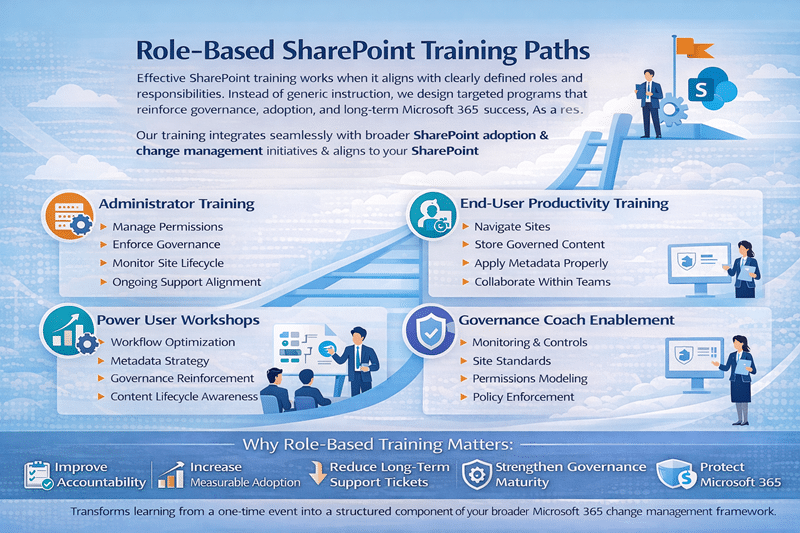
End user training
We help everyday users work confidently across SharePoint and Microsoft 365, using real scenarios instead of abstract feature tours.
Participants learn:
- Navigating modern SharePoint sites and hubs
- Working with documents in SharePoint and OneDrive
- Applying metadata, versioning, and search correctly
- Collaborating through Microsoft Teams
- Sharing content securely and appropriately
End-user training reduces shadow storage habits and aligns daily work with the standards set in your SharePoint strategy & roadmapping efforts.
Site owner training
Site owners keep sites usable long after launch. We train them to manage their spaces responsibly within the broader Microsoft 365 ecosystem.
Topics include:
- Managing site settings, permissions, and access
- Maintaining navigation, pages, and content structure
- Using modern pages, layouts, and web parts effectively
- Applying governance standards consistently
- Understanding lifecycle and ownership responsibilities
This training aligns closely with SharePoint Security & Compliance to reinforce accountability.
Power user workshops
Power users often become informal support resources inside their departments. Workshops give them advanced instruction on:
- Information architecture alignment
- Workflow optimization
- Metadata strategy
- Governance reinforcement
- Content lifecycle awareness
These workshops create internal champions who sustain adoption after the initial training ends, and they reinforce outcomes from your Forms & Workflow Readiness Assessment and modernization initiatives.
Administrator training
Strong environments begin with strong administration. IT teams learn to manage permissions, enforce governance policies, monitor lifecycle controls, and maintain structural integrity across Microsoft 365.
Sessions cover:
- SharePoint and Microsoft 365 administration fundamentals
- Permissions, security groups, and access models
- Monitoring usage, adoption, and governance compliance
- Supporting users without breaking structure
- Preparing for Microsoft 365 updates, Copilot, and AI features
Administrators also learn how training outcomes connect to ongoing SharePoint support services, reducing reactive troubleshooting. Sessions are often informed by a Copilot Readiness Assessment for SharePoint so content matches your environment.
Governance coach enablement
Governance requires ownership. We train designated stakeholders to oversee site standards, permission modeling, provisioning controls, and policy reinforcement.
This keeps governance actively maintained rather than documented and forgotten. We often pair this work with a SharePoint governance maturity model review so training reinforces the controls that matter most at your current stage, and it prepares the environment for Copilot readiness and AI alignment.
Training That Fits Your Environment
dataBridge training is delivered in the context of your actual SharePoint and Microsoft 365 environment, not a generic demo tenant. This ensures participants immediately understand how training applies to their daily work.
Our training formats include:
- Live virtual or onsite sessions
- Role-based workshops
- Recorded sessions for ongoing reference
- Job aids and supporting documentation
- Post-training Q&A and reinforcement
This flexible approach supports both immediate learning and long-term adoption.
When Training Makes the Biggest Impact
Organizations commonly engage dataBridge training:
- After a SharePoint or Microsoft 365 rollout
- Following a SharePoint Migration
- During a new intranet or collaboration launch
- When usage is inconsistent or adoption has stalled
- Ahead of Copilot or AI feature introductions
In each case, training helps reset expectations and reinforce best practices.
Why Organizations Choose dataBridge for Training
Clients choose dataBridge because we:
- Specialize deeply in SharePoint and Microsoft 365
- Teach the why, not just the how
- Align training to governance and real workflows
- Adapt content to different roles and audiences
- Reinforce long-term platform success
Training becomes more than an event—it becomes part of a sustainable Microsoft 365 strategy.
Get Started with SharePoint & Microsoft 365 Training
If your organization wants training that improves confidence, consistency, and adoption across SharePoint and Microsoft 365, dataBridge can help.
Start with a conversation or pair training with dataBridge SharePoint & Microsoft 365 Support
Why Role-Based Training Matters
When training aligns with defined responsibilities, organizations:
- Improve accountability
- Increase measurable adoption
- Reduce long-term support tickets
- Strengthen governance maturity
- Protect Microsoft 365 investment
Ultimately, role-based SharePoint training transforms learning from a one-time event into a structured component of your broader Microsoft 365 change management framework.
That matters because training will not fix low trust in SharePoint by itself; employees also need an environment with dependable structure, clear ownership, trustworthy search, and current content.
Measurable Training Outcomes
Effective SharePoint training produces measurable results—not just attendance metrics. By aligning learning to governance and adoption goals, organizations can track clear performance improvements.
Training Outcomes Dashboard
✔ Increased SharePoint user engagement across departments
✔ Improved metadata accuracy and structured content usage
✔ Reduction in shadow storage and unmanaged file sharing
✔ Decrease in support tickets related to misuse or confusion
✔ Stronger governance compliance and permission consistency
✔ Increased executive confidence in Microsoft 365 investment
Adoption Metrics for SharePoint
We measure training effectiveness using structured adoption metrics for SharePoint, including:
- Active site usage rates
- Metadata application consistency
- Workflow completion and automation participation
- Governance adherence benchmarks
- Reduction in legacy storage reliance
What Our Clients Say