
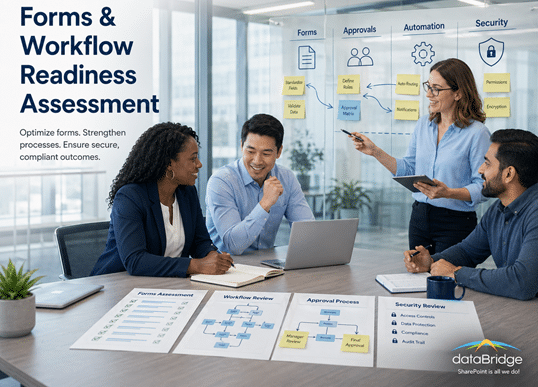
Forms & Workflow Readiness Assessment
A forms and workflow readiness assessment helps organizations identify broken processes, automation gaps, ownership issues, data-quality concerns, and platform constraints before rebuilding with Power Platform or SharePoint. dataBridge uses assessment work to define priorities and create a more supportable automation roadmap.
Manual forms and fragile workflows usually signal deeper process and governance issues. Before rebuilding, it helps to understand where data lives, who owns the process, and what the future state should accomplish. This page explains how dataBridge uses readiness assessment work to guide smarter automation decisions.
This page focuses on the diagnostic stage before forms and workflows are rebuilt.
Use this assessment when the organization needs to understand existing forms, workflows, ownership, business rules, data quality, security, technical debt, and modernization priorities before deciding what to rebuild, retire, consolidate, or redesign.
Modernizing SharePoint Forms and Workflows Requires More Than Migration
Modernizing SharePoint forms and workflows requires more than a basic SharePoint workflow migration. In many environments, legacy InfoPath forms and SharePoint Designer workflows create hidden operational risk, including undocumented logic, inconsistent permissions, and compliance exposure.
While organizations often focus on migrating workflows to Power Automate, the real challenge is architectural. A SharePoint workflow migration that ignores governance, ownership, and business logic simply transfers technical debt into a modern platform.
A structured Forms & Workflow Readiness Assessment evaluates governance controls, process ownership, embedded business rules, compliance requirements, and integration dependencies before modernization begins. As a result, SharePoint workflow migration becomes a controlled transformation—ensuring scalability, maintainability, and long-term Microsoft 365 alignment rather than recreating legacy risk.
Who This Assessment Is For
A Forms & Workflow Readiness Assessment is ideal for organizations that:
- Depend on legacy InfoPath or SharePoint Designer workflows
- Have undocumented or unowned automation processes
- Experience recurring workflow failures during SharePoint workflow migration efforts
- Face compliance or audit pressure
- Are planning a SharePoint Online migration that includes workflow modernization
- Want to modernize automation without recreating technical debt
Ultimately, this assessment ensures SharePoint workflow migration is strategic, governed, and sustainable—not simply a technical rebuild.
Ensure Power Platform Automation Is Scalable, Secure, and Ready for AI
Many organizations rely on Microsoft Forms, Power Apps, and Power Automate to run critical processes—but over time, these solutions often become fragile, hard to maintain, and risky to scale.
dataBridge’s Forms & Workflow Readiness Assessment helps organizations evaluate the health of their Power Platform solutions, identify risk and technical debt, and determine whether forms and workflows are structured to support long-term use, governance, and Copilot readiness.
Why a Forms & Workflow Assessment Is Necessary
Forms and workflows frequently start as quick wins:
- A simple intake form
- A basic approval flow
- A lightweight Power App
Over time, they often evolve into mission-critical processes—without being redesigned to support scale, ownership, or change.
Common warning signs include:
- Workflows failing unexpectedly
- Only one person understands how a solution works
- Hard-coded logic and personal connections
- Inconsistent or unreliable data
- Difficulty preparing automation for Copilot
This assessment helps surface these issues before they cause disruption.
What This Assessment Does Not Replace
A Forms & Workflow Readiness Assessment is not the full implementation project.
It does not replace:
- Microsoft Power Platform Consulting for broader app, workflow, governance, adoption, and automation planning
- Power Automate Best Practices & Use Cases for workflow design and automation reliability
- Power Apps Strategy & Architecture for app design, data model, security, and scalability
- Power Platform Governance & Security for environment strategy, connectors, maker controls, security, and lifecycle rules
Its job is more specific: diagnose what exists, what is fragile, what should be retired, and what should be redesigned before modernization begins.
What the Assessment Evaluates
The Forms & Workflow Readiness Assessment focuses on five core areas:
1. Forms & App Design
We evaluate:
- How forms and Power Apps capture data
- Alignment with SharePoint lists and libraries
- Consistency, validation, and usability
- Whether designs support reuse and scale
Poor form design leads to bad data—and bad automation.
2. Workflow Architecture & Reliability
We assess:
- Power Automate flow structure and complexity
- Error handling and logging
- Use of hard-coded values and dependencies
- Resilience to change
The goal is to determine whether workflows are stable and maintainable.
3. Data & SharePoint Alignment
We review:
- SharePoint lists and libraries used by automation
- Metadata design and data quality
- Permissions alignment
- Long-term reporting and search implications
Strong data foundations are critical for automation and AI.
4. Governance, Ownership & Security
We examine:
- Environment usage and strategy
- Connector and security practices
- Ownership and accountability
- Documentation and handoff readiness
Automation without governance creates risk.
5. Copilot & AI Readiness
We evaluate:
- Whether data is structured and trustworthy
- How workflows may surface information through Copilot
- Risk of AI amplifying bad data or logic
- Gaps that limit AI effectiveness
AI readiness depends on clean processes—not just licensing.
Common Legacy Workflow Risks
Without structured assessment, organizations often face:
- Unsupported technologies (InfoPath retirement risk)
- Broken permission inheritance
- Embedded business logic without documentation
- Workflow failures that go unnoticed
- Redundant or conflicting approval processes
- Compliance exposure due to unmanaged automation
- Poor Copilot and AI performance caused by inconsistent data
Modernization without governance simply transfers risk into a new platform.
A practical Power Platform governance and security model helps define ownership, connectors, environments, permissions, exception handling, and lifecycle expectations before automation is rebuilt.
What You’ll Receive
At the conclusion of the assessment, you receive:
- A clear health summary of your forms and workflows
- Identified risk areas and technical debt
- Practical recommendations for improvement
- Guidance on governance and ownership
- Clear next steps to improve stability, scalability, and Copilot readiness
This is an actionable assessment—not a theoretical report.
How dataBridge Approaches Assessments
dataBridge assessments are:
- Platform-aware (SharePoint, Teams, Power Platform, Copilot)
- Experience-driven, not checklist-based
- Focused on long-term sustainability
- Designed to inform real decisions
We don’t just identify problems—we help you understand what matters most.
Forms & Workflows Don’t Have to Be Fragile
With the right structure, governance, and design, Power Platform automation becomes:
- Easier to maintain
- More reliable
- Safer to scale
- Ready for AI
Readiness starts with clarity.
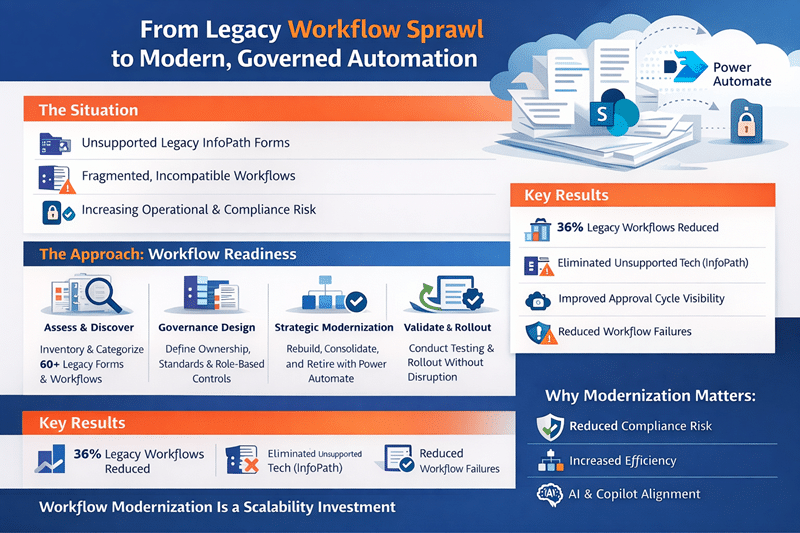
Use Case: From Legacy Workflow Sprawl to Modern, Governed Automation
The Situation
A regional financial services organization had relied on legacy InfoPath forms and SharePoint Designer workflows for over a decade. While the environment “worked,” it had become fragile, difficult to maintain, and increasingly risky.
More than 60 forms and automated approval processes existed across departments, including HR onboarding, compliance reporting, contract approvals, and vendor requests.
However:
- Many workflows were undocumented
- Ownership was unclear
- Business rules were embedded in legacy logic
- Some workflows failed silently
- Customizations were incompatible with modern SharePoint Online
- No long-term modernization plan existed
With Microsoft retiring legacy technologies, leadership recognized that continued reliance on outdated forms presented operational and compliance risk.
Initially, the organization viewed the effort as a simple migration to Power Automate.
However, they quickly realized the challenge was architectural—not technical.
The Approach
Through a structured Forms & Workflow Readiness Assessment, we applied The dataBridge Way™ framework to modernize automation strategically.
Assess & Discover
We inventoried all legacy forms and workflows, documented dependencies, mapped business logic, and interviewed stakeholders to understand real operational impact.
We categorized each process into:
- Retire
- Rebuild
- Consolidate
- Modernize
This reduced unnecessary redevelopment before redesign began.
Architecture & Governance
We designed a structured automation governance model that included:
- Clear workflow ownership
- Standardized approval patterns
- Role-based access controls
- Documentation standards
- Lifecycle review cycles
- Integration mapping with Teams and Microsoft 365
Forms and workflows were aligned to modern SharePoint architecture—not recreated in isolation.
Modernization Strategy & Phasing
Rather than rebuilding every legacy form, we:
- Retired 22 redundant or unused workflows
- Consolidated overlapping processes
- Rebuilt critical workflows using Power Automate and modern SharePoint forms
- Integrated approval notifications within Microsoft Teams
This phased approach reduced technical debt and improved maintainability.
Validation & Controlled Rollout
Before deployment, we:
- Tested workflow logic under real business scenarios
- Validated permission models
- Confirmed integration stability
- Conducted stakeholder acceptance reviews
Modernization occurred without operational disruption.
Post-Implementation Governance
We implemented:
- Workflow documentation standards
- Ongoing review cycles
- Change control procedures
- Copilot and AI-readiness alignment
Automation became governed infrastructure—not shadow IT.
The Results
✔ 36% reduction in redundant workflows
✔ Eliminated unsupported InfoPath dependencies
✔ Improved approval cycle visibility
✔ Reduced workflow failure incidents
✔ Strengthened compliance oversight
✔ Increased executive confidence in Microsoft 365 modernization
Most importantly, automation transitioned from fragile legacy logic to scalable, governed digital process infrastructure.
Why This Matters
Forms and workflows often represent hidden operational risk within SharePoint environments.
Without structured assessment and modernization planning, organizations:
- Rebuild unnecessary processes
- Recreate technical debt
- Expose compliance vulnerabilities
- Undermine AI and Copilot accuracy
When approached through structured consulting and governance-first planning, workflow modernization becomes an opportunity to improve efficiency, reduce risk, and align automation with long-term business growth.
What Our Clients Say
Related Forms and Workflow Modernization Resources
- Microsoft Power Platform Consulting
- Power Automate Best Practices & Use Cases
- Power Apps Strategy & Architecture
- Power Platform Governance & Security
- Power Platform Adoption & Change Management
- Power Apps vs Power Automate
- SharePoint & Microsoft 365 Integration
Frequently Asked Questions
How do I replace InfoPath forms in SharePoint Online?
Replacing InfoPath forms requires more than rebuilding the interface. Organizations must evaluate business rules, approval logic, data dependencies, and integration points before migrating to Power Automate or modern SharePoint forms. A structured readiness assessment ensures unnecessary forms are retired, redundant workflows are consolidated, and critical processes are rebuilt within a governed, scalable framework.
What are the risks of migrating SharePoint Designer workflows without assessment?
Migrating SharePoint Designer workflows without proper evaluation can recreate outdated logic, broken permissions, and inefficient approval chains in a modern environment. Without governance alignment and ownership clarity, organizations risk workflow failures, compliance exposure, and long-term maintainability issues. Strategic modernization reduces these risks before automation is rebuilt.
How do I ensure Power Automate workflows remain governed and sustainable?
Sustainable automation requires governance standards, documented ownership, lifecycle review processes, and structured permission controls. Without defined governance, Power Automate workflows can grow unchecked, creating security gaps and operational inconsistencies. A readiness assessment establishes policy frameworks to ensure workflows remain aligned with business objectives and Microsoft 365 governance standards.