Skip to content
Enterprise team reviewing SharePoint planning worksheets, checklists, and assessment scorecards in a modern office.

SharePoint Planning Tools and Assessment Resources

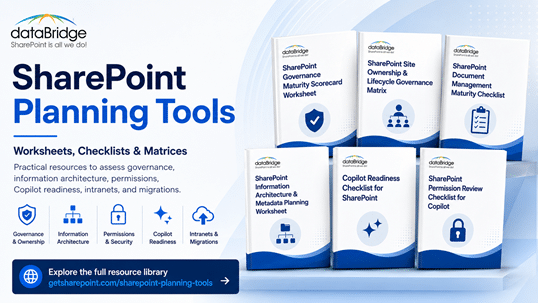
Use these dataBridge SharePoint planning tools to assess governance maturity, Copilot readiness, permissions, migrations, intranet redesign, AI readiness, and long-term SharePoint adoption. Each worksheet, checklist, scorecard, and assessment resource helps your team move from broad concerns to clearer priorities, stronger decisions, and practical next steps.

Most SharePoint planning conversations start with a familiar feeling: something needs attention, but the path forward is not clear yet. These dataBridge tools help teams score the current state, identify risk, compare priorities, and prepare SharePoint for stronger governance, cleaner migrations, better intranets, and more trusted AI outcomes.

Talk to dataBridge about your SharePoint planning priorities

Start With the Right SharePoint Planning Tool

Every SharePoint challenge needs the right kind of planning.

A governance problem is not the same as a migration risk. A Copilot readiness concern is not the same as an intranet redesign issue. The right tool helps your team focus on the decision in front of you.

Use this hub when your organization needs to:

  • Score SharePoint governance maturity.
  • Review Copilot readiness before rollout.
  • Check permissions before AI expands content discovery.
  • Plan a SharePoint migration.
  • Validate SharePoint after migration.
  • Prepare for an intranet redesign.
  • Assess file share migration readiness.
  • Connect SharePoint structure to AI readiness.
  • Turn assessment findings into a practical roadmap.

A checklist is not a strategy. Still, a good checklist often reveals where the strategy is missing.

SharePoint Planning Tools by Need

Governance Maturity

Start with the SharePoint Governance Maturity Scorecard when your team needs to evaluate ownership, permissions, site lifecycle, metadata, records, search, Copilot readiness, adoption, and support model maturity.

The scorecard gives teams a measurable way to discuss SharePoint governance. Instead of debating whether governance feels weak, your team can see which areas need attention first.

This resource works well before a governance reset, intranet redesign, file share migration, Copilot rollout, or broader SharePoint cleanup effort.

Copilot Readiness

Review the Copilot Readiness Checklist for SharePoint when your organization wants to prepare SharePoint before Microsoft 365 Copilot rollout.

This checklist focuses on the SharePoint foundation behind Copilot outcomes. It looks at permissions, content quality, metadata, stale content, source authority, search behavior, governance, and ownership.

Copilot readiness is not only a licensing decision. It is a SharePoint trust decision.

Permission Review for Copilot

Use the SharePoint Permission Review Checklist for Copilot when your team needs to inspect broad access, guest users, sharing links, direct permissions, broken inheritance, inactive owners, and high-risk content areas.

This tool helps answer one of the most important Copilot readiness questions: what can users already access?

That answer matters because Copilot does not create permission risk by itself. It makes existing access easier to discover.

Migration Planning

Use the SharePoint Migration Checklist when your organization is preparing to move content into SharePoint Online.

This checklist helps teams think through source review, cleanup, destination structure, metadata, permissions, migration waves, testing, communication, training, and post-migration validation.

Most migration issues are not transfer issues. They are structure issues that were missed before the move.

Post-Migration Validation

Open the SharePoint Post-Migration Checklist after go-live to confirm whether the new SharePoint environment is usable, searchable, secure, governed, and ready for long-term adoption.

This checklist helps teams review permissions, ownership, content quality, navigation, search, training, governance, and support needs after migration.

A migration is not complete when files move. It is complete when users can work confidently in the new environment.

Migration Readiness

Choose the SharePoint Migration Readiness Assessment when your team is not yet sure what exists, what should move, what should be cleaned up, or where migration risk exists.

This assessment helps clarify scope before timeline, tool selection, destination architecture, and stakeholder expectations become fixed.

A readiness assessment prevents the migration plan from becoming a guess.

File Share to SharePoint Planning

Review File Share to SharePoint Migration Services when your organization needs to move network drives, legacy folders, or shared file systems into SharePoint Online with better structure, permissions, metadata, search, and governance.

The planned File Share to SharePoint Migration Readiness Matrix will help teams score readiness across cleanup, access, ownership, metadata, content priority, and business risk.

File shares were built for storage. SharePoint should be built for work.

Intranet Redesign Readiness

Start with SharePoint Intranet Redesign Services when your current intranet feels cluttered, stale, difficult to navigate, or disconnected from daily work.

The planned SharePoint Intranet Redesign Readiness Worksheet will help teams assess hub architecture, navigation, page ownership, content quality, search, governance, adoption, and relaunch readiness.

A redesign that only changes colors is not a redesign. It is decoration.

SharePoint AI Readiness

Use the SharePoint AI Readiness Center when your organization needs to connect SharePoint structure, permissions, metadata, source authority, lifecycle governance, search, and ownership to AI readiness.

The planned SharePoint AI Readiness Framework will help teams evaluate whether SharePoint can support trusted AI retrieval, Copilot outcomes, and SharePoint agents.

AI does not fix a weak SharePoint foundation. It makes that foundation easier to see.

How This Page Fits With Related dataBridge Resources

This page is the primary dataBridge hub for SharePoint planning tools, worksheets, scorecards, checklists, and assessment resources. It helps teams find the right practical tool for a specific planning need.

The broader SharePoint and Microsoft 365 Knowledge Center remains the main dataBridge learning hub. This page adds the practical action layer for teams that need to assess, score, validate, or plan.

Use related dataBridge resources this way:

Together, these resources separate learning, planning, assessment, and consulting action. That keeps this page focused on practical tools instead of competing with deeper topic guides.

What Are SharePoint Planning Tools?

SharePoint planning tools are practical resources that help teams assess the current state, identify gaps, compare options, and decide what to improve next.

They can include:

  • Scorecards
  • Checklists
  • Worksheets
  • Readiness assessments
  • Migration matrices
  • Permission review guides
  • Governance review tools
  • Benchmark frameworks
  • Discovery questions
  • Roadmap templates

The best tools do not create busywork. They create better decisions.

A strong SharePoint planning tool should help your team answer questions like:

  • What is working today?
  • Where is risk building?
  • Which issues matter most?
  • Who needs to be involved?
  • What should be fixed first?
  • Which decisions require business input?
  • What belongs in a roadmap?
  • Where does dataBridge support make sense?

In SharePoint consulting work, dataBridge often sees the same pattern. Teams know something is not working, but they have not translated that concern into categories, scores, owners, and priorities.

Planning tools help close that gap.

Why SharePoint Teams Need Practical Assessment Resources

SharePoint environments rarely fail all at once.

They drift.

A site owner changes roles. A library keeps old permissions. A policy appears in three places. A file share migration brings over years of folder clutter. An intranet page stops getting reviewed. A Copilot rollout exposes content quality problems that were already there.

At first, those issues may feel separate.

They are usually connected.

SharePoint planning tools help teams step back and see the pattern. They also make the discussion less subjective. Instead of saying “SharePoint feels messy,” your team can say “ownership, permissions, lifecycle, and search are the highest-priority risks.”

That difference matters.

Executives respond better to clear findings. IT teams work better from scoped priorities. Business owners participate more effectively when they can see their role.

A practical assessment resource turns SharePoint from a platform conversation into an operating model conversation.

The dataBridge View: Tools Should Lead to Action

A worksheet should never end in a folder.

It should lead to a decision.

That is why dataBridge planning tools focus on practical next steps. The goal is not to score every area perfectly. The goal is to understand what needs attention first and what can wait.

A useful SharePoint planning tool should create one or more of these outcomes:

  • A clearer current-state picture.
  • A prioritized list of risks.
  • A stronger business case.
  • A cleaner migration plan.
  • A more realistic governance roadmap.
  • A better Copilot readiness discussion.
  • A defined ownership model.
  • A stronger post-launch support plan.
  • A practical reason to involve the right stakeholders.

The tools on this page support the same structure-first approach used in The dataBridge Way: assess, design, implement, validate, adopt, support, and improve.

Structure comes before scale. That principle matters in SharePoint governance, migration, intranet work, document management, and AI readiness.

The dataBridge Way

Which SharePoint Planning Tool Should You Use First?

If Governance Feels Inconsistent

Start with the SharePoint Governance Maturity Scorecard.

This is the best first tool when ownership, permissions, lifecycle control, metadata, search, records, adoption, or support practices feel inconsistent.

It helps your team measure governance across the areas that affect long-term SharePoint trust.

If Copilot Is Planned or Already Rolling Out

Begin with the Copilot Readiness Checklist for SharePoint.

Then pair it with the SharePoint Permission Review Checklist for Copilot if access, oversharing, guest users, sharing links, or sensitive content exposure are concerns.

Copilot makes weak SharePoint foundations more visible. Planning should happen before users discover the gaps.

If a Migration Is Coming

Use the SharePoint Migration Checklist before migration waves begin.

Next, review the SharePoint Migration Readiness Assessment if scope, cleanup, ownership, or risk is still unclear.

Migration planning should decide what belongs in SharePoint, not only how content will move.

If Migration Already Happened

Use the SharePoint Post-Migration Checklist after go-live.

This is the right tool when users are in the new environment, but the team still needs to validate permissions, search, structure, content quality, adoption, and support.

Post-migration work protects the investment. It also prevents old problems from returning in a new location.

If the Intranet Needs a Redesign

Start with SharePoint Intranet Redesign Services and use the planned intranet redesign worksheet when it becomes available.

This path works well when employees struggle with navigation, stale content, unclear ownership, inconsistent pages, weak search, or poor adoption.

A successful intranet redesign fixes trust, not just layout.

If AI Readiness Is the Bigger Goal

Use the SharePoint AI Readiness Center to understand the broader readiness model.

Then use the governance, Copilot, permissions, migration, and source-of-truth resources that match your current risk.

AI readiness is not one checklist. It is a connected SharePoint improvement path.

SharePoint Planning Tools for Governance

Governance is one of the clearest places to start because it affects every other SharePoint outcome.

A governance problem can show up as a permission issue, search issue, intranet issue, migration issue, records issue, or Copilot issue. The root cause is often the same: unclear ownership and inconsistent operating discipline.

The SharePoint Governance Maturity Scorecard helps teams evaluate nine practical categories:

  • Ownership
  • Permissions
  • Site lifecycle
  • Metadata
  • Records and retention
  • Search
  • Copilot readiness
  • Adoption
  • Support model

Those categories matter because they describe how SharePoint works after launch.

A governance plan that no one follows will not protect the environment. A scorecard helps teams compare written expectations with actual operating behavior.

For a broader explanation of governance roles, standards, lifecycle controls, and accountability, use the SharePoint Governance Guide. Then return to this tools hub when you need a practical assessment resource.

SharePoint Planning Tools for Copilot Readiness

Copilot readiness requires more than enthusiasm.

SharePoint content must be trustworthy, findable, well owned, and appropriately permissioned. Otherwise, Copilot can surface the same problems users already experience through search, only faster.

The Copilot Readiness Checklist for SharePoint helps teams review:

  • Oversharing risk
  • Stale content
  • Sensitive libraries
  • Source-of-truth gaps
  • Metadata consistency
  • Search behavior
  • Site and library ownership
  • Archive readiness
  • Governance gaps
  • Adoption planning

Then the SharePoint Permission Review Checklist for Copilot gives teams a more focused access-review path.

That sequence works well.

First, assess the broader SharePoint foundation. Next, inspect access risk. After that, prioritize cleanup and governance changes.

The best Copilot readiness work does not try to fix everything. It finds the areas most likely to affect trust, security, and user confidence.

SharePoint Planning Tools for Migration

Migration planning should begin before tools are configured.

A migration checklist helps teams decide what content should move, where it should go, who should own it, how permissions should work, and what the new environment should support.

The SharePoint Migration Checklist helps teams plan:

  • Source inventory
  • Content cleanup
  • Destination architecture
  • Metadata mapping
  • Permission review
  • Migration waves
  • Testing and validation
  • Communication
  • Training
  • Cutover support
  • Post-migration review

For uncertain environments, the SharePoint Migration Readiness Assessment helps clarify scope and risk before planning goes too far.

That order matters.

A migration plan built on weak discovery usually becomes a cleanup project after go-live.

SharePoint Planning Tools for Post-Migration Validation

Post-migration validation is where many SharePoint projects lose momentum.

The files moved. The launch happened. The project team is tired. Then users begin finding missing links, confusing libraries, unexpected access issues, search problems, or unclear support paths.

The SharePoint Post-Migration Checklist helps teams validate the environment after launch.

It focuses on:

  • Content access
  • Permissions
  • Search
  • Navigation
  • Ownership
  • Metadata
  • Governance
  • Training
  • Adoption
  • Support
  • Optimization

This checklist protects the handoff from project mode to operating mode.

In our experience, the best post-migration reviews happen soon after go-live. Waiting too long allows workarounds to become habits.

SharePoint Planning Tools for Intranet Redesign

Intranet redesign planning should start with the employee experience, but it should not stop there.

A trusted intranet depends on structure, ownership, page standards, governance, search, adoption, and content quality. Design matters, but design alone cannot fix stale content or unclear ownership.

Use SharePoint Intranet Redesign Services when your intranet needs a practical redesign path.

The planned SharePoint Intranet Redesign Readiness Worksheet will help teams review:

  • Hub architecture
  • Navigation clarity
  • Page ownership
  • Department content
  • News practices
  • Search and findability
  • Page governance
  • Content cleanup
  • Adoption needs
  • Relaunch planning

A good redesign makes the intranet easier to trust.

That is more valuable than making it look new.

SharePoint Planning Tools for AI Readiness

SharePoint AI readiness depends on the same foundation that supports good governance, search, knowledge management, and document management.

That is why AI readiness cannot sit apart from SharePoint structure.

Use the SharePoint AI Readiness Center when you need a broader view of how SharePoint supports Copilot, SharePoint agents, and trusted AI retrieval.

The planned SharePoint AI Readiness Framework will connect practical readiness areas such as:

  • Trusted content
  • Source authority
  • Permissions
  • Metadata
  • Search signals
  • Lifecycle governance
  • Records and retention
  • SharePoint agents
  • Ownership
  • Adoption
  • Support model
  • Roadmap planning

AI readiness should not be treated as a one-time technical checklist.

It should become part of the SharePoint operating model.

How to Use These Tools With Your Internal Team

A planning tool works best when the right people are involved.

SharePoint decisions often cross IT, operations, compliance, communications, records, legal, HR, finance, department leadership, and site ownership. One person may know the platform. Another may know the content. A third may understand the risk.

Bring those perspectives together before scoring or completing a checklist.

A practical working session should include:

  • A clear planning goal.
  • The right assessment tool.
  • Current-state examples.
  • Known problem areas.
  • Business owner input.
  • Permission and security context.
  • Records or compliance input when needed.
  • A short list of priority actions.
  • A named owner for each next step.
  • A date to review progress.

Do not try to solve every SharePoint issue in one meeting.

Instead, use the tool to identify the highest-value next move.

How dataBridge Uses Planning Tools in SharePoint Consulting

dataBridge uses planning tools to make SharePoint conversations more concrete.

A discovery call might begin with a broad concern. A client may say the intranet is hard to use, the migration feels risky, permissions are confusing, or Copilot readiness is unclear.

The tool helps organize that concern.

From there, dataBridge can identify patterns, risk areas, stakeholder needs, and practical improvement paths. The result is not just a score or checklist. It is a clearer roadmap.

That roadmap may include:

  • Governance cleanup.
  • Permission review.
  • Site ownership repair.
  • Metadata and taxonomy improvement.
  • Migration planning.
  • Intranet redesign.
  • Search governance.
  • Records and retention alignment.
  • Copilot readiness preparation.
  • SharePoint advisory support.

Tools create the starting point. Consulting turns the findings into a plan.

Schedule a SharePoint planning conversation with dataBridge

From Scorecards to Benchmark Insight

These planning tools also support a larger authority goal.

Over time, completed scorecards, readiness reviews, discovery conversations, and assessment findings can help dataBridge identify common SharePoint maturity patterns across organizations.

That insight can support future benchmark resources, such as a SharePoint Governance and Copilot Readiness Benchmark.

The benchmark should focus on anonymized patterns, not client-specific details.

Potential benchmark insights may include:

  • Which governance areas score lowest most often.
  • How frequently permissions create Copilot readiness risk.
  • Where migrations struggle before go-live.
  • Which intranet issues appear before redesign.
  • How often ownership gaps affect content trust.
  • Which readiness gaps appear across industries.
  • What improvement actions create the most value.

This is where original tools become original insight.

Articles explain. Tools measure. Benchmark data strengthens authority.

When to Contact dataBridge

Contact dataBridge when your team has completed a scorecard, checklist, worksheet, or readiness review and needs help interpreting the results.

You may also need support when:

  • Scores are low across multiple categories.
  • Permissions are too complex to review internally.
  • Copilot rollout is moving faster than SharePoint readiness.
  • A migration needs better structure before content moves.
  • An intranet redesign needs governance, not just design.
  • Search problems point to deeper content issues.
  • Ownership is unclear across key sites or libraries.
  • Leaders need a roadmap before approving investment.
  • Your team needs an outside perspective on priority actions.

The best time to ask for help is before the issue becomes urgent.

SharePoint is easier to improve when the work starts with clear findings, not emergency cleanup.

Contact dataBridge to review your SharePoint planning results

Frequently Asked Questions About SharePoint Planning Tools

What are SharePoint planning tools?

SharePoint planning tools are worksheets, checklists, scorecards, matrices, and assessment resources that help teams evaluate current-state SharePoint structure, governance, permissions, migration readiness, Copilot readiness, intranet quality, and adoption needs.

Which SharePoint planning tool should we use first?

Start with the tool that matches your most urgent decision. Use the SharePoint Governance Maturity Scorecard for governance concerns, the Copilot Readiness Checklist for SharePoint before Copilot rollout, the SharePoint Migration Checklist before migration, and the SharePoint Post-Migration Checklist after go-live.

Do these tools replace a SharePoint consulting engagement?

No. These tools help teams identify issues, ask better questions, and prioritize next steps. A consulting engagement helps turn findings into architecture, governance, migration, redesign, readiness, or support work.

Can we use these tools without dataBridge?

Yes. The tools are designed to help internal teams assess their current state. However, many organizations contact dataBridge when they need help interpreting results, building a roadmap, or implementing the recommended improvements.

How do SharePoint planning tools help with Copilot readiness?

Planning tools help teams review the SharePoint foundation that Copilot depends on. That includes permissions, content quality, ownership, metadata, source authority, lifecycle governance, search behavior, and adoption readiness.

Why does governance matter for SharePoint planning?

Governance defines how SharePoint stays organized, secure, current, and trusted after launch. Without governance, migrations drift, intranets become stale, permissions become unclear, and AI readiness becomes harder to prove.

Should we complete a checklist before a SharePoint migration?

Yes. A checklist helps your team review scope, cleanup, destination structure, metadata, permissions, testing, communication, and post-migration validation before the project becomes harder to change.

What should we do after completing a scorecard or checklist?

Review the lowest-scoring areas first. Then identify the business impact, assign owners, define priority actions, and decide which items need immediate attention. If the results point to larger structural issues, contact dataBridge for roadmap support.

Build a Better SharePoint Plan Before the Next Project Starts

Strong SharePoint outcomes do not happen by accident.

They come from clear ownership, practical governance, useful structure, reviewed permissions, trusted content, realistic migration planning, and ongoing support.

The tools on this page help your team see where things stand before the next decision gets made. They also help leaders understand which SharePoint issues are technical, which are operational, and which require business ownership.

That clarity matters.

A better plan reduces rework. A better assessment exposes risk earlier. Better questions lead to stronger SharePoint decisions.

dataBridge created these SharePoint planning tools to help organizations move from uncertainty to action.

Talk to dataBridge about SharePoint planning, assessment, and readiness support