
The Complete Guide to SharePoint Governance for Microsoft 365
This guide explains how SharePoint governance defines ownership, policies, permissions, lifecycle controls, and structural standards across Microsoft 365. It helps organizations reduce sprawl, improve trust, and build a governance model that supports collaboration without sacrificing security, consistency, or long-term scalability.
Governance becomes valuable when it shapes how the environment actually works day to day. Without it, SharePoint usually accumulates site sprawl, permission drift, inconsistent content practices, and unreliable search. This guide explains the structural decisions, ownership rules, and operating habits that help Microsoft 365 remain usable as it grows.
Written by Michael Fuchs, Founder and CEO of dataBridge. Reviewed by Ken Lewis, Principal Consultant, for SharePoint governance, records management, lifecycle, and Microsoft 365 compliance accuracy.
Published: May 5, 2026
Last reviewed: May 29, 2026
Governance ensures that collaboration remains flexible while information stays structured, secure, and compliant. When done well, it becomes the foundation that allows Microsoft 365 to scale confidently across the organization.
This is the primary dataBridge resource for broad SharePoint governance strategy. Use this guide for the overall model, definitions, best practices, and planning principles. For the operating model used to apply governance in practice, see our SharePoint Governance Framework. For current-state assessment and improvement planning, use the SharePoint Governance Maturity Model.
What Is SharePoint Governance?
SharePoint governance is the set of policies, processes, and structural decisions that control how information is created, organized, accessed, and maintained across Microsoft 365. When those governance decisions are applied to libraries, metadata, permissions, search, and retention together, they form the backbone of a scalable SharePoint Document Management System.
That same governance foundation should also define retention rules, records ownership, and lifecycle controls, which is why a clear SharePoint records management strategy is essential for long-term Microsoft 365 governance.
Governance should also define when a site is still active, when it should be reviewed, and when it should move out of the active collaboration layer. Our guide to Microsoft 365 Archive for SharePoint explains how archiving inactive SharePoint sites can support cleaner lifecycle control across Microsoft 365.
Teams also need a clear understanding of which governance job belongs to which control. This breakdown of retention labels vs sensitivity labels vs permissions in SharePoint helps clarify how lifecycle, protection, and access should work together instead of being treated like the same decision.
For lifecycle governance specifically, a retention label rollout plan helps organizations move from policy intent to practical SharePoint execution, including pilot sites, label ownership, site owner guidance, adoption tracking, and ongoing review.
Effective governance typically addresses:
- Site creation and lifecycle management
- Permissions and access controls
- Information architecture and metadata
- Content ownership and stewardship
- Compliance and retention policies
- Collaboration standards across Teams and SharePoint
For a more practical site-level review, the SharePoint site ownership governance matrix helps teams evaluate each site by purpose, owner, permissions, lifecycle stage, external sharing risk, and review cadence.
Those governance areas become much easier to enforce when site creation follows a defined SharePoint site provisioning strategy that sets ownership, template, approval, permission, and lifecycle expectations before each new site goes live.
When governance is clear, the environment becomes easier to manage and easier for users to trust.
When governance is absent, even well-implemented SharePoint environments gradually drift toward disorder.
Because governance policies rely heavily on consistent classification, many organizations begin governance planning with a defined metadata model. Our SharePoint metadata strategy guide explains how structured metadata supports search reliability, compliance policies, and Microsoft Copilot readiness.
Organizations often discover that governance problems are not technical limitations. They are architectural and operational decisions that were never formally defined.
That is also a central theme in What 20+ Years of SharePoint Consulting Actually Teaches You, which explains why long-term SharePoint success depends more on structure and operating discipline than on features alone.
For organizations exploring governance planning, our SharePoint Governance Framework explains the structural components required to manage Microsoft 365 effectively.
How This SharePoint Governance Guide Fits With Related dataBridge Resources
This guide provides the broad foundation for SharePoint governance strategy. It explains the principles, best practices, planning decisions, and operating habits that help Microsoft 365 stay organized, secure, usable, and trusted as it grows.
Use these related resources when you need to go deeper into a specific part of governance:
- Use the SharePoint Governance Framework when you need roles, decision rights, review cadence, enforcement, ownership, and a practical operating model.
- Use the SharePoint Governance Maturity Model when you need to assess current-state governance, identify gaps, and prioritize improvements.
- Use SharePoint Records Management and Retention Strategy when lifecycle, retention, disposition, defensibility, and Microsoft Purview alignment are the main concerns.
- Use the SharePoint Permissions Guide when access control, inheritance, groups, unique permissions, and permission cleanup are the main concerns.
- Use SharePoint Site Provisioning Strategy when governance problems start with uncontrolled site creation, inconsistent templates, unclear ownership, or missing lifecycle expectations.
Together, these resources help separate the full governance model from the specific controls, decisions, and operating practices needed to make SharePoint governance work in day-to-day use.
For a curated view of the full governance cluster, use the SharePoint governance resource hub to move from broad strategy to framework design, maturity assessment, provisioning, permissions, search, records, external sharing, and AI readiness.
Why Governance Matters More in Microsoft 365
Modern Microsoft 365 environments are more dynamic than traditional file shares.
New collaboration tools — including Microsoft Teams, Power Platform, and AI services like Copilot — accelerate how quickly content is created and shared.
Without governance, this growth creates several risks:
Uncontrolled Workspace Sprawl
Teams and SharePoint sites multiply rapidly, making it difficult to understand where information lives.
Fragmented Permissions
Individual users gain direct access instead of role-based permissions, increasing security exposure.
Inconsistent Information Architecture
Documents are stored without consistent metadata, making search unreliable.
Compliance and Retention Gaps
Content retention policies may exist but fail to align with real collaboration patterns.
AI Accuracy Problems
As organizations introduce Microsoft Copilot, governance becomes even more critical. AI systems rely on structured information and clear permissions to produce reliable results.
In short, governance is not administrative overhead. It is the framework that allows collaboration platforms to function responsibly at scale.
The Four Pillars of SharePoint Governance
Successful governance strategies typically rest on four foundational pillars.
Ownership
Every site, workspace, and document library should have a clearly defined owner responsible for maintaining content quality and access controls.
Ownership ensures accountability and prevents abandoned environments.
Permissions
Permissions should follow role-based access rather than individual user assignments. This approach reduces complexity and supports consistent security policies.
Lifecycle Management
Workspaces should have defined lifecycle stages, including creation, active collaboration, archival, and eventual retirement.
Lifecycle management should also define what happens when retained content reaches the end of its required retention period. For organizations using Microsoft Purview, Purview disposition review helps connect retention labels, reviewer responsibility, records ownership, and defensible disposal into one governed process.
Lifecycle governance prevents the platform from accumulating outdated or irrelevant content.
Compliance
Governance must support regulatory obligations, retention policies, and audit requirements.
Organizations operating in regulated industries often implement specialized architecture patterns described in SharePoint Architecture for Regulated Industries.
Governance and Information Architecture
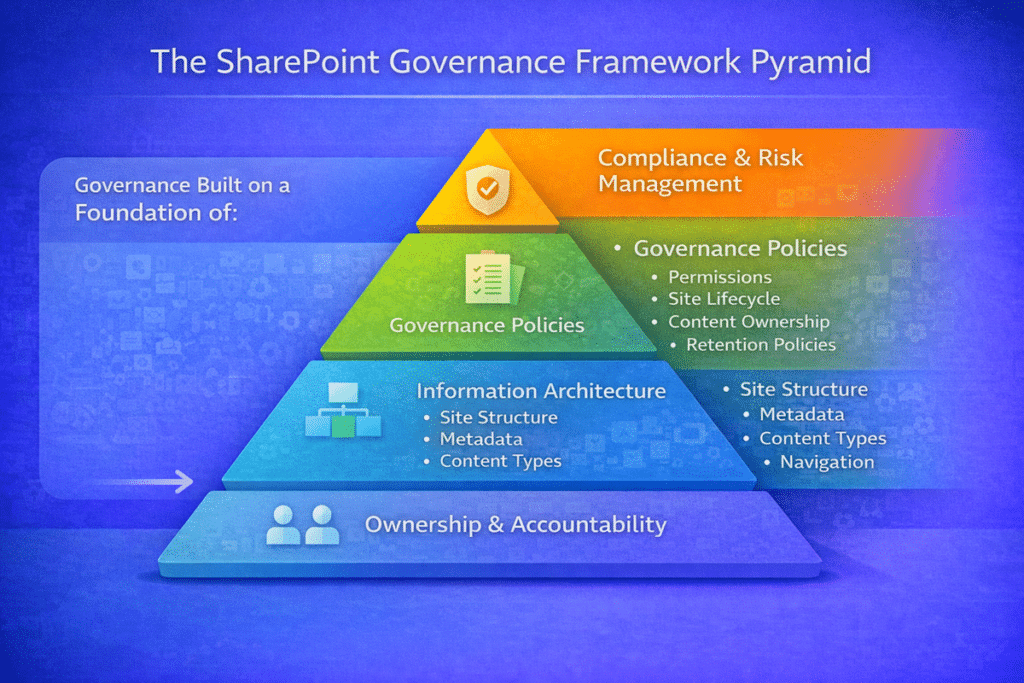
Governance cannot exist independently from information architecture.
The way content is structured directly affects how governance policies can be enforced. Governance becomes easier to enforce when information architecture reflects how the business actually manages content. For many organizations, that means translating legacy folder structures into metadata-driven SharePoint content instead of relying on inconsistent folder paths, outdated naming habits, and tribal knowledge.
Strong governance depends on:
- Consistent site architecture
- Well-designed document libraries
- Metadata classification
- Content type alignment
- Structured navigation
These elements are explored in depth within our SharePoint Information Architecture & Metadata Strategy resources.
When architecture and governance align, organizations gain both flexibility and control.
When your organization needs help turning that alignment into a practical design, SharePoint architecture and governance consulting connects site structure, hubs, permissions, ownership, metadata, lifecycle, and governance standards into one operating model.
Governance for Microsoft Teams
Many organizations believe Teams governance is separate from SharePoint governance.
In reality, Microsoft Teams relies heavily on SharePoint for file storage, permissions, and content management.
As a result, Teams governance must include:
- Workspace provisioning standards
- Naming conventions
- Lifecycle policies
- Guest access controls
- Retention alignment
Without these guardrails, Teams environments quickly become difficult to manage.
That becomes even more important when outside users are involved, which is why SharePoint external sharing governance should define how guest access, Anyone links, and external collaboration are handled across Microsoft 365.
Our Microsoft Teams Strategy resources explain how Teams governance integrates with broader Microsoft 365 architecture.
Governance Policies Every Organization Should Define
While governance models vary by organization, several policies appear consistently across successful environments. Those same governance decisions also shape investigation readiness. Microsoft Purview eDiscovery for SharePoint and Teams depends on ownership, permissions, retention, and content structure being clear before a real case begins.
Workspace Creation Policies
Define how new Teams and SharePoint sites are provisioned and who can request them. A strong SharePoint site provisioning strategy helps turn governance into a practical operating model by defining how new sites are requested, approved, named, templated, assigned owners, permissioned, and managed through their lifecycle.
Permissions Model
Establish a standard approach using security groups and role-based access. Governance policies define how sites are created, managed, and maintained across the SharePoint environment.
They also establish how access should be granted and reviewed. A well-designed governance model includes clear permission strategies so administrators and site owners understand how access should be managed over time. Our SharePoint Permissions Guide explains how inheritance, groups, and permission levels work together to support secure collaboration.
Content Classification
Implement metadata or sensitivity labels to identify document types and information sensitivity. Governance also needs protection controls for how sensitive content moves across SharePoint, Teams, OneDrive, and Copilot. Microsoft Purview DLP for SharePoint, Teams, OneDrive, and Copilot helps define where data loss prevention fits alongside permissions, sensitivity labels, retention, and records management.
When classification needs a more specific protection model, use SharePoint sensitivity labels to clarify the difference between container labels, file labels, permissions, DLP, retention labels, and Copilot-related exposure risk.
Retention and Records Policies
Align SharePoint content with organizational retention schedules. For business-critical libraries, governance should also define SharePoint document control standards so version history, approval status, review ownership, retention expectations, and audit traceability are handled consistently instead of left to each department.
Lifecycle Management
Ensure inactive sites are reviewed, archived, or retired over time.
These policies create a foundation that supports both collaboration and compliance.
Governance becomes especially important in organizations responsible for managing grants, board documentation, and compliance records. Nonprofits often rely on structured SharePoint governance to maintain transparency and ensure information remains secure and accessible.
See how governance supports nonprofit collaboration in our SharePoint Intranet for Non-Profit Organizations guide.
SharePoint Governance Best Practices
SharePoint governance best practices include defining site ownership, standardizing site provisioning, using role-based permissions, aligning metadata with business language, creating lifecycle and retention rules, training site owners, and reviewing governance regularly. The best governance models are practical enough for users to follow and structured enough for IT, compliance, and business owners to sustain.
One practical place to apply those best practices is the publishing layer: a SharePoint page governance model helps teams manage ownership, page templates, review dates, news content, and stale-page retirement over time.
Organizations that manage Microsoft 365 effectively tend to follow several practical governance principles.
Start with architecture before policy writing. Governance works best when structural decisions guide how content is organized.
Align governance with real collaboration patterns. Policies that contradict how people work rarely succeed.
Assign ownership early. Governance fails when responsibility for content management is unclear.
Use automation where possible. Provisioning workflows and lifecycle policies reduce manual oversight.
However, lifecycle automation works best when retention rules and records decisions have already been defined in a structured SharePoint records management framework.
Review governance regularly. Microsoft 365 evolves quickly, and governance must evolve with it.
For year-specific governance shifts, Copilot pressure points, and current trends, see the SharePoint Governance in 2026.
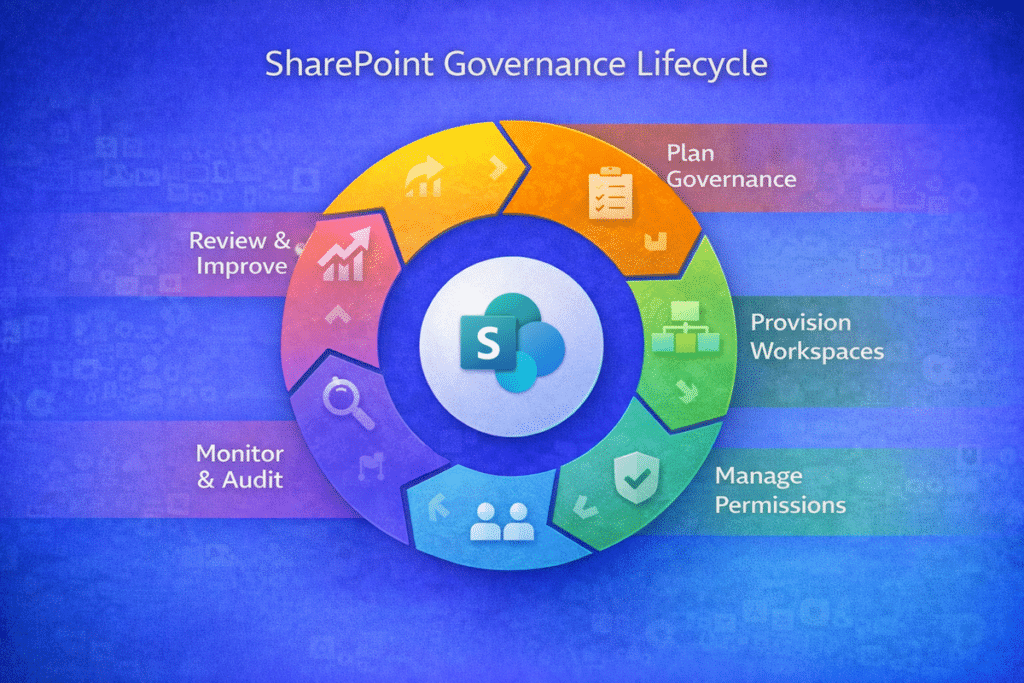
Effective governance is not a one-time policy document. The SharePoint Governance Lifecycle shows how organizations continuously plan, implement, monitor, and refine governance across Microsoft 365 environments.
Governance and Copilot Readiness
As organizations evaluate Microsoft Copilot, governance becomes increasingly important.
Copilot relies on the same permissions and information structure that users rely on.
If governance is inconsistent, AI systems may:
- Surface irrelevant information
- Expose sensitive content unintentionally
- Struggle to locate reliable documents
This is why Copilot readiness is fundamentally an architecture and governance conversation. The same governance principle applies to SharePoint agents. Before rollout, organizations should define scope, approved sources, permissions, ownership, and review expectations so they can design SharePoint agents users can trust instead of launching AI experiences that depend on unclear or outdated content.
Our Copilot Readiness for SharePoint resources explain how organizations can prepare their environments for AI-driven collaboration.
For organizations that need a more concrete starting point, SharePoint Data Access Governance reporting helps connect governance strategy to site-level review by identifying where oversharing, sensitive content, permission drift, or unclear ownership may need action before Copilot rollout.
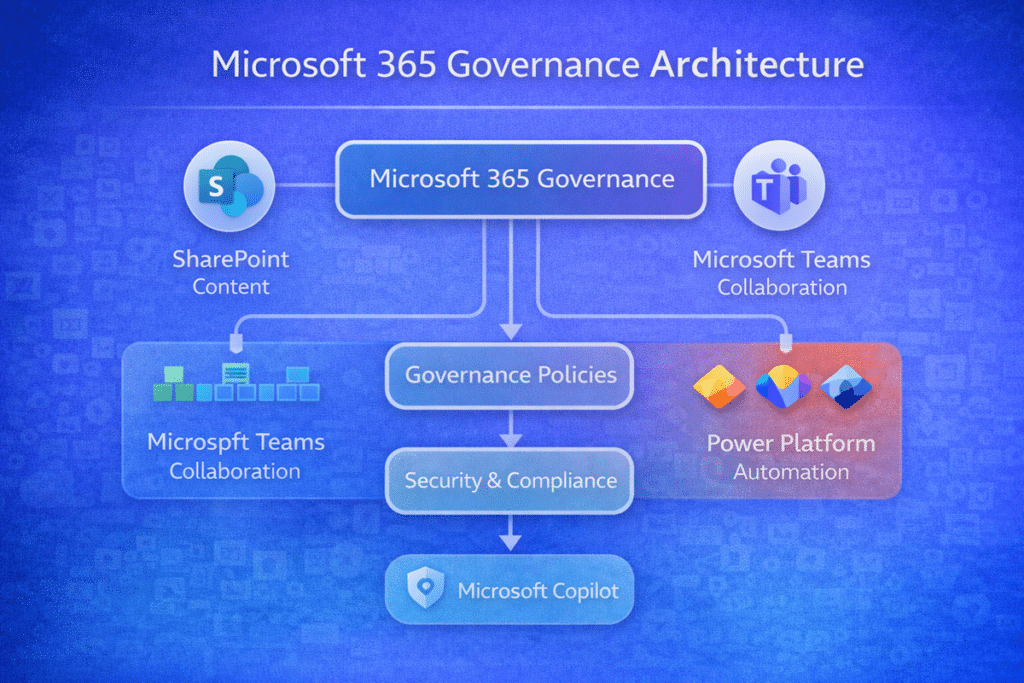
Microsoft 365 governance extends beyond SharePoint alone. The architecture below illustrates how governance policies coordinate collaboration across SharePoint, Teams, Power Platform, and emerging AI services like Copilot.
Signs Your SharePoint Governance Needs Improvement
Many organizations discover governance gaps only after problems appear.
Common indicators include:
- Duplicate Teams and sites performing the same function
- Users unsure where documents should be stored
- Broken or overly complex permission structures
- Unreliable search results
- Difficulty locating authoritative content
When these symptoms appear, governance redesign often becomes necessary.
The SharePoint Governance Maturity Model
Governance typically evolves through five maturity stages: informal, documented, enforced, operational, and adaptive. Early on governance is implied rather than owned. It becomes documented as policies and roles are written down, enforced once provisioning, permissions, and information architecture make standards the default, operational when review and support turn governance into a rhythm, and adaptive when it improves continuously alongside usage and AI adoption. Our SharePoint Governance Maturity Model breaks down each stage and how to move up without over-engineering.
For a practical scoring worksheet, use the SharePoint governance maturity scorecard to move from maturity stages into a 1–5 assessment your team can complete during governance planning.
Governance Implementation Roadmap
A structured governance initiative typically follows a series of steps:
- Assess current Microsoft 365 environment
- Define governance objectives and policies
- Align architecture with governance requirements
- Implement provisioning and lifecycle controls
- Train site owners and content stewards
- Monitor governance effectiveness over time
Migration is often where governance gaps become visible. Many organizations repeat the same SharePoint migration mistakes when ownership, permissions, cleanup, site structure, and lifecycle decisions are not defined before migration waves begin.
This structured process reflects the methodology we apply through The dataBridge Way™, where discovery, architecture, governance, implementation, adoption, and ongoing optimization work together to support long-term SharePoint success.
When to Engage a SharePoint Governance Consultant
Governance planning often becomes necessary when organizations experience rapid platform growth, migration initiatives, or new compliance requirements.
Consulting engagements typically focus on:
- Governance framework design
- Architecture alignment
- Policy development
- Lifecycle automation
- Adoption and training
Governance also becomes easier to evaluate when leaders can see how structured planning shows up in real environments. Our Client Success and Microsoft 365 case studies show how architecture, governance, implementation, adoption, and support connect across SharePoint projects.
Governance is rarely successful when it is treated as an afterthought. In most organizations, effective governance frameworks are designed during architecture planning and implemented by experienced consultants who understand enterprise collaboration environments. If you are evaluating outside expertise, our SharePoint Consulting Firm Guide explains how to identify firms with the governance experience required to build a sustainable SharePoint environment.
Organizations seeking structured guidance often begin with SharePoint Consulting Services, where governance planning becomes part of a broader Microsoft 365 strategy.
Final Thoughts
SharePoint governance is not a static policy document.
It is an ongoing framework that supports collaboration, protects information, and ensures Microsoft 365 continues to deliver value as organizations grow.
When governance is thoughtfully designed and consistently applied, SharePoint becomes more than a document repository. It becomes a trusted platform for collaboration, knowledge management, and modern digital work.
When an intranet already exists but trust, ownership, and findability have started to erode, a SharePoint intranet assessment can help pinpoint where governance breakdowns are affecting day-to-day performance.
Frequently Asked Questions
SharePoint governance is the framework of policies, roles, and processes that guide how content, sites, and permissions are managed across Microsoft 365. Effective governance ensures that collaboration remains flexible while information stays organized, secure, and compliant. Without governance, SharePoint environments often experience site sprawl, inconsistent permissions, and unreliable search results.
A comprehensive SharePoint governance framework typically includes policies for site creation, permissions management, lifecycle management, information architecture, and compliance. It also defines ownership responsibilities and operational processes that ensure the environment remains structured as collaboration grows.
Microsoft Teams relies on SharePoint for document storage, permissions, and content management. As a result, Teams governance must align with SharePoint governance policies. This includes workspace provisioning standards, naming conventions, lifecycle controls, and role-based permissions to prevent collaboration environments from becoming fragmented.
Governance policies should be reviewed regularly to ensure they continue to align with organizational needs and Microsoft 365 capabilities. Many organizations perform annual governance reviews, while larger or highly regulated environments may conduct quarterly reviews to maintain compliance and operational efficiency.
Common indicators include duplicate Teams or SharePoint sites performing the same function, unclear ownership of workspaces, overly complex permissions structures, and difficulty locating authoritative content. When these symptoms appear, organizations often benefit from reassessing governance policies and information architecture.