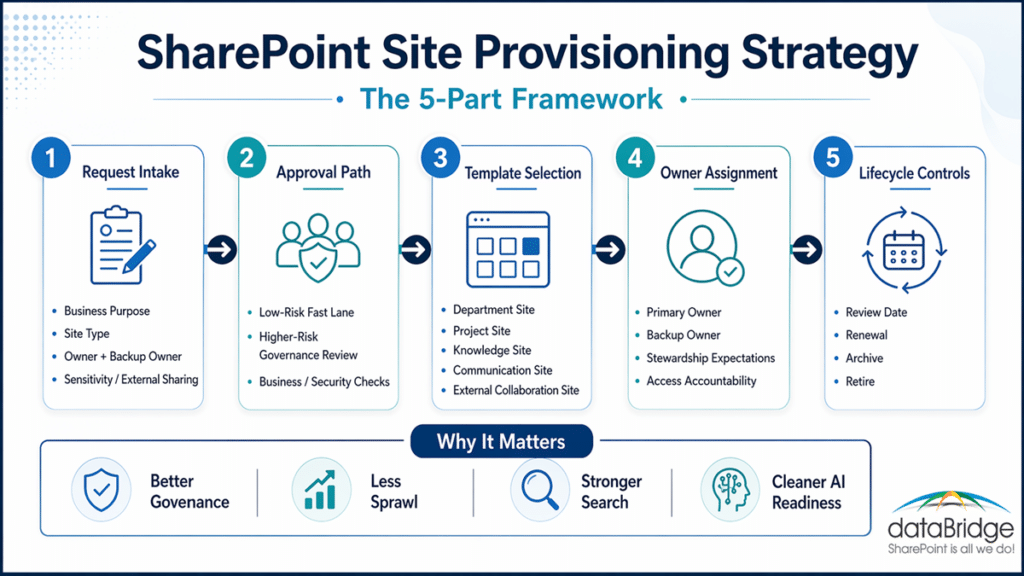
1. Start with a clear request workflow
Every new site should begin with a simple intake process.
That process should capture the site purpose, business unit, expected audience, named owner, backup owner, and any need for external sharing or sensitive content handling.
Keep the form short. Do not make it vague.
If a requester cannot explain what the site is for, who owns it, and who will use it, the site is probably not ready to be created.
A practical request workflow should capture:
- site purpose
- requested site type
- primary owner
- backup owner
- business sponsor, if needed
- expected duration
- external sharing needs
- sensitivity or compliance flags
This is where many teams go off track. They make the form easy by removing the key decisions. Later, those missing decisions come back as governance work.
2. Standardize the template catalog
Most organizations do not need a large library of site templates. They need a small catalog with clear intent.
Templates are governance tools, not design extras.
Each template should include the right structure, default libraries, metadata approach, navigation pattern, owner expectations, and review cadence.
Blank sites are rarely neutral. In practice, they multiply inconsistency.
In most environments, a short template catalog works well:
Department or function site
Use this for ongoing operational work.
These sites usually need stable ownership, standard libraries, predictable permissions, hub alignment, and an annual review cycle.
Project or initiative site
Use this for time-bound collaboration.
These sites should include a target end date, clear membership rules, and a post-close review.
Knowledge or policy site
Use this for reference content, SOPs, policies, and team guidance.
These sites need content review dates, publishing discipline, and tighter ownership.
Communication or intranet site
Use this for broad publishing across a department or business area.
These sites should align closely to enterprise navigation and publishing standards. Before provisioning one, it helps to confirm which intranet building block actually fits – a home site, a hub site, or a communication site, since each plays a different role in the structure.
External collaboration site
Use this when guest access is justified.
These sites need stricter approval, tighter sharing controls, and more frequent review.
Your template catalog should also support your SharePoint Hub Site & Enterprise Intranet Architecture Framework. Otherwise, provisioning and architecture will keep pulling in different directions.
SharePoint Site Provisioning Decision Matrix
Site type | Approval level | Ownership requirement | Lifecycle rule |
Department site | Standard approval | Primary and backup owner | Annual review |
Project site | Fast lane or project sponsor approval | Project owner and backup owner | Review at project close |
Knowledge or policy site | Content owner approval | Business content owner | Scheduled content review |
Communication or intranet site | Publishing/governance approval | Department owner and communications owner | Ongoing publishing review |
External collaboration site | Higher-risk approval | Business sponsor and site owner | More frequent access review |
3. Assign ownership before the site is provisioned
Ownership assigned after launch usually becomes ownership ignored. The same principle applies at the page level: page governance after site launch helps make sure important pages have owners, review dates, publishing standards, and a clear retirement path.
Every new site should have a named primary owner and a backup owner before it is created. Those people should understand what they are responsible for from the start.
That includes:
- access decisions
- content quality
- basic stewardship
- review participation
- external sharing awareness
- lifecycle decisions
This is where SharePoint Site Owner Responsibilities becomes essential. A title alone is not enough. Ownership has to mean something in practice.
We rarely recommend a single-owner model unless there is a strong reason for it. One owner creates a single point of failure. Two accountable owners create continuity.
4. Route approvals by risk, not by habit
Not every site needs the same approval path.
A standard internal team site may only need business approval. A site that supports regulated content, executive collaboration, or guest access may need a stronger review path.
The goal is not to slow people down. It is to apply proportionate control.
A risk-based approval model often works best:
- low-risk internal collaboration sites move through a fast lane
- externally shared sites go through extra review
- regulated or sensitive sites include governance or compliance checks
- intranet and communication sites include publishing oversight
This is one place where consultant-led design helps. Many organizations either over-approve everything or under-review the sites that matter most.
Both approaches create friction. One creates delay. The other creates risk.
5. Set lifecycle controls on day one
Lifecycle should begin before the site is created.
Every site should launch with a review date, a business purpose, named owners, and a likely future path. That path may be renewal, archive, or retirement.
If lifecycle starts after go-live, it started too late.
At a minimum, each site should launch with:
- a review date
- an expected lifespan
- a hub relationship or structural home
- a renewal expectation
- a path for archive or retirement
- rules for guest access, if applicable
In tenant reviews, we often find completed project sites still sitting beside active departmental work because nobody set an end-state at launch. Mature SharePoint environments make that decision on purpose.
A practical SharePoint site request workflow that scales
A good workflow does not need to be complex. It needs to be intentional.
Here is a practical model:
- Select the site type
Separate project, department, knowledge, communication, and external collaboration requests. - Capture the business purpose
Require a short explanation of what the site will support and who it serves. - Name the owners
Record the primary owner and backup owner before approval. - Classify the request
Flag external sharing, sensitive content, or regulated use early. - Route the approval
Send low-risk requests through a fast lane and higher-risk requests through a stricter path. - Apply the right template
Provision the correct structure, libraries, metadata approach, navigation, and default permissions. - Attach governance defaults
Set naming, hub alignment, review dates, and owner expectations at launch. - Record the decision
Keep an approval record so purpose, ownership, and risk posture stay visible later.
We often see organizations automate the wrong part. They automate the creation step, but they leave the decision logic undefined.
Automation helps only after the operating model is clear.
If your current process is fast but inconsistent, contact dataBridge to design a SharePoint provisioning strategy that scales.
How provisioning connects to governance, architecture, and strategy
Provisioning does not stand alone. It only works when it connects to the rest of the SharePoint operating model.
That is why site provisioning should align with:
Without that connection, site requests get treated like isolated admin tasks. In reality, each new site affects structure, ownership, search, permissions, and content lifecycle across Microsoft 365.
Provisioning is where governance becomes operational.
External sharing should have its own provisioning lane
Guest access changes the risk profile of a SharePoint site.
That is why external collaboration should not be treated like a normal internal request. It should trigger additional review, stricter template controls, and more frequent lifecycle checks.
This is where SharePoint External Sharing Governance should feed directly into the provisioning process.
In our experience, external sharing creates the most governance friction when it enters through the side door. A better model brings it through the front door from the start.
Common SharePoint provisioning mistakes to avoid
Even mature teams make the same errors when provisioning is not clearly defined.
Watch for these common problems:
- allowing users to request a blank site with no clear purpose
- using one template for every use case
- launching sites before ownership is confirmed
- skipping review dates and renewal points
- applying the same approval path to every request
- treating external sharing as an afterthought
- creating sites outside the hub and navigation model
- waiting until a cleanup project to define lifecycle
None of these issues looks major on its own. Together, they create the slow drift that makes SharePoint harder to trust.
Why this matters for search, AI visibility, and long-term platform trust
AI does not fix a messy content estate. It exposes it faster.
When sites are provisioned with weak ownership, poor structure, and no lifecycle control, users struggle to find the right source. AI tools inherit that same confusion.
Provisioning should also help prevent future source-of-truth problems. When new sites launch with clear purpose, ownership, lifecycle expectations, and content authority rules, SharePoint becomes easier for users, search, Copilot, and agents to trust.
A disciplined SharePoint site provisioning strategy improves:
- content placement
- owner accountability
- hub and navigation consistency
- permission clarity
- search quality
- confidence in source content
That is one reason this topic also connects to SharePoint Governance in 2026. Governance priorities are becoming more practical, more operational, and more tied to AI readiness.
Better provisioning improves both human findability and machine confidence.
When a consultant-led provisioning strategy makes sense
Some organizations only need to tune the process they already have. Others need to build one from scratch.
A consultant-led approach makes sense when:
- site sprawl is already widespread
- departments use different patterns
- hub architecture is inconsistent
- ownership is vague
- external sharing rules vary by team
- lifecycle decisions rarely happen on time
- SharePoint now supports intranet, project, compliance, and knowledge use cases at once
This is where dataBridge helps. We translate governance goals into request logic, template rules, ownership expectations, and lifecycle controls that people can actually follow.
dataBridge’s SharePoint architecture and governance consulting turns provisioning goals into request logic, template rules, and lifecycle controls.
If you need to turn site creation into a controlled operating model, contact dataBridge.
SharePoint provisioning services from dataBridge
Strong provisioning comes down to a clear operating model built by people who have done it before. dataBridge designs the full request-to-retirement model: intake forms, a governed template catalog, risk-based approval routing, ownership rules, and lifecycle controls your admins can run on their own. Every engagement is staffed by senior, US-based SharePoint specialists, so the model matches how your organization actually works.
See how provisioning fits into our broader SharePoint consulting services.
Frequently asked questions about SharePoint site provisioning strategy
What is SharePoint site provisioning?
SharePoint site provisioning is the process of creating new sites through a defined model. That model should include request steps, template selection, ownership assignment, approval rules, and lifecycle controls.
How is provisioning different from governance?
Governance defines the rules. Provisioning applies many of those rules at the moment a site is created. Governance without provisioning stays abstract. Provisioning without governance becomes inconsistent.
What should a SharePoint site request form include?
A good form should capture site purpose, requested site type, primary owner, backup owner, business unit, sensitivity or sharing needs, and expected lifespan.
How many site templates should an organization have?
Most organizations need a small catalog, not a large one. Four or five well-governed templates usually outperform a long list of loosely defined options.
How often should SharePoint sites be reviewed?
The answer depends on the site type and risk level. External collaboration and project sites usually need more frequent review. Department and knowledge sites can often follow a longer cycle if ownership is clear.
Should every SharePoint site use the same approval path?
No. Low-risk internal requests should move faster. Higher-risk sites should include the right governance, compliance, or security review.
The bottom line
A mature SharePoint environment does not let every new site start from scratch.
Instead, it uses a clear SharePoint site provisioning strategy to guide requests, apply the right templates, assign real owners, and control lifecycle from the start.
That approach reduces sprawl, improves trust, and gives governance something practical to stand on. It also makes SharePoint easier to scale across Microsoft 365.
If you want a provisioning model that supports real business work and long-term control, contact dataBridge
Reviewed By