When an Intranet-in-a-Box Is the Right Call
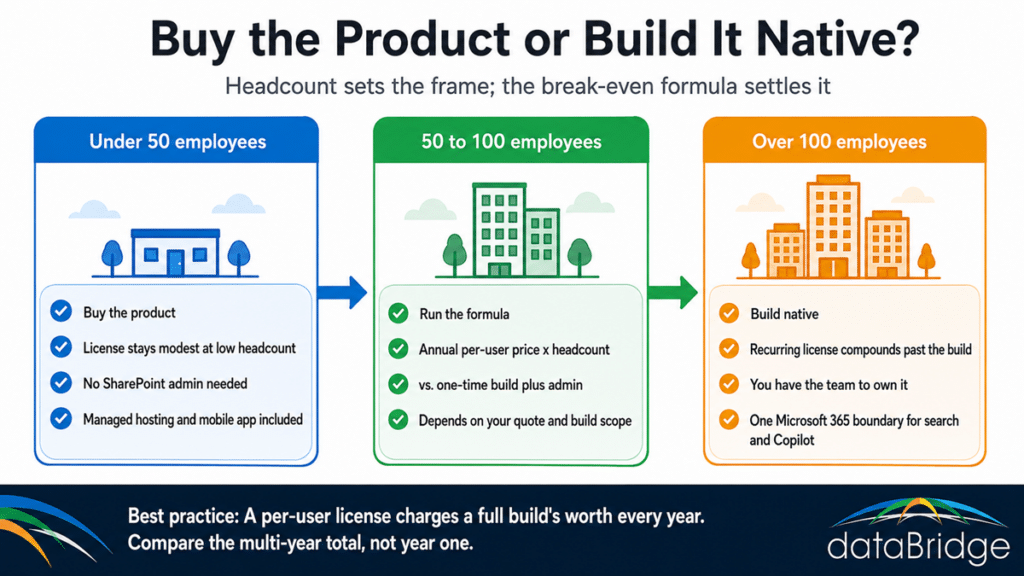
For a company under about 50 employees, buying the product is usually the better decision, and we tell small organizations exactly that. The reason is two things landing together, not just price.
First, the cost math favors the product at low headcount. A 40-person license doesn’t compound into serious money the way a 400-person one does, and the one-time build cost is harder to justify when it’s spread across a small team.
Second, and just as important, a company that size usually has no SharePoint administrator and doesn’t want one. The intranet-in-a-box value isn’t only the software – it’s the managed hosting, the vendor support line, the upgrade path you don’t maintain, and the mobile app that works on day one without anyone configuring it. A 40-person company that would otherwise assign its intranet to whoever is least busy is genuinely better served by a product someone else runs.
Those two forces cross the same place. Below the threshold, you likely lack both the headcount to justify the build and the IT capacity to own it, and the product solves both. That is a real recommendation, not a hedge – if you’re a small organization reading this, buy the product and skip the rest of the build-versus-buy agonizing.
Between roughly 50 and 100 employees is the genuine judgment zone. Run the formula with your actual quote and your actual build scope, because at that size the answer legitimately depends on your numbers, your integration needs, and whether you have anyone on staff who can own a SharePoint environment.
When to Build on Native SharePoint
Above about 100 employees, the equation inverts. The per-user license is now compounding into real annual money, an organization that size typically has the IT capacity to own a SharePoint environment, and the one-time build stops competing with a subscription and starts replacing a series of them. This is also, not by coincidence, where a custom intranet’s advantages start to matter: an information architecture built for how your organization actually works, branding and navigation you control completely, and no dependency on a vendor’s roadmap or renewal pricing.
There’s a second reason the build wins at scale, and it’s the one the product vendors would rather not raise. An intranet-in-a-box adds another layer on top of Microsoft 365 – another place content lives, another permission model, another search index, another integration surface to govern. For an organization already running Teams, SharePoint, and Copilot, a native intranet keeps the employee experience inside the Microsoft 365 boundary where search, permissions, and AI grounding already operate. The product buyer is paying a subscription to sit beside the platform they already own; the builder is using it. The full picture of what a native intranet involves is in the complete guide to building a modern SharePoint intranet.
What Native SharePoint Already Does – and the One Thing It Makes You Build
Here’s the part that saves organizations the most money: much of what the product is demoing, native SharePoint already does perfectly well. Document libraries, version control, enterprise search that respects permissions, people directories, basic news and announcements – all native, all included in Microsoft 365 licensing you already pay for. When a buyer is dazzled by a product’s document experience, they’re usually looking at something their own tenant does natively and no one configured.
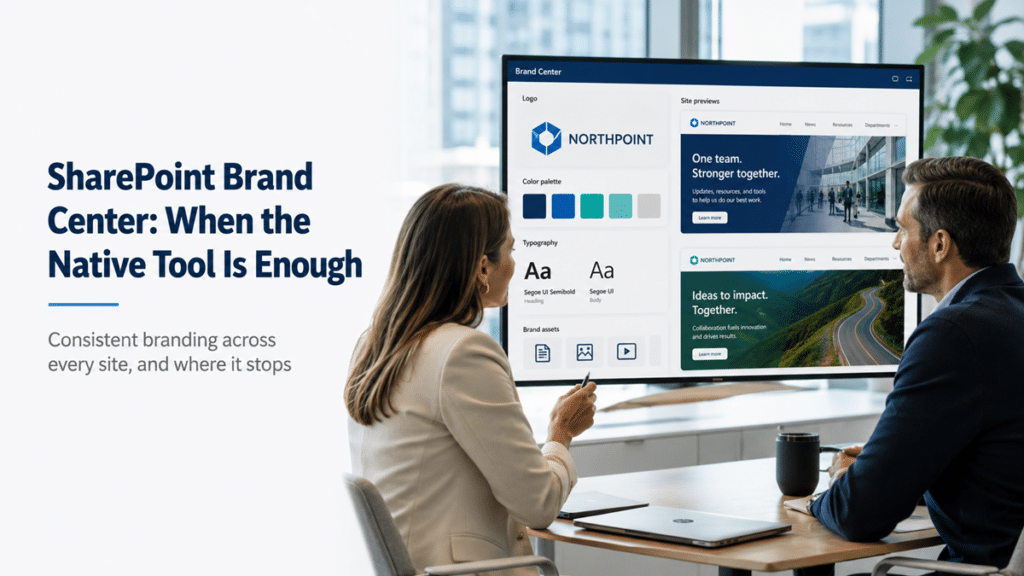
Branding belongs on that list too. A polished, consistent look is a big part of what the product demos sell, and the native Brand Center in SharePoint now lets a brand manager set approved fonts, colors, and themes once for every site, on licensing you already hold.
But an honest comparison names what the product genuinely does better out of the box, and there’s one that comes up in nearly every one of these deals: targeted, audience-based news publishing. Sending the right announcement to the right region, department, or role – and only them – is something the intranet-in-a-box platforms make easy and native SharePoint makes you configure. It’s doable in SharePoint with audience targeting, and it works well once built, but it is genuine configuration work rather than a switch you flip. If organization-wide targeted communications are the entire reason you’re shopping, that’s a real capability gap to weigh – not a reason to buy a whole platform, but an honest mark in its favor.
The distinction that matters: buying a product to get document libraries and search is paying twice for what you own. Buying one because you need sophisticated audience-targeted publishing on day one and have no one to configure it is at least buying something real. Know which one you’re actually doing.
How to Decide
Start with headcount, because it sets the frame. Under 50, buy the product and move on. Over 100, build native and stop paying a subscription to sit next to your own platform. Between the two, run the formula with your real quote and your real build scope, then weigh whether you have anyone to own a SharePoint environment.
Then pressure-test what’s driving the evaluation. If it’s document management and search, you already own that and the product is solving a configuration problem you could solve once. If it’s audience-targeted publishing and a managed mobile app with no admin on staff, the product is addressing something real – weigh it against the recurring cost. Either way, make the decision on your numbers and your requirements, not on a demo that compared a finished product against a tenant nobody structured. If you want that comparison run against your actual environment, a SharePoint intranet assessment starts there.
FAQ
Is an intranet-in-a-box cheaper than building on SharePoint?
At low headcount, often yes. The products charge per user annually, so a small team’s license stays modest while a one-time custom build is harder to justify. As headcount rises the recurring license compounds, and somewhere around 50 to 100 employees it crosses the one-time build cost. Above that line, building native is usually cheaper over any multi-year window because you stop paying the subscription entirely.
What do Simpplr, Staffbase, and Unily do that SharePoint doesn’t?
The clearest genuine gap is targeted, audience-based news publishing delivered out of the box – sending communications to specific regions, departments, or roles without configuration. Native SharePoint does this through audience targeting, but it’s configuration work rather than a built-in feature. The products also package a managed mobile app, vendor hosting and support, and adoption analytics. Much of the rest of what they demo – libraries, search, directories – SharePoint already does natively.
At what company size should we build a custom SharePoint intranet instead of buying?
As a working rule, under 50 employees buying the product usually wins, over 100 building native usually wins, and 50 to 100 is a genuine judgment call that depends on your quoted per-user price and your build complexity. The deciding factors beyond headcount are whether you have IT capacity to own a SharePoint environment and how much your requirements exceed what native SharePoint does out of the box.
Does an intranet-in-a-box work with Microsoft 365?
Yes – the products are built to sit on top of or alongside Microsoft 365. That integration is also the catch at scale: the product becomes another layer with its own content, permission model, and search index to govern, sitting beside the Microsoft 365 you still pay for. For organizations invested in Teams, SharePoint, and Copilot, a native intranet keeps everything inside one boundary rather than spanning two.
We already have SharePoint. Why would we pay for an intranet product on top of it?
That’s the right question to ask, and often the answer is that you shouldn’t. If the frustration driving the evaluation is that nobody can find anything or the intranet looks unfinished, that’s an unconfigured SharePoint environment, not a missing product – and the configuration work follows you into the product’s implementation anyway. Pay for the product when you genuinely need what it does better out of the box and have no one to build it, not to escape structuring what you already own.
Most organizations above 100 employees that come to us mid-evaluation discover the product was quoting them a yearly fee to deliver what their Microsoft 365 licensing already covers. If you want the build-versus-buy decision made on your headcount and your requirements rather than a demo, our intranet consulting team runs that comparison against your real environment.
Reviewed By