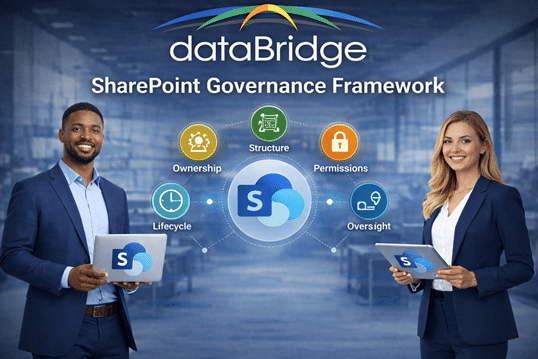
SharePoint Governance Framework
A SharePoint governance framework turns broad governance goals into practical decisions about ownership, permissions, lifecycle management, content standards, and Microsoft 365 controls. This page explains how dataBridge helps organizations establish a working framework that can guide behavior, reduce risk, and support long-term platform maturity.
This page focuses on the operating model behind governance: roles, decision rights, review cadence, enforcement, ownership, and implementation. For the broader educational overview, start with The Complete Guide to SharePoint Governance for Microsoft 365. For current-state benchmarking, use the SharePoint Governance Maturity Model.
What a SharePoint governance framework should define
A SharePoint governance framework is only useful when it answers the boring questions before they become problems: who owns what, who can create sites, how content retires, and how permissions stay clean. We turn those into rules a team can actually run. For the full picture across the environment, our SharePoint Governance Center pulls the related resources together.
Many organizations have governance intentions but no operational framework to support them. Policies exist on paper, yet site creation, content ownership, and permission decisions still happen inconsistently. This page explains how dataBridge translates governance into a usable structure that teams can follow and leaders can sustain.
How to structure, control, and scale SharePoint across Microsoft 365
A SharePoint governance framework defines the structure behind how Microsoft 365 is managed day to day. dataBridge helps organizations establish the roles, policies, ownership rules, permissions model, and lifecycle controls that turn broad governance goals into an operational framework that can scale.
For a broader overview of governance strategy, policies, and best practices, start with our complete SharePoint governance guide.
Why a SharePoint Governance Framework Needs an Operating Model
Most organizations don’t struggle with SharePoint because of missing features.
They struggle because there is no clear structure guiding how SharePoint should be used.
At first, everything appears to work. A few sites are created. Documents are uploaded. Teams begin collaborating. But over time, small inconsistencies begin to compound. New sites are created without standards. Permissions drift. Content becomes harder to find. Search becomes unreliable. Users begin to question whether SharePoint is a system they can trust.
That pattern usually starts at the point of creation, which is why a clear SharePoint site provisioning strategy should define request paths, templates, ownership, approval rules, and lifecycle controls before new sites are launched.
This is not a technology failure.
It is a governance failure.
A SharePoint governance framework defines how your environment operates. It establishes how decisions are made, how content is structured, how access is controlled, and how the platform evolves as your organization grows.
At dataBridge, we’ve worked with organizations across industries—including healthcare, financial services, manufacturing, and professional services—and the pattern is consistent:
SharePoint success is not determined at go-live. It is determined by how well governance holds six months later.
That same principle applies to AI readiness. Use the SharePoint governance for AI readiness hub to connect governance roles, permissions, lifecycle decisions, content ownership, search trust, and SharePoint agents.
Organizations that design governance early build environments that scale.
Organizations that delay governance often find themselves revisiting the same problems—only now in a more complex and harder-to-control environment.
For teams that need to see where this framework fits beside the broader guide, maturity model, provisioning, permissions, records, search, and Copilot readiness resources, the SharePoint Governance Center provides a practical cluster map.
Written by Michael Fuchs, Founder and CEO of dataBridge. Reviewed by Ken Lewis, Principal Consultant, for SharePoint governance, records management, compliance-driven information architecture, lifecycle, and Microsoft 365 governance accuracy.
Published: January 25, 2026
Last reviewed: May 29, 2026
Table of Contents
What Is a SharePoint Governance Framework?
A SharePoint governance framework is the operational system that defines how SharePoint is structured, managed, and sustained over time.
It establishes:
- How sites are created and organized
- Who owns content and decisions
- How permissions are assigned and maintained
- How content is reviewed, retained, and archived. Those rules should be practical, not theoretical. A strong SharePoint archive strategy helps teams decide when inactive sites should remain available for reference but stop cluttering the active collaboration environment.
- How standards are enforced across Microsoft 365
Unlike a static policy document, a governance framework is not theoretical.
It is embedded into how your environment functions every day.
Governance is not something that sits in a document repository. It is reflected in how users create sites, how teams collaborate, how content is maintained, and how decisions are made across the platform.
Organizations that engage in SharePoint consulting services often discover that governance is the missing layer between initial implementation and long-term success.
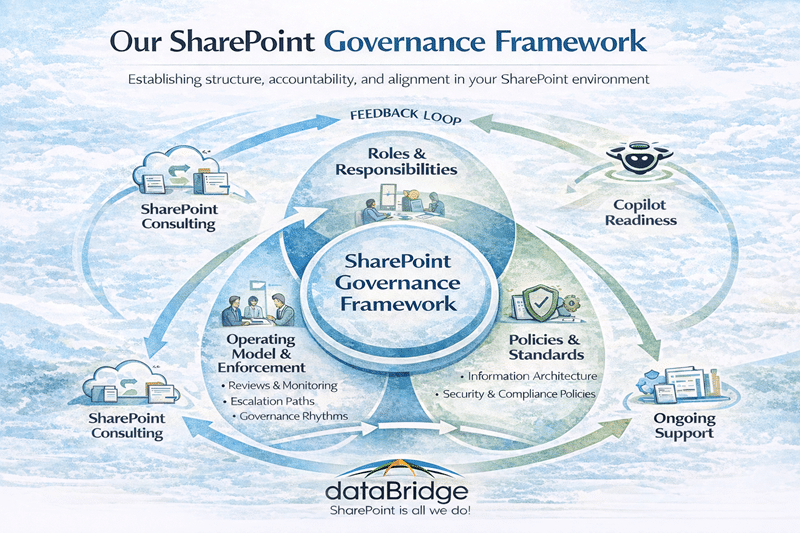
How the Governance Framework Fits into Your Overall Strategy
Governance is often misunderstood because it is used interchangeably with other concepts. In reality, it works alongside several other strategic components, each serving a different purpose.
Governance Framework vs Governance Guide vs Maturity Model
Each element plays a distinct role:
- A governance framework defines how your environment operates
- A governance guide defines best practices and standards
- A maturity model defines how governance evolves over time
Your framework is the operating model.
The guide is the reference.
Your maturity model is the roadmap.
If you are looking for deeper best practices and implementation guidance, your SharePoint governance guide expands on policies and execution. If you want to evaluate your current state, your SharePoint governance maturity model outlines how governance evolves from informal to adaptive.
Once the roadmap is clear, the SharePoint Governance Maturity Scorecard helps identify which framework components need attention first, including ownership, permissions, lifecycle, metadata, records, search, adoption, and support.
Most organizations do not struggle because they lack governance knowledge. They struggle because they lack a structured operating model that defines how governance is applied consistently.
What a SharePoint Governance Framework Should Produce
A SharePoint governance framework should produce practical operating tools, not just policy language.
One useful operating tool is a site ownership and lifecycle governance matrix that connects ownership, permissions, lifecycle review, external sharing, and Copilot exposure to real sites instead of keeping governance in abstract policy language.
Common deliverables include:
- Governance charter
- Roles and responsibilities model
- Site provisioning standards
- Permission and access model
- Content ownership model
- Lifecycle and archival standards
- External sharing rules
- Review cadence
- Escalation path
- Site owner support model
- Governance improvement backlog
These deliverables help governance move from intention to execution.
Why Governance Matters More Than Ever in Microsoft 365
SharePoint is no longer a standalone platform. It sits at the center of Microsoft 365, supporting collaboration, automation, content management, search, compliance, and AI-driven experiences.
Governance matters more in Microsoft 365 because SharePoint connects to Teams, OneDrive, Power Platform, search, compliance, and Copilot. A framework gives those connected experiences a shared operating model so each site, workspace, permission decision, automation, and lifecycle rule does not become a one-off exception.
That is why Microsoft Teams consulting and governance, Power Automate best practices and use cases, Power Apps strategy and architecture, and Copilot readiness for SharePoint all depend on clear ownership, access models, lifecycle expectations, and support responsibilities.
When governance is weak, search becomes inconsistent, workflows become fragile, security risks increase, and AI outputs become harder to trust. Organizations investing in Copilot often discover that governance, not technology, is the limiting factor.
AI surfaces what already exists in the environment. If SharePoint lacks structure, ownership, permissions clarity, and trusted content, the outputs will reflect those same weaknesses.
The strongest governance frameworks do not treat these areas as separate problems. They create a practical operating model that helps Microsoft 365 remain secure, usable, scalable, and easier to manage over time.
When the operating model also requires a clearer structural design, SharePoint architecture and governance consulting helps align site architecture, hub relationships, ownership, permissions, metadata, lifecycle controls, and governance responsibilities before the framework is rolled out.
The dataBridge SharePoint Governance Framework
At dataBridge, governance is not delivered as documentation. It is designed as a system that is practical, enforceable, and aligned with how organizations actually operate.
Our approach—aligned to The dataBridge Way™—organizes governance into five core pillars that define how SharePoint functions at scale.
1. Structure
Structure defines how content is organized across your environment.
It aligns with:
- Site hierarchy and navigation
- Hub architecture, as outlined in SharePoint hub site architecture framework
- Metadata models, supported by SharePoint taxonomy and metadata strategy
Governance ensures that structure is not only designed effectively but maintained consistently over time.
Even well-designed environments will degrade without governance reinforcing structure. What begins as a clean, logical system can quickly become fragmented if standards are not enforced.
2. Ownership
Ownership defines who is responsible for content, decisions, and outcomes.
This includes:
- Site owners responsible for managing content and permissions
- Department content owners responsible for accuracy and relevance
- Platform administrators responsible for governance oversight
When ownership is clearly defined, accountability becomes part of the system.
When ownership is unclear, content becomes outdated, permissions drift, and governance loses effectiveness regardless of how well it is documented.
The same pattern shows up quickly in AI experiences, which is why our guide to SharePoint agents scope, sources, permissions, and ownership is useful for teams translating governance standards into a practical agent operating model.
That is also one of the clearest reasons employees do not trust SharePoint: once ownership fades, content quality slips, access feels inconsistent, and confidence in the platform starts eroding.
Organizations that invest in SharePoint adoption and change management often find that ownership clarity is one of the most important drivers of long-term success.
3. Permissions
Permissions governance ensures access is controlled, consistent, and auditable.
It builds on principles outlined in the SharePoint permissions guide, but focuses on how those principles are applied and sustained.
This includes:
- Role-based access models
- Standardized permission groups
- Controlled use of unique permissions
Without governance, permissions quickly become one of the most complex and difficult areas to manage. Over time, this leads to reduced visibility, increased risk, and challenges in maintaining compliance.
4. Lifecycle
Lifecycle governance ensures that content remains accurate, relevant, and manageable.
It aligns with:
- Document management strategies, such as those outlined in the SharePoint document management system
- Retention expectations
- Review and archiving processes
Without lifecycle governance, content accumulates indefinitely. This reduces the overall quality of the environment, impacts search, and makes it harder for users to find trusted information.
For modern intranets, those lifecycle controls should extend to publishing, review, and retirement rules for modern pages, not only sites, libraries, and documents.
A well-governed lifecycle ensures that SharePoint remains an active, reliable system rather than a passive storage repository.
5. Oversight
Oversight ensures that governance is sustained over time.
It includes:
- Governance review cadence
- Audit processes
- Continuous improvement
Without oversight, governance becomes outdated. Standards drift. Processes weaken. The environment gradually returns to the same state governance was meant to prevent.
Organizations that implement regular oversight maintain significantly higher levels of control, consistency, and user trust.
For organizations that need help sustaining governance after launch, post-launch SharePoint advisory services provide a practical way to review ownership, permissions, content health, and improvement priorities over time.
What a SharePoint Governance Framework Looks Like in Practice
A well-defined governance framework should not feel abstract.
It should be visible in how your SharePoint environment operates every day.
In practice, governance shows up in the decisions your organization makes repeatedly—and how consistently those decisions are applied across teams, departments, and projects.
Governance Proof Pattern: From Policy to Operating Rhythm
A governance framework becomes credible when it changes repeated decisions, not when it adds another policy document.
The visible problem is often site sprawl, inconsistent permissions, unclear ownership, stale content, or governance rules that different teams interpret differently.
The deeper issue is usually the absence of an operating rhythm. Site requests, ownership reviews, permission exceptions, page updates, metadata standards, archive decisions, and support responsibilities happen without a shared model.
dataBridge helps turn those scattered decisions into a practical governance framework. That may include site request standards, owner expectations, permission review cadence, lifecycle rules, publishing standards, records alignment, escalation paths, and governance review meetings.
The result is a SharePoint environment that becomes easier to manage over time. Teams know who owns decisions, IT has a clearer enforcement model, content owners understand their responsibilities, and leadership has a better way to see where governance maturity still needs work.
For teams that need to benchmark the current state first, the SharePoint Governance Maturity Scorecard helps score ownership, permissions, lifecycle, metadata, records, search, Copilot readiness, adoption, and support. The SharePoint Site Ownership and Lifecycle Governance Matrix helps turn that score into accountable ownership decisions.
Site Creation, Structure, and Ownership
For example, when a new SharePoint site is requested, governance defines what happens next. There is a clear process for submission, review, and approval. The site follows a defined structure aligned to your SharePoint hub site architecture framework, and ownership is assigned before the site is created—not after.
Content ownership is a critical part of this process. Each site or library has a defined owner responsible for maintaining content accuracy, reviewing relevance, and ensuring alignment with lifecycle expectations. This aligns closely with broader SharePoint adoption and change management efforts, where ownership becomes a key driver of sustained engagement.
Permissions and Access Control in Practice
The same applies to permissions. Instead of assigning access ad hoc, governance ensures permissions follow a consistent model aligned with your SharePoint permissions guide, using role-based access and standardized groups.
Exceptions may still occur, but they are intentional, documented, and reviewed. This prevents permission sprawl and maintains visibility into who has access to what across the environment.
Lifecycle Management and Ongoing Governance
Lifecycle governance is equally important. In a well-governed environment, content does not accumulate indefinitely. Sites are reviewed, inactive content is archived, and outdated information is removed. This reinforces the effectiveness of your SharePoint document management system and improves overall search reliability.
For libraries that contain policies, procedures, contracts, specifications, or other high-value business content, governance should also define how documents move from draft to approval to review to retirement. A practical controlled document governance model helps translate governance into library-level decisions about versioning, approvals, review dates, document owners, permissions, and retention alignment.
Across all of these areas, one pattern becomes clear:
Governance is not a one-time decision. It is a repeatable system.
Organizations that succeed with SharePoint are not the ones that define governance once—they are the ones that operationalize it. They create consistency in how decisions are made, how standards are applied, and how the platform evolves over time.
How Governance Decisions Are Actually Made
Many organizations define governance policies but do not define how decisions are made.
This is where governance often breaks down.
A strong governance framework provides clarity around:
- Who approves new SharePoint sites
- When exceptions to standards are allowed
- How conflicts between departments are resolved
- What standards are mandatory versus flexible
Governance is not only about defining rules. It is about defining how those rules are applied in real-world scenarios.
When decision-making is unclear, governance becomes inconsistent. When it is clearly defined, governance becomes predictable and scalable.
Governance Roles and Responsibilities
A governance framework is only effective when roles are clearly defined and consistently applied.
Typical governance roles include:
- Executive sponsor providing strategic direction
- Platform owner responsible for governance oversight
- IT administrators responsible for technical enforcement
- Site owners responsible for content and permissions
- Department stakeholders ensuring alignment with business needs
Clear role definition is often established during SharePoint discovery and readiness assessments, where governance gaps and ownership challenges are identified early.
Governance Operating Rhythm
Governance is not a one-time activity. It requires ongoing execution.
A well-defined governance framework includes a consistent operating rhythm:
- Quarterly governance reviews to assess alignment and performance
- Regular site audits to maintain structure and relevance
- Permission audits to ensure access remains appropriate
- Lifecycle checks to manage content effectively
This is also where site attestation policies and other SharePoint Advanced Management capabilities become useful, especially for organizations that want recurring ownership validation and stronger Copilot governance discipline without relying on one-time cleanup alone.
Once the operating model is defined, the next question is enforcement tooling, and our breakdown of which governance tools a team actually needs covers when native Microsoft 365 is enough and when a third-party platform earns its cost.
Organizations that incorporate governance into ongoing operations—often supported through SharePoint support services—maintain stronger, more reliable environments over time.
How Architecture Supports Governance
Architecture and governance are closely related, but they serve different purposes.
Architecture defines structure.
Governance defines how that structure is used, maintained, and enforced.
For example:
- Architecture defines site design, supported by SharePoint design and development
- Governance defines how new sites are created and approved
- Architecture defines metadata, aligned with the SharePoint metadata strategy guide
- Governance defines how metadata is applied and maintained
Organizations that align governance with SharePoint strategy and roadmapping create environments that scale in a controlled and predictable way.
The Cost of Poor Governance
Poor governance rarely causes immediate failure. Instead, it creates gradual decline that becomes more difficult to correct over time.
The impact appears in several ways:
- Time lost searching for content
- Duplicate or conflicting documents
- Permission sprawl
- Reduced user trust
It also introduces strategic challenges:
- Slower decision-making
- Reduced adoption of the platform
- Increased rework and inefficiency
Over time, users begin to work around SharePoint rather than within it. This leads to the use of external tools, duplicated systems, and fragmented collaboration.
Poor governance is not always visible in reports or dashboards. It becomes visible in behavior—when users stop relying on the system.
Common SharePoint Governance Failure Points
Most governance challenges are not caused by a lack of intent.
They are caused by predictable breakdowns that occur as environments grow.
Over time, these failure points begin to surface.
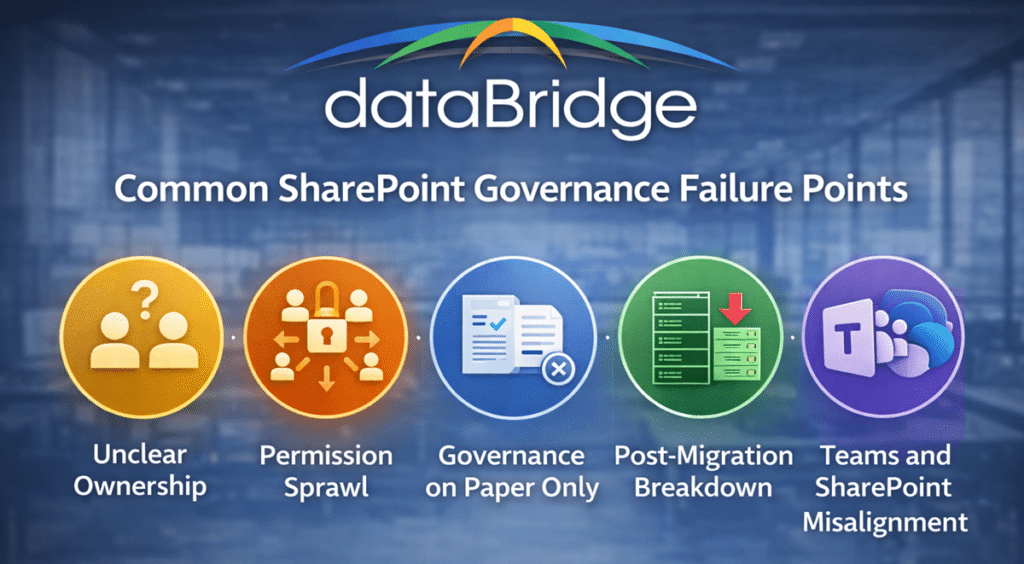
Unclear Ownership and Accountability Gaps
One of the most common is unclear ownership. Sites are created without clearly assigned owners, or ownership changes without being updated. As a result, content becomes outdated and accountability disappears.
Without defined ownership, even well-designed governance models lose effectiveness.
Permission Sprawl and Access Complexity
Another frequent issue is permission sprawl. Unique permissions are created to solve short-term needs, but over time they accumulate, making it difficult to understand who has access to what.
This is especially common in environments that have not aligned governance with a structured SharePoint permissions guide.
As complexity increases, visibility decreases—and risk increases with it.
Governance That Exists Only on Paper
Governance that exists only on paper is another major failure point. Policies are documented, but they are not enforced.
Site creation bypasses standards. Metadata is inconsistently applied. Lifecycle reviews do not happen.
The result is a growing gap between intended governance and actual behavior.
Post-Migration Governance Breakdown
Lack of post-migration governance is also a recurring issue. Organizations invest heavily in migration—often guided by SharePoint migration readiness assessments—but governance is not sustained after go-live.
Over time, the same issues begin to reappear, often in more complex forms.
Teams and SharePoint Growing Without Alignment
Finally, governance often fails when Microsoft Teams and SharePoint grow without shared standards.
Teams are created rapidly. Files are stored inconsistently. The relationship between Teams and SharePoint becomes unclear.
This is something we frequently see in environments that have not aligned governance with Microsoft Teams consulting and governance.
These failure points are not isolated incidents.
They are patterns.
Recognizing them early allows organizations to correct course before governance becomes difficult to recover.
Is Your SharePoint Governance Breaking Down?
If your environment shows signs of site sprawl, permission confusion, inconsistent ownership, or governance that exists only on paper, the issue is usually structural—not temporary.
At dataBridge, we help organizations assess, design, and implement SharePoint governance frameworks that support scale, security, adoption, and long-term success across Microsoft 365.
Start with a SharePoint discovery and readiness assessment or explore our SharePoint consulting services to see how we help organizations bring structure back to SharePoint. Start the conversation.
Governance and SharePoint Migration
Governance plays a critical role in migration success.
Organizations that migrate without governance often recreate the same problems they were trying to solve.
Effective governance ensures:
- Content is structured before migration
- Permissions are standardized
- Redundant or outdated content is removed
This is why governance is a core component of both SharePoint migration readiness assessment and broader SharePoint migrations strategy.
Migration is not just about moving content. It is an opportunity to reset structure, improve governance, and establish a foundation for long-term success.
For organizations leaving shared drives behind, file share migration governance should define site owners, library owners, permission review cadence, archive expectations, metadata standards, and lifecycle rules before migration waves scale.
Governance and Copilot Readiness
As organizations adopt Microsoft Copilot, governance becomes even more important.
Copilot relies on:
- Structured content
- Accurate metadata
- Controlled permissions
- Trusted information sources
Trusted information sources do not happen by accident. A SharePoint source of truth framework helps governance teams define which content is authoritative, who owns it, how it should be reviewed, and whether it is ready to support search, Copilot, and SharePoint agents.
Without governance, AI outputs become inconsistent and less reliable.
Organizations preparing for AI adoption should align governance with Copilot readiness assessment for SharePoint to ensure their environment supports accurate and meaningful insights.
A governance framework becomes more actionable when teams use SharePoint Data Access Governance reports to identify where permissions, external sharing, sensitive content, ownership, and remediation priorities need closer review.
Strong governance improves not only operational efficiency but also the quality of AI-driven decision-making.
How Governance Supports Different Business Scenarios
A strong SharePoint governance framework is not limited to a single use case.
It supports multiple business scenarios across the organization, each with its own requirements and risks.
Governance for SharePoint Migrations
During migration, governance ensures that content is not simply moved—but improved.
It supports:
- Structured content organization
- Permission standardization
- Elimination of redundant or outdated content
This aligns directly with SharePoint migrations and helps avoid common pitfalls outlined in SharePoint migration mistakes.
Organizations that apply governance during migration create a cleaner, more scalable environment from day one.
Governance for Intranets
Intranet environments require consistent structure, clear ownership, and strong content lifecycle management.
Governance ensures that:
- Content remains current and relevant
- Navigation stays intuitive
- Ownership is clearly defined
This is especially important in environments built through SharePoint intranet portal design or aligned to SharePoint intranet by industry strategies.
Without governance, intranets quickly lose relevance and adoption declines.
Governance for Regulated Industries
Organizations in healthcare, financial services, and government operate under strict compliance requirements.
Governance ensures that:
- Access is controlled and auditable
- Content aligns with regulatory expectations
- Retention and lifecycle policies are enforced
Regulated environments should also define how SharePoint sensitivity labels classify sites and protect files so workspace-level controls and document-level controls are not confused.
Enforcement should also include disposition decisions. A governance framework becomes stronger when it defines how reviewers evaluate expired retained content, which roles approve deletion, and how SharePoint disposition review in Microsoft Purview fits into the operating model.
This is a key component of environments designed through SharePoint architecture for regulated industries and aligned with SharePoint security and compliance.
Governance for Microsoft Teams and Collaboration
Microsoft Teams relies heavily on SharePoint for document storage and collaboration.
Without governance:
- Teams are created without structure
- Files are stored inconsistently
- Permissions become difficult to manage
Governance aligns Teams and SharePoint, ensuring consistency across collaboration environments and supporting Microsoft Teams readiness assessment for SharePoint.
Governance for Copilot and AI Readiness
As organizations adopt AI, governance becomes even more critical.
Copilot depends on:
- Structured content
- Accurate metadata
- Clear ownership
- Reliable information sources
This aligns with Copilot readiness for SharePoint and is reinforced by insights from Copilot doesn’t fix bad SharePoint structure.
Strong governance improves not only operational efficiency but also the quality of AI-driven insights.
Governance Deliverables That Drive Real Outcomes
A well-designed governance framework produces tangible outputs that support daily operations.
These typically include:
- Governance charter
- Roles and responsibilities model
- Site provisioning standards
- Permission model
- Lifecycle policies
- Governance review cadence
These deliverables are not theoretical. They are practical tools used to maintain consistency, enforce standards, and support ongoing governance.
They are often developed as part of broader Microsoft 365 consulting strategy engagements.
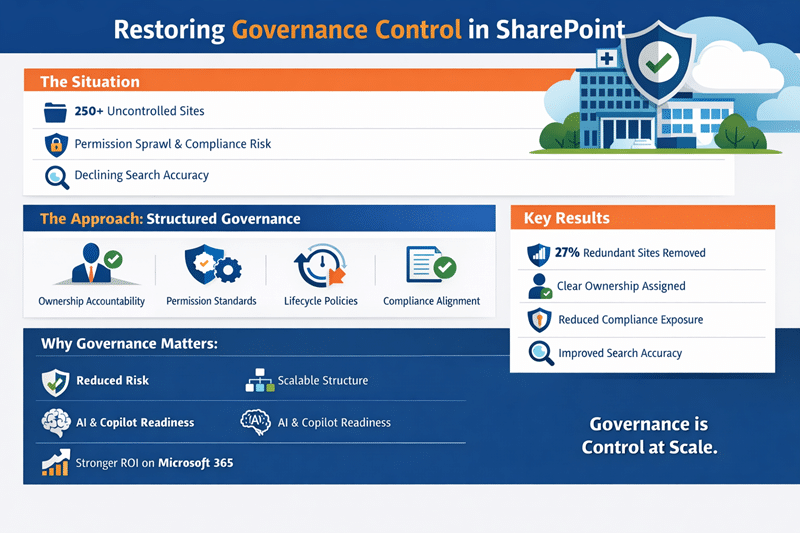
Use Case 1: Restoring Governance Control in a Growing SharePoint Environment
The Situation
A multi-department healthcare organization had adopted SharePoint Online broadly across the business. Usage was strong—but governance had not scaled with growth.
Over time, the environment expanded to more than 250 sites created without consistent structure, ownership accountability, or lifecycle oversight. Permissions were manually assigned, search reliability declined, and compliance leaders expressed concern about sensitive information exposure.
The organization initially believed it needed administrative cleanup.
However, the real issue was governance maturity—not configuration.
The Approach
Through a structured SharePoint governance engagement aligned to The dataBridge Way™, we focused on control, clarity, and enforceability.
Assess & Discover
We evaluated the current environment, audited site ownership and permission models, and identified structural governance gaps impacting compliance, scalability, and executive visibility.
Governance Architecture & Policy Design
We implemented a formal governance framework that included:
- Standardized site provisioning controls
- Clearly defined ownership accountability
- Role-based permission standards
- Lifecycle and retention enforcement
- Metadata alignment to improve search and oversight
- Hub site structure aligned to business functions
Governance shifted from informal practice to enforceable structure.
Controlled Remediation & Validation
Rather than disrupt active teams, we phased remediation:
- Retired inactive or redundant sites
- Repaired broken permission inheritance
- Consolidated overlapping content
- Reassigned orphaned ownership
- Validated search and metadata performance
Governance improvements were implemented with minimal operational disruption.
Ongoing Governance Reinforcement
To prevent regression, we established:
- Quarterly governance reviews
- Ownership certification cycles
- Lifecycle monitoring
- AI and Copilot readiness alignment
Governance became operational discipline—not documentation.
The Results
✔ 27% reduction in redundant or inactive sites
✔ Clear ownership accountability across active environments
✔ Reduced compliance exposure risk
✔ Improved search accuracy through structured metadata
✔ Strengthened executive oversight of Microsoft 365
Most importantly, SharePoint transitioned from unmanaged growth to a controlled, scalable digital workplace platform.
Why This Matters
Unstructured SharePoint environments create hidden risk—permission sprawl, compliance exposure, inconsistent search, and reduced executive confidence.
When governance is architected intentionally and reinforced operationally, organizations gain:
- Scalable structure
- Reduced risk
- Increased accountability
- Improved AI and Copilot reliability
- Stronger return on Microsoft 365 investment
Governance is not restriction.
It is operational control at scale.
Use Case 2: Governance Transformation
A financial services organization approached dataBridge with a SharePoint environment that had grown rapidly without governance.
They faced:
- Hundreds of unmanaged sites
- Inconsistent permissions
- Limited content ownership
- Poor search performance
We implemented a governance framework focused on:
- Structured site provisioning
- Role-based permissions
- Clear ownership models
- Lifecycle governance
The results were measurable:
- Improved search accuracy
- Reduced content duplication
- Increased user adoption
- Stronger compliance alignment
Read the MedPOINT healthcare compliance case study to see how dataBridge standardized collaboration and deployed retention and sensitivity labels to strengthen Microsoft 365 governance in a HIPAA-regulated environment.
When Organizations Need Help Building a Governance Framework
Organizations usually need outside help when governance decisions are understood but not operationalized.
Common signs include:
- Site creation happens without consistent approval.
- Site owners are assigned but not supported.
- Permission exceptions are difficult to explain.
- Inactive sites remain live indefinitely.
- Governance policies exist but are not enforced.
- Teams and SharePoint usage has grown faster than the operating model.
- Copilot readiness is exposing content, ownership, or access gaps.
This is where dataBridge helps turn governance from documentation into a working SharePoint operating model.
When to Fix Governance, Rebuild Governance, or Formalize It for the First Time
Not every organization needs the same governance approach.
The right path depends on the current state of your environment.
Fix Governance When Issues Are Isolated
In some environments, governance issues are limited to specific areas—such as a few sites with inconsistent permissions or outdated content.
In these cases, governance can often be improved without major structural changes.
This typically involves:
- Cleaning up permissions
- Clarifying ownership
- Reinforcing existing standards
Organizations at this stage often benefit from targeted improvements guided by SharePoint support services or focused assessments.
Rebuild Governance When Issues Are Widespread
When governance issues are widespread, a more structured reset is required.
This often includes:
- Reorganizing site architecture
- Redefining ownership models
- Standardizing permissions
- Re-establishing lifecycle policies
This approach aligns with insights from Fix SharePoint, rebuild it, or start over, where governance becomes a central part of the rebuild strategy.
Formalize Governance When Growth Outpaces Structure
Some organizations operate without formal governance until growth reaches a tipping point.
At this stage:
- Site sprawl increases
- Ownership becomes unclear
- Standards are inconsistent
Formalizing governance provides structure without requiring a full rebuild.
This often begins with a SharePoint discovery and readiness assessment, followed by a structured governance framework aligned to business needs.
Across all three scenarios, one principle remains consistent:
Governance should match the complexity of the environment.
Organizations that align governance to their current state—and evolve it over time—are better positioned to maintain control, improve adoption, and support long-term success.
Frequently Asked Questions About SharePoint Governance
Who should own governance roles?
Effective SharePoint governance starts with clearly defined ownership and accountability. Understanding governance roles vs responsibilities is critical to making governance sustainable.
Governance roles should be shared between:
- Business owners (such as department leads and information managers) who understand content purpose, compliance needs, and risk tolerance.
- Platform owners (IT leadership and architecture teams) who understand technical impact, security boundaries, and lifecycle management.
This shared ownership model prevents governance from becoming either purely theoretical or overly technical. When roles are unclear, governance decisions stall and standards are inconsistently applied.
How often should governance be reviewed?
Governance is not a one-time exercise — it’s an operating rhythm that matures over time.
Most organizations benefit from reviewing their SharePoint governance framework:
- Quarterly, to account for usage changes and emerging risks
- After major events, such as migrations, restructuring, or security updates
- When governance maturity increases, to reassess policies and decision authority through a governance maturity model comparison
Regular reviews ensure governance evolves alongside the organization instead of becoming outdated documentation.
How does governance affect Copilot outcomes?
Governance plays a direct role in how Copilot performs and how much users trust its output.
Strong governance supports governance readiness for Copilot by ensuring:
- Consistent structure, metadata, and content ownership
- Clear permission boundaries that Copilot can respect
- Reliable, well-maintained content that improves answer quality
Without governance, Copilot doesn’t fail quietly — it amplifies inconsistency. Poor structure, outdated content, and unclear ownership lead to unreliable AI responses and eroded user trust.
What’s the difference between governance and administration?
Governance and administration serve different — but complementary — purposes.
- Governance defines why decisions are made, who is accountable, and what standards guide consistency, risk management, and governance and compliance controls across SharePoint.
- Administration focuses on execution — provisioning sites, managing permissions, resolving issues, and keeping the platform operational.
Administration keeps SharePoint running. Governance ensures it scales responsibly, remains secure, and continues to support business objectives.
What should a SharePoint governance framework include?
A governance framework should define structure, ownership, permissions, lifecycle management, and oversight processes.
That includes defining how retention rules, records responsibilities, and disposal decisions will be managed across SharePoint and Microsoft 365 through a practical SharePoint records management strategy.
Can governance be lightweight?
Yes. Governance should align with the size and complexity of the organization, but it should always be intentional and structured.
What happens if governance is ignored?
Without governance, SharePoint environments become disorganized, difficult to manage, and less effective over time.
Why Organizations Choose dataBridge
Organizations partner with dataBridge because we focus on long-term success—not just implementation.
We integrate governance into:
- Architecture
- Migration
- Adoption
- Ongoing support
This ensures that governance is not only defined but sustained.
To learn more about our approach, visit The dataBridge Way™, explore our solutions hub, or connect with us directly through our contact page.
Final Thoughts
A SharePoint governance framework is not optional.
It is the foundation that determines whether your environment will scale, remain secure, and deliver long-term value.
Organizations that invest in governance early:
- Avoid costly rework
- Improve adoption
- Enable automation and AI
- Maintain control as they grow
Governance is not something that can be added later without consequence.
It must be designed, implemented, and sustained as part of your overall SharePoint and Microsoft 365 strategy.
What our clients say