
Microsoft Teams Readiness vs. Teams Readiness for SharePoint
Microsoft Teams readiness is not just about creating teams and channels. It is about designing a collaboration structure that connects Teams, SharePoint, permissions, ownership, governance, and adoption before sprawl becomes the default.
Teams and SharePoint are tightly connected, but most readiness conversations treat them separately. A Teams rollout may look successful at first because users can chat, meet, and create channels, while the underlying SharePoint sites, files, permissions, and ownership model quietly become harder to manage. dataBridge helps organizations evaluate both sides of the environment so Teams works as a governed collaboration workspace, not just another place where content spreads without structure.
This page is a comparison guide. It explains the difference between a Microsoft Teams readiness assessment and SharePoint readiness for Teams files and permissions. It should not replace either assessment page. Use it when you are deciding which diagnostic path fits your current problem.
Understanding the Difference—and Why It Matters
Microsoft Teams doesn’t operate in isolation.
Every Team relies on SharePoint for files, permissions, structure, and long-term content management. Because of that, organizations often struggle when they assess Teams without evaluating the SharePoint foundation behind it.
At dataBridge, we distinguish between two related—but very different—assessments:
- Microsoft Teams Readiness Assessment
- Microsoft Teams Readiness Assessment for SharePoint
Understanding the difference helps organizations fix root problems instead of treating symptoms.
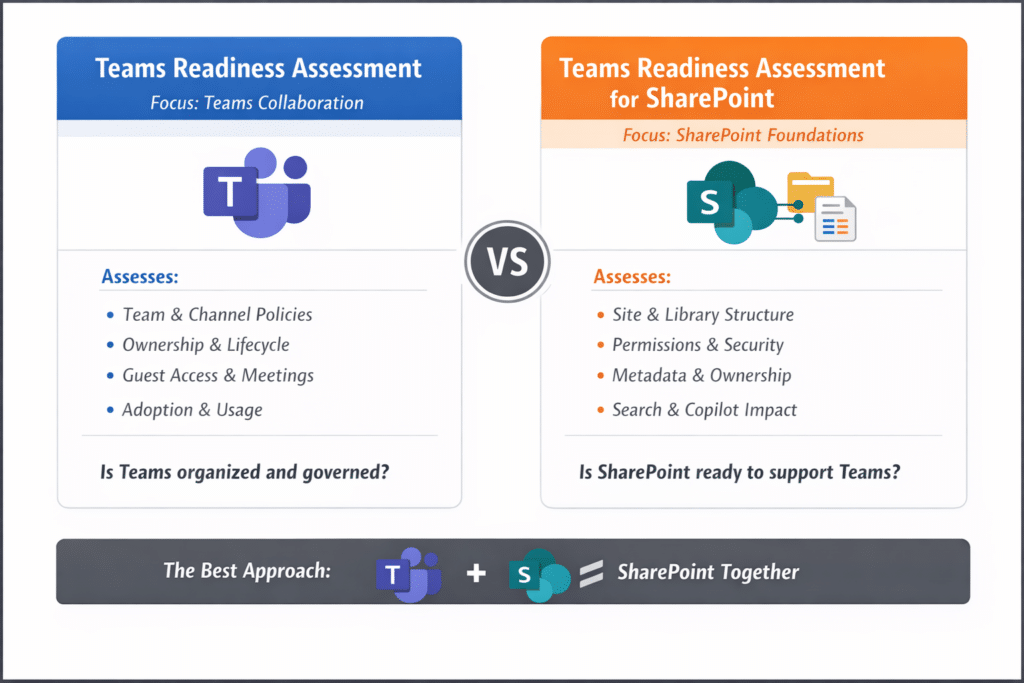
Quick Comparison: Teams Readiness vs. Teams Readiness for SharePoint
Question | Microsoft Teams Readiness Assessment | Microsoft Teams Readiness Assessment for SharePoint |
Main focus | Teams usage and governance | SharePoint foundation behind Teams |
Evaluates | Teams, channels, ownership, lifecycle, guest access, adoption | Sites, files, libraries, metadata, permissions, search, lifecycle |
Best for | Teams feels noisy, inconsistent, or hard to manage | Teams files are hard to find, permissions feel risky, or content trust is weak |
Primary outcome | Cleaner collaboration behavior | Stronger file, permission, search, and content foundation |
Copilot impact | Improves Teams signals and collaboration context | Improves content quality, permission clarity, and retrieval trust |
Microsoft Teams Readiness Assessment
Focus: How Teams Is Used and Governed
A Microsoft Teams Readiness Assessment evaluates how well your organization uses, governs, and scales Teams as a collaboration tool.
This assessment looks directly at Teams behavior, structure, and policies.
What this Assessment Evaluates
- Team and channel structure
- Team creation policies and sprawl
- Ownership and lifecycle management
- Standard, private, and shared channel usage
- Guest access and external collaboration
- Meetings, chat, and collaboration patterns
- Adoption trends and usage consistency
- Teams governance settings and controls
The Core Question it Answers
Is Microsoft Teams organized, governed, and usable at scale?
Organizations typically request this assessment when:
- Teams feels noisy or overwhelming
- Collaboration lacks consistency
- Ownership and accountability feel unclear
- Adoption varies widely across departments
This assessment helps Teams work better as a collaboration experience.
Microsoft Teams Readiness Assessment for SharePoint
Focus: The Foundation That Teams Depends On
A Microsoft Teams Readiness Assessment for SharePoint evaluates whether SharePoint is properly designed to support Teams.
Every Team includes:
- A SharePoint site
- One or more document libraries
- SharePoint-based permissions
- SharePoint search and metadata
If SharePoint isn’t ready, Teams will struggle—no matter how well Teams itself is configured.
What this Assessment Evaluates
- SharePoint site architecture behind Teams
- Document library and folder structure
- Metadata and content organization
- Permissions and inheritance models
- Role-based access vs. individual access
- Content ownership and lifecycle management
- Search behavior for Teams files
- Governance alignment between Teams and SharePoint
- Copilot readiness related to Teams content
The Core Question it Answers
Is SharePoint ready to support Teams—and the way people actually work in it?
Organizations often request this assessment when:
- Files feel hard to find in Teams
- Permissions feel risky or unpredictable
- Copilot surfaces the wrong content
- Teams and SharePoint feel misaligned
This assessment fixes the root causes behind many Teams problems.
The Key Difference, Simply Explained
| Assessment | Primary Focus | Solves |
|---|---|---|
| Teams Readiness Assessment | Teams usage, structure, and governance | Collaboration chaos, sprawl, adoption issues |
| Teams Readiness for SharePoint | SharePoint foundations behind Teams | File confusion, permission risk, Copilot accuracy |
A Teams-only assessment improves how people collaborate.
A Teams-for-SharePoint assessment improves how collaboration actually works.
Why This Distinction Matters More Now
With Microsoft Copilot relying on both Teams conversations and SharePoint content, the stakes are higher than ever.
When SharePoint is poorly structured:
- Teams files feel scattered
- Search becomes unreliable
- Copilot surfaces noise instead of insight
- Trust in AI declines
Teams readiness without SharePoint readiness often treats symptoms.
Assessing both creates sustainable improvement.
How dataBridge Uses Both Assessments
dataBridge uses these assessments to separate symptoms from root causes.
A Teams-specific assessment helps identify problems with collaboration behavior, channel design, ownership, lifecycle rules, guest access, and adoption consistency.
A Teams-for-SharePoint assessment helps identify problems with the content foundation behind Teams, including sites, files, permissions, metadata, search, ownership, lifecycle, and Copilot readiness.
Some organizations need one assessment. Others need both. The right starting point depends on whether the problem is mainly visible inside Teams, mainly rooted in SharePoint, or spread across both.
The Bottom Line
- A Microsoft Teams Readiness Assessment improves collaboration behavior.
- A Microsoft Teams Readiness Assessment for SharePoint strengthens the foundation that makes collaboration work.
- Organizations that address both get the best results—especially with Copilot.
If Teams feels chaotic or AI results feel unreliable, the issue usually isn’t Teams alone. It’s the SharePoint foundation underneath it.
Related Teams Readiness Resources
- Microsoft Teams Consulting & Governance
- Microsoft Teams Readiness Assessment
- Microsoft Teams Readiness Assessment for SharePoint
- SharePoint vs Teams
- Teams Is Not a File System
- Why Teams Becomes Chaotic
- How Teams Impacts Copilot
Ready to Assess Your Teams Environment?
If Teams feels noisy, inconsistent, or difficult to manage, start with a Microsoft Teams Readiness Assessment.
If Teams file structure, permissions, search, metadata, ownership, or Copilot reliability are the concern, start with a Microsoft Teams Readiness Assessment for SharePoint.
For broader support across both areas, use Microsoft Teams Consulting & Governance.