How to Design and Build a Modern SharePoint Intranet
This guide explains how to build a modern SharePoint intranet that supports communication, navigation, governance, usability, and long-term adoption across Microsoft 365. It helps organizations think beyond homepage design and focus on the structural decisions that make an intranet useful, trusted, and sustainable over time.
A modern SharePoint intranet should do more than look polished. It should help people find information, understand where content belongs, and trust the platform as part of daily work. This guide explains how architecture, governance, design, and adoption work together to shape a stronger intranet experience.
Designing and Building Modern SharePoint Intranets with Microsoft 365
A SharePoint intranet is the central digital workplace of Microsoft 365, connecting communication, document management, governance, and collaboration across the organization.
A modern SharePoint intranet is more than a homepage, a news feed, or a collection of department sites. At its best, it becomes the digital front door to the organization: a structured environment where employees find trusted information, navigate policies and procedures, access shared resources, and connect daily work to the broader Microsoft 365 ecosystem.
Many organizations approach intranet projects as design initiatives. They start by discussing homepage layouts, quick links, brand colors, and visual style. Those details matter, but they are rarely what determines whether the intranet succeeds. In practice, the long-term success of a SharePoint intranet depends far more on structure than appearance. It depends on architecture, governance, ownership, search quality, and the way documents and knowledge are managed across the environment.
If you are evaluating a real intranet project and need strategy, structure, governance, and delivery support, visit our SharePoint Intranet Consulting Services page.
Written by Michael Fuchs, Founder and CEO of dataBridge. Reviewed by Barry Turnmeyer, Senior Solution Architect and Director of Client Success, for SharePoint intranet strategy, solution design, training, adoption, and long-term client success accuracy.
Published: February 17, 2026
Last reviewed: August 18, 2026
Table of Contents
What Is a SharePoint Intranet?
A SharePoint intranet is a centralized internal platform built within Microsoft 365 that helps organizations communicate, organize knowledge, manage documents, and provide employees with a reliable place to access important information.
For some organizations, the intranet acts primarily as a communication hub. In others, it also serves as a document access layer, a policy center, a departmental resource environment, or a search-driven knowledge portal. In mature environments, it often becomes all of those things at once.
A modern SharePoint intranet typically helps organizations:
- Publish company news and announcements
- Share policies, procedures, and templates
- Organize department and functional resources
- Improve search and knowledge discovery
- Support governance and compliance requirements
- Connect intranet content to Microsoft Teams and the wider Microsoft 365 experience
This is why SharePoint remains such a strong intranet platform. It does not sit outside the organization’s work environment. It is already connected to the collaboration, document, and productivity tools employees use every day.
Microsoft is also changing where that day starts. Microsoft’s new Discover landing page drops employees into a personalized feed instead of your curated homepage, which raises the stakes for getting intranet news, audiences, and navigation right so the content people need still reaches them.
That connection now reaches into Teams itself through the SharePoint app in Teams, formerly Viva Connections, which puts the intranet in front of employees where they already spend their day.
That integration is also why intranet quality matters so much. If the intranet is poorly structured, the problem does not stay isolated to one page. It affects search, document trust, governance, and increasingly, AI readiness across the Microsoft 365 environment.
Why Organizations Build SharePoint Intranets
Organizations usually invest in SharePoint intranets because information has become too scattered to manage well through email, shared drives, chats, and disconnected applications alone.
Employees waste time looking for policies, forms, departmental procedures, templates, and internal contacts. Teams create duplicate resources because they cannot confidently locate the existing version. News and communication live in one place while the documents people actually need live somewhere else. Search becomes inconsistent. Ownership becomes unclear. Over time, trust declines.
A well-designed intranet brings those moving parts together. It creates a structured environment where communication and knowledge management support one another instead of competing.
Most organizations want their intranet to accomplish several things at once:
- Improve internal communication
- Centralize important information
- Reduce duplication and fragmentation
- Strengthen knowledge management
- Support compliance and governance
- Make search more reliable
- Provide a better employee experience
Those are valid goals, but they are not achieved through visual design alone. They are achieved by making good structural decisions early.
This is why strong intranet initiatives often begin with SharePoint Strategy & Roadmapping for Long-Term Success. The organizations that get the most value from SharePoint tend to define business goals, ownership models, content strategy, architecture, and governance before they spend much time debating visual presentation.
Without that groundwork, design fills space. With it, design supports a system that actually works.
Core Components of a Modern SharePoint Intranet
Successful intranets are not built from a single idea. They are built from several interconnected components that work together over time.
1. Information Architecture
That is the structure behind the experience: site relationships, navigation, content grouping, hub strategy, document library design, and metadata alignment. Strong architecture helps employees move through information logically instead of relying on guesswork.
2. Document Management
Many intranets fail because they treat documents like an afterthought. In reality, a large share of intranet usage revolves around policies, procedures, templates, department documentation, and operational knowledge. A structured SharePoint Document Management System helps ensure those resources remain classified, governed, secure, and searchable.
3. Governance and Ownership
Every successful intranet needs clear decisions around who creates sites, who owns content, who publishes updates, who manages metadata, and how outdated information is archived or removed. Governance is not what slows intranets down. Weak governance is what makes them chaotic.
4. Search and Discoverability
Employees should not have to remember exactly where a policy lives in order to find it. Search quality depends on architecture, metadata, permissions, naming conventions, and content hygiene. When those things are aligned, discoverability improves naturally.
5. Security and Permissions
Permissions must be designed intentionally so content is accessible to the right people without becoming fragmented through endless exceptions. A permission model that looks flexible in the short term often becomes unreliable at scale.
6. Adoption and Reinforcement
Even a strong intranet needs reinforcement after launch. Employees need to understand what the platform is for, where content belongs, how to find trusted resources, and who is responsible for maintaining key areas. Without adoption support and ownership reinforcement, even a well-built intranet can drift into neglect.
When these components are aligned, the intranet becomes more than a communication site. It becomes a structured knowledge environment that supports long-term Microsoft 365 success.
The dataBridge Way: A Framework for Building Modern SharePoint Intranets
At dataBridge, we follow The dataBridge Way:
Assess & Discover → Architecture & Governance → Design & Build → Implementation → Adoption & Ownership → Ongoing Optimization
That sequence is deliberate. It reflects the belief that intranet success comes from structural decisions made early and reinforced consistently over time.
Below is our comprehensive guide for planning a SharePoint intranet that can support long-term usability, governance, adoption, and future AI readiness.
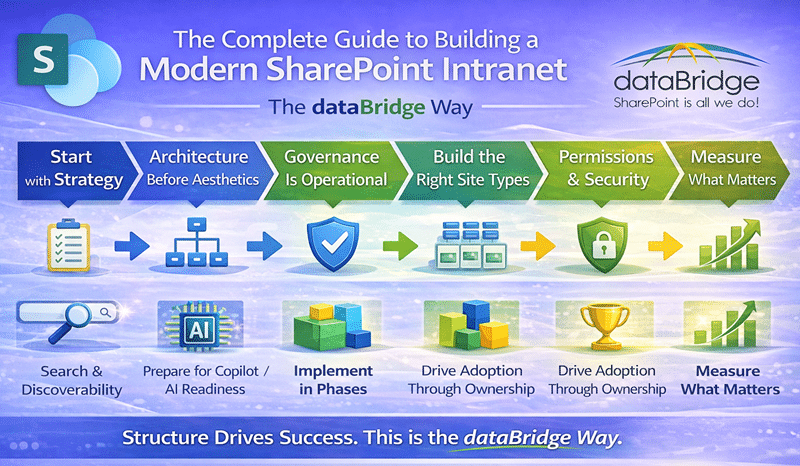
1. Start with Strategy – Not Design
Before you design a homepage, define the strategy behind it. A nuance we notice in large enterprise builds is that strategy often gets compressed into visual wireframes – even before use cases are defined.
A modern intranet must answer:
- What business problems are we solving?
- Who owns content?
- How long should information live?
- How should employees find information?
- What compliance standards must we meet?
Those same questions shape the design of a scalable SharePoint Document Management System, especially when intranet content, policies, and business documents must remain searchable, governed, and easy to manage over time.
This is why every intranet initiative should begin with SharePoint Strategy & Roadmapping for Long-Term Success.
Without strategy, design becomes decoration.
2. Architecture Before Aesthetics
Although visual appeal matters, structure matters more. In our experience with deployments over 1,000 users, the biggest architectural failure we see is inconsistent metadata – not bad design.
An effective intranet depends on strong SharePoint Information Architecture & Metadata.
This includes:
- Hub structure
- Logical site hierarchy
- Metadata-driven document libraries
- Standardized content types
- Clear taxonomy
When architecture comes first, navigation becomes intuitive, search becomes reliable, and governance becomes enforceable.
If architecture comes last, everything feels fragile.
For organizations that already have a live intranet and need to correct structure after years of growth, SharePoint intranet redesign services provide a focused way to improve hub architecture, navigation, content cleanup, page standards, governance, search, and relaunch planning.
3. Governance Is Operational – Not Theoretical
It’s that simple.
Strong intranets align with the principles outlined in the SharePoint Governance Maturity Model.
You must define:
- Who can create sites
- Who can publish content
- Who manages metadata
- How content lifecycle works
- How permissions are granted
Governance is not restrictive when done correctly. Instead, it protects clarity and enables scale.
4. Design for Structure, Not Flash
Once structure is defined, then design supports it.
Our philosophy aligns with SharePoint Design and Development best practices:
- Use modern, out-of-the-box capabilities first
- Avoid unnecessary custom code
- Keep layouts clean and purposeful
- Limit web part overload
- Maintain visual consistency
A modern intranet should feel clean, calm, and structured – not cluttered.
To see that principle on real pages, look at these six modern SharePoint intranet examples. They show where each organization put its daily tools and which layout choices hold up after launch.
Visual consistency no longer needs custom code either. Our post on what the SharePoint Brand Center does and where it stops explains how one governed source of brand assets keeps every site on-brand, and where design work still has to pick up.
5. Build the Right Site Types
An effective intranet separates responsibilities.
Typically, this includes:
- Corporate communication hub
- Departmental sites
- Functional knowledge hubs
- Project or collaboration sites
These site types should align with the broader SharePoint Intranet Consulting Services strategy so communication sites, department sites, knowledge hubs, and collaboration areas remain consistent across Microsoft 365.
When you mix communication and collaboration without boundaries, confusion follows.
6. Permissions & Security Must Be Intentional
Permissions are one of the biggest intranet risks.
Instead of breaking inheritance everywhere, design a role-based model aligned with the SharePoint Permissions Guide and your broader SharePoint governance framework.
Best practices include:
- Minimize unique permissions
- Align with Microsoft 365 groups
- Avoid ad-hoc access grants
- Audit regularly
7. Search & Discoverability Drive Adoption
Even the most beautiful intranet fails if employees cannot find information.
Strong search depends on:
- Metadata consistency
- Managed properties
- Clean naming conventions
- Removal of outdated content
If employees still rely on email or chat to ask, “Where is that document?” your structure needs refinement.
This is why we emphasize SharePoint Search Optimization principles during intranet builds.
Search should feel predictable – not mysterious.
8. Prepare for AI & Copilot
With the rise of Microsoft Copilot, structure matters more than ever.
Copilot surfaces what already exists.
If your intranet contains:
- Duplicate files
- Inconsistent metadata
- Over-permissioned libraries
- No ownership model
AI will amplify those weaknesses.
This is why intranet initiatives should align with Copilot Readiness for SharePoint.
Interestingly, Copilot doesn’t “fix” weak structure – it highlights it. That’s not a flaw in AI; it’s a mirror of what’s already there.
9. Implement in Phases
Rather than launching everything at once, we recommend phased implementation:
Phase 1: Corporate hub
Phase 2: Department sites
Phase 3: Navigation refinement
Phase 4: Search tuning
Phase 5: Governance reinforcement
Phased rollout reduces disruption and builds confidence across the organization.
10. Drive Adoption Through Ownership
An intranet succeeds when ownership is clear.
Each site should have:
- A defined business owner
- A content steward
- Publishing accountability
- Governance alignment
Without ownership, content decays quickly.
Adoption requires leadership visibility, training sessions, and reinforcement. Otherwise, even a well-built intranet becomes static. Designing your intranet is only the first step. To ensure long-term success, follow a structured SharePoint intranet adoption strategy that reinforces behavior, activates managers, and sustains governance beyond launch.
For organizations with an existing intranet that already feels cluttered, outdated, or difficult to trust, a SharePoint intranet assessment is often the best first step before redesign. It helps clarify whether the real issue is architecture, ownership, governance, content quality, or search friction.
If your team already knows the intranet needs attention but not the level of change, use the intranet redesign vs restructure vs rebuild worksheet to choose a practical direction before design work begins.
11. Measure What Matters
To evaluate success, measure:
- Engagement analytics
- Content freshness
- Search behavior
- Governance compliance
- Reduction in redundant storage
For communications teams, measurement now extends past single pages. Campaign-level analytics for SharePoint news lets a team group related news posts and read the results of a whole initiative, which is a better signal of intranet communication health than individual page views.
Modern intranets must evolve with the organization. Therefore, quarterly governance reviews are essential
12. Timeline Expectations
| Organization Size | Typical Timeline |
|---|---|
| Small (<250 users) | 6–10 weeks |
| Mid-size (250–2,000 users) | 3–6 months |
| Enterprise (2,000+) | 6–12+ months |
Complexity depends more on governance clarity than design effort.
Timeline is one half of the planning conversation. Budget is the other, and we break down how much a SharePoint intranet costs in a separate guide, including what moves a build from the lower end of the range to the higher end.
If you’re putting the project out to bid, include both in the request. A SharePoint intranet RFP that states your site count and names your content owners gets back proposals that price the same project.
Budget also raises the question of whether to build at all or buy a packaged product instead. Our comparison of a SharePoint intranet vs an intranet-in-a-box platform lays out the employee count where a one-time build beats a per-user subscription, and when buying the product is the right call.
SharePoint Intranet Architecture and Site Structure
Once the implementation framework is defined, the next question is how the intranet should be structured at scale.
This is where many organizations run into trouble. They launch a homepage, build a few department sites, and then allow the environment to evolve informally. New content areas are added reactively. Site relationships become inconsistent. Navigation grows unevenly. Departments create local patterns that do not align with the rest of the environment. Eventually the intranet becomes harder to understand than the file shares it was supposed to replace.
A strong intranet architecture prevents that drift.
In most organizations, effective intranet architecture includes a combination of communication sites, department sites, functional knowledge hubs, and collaboration spaces. Those elements need boundaries. Corporate communication should not be mixed casually with operational documentation. Department content should be easy to own without becoming isolated. Cross-functional information should be grouped intentionally so users understand where it belongs.
This is where SharePoint Information Architecture & Metadata becomes essential. Architecture is not simply a sitemap. It is the logic behind how information is grouped, named, navigated, filtered, and governed. It determines whether the employee experience feels coherent or improvised.
Hub sites also play an important role here. A thoughtful SharePoint Hub Site Architecture Framework helps organizations connect related sites under shared navigation, branding, and governance expectations. That structure makes it easier for users to move through the intranet without having to relearn the environment every time they switch departments.
One of the most common architecture questions is how a SharePoint home site, hub site, and Viva Connections should work together so each one plays a clear role instead of competing.
Good architecture also reduces long-term maintenance. When sites are designed according to clear patterns, governance becomes easier to apply, training becomes easier to deliver, and search becomes easier to tune.
Intranet structure should never be left to chance. The more intentional it is early, the less remediation is needed later.
Document Management in SharePoint Intranets
One of the biggest mistakes organizations make is treating the intranet and document management as separate conversations.
In reality, they are tightly connected.
Employees do not visit intranets only to read announcements. They visit intranets to find policies, procedures, forms, templates, department guidance, onboarding content, and operational knowledge. In many environments, documents make up a large share of the value employees expect from the intranet every day.
When those documents are poorly managed, the intranet becomes unreliable. Policies appear in multiple places. Department libraries use different naming and classification patterns. Outdated versions remain visible. Search returns too many conflicting results. Employees stop trusting what they find.
That is why a mature intranet almost always depends on a strong SharePoint Document Management System.
If the intranet is being rebuilt as part of a larger move from file shares, legacy portals, or older SharePoint environments, the SharePoint Migration Guide helps align migration planning with hub architecture, documents, policies, navigation, ownership, search, validation, and adoption before launch.
Document management brings structure
Structure to the resources that sit behind the intranet experience. It helps define how content is classified, how long it should remain active, who owns it, and how permissions and lifecycle policies are applied. It also improves discoverability by making document libraries more consistent and more aligned with search.
This is especially important for policy-heavy or regulated environments. If employees rely on the intranet to access authoritative documents, then document governance is not optional. It is part of the intranet’s credibility.
Strong intranets therefore do not separate communication from knowledge architecture. They combine them. News, resources, policies, templates, and department documentation all need to work within one coherent structural model.
The organizations that do this well usually define intranet document management standards early. They decide what belongs in communication areas, what belongs in governed libraries, how metadata should be used, which content requires stricter lifecycle controls, and how search should surface trusted content over stale content.
When that work is done well, the intranet feels organized. When it is skipped, the intranet becomes another place where information goes to drift.
Governance and Lifecycle Management in SharePoint Intranets
Governance is often discussed as if it were a policy layer added after launch. In practice, governance is what determines whether an intranet remains usable six months, twelve months, and three years after go-live.
Every intranet accumulates content. The question is whether that accumulation is controlled.
Without clear governance, content ownership fades. Departments stop reviewing old material. News posts remain highlighted long after they stop mattering. Policies stay visible even after they have been replaced. Libraries grow without standards. Site requests are fulfilled without a structural model. What looked good during launch begins to feel cluttered and uncertain.
This is why governance has to be operational.
A strong intranet governance model typically defines:
- Who owns each site or section
- Who is allowed to publish or approve content
- How metadata and content types are managed
- How often content should be reviewed
- What should be archived, retained, or removed
- How new sites are requested and provisioned
Those decisions connect directly to the broader SharePoint Governance Guide and to any organization trying to build a sustainable Microsoft 365 environment. Governance is what turns launch into longevity.
Lifecycle management matters just as much. Every intranet contains information with different lifespans. A company announcement may matter for a week. A benefits policy may matter for a year. An operational procedure may need periodic review. Some content should be archived, some should be disposed of and some should remain as a governed record.
When lifecycle is ignored, old content stays visible longer than it should, and trust begins to erode.
A strong intranet is not only well built. It is well maintained. Governance makes that possible.
For the page-level operating model behind that maintenance, see our guide to SharePoint page governance, which explains how ownership, publishing rules, review dates, and stale-page retirement keep modern intranet pages trustworthy after launch.
Nowhere does this matter more than the knowledge base, which is usually the most-visited site in the hub and the first one employees stop trusting when it goes stale. Our template for a SharePoint knowledge base builds the review date, owner and retirement flow into the structure so that discipline runs on columns rather than on memory.
Preparing SharePoint Intranets for AI and Copilot
AI has changed the stakes for intranet structure.
In the past, a messy intranet mainly created frustration. Search was weaker, navigation was less reliable, and employees asked more questions in chat or email. Now the consequences are broader. AI tools such as Microsoft Copilot can surface whatever already exists across the Microsoft 365 environment. That means weak architecture, duplicate content, inconsistent metadata, and over-permissioned libraries are no longer hidden. They are amplified.
This is why intranet quality now matters even more.
When intranet content is organized well, AI tools can help employees find authoritative policies, summarize department knowledge, connect related resources, and reduce the time spent searching for information. When the underlying structure is weak, AI surfaces the same uncertainty the organization has already been living with.
The key point is simple: Copilot does not create good structure. It depends on it.
That is why organizations preparing for AI often review their environments through Copilot Readiness for SharePoint. The focus should not be on licensing first. It should be on whether the intranet and supporting knowledge environment are structured clearly enough to support useful, trustworthy answers.
A strong intranet improves AI readiness because it provides a more stable foundation for how information is named, classified, owned, secured, and discovered. It also improves the quality of prompts employees can rely on. If the environment is governed well, AI becomes more useful. If the environment is fragmented, AI becomes less trustworthy.
In that sense, AI readiness is not a separate workstream from intranet planning. It is an extension of it.
For what that looks like in practice, see how a SharePoint intranet AI assistant turns governed intranet content into direct employee answers.
The same holds for how pages get authored, so as Copilot starts generating them, publishing standards for SharePoint HTML pages decide whether AI-written markup strengthens the intranet or quietly works around it.
How to Evaluate an Existing SharePoint Intranet
Many organizations do not need to start from zero. They already have an intranet. The real question is whether the current environment is helping or slowly becoming harder to trust.
A useful evaluation usually starts with practical questions.
Can employees find policies and procedures without asking someone where they live? Are department sites structured consistently? Are search results predictable? Is metadata being used intentionally, or only in isolated places? Do site owners understand their responsibilities? Are permissions stable enough to support governance and search? Is old content being reviewed and archived appropriately?
These questions matter because intranets rarely fail all at once. They decline gradually. A few duplicate libraries become many. Local exceptions become normalized. Publishing becomes inconsistent. Search becomes noisier. Ownership becomes assumed rather than explicit. What was once manageable becomes heavier every quarter.
That is often the point where organizations benefit from SharePoint Consulting Services. A structured review can identify where architecture is drifting, where governance is weak, where permissions need rationalization, and where the intranet should connect more clearly to document management and Microsoft 365 strategy.
In one nonprofit healthcare engagement, dataBridge helped rationalize a highly complex intranet permission model into clearer role-based access. That work improved search trust, simplified ownership, and made the intranet easier to manage after launch. See the SharePoint Intranet and Policy Management System for National Nonprofit Healthcare Organization case study for a real-world example of how intranet strategy, governance, and structured delivery come together.
The goal is not to make the intranet perfect. The goal is to make it reliable, scalable, and aligned with how the organization actually works.
If the intranet feels harder to maintain every year, that is usually a structural signal – not just a content problem.
Common SharePoint Intranet Mistakes
Most intranet problems follow recognizable patterns.
One common mistake is starting with design before strategy. Teams spend weeks discussing wireframes and homepage presentation before defining content ownership, architecture, metadata, or governance. The result may look polished, but it rarely scales.
Another mistake is mixing communication and collaboration without boundaries. Department knowledge, project work, operational documents, and news content all end up blended together. That makes ownership unclear and creates confusion around where information belongs.
A third mistake is weak content governance. When publishing is decentralized without standards, content becomes uneven. When publishing is centralized without ownership, updates become slow. Strong intranets need a balanced model.
Another frequent issue is over-customization. Organizations sometimes try to design around the platform rather than with it. Too much custom code, too many nonstandard layouts, and too many visual exceptions create unnecessary maintenance burdens.
Search neglect is also common. Employees often judge the whole intranet based on whether they can find what they need quickly. If search is weak, the platform feels weak, even if the content technically exists.
Finally, many organizations underestimate how much intranet success depends on documents. A beautiful intranet with weak policy management, duplicate forms, and outdated procedures still feels broken.
Most of these issues can be traced back to the same root cause: structure was treated as secondary. In mature environments, it is primary.
Why dataBridge Leads with Structure
Many firms start with visual mockups.
We start with structure.
At dataBridge:
Consulting leads. Build follows.
Architecture precedes customization.
Governance is operational – not theoretical.
Ownership is mandatory.
AI readiness is embedded from the beginning.
This is The dataBridge Way.
Related SharePoint Intranet Resources
Use these related dataBridge resources to go deeper into the specific part of SharePoint intranet planning, governance, design, adoption, or improvement you need to address.
SharePoint Intranet Consulting Services
Use this when your organization needs project support for intranet strategy, planning, design, build, redesign, rollout, governance, and long-term improvement.
SharePoint Intranet Assessment
Use this when an existing intranet needs a current-state review before deciding whether to redesign, rebuild, or improve specific areas.
SharePoint Intranet Redesign Services
Use this when the current intranet feels cluttered, outdated, difficult to navigate, underused, or hard to maintain.
SharePoint Hub Site & Enterprise Intranet Architecture Framework
Use this when hub structure, site relationships, navigation, department areas, and enterprise intranet architecture need to be clarified.
SharePoint Page Governance
Use this when modern pages, news posts, department pages, templates, publishing rules, review dates, and stale-content retirement need a clearer operating model.
SharePoint Document Management System
Use this when intranet value depends on better document libraries, metadata, permissions, lifecycle controls, search, retention, and policy access.
SharePoint Intranet Adoption Strategy & Launch Framework
Use this when the intranet is approaching rollout, has recently launched, or needs stronger reinforcement after adoption has stalled.
Copilot Readiness for SharePoint
Use this when the intranet is part of a broader Copilot readiness effort involving content quality, permissions, metadata, governance, search, and source authority.
Frequently Asked Questions
Enterprise intranets should use hub sites, communication sites, and collaboration workspaces with defined ownership and governance. A scalable structure includes consistent navigation, managed metadata, standardized content types, and lifecycle controls to ensure discoverability, security, and long-term sustainability.
Governance maturity prevents site sprawl, permission chaos, and inconsistent content. Organizations must define ownership roles, lifecycle policies, permission standards, and accountability processes to keep the intranet secure, searchable, and aligned with business operations.
AI-ready intranets require clean permissions, structured metadata, clear site ownership, and reduced content duplication. Copilot surfaces information based on Microsoft 365 signals, so structured architecture and governance directly impact AI accuracy and security.
Deploying SharePoint activates tools and templates. Building a modern intranet requires strategic planning, information architecture, governance enforcement, and measurable outcomes to ensure structure, scalability, and adoption.
Intranet success should be measured using search performance, content lifecycle compliance, ownership engagement, duplication reduction, and adoption analytics. Behavioral and operational metrics provide more insight than page views alone.
Final Perspective
A modern SharePoint intranet is not a design project.
It is a structural transformation that strengthens communication, governance, compliance, and discoverability.
When built correctly, it becomes the backbone of your Microsoft 365 ecosystem. The SharePoint intranet helps employees find what they need, trust what they find, and use the platform with confidence. It supports communication, but it also supports knowledge. The intranet improves usability, but it also improves governance. It creates a better employee experience, but it also creates a stronger information environment for search, compliance, and AI.
If you are planning to build or rebuild your intranet, start with strategy and architecture – not aesthetics.
That is how modern intranets create enterprise value.
What Our Clients Say