
How to Identify Authoritative SharePoint Content Before Copilot
A SharePoint source of truth is not just a library, site, or knowledge base.
It is a governed decision about which content your organization trusts enough to guide search, Copilot, SharePoint agents, and daily work.
That distinction matters.
Microsoft 365 can surface content quickly. It can help people find pages, documents, sites, conversations, and files. However, it cannot decide which version of a policy, procedure, project file, FAQ, or department page should be trusted.
Your organization has to make that decision first.
Copilot does not create authority. It exposes whether authority already exists.
At dataBridge, we often see this issue during Copilot Readiness for SharePoint planning, intranet redesign, migration work, governance projects, and search improvement efforts. The platform may look modern, but employees still ask the same practical question:
“Which version should I trust?”
That question sits at the center of a SharePoint source of truth model.
If your organization wants Copilot, search, and SharePoint agents to produce better answers, start by deciding which SharePoint content should be treated as authoritative.
This article focuses specifically on authority: which SharePoint content should be trusted first by employees, search, Copilot, and SharePoint agents. For the broader document management foundation, use the SharePoint Document Management System page and for knowledge article structure, use SharePoint Knowledge Base Design. AI-specific architecture planning, use Copilot-Ready SharePoint Information Architecture.
For the full SharePoint AI readiness model, including structure, permissions, metadata, search, lifecycle, governance, and adoption, use Copilot Readiness for SharePoint.
You can also use the SharePoint AI readiness resources hub to see how source authority fits with permissions, metadata, search governance, lifecycle decisions, SharePoint agents, and adoption planning.
Once authoritative content is defined, organizations also need a way to keep it visible, current, and trusted in search. That is where governing SharePoint search becomes part of the source-of-truth model, because trusted content only helps if employees and AI tools can reliably find the right version.
Written by Michael Fuchs, Founder and CEO of dataBridge. Reviewed by Hayden Honerkamp, Senior Solution Architect and Client Success Lead, for SharePoint architecture, discovery, readiness, adoption, migration planning, and Microsoft 365 Copilot readiness accuracy.
Published: May 12, 2026
Last reviewed: May 12, 2026
What Is a SharePoint Source of Truth?
A SharePoint source of truth is the approved place where trusted information lives, stays current, and can be used with confidence.
It may be a SharePoint site, document library, page, list, policy center, SOP library, knowledge base, or governed content area. The location matters, but the governance matters more.
In practical terms, a SharePoint source of truth answers these questions:
- Which content is authoritative?
- Who owns it?
- Who can edit it?
- Who can approve it?
- When was it last reviewed?
- What content does it replace?
- Where should employees go first?
- Should Copilot or a SharePoint agent use it as an answer source?
A source of truth is not just “where the file is stored.”
It is the place your organization has chosen as the trusted answer.
That choice needs structure. It also needs ownership, metadata, permissions, review habits, and retirement rules. Without those controls, a folder full of documents is only a storage location.
A source-of-truth model becomes easier to sustain when it is supported by SharePoint architecture and governance that defines where authoritative content lives, who owns it, how access works, how content is reviewed, and when stale information is retired.
It may hold useful information. It does not automatically create trust.
Why a SharePoint Source of Truth Matters Before Copilot
Copilot and SharePoint agents rely on the content environment beneath them.
If that environment has duplicate policies, stale procedures, unclear owners, loose permissions, and conflicting department pages, AI experiences will reflect those weaknesses.
That does not mean Copilot is broken.
It usually means the content model is unclear.
People feel this problem before they can name it. They ask a question and receive several possible answers. They find three versions of a policy. An old project document appears beside a current one. Eventually, they stop trusting SharePoint and go back to asking coworkers.
AI can make that trust problem more visible.
A strong SharePoint source of truth model helps your organization:
- Reduce duplicate answers
- Improve SharePoint search quality
- Give Copilot stronger source material
- Help SharePoint agents answer from trusted content
- Clarify content ownership
- Retire stale content with confidence
- Improve employee trust in Microsoft 365
- Support governance, compliance, and knowledge management
Search quality is a governance outcome, not only a search setting.
That is why organizations improving SharePoint Online Search Optimization should also define which content is authoritative. Better configuration helps, but search cannot make an outdated policy trustworthy.
The same principle applies when users wonder why SharePoint search results vary by user. Permissions, metadata, and content structure shape what people see. A source-of-truth model clarifies what they should trust once they find it.
SharePoint Source of Truth vs. Knowledge Base vs. Document Management
These ideas overlap, but they are not the same.
A SharePoint source of truth defines which content is authoritative.
The SharePoint knowledge base organizes trusted answers, FAQs, SOPs, policies, and guidance so employees can find and use them.
A SharePoint document management system stores, organizes, secures, and manages documents across the organization.
Each one plays a different role.
For example, a formal policy may live in a controlled document library. A plain-language summary may live in a knowledge base. The source-of-truth model tells users and AI which one is official for each type of answer.
That distinction helps prevent content confusion.
A SharePoint Document Management System may manage the file. A SharePoint Knowledge Base Design strategy may make the answer easier to use. The source-of-truth model defines which content should be trusted first.
All three sit inside one strategy question – whether your content works as a knowledge system at all, or just a place files are stored. Our guide to SharePoint knowledge management covers the taxonomy and ownership decisions that turn a document store into answers people can actually find.
The Real Business Question: Which Content Deserves Authority?
The phrase “SharePoint source of truth” sounds technical.
The real business question is simpler:
Which content should employees, search, Copilot, and agents trust first? Use the Copilot Readiness Checklist for SharePoint when that source-of-truth question needs to be tested across permissions, stale content, metadata, search, archive readiness, and site ownership before Copilot expands.
For intranets with conflicting department pages, stale policy content, duplicate resources, and unclear ownership, SharePoint intranet restructuring and relaunch can help make trusted content easier for employees, search, Copilot, and SharePoint agents to identify.
That question deserves more than a cleanup project.
It requires business judgment. It also requires SharePoint architecture, governance, metadata, permissions, lifecycle rules, and content ownership.
In our consulting work, we usually find that organizations do not lack content.
They lack authority signals. In one common scenario, a client may have an HR policy library, an intranet FAQ, several department pages, and old PDF copies all answering the same employee question. The issue is not that SharePoint lacks content. The issue is that none of those sources has been clearly labeled as the trusted answer.
People can find documents, pages, and files. They just cannot always tell which ones are current, approved, complete, or safe to use.
That is why authority must be designed into SharePoint.
When organizations prepare a Copilot-Ready SharePoint Information Architecture, this is one of the most important decisions. AI readiness is not only about permissions and licensing. It is also about the quality, ownership, and authority of the content Copilot may use.
The Core SharePoint Source of Truth Model
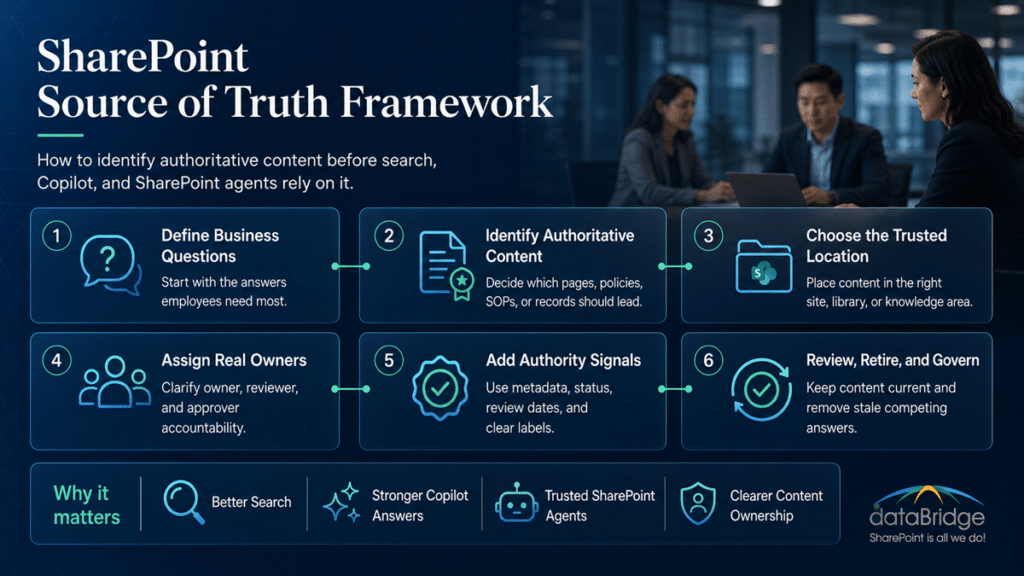
A practical SharePoint source of truth model includes six decisions.
1. Define the Business Question
Start with the answer employees need.
Do not start with the site structure.
A source-of-truth model should support real questions, such as:
- What is the current remote work policy?
- How do we submit a vendor request?
- Which SOP applies to this process?
- Where is the approved client deliverable template?
- What records should we keep after a project closes?
- Which department owns this procedure?
- What content should Copilot use for this topic?
Clear questions create better architecture.
When the question is vague, the source of truth becomes vague too.
That is why the first step is not creating a new site. The first step is understanding which decisions, processes, and answers need to be trusted.
2. Identify the Authoritative Content Type
Next, decide which type of content should provide the answer.
The answer may come from:
- A SharePoint page
- A controlled document
- A policy document
- A knowledge article
- A list item
- A procedure library
- A project record
- A department page
- A formal template
- A retained record
Different content types need different governance.
A quick FAQ should not follow the same control process as a regulated SOP. A policy summary should not replace the approved policy document. A project update should not become permanent guidance.
Authority depends on purpose.
This is where many SharePoint environments get messy. Everything lives in the same general storage model, even though the content carries very different risk.
3. Choose the Authoritative Location
Then decide where trusted content should live.
This could be a hub site, department site, policy center, knowledge base, document library, records area, or operational workspace.
The location should match the content’s purpose.
A source of truth should be easy to find, easy to govern, and hard to confuse with unofficial content.
That last point matters.
If employees can find the authoritative content but also find five competing versions, the model is still weak.
A good location strategy reduces that noise. It gives people a place to go first and gives content owners a place to maintain.
4. Assign a Real Owner
Every source of truth needs an owner.
Ownership is not a decorative metadata field. It is accountability.
A content owner should know when the content needs review, who can change it, what it replaces, and what business process it supports.
In many SharePoint environments, ownership breaks down after launch.
The site exists. The content exists. Nobody owns the answer.
That is where trust starts to decay.
A source of truth without an owner becomes stale by default. This is why source-of-truth design should connect to practical governance and SharePoint Site Owner Responsibilities instead of relying only on IT administration.
IT can help manage the platform. The business still needs to own the meaning.
5. Add Authority Signals
Authority needs to be visible.
Users should not need to guess whether a page, file, or article is official.
Useful authority signals include:
- Approved status
- Content owner
- Last reviewed date
- Next review date
- Effective date
- Version
- Document type
- Policy category
- Related process
- Retention category
- Replacement content
- Retired status
- Audience
- Department owner
Metadata gives SharePoint content context.
A strong SharePoint Metadata Strategy Guide should help users, owners, search, and AI tools understand what the content is, who owns it, and whether it should be trusted.
Metadata should never exist only for tidy columns.
It should support trust, retrieval, ownership, lifecycle, and decision-making.
In practical terms, metadata should help someone answer, “Is this the right thing to use?”
6. Create Review and Retirement Rules
A source of truth should not stay live forever by accident.
Content changes. Owners leave. Processes evolve. Systems get replaced. Policies expire.
Review and retirement rules protect trust over time.
A good model should define:
- How often content gets reviewed
- Who receives review reminders
- What happens when content is stale
- When duplicates should be merged
- How retired content appears in search
- Whether old content should be archived
- Which content should be deleted
- Which content should remain retained
Keeping everything active is not safe.
It is just delayed governance.
A clean source-of-truth model makes content retirement a normal part of operations, not an uncomfortable cleanup event.
SharePoint Source of Truth Checklist
A source-of-truth model should answer practical questions before content is promoted as authoritative.
Use this checklist:
- Which topic, process, policy, or decision does this content support?
- Which content type is authoritative: page, document, library, list, SOP, policy, or knowledge article?
- Where should the trusted version live?
- Who owns the content?
- Who can edit it?
- Who approves it?
- When was it last reviewed?
- What older content does it replace?
- Which duplicate or stale versions should be retired?
- Should Copilot or a SharePoint agent use it as a source?
- How will users know this is the trusted answer?
Authority is not created by storing content in SharePoint. Authority is created by ownership, review, structure, and trust signals.
What Content Should Become a SharePoint Source of Truth?
Not all content deserves source-of-truth status.
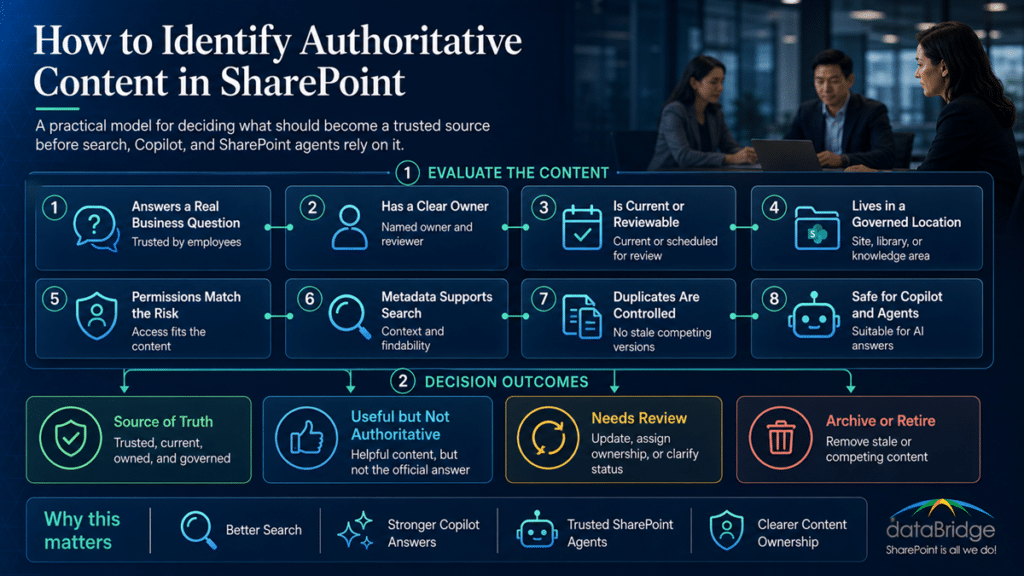
A SharePoint source of truth should usually meet these standards:
- The content supports a real business decision.
- Employees rely on it repeatedly.
- The information needs consistency.
- A clear owner exists.
- The content is current or reviewable.
- The location is governed.
- Permissions match the content’s risk.
- Metadata supports search and filtering.
- Duplicates can be reduced or removed.
- The content can support Copilot or agents safely.
Strong candidates include:
- HR policies
- IT support guidance
- SOPs
- Work instructions
- Compliance procedures
- Department service guides
- Approved templates
- Current project standards
- Client delivery standards
- Procurement procedures
- Finance processes
- Safety guidance
- Legal or records guidance
- Employee self-service content
These areas often drive repeated questions.
They also create risk when answers conflict.
If people use the wrong guidance, the organization pays for it through rework, delays, compliance exposure, or lost trust.
That is why authoritative content should not be defined casually. It should be chosen intentionally.
What Content Should Not Become a Source of Truth?
Some SharePoint content should stay useful without becoming authoritative.
Other content should be archived, retired, or removed.
Weak source-of-truth candidates include:
- Draft files
- Old project documents
- Unowned department pages
- Duplicate policies
- Informal notes
- Chat-based decisions
- Personal working files
- Legacy folders
- Outdated templates
- Unreviewed procedures
- Temporary collaboration files
- Documents with unclear permissions
- Pages with no owner or review date
This does not mean those items have no value.
It means they should not guide enterprise answers.
A draft can inform a decision. It should not become the answer.
An old project document may need retention. It should not compete with current guidance.
A department page can describe a service. It should not override an approved policy.
The best SharePoint environments separate useful content from authoritative content.
Microsoft Loop is a good example of content that should stay useful without becoming authoritative – it is a live drafting canvas stored in personal OneDrive and SharePoint Embedded containers, which is why governing Microsoft Loop as a working draft keeps it from competing with the trusted answer.
That separation becomes even more important when organizations design SharePoint agents that users can trust. An agent should not pull answers from every available page just because the content exists.
It should use sources that have been scoped, owned, reviewed, and approved for the purpose.
How to Build a SharePoint Source of Truth Model
A source-of-truth model should be practical.
It should not become a giant policy exercise that nobody follows.
Use this sequence.
Step 1: Map the Questions Employees and Leaders Ask Most
Start with demand.
Which questions create repeat work, confusion, risk, or delays?
Examples include:
- How do I request access?
- Which policy applies?
- Where is the approved form?
- What is the current process?
- Who owns this service?
- What should I do next?
- Which version is approved?
- Can Copilot answer this safely?
These questions reveal where authority matters.
In our SharePoint projects, this step often exposes the biggest gaps. The content may exist, but the answer path is unclear.
That is a design problem.
It is also a business problem, because people lose time when the trusted answer is not obvious.
Step 2: Inventory the Current Answer Sources
Next, identify where answers live today.
Look across:
- SharePoint sites
- Teams-connected sites
- Document libraries
- Intranet pages
- Policy libraries
- Knowledge articles
- Lists
- OneDrive locations
- Legacy folders
- Email attachments
- PDFs
- Department portals
- Archived project areas
Then ask a direct question:
Which one should win?
That simple question changes the conversation.
Without a winner, users must compare sources manually. Copilot may also surface content that feels useful but is not authoritative.
The goal is not to shame the mess.
Most organizations get here naturally over time. The goal is to decide what should move forward as the trusted model.
Step 3: Identify Duplicate and Conflicting Content
Duplicates create noise.
Conflicting content destroys trust.
A source-of-truth project should identify:
- Duplicate pages
- Similar policies
- Reused templates
- Old SOPs
- Unofficial guidance
- Department-specific variations
- Legacy PDFs
- Search results that compete with current content
Then decide what to merge, redirect, retire, archive, or govern separately.
For organizations migrating legacy folders, file share to SharePoint migration planning should make those merge, archive, retire, and governance decisions before old file-share content becomes part of the searchable Microsoft 365 estate.
Do not treat every duplicate as a technical cleanup item.
Some duplicates reveal a real ownership issue. Others reveal process differences that need clarification.
A search result full of duplicates is not a search problem only. It is an authority problem.
That is why source-of-truth work should sit beside search strategy. If your SharePoint search experience already shows old or conflicting answers, Why SharePoint Search Results Vary by User is a useful companion topic because it explains how permissions and access boundaries affect what people see.
Step 4: Choose Authoritative Containers
After that, define where trusted content should live.
An authoritative container may be:
- A policy library
- A knowledge base
- A controlled document library
- A department service site
- A records library
- A process hub
- A SharePoint list
- A communication site
- A governed intranet area
The container should support the content’s lifecycle.
For example, policies may need approval, effective dates, retention labels, and review cycles. FAQs may need plain-language titles, owners, and frequent review. SOPs may need versioning, approval, and audit traceability.
A good source-of-truth model connects the content type to the right SharePoint structure.
This is where SharePoint Document Management System planning and knowledge base design should work together instead of competing.
The structure should make the trusted path easier than the unofficial workaround.
Step 5: Define Owners, Reviewers, and Approvers
Authority requires people.
SharePoint settings can help, but the business still needs to decide who owns each answer.
A practical model may include:
- Content owner
- Business owner
- Technical owner
- Reviewer
- Approver
- Backup owner
- Site owner
- Knowledge manager
- Compliance owner
Do not assign ownership only to IT.
IT can manage the platform. It usually should not decide whether a policy, SOP, or business process is correct.
Business ownership makes the source of truth defensible.
A source-of-truth model becomes stronger when it aligns with the broader SharePoint Governance Framework. Governance should define how ownership, review, approval, permissions, and lifecycle decisions work in practice.
Without that operating model, source-of-truth decisions tend to fade after the project ends.
Step 6: Use Metadata to Label Authority
Metadata should help users and systems recognize trusted content.
A source-of-truth model may use fields such as:
- Source status
- Authoritative source
- Content owner
- Business process
- Department
- Audience
- Approval status
- Effective date
- Last reviewed date
- Next review date
- Related policy
- Related SOP
- Replacement content
- Retired status
- Retention category
Keep the model usable.
Too much metadata slows adoption. Too little metadata leaves content ambiguous.
The right metadata gives people enough context to trust the answer.
For larger environments, this work should align with The Complete Guide to SharePoint Metadata Strategy because metadata becomes the connective tissue between search, governance, content ownership, and AI readiness.
Good metadata should feel useful to the people maintaining it. Otherwise, it turns into another ignored field set.
Step 7: Fix Permissions Before AI Relies on the Content
Permissions shape what users, search, Copilot, and agents can access.
That makes permissions central to source-of-truth design.
An authoritative page may be safe for all employees. A legal procedure may need restricted access. A controlled document may allow broad reading but limited editing. A draft policy should stay hidden until approved.
The permission model should match the content’s role.
A source of truth should be easy to read when appropriate and tightly controlled when needed.
Loose editing rights weaken authority.
If everyone can change the answer, nobody truly owns it.
Before organizations connect content to Copilot or agents, they should review permissions with the same care they apply to metadata and ownership. For that reason, Copilot Readiness for SharePoint should include content authority and permission quality, not just technical enablement.
Permission cleanup is not glamorous work. It is often what makes the AI conversation safer.
Use the SharePoint Permission Review Checklist for Copilot when source-of-truth work reveals broad access, old sharing links, guest users, or broken inheritance that needs owner validation.
Step 8: Decide What Copilot and Agents Should Use
Not every SharePoint source should feed AI-enabled answer experiences.
Some content is too broad. Some is stale. Other content lacks ownership. Certain areas may have sensitive context that needs tighter boundaries.
Before connecting content to Copilot planning or SharePoint agents, ask:
- Is this content current?
- Does it have an owner?
- Is it the approved source?
- Are permissions correct?
- Are duplicates controlled?
- Does the title match user language?
- Does metadata support context?
- Are stale pages retired?
- Can the answer be explained later?
A SharePoint agent should not become a shortcut around poor content governance.
It should sit on top of trusted sources.
That is why the source-of-truth model should be defined before organizations create broad agents. When the content source is unclear, the agent may sound confident while still relying on weak material.
A narrower, better-governed source often produces a stronger agent than a broad source with questionable content.
Step 9: Test With Real Search and Copilot Questions
A source-of-truth model should work in practice.
Test it with real user questions.
Examples include:
- What is our travel policy?
- How do I submit a purchase request?
- Where is the current onboarding checklist?
- What SOP applies to this process?
- Who owns this client deliverable template?
- What content should I use for this department process?
Then review what appears.
Look at search results. Check whether duplicates compete with the official answer. Confirm that the correct users can access the right content. Identify old content that still appears active.
This step often reveals hidden governance issues. A source-of-truth model should also be checked against SharePoint Data Access Governance reports so the organization can confirm that trusted content is not only current and authoritative, but also governed with appropriate permissions, sharing controls, and owner accountability.
The best test is not whether SharePoint stores the answer.
The best test is whether people can find the right answer first.
If the right answer exists but stays buried, the model still needs work.
Step 10: Govern the Model After Launch
A source-of-truth model needs ongoing care.
Review these areas on a schedule:
- Content ownership
- Search quality
- Duplicate content
- Stale pages
- Review dates
- Permission drift
- Retired content
- Metadata quality
- Copilot answer quality
- SharePoint agent source scope
- User feedback
Governance should not feel like bureaucracy.
Good governance makes the right content easier to trust. That same discipline should be applied to modern pages through review and retirement rules for trusted pages, especially when intranet pages, policy summaries, or department resources are used as source-of-truth content.
A source-of-truth model should become part of the same operating discipline described in The Complete Guide to SharePoint Governance for Microsoft 365. If governance only exists in a document, it will not protect content authority.
The model needs habits, owners, and recurring decisions.
SharePoint Source of Truth Checklist
Use this checklist before treating SharePoint content as authoritative.
- The content answers a real business question.
- The authoritative location is clear.
- The owner is named.
- The reviewer is named.
- The approval path is defined.
- The title uses plain language.
- Metadata supports search and filtering.
- Permissions match the content’s risk.
- Duplicate content has been merged or retired.
- Stale content has a retirement path.
- Review dates are visible.
- Related policies, SOPs, and forms are linked.
- Drafts do not appear as approved guidance.
- Retired content does not compete with current content.
- Copilot and agents can use the source safely.
This checklist works because it focuses on trust.
A source of truth should be obvious to users, maintainable for owners, and safe for AI-enabled experiences.
If your team cannot confirm these basics, the content may still be useful. It just may not be ready to serve as the trusted answer.
Source of Truth Signals That Help Search
SharePoint search performs better when content sends clear signals.
Those signals include:
- Clear page titles
- Descriptive headings
- Consistent metadata
- Approved status
- Strong internal links
- Current review dates
- Limited duplicates
- Clean permissions
- Plain-language summaries
- Related content links
- Retired-content handling
Search should not depend on employees knowing the exact file name.
A strong source-of-truth model helps users find content by topic, task, phrase, owner, audience, or process.
This matters because users search the way they think.
They may search “expense reimbursement” instead of the official finance policy name. They may search “new vendor” instead of “supplier onboarding.” A good SharePoint model accounts for that behavior.
A source-of-truth model strengthens SharePoint Online Search Optimization because it gives search better content signals. Search can only rank and retrieve what the environment makes clear.
Search is not magic. It performs better when the content layer is less ambiguous.
Source of Truth Signals That Help Copilot
Copilot benefits from clear, current, and well-governed content.
A Copilot-ready source of truth should include:
- One authoritative answer source for each topic
- Clear ownership
- Clean permissions
- Current content
- Strong metadata
- Direct summaries
- Useful headings
- Limited duplicates
- Controlled retired content
- Related source links
Copilot does not remove the need for content decisions.
It raises the value of making those decisions well.
If Copilot finds three conflicting pages, the issue is not only AI behavior. The issue is usually source ambiguity.
Your organization should fix the source before blaming the answer.
That is why Copilot-Ready SharePoint Information Architecture should focus on structure, content quality, ownership, and permissions together. AI readiness gets stronger when the underlying SharePoint environment is easier to interpret.
The cleaner the source, the more useful the answer experience becomes.
Source of Truth Signals That Help SharePoint Agents
SharePoint agents need trusted source content.
An agent designed around messy content may sound confident and still be wrong.
Before using a content area for an agent, confirm:
- The scope is narrow enough.
- The source content is authoritative.
- Owners exist.
- Review dates are current.
- Permissions are appropriate.
- Duplicates are controlled.
- Retired content is hidden or labeled.
- Users understand what the agent can answer.
- The agent has a clear business purpose.
Agents work best when they answer from a bounded, governed source.
Broad source scope creates broad risk.
In many environments, a focused agent tied to a well-designed knowledge area performs better than a broad agent pointed at everything. That is why How to Design SharePoint Agents That Users Can Trust should be part of the same planning conversation as source-of-truth design.
Trusted agents need trusted sources.
That sounds simple, but it is where many agent projects succeed or fail.
Common SharePoint Source of Truth Mistakes
Source-of-truth projects usually fail for predictable reasons.
The platform is rarely the real problem.
The issue is usually unclear authority.
1. Treating Storage as Authority
A document library does not become authoritative only because content lives there.
Authority requires ownership, approval, metadata, permissions, and review rules.
2. Letting Duplicates Remain Active
Duplicate content forces users to choose.
That creates friction and weakens trust.
3. Ignoring Ownership
Unowned content becomes stale.
Someone must be accountable for keeping the answer current.
4. Using Folders Instead of Metadata
Folders can help with navigation.
They cannot provide enough context for search, filtering, ownership, review, or Copilot readiness.
5. Allowing Too Many Editors
Broad edit access weakens control.
Authoritative content needs clear contribution and approval rules.
6. Forgetting Review Dates
Even approved content can become outdated.
A review date creates accountability before trust breaks.
7. Connecting Agents to Messy Sources
An agent cannot rescue weak content.
It will expose weak content faster.
8. Keeping Retired Content Visible
Old content should not compete with current guidance.
Retirement rules protect users from bad answers.
Most of these mistakes are fixable. The hard part is deciding who owns the correction.
A Practical Source-of-Truth Matrix
Use this model to decide how content should behave.
Current and Authoritative
Keep it active.
Make it easy to find. Add strong metadata. Confirm ownership. Link related content. Use it for search, Copilot, and agents when permissions allow.
Current but Not Authoritative
Keep it available, but label it clearly.
This may include supporting notes, related documents, or local team guidance. It should not compete with the approved answer.
Useful but Stale
Send it to review.
Assign an owner. Update it, merge it, relabel it, or retire it.
Duplicate and Weaker
Merge or redirect it.
Do not let weaker duplicates stay active because someone might need them later.
Historical or Retained
Archive or retain it.
Preserve what the organization needs, but prevent it from competing with current guidance.
Risky or Unmanaged
Restrict, remediate, or remove it.
Content with unclear ownership, sensitive exposure, or conflicting guidance should not remain active by default.
This matrix helps teams make decisions without turning every item into a debate.
It also gives business owners a practical language for cleanup. Not everything is “keep” or “delete.” Some content needs review, some needs retirement, and some needs stronger authority signals.
How dataBridge Approaches SharePoint Source-of-Truth Design
dataBridge approaches source-of-truth design as a SharePoint architecture and governance problem.
The goal is not just cleaner content.
The goal is a more trustworthy Microsoft 365 environment.
Our approach usually focuses on five areas.
1. Content Authority Discovery
We identify the content employees rely on most.
This includes policies, SOPs, FAQs, department guidance, process documentation, templates, and high-value document libraries.
The discovery work often reveals more than content gaps. It shows where people already know the trusted answer but cannot find it consistently.
2. SharePoint Architecture Review
We review sites, hubs, libraries, pages, lists, permissions, and navigation.
The structure should make trusted content easier to find than unofficial content.
A good architecture does not force employees to understand the org chart before they can find the answer.
3. Ownership and Governance Design
We define who owns each content area.
Then we connect ownership to review cadence, approval rules, metadata, and retirement decisions.
This is where source-of-truth work becomes sustainable. Someone has to own the answer after launch.
4. Search and Copilot Readiness
We align source-of-truth decisions with search behavior, Copilot readiness, and SharePoint agent planning.
The goal is simple: better answers from better sources.
When the content foundation improves, the search and AI conversations become more practical.
5. Practical Operating Model
We help teams maintain the model after launch.
This includes owner views, review workflows, duplicate cleanup, metadata standards, and governance checkpoints.
In real SharePoint environments, the strongest results come from practical governance.
Not oversized policy binders.
If your organization needs help identifying authoritative content before Copilot rollout, contact dataBridge.
When to Get Help With a SharePoint Source of Truth Model
You may need help if your SharePoint environment already has useful content, but users still do not know what to trust.
Common signs include:
- Employees find several versions of the same answer.
- Search returns old policies beside current ones.
- Copilot readiness work reveals stale content.
- SharePoint agents lack trusted sources.
- Owners are unclear.
- Department pages compete with enterprise guidance.
- Policies exist as documents but lack plain-language support.
- SOPs are scattered across libraries.
- Permissions allow too many people to edit key content.
- Retired content still appears active.
- Nobody wants to approve deletion or retirement.
- Users still ask people instead of trusting SharePoint.
These issues usually point to an authority gap.
Adding more content will not fix it.
The better answer is a source-of-truth model that connects content, ownership, structure, permissions, review, and AI readiness.
Related Source-of-Truth and Copilot Readiness Resources
- Copilot Readiness for SharePoint
- Copilot-Ready SharePoint Information Architecture
- SharePoint Knowledge Base Design
- SharePoint Document Management System
- Why SharePoint Search Results Vary by User
- How to Design SharePoint Agents That Users Can Trust
If your organization needs that kind of clarity, contact dataBridge to discuss a SharePoint source-of-truth model for your Microsoft 365 environment.
Frequently Asked Questions About SharePoint Source of Truth
What Is a SharePoint Source of Truth?
A SharePoint source of truth is the approved location or content asset that your organization treats as the trusted answer for a topic, process, policy, document, or decision. It should have ownership, permissions, metadata, review rules, and clear authority signals.
Why Does a SharePoint Source of Truth Matter for Copilot?
A SharePoint source of truth matters for Copilot because Copilot depends on the content it can access. If SharePoint contains duplicate, stale, or conflicting content, Copilot may surface weaker answers. Clear source authority gives Copilot better material to work from.
Is a SharePoint Source of Truth the Same as a Knowledge Base?
No. A knowledge base organizes trusted answers, FAQs, SOPs, and policies. A source-of-truth model defines which content is authoritative. A knowledge base may contain many sources of truth, but the authority model should come first.
Can a Document Library Be a Source of Truth?
Yes, a document library can be a source of truth when it is governed properly. It needs clear ownership, permissions, metadata, versioning, approval rules, review dates, and lifecycle controls. A basic library without those controls is only a storage location.
How Do You Identify Authoritative Content in SharePoint?
Start by mapping the questions employees ask most. Then identify the current answer sources, compare duplicates, assign ownership, choose the authoritative location, add metadata, fix permissions, and define review rules.
What Metadata Helps Identify a Source of Truth?
Useful metadata includes content owner, department, audience, approval status, effective date, last reviewed date, next review date, source status, business process, document type, replacement content, and retired status.
How Does a Source-of-Truth Model Improve SharePoint Search?
A source-of-truth model improves search by reducing duplicates, clarifying content status, improving metadata, strengthening internal links, and retiring stale content. Users are more likely to find the right answer first.
How Does a Source-of-Truth Model Help SharePoint Agents?
A source-of-truth model gives SharePoint agents cleaner and safer source content. Agents work better when source scope is clear, content is current, owners exist, permissions are correct, and stale content is controlled.
Should Every SharePoint Site Have a Source of Truth?
No. Not every site needs to become authoritative. Some sites support collaboration, projects, drafts, or temporary work. A source of truth should be reserved for content that needs trust, consistency, ownership, and ongoing governance.
What Is the Biggest Mistake in Source-of-Truth Design?
The biggest mistake is treating location as authority. Content does not become trustworthy because it sits in SharePoint. It becomes trustworthy when the organization defines ownership, approval, metadata, permissions, review, and lifecycle rules.
Final Thought: Authoritative Content Does Not Happen by Accident
A SharePoint source of truth is a business decision supported by technology.
SharePoint gives your organization the sites, libraries, pages, metadata, permissions, and search experiences. Copilot and SharePoint agents can then use that environment to help people find answers faster.
Still, the platform cannot decide which answer deserves trust.
Your organization must define that authority.
The strongest SharePoint environments make trusted content obvious. They show who owns it, when it was reviewed, what it replaces, and why users should rely on it.
That clarity helps people.
It also helps search, Copilot, and agents.
If your organization wants a cleaner, safer, and more AI-ready SharePoint environment, contact dataBridge to build a SharePoint source-of-truth model that supports search, governance, Copilot readiness, and long-term trust.
Reviewed By

Author
-

Hayden helps organizations shape SharePoint and Microsoft 365 environments from the ground up, with a strong focus on discovery, readiness, architecture, migration planning, and adoption. He is especially skilled at helping clients translate broad goals into practical next steps and sustainable solutions.