
Why Most SharePoint Migrations Fail (And How to Avoid It)
Why Most SharePoint Migrations Fail explains the planning, architecture, governance, permissions, metadata, and adoption mistakes that cause migrations to disappoint after go-live. This article shows why moving content is not enough, how to avoid rework, and when migration planning should become a larger SharePoint architecture, governance, or readiness conversation.
Organizations migrate to SharePoint expecting a fresh start. They want better collaboration, easier document management, improved search, stronger governance, and a Microsoft 365 environment that users can trust.
Yet many migrations struggle to deliver lasting value. Search still feels unreliable. Duplicate files multiply across teams. Permissions become confusing. Content ownership remains unclear. Users begin storing information in Teams chats, personal folders, or email attachments because they do not fully trust the new structure.
These outcomes are rarely caused by SharePoint itself. They usually come from avoidable planning and architecture mistakes made before migration begins.
This article is the primary dataBridge resource for understanding why SharePoint migrations fail and which mistakes create long-term problems. For the broader end-to-end planning sequence, use The Complete Guide to SharePoint Online Migrations. For hands-on planning and execution, use SharePoint Migration Consulting. For a practical pre-migration planning resource, use the SharePoint Migration Checklist for Microsoft 365.
Organizations that want to evaluate scope, cleanup needs, ownership, permissions, and readiness before migration should start with a SharePoint Migration Readiness Assessment.
What this article covers
This article explains:
- Why many SharePoint migrations fail after content has already moved
- Which planning mistakes create duplicate content, poor search, weak ownership, and permission confusion
- How information architecture, metadata, governance, and adoption shape migration success
- Why migration quality affects long-term trust, document management, and Copilot readiness
- When migration risk should become a readiness assessment, architecture sprint, governance effort, or larger consulting engagement
Why SharePoint Migrations Fail
At a technical level, SharePoint migrations are relatively straightforward. Modern migration tools can move content from file shares, legacy SharePoint environments, and other repositories into Microsoft 365 quickly.
However, the technical migration is rarely the hardest part.
The real challenge is ensuring the information architecture, governance model, and user experience support long-term success.
One way to avoid a lift-and-shift mistake is to score legacy content before migration. Use the File Share to SharePoint Migration Readiness Matrix to separate content that should move from content that should be archived, restructured, or excluded.
After migration planning and rollout, a SharePoint Advisory Partnership can help keep the environment from sliding back into the same patterns by reviewing adoption, governance, permissions, and improvement priorities over time.
Many migrations fail because organizations treat them as IT infrastructure projects rather than organizational information management initiatives.
Instead of redesigning how information should be structured and governed, they simply move existing content into a new platform.
This approach may appear efficient. However, it often reproduces the same problems that existed before migration.
Common issues that migrate along with the content include:
- Disorganized folder structures
- Inconsistent naming conventions
- Outdated files
- Duplicate documents
- Broken permissions
When these problems move into SharePoint unchanged, users quickly lose confidence in the system.
In many environments, the migration simply creates a new interface for the same old problems.
That is exactly why teams should work through a SharePoint Migration Checklist for Microsoft 365 before migration waves begin.
Download the planning worksheet (PDF) to catch the planning gaps that cause lift-and-shift problems, including unclear ownership, weak architecture, broken permissions, missing metadata, skipped testing, and poor user readiness.
This is why experienced consultants emphasize architecture and governance before migration begins. Strategic planning through consulting-led migration support helps organizations design environments that remain usable and scalable long after the migration is complete.
Organizations in sectors such as healthcare, financial services, government, and manufacturing often face additional regulatory and collaboration challenges. These scenarios are explored in more detail within the SharePoint Intranet by Industry section.
The Hidden Cost of Lift-and-Shift Migrations
One of the most common migration strategies is known as lift-and-shift.
In a lift-and-shift migration, organizations move content from an existing system into SharePoint without redesigning its structure.
At first glance, this seems appealing.
It is faster. It reduces planning time. And it appears to minimize disruption.
However, lift-and-shift migrations often introduce hidden costs that appear months later.
Hidden costs like these are why an honest look at SharePoint migration cost weighs planning and cleanup, not just the file transfer.
Poor Search Results
SharePoint search depends heavily on structured content and metadata.
When files migrate with inconsistent folder structures and naming conventions, search results become unreliable. Users must navigate complex folder hierarchies instead of relying on search.
Over time, frustration grows.
One of the biggest reasons migrations recreate old problems is that organizations move files without improving their classification structure. A well-designed SharePoint metadata strategy ensures documents are organized by meaning rather than folder location before they are migrated.
Duplicate Content
Lift-and-shift migrations frequently transfer large volumes of duplicate content.
For example:
- Multiple versions of the same document
- Outdated project files
- Obsolete department folders
These duplicates create confusion and increase storage costs.
More importantly, they reduce trust in the platform.
Broken Permissions
Legacy file shares often contain complex permission structures.
When these permissions migrate directly into SharePoint, they can become difficult to manage and audit.
Users may gain access to information they should not see, or lose access to files they need. Before carrying old access models forward, use The Complete Guide to SharePoint Permissions to understand inheritance, groups, permission levels, and the risks of one-off access.
For file-server projects, file share permission cleanup before SharePoint migration should happen before content moves, not after users discover broken inheritance, old access exceptions, and sensitive folders in the new environment.
Copilot Confusion
As organizations adopt Microsoft Copilot, poorly structured content becomes an even greater challenge.
Copilot relies on accessible, well-organized information to generate accurate responses.
In environments with inconsistent governance and metadata, AI tools often produce unreliable results.
This is why many Copilot readiness initiatives begin with improving SharePoint information architecture.
The lift-and-shift trap is most expensive when the source is an on-premises SharePoint Server farm, because workflows, InfoPath forms, and custom code don’t survive the move and resurface as broken processes weeks after go-live. Planning a migration of an on-premises SharePoint Server farm as a redesign, with the July 2026 support deadline in view, is how you avoid it.
5 Common SharePoint Migration Mistakes
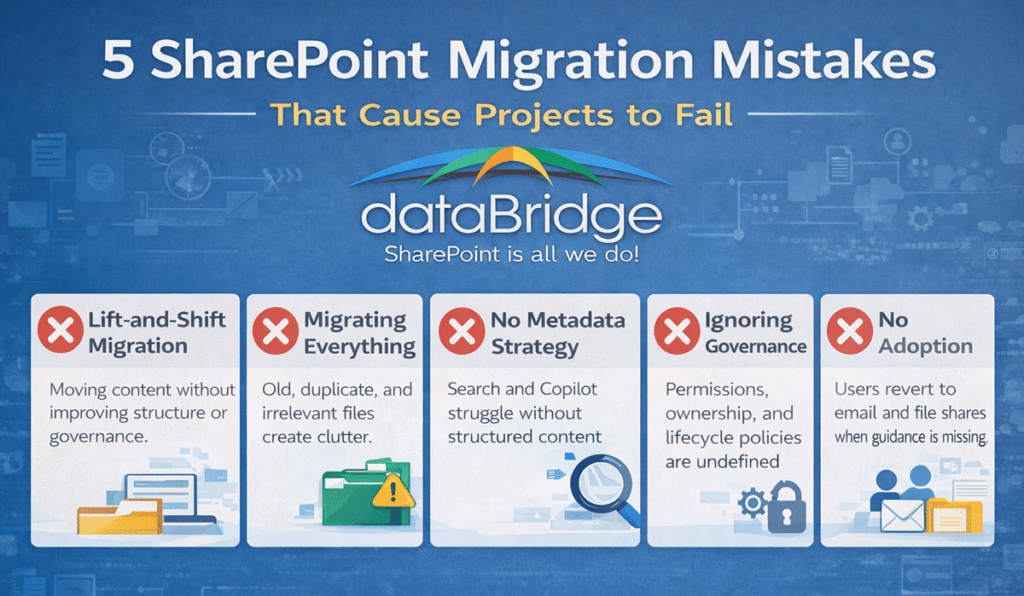
While every organization faces unique challenges, most migration failures can be traced to a small set of recurring mistakes.
Understanding these pitfalls can dramatically improve migration outcomes.
1. Migrating Everything
Many organizations assume they should migrate every file from legacy systems.
However, legacy repositories frequently contain:
- Outdated content
- Duplicate files
- Obsolete projects
- Personal folders
Migrating everything increases storage costs and makes information harder to find.
In many environments, a meaningful portion of legacy content is outdated, duplicated, unused, or no longer appropriate to move forward.
A thoughtful migration strategy evaluates which content should move forward and which should be archived or retired.
Wiki platforms make this worse than file shares do. Most Confluence instances are largely stale, which makes leaving Confluence for SharePoint the best content audit you will get. Move what people still use. Carrying the dead pages forward only pollutes search and Copilot in the new environment.
2. Ignoring Information Architecture
Information architecture determines how content is organized, categorized, and discovered.
Without a clear architecture, SharePoint becomes little more than a file repository.
Effective architectures typically include:
- Structured site collections
- Consistent content types
- Metadata classification
- Intuitive navigation
Organizations that design architecture before migration almost always see stronger adoption and better search outcomes.
3. Over-Reliance on Folders
Legacy file shares rely heavily on nested folder structures.
While SharePoint supports folders, modern environments benefit from metadata-driven organization.
Metadata allows content to appear in multiple views without duplicating files.
For example, a document tagged with metadata could appear in views for:
- Department
- Project
- Document type
This approach improves search accuracy and reduces reliance on deep folder hierarchies.
4. Ignoring Governance
Governance defines how content is created, managed, secured, and retained.
Without governance, SharePoint environments gradually become disorganized.
Common governance challenges include:
- Inconsistent naming conventions
- Uncontrolled site creation
- Unclear ownership of content
- Unmanaged permissions
Organizations that establish governance policies early avoid many of these problems.
The SharePoint Governance Guide provides a practical framework for defining policies that keep SharePoint environments organized and secure over time.
Additional governance strategies and technical planning insights can also be found in the SharePoint Resources section. Organizations that want migration cleanup to result in a stronger destination environment should also review our SharePoint Document Management System guide.
5. Skipping User Adoption Planning
Technology alone does not guarantee success.
Users must understand:
- Where to store information
- How to find document
- Permissions and how they work
- How collaboration tools integrate
Without training and clear guidance, users often revert to old habits.
Adoption planning ensures the migration leads to lasting behavioral change rather than temporary improvements.
How Governance Prevents Migration Chaos
Governance is one of the most overlooked aspects of SharePoint migrations, yet it is also one of the most important.
Governance establishes the rules that keep a SharePoint environment organized over time.
These rules typically address several key areas.
Site Creation
Who can create new sites?
Uncontrolled site creation often leads to sprawl and confusion. Governance ensures new sites follow consistent naming conventions and structural guidelines. A clear SharePoint site request and approval strategy helps prevent that problem by defining who can request a site, which templates should be used, who must approve it, who owns it after launch, and when it should be reviewed or retired.
Permissions Management
Clear permission strategies reduce security risks and simplify administration.
Many organizations adopt group-based permissions rather than assigning access individually.
Content Lifecycle
Documents do not last forever.
Retention policies help organizations archive or delete outdated content automatically.
Ownership and Accountability
Every site should have a clear owner responsible for maintaining its content.
Without ownership, sites gradually become outdated and difficult to navigate.
Governance may seem restrictive at first, but in practice it protects the usability and reliability of the platform.
How to Avoid These SharePoint Migration Mistakes
Avoiding migration mistakes requires more than selecting the right tool. The strongest migration plans usually include five decisions before content moves:
- Decide what should not be migrated. Remove or archive outdated, duplicate, unmanaged, or low-value content before it becomes part of the new environment.
- Design the target structure. Define sites, libraries, metadata, content types, navigation, and ownership before migration waves begin.
- Simplify permissions. Review broken inheritance, direct user access, broad groups, and legacy permission exceptions before mapping access forward.
- Define governance before go-live. Establish ownership, lifecycle rules, site creation standards, naming expectations, and review cadence.
- Plan adoption and validation. Make sure users understand where content lives, how to find it, who owns it, and how the environment will be supported after launch.
To turn those five decisions into a migration project plan with named owners and realistic timelines, build the phases before content moves.
For the full planning sequence, use The Complete Guide to SharePoint Online Migrations. For implementation support, work with our migration consultants.
What Does a SharePoint Migration Consultant Do?
A SharePoint migration consultant helps organizations plan and execute migrations that improve long-term usability rather than simply moving files.
Typical responsibilities include:
- Assessing legacy content repositories
- Designing SharePoint information architecture
- Defining governance policies
- Planning migration phases
- Supporting user adoption and training
Working with an experienced SharePoint migration consultant helps organizations avoid common migration mistakes and build a SharePoint environment that supports collaboration, search, compliance, and future AI capabilities.
Final Thoughts on SharePoint Migration Success
Many organizations believe a SharePoint migration is primarily a technology project.
In reality, it is a structural transformation of how information is organized and shared.
Organizations that focus only on tools often repeat the same problems in a new environment.
Those that prioritize architecture, governance, and adoption create systems that scale for years.
Avoiding common SharePoint migration mistakes dramatically improves outcomes and ensures SharePoint becomes what it was intended to be: a reliable foundation for collaboration, knowledge sharing, and intelligent workplace tools.
Organizations preparing for migration often benefit from strategic guidance through SharePoint Migration Consulting, ensuring every step—from discovery through adoption—supports long-term success.
Related SharePoint Migration Resources
- SharePoint Migration Consulting
- The Complete Guide to SharePoint Online Migrations
- SharePoint Migration Readiness Assessment
- SharePoint Migration Checklist for Microsoft 365
- How to Map Legacy Folder Structures to Metadata in SharePoint
- SharePoint Post-Migration Checklist
- The Complete Guide to SharePoint Permissions
- SharePoint Governance Framework
Frequently Asked Questions About SharePoint Migrations
Most SharePoint migrations fail because organizations focus on moving files instead of improving structure. Without clear information architecture, governance policies, and metadata strategies, the same problems from legacy systems simply reappear in SharePoint.
Successful migrations focus on architecture, governance, and user adoption—not just technical migration.
The most common mistake is performing a lift-and-shift migration. While this approach moves content quickly, it often transfers outdated files, duplicate documents, and broken permission structures into the new environment.
A strategic migration evaluates which content should be migrated and redesigns the structure before moving data.
Migration timelines vary depending on the amount of content and the complexity of the environment. Smaller migrations may take a few weeks, while large enterprise migrations often occur in phases over several months.
Many organizations start with a SharePoint Migration Readiness Assessment to understand the scope and plan a realistic migration strategy.
Organizations with large or complex environments often benefit from working with a SharePoint migration consultant. Consultants help design information architecture, establish governance policies, and plan migration phases to reduce risk.
Working with experienced advisors through SharePoint Migration Consulting can prevent costly mistakes and improve long-term usability.
In most cases, no. Legacy systems often contain large amounts of outdated or duplicate content. Migrating everything increases storage costs and makes information harder to find.
A well-planned migration identifies which content should be migrated, archived, or retired.
Organizations should consider hiring a SharePoint migration consultant when their migration involves large volumes of content, complex permission structures, or multiple legacy systems. A consultant helps evaluate the existing environment, design information architecture, establish governance policies, and plan a phased migration strategy.
Working with an experienced consultant through SharePoint Migration Consulting helps organizations avoid common migration mistakes and ensures the new SharePoint environment is structured for long-term usability rather than simply moving files from one system to another.
A SharePoint migration consultant helps organizations plan and execute migrations that improve how information is organized, secured, and discovered.
Typical responsibilities include:
• Assessing Existing Content Repositories to identify outdated or duplicate files
• Designing SharePoint Information Architecture for long-term usability
• Defining Governance Policies for permissions, lifecycle management, and site creation
• Planning Migration Phases to reduce disruption during the transition
• Supporting User Adoption so employees understand how to use the new environment
This strategic approach ensures the migration improves collaboration, search quality, and governance instead of simply replicating legacy problems in a new system.
What our clients say
