
The Complete Guide to SharePoint Metadata Strategy
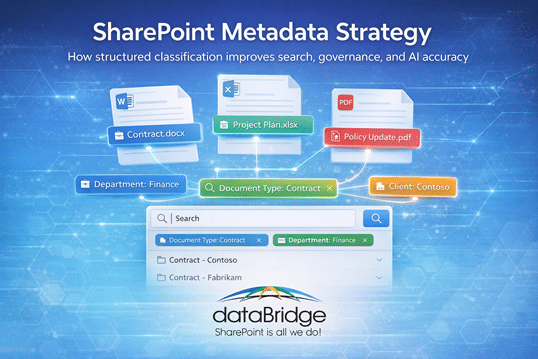
A strong SharePoint metadata strategy improves search, governance, compliance, automation, and Copilot accuracy by making content easier to classify and manage at scale. This guide explains how metadata, content types, and taxonomy work together to create cleaner information architecture across Microsoft 365.
Most SharePoint environments do not struggle because metadata is too complex. They struggle because content is still organized around location instead of meaning. This guide explains how to create a practical metadata strategy that improves findability, governance, automation, and long-term usability across Microsoft 365.
Many organizations begin using SharePoint with the assumption that a well-organized folder structure will be enough. That may work for a while in a small library, but it rarely works for long in a growing Microsoft 365 environment.
As content volume increases, folder paths become deeper, naming conventions drift, and teams start recreating documents because they cannot find the original version. A metadata strategy solves that problem by organizing content around meaning instead of location.
Metadata becomes even more valuable when it supports a clear content authority model. Before users, search, or AI tools can trust the right answer, organizations need a SharePoint source of truth strategy that identifies which libraries, pages, and documents should be treated as authoritative.
This guide focuses on metadata strategy: what metadata is, why it matters, how it supports search and governance, and how organizations can design a practical classification model. For consulting help applying these ideas in a real SharePoint environment, use SharePoint Information Architecture & Metadata Consulting. For the broader business document platform, start with the SharePoint Document Management System page.
Written by Michael Fuchs, Founder and CEO of dataBridge. Reviewed by Hayden Honerkamp, Senior Solution Architect and Client Success Lead, for SharePoint hub site architecture, enterprise intranet structure, navigation planning, migration readiness, and Microsoft 365 adoption accuracy.
Published: March 11, 2026
Last reviewed: March 11, 2026
What Is SharePoint Metadata?
SharePoint metadata is structured information used to classify documents so they can be filtered, searched, secured, and automated across Microsoft 365 environments.
This is where metadata changes the equation.
Metadata allows SharePoint to organize information based on meaning rather than location. When documents are classified consistently, users can locate them through search, filters, and dynamic views instead of clicking through a rigid folder hierarchy.
For controlled documents, metadata should do more than improve findability. A strong SharePoint document control approach uses metadata to track document type, owner, approval status, effective date, review date, retention category, and related business process.
For migration projects, a metadata strategy often starts with mapping folder-based content into SharePoint metadata so important business context is not lost during the move.
At dataBridge, we regularly work with organizations managing tens or even hundreds of thousands of documents across Microsoft 365. When search quality is poor, governance is inconsistent, or adoption stalls, the root cause is often the same: the environment lacks a clear metadata strategy.
Metadata strategy should also connect to SharePoint search quality reviews, because even a well-designed metadata model can lose value when fields are ignored, stale content remains active, or no one reviews how search results are performing over time.
After working with SharePoint environments across industries since 2006, one pattern appears again and again. Organizations that invest in metadata early typically experience better search performance, stronger governance, cleaner automation, and much higher user adoption.
This guide explains how SharePoint metadata works, why it matters more than folders, and how to design a metadata structure that supports long-term collaboration. Organizations that want to go deeper into related best practices can also explore the broader educational content in the dataBridge SharePoint resources library.
Metadata Strategy vs. Information Architecture vs. Taxonomy
These terms overlap, but they do not mean the same thing.
A SharePoint metadata strategy defines how documents and content should be classified so they can be found, filtered, governed, automated, retained, and trusted.
SharePoint information architecture defines the broader structure around sites, libraries, hubs, content models, navigation, permissions alignment, and long-term scalability.
SharePoint taxonomy defines the controlled vocabulary behind metadata. It helps the organization use consistent terms across departments, libraries, hubs, and content types.
Use SharePoint Information Architecture & Metadata Consulting when you need help applying structure in a real environment. Use SharePoint Taxonomy and Metadata Strategy when the main issue is term store design, managed metadata, enterprise terminology, or term sprawl.
SharePoint Metadata Strategy Quick Checklist
Before diving deeper, it helps to understand what a strong SharePoint metadata strategy usually includes.
Most successful environments follow a similar structure:
- Define core document categories such as contracts, policies, and project documents
- Create reusable metadata columns that describe documents consistently
- Use content types to standardize document structures
- Implement managed taxonomy for controlled classification terms
- Establish governance ownership for taxonomy management
- Align metadata with search, automation, and compliance policies
When these elements work together, SharePoint shifts from a basic file repository to a structured knowledge platform.
The sections below explain how each component works and how organizations design a metadata architecture that scales.
Why Metadata Matters More Than Folders
Folders organize documents by location.
Metadata organizes documents by meaning.
That difference may sound small, but it changes how people experience SharePoint every day.
Traditional file systems depend on hierarchy. A file sits inside one folder, which sits inside another folder, and the only reliable way to find it is to follow that exact path. SharePoint can do something much more useful. It can classify documents based on what they are, who they belong to, what process they support, or what stage they are in.
A contract, for example, does not need to live only in a single folder path. It can be tagged by client, department, contract type, region, and effective date. Once those attributes exist, users can filter, sort, and surface the document in multiple ways without duplicating it.
This flexibility becomes critical as environments grow. A small team may be able to remember where files live. A larger organization with thousands of documents and multiple departments usually cannot. That is one reason a strong SharePoint information architecture matters so much: it gives structure to content across sites, libraries, and collaboration spaces before the environment becomes messy.
Metadata removes the dependency on memory. Users no longer need to remember where a document was stored. They only need enough context to describe what they are looking for.
Metadata vs Folders in SharePoint
One of the most common questions organizations ask is whether they should use folders or metadata in SharePoint. The honest answer is that both can exist, but they do not serve the same purpose. Folders create a navigation structure. Metadata creates a classification structure.
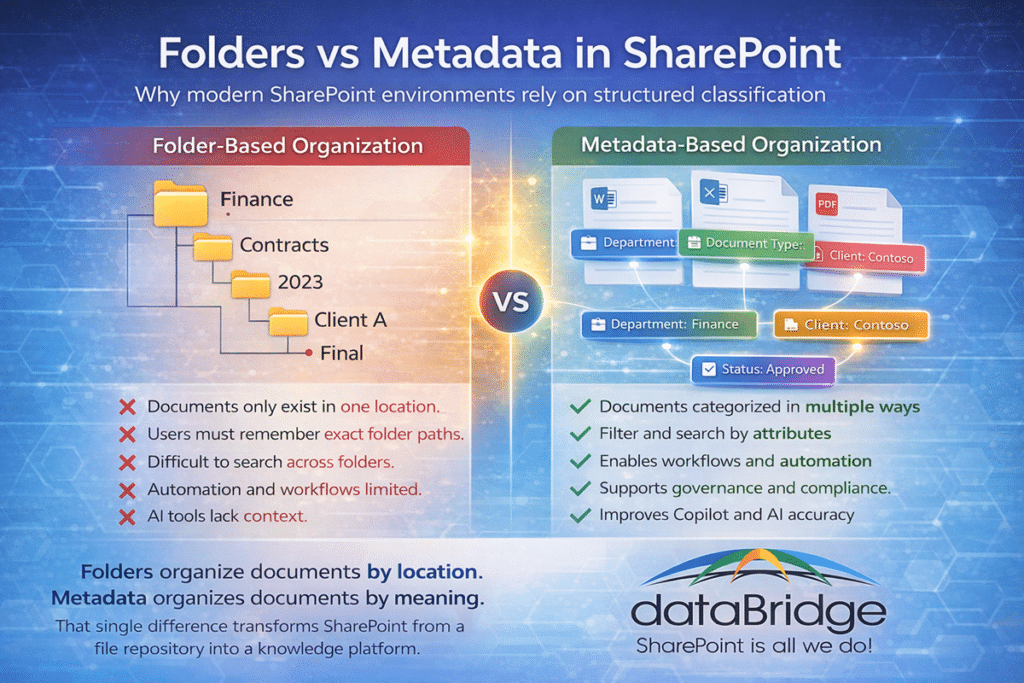
When teams rely entirely on folders, users must know where someone decided to save the file. That may sound manageable at first, but it becomes frustrating very quickly when different departments think about information in different ways. One person looks by client. Another looks by department. Another looks by document type. A single folder tree cannot satisfy all three approaches well.
Metadata solves that problem because it allows one document to be found through multiple paths. A proposal can be filtered by project, client, department, or status without being stored in four different places.
This is also where many organizations start seeing a difference in operational maturity. Folders are primarily about storage. Metadata supports storage, but it also supports automation, governance, reporting, and AI. Workflows can trigger based on metadata. Retention rules can apply based on metadata. Views can change based on metadata. Even search quality improves because SharePoint has better signals about what each document actually represents.
Folders still have a place. They can help with simple high-level organization inside a library. But when it comes to scalable discovery and long-term usability, metadata should do the heavier lifting.
How Metadata Improves SharePoint Search
Search is one of the most powerful capabilities in SharePoint, but it performs best when the content underneath it is structured well.
Many organizations assume weak search is a technology issue. In practice, it is often a classification issue.
Search engines need signals. Metadata provides those signals. Metadata is one of those signals, but it is not the only one. Permissions, indexing, content ownership, and managed properties also influence what appears in search. That is why SharePoint search results vary by user even when people search for the same phrase.
When documents include consistent attributes such as department, document type, project name, client, or status, SharePoint can interpret and organize results much more effectively. Users can then refine results quickly instead of scanning through long lists of loosely related documents.
Without metadata, search depends far more heavily on filenames and full-text indexing. That approach can work in a limited way, but it tends to break down when naming standards vary or when different teams use different language for the same type of content.
This is why metadata is closely tied to scalable SharePoint information architecture. A library with well-planned columns, content types, and taxonomy simply gives search more usable structure. In many environments, improving metadata classification has a much bigger impact on search quality than tweaking search settings ever will.
Use the SharePoint metadata maturity checklist when you need to evaluate whether metadata, content types, ownership, permissions, lifecycle controls, and search are working together inside real document libraries.
Metadata and Compliance
Metadata also plays a central role in compliance and records management.
Many organizations operate under strict regulatory expectations. Healthcare providers must manage protected information carefully. Financial institutions deal with retention and oversight requirements. Manufacturers, professional services firms, and nonprofits may all have their own internal audit needs as well.
In those environments, documents cannot simply be stored. They must be classified in ways that support policy enforcement.
Metadata makes that possible. A document tagged as a contract, policy, employee record, or financial record can follow different retention rules, security rules, or review processes based on that classification. Without structured metadata, those controls become much harder to apply consistently.
Metadata helps describe what content is. SharePoint sensitivity labels help define how sensitive content should be protected when the file, site, or Teams-connected workspace requires stronger control.
This is one reason metadata design often sits inside a broader SharePoint governance framework. Governance defines how content should be categorized, managed, retained, and secured over time. Metadata gives those policies a practical way to operate inside the platform.
Metadata structures also vary by sector, which is why organizations often need classification models that reflect their specific regulatory and operational realities. A healthcare provider and a manufacturing company may both use SharePoint, but they will not organize sensitive content the same way. That is exactly why dataBridge developed industry-specific SharePoint solutions rather than treating every environment as if the same model fits all.
Metadata and Copilot Accuracy
Artificial intelligence has made metadata even more important.
Microsoft Copilot and similar tools rely on SharePoint and Microsoft 365 content to generate summaries, responses, and insights. The quality of those outputs depends heavily on how clearly the underlying information is structured.
Metadata gives AI context.
Fields such as department, project, client, document type, and status help systems interpret how information relates across the environment. Without that structure, AI can still retrieve content, but the results are more likely to be broad, incomplete, or missing important context.
That is why organizations preparing for AI often discover that Copilot readiness for SharePoint is not really just about licensing or enablement. It starts with the quality of the information architecture beneath the content. If documents are poorly classified, AI will reflect that disorder.
In other words, better metadata does not just improve search for humans. It improves retrieval and relevance for AI as well.
For the broader connection between metadata, trusted content, permissions, lifecycle governance, search, and SharePoint agents, use the SharePoint metadata for AI readiness resource center.
Common SharePoint Metadata Mistakes
Even organizations that understand the value of metadata often run into the same implementation mistakes.
One common issue is overengineering the model. If users are asked to fill out too many fields every time they upload a document, they will often skip classification or enter inconsistent values just to move on. Good metadata strategy is disciplined. It focuses on the few fields that truly improve findability, governance, and process flow.
Another issue is inconsistent naming. When departments invent their own terminology, taxonomy breaks down quickly. One team may use “HR,” another may use “Human Resources,” and a third may use “People Operations.” Technically those may all point to the same concept, but structurally they create fragmentation.
Timing is another frequent problem. Many organizations move large volumes of content first and try to layer metadata on afterward. That usually creates a painful cleanup effort. Metadata works best when it is part of the plan before migration, which is one reason it often belongs in conversations about SharePoint migration mistakes and pre-migration design.
Finally, metadata needs ownership. Without governance, the taxonomy slowly drifts. New terms appear without standards, fields become inconsistent, and the structure loses value.
SharePoint Content Types vs Metadata
Metadata and content types are closely related, but they are not the same thing.
Metadata describes documents.
Content types define categories of documents that share common metadata fields, templates, and behaviors.
A contract content type, for example, might include fields such as client name, contract category, department, approval status, and effective date. A policy content type might include a different set of fields such as policy category, review date, business owner, and compliance classification.
This matters because organizations do not just need isolated metadata fields. They need repeatable document structures.
Content types make metadata scalable. They let you standardize how specific categories of information are created and managed across sites and libraries. When done well, this creates a much cleaner and more governable environment.
From a consulting perspective, this is one reason metadata strategy often overlaps with broader SharePoint consulting services. The goal is not to add columns randomly. The goal is to design a usable system that supports how the organization actually works.
Designing a SharePoint Metadata Strategy
Designing a metadata strategy requires balance.
Too little structure leaves content hard to organize and even harder to find. Too much structure makes the system feel heavy and discourages user adoption.
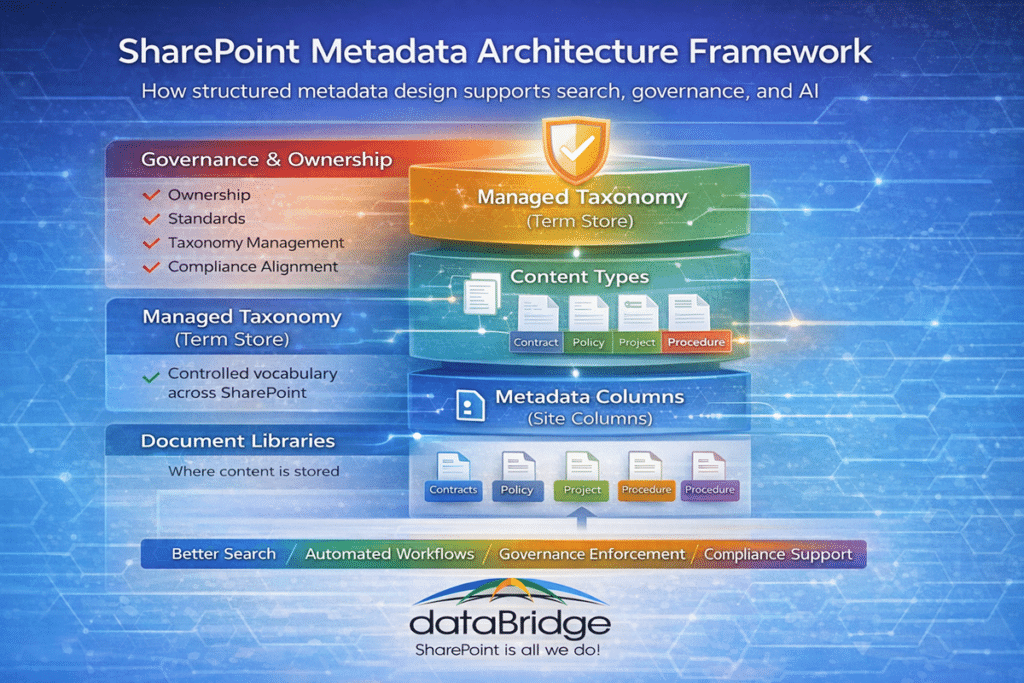
The best metadata models usually begin with business reality, not technical features. What kinds of documents does the organization manage? The fields that actually help users locate those documents? What classifications support governance, automation, compliance, or reporting?
From there, the structure becomes clearer.
Content types define major categories of content. Site columns create reusable fields. Managed metadata supports consistency in controlled terms such as departments, regions, policy types, or business units. Governance ownership keeps the taxonomy from drifting over time.
For enterprise term store planning and controlled vocabularies, review our SharePoint Taxonomy & Metadata Strategy.
These decisions rarely exist in isolation. They often connect to intranet design, document management, process automation, and broader Microsoft 365 planning. That is why many organizations evaluate metadata design as part of a larger Microsoft 365 solutions portfolio rather than as a narrow standalone task.
Clear classification also makes it much easier to manage access control. When organizations design content types and metadata intentionally, permission models become simpler to manage across sites and libraries, which is why many governance strategies also address SharePoint permissions architecture alongside taxonomy design.
Metadata strategy should connect naturally to document management, information architecture, taxonomy, governance, search, and Copilot readiness. Those related topics are covered in the supporting resources linked throughout this guide.
Step-by-Step Metadata Implementation
Organizations beginning their metadata journey usually benefit from a practical sequence.
The first step is identifying the major content categories used across the business. Policies, procedures, contracts, project documents, client deliverables, and operational records are all common examples.
The next step is deciding which attributes actually improve findability and usability. Department, document type, project, client, region, and status are common starting points, but the right choices depend on how people search and how the organization governs information.
Once those fields are clear, reusable site columns and content types can be designed around them. That keeps classification consistent across multiple libraries and sites instead of letting every area reinvent its own structure.
After that, managed taxonomy becomes important. Controlled vocabularies help prevent drift and keep terms standardized over time.
Finally, governance has to support the structure. Someone needs responsibility for maintaining terms, reviewing changes, and keeping the model aligned with business use.
Before turning those ideas into SharePoint fields or content types, use the SharePoint metadata planning worksheet to capture business areas, document categories, required fields, search needs, ownership, and priority actions.
After the fields are chosen, form-based metadata intake in SharePoint helps make those decisions usable by guiding people to provide the right document type, owner, department, status, and review information at submission time.
For many organizations, this work begins with a structured review of the existing environment, which is exactly what a SharePoint Discovery & Readiness Assessment is designed to support.
Metadata Governance and Long-Term Sustainability
Even a strong metadata model will not stay strong by accident.
Without governance, it starts to erode. Terms multiply. Naming standards become inconsistent. Users work around the model instead of with it. Over time, search quality declines and trust in the structure fades.
Good metadata governance is not complicated for the sake of being complicated. It is simply disciplined. It defines ownership, establishes processes for approving new terms or fields, and periodically reviews whether the taxonomy still reflects how the business operates.
That discipline is one of the biggest differences between environments that feel clean after three years and environments that feel chaotic after twelve months.
Real-World Metadata Example
In one SharePoint environment containing more than 300,000 documents, users struggled to locate files even when they knew the document existed.
The environment relied heavily on deeply nested folders, and different departments had developed their own naming habits over time. The result was predictable: documents were technically stored, but practically hard to find.
After implementing a metadata model built around department, project, and document type, search accuracy improved dramatically. Users who had been spending several minutes hunting through folders could now narrow results quickly and find the correct document in seconds.
That kind of shift is not unusual. It is one reason many organizations evaluating structural improvements spend time reviewing client success case studies before moving forward. The most persuasive proof is often seeing how better architecture improved search, compliance, and collaboration in a real environment.
When to Bring in SharePoint Metadata Consulting
Designing a metadata strategy can become complex quickly, especially in larger, older, or heavily regulated SharePoint environments.
Organizations often need help when they have:
- Overlapping taxonomy structures
- Inconsistent metadata across departments
- Legacy content with no usable classification
- Search results that feel noisy or unreliable
- Governance gaps that make standards hard to enforce
- Migration projects where folder paths need to become metadata
- Copilot readiness concerns tied to weak content structure
In those situations, dataBridge helps evaluate the existing content model, identify what is hurting usability, and define a scalable structure that supports search, compliance, governance, and AI readiness together.
For applied planning and implementation support, use SharePoint Information Architecture & Metadata Consulting.
Frequently Asked Questions About SharePoint Metadata
What is metadata in SharePoint?
Metadata in SharePoint is structured information that describes documents and other content. It helps classify files by attributes such as department, document type, project, client, or status so they can be filtered, grouped, and found more easily.
Is metadata better than folders in SharePoint?
Metadata is usually more flexible than folders because one document can be categorized in multiple ways at the same time. Folders can still help with simple navigation, but metadata is far better for scalable search, filtering, automation, and governance.
How many metadata fields should a library have?
There is no universal number, but most successful implementations focus on a small set of high-value fields. Too many required fields often reduce adoption and create inconsistent data entry.
Does metadata improve SharePoint search?
Yes. Metadata gives SharePoint more structure to interpret documents accurately and allows users to narrow results with filters and refiners instead of relying only on filenames or full-text matches.
Does metadata affect Microsoft Copilot results?
Yes. Metadata helps provide context that improves how AI systems retrieve and interpret documents. Better classification generally supports better relevance.
How do SharePoint site columns relate to metadata?
Site columns are reusable metadata fields that can be applied across multiple libraries and sites. Instead of creating the same column repeatedly in different locations, administrators define a site column once and reuse it throughout the SharePoint environment.
This approach ensures consistent classification and simplifies governance. When metadata fields are managed centrally through site columns, organizations maintain better control over taxonomy and reduce the risk of inconsistent naming across departments.
What is managed metadata in SharePoint?
Managed metadata refers to terms stored in the SharePoint Term Store, which allows administrators to maintain a centralized taxonomy for commonly used classifications.
For example, departments, document categories, product names, or business units can be defined as controlled vocabulary terms. Users then select these predefined terms instead of entering free text.
This approach improves consistency, enables hierarchical classification, and makes metadata easier to manage across large SharePoint environments.
For a deeper look at managed metadata, enterprise terms, local vs. global term sets, and term store governance, use SharePoint Taxonomy and Metadata Strategy.
Should metadata be required when uploading documents?
In most cases, a small number of metadata fields should be required when documents are uploaded. Required fields help ensure that content is classified consistently and can be discovered through search and filters.
However, requiring too many fields can reduce adoption. Successful implementations usually limit required fields to the attributes that provide the greatest value for search, governance, or automation.
Balancing structure and usability is an important part of designing a sustainable metadata strategy.
Can metadata be added to existing documents in SharePoint?
Yes. Metadata can be applied to existing documents after they are uploaded or migrated into SharePoint.
Administrators can update metadata individually, through bulk editing in library views, or by using automation tools such as Power Automate or migration utilities.
However, applying metadata during migration or document creation is typically far more efficient than retroactively classifying large volumes of content.
For high-volume, repeatable document types, you can extract the metadata from the documents themselves instead of backfilling by hand – though it only works when the files are consistent enough to read reliably.
How does metadata support SharePoint automation and workflows?
Metadata plays a major role in automation because workflows often rely on document attributes to determine what should happen next.
For example, a workflow might route a document for approval based on department metadata, trigger retention policies based on document type, or notify stakeholders when project documents reach a specific status.
Without structured metadata, automation systems have fewer signals to interpret document context, which limits their effectiveness.
Related Metadata and Information Architecture Resources
- SharePoint Document Management System
- SharePoint Information Architecture & Metadata Consulting
- SharePoint Taxonomy and Metadata Strategy
- How to Map Legacy Folder Structures to Metadata in SharePoint
- Copilot-Ready SharePoint Information Architecture
- SharePoint Source of Truth Model for Copilot Readiness
- Why SharePoint Search Results Vary by User
Final Thought
Many SharePoint environments struggle not because the platform lacks capability, but because the structure beneath the content was never designed intentionally.
Metadata is one of the foundational elements that turns SharePoint from a storage location into a usable knowledge platform. When it is planned well, search improves, governance becomes easier to enforce, compliance is easier to support, and AI tools have better context to work with.
That is why metadata strategy is rarely just a technical detail. It is an architectural decision with long-term consequences for the entire Microsoft 365 environment.
Contact us today to start the conversation.