

File Share to SharePoint Migration Services
Move file shares, network drives, and legacy folder structures into SharePoint Online with a migration plan that improves structure, permissions, metadata, search, ownership, and governance. dataBridge helps organizations avoid a basic lift-and-shift by designing SharePoint around how employees actually find, use, and manage content.
A successful file share migration should not recreate the same folder sprawl in a newer platform. Before content moves, we help you decide what to migrate, what to archive, how to map folders to SharePoint metadata, and how to prepare users for a cleaner Microsoft 365 environment.
File share to SharePoint migration services help organizations move content from network drives, file servers, shared drives, and legacy folder structures into SharePoint Online with better structure, ownership, permissions, metadata, search, and governance.
A successful file share migration is not just a transfer. It is a chance to turn years of folder sprawl into a cleaner Microsoft 365 content environment that employees can find, trust, and use.
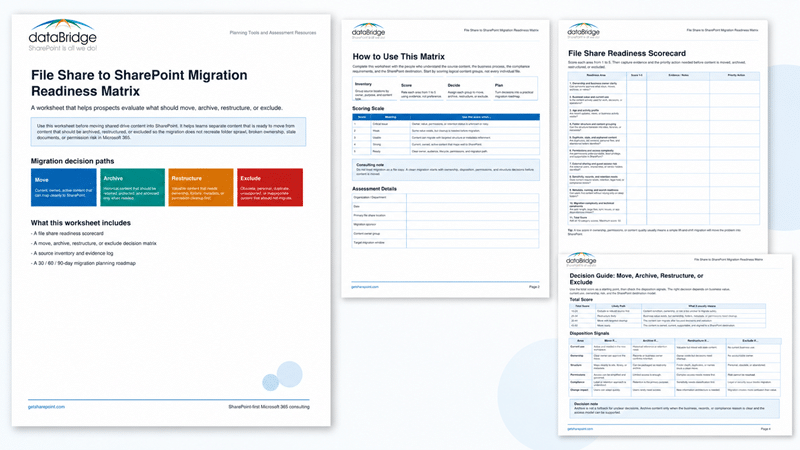
Before moving file share content into SharePoint, use the File Share to SharePoint Migration Readiness Matrix to decide what should move, archive, restructure, or exclude from the migration scope.
When your organization is ready to move from network drives to SharePoint Online, talk with dataBridge about your file share migration plan.
Move From Network Drives to SharePoint Without Rebuilding the Same Mess
Most file shares were built for storage.
SharePoint should be built for work.
That difference matters. A network drive can hold files for years with little structure beyond folders, naming habits, inherited permissions, and user memory. SharePoint Online can support collaboration, document management, search, governance, retention, Teams integration, and Copilot readiness.
However, SharePoint only works well when the migration design is intentional.
In our experience, file share migrations struggle when organizations treat SharePoint like a newer version of the same shared drive. They copy old folders into new libraries. Unclear ownership follows the content. Stale files stay visible. Permission exceptions move forward. Then users wonder why SharePoint feels just as confusing as the file server.
A better approach starts with structure.
dataBridge helps organizations assess existing file shares, design the right SharePoint destination, clean up source content, map folders to metadata, align permissions, plan migration waves, validate results, and prepare users for a new way of working.
For broader migration strategy, our SharePoint Migration Consulting page explains how dataBridge plans and executes Microsoft 365 migrations across architecture, governance, adoption, and post-migration optimization.
Before migration waves begin, teams moving from shared drives can use the SharePoint file share migration and planning tools hub to connect file share cleanup with governance maturity, permission review, migration readiness, and post-migration validation.
What This Tool Helps Prove
The Migration Readiness Matrix helps your team move from migration assumptions to evidence.
Use it to identify which file share content should move, archive, restructure, exclude, or clean up before migration begins. It also helps clarify owner assignment, permission review needs, metadata mapping opportunities, destination architecture concerns, and cleanup priorities.
The goal is not to complete a matrix and stop. The goal is to turn the findings into a cleaner migration plan. After completing the matrix, review the highest-risk content areas, confirm business owners, decide what should happen before migration waves begin, and connect the results to the right dataBridge service or resource.
When the findings show that the migration scope is still unclear, use the SharePoint Migration Readiness Assessment before committing to migration waves. When your team needs a broader migration planning structure, use the SharePoint Migration Checklist to organize architecture, permissions, communication, validation, adoption, and post-migration follow-through.
What Are File Share to SharePoint Migration Services?
File share to SharePoint migration services help organizations move files from traditional shared drives, file servers, department folders, home drives, project folders, and legacy network storage into SharePoint Online.
These services usually include:
- Source content assessment
- File share inventory review
- Folder structure analysis
- Cleanup and archive recommendations
- SharePoint site and library design
- Metadata and content type planning
- Permission mapping and access review
- Migration tooling strategy
- Pilot migration and testing
- Migration wave planning
- User readiness and communication
- Post-migration validation
- Governance and ownership setup
The work is not only about moving content.
It is about making SharePoint easier to navigate, easier to govern, easier to search, and easier to trust.
Microsoft provides tools such as Migration Manager for file share migration and the SharePoint Migration Tool. Those tools can help move content. They do not decide what should move, what should be archived, how libraries should be structured, who should own content, or how permissions should work after migration.
That is where migration consulting becomes important.
It also helps to know the tradeoffs between the tools themselves, since SPMT, ShareGate, Quest, and PowerShell each suit a different kind of move – here is how the main SharePoint migration tools compare.
Why File Share Migrations Need More Than a Tool
Migration tools can move files.
They cannot fix the decisions that created the mess.
A typical file share contains years of unmanaged content. Some folders are still active. Others have been abandoned. Certain files appear in several places. Many documents have no clear owner. Permissions often reflect old teams, old projects, one-off exceptions, and role changes that nobody reviewed.
When that structure moves unchanged into SharePoint, the organization gets a modern platform with old problems.
A file share migration should answer practical questions before content moves:
- Which content is still useful?
- Which folders represent departments, projects, clients, processes, or records?
- Which files should be archived instead of migrated?
- Which content needs restricted access?
- Which permissions are still valid?
- Which folders should become SharePoint sites?
- Which folders should become libraries?
- Which folder names should become metadata?
- Which users need training before go-live?
- Which content should support search, Copilot, and SharePoint agents?
Small decisions made before migration create large benefits after launch.
That is why dataBridge treats file share migration as an architecture, governance, and adoption project. The technical transfer matters, but it should not lead the strategy.
What This Looks Like in Practice
A file share migration often starts with a simple request: move department drives into SharePoint. Once discovery begins, the risk becomes clearer. Some folders are active, others are abandoned, duplicate files exist across departments, and permissions may reflect old teams, old employees, or one-off exceptions no one has reviewed.
In that situation, dataBridge does not treat the project as a bulk copy exercise. We help classify source content, define what should move, identify what should be archived, map folders to better SharePoint structures, review permissions, and design destination libraries around how people actually work.
The improvement is not just that content moves to SharePoint. Migration scope becomes cleaner, destination libraries become easier to understand, permissions are easier to validate, and users inherit a more trustworthy Microsoft 365 environment.
Before migration waves begin, the SharePoint Migration Readiness Matrix helps teams decide what should move, archive, restructure, exclude, or clean up first. For broader scope review, use a broader readiness review and the SharePoint Migration Checklist for Microsoft 365
When a File Share to SharePoint Migration Makes Sense
A file share to SharePoint migration is a strong fit when your organization wants to modernize how employees store, find, govern, and collaborate on documents.
This service is especially useful when:
- Department drives have become hard to navigate
- File servers contain duplicate or outdated content
- Employees rely on tribal knowledge to find documents
- Folder structures are too deep or inconsistent
- Permissions are unclear or difficult to review
- Remote or hybrid employees need better access
- Leadership wants to reduce dependency on legacy file servers
- Teams need stronger document collaboration
- Search results are weak because content lacks structure
- Microsoft 365 adoption is expanding
- Copilot readiness depends on cleaner content
- Compliance teams need stronger lifecycle and ownership controls
Not every file belongs in SharePoint.
That is a healthy migration principle.
Some content should move to SharePoint. Other content may belong in OneDrive, an archive, a records location, or a different system. Certain files should be deleted based on policy. A good migration plan makes those decisions before users inherit another cluttered environment.
Scope decisions like these also move the budget, so it helps to see what drives SharePoint migration cost before you commit to a wave plan.
For organizations that need a broader readiness review before scope is finalized, dataBridge’s SharePoint Migration Readiness Assessment helps identify content sprawl, ownership gaps, permission risk, cleanup needs, governance weaknesses, and migration priorities.
File Share Migration Is Really a Content Strategy Decision
A file server often reflects how people stored content in the past.
SharePoint should reflect how people need to work now.
That shift changes the migration conversation. Instead of asking, “Where do we copy this folder?” the better question is, “What business purpose should this content support?”
For example, a folder named Finance may contain budgets, reports, contracts, approvals, templates, audits, and internal procedures. Moving that whole folder into one document library may feel efficient. Yet it may not support search, permissions, retention, or ownership very well.
A stronger SharePoint structure may separate that content by purpose:
- Finance team collaboration
- Controlled financial reports
- Vendor contracts
- Budget templates
- Audit evidence
- Department procedures
- Archived historical files
Each area can have the right owner, permission model, metadata, retention expectation, and governance rule.
This is where file share migration becomes valuable. The project gives your organization a chance to stop organizing documents around old folder habits and start organizing them around business use.
For a deeper explanation of this shift, use our guide on how to map legacy folder structures to SharePoint metadata.
Common Problems We Find in File Shares Before Migration
File shares usually look organized from a distance.
They rarely stay that way when you inspect them closely.
After more than 20 years of SharePoint consulting work, dataBridge has seen the same patterns across departments, industries, and organization sizes.
Common file share issues include:
- Duplicate folders with slightly different names
- Old versions stored as separate files
- Final files that are not really final
- Personal working folders inside shared department areas
- Broken naming conventions
- Deep folder paths that users no longer understand
- Permissions inherited from old teams or employees
- Sensitive content stored in general-access folders
- Project folders with no active owner
- Archived content mixed with current content
- Templates stored beside completed documents
- Client or vendor files scattered across departments
- Records stored without retention context
- Empty folders that preserve outdated structure
- Content that no longer supports current operations
These issues do not disappear during migration.
They become easier to expose.
That is why cleanup, classification, and ownership decisions should happen before the main migration waves begin.
The dataBridge Approach to File Share to SharePoint Migration
dataBridge uses a structure-first approach to file share migration.
We help your organization understand what exists, decide what should move, design where it should live, and establish the governance model needed to keep SharePoint healthy after launch.
Our approach follows the same practical principles behind The dataBridge Way: assess, design, build, implement, adopt, and optimize.
Here is the high-level roadmap we use to help organizations move from legacy file shares to a cleaner, better-governed SharePoint Online environment.
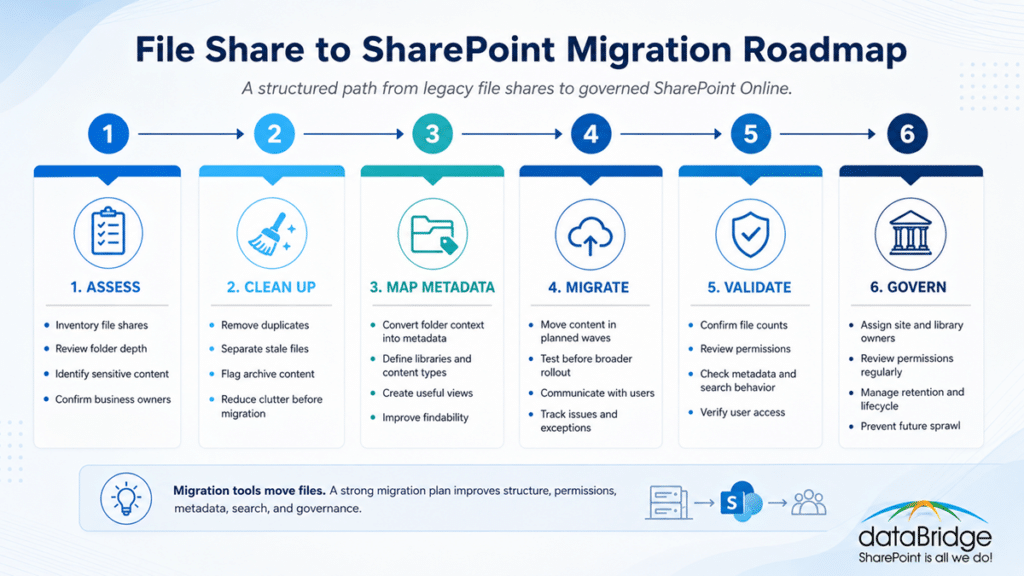
Each stage plays a different role, but together they create a migration plan that improves structure, findability, permissions, and long-term governance.
1. Assess the File Share Environment
We begin by reviewing the current file share landscape.
This includes source locations, content volume, folder depth, ownership, permissions, business purpose, active use, and known pain points.
The assessment helps answer:
- Which file shares are in scope?
- Which departments own the content?
- Which areas contain sensitive information?
- Which folders are active?
- Which folders appear stale?
- Which structures should not be copied forward?
- Which content requires special handling?
- Which users will be affected by the change?
A good assessment reduces surprises.
It also prevents the migration from becoming a rushed copy exercise.
2. Define the SharePoint Destination Architecture
Next, dataBridge helps design the destination structure in SharePoint Online.
This may include SharePoint sites, hub sites, document libraries, Teams-connected sites, communication sites, metadata fields, content types, naming standards, and permission boundaries.
The destination should match how the organization works.
A department folder does not always become one site. A project folder does not always become one library. A restricted folder may need a separate permission model. Older archive folders may not belong in an active collaboration area at all.
Better architecture creates better adoption.
For complex environments, our SharePoint Information Architecture and Metadata services help define the structure, labels, content organization, and findability model that should guide migration decisions.
Before the destination model is configured, the SharePoint information architecture planning worksheet gives project teams a practical way to capture libraries, metadata, content types, owners, search needs, and migration-ready priorities.
3. Separate Active Content From Archive Content
Not all content deserves the same treatment.
Active working documents should be easy to find and use. Reference content should be organized and trusted. Records may need retention controls. Old files may need to be archived. Redundant or obsolete content may need to be removed.
A file share migration is the wrong time to move everything blindly.
It is the right time to decide what should remain useful.
dataBridge helps organizations create practical migration categories, such as:
- Migrate to active SharePoint workspace
- Migrate to controlled document library
- Move to archive location
- Keep outside SharePoint
- Review with business owner
- Delete based on policy
- Exclude from migration
These categories help stakeholders make decisions without reviewing every file one by one.
4. Map Folders to SharePoint Sites, Libraries, and Metadata
File shares rely heavily on folders.
SharePoint can use folders, but folders should not carry the entire information architecture.
In many migrations, folder names contain valuable business context. Department, client, project, year, document type, region, status, and process names often appear in folder paths. Some of that context should become metadata.
A practical mapping model may convert folder structure into:
- SharePoint sites for major business areas
- Document libraries for content collections
- Metadata columns for classification
- Content types for repeatable document patterns
- Views for user-friendly navigation
- Hubs for related sites
- Naming standards for consistency
This step improves search, filtering, governance, and future automation.
It also helps SharePoint support a stronger SharePoint Document Management System instead of becoming another shared drive with a browser interface.
5. Review Permissions Before They Move
File share permissions often contain hidden risk.
Groups may be outdated. Individuals may have direct access. Inheritance may be broken. Sensitive folders may sit inside broad-access locations. Former project teams may still have access to content they no longer need.
Migrating permissions without review can preserve problems for years.
A better model reviews access before migration and simplifies where possible.
dataBridge helps organizations evaluate:
- Current source permissions
- Business owners for restricted content
- Sensitive libraries and sites
- Department access needs
- External sharing requirements
- Guest access risk
- Broken inheritance
- Direct user permissions
- Group-based access models
- Post-migration review cadence
The goal is not to make permissions complicated.
The goal is to make access understandable, secure, and governable.
For foundational guidance, our SharePoint Permissions Guide explains how SharePoint permissions work across sites, libraries, folders, and files.
6. Plan Migration Waves and Testing
Large file share migrations should not happen all at once.
A phased plan reduces risk and gives users time to adjust.
Migration waves may be organized by department, business unit, location, content type, complexity, sensitivity, or readiness. Each wave should include a clear owner, source scope, destination location, testing approach, communication plan, and validation checklist.
Pilot migrations are especially useful.
They reveal issues with path length, invalid characters, metadata mapping, permissions, sync expectations, user behavior, and business rules. A pilot also gives stakeholders a real preview before larger waves begin.
The best migration plans leave room to learn.
That is not a delay. It is risk control.
7. Validate Content After Migration
A migration is not complete when the files arrive.
It is complete when users can find, access, understand, and trust the migrated content.
Post-migration validation should review:
- File counts
- Error reports
- Missing items
- Permission behavior
- Library structure
- Metadata values
- Views and navigation
- Search visibility
- Broken links
- User access
- Owner acceptance
- Go-live readiness
- Support needs
Skipping validation creates long-term frustration.
Users will notice missing structure faster than a project team expects.
After go-live, our SharePoint Post-Migration Checklist helps organizations confirm that content is usable, secure, governable, and ready to scale.
8. Establish Governance and Ownership
File share migration should leave behind a better operating model.
Someone needs to own the content. A person or group must approve structural changes. Permissions need review. Stale material needs a retirement path. Libraries need care after the project ends.
Without governance, the new SharePoint environment slowly becomes the old file share.
A working governance model should define:
- Site owners
- Library owners
- Content review cadence
- Permission review cadence
- Naming standards
- Metadata standards
- Lifecycle rules
- Archive expectations
- External sharing guidance
- Support paths
- Change request process
- User responsibilities
Our SharePoint Governance Framework explains how dataBridge helps organizations turn governance goals into practical roles, controls, standards, and operating rhythms.
File Share Structure Versus SharePoint Structure
A file share structure should not be copied into SharePoint without review.
The platforms work differently.
| File Share Habit | SharePoint Risk | Better SharePoint Approach |
|---|---|---|
| Deep folders | Users struggle to navigate and search | Use sites, libraries, metadata, and views |
| Broad department drives | Permissions become too general | Create clearer site and library boundaries |
| Folder names as classification | Context stays buried in paths | Convert key folder values into metadata |
| Duplicate files across teams | Search returns conflicting results | Define authoritative content locations |
| Old files mixed with active files | Users lose trust in content | Separate active, reference, and archive content |
| Individual access exceptions | Permissions become hard to manage | Use groups and governed access patterns |
| No clear owner | Content quality declines | Assign site and library ownership |
| Migration as a copy job | Problems move unchanged | Use assessment, cleanup, design, and validation |
The main point is simple.
Do not migrate confusion.
Fix the structure first.
What Should Move From File Shares to SharePoint?
The right migration scope depends on business value, content type, ownership, sensitivity, and future use.
Content that often belongs in SharePoint includes:
- Department working documents
- Team collaboration files
- Standard operating procedures
- Policies and reference documents
- Templates
- Project documents
- Client or customer deliverables
- Internal knowledge content
- Process documentation
- Published department resources
- Controlled document libraries
- Files that need metadata, search, and governance
Content that may need a different decision includes:
- Personal work files
- Duplicate drafts
- Old exports
- System-generated files
- Large media collections
- Historical archives
- Obsolete documents
- Files with no owner
- Content under legal hold or records rules
- Highly sensitive material requiring special controls
Before files move, the most important decision is whether each content group should be migrated, structured, archived, restricted, or left behind.
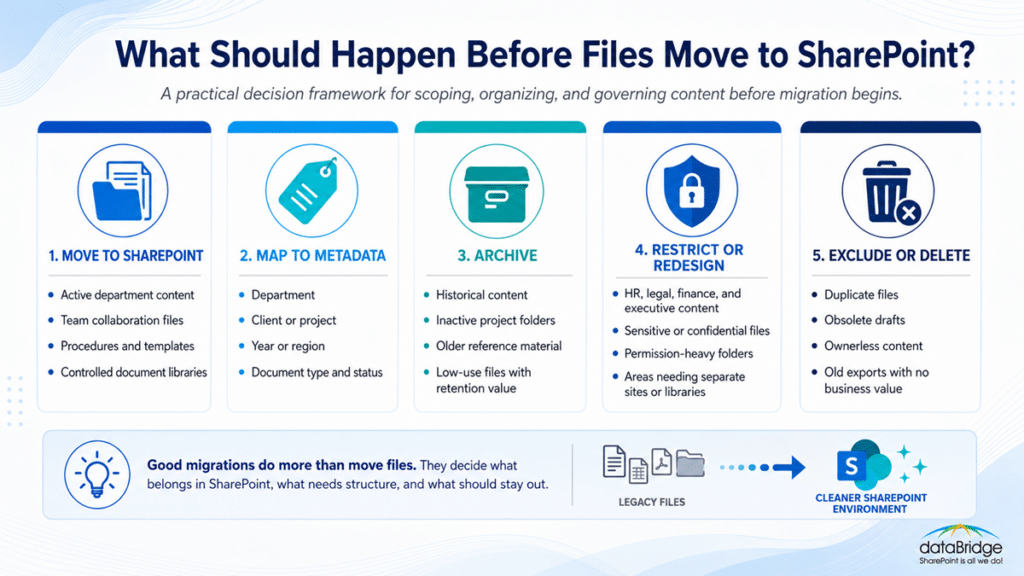
This decision framework keeps SharePoint from becoming another file share and gives users a cleaner, more trusted content environment after migration.
The best migration plan does not ask, “Can SharePoint store this?”
It asks, “Should SharePoint manage this?”
For the broader migration plan, use the downloadable file share migration worksheet to confirm source review, cleanup decisions, destination architecture, permissions, metadata, pilot testing, communication, and cutover readiness.
That distinction protects the long-term health of the environment.
Use the SharePoint Governance Maturity Scorecard before file share migration when you need to confirm whether the future SharePoint environment has enough ownership, permissions discipline, metadata structure, lifecycle control, and support to stay clean after content moves.
Network Drive to SharePoint Migration for Departments
Department drives are one of the most common file share migration scenarios.
They also create some of the hardest design decisions.
A department drive may include daily working files, internal procedures, leadership-only documents, reports, templates, forms, vendor files, financial records, and cross-department materials. That content rarely belongs in one flat destination.
dataBridge helps departments separate content by purpose.
For example:
- Team collaboration content may move into a department team site
- Published reference content may move into a communication site or knowledge area
- Restricted content may need its own library or site
- Templates may need a controlled location
- Old content may move to archive
- Shared cross-functional content may need a broader hub or enterprise location
This design creates clarity for users.
It also helps IT and business owners manage SharePoint after migration.
File Server to SharePoint Migration for Projects
Project folders often look simple until the migration starts.
A legacy project folder may contain contracts, plans, deliverables, emails, meeting notes, drafts, approvals, financial details, client materials, and archived versions. Some project content needs collaboration. Other content needs preservation. Certain files may require restricted access.
A strong project migration model defines the lifecycle first.
Questions should include:
- What starts a new project space?
- Who owns the project site or library?
- Which documents are active during the project?
- Which documents become final deliverables?
- Which content should be retained after closeout?
- Which content should move into a client or department archive?
- How should permissions change after the project ends?
- How will users find completed project examples later?
Project file migrations work best when the future state supports active delivery and long-term knowledge reuse.
That requires more than moving folders.
It requires a lifecycle model.
One distinction worth drawing: a file server is not the same as an on-premises SharePoint Server farm. When the source is an actual SharePoint 2016 or 2019 environment, the move carries workflows, forms, and custom code that a file-share migration never touches, which our on-premises SharePoint Server migration page covers along with the July 2026 support deadline driving it.
File Share Migration and SharePoint Search
Search is one of the biggest reasons to improve structure during migration.
Users do not want to browse twenty folder levels to find one document. They want to search, filter, and recognize the right result quickly.
However, SharePoint search depends on structure.
Metadata, permissions, naming standards, content quality, source authority, and information architecture all shape whether users trust what they find.
A file share migration can improve search by:
- Reducing duplicates
- Separating current and archived content
- Adding meaningful metadata
- Creating authoritative libraries
- Improving file names
- Cleaning stale content
- Clarifying permissions
- Designing useful views
- Establishing ownership
- Creating better navigation paths
If users cannot find content after migration, the project will feel unsuccessful even if the technical migration worked.
Our SharePoint Online Search Optimization services help organizations improve findability through metadata, managed properties, governance, content quality, and search-focused architecture.
File Share Migration and Copilot Readiness
Microsoft 365 Copilot makes file share migration decisions more important.
AI depends on the content environment underneath it.
If an organization migrates duplicate, stale, poorly owned, or over-permissioned content into SharePoint, Copilot may expose the same trust problems faster. It does not magically know which document is authoritative unless the environment gives it better signals.
That is why migration planning should consider:
- Which content is authoritative
- Which files are outdated
- Which documents should remain discoverable
- Which content needs restricted access
- Which libraries need owners
- Which metadata improves context
- Which archives should stay separate
- Which sites should be included in future AI experiences
Copilot does not create your information architecture.
It reveals whether you have one.
A file share migration is one of the best moments to clean the foundation before AI depends on it.
For the full argument, including where Graph connectors help and where they fall short, see our post on file share migration for Copilot.
File Share Migration and Document Management
Many organizations start with a simple goal: move files off a server.
The better goal is usually larger: create a stronger document management foundation in SharePoint Online.
That means thinking beyond storage.
A SharePoint document management model may include:
- Document libraries by business purpose
- Metadata and content types
- Version history
- Views for different audiences
- Permission models
- Approval or publishing patterns
- Retention expectations
- Naming standards
- Templates
- Ownership
- Search optimization
- Governance routines
File shares can store documents.
SharePoint can manage them.
That difference is the reason migration design matters.
For organizations building a broader content platform, our SharePoint Document Management System page explains how SharePoint can support structured document management, governance, search, metadata, and lifecycle control.
What dataBridge Delivers During a File Share Migration
Every migration scope is different, but a dataBridge file share to SharePoint migration engagement may include:
- Current-state file share assessment
- Stakeholder discovery sessions
- Source inventory review
- Folder structure analysis
- Content cleanup recommendations
- Migration scope definition
- Destination architecture design
- Site and library recommendations
- Metadata mapping model
- Permission review guidance
- Governance recommendations
- Migration wave plan
- Pilot migration support
- Migration execution support
- Error review and remediation planning
- User communication guidance
- Site owner coaching
- Post-migration validation checklist
- Adoption and support recommendations
- Future optimization roadmap
The deliverable is not just migrated content.
The deliverable is a more usable SharePoint environment.
The dataBridge File Share Migration Process
Assess and Discover
We begin by learning how your organization uses its file shares today.
This includes business context, source locations, user pain points, content volume, ownership, security concerns, and desired outcomes.
Good discovery prevents bad assumptions.
It also helps stakeholders understand that migration is a business change, not only an IT task.
Architecture and Governance
Once we understand the source, we design the destination.
This step defines sites, libraries, metadata, permissions, ownership, lifecycle expectations, and governance decisions.
The destination should be easier to manage than the source.
If it is not, the migration design needs more work.
Design and Build
Next, dataBridge helps configure or guide the SharePoint structure needed for migration.
This may include site templates, libraries, columns, views, navigation, permissions, and supporting governance elements.
The build should reflect how people work.
A technically correct structure can still fail if users cannot understand it.
Implementation
During implementation, content moves through planned migration waves.
Each wave should include source scope, destination mapping, timing, communication, testing, and validation.
This keeps the migration controlled.
It also gives the team a way to resolve issues before they spread across the full environment.
Adoption and Ownership
After content moves, users need to understand the new structure.
Site owners need to understand their responsibilities. Employees need to know where to store files, how to find content, and what changed from the file share model.
Adoption is not a poster.
It is the moment users decide whether the new environment makes their work easier.
Ongoing Optimization
A strong migration leaves room for improvement after launch.
Search behavior, permissions, metadata, content quality, and user feedback should be reviewed after real use begins.
That follow-through helps SharePoint mature instead of decay.
Why Organizations Choose dataBridge
dataBridge is a SharePoint-first consulting firm.
That focus matters during file share migration because SharePoint success depends on more than moving documents. It depends on information architecture, governance, permissions, metadata, adoption, search, and long-term ownership.
With more than 20 years of SharePoint consulting experience, dataBridge has seen what happens when organizations lift and shift old file shares into SharePoint without enough planning.
The pattern is predictable.
Users get a new destination, but the same confusion follows them.
Our approach is different. We help organizations make practical decisions before migration, so SharePoint becomes cleaner, more trusted, and easier to manage after go-live.
If you need help moving network drives, shared drives, or file servers into SharePoint Online, schedule a conversation with dataBridge.
File Share Migration Planning Questions
Before your organization starts a file share to SharePoint migration, answer these questions:
- Which file shares are in scope?
- Who owns each source area?
- Which content is active?
- Which content is outdated?
- Which content is duplicated?
- Which folders contain sensitive information?
- Which permissions are still valid?
- Which content should be archived?
- Which content should not move?
- Which folders represent business categories?
- Which folders should become metadata?
- Which areas need separate SharePoint sites?
- Which users will be affected first?
- Which business groups are ready for change?
- Which content needs validation after migration?
- Which governance rules will prevent future sprawl?
These questions reveal whether the migration is ready.
They also expose where the organization needs stronger ownership before content moves.
Signs Your File Share Is Ready for SharePoint Migration
Your organization may be ready when leaders and stakeholders agree that the file share no longer supports the way people work.
Common signs include:
- Employees cannot find the right version of documents
- New hires need help understanding folder structures
- Department folders contain too many exceptions
- Sensitive content is hard to identify
- Permissions are difficult to explain
- Remote access is frustrating
- Business teams want better collaboration
- IT wants to reduce file server dependency
- Leaders want stronger governance
- Search and Copilot readiness are becoming priorities
- The organization is already using Microsoft Teams and SharePoint
Readiness does not mean the file share is clean.
It means the organization is prepared to make decisions.
For a broader planning framework, use the Complete Guide to SharePoint Online Migrations to understand assessment, planning, governance, destination architecture, permissions, metadata mapping, adoption, validation, and post-migration follow-through.
Mistakes to Avoid During File Share to SharePoint Migration
Some migration mistakes are technical.
Most are structural.
Avoid these common problems:
- Copying every folder without review
- Preserving outdated permissions
- Moving stale content into active libraries
- Creating one giant document library
- Ignoring metadata
- Treating archive content like active content
- Failing to assign site owners
- Skipping pilot migrations
- Not testing user access
- Ignoring search behavior
- Leaving users without guidance
- Declaring success before validation
- Forgetting governance after go-live
The biggest mistake is thinking the file share structure is neutral.
It is not.
That structure shapes how users work, how content is found, how permissions behave, and how quickly the new environment becomes cluttered.
Our article on why most SharePoint migrations fail explains why migrations often break down when planning, governance, ownership, and adoption are treated as secondary concerns.
How File Share Migration Supports Long-Term SharePoint Success
A well-planned file share migration creates value beyond the initial move.
It can improve:
- Document findability
- Collaboration
- Information governance
- User adoption
- Permission clarity
- Search relevance
- Content ownership
- Department consistency
- Records readiness
- Copilot readiness
- SharePoint trust
- Microsoft 365 maturity
The migration becomes a foundation for a stronger digital workplace.
That is the real opportunity.
Your organization is not just leaving a file server.
It is deciding how content should work in Microsoft 365.
Start Your File Share to SharePoint Migration With a Better Plan
A file share to SharePoint migration can simplify collaboration, improve document management, reduce file server dependency, and create a stronger Microsoft 365 foundation.
It can also recreate years of folder sprawl if the project moves too fast.
The difference is planning.
dataBridge helps organizations assess file shares, design SharePoint destinations, clean up content, map metadata, simplify permissions, plan migration waves, support users, and establish governance after launch.
If you need to justify the move internally, the SharePoint migration ROI calculator estimates what retiring those file servers is worth in eliminated costs, reduced risk, and payback months. If your organization is preparing to migrate network drives, file servers, or shared folders into SharePoint Online, contact dataBridge to plan your file share to SharePoint migration.
Frequently Asked Questions
Can file shares be migrated to SharePoint Online?
Yes. File shares can be migrated to SharePoint Online using Microsoft migration tools, third-party migration tools, or a structured consulting-led migration process.
The tool matters, but the plan matters more. A successful migration should review content, permissions, ownership, metadata, destination architecture, user readiness, and post-migration validation before the main move begins.
Should we copy our file share folder structure exactly into SharePoint?
Usually, no.
Some folders may still make sense, but copying the entire file share structure often recreates the same problems in SharePoint. Deep folders, outdated naming, duplicate content, and unclear ownership should be reviewed before migration.
A better approach maps important folder context into SharePoint sites, libraries, metadata, views, and governance rules.
What is the best way to migrate a network drive to SharePoint?
The best way is to start with assessment and planning.
Review the source content, identify owners, clean up stale files, define the SharePoint destination, map permissions, pilot the migration, validate the results, and train users before broader rollout.
A migration tool can move content. It cannot replace business decisions about structure and governance.
Do file share permissions migrate to SharePoint?
Some migration tools can carry over permissions in certain scenarios, but that does not mean every permission should move.
File share permissions often contain years of exceptions. Before migration, organizations should review access, simplify groups, identify sensitive content, and decide which permissions should be redesigned for SharePoint.
How do we decide what becomes a SharePoint site or library?
The decision should be based on business purpose, ownership, permissions, lifecycle, audience, and content volume.
A department may need a team site. A controlled document collection may need a separate library. A restricted business process may need its own site. Archive content may need a different destination.
The right structure depends on how the content will be used after migration.
How does metadata help during a file share migration?
Metadata helps preserve business context that is often buried in folder paths.
For example, folder names may contain department, client, project, year, region, document type, or status. Moving those values into metadata can improve filtering, search, views, governance, and future automation.
Should we clean up files before migrating to SharePoint?
Yes.
Cleanup before migration reduces clutter, lowers risk, improves search, and helps users trust the new environment. Cleanup does not need to be perfect, but the organization should identify stale, duplicate, sensitive, ownerless, and archive content before migration waves begin.
Can file share migration improve Copilot readiness?
Yes, when the migration improves content quality, ownership, permissions, metadata, and source authority.
Copilot depends on the Microsoft 365 content environment underneath it. If SharePoint contains stale, duplicated, or over-permissioned content, AI experiences may surface information users should not trust.
How long does a file share to SharePoint migration take?
The timeline depends on content volume, source complexity, cleanup needs, permissions, stakeholder availability, destination design, testing requirements, and user readiness.
Small migrations may move quickly. Larger file share migrations usually need phased planning, pilot migrations, migration waves, validation, and adoption support.
What happens after the migration is complete?
After migration, the organization should validate content, review permissions, support users, confirm search behavior, gather feedback, and establish ongoing governance.
The first few weeks after launch are important. That is when users decide whether SharePoint is easier to use than the old file share.