

The Complete Guide to SharePoint Permissions
This guide explains how SharePoint permissions work across sites, libraries, folders, files, groups, and Microsoft 365-connected workspaces. It helps organizations reduce access confusion, limit oversharing risk, improve search trust, and design a permission model that supports governance, collaboration, security, and Copilot readiness instead of becoming a hidden source of risk.
Permissions determine who can access information, how they interact with it, and how securely collaboration happens across Microsoft 365. Yet permission problems rarely exist in isolation. They usually connect to structure, ownership, document management, external sharing, metadata, lifecycle rules, and governance.
A well-designed permission structure usually feels invisible. Users can access the content they need. Site owners understand their responsibilities. Administrators can explain how access is controlled. A poorly designed permission structure creates the opposite experience: constant access requests, inconsistent search results, unclear site ownership, and too many one-off exceptions.
Permissions are one part of a larger governance model. For the broader structure behind ownership, policies, lifecycle control, provisioning, external sharing, records, and review cadence, start with The Complete Guide to SharePoint Governance for Microsoft 365. External collaboration also needs its own guardrails, so SharePoint external sharing governance explains how guest access, sharing links, and site-level sharing rules should be managed before convenience turns into oversharing risk.
During migration planning, teams should pair permissions cleanup with a SharePoint migration checklist so legacy complexity is not copied into a new environment. When permissions affect controlled documents, a SharePoint document control model helps define who can draft, review, approve, publish, archive, and audit documents across the lifecycle.
What this guide covers
This guide explains:
- How SharePoint permissions work across sites, libraries, folders, files, and items
- Why groups, permission levels, inheritance, and ownership matter
- How broken inheritance, direct access, overbroad sharing, and owner sprawl create long-term risk
- How permissions affect search, governance, adoption, external sharing, document management, and Copilot readiness
- When permission issues should become a cleanup effort, governance sprint, migration planning item, advisory conversation, or larger SharePoint consulting project
Written by Michael Fuchs, Founder and CEO of dataBridge. Reviewed by Hayden Honerkamp, Senior Solution Architect and Client Success Lead, for SharePoint permissions, access control, collaboration structure, and Microsoft 365 governance accuracy.
Published: March 12, 2026
Last reviewed: May 29, 2026
Table of Contents
What Are SharePoint Permissions?
SharePoint permissions control who can access content and what actions they are allowed to perform.
Permissions determine whether users can:
- View documents
- Edit files
- Upload content
- Create lists
- Manage libraries
- Configure security settings
In practice, permissions are implemented through three core components:
- Permission levels
- SharePoint groups
- Permission inheritance
These elements work together to define how access flows throughout a SharePoint environment.
One of the most important design principles is that SharePoint was built to assign permissions primarily through groups rather than individuals. When administrators rely on groups instead of direct user assignments, access becomes easier to manage and significantly more consistent.
Permission architecture rarely exists in isolation. It works alongside information architecture, metadata classification, and governance policies. Organizations that design permissions without considering structure often discover that content organization problems lead directly to complicated access rules.
For example, environments with inconsistent classification frequently struggle with access visibility and document discovery. Designing metadata structures alongside permission models helps prevent this problem, which is why many organizations begin with a structured SharePoint Metadata Strategy Guide when evaluating architecture improvements.
SharePoint Permissions vs SharePoint Governance
SharePoint permissions are one part of governance, not the whole model.
Permissions answer:
- Who can access this site, library, folder, or file?
- What can that person or group do?
- Should access be inherited or unique?
- How should access be reviewed over time?
Governance answers the broader operating questions around ownership, structure, lifecycle, provisioning, metadata, external sharing, compliance, and review cadence.
That distinction matters because many organizations try to solve governance problems with permission changes. That usually creates more complexity, not more control.
For the broader map of related ownership, provisioning, lifecycle, external sharing, search, records, and Copilot readiness topics, use the SharePoint Governance Center as the central governance resource hub.
To evaluate permission risk as part of the larger governance model, use the SharePoint Governance Maturity Scorecard to score permissions alongside ownership, lifecycle, metadata, search, records, Copilot readiness, adoption, and support.
Why SharePoint Permissions Matter More Than Most Organizations Realize
Permissions are not just a security setting. They shape how people experience SharePoint every day.
If permissions are too restrictive, users cannot find the documents they need, collaboration slows down, and teams create workarounds outside the platform. If permissions are too broad, sensitive files become visible to more people than intended, governance weakens, and risk increases.
That tension is why permissions matter so much. They sit at the intersection of security, usability, governance, and search.
During migration planning, teams should pair permissions cleanup with a SharePoint migration checklist so access design is simplified before legacy complexity is copied forward.
When that legacy complexity comes from a file server, file share permission cleanup before SharePoint migration helps reduce inherited exceptions, direct user access, broken inheritance, and sensitive-folder risk before content becomes more discoverable.
A well-designed permission structure usually feels invisible. Users can access the content they need, site owners understand their responsibilities, and administrators can explain how access is controlled. A poorly designed permission structure feels confusing from every angle. Users request access constantly. Search results appear inconsistent. Site owners are unsure who can see what. Administrators spend too much time troubleshooting one-off permission issues.
If your team is trying to manage risky access patterns in SharePoint before broader AI use, our SharePoint Advanced Management guide explains how reporting, reviews, and discovery controls can help reduce exposure while permissions cleanup is still underway.
That same preparation also shapes whether a SharePoint agent feels trustworthy in practice, which is why our guide to SharePoint agents scope, sources, permissions, and ownership explains how access design, approved content sources, and clear ownership should be defined before rollout.
This is one reason permission architecture should be treated as a design decision, not an afterthought.
Understanding the SharePoint Permission Hierarchy
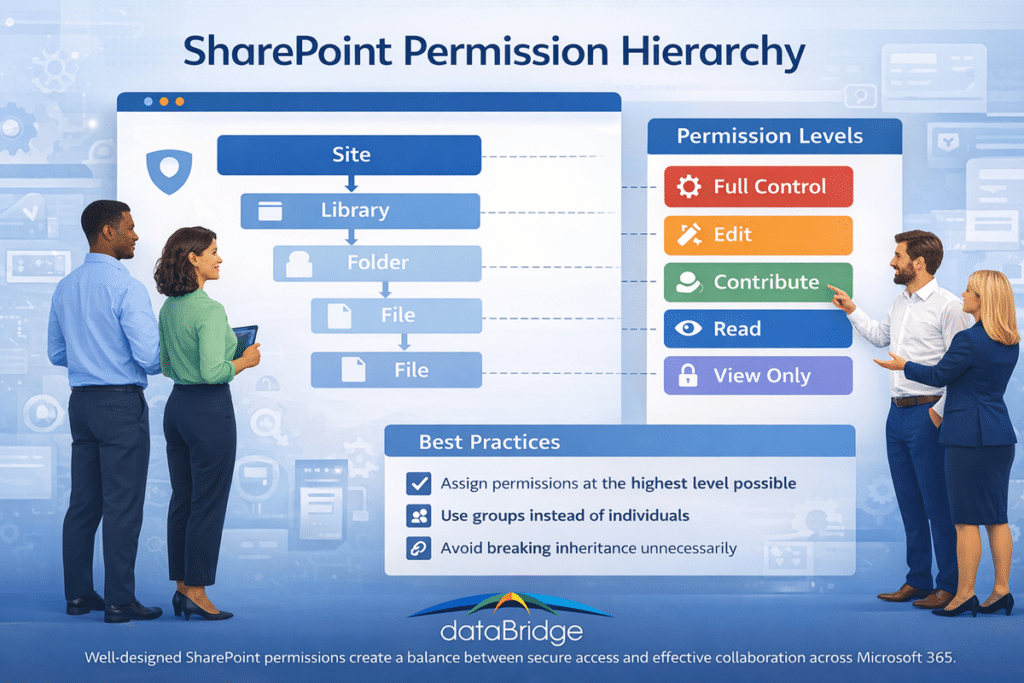
SharePoint permissions follow a hierarchical structure.
Permissions assigned at higher levels cascade down to lower levels unless inheritance is intentionally broken. This inheritance model also affects search visibility. SharePoint search is security trimmed, so users only see content they have permission to access. When inheritance is broken or access is managed inconsistently, it can create different SharePoint search results for different users across the same environment.
The typical hierarchy looks like this:
Site
↓
Library
↓
Folder
↓
File or Item
When permissions are applied at the site level, they automatically extend to all libraries, folders, and files within that site.
This inheritance model simplifies administration because administrators can manage access centrally rather than configuring permissions individually for each piece of content.
However, SharePoint also allows inheritance to be broken at any level.
For example:
- A document library may require restricted access
- A confidential folder may need limited visibility
- A specific document may need unique permissions
While these exceptions are sometimes necessary, excessive inheritance breaks can create complexity.
Organizations that rely heavily on unique permissions often struggle to answer questions such as:
- Who can access this document?
- Why does a specific user have access?
- Are sensitive files properly protected?
In most environments, maintaining inheritance wherever possible provides the most predictable and manageable permission structure.
This principle becomes even more important in environments with multiple departments, project teams, and business units. The more collaboration spaces you have, the more valuable a simple inheritance model becomes.
SharePoint Permission Levels Explained
Permission levels determine what actions users are allowed to perform within SharePoint.
SharePoint includes several built-in permission levels that provide different capabilities.
Full Control
Full Control grants complete administrative authority within a site.
Users with Full Control can:
- Modify permissions
- Manage site settings
- Create and delete lists and libraries
- Configure navigation and structure
This level should typically be limited to site owners or administrators responsible for governance.
Edit
Edit permissions allow users to add, modify, and delete content.
This level is commonly assigned to team members who collaborate regularly on documents and lists.
Contribute
Contribute permissions allow users to create and modify content while limiting structural changes to the site.
Organizations sometimes use this level to encourage collaboration while maintaining tighter control over site configuration.
Read
Read permissions allow users to view documents and lists without making changes.
This level is frequently assigned to employees who need visibility into shared resources but do not actively edit content.
View Only
View Only permissions allow users to view documents but may restrict downloading or editing capabilities.
This permission level is sometimes used for external sharing scenarios or sensitive documentation.
Understanding these permission levels matters because many SharePoint problems start when organizations grant a level that is broader than necessary. For example, giving too many users Full Control or Edit access may seem harmless at first, but over time it increases the chance of accidental changes, broken inheritance, and inconsistent security management.
In well-governed environments, permission levels are assigned intentionally and mapped to clear roles.
SharePoint Groups vs Direct Permissions
One of the most important best practices in SharePoint is assigning permissions through groups instead of individual users.
SharePoint sites typically include three default groups:
- Site Owners
- Site Members
- Site Visitors
Each group corresponds to a permission level.
Owners typically receive Full Control.
Members typically receive Edit permissions.
Visitors usually receive Read access.
This structure simplifies permission management. Administrators can add or remove users from groups rather than modifying permissions across multiple libraries and documents.
Direct permissions—where access is granted to individual users—can create long-term complexity. Over time, these individual assignments accumulate and make it difficult to understand who has access to content.
Organizations with mature governance practices usually avoid individual permission assignments whenever possible.
That does not mean direct permissions are never appropriate. In some scenarios, they may solve a legitimate short-term need. The problem is that short-term exceptions rarely stay short-term. Months later, administrators often find direct assignments that no one remembers creating.
Using groups by default helps prevent that drift.
SharePoint Groups vs Microsoft 365 Groups
Many administrators confuse SharePoint groups with Microsoft 365 groups.
SharePoint groups operate within a specific SharePoint site and manage permissions for that site.
Microsoft 365 groups operate across the broader Microsoft 365 ecosystem, including:
- Microsoft Teams
- Outlook
- Planner
- SharePoint
When a Microsoft Teams workspace is created, it automatically generates a Microsoft 365 group that controls membership across associated services.
Understanding the relationship between these group types is important for maintaining consistent access across Microsoft 365 environments.
This is where many organizations run into trouble. Someone assumes that membership in Teams automatically handles every permission scenario, while another team manually manages access inside SharePoint. The result is confusion, duplicated effort, and inconsistent ownership.
Organizations that standardize their group strategy tend to manage collaboration much more effectively. That is also why permission design often sits inside broader Microsoft 365 solutions planning instead of being treated as a narrow SharePoint-only task.
Permission Inheritance in SharePoint
Inheritance allows permissions assigned at higher levels to automatically apply to lower levels in the SharePoint hierarchy.
For example, if a user receives access at the site level, that access typically applies to all libraries and documents within the site.
This cascading model simplifies administration because administrators can configure permissions centrally.
However, inheritance can be broken when different access rules are required.
For example, a confidential library containing financial data might require restricted access compared to the rest of the site.
Breaking inheritance should be done carefully and intentionally. Environments with excessive inheritance breaks often become difficult to manage and audit.
Organizations designing scalable architecture often evaluate inheritance models alongside broader structural planning outlined in designing scalable SharePoint information architecture. This is especially important in environments where departments need different access patterns but still want a structure that remains understandable over time.
A useful rule of thumb is simple: break inheritance only when there is a clear business reason, and document why it was done.
The Problem with Unique Permissions
Unique permissions occur when inheritance is broken and custom access rules are applied to a library, folder, or document.
Examples include:
- Restricting a specific folder to a small group of users
- Granting special permissions to a single document
- Allowing individual users access to specific files
Although these adjustments may solve immediate collaboration needs, they accumulate over time.
Large environments often develop thousands of unique permission rules. This phenomenon is commonly referred to as permission sprawl.
Permission sprawl introduces several challenges:
- Administrators lose visibility into who can access information
- Permission audits become difficult
- Security reviews require significant manual effort
Reducing unique permissions is therefore one of the most important goals of SharePoint governance.
Organizations seeking to improve long-term security practices often align permission policies with broader governance strategies documented in the SharePoint Governance Guide. The same is true in more regulated environments, where permission design needs to support structured control, auditability, and secure collaboration. That is one reason secure access planning often connects naturally to SharePoint Architecture for Regulated Industries.
Unique permissions are not inherently bad. The issue is volume and inconsistency. A handful of well-documented exceptions may be reasonable. Hundreds of undocumented exceptions create risk.
How Permissions Affect SharePoint Search
Permissions directly influence search results in SharePoint.
Search only returns content that a user has permission to access. If a user lacks access to a document, it will not appear in search results.
This behavior protects sensitive information but can create confusion when users believe documents are missing.
In many environments, search complaints are actually permission issues rather than indexing problems.
Improving permission architecture therefore improves the overall reliability of SharePoint search.
Search effectiveness also depends heavily on structured classification systems. Content that is consistently tagged and organized can be filtered and discovered more easily, which is why permission architecture is often designed alongside SharePoint information architecture and metadata planning.
This is also where many organizations misunderstand search quality. They assume the search engine is underperforming when the real issue is that users simply do not have access to the right content. In other cases, they have access, but the information is organized so inconsistently that it remains difficult to find.
Search, permissions, and metadata work together. When one of those three areas is weak, the user experience suffers.
Permissions and Microsoft Copilot
Artificial intelligence tools such as Microsoft Copilot retrieve information from SharePoint and other Microsoft 365 services.
Copilot respects existing permission boundaries, meaning it can only access information users are authorized to view.
However, poorly designed permission structures can still produce unexpected results.
That is also why it helps to separate access control from content protection and retention decisions. Our guide on retention labels vs sensitivity labels vs permissions in SharePoint explains where each control belongs and why confusing them usually leads to weak governance and more user friction.
When sensitive content needs protection beyond access control, SharePoint sensitivity labels can help classify and protect files or workspaces without replacing the permission model.
For example:
- Documents shared broadly may appear in AI responses
- Legacy files with outdated permissions may become visible again
- Inconsistent access rules may expose sensitive content
Organizations preparing for AI adoption often review their environments through Copilot Readiness for SharePoint to ensure content permissions align with security expectations.
This matters more now than it did a few years ago. In the past, a file with overly broad access might simply sit unnoticed in a library. With AI tools surfacing and summarizing content more actively, weak permission design becomes easier to expose.
That does not mean AI creates the permission problem. It means AI makes existing permission problems more visible.
For organizations preparing for Copilot, SharePoint Data Access Governance reports can help identify where broad access, sensitive content exposure, external sharing, and access drift should be reviewed before permission cleanup begins.
Common SharePoint Permission Mistakes
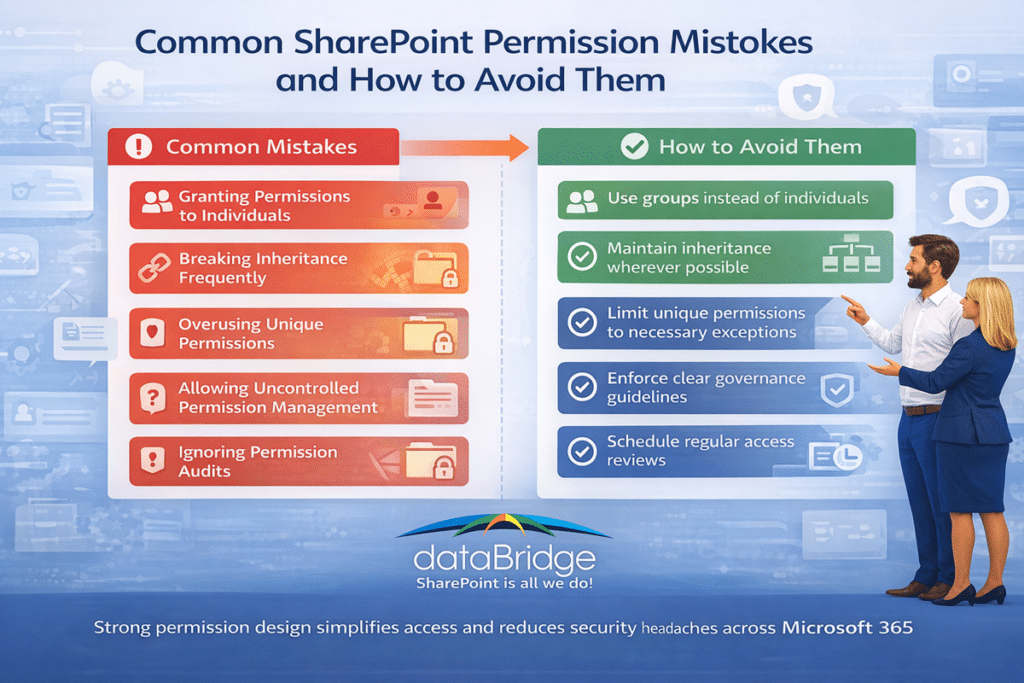
Many organizations repeat the same permission mistakes as their environments grow.
These issues often appear gradually but create long-term complexity.
Granting Permissions to Individuals
Direct user permissions accumulate over time and complicate management.
Breaking Inheritance Frequently
Frequent inheritance breaks create unpredictable permission structures.
Overusing Unique Permissions
Unique permissions should be used sparingly and intentionally.
Allowing Uncontrolled Permission Management
Without governance guidelines, site owners may apply inconsistent access rules.
Ignoring Permission Audits
Periodic reviews help ensure that permissions remain appropriate as teams evolve.
Another common mistake is trying to solve structural problems with permissions. For example, if content is poorly organized, administrators may start creating complex access exceptions to compensate. That approach rarely scales well.
Strong permission design should complement structure, not replace it.
SharePoint Permission Best Practices
Organizations that manage permissions well usually follow a few consistent practices.
Many organizations find it helpful to think about SharePoint permissions as a repeatable framework rather than a collection of individual settings.
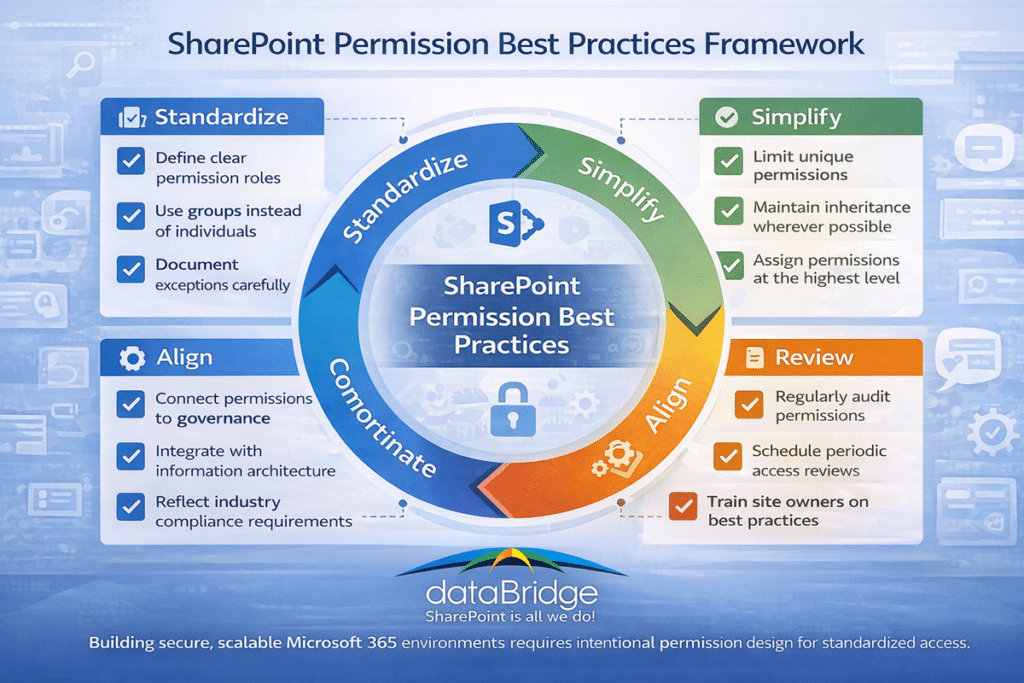
- Use groups instead of direct user permissions
- Maintain inheritance wherever possible
- Limit Full Control to a small number of owners
- Review permissions regularly
- Document exceptions when inheritance is broken
- Align permission design with governance policies
- Standardize site ownership responsibilities
These practices are not complicated, but they are disciplined. That is often the difference between environments that stay manageable and environments that slowly become confusing.
The “review regularly” step is the one that slips first. Our guide to whether Entra access packages are worth it explains how bundled grants, automatic expiry, and scheduled recertification keep that review from depending on someone remembering.
In many successful environments, administrators also define repeatable permission models for common site types. For example, a department site may follow one pattern, while a project site follows another. This reduces guesswork and makes access easier to explain.
Designing Permission Architecture for Intranets
Permissions play an important role in intranet architecture.
Intranets typically contain a mix of:
- Company-wide information
- Departmental resources
- Project collaboration spaces
- Confidential documentation
Each category may require different access rules.
For example, company-wide news may be accessible to all employees, while departmental content may restrict editing rights to a specific team.
Designing these structures intentionally helps maintain secure collaboration environments.
Organizations exploring industry-specific intranet architecture models often review examples across SharePoint Intranet Solutions by Industry. This becomes especially useful when access requirements differ between healthcare, financial services, manufacturing, nonprofit, and professional services environments.
A strong intranet is not just visually organized. It is permissioned clearly. Users should understand where broad access exists, where team collaboration happens, and where restricted content belongs.
Permissions, Compliance, and Regulated Environments
Permissions become even more important in regulated environments.
Organizations operating in healthcare, finance, legal services, government, or other compliance-sensitive sectors often need tighter controls around access, retention, and auditability.
In these environments, permission design cannot be casual. It must reflect policy requirements and support documented governance practices.
This does not always mean the environment needs to be locked down aggressively. It means access rules must be intentional, explainable, and aligned with the way regulated content is managed. The more sensitive the information, the more important it becomes to understand exactly where access is granted and why.
That is why permission planning in regulated environments often connects naturally with industry-specific SharePoint solutions and structured architecture planning.
Real-World Permission Challenges
In real environments, permission issues often show up in familiar ways.
A department says search is broken because staff cannot find documents they need. A project team complains that external partners should see one folder but not another. A site owner grants direct access to a few users to solve the issue quickly. Later, no one remembers who was added or why.
This pattern repeats constantly in organizations that do not have a clear permission model.
The issue is rarely one bad decision. It is usually the accumulation of many small decisions made without a standard.
That is one reason real-world examples matter so much. Organizations evaluating permission redesign often want proof that better architecture leads to cleaner collaboration and less confusion. Reviewing Client Success stories can help reinforce how structural decisions improve outcomes beyond just technical cleanliness.
When to Review Your SharePoint Permissions
For organizations preparing for Copilot, our SharePoint permission review checklist for Copilot provides a practical review sequence for high-risk sites, guests, broad groups, broken inheritance, and sharing links.
You can also download the Permission Review Worksheet (PDF) as a practical worksheet for reviewing high-risk sites, broad groups, guest users, broken inheritance, and sharing links.
Organizations should review their permission architecture if they experience:
- Frequent access requests
- Confusion about who owns sites
- Missing search results
- Concerns about sensitive information exposure
- Large numbers of unique permissions
These signals often indicate that permission structures evolved without a clear architectural framework. If you are defining how permissions fit into day-to-day governance structure, our SharePoint Governance Framework explains the roles, rules, and controls that support secure collaboration at scale.
Many organizations begin addressing these issues through a structured SharePoint Discovery & Readiness Assessment that evaluates architecture, governance, and security practices.
A permission review is especially valuable before major changes such as:
- An intranet redesign
- A migration to modern SharePoint
- A Microsoft Teams rollout
- A Copilot readiness initiative
- A governance refresh
Reviewing permissions before these efforts usually saves time later. The stakes climb when moving between tenants in a merger or divestiture, where accounts re-home to new identities and direct grants, external links, and broken inheritance rarely survive the move cleanly – so the access audit has to happen before content crosses tenants, not after.
For an existing SharePoint intranet redesign, permission review should happen alongside navigation, content ownership, page standards, and search planning so the improved experience is easier to trust after relaunch.
Frequently Asked Questions About SharePoint Permissions
What are SharePoint permissions?
SharePoint permissions determine who can access content and what actions they are allowed to perform within a site, library, or document.
What is permission inheritance?
Inheritance allows permissions assigned at higher levels to automatically apply to lower levels such as libraries and files.
Should permissions be assigned to individuals?
Best practice is to assign permissions through SharePoint groups rather than individual users whenever possible.
What are unique permissions?
Unique permissions occur when inheritance is broken and custom access rules are applied to specific libraries, folders, or documents.
How do permissions affect SharePoint search?
Search results only include content that users have permission to access.
What is the difference between SharePoint groups and Microsoft 365 groups?
SharePoint groups manage access within a specific SharePoint site. Microsoft 365 groups manage membership across multiple Microsoft 365 services such as Teams, Outlook, Planner, and SharePoint.
When should inheritance be broken in SharePoint?
Inheritance should only be broken when there is a clear business need for different access rules, such as confidential content or restricted collaboration areas.
Why are direct user permissions a problem?
Direct user permissions become difficult to track over time, especially in large environments. They increase administrative overhead and make governance more difficult.
Can poor permissions affect Microsoft Copilot results?
Yes. Copilot respects existing permissions, so if files are shared too broadly or inconsistently, users may see information surface in ways the organization did not expect.
How often should SharePoint permissions be reviewed?
Organizations should review permissions regularly, especially for high-value sites, sensitive content areas, and environments experiencing growth, restructuring, or governance changes.
Final Thoughts
SharePoint permissions are one of the most important elements of a secure and scalable Microsoft 365 environment.
When permissions are structured intentionally, users can collaborate freely while sensitive information remains protected. When permissions evolve without governance, environments often become difficult to manage and audit.
Organizations that invest in clear permission architecture—alongside metadata strategy, governance planning, and information architecture—are far more likely to maintain SharePoint environments that support long-term collaboration and security.
Understanding how permissions work is the first step toward building a SharePoint environment that scales with your organization.
Just as important, permission design should not live in isolation. The strongest environments connect access control with structure, governance, search, and real business workflows. That is where SharePoint starts feeling less like a collection of sites and more like a well-managed platform.