eDiscovery readiness: what many organizations assume vs what actually matters
What many organizations assume
- Purview is enabled, so the organization is ready
- Legal or compliance can sort it out when a case appears
- Teams content is easy to identify because users know where they worked
- Retention settings alone create investigative readiness
- IT can piece the environment together quickly when needed
What actually matters
That gap is where most eDiscovery stress begins.
Why this matters more than many organizations expect
eDiscovery work usually appears at the worst time. A legal request, HR issue, regulatory concern, or internal investigation rarely arrives when the environment is clean, current, and fully documented.
More often, organizations face that moment while dealing with old SharePoint sites nobody owns, Teams sprawl across departments, inconsistent naming, broken permission inheritance, unclear retention decisions, and duplicate content across SharePoint, Teams, and OneDrive.
This is where the gap becomes obvious.
Purview can support an investigation. It cannot fix years of unmanaged content structure in the moment.
That distinction matters. Tools support readiness. They do not replace it.
What Microsoft Purview eDiscovery actually covers
Microsoft Purview eDiscovery is designed to support investigations across Microsoft 365 content. For most organizations, that means the conversation quickly moves beyond one platform. Very few real investigations stay neatly inside SharePoint or neatly inside Teams.
That matters because content connected to Teams often points back to SharePoint and OneDrive. A Team may look simple from the front end. Under the surface, the content model is more layered.
A modern investigation may involve files stored in SharePoint team sites, shared files tied to OneDrive, group-connected workspaces, department sites with inconsistent ownership, and project environments that were never fully governed.
In other words, the first investigation often exposes how your Microsoft 365 environment actually works.
Why SharePoint and Teams are harder than they look
SharePoint and Teams create a false sense of simplicity.
Users see a team, a channel, a document library, or a shared file. Investigations do not see the environment that way. Investigations depend on data sources, preservation, scope, access, and defensible search decisions.
That is one reason we keep coming back to the same point: structure matters more than most people expect.
When the environment is well governed, the case team can move faster. When ownership is fuzzy and content lives everywhere, every step gets harder.
That is also why strong SharePoint governance and a scalable information architecture do more than improve usability. They also reduce investigative friction when scrutiny arrives.
The biggest readiness mistake: treating eDiscovery like a last-minute tool problem
Many organizations wait until an investigation begins before asking whether they are ready.
That is usually too late.
At that point, teams are forced to answer high-stakes questions quickly. Which sites matter? What Team contains the relevant channel files? Which OneDrive belongs to the departed employee? What group owns the project workspace? Which permissions were in effect? What content is still active, archived, or subject to retention? Which administrators can access the case?
Those are not product setup questions. They are governance and architecture questions.
From experience, the organizations that respond best are rarely the ones with the most complex tooling. They are the ones with clearer ownership, cleaner information architecture, more disciplined permissions, and better content lifecycle practices.
A quick scenario: what the first investigation often looks like
A department leader leaves unexpectedly. Soon after, HR and Legal need to review project files, Teams conversations, shared documents, and related records tied to that person’s work.
At first, the request sounds simple.
Then the real questions appear. Which Team held the active discussions? Were the key files stored in the Team’s SharePoint site or in someone’s OneDrive? Who had access to the workspace? Which content was duplicated across multiple locations? Was any of it subject to retention or a records requirement?
This is where weak structure creates immediate friction.
We have seen organizations lose valuable time not because Microsoft 365 lacked the right capability, but because nobody could explain the environment with confidence. That is usually the real problem.
What to prepare before your first Microsoft Purview eDiscovery case
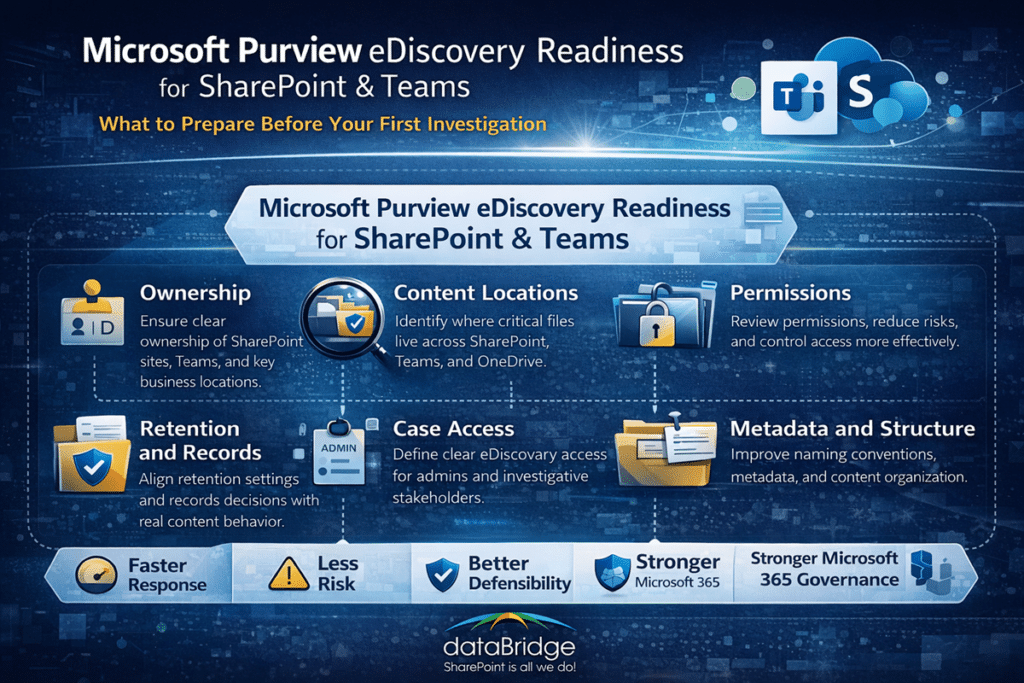
1. Know your critical SharePoint and Teams locations
Start with visibility.
You should know which SharePoint sites, Teams, Microsoft 365 Groups, and OneDrive accounts are most likely to matter in an investigation. That does not mean documenting every corner of the tenant in perfect detail. It does mean identifying high-value locations before urgency forces guesswork.
Focus first on executive and leadership collaboration spaces, HR-related sites and Teams, finance and contract repositories, compliance and records libraries, project or client workspaces, department Teams with sensitive operational content, and heavily used OneDrive accounts tied to key roles.
A common mistake is assuming teams can map this quickly under pressure. They often cannot.
2. Establish clear ownership for sites and Teams
Ownership gaps create investigative gaps.
Every critical site and Team should have named business ownership and administrative accountability. When nobody clearly owns a workspace, decisions around access, retention, classification, and preservation become harder to trace and harder to defend.
This is one reason dataBridge pushes structure before convenience. Easy collaboration without clear ownership almost always creates downstream governance problems.
If your environment still has abandoned workspaces, duplicate Teams, or legacy sites with unclear purpose, that is a readiness problem now, not later. Organizations that invest in a practical governance framework usually respond more effectively when compliance pressure shows up.
3. Clean up permissions before they become evidence questions
Permissions deserve more attention in this conversation than they usually get.
When an investigation starts, access history and content exposure can become part of the issue. Overly broad access, broken inheritance, one-off sharing decisions, and unmanaged site membership can all complicate response.
Strong readiness includes reviewing who has access to critical sites and Teams, reducing unnecessary broad permissions, limiting owner sprawl, documenting exceptions, and aligning site and Team access with business function.
If permissions are already inconsistent, your first investigation will not just ask what content exists. It may also reveal who could see it and whether that exposure was appropriate.
That is why a mature SharePoint permissions model should support compliance readiness, not only daily collaboration.
4. Understand where content actually lives across workloads
This is where many organizations get surprised.
A Teams-centric business often assumes the work lives in Teams. In reality, the files behind Teams collaboration frequently live in SharePoint and OneDrive. That means eDiscovery readiness depends on understanding the storage model behind the user experience, not just the interface people click every day.
That makes content mapping important.
You should be able to explain which files live in SharePoint team sites, which shared files are tied to OneDrive, which Teams are group-connected and business-critical, which departments rely on channel-based file storage, and which workspaces duplicate content across multiple locations.
Without that clarity, collections get broader than they need to be, review gets more expensive, and response becomes less precise.
Organizations that already treat document management in SharePoint as a governed operating model usually have a major advantage here because content locations are easier to explain and easier to defend.
5. Align retention and records decisions with real content behavior
Investigation readiness does not require turning every collaboration space into a records vault.
It does require clarity.
Your organization should understand which content is transient, which content is operational, which content is regulated, and which content may need long-term preservation. A strong records management and retention strategy makes that easier because it reduces ambiguity before a case begins.
Disposition review also supports that clarity. When SharePoint content reaches the end of its retention period, a documented Microsoft Purview disposition review process helps organizations avoid deleting content casually or preserving everything indefinitely.
This is where experience matters. Overly simple retention plans often look neat in policy decks and fail in the real environment. On the other side, overly complex models collapse under administration.
The better answer is a practical model that matches business value, compliance requirements, and actual user behavior.
6. Review your admin and case access model
Not everyone who can help with SharePoint or Microsoft 365 administration should have broad eDiscovery access.
Investigations should be controlled carefully. That is a healthy discipline, not an inconvenience.
Your organization should define who can create or manage cases, who can approve access, who can participate in legal or compliance matters, who should remain outside investigative workflows, and how guest or external access is handled if needed.
Too many organizations leave this blurry until the first urgent request lands. That usually leads to rushed permissioning, overbroad access, or confusion about who is actually authorized to act.
A strong control model also reinforces the kind of operational discipline discussed in SharePoint security and compliance planning, where access, governance, and content risk need to work together.
7. Prepare for holds with realistic expectations
Holds are serious. They also require precision.
Your team should understand which locations may need preservation, which custodians are relevant, which assumptions are unsafe, which cross-workload relationships need to be mapped, and which stakeholders must be involved before hold decisions are made.
This is not a place for guesswork.
That is another reason governance and content clarity matter so much. When structure is weak, organizations often cast too wide a net. When structure is stronger, they can respond more deliberately.
8. Improve naming, metadata, and content clarity
Investigations get harder when content is poorly named and poorly organized.
That sounds obvious, yet it is often ignored.
Weak naming conventions, inconsistent metadata, unclear folder structures, and unmanaged site sprawl all make search and review harder. They also increase noise. That can slow down triage, widen search results, and create unnecessary review effort.
Cleaner content architecture helps in three ways. It makes important information easier to locate. Reduces ambiguity during search and review. It supports more defensible governance over time.
That is another reason a strong metadata and information architecture strategy is not only about findability. It also supports operational control.
9. Make audit and investigation readiness part of the same conversation
eDiscovery should not live in a silo.
Investigations often begin with a concern, a complaint, a signal, or an unexplained event. They do not always begin with a neatly defined legal matter.
When audit visibility, permissions hygiene, and governance maturity are weak at the same time, investigative response gets much harder.
That is why organizations should connect eDiscovery readiness to broader Microsoft 365 governance, not treat it as a separate compliance island. In practice, that means your governance approach, your permissions model, and your retention strategy should reinforce one another.
A practical readiness checklist for SharePoint and Teams leaders
Use this checklist to assess where you stand today.
Governance and ownership
- Critical SharePoint sites have named owners
- Business-critical Teams have clear ownership
- Abandoned or duplicate workspaces are being addressed
- High-risk content areas are known
Content structure
- Core sites and Teams are organized consistently
- Naming conventions are usable and followed
- Metadata supports content clarity where needed
- Team and site purpose is understandable without tribal knowledge
Permissions and access
- Access to sensitive locations is reviewed regularly
- Owner sprawl is limited
- Unique permissions are controlled carefully
- Oversharing risks are being reduced
Retention and records
- Major content categories have defined lifecycle expectations
- Records and retention decisions align with business reality
- High-value content is not being left unmanaged
- Compliance-sensitive libraries and sites are known
Investigation readiness
- Key stakeholders know who would respond first
- eDiscovery-related access is defined deliberately
- Critical data sources can be identified quickly
- Teams, SharePoint, and OneDrive relationships are understood
- Hold assumptions have been reviewed before urgency arrives
If too many of those boxes remain unchecked, your environment is telling you something important.
Where this connects to Copilot readiness and broader Microsoft 365 control
This topic also matters for AI rollout.
Organizations cannot separate investigation readiness from broader content control forever. The same environment issues that make eDiscovery harder often create Copilot risk, governance friction, and information exposure concerns.
That includes unclear permissions, weak ownership, unmanaged content sprawl, redundant workspaces, inconsistent metadata, and legacy sites with unclear business value.
A cleaner environment supports better governance, better findability, and better control. That is why Copilot-ready information architecture and a scalable document management strategy belong in the same strategic conversation as eDiscovery readiness.
Common signs your organization is not ready
You do not need a formal investigation to see the warning signs.
Watch for these:
- Nobody can explain which Teams matter most
- Site ownership is outdated or missing
- Permissions have not been reviewed in a meaningful way
- Sensitive content lives in too many places
- OneDrive has become an unofficial records system
- Teams sprawl has outpaced governance
- Retention decisions exist on paper but not in practice
- Legal, compliance, and IT do not share the same view of the environment
Those signs usually point to a structural issue, not a tooling gap.
Our view: investigation readiness is a SharePoint and Teams maturity issue
This is the core point.
Organizations do not become investigation-ready because Purview exists in the tenant. They become investigation-ready because content, ownership, access, governance, and lifecycle decisions are mature enough to support the tool.
That is a different standard. It is also the standard that matters.
We have seen the same pattern repeatedly across Microsoft 365 environments. The organizations that handle pressure best usually did the quieter work first. They clarified site ownership. Cleaned up permissions. They aligned governance. Treated records and collaboration as connected disciplines. They built structure before urgency forced it.
That is not flashy advice. It is dependable advice.
If your organization is trying to improve governance, reduce risk, and prepare SharePoint and Teams for real-world compliance pressure, contact dataBridge.
Final thoughts
Your first Microsoft Purview eDiscovery matter should not be the moment your organization learns how its SharePoint and Teams environment actually works.
By then, the stakes are already too high.
In our experience, investigation readiness is one of the clearest tests of whether SharePoint governance is real or only documented. Many organizations say they have structure. Fewer can prove it when an urgent request forces them to identify content, explain access, and preserve the right information quickly.
That is why this work matters beyond compliance.
When you map critical locations, clarify ownership, reduce permission risk, align retention with reality, and define case access deliberately, you are not only preparing for a possible investigation. You are also building a cleaner, more controlled Microsoft 365 environment that performs better every day.
We have seen this repeatedly. The organizations that respond best under pressure usually did the unglamorous work first. They cleaned up the environment before they needed to defend it.
That is the real takeaway. Investigation readiness is not a last-minute Purview project. It is the result of disciplined SharePoint, Teams, and Microsoft 365 governance over time.
If you want help improving SharePoint, Teams, and Microsoft 365 readiness before your first investigation, contact dataBridge.