Education SharePoint Intranet Services
A SharePoint intranet for education should make it easier for faculty, staff, and administration to find trusted policies, resources, and campus information without creating departmental sprawl. dataBridge designs education intranets that improve campus communications, strengthen policy access, support decentralized ownership, and bring clearer governance to Microsoft 365.
Schools, colleges, and universities need more than a polished homepage. They need a structured intranet that supports academic departments, administrative teams, committee work, and FERPA-aware access decisions. dataBridge helps education organizations build SharePoint intranets that stay usable, consistent, and manageable as content grows.
This page focuses on education intranet needs such as faculty and staff resources, campus communications, administrative services, committee documentation, policy access, and FERPA-aware information management. For the broader intranet delivery model, use SharePoint Intranet Consulting Services; for planning guidance, use the modern SharePoint intranet guide.
Education Intranets Break Down When Decentralization Turns Into Sprawl
Most education intranets do not fail because SharePoint lacks capability. They fail because the institution never defines how information should be organized across schools, departments, committees, and administrative functions.
That is where the real friction starts.
Faculty cannot find the current policy version. Staff rely on old links. Departments build their own navigation patterns. Committees store important files in isolated workspaces. Campus announcements live in too many places. Search becomes inconsistent because the content underneath it is inconsistent.
In education, intranet problems are rarely just design problems. They are usually structure problems first.
Organizations planning a broader modernization effort often start with our Guide to Building a Modern SharePoint Intranet and then move into a more tailored SharePoint Intranet Consulting Services engagement when the campus environment needs a more deliberate architecture.
What Makes an Education Intranet Different
Education environments have a few realities that make intranet planning more complex than other sectors.
Decentralized Ownership Is Normal
Academic departments, student-facing teams, administrative offices, and shared governance groups all create and manage content differently. A strong intranet has to support that reality without letting every section of the institution become its own isolated island.
Policy and Reference Content Must Stay Trustworthy
Faculty handbooks, HR resources, IT guidance, academic calendars, operational procedures, and institutional policies all need clear ownership and publishing discipline. When people stop trusting whether a page is current, they stop using the intranet.
Committee and Governance Work Is Part of Daily Operations
Education institutions often rely on councils, committees, senates, boards, and cross-functional governance groups. That means the intranet cannot only serve as a news destination. It also needs to support structured collaboration and document visibility behind the scenes.
Compliance Still Matters
FERPA changes the access conversation. So do records expectations, grant documentation, audit support, and institutional governance standards. Permissions, metadata, retention decisions, and site ownership need more discipline than many campuses expect at the start.
Education Intranet Needs That Shape SharePoint Design
Education intranets need to support faculty, staff, administrators, departments, committees, student-service teams, and campus operations with clear access to trusted resources.
Common needs include:
- Faculty and staff resources
- Academic and operational policies
- Committee and governance documentation
- IT, HR, and finance guidance
- Campus communication
- Department sites
- Review cycles for institutional content
Education Intranet Requirements: Departments, Documents, Governance, and AI Readiness
An education SharePoint intranet should support distributed ownership without allowing every school, department, committee, and administrative office to become its own disconnected island. Faculty, staff, administrators, and student-service teams need reliable access to institutional information, but education environments also need enough flexibility for local departments to manage their work.
Education intranet planning usually includes academic affairs, HR, finance, IT, facilities, communications, student services, registrar functions, advancement, compliance, institutional leadership, faculty governance, and department-level teams. The intranet should give these groups practical ownership while still protecting navigation, search, accessibility, permissions, and content standards.
Common education document types include:
- Faculty handbooks
- Staff resources
- Institutional policies
- Academic calendars
- Committee materials
- Accreditation evidence
- HR and finance forms
- IT guidance
- Student-service procedures
- Campus communication resources
The governance problem is usually decentralization without enough structure. Departments need autonomy, but the institution still needs consistent navigation, publishing rules, metadata, review cycles, and access decisions. Without those guardrails, faculty and staff stop trusting the intranet because they cannot tell whether a page, policy, or form is current.
An education intranet should support use cases such as faculty resources, staff communication, policy access, committee work, accreditation support, department sites, employee onboarding, and campus operations. Document management use cases often include policy libraries, committee documentation, accreditation evidence, version control, review dates, and controlled access for sensitive materials. These needs connect naturally to the broader SharePoint Document Management System model.
Copilot readiness has a specific education concern: not every accessible document should become easy to summarize or reuse. Student-sensitive content, HR information, committee materials, and institutional records need clear permissions and ownership before AI tools are expanded. A Copilot Readiness for SharePoint review helps institutions evaluate content sprawl, source authority, access governance, and metadata before Copilot becomes part of faculty or staff workflows.
What this looks like in practice: a college or university may begin with a request to improve campus communication. dataBridge would also evaluate department structures, policy ownership, committee workspaces, FERPA-aware access decisions, and search behavior. A thoughtful SharePoint Governance Guide approach helps preserve departmental flexibility without sacrificing institutional trust.
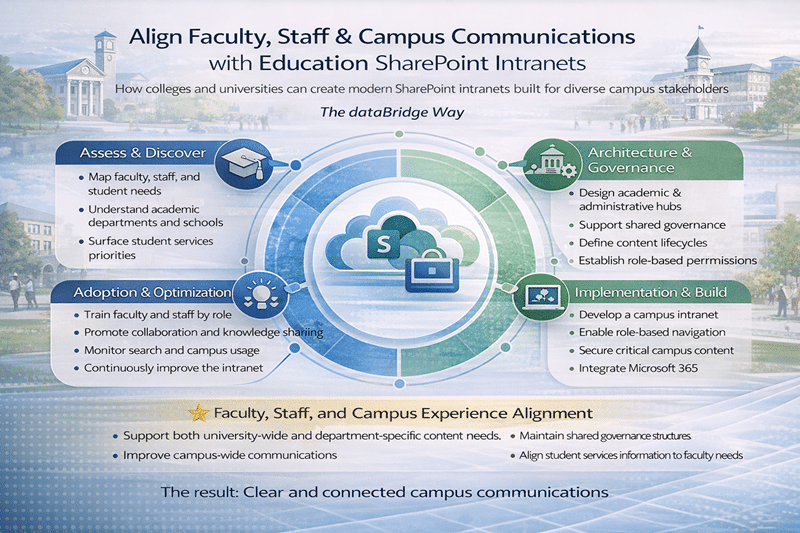
How dataBridge Approaches Education SharePoint Intranets
At dataBridge, we do not treat an education intranet as a homepage project. We treat it as an operating environment for the institution.
That changes the work.
We look at how content moves across campus, who owns it, where people expect to find it, and what should remain centrally governed versus locally managed. That is the same practical thinking behind The dataBridge Way and our SharePoint intranet consulting approach.
What We Commonly Help Education Clients Solve
Faculty and Staff Resource Hubs
We design intranet experiences that make day-to-day resources easier to find for the people who actually use them. That often includes faculty support resources, employee self-service content, institutional forms, departmental tools, and operational guidance.
Academic Affairs and Administrative Content
Academic affairs, registrar functions, HR, finance, IT, facilities, communications, and institutional leadership all need a place in the intranet. The key is giving each area enough flexibility to manage its content while keeping the overall environment consistent.
Policy Libraries That People Can Actually Search
A policy library should not feel like a filing cabinet. We help institutions create structured, searchable policy areas with clearer ownership, better metadata, and stronger version control so faculty and staff can find the right document without guessing.
Institutions that need stronger findability usually benefit from aligning intranet work with SharePoint Information Architecture & Metadata and a more deliberate SharePoint Metadata Strategy Guide.
Committee, Governance, and Accreditation Support
Education intranets often need to support committee workspaces, institutional governance materials, accreditation evidence, and audit-ready document areas. That work usually demands more structure than a standard communications intranet build.
Department Templates Without Department Chaos
One of the biggest education challenges is preserving departmental autonomy without accepting a fragmented user experience. We help institutions create templates, content standards, and governance guardrails so schools and departments can manage their own areas without breaking navigation, search, or content consistency across campus.
Education Intranet Priorities We Focus On
Campus Communications
People should know where official announcements live and which messages matter. We help institutions reduce communication fragmentation by creating clearer publishing models and more predictable content destinations.
Search and Findability
Search quality in SharePoint reflects content quality. If pages, documents, and policies are poorly structured, search becomes unreliable. We help improve findability by fixing the architecture underneath the experience, not just the interface on top.
Governance That Fits Higher Education Reality
Education needs a balance between central standards and distributed ownership. Heavy-handed control usually fails. No governance fails faster. The right model gives departments enough freedom to operate while protecting consistency where it matters most.
Institutions working through that balance often pair intranet planning with a broader SharePoint Governance Framework or use the SharePoint Governance Maturity Model to assess where their environment stands today.
FERPA-Aware Access Decisions
Not every education intranet project is compliance-heavy, but every institution should think clearly about what belongs in broadly shared environments versus restricted areas. Student-sensitive content, employee data, committee materials, and operational records should never be governed casually.
That is why architecture matters before expansion. Our SharePoint Architecture for Regulated Industries approach is often relevant when institutions need stronger control around permissions, metadata, and long-term content handling.
Where SharePoint Fits in the Education Workplace
A well-structured SharePoint intranet can support much more than a campus homepage.
It can become the place where faculty and staff go for:
- Current institutional policies
- Department and school resources
- Committee and governance materials
- HR and IT support information
- Internal announcements and campus updates
- Accreditation and audit-related documentation
- Shared templates, forms, and process guidance
That is a better model than scattering critical information across email threads, disconnected Teams, legacy file shares, and departmental one-offs.
Preparing Education Environments for Copilot
Many education organizations are also thinking about Copilot. That raises the stakes for intranet structure.
If permissions are loose, metadata is inconsistent, and authoritative content is hard to identify, AI does not fix the problem. It amplifies it.
That is why education intranet planning often overlaps with Copilot Readiness for SharePoint and stronger content discipline across Microsoft 365. Clean architecture, controlled access, and trusted source content are not optional if AI is part of the roadmap.
Why Education Leaders Work With dataBridge
Education institutions usually come to dataBridge when they need more than a design refresh.
They need a structure that can hold up across departments, governance groups, administrative teams, and long-term content growth.
We help organizations:
- Create a more usable faculty and staff experience
- Reduce intranet sprawl across departments and teams
- Improve policy visibility and content trust
- Build governance into the environment from the start
- Support campus communications with clearer ownership
- Create a stronger foundation for search, compliance, and AI readiness
That work fits naturally within our broader Solutions hub, our Resources hub, and the thinking reflected across our Client Success Case Studies.
Related SharePoint Intranet Resources
- SharePoint Intranet Consulting Services
- How to Design and Build a Modern SharePoint Intranet
- SharePoint Intranet Assessment
- SharePoint Branding, UX & Page Template Design
- SharePoint Intranet Adoption Strategy
- Industry-Specific SharePoint Intranet Solutions
- SharePoint Intranet Page Governance
- SharePoint Source of Truth Model for Copilot Readiness
- SharePoint Architecture for Regulated Industries
- SharePoint Records Management and Retention Strategy
- The Complete Guide to SharePoint Permissions
Ready to Improve Your Education Intranet?
If your institution is trying to unify faculty and staff resources, clean up departmental sprawl, improve policy access, or bring more structure to Microsoft 365, dataBridge can help.
Education SharePoint Intranet FAQs
Below are common questions we hear from education leaders.
Education intranets must support faculty and staff, academic departments, and student services teams within a shared governance model. Without strong SharePoint Information Architecture & Metadata, institutions risk fragmented campus communications.
Improvement typically requires better information architecture, clearer ownership, and consistent publishing standards. Many institutions accelerate progress through structured SharePoint Intranet & Portal Design.
Adoption improves when the intranet reflects real campus workflows and provides role-based navigation tailored to different audiences.
Many education environments are not fully ready due to inconsistent metadata and over-permissioned content. Preparing for Copilot typically involves structured cleanup and governance through Copilot Readiness for SharePoint.
What Our Clients Say