

SharePoint Architecture & Governance Consulting
Design the structure behind a healthier SharePoint environment. dataBridge helps organizations align sites, hubs, permissions, metadata, ownership, lifecycle controls, migrations, intranets, search, and Copilot readiness into one practical governance model.
When SharePoint feels messy, the issue is rarely one setting. It is usually the missing architecture and governance decisions underneath it.
SharePoint architecture and governance consulting helps organizations design the structure behind a scalable Microsoft 365 environment. dataBridge helps teams align sites, hubs, permissions, metadata, ownership, lifecycle controls, migrations, intranets, search, and Copilot readiness into one practical operating model.
Most SharePoint problems do not start with SharePoint.
They start when structure is unclear.
A department creates sites without a naming model. A project team stores documents in the wrong place. An intranet grows page by page without ownership. Permissions expand quietly. Metadata becomes optional. Old content stays searchable. Teams, SharePoint, OneDrive, and Microsoft 365 groups begin to overlap.
Microsoft’s reorganized Discover, Publish, and Build experience speeds that drift up, because a site created in a sentence still defaults to no owner and no home in the architecture unless your provisioning model already answers for it.
At first, the environment still works.
Then employees stop trusting what they find.
That is where SharePoint architecture and governance consulting becomes essential. It gives your organization a clear model for how SharePoint should be structured, governed, secured, maintained, and improved over time.
dataBridge helps organizations design SharePoint environments that support real work. We connect business goals, Microsoft 365 architecture, content governance, permissions, metadata, search, adoption, and long-term ownership. That structure helps SharePoint perform as a trusted business platform instead of a growing collection of disconnected sites.
If your organization needs a practical plan before a migration, intranet redesign, document management initiative, governance cleanup, or Copilot readiness effort, dataBridge can help. Start a conversation with our team through our SharePoint consulting contact page.
What Is SharePoint Architecture and Governance Consulting?
SharePoint architecture and governance consulting is the process of designing how SharePoint should be organized, secured, owned, governed, and sustained across Microsoft 365.
It answers practical questions:
- Where should content live?
- Which sites should exist?
- How should hubs and navigation work?
- Who owns each site, library, page, and process?
- How should permissions be designed?
- What metadata should be required?
- Which content should be authoritative?
- How should old content be reviewed, archived, or removed?
- How should SharePoint support intranets, migrations, document management, Teams, search, and Copilot?
- What governance model will keep the environment healthy after launch?
When Copilot readiness is part of the architecture work, use the Copilot Readiness Checklist for SharePoint to review whether permissions, metadata, ownership, search, lifecycle, and source authority are strong enough to support AI-assisted work.
Architecture defines the structure.
Governance defines how that structure stays trusted.
A strong SharePoint environment needs both. Architecture without governance becomes fragile. Governance without architecture becomes theoretical.
That is why dataBridge treats architecture and governance as one connected discipline.
Why SharePoint Architecture and Governance Belong Together
SharePoint architecture decides how the environment is built. Governance decides how people use, manage, secure, and maintain it.
Those two decisions cannot be separated for long.
A hub structure affects navigation. Navigation affects findability. Findability affects adoption. Permissions affect search. Search affects Copilot readiness. Metadata affects records management. Site ownership affects content quality. Content quality affects employee trust.
When organizations separate those decisions, SharePoint becomes harder to manage.
A common mistake is to build the structure first and “add governance later.” That usually creates cleanup work. Governance should not arrive after the environment becomes messy. It should shape the environment from the beginning.
For organizations connecting architecture and governance to AI rollout, the SharePoint AI readiness path shows how structure, permissions, ownership, metadata, content quality, lifecycle governance, search, and agents fit together.
For readers who want the governance side organized by topic, the SharePoint Governance Center provides a central path through strategy, framework design, maturity assessment, provisioning, permissions, lifecycle, records, search, external sharing, and Copilot readiness.
dataBridge helps organizations make architecture decisions with governance built in. That means your site model, hub structure, permissions approach, metadata strategy, content ownership model, and lifecycle rules work together.
For broader service context, our SharePoint consulting services page explains how dataBridge supports strategy, architecture, migrations, intranets, governance, adoption, and long-term improvement across SharePoint and Microsoft 365.
What This Looks Like in Practice
A company may start with a simple request: “We need to clean up SharePoint.” Once the environment is reviewed, the problem is rarely just cleanup. A department may have its own sites, a project team may be using Teams as a file system, old libraries may still be searchable, and several groups may be managing permissions differently.
That is where architecture and governance need to be designed together. dataBridge helps define where content belongs, how hubs should relate to sites, who owns each area, which permissions model should apply, and how lifecycle decisions should work after launch.
This kind of engagement often connects directly to the SharePoint Governance Framework, SharePoint Information Architecture and Metadata Consulting, and the SharePoint Governance Maturity Model. The work is not about creating more rules. It is about making the right way to use SharePoint easier to follow.
Architecture defines the SharePoint structure, while governance keeps that structure trusted, usable, and sustainable. This model shows how both work together.
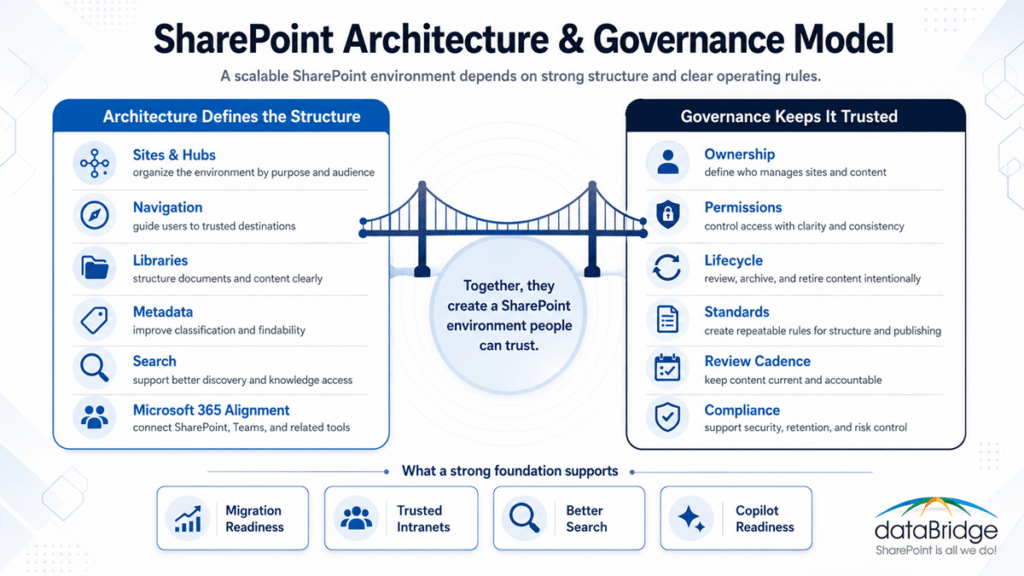
Architecture and governance work together to support migration readiness, trusted intranets, better search, and Copilot readiness.
Signs Your SharePoint Environment Needs Architecture and Governance Help
Many organizations wait too long to address architecture and governance. The signs usually appear before a major failure.
Your SharePoint environment may need architecture and governance support if:
- Sites are growing without a clear model.
- Departments create their own structures without standards.
- Users do not know where documents should live.
- Teams, SharePoint, and OneDrive overlap in confusing ways.
- Navigation feels inconsistent across departments.
- Permissions are hard to explain.
- Sensitive content appears in too many places.
- Old documents remain searchable.
- Employees question which version of a file is correct.
- Intranet pages look polished but become difficult to maintain.
- Site owners are unclear about their responsibilities.
- Metadata exists but is not used consistently.
- Search results vary in ways users do not understand.
- Migration planning keeps exposing old folder problems.
- Copilot readiness raises concerns about stale content or oversharing.
- Leadership wants more control without slowing down the business.
These issues rarely come from one bad setting.
They usually come from missing decisions.
SharePoint needs an intentional structure. It also needs a governance model that people can actually follow.
The Cost of Weak SharePoint Architecture
Weak architecture creates friction that grows over time.
Employees waste time searching for content. Site owners make inconsistent decisions. Teams duplicate libraries. Departments create pages without review standards. Project sites stay active after the work ends. Permissions drift. Content gets copied instead of managed.
Eventually, people create workarounds.
Employees start saving documents locally. Coworkers become the fastest way to find links. New Teams get created because the old ones feel cluttered and unreliable. Search loses credibility. The intranet gets ignored because people are not sure the content is still current.
That is the real cost.
Poor architecture does not always look broken. Sometimes it simply makes the right way to work harder than the wrong way.
In our consulting work, we often find that the technical platform is not the main problem. The missing layer is usually decision structure. SharePoint needs clear rules for sites, hubs, ownership, permissions, metadata, content lifecycle, and governance.
When those decisions are missing, every new initiative inherits the confusion.
The Cost of Weak SharePoint Governance
Weak governance creates uncertainty.
Site creation becomes unclear. Page approval feels inconsistent. Old content stays online because removal rules are not defined. Permission reviews get delayed or skipped. Metadata ownership remains vague. Nobody has a shared definition of what “good” looks like.
That uncertainty produces inconsistent behavior.
Some site owners manage content carefully. Others let libraries grow without review. Some departments follow naming standards. Others create their own. Some teams use metadata. Others rely on folders. Some owners remove stale content. Others leave everything live.
Governance should reduce decision fatigue.
It should not become a document nobody reads.
dataBridge builds SharePoint governance models around real operational behavior. We define roles, ownership, decision rights, standards, review cycles, escalation paths, and practical controls. Our SharePoint governance framework service explains how those decisions become a repeatable operating model.
What SharePoint Architecture and Governance Consulting Includes
A SharePoint architecture and governance engagement can include several connected workstreams. The exact scope depends on your current environment, business goals, and Microsoft 365 maturity.
Most engagements include a mix of discovery, architecture design, governance planning, stakeholder alignment, implementation guidance, and roadmap development.
SharePoint Site and Hub Architecture
Site and hub architecture defines how your environment is organized.
This includes decisions about:
- Communication sites
- Team sites
- Hub sites
- Department sites
- Project sites
- Knowledge sites
- Client or partner collaboration sites
- Intranet sites
- Document management areas
- Archive or records locations
- Site templates and provisioning patterns
A strong site architecture makes SharePoint easier to navigate, manage, secure, and scale.
It also helps prevent the “one big site” problem. Large organizations often try to force too much content into a single structure. That creates security, ownership, navigation, and performance challenges.
A better model separates content by purpose, audience, ownership, and lifecycle.
For intranet-specific planning, our SharePoint intranet consulting services page explains how hub architecture, navigation, content ownership, publishing standards, and adoption planning support a modern employee experience.
Microsoft 365 Structure and SharePoint Alignment
SharePoint does not operate alone.
It connects to Teams, OneDrive, Microsoft 365 Groups, Planner, Power Platform, Viva, Purview, search, Copilot, and SharePoint agents. That makes architecture decisions more important.
A team site may support collaboration. A communication site may support publishing. A hub may support navigation and related content. A Teams-connected site may support active work. A records library may support compliance. A knowledge base may support authoritative answers.
Each location should have a purpose.
dataBridge helps organizations define how SharePoint fits into the broader Microsoft 365 ecosystem. This reduces overlap and gives users clearer guidance.
A practical architecture should answer one simple question:
Where should this work happen?
If employees cannot answer that question, the architecture is not finished.
Navigation and Findability
Good Navigation is not decoration.
Navigation is governance made visible.
A good navigation model helps employees understand how the organization works, where content belongs, and which sources they should trust. It also reduces dependence on memory, bookmarks, and informal links.
Architecture and governance consulting can define:
- Global navigation
- Hub navigation
- Department navigation
- Audience-based navigation
- Intranet navigation
- Footer navigation
- Related resource models
- Search-driven navigation patterns
- Page template navigation standards
Navigation should reflect how people actually seek information. It should not simply mirror an org chart.
Org charts change. Work patterns are often more stable.
For larger environments, navigation also needs ownership. Someone must review labels, links, placement, and outdated destinations.
Without ownership, navigation becomes another content problem.
Permissions and Access Models
Permissions shape trust.
They also shape search results, Copilot behavior, document visibility, and user confidence.
Many organizations struggle because permissions grew over time. Sites have unique permissions. Libraries have exceptions. Folders have broken inheritance. Users gain access through multiple groups. External sharing expands quietly. Nobody feels fully confident explaining who can see what.
That is risky.
Architecture and governance consulting helps define a permissions model that supports security without overwhelming site owners.
This may include:
- Microsoft 365 group strategy
- SharePoint group strategy
- Site owner rules
- Visitor and member models
- External sharing standards
- Private channel and shared channel considerations
- Sensitive site rules
- Permission review cadence
- Inheritance guidance
- Exception handling
- Administrative escalation paths
Permissions should be simple enough to explain.
If the model is too complex for owners to follow, it will drift.
For deeper security planning, our SharePoint security and compliance services page explains how permissions, governance, compliance, and Microsoft 365 controls work together.
Metadata, Taxonomy, and Content Structure
Metadata helps SharePoint understand content.
It also helps people find, filter, group, manage, retain, and trust information.
Yet metadata fails when it is designed in isolation. A team may create columns nobody uses. Another department may invent different labels. A migration may move folder names into SharePoint without improving classification. A knowledge base may publish articles without review dates or content owners.
That creates a surface-level structure.
A strong metadata model starts with business use.
It asks:
- Which content types matter?
- Which documents need classification?
- Which fields improve findability?
- Which labels support lifecycle or retention?
- Which metadata should be required?
- Which values should be standardized?
- Which fields help search?
- Which metadata supports Copilot and SharePoint agents?
- Which owners maintain the taxonomy?
dataBridge connects metadata planning with architecture and governance. That prevents metadata from becoming a separate project nobody sustains.
Our SharePoint information architecture and metadata service explains how classification, content types, metadata, taxonomy, and search work together inside SharePoint.
Content Ownership and Stewardship
SharePoint needs owners.
Not just technical owners.
Content owners.
A site can be technically functional and still fail because nobody owns the quality of the information inside it. Pages age. Documents duplicate. Policies expire. FAQs drift. Department resources become stale. Search returns outdated content because nobody removed it.
Ownership is one of the most important governance decisions.
Architecture and governance consulting helps define:
- Site owners
- Business owners
- Content owners
- Page owners
- Library owners
- Knowledge owners
- Records owners
- Governance sponsors
- Review participants
- Escalation contacts
Ownership should be assigned before launch, not after problems appear.
It should also be realistic. A single person cannot own an entire enterprise intranet. A governance model should distribute responsibility across the organization.
That approach creates accountability without creating bottlenecks.
Lifecycle, Archive, and Retention Planning
SharePoint environments need lifecycle rules.
Without them, everything stays active.
That creates noise, risk, and confusion.
Lifecycle planning defines how sites, pages, documents, libraries, Teams-connected sites, project areas, and knowledge content move through different stages. Active content needs clear ownership. Reference material should remain easy to find. Archived content belongs outside the daily workstream. Retained content must follow policy. Other content should be disposed of when it no longer has business, legal, or compliance value.
Architecture and governance consulting may define:
- Site lifecycle rules
- Project closeout rules
- Page review cycles
- Document review dates
- Archive criteria
- Retention considerations
- Disposition responsibilities
- Content cleanup practices
- Inactive site handling
- Ownership transfer rules
Lifecycle governance is especially important before migrations and Copilot readiness efforts.
AI does not know your business intent unless the content environment reflects it. If old content remains discoverable, employees and AI tools may treat it as current.
That is why lifecycle decisions belong in the architecture conversation.
Search and Knowledge Trust
Search quality depends on structure.
It also depends on permissions, metadata, page quality, content ownership, navigation, source authority, and lifecycle governance.
Organizations often treat search as a technical tuning issue. Sometimes it is. More often, search exposes architecture problems.
Search results become weak when content is duplicated, poorly labeled, inconsistently owned, broadly permissioned, or outdated.
Architecture and governance consulting helps improve search by improving the environment behind search.
This may include:
- Authoritative content models
- Metadata standards
- Content quality rules
- Page title standards
- Library structure standards
- Permissions review
- Navigation alignment
- Knowledge base governance
- Source-of-truth decisions
- Search result improvement planning
Our SharePoint Online search optimization service explains how content structure, metadata, permissions, governance, and adoption shape better search experiences.
How Architecture and Governance Support SharePoint Consulting
SharePoint consulting works best when the environment has a clear foundation.
A consultant can build pages, migrate content, configure libraries, improve search, or design an intranet. Yet those improvements will not last if the underlying structure is unclear.
That is why architecture and governance should sit near the center of any serious SharePoint consulting engagement.
It gives the work a decision model.
Instead of asking each project team to invent its own approach, the organization defines standards. Those standards guide design, development, migration, intranet planning, document management, training, and support.
For example:
- A site model guides where new content belongs.
- A permissions model guides access decisions.
- A metadata model guides classification.
- A navigation model guides findability.
- A lifecycle model guides cleanup.
- A governance model guides ownership.
- A roadmap guides sequencing.
That structure helps consulting work produce lasting value.
Without it, every project becomes another isolated improvement.
dataBridge uses architecture and governance consulting to connect SharePoint decisions across the whole environment. That approach supports organizations that need more than a one-time build.
How Architecture and Governance Support SharePoint Migrations
A SharePoint migration should not simply move old problems into a new platform.
That is one of our strongest opinions.
Migration creates a rare opportunity to improve structure. You can clean up outdated content, rethink folders, define metadata, adjust permissions, clarify ownership, archive low-value material, and design a better destination model.
However, that only happens when architecture and governance are defined before migration waves begin.
A strong migration architecture answers:
- What content should move?
- What content should be archived?
- Which destinations should exist?
- How should source folders map to SharePoint libraries?
- Which metadata should replace folder depth?
- Who owns each destination?
- How should permissions change?
- Which content should become authoritative?
- What should be tested before launch?
- How will adoption be supported after migration?
Without those decisions, migration becomes a file transfer.
With those decisions, migration becomes a modernization effort.
Our SharePoint migration consulting service explains how dataBridge plans and executes migrations with structure, governance, security, validation, and adoption in mind.
If your organization is still evaluating readiness, our SharePoint migration readiness assessment helps identify content, permissions, metadata, ownership, and governance issues before migration work begins.
How Architecture and Governance Support SharePoint Intranets
A modern SharePoint intranet needs more than attractive pages.
Design matters. Branding matters. Page templates matter. Employee experience matters.
Still, the intranet will not stay healthy without architecture and governance.
An intranet needs clear decisions about:
- Hub structure
- Navigation
- Department ownership
- Page templates
- Publishing standards
- Content review cycles
- News governance
- Search experience
- Audience targeting
- Accessibility
- Policy and resource ownership
- Retired page handling
- Employee feedback
- Adoption and training
A polished intranet can still fail if content ownership is weak.
Employees do not judge an intranet only by how it looks. They judge it by whether they can trust what they find.
That trust comes from structure.
dataBridge helps organizations design intranets with governance built into the experience. That means the intranet can grow without becoming cluttered, stale, or inconsistent.
That discipline now has to cover a newer authoring option, since deciding who can publish HTML pages in SharePoint keeps AI-authored markup from bypassing the publishing standards the rest of the environment follows.
For organizations improving an existing intranet, our SharePoint intranet assessment helps evaluate structure, navigation, content quality, ownership, governance, search, and adoption barriers before redesign work begins.
A strong SharePoint foundation supports more than one initiative. It improves consulting decisions, migration planning, intranet trust, document management, search, and Copilot readiness.
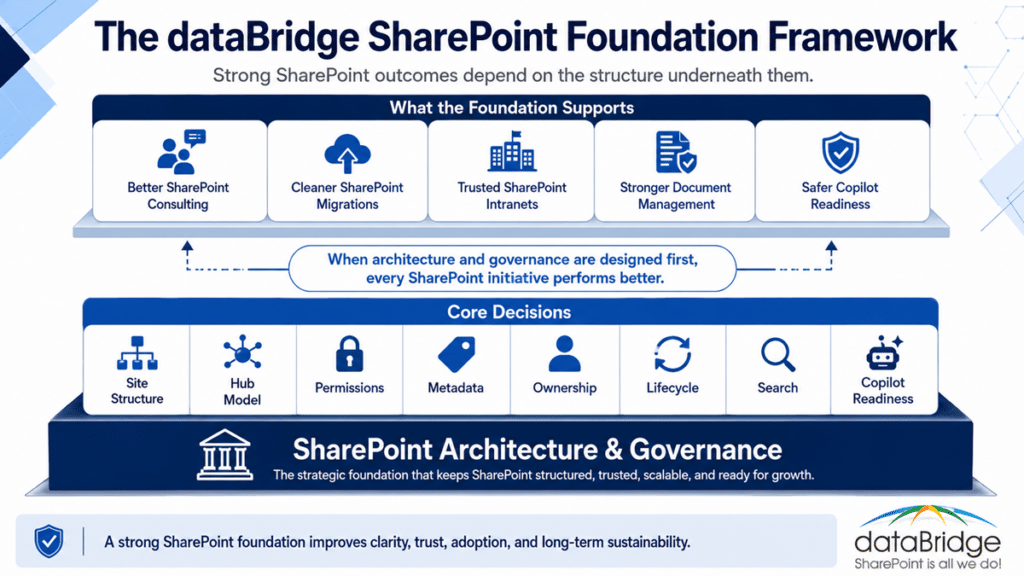
Strong SharePoint outcomes depend on the architecture and governance decisions underneath them.
How Architecture and Governance Support Document Management
SharePoint document management depends on architecture.
A document management system needs more than libraries and folders. It needs decisions about content types, metadata, ownership, permissions, retention, versioning, naming, review cycles, search, and lifecycle management.
Without those decisions, document libraries become digital storage.
With them, SharePoint becomes a managed content environment.
Architecture and governance consulting helps define how documents should be organized, classified, secured, retained, reviewed, and found.
This is especially important when organizations use SharePoint for:
- Policies
- Procedures
- Contracts
- Client documents
- Project files
- HR records
- Finance documents
- Legal content
- Standard operating procedures
- Regulated content
- Knowledge articles
The goal is not to make SharePoint complicated.
The goal is to make the right behavior obvious.
Our SharePoint document management system page explains how libraries, metadata, permissions, records, search, and governance work together to support controlled document management.
For the operational side – what site owners and content owners should actually do to keep that system healthy – our SharePoint document management best practices guide breaks the work into practices teams can follow after launch.
How Architecture and Governance Support Copilot Readiness
Copilot readiness starts with SharePoint readiness.
That statement will become more important every year.
Microsoft 365 Copilot and SharePoint agents depend on the content environment underneath them. If SharePoint contains outdated, duplicated, poorly permissioned, or weakly governed content, AI can surface information that sounds helpful but may not be authoritative.
AI does not fix bad structure.
It exposes it faster.
Architecture and governance consulting helps organizations prepare SharePoint for AI by improving the content foundation.
That work may include:
- Identifying authoritative content sources
- Reviewing permissions and oversharing risk
- Improving metadata and classification
- Cleaning up stale content
- Defining ownership
- Reviewing sensitive sites
- Clarifying lifecycle rules
- Strengthening search and knowledge quality
- Aligning governance with Copilot and SharePoint agents
- Prioritizing high-value content areas for readiness
Copilot readiness should not start with a license rollout.
It should start with trusted content.
Our Copilot readiness for SharePoint service explains how SharePoint structure, permissions, metadata, governance, and content quality affect AI readiness across Microsoft 365.
During architecture and governance discovery, SharePoint Data Access Governance reports for Copilot can help reveal which sites, libraries, sharing patterns, and sensitive content areas need deeper review before the organization relies on AI-enabled search, summarization, or SharePoint agents.
How Architecture and Governance Support Security and Compliance
Security and compliance work better when SharePoint has clear structure.
Permissions, sensitivity, retention, records, sharing, lifecycle, and ownership all depend on the architecture underneath them.
A weak structure makes compliance harder.
For example, a sensitive document stored in the wrong location may inherit the wrong access. A library with inconsistent metadata may not support retention decisions. A department site without an owner may miss review cycles. A project area with external users may remain active too long.
Architecture and governance consulting helps reduce that risk.
It defines where sensitive content belongs, who should own it, how access should work, and which governance rules apply. This gives compliance controls a stronger foundation.
Security should not rely only on after-the-fact cleanup.
It should be designed into the way SharePoint works.
The dataBridge Way for SharePoint Architecture and Governance
dataBridge uses a structured consulting approach that connects discovery, architecture, governance, implementation, adoption, and optimization.
This approach keeps the work practical.
We do not start with a generic governance template. We start with how your organization actually works.
Assess and Discover
We begin by understanding your current SharePoint and Microsoft 365 environment.
Discovery may include stakeholder conversations, current-state review, site structure analysis, content patterns, permissions concerns, governance gaps, intranet issues, migration risks, search problems, and adoption barriers.
This phase helps us separate symptoms from root causes.
A messy intranet may point to weak ownership. Poor search may point to inconsistent metadata. Migration risk may point to old folder structures. Copilot concerns may point to permission drift.
Good discovery prevents shallow recommendations.
Architecture and Governance Design
Next, we design the structure and rules that SharePoint needs.
This may include a site model, hub strategy, navigation model, ownership framework, permissions approach, metadata recommendations, lifecycle guidance, provisioning rules, content standards, and governance responsibilities.
The goal is clarity.
Every recommendation should help someone make a better decision.
Implementation Planning
After the model is defined, dataBridge helps plan how to implement it.
Implementation planning may include sequencing, priorities, quick wins, migration dependencies, intranet dependencies, training needs, technical configuration, content cleanup, stakeholder communication, and adoption planning.
A good roadmap avoids trying to fix everything at once.
It prioritizes the work that reduces risk and creates visible value.
Migration, Intranet, and Content Alignment
Architecture and governance should guide major SharePoint initiatives.
For migrations, the work includes destination design, cleanup, metadata, permissions, and validation. Intranets require hub structure, navigation, page ownership, templates, publishing standards, and content review. Document management depends on libraries, metadata, retention, records, and search.
This alignment prevents disconnected projects.
It also helps your organization build once and reuse the model.
Adoption and Ownership
SharePoint governance succeeds when people understand their role.
That means site owners, content owners, business owners, administrators, and leadership need clear expectations. They also need simple guidance.
dataBridge helps define practical ownership models that support adoption.
Training should not only explain features. It should explain decisions.
When people understand the “why” behind the structure, they are more likely to follow it.
Ongoing Optimization
SharePoint changes.
Your organization changes too.
That is why architecture and governance should include review cycles. Sites need periodic review. Permissions need attention. Content needs lifecycle management. Metadata may need refinement. Search patterns may reveal gaps. New Microsoft 365 capabilities may affect standards.
Ongoing optimization keeps the environment from drifting.
Our SharePoint advisory partnership gives organizations structured guidance after launch so governance, adoption, ownership, and continuous improvement do not fade.
What You Receive from a SharePoint Architecture and Governance Engagement
Each engagement is shaped around your goals, but typical deliverables may include:
- SharePoint current-state findings
- Architecture recommendations
- Hub and site model
- Communication site and team site guidance
- Navigation strategy
- Site ownership model
- Content ownership model
- Permissions design principles
- Governance roles and responsibilities
- Metadata and taxonomy recommendations
- Library structure guidance
- Site provisioning recommendations
- Lifecycle and archive guidance
- Migration architecture recommendations
- Intranet governance recommendations
- Search and findability recommendations
- Copilot readiness considerations
- Risk and priority assessment
- Implementation roadmap
- Stakeholder presentation materials
- Practical next-step plan
The deliverable is not just a document.
The value is decision clarity.
A strong architecture and governance engagement gives your organization a shared model for what SharePoint should become.
When to Use SharePoint Architecture and Governance Consulting
This service is useful when SharePoint has become important enough that informal decisions no longer work.
You should consider this engagement before:
- A SharePoint Online migration
- A file share to SharePoint migration
- A SharePoint intranet redesign
- A governance framework rollout
- A document management initiative
- A Copilot readiness program
- A permissions cleanup effort
- A search improvement project
- A Microsoft Teams governance initiative
- A records management or retention initiative
- A major department site redesign
- A Microsoft 365 adoption program
It is also valuable when your organization feels stuck.
Sometimes teams know SharePoint needs improvement, but they cannot agree on where to start. Architecture and governance consulting creates the decision framework needed to move forward.
SharePoint Architecture and Governance for Migrations
Migration is one of the best moments to improve SharePoint architecture.
It is also one of the easiest moments to create long-term problems.
If content moves without structure, the new environment inherits the old confusion. Folders remain too deep. Permissions remain unclear. Duplicate content stays active. Old files move forward without review. Departments recreate old habits inside SharePoint Online.
A better approach starts with architecture.
Before content moves, dataBridge helps organizations define destination sites, libraries, metadata, permissions, ownership, cleanup rules, validation steps, and adoption support.
This gives the migration a better purpose.
The goal is not just to move content.
The goal is to create a SharePoint environment people can trust.
For more migration-specific guidance, the SharePoint Migration Guide explains how planning, cleanup, mapping, permissions, testing, adoption, validation, and post-migration governance reduce migration risk.
SharePoint Architecture and Governance for Intranets
Intranet success depends on structure.
A beautiful homepage cannot compensate for weak ownership, confusing navigation, stale pages, or inconsistent department content.
An intranet should help employees find trusted information quickly. That requires clear architecture and governance underneath the design.
dataBridge helps organizations define intranet structures that support communication, departments, policies, resources, knowledge, leadership updates, and employee services.
Governance decisions may include:
- Who owns the homepage
- Who owns department pages
- Who approves news
- How page templates should be used
- How often content should be reviewed
- Which pages are authoritative
- How navigation changes are requested
- How stale content is retired
- How employee feedback is handled
- How intranet adoption is measured
The strongest intranets feel simple to employees because the structure behind them is disciplined.
For design-specific support, our SharePoint branding, UX, and page template design page explains how visual design, page structure, templates, and user experience support a more usable SharePoint environment.
SharePoint Architecture and Governance for Departments
Department sites need consistency and flexibility.
Too much standardization frustrates teams. Too little standardization creates chaos.
Architecture and governance consulting helps define a practical department site model. This model gives departments enough room to support their work while keeping the broader SharePoint environment manageable.
A department model may include:
- Standard landing page structure
- Common document library patterns
- Required ownership roles
- Navigation standards
- News and announcement rules
- Metadata guidance
- Security expectations
- Review cadence
- Template recommendations
- Integration with intranet navigation
This type of model improves employee experience.
People should not have to relearn SharePoint every time they visit a different department site.
SharePoint Architecture and Governance for Project Work
Project work creates a different challenge.
Projects move fast. Teams change. Documents evolve. Permissions shift. Deadlines matter. When the work ends, content often lingers.
Without governance, project sites become long-term clutter.
Architecture and governance consulting can define how project sites should be requested, created, used, reviewed, closed, archived, or retained.
That helps organizations avoid a common problem: thousands of project areas with unclear ownership and unknown value.
A project governance model may include:
- Project site templates
- Naming standards
- Required owners
- External sharing rules
- Document library standards
- Closeout checklist
- Archive rules
- Retention considerations
- Review cadence
- Decommissioning process
This keeps active collaboration productive without allowing old workspaces to become permanent noise.
SharePoint Architecture and Governance for Knowledge Management
Knowledge management depends on trust.
A knowledge base, resource center, policy center, or help site must make it clear which content is current, approved, and authoritative.
Architecture and governance consulting helps define the model behind trusted knowledge.
That may include:
- Article types
- Ownership roles
- Review dates
- Approval standards
- Metadata fields
- Related content models
- Search optimization
- Source-of-truth rules
- Archive or retirement process
- Feedback loops
- Copilot readiness considerations
A knowledge site should not be treated like a document dump.
It should be treated like a governed publishing system.
Our SharePoint knowledge base guide explains how ownership, metadata, review cycles, search, governance, and AI readiness shape a more trusted knowledge environment.
SharePoint Architecture and Governance for Executive and Leadership Content
Executive content needs special care.
Leadership updates, board materials, strategy documents, financial content, HR communications, legal content, and sensitive planning materials often require clearer ownership and stricter access.
Architecture and governance consulting helps organizations define where sensitive content belongs and how it should be controlled.
This may include:
- Executive communication sites
- Leadership collaboration areas
- Confidential document libraries
- Board content models
- Restricted access rules
- Review cycles
- Publishing controls
- Retention considerations
- Search visibility decisions
- Oversharing prevention
The model should protect sensitive information without creating unnecessary friction.
Security works best when the structure supports it.
SharePoint Architecture and Governance for Regulated Organizations
Regulated organizations need SharePoint to support control, consistency, and accountability.
That does not mean every site should become complicated.
It means the environment needs clear decisions about ownership, metadata, permissions, retention, records, review cycles, and evidence of control.
Architecture and governance consulting helps regulated organizations design SharePoint environments that support operational needs and compliance expectations.
This may include:
- Controlled document libraries
- Standardized metadata
- Sensitive content locations
- Retention and records alignment
- Permission review processes
- Audit-friendly ownership models
- Lifecycle standards
- Intranet publishing controls
- Policy and procedure governance
- Search and source-of-truth clarity
Regulated teams do not need more clutter.
They need stronger structure.
Our SharePoint architecture for regulated industries page explains how architecture, governance, compliance, and operational needs connect in regulated environments.
Why Organizations Choose dataBridge
dataBridge has focused on SharePoint and Microsoft 365 for nearly two decades.
That experience matters because SharePoint problems are rarely isolated. A permissions issue may be an architecture issue. A search issue may be a metadata issue. A migration issue may be a governance issue. An intranet issue may be an ownership issue.
We look for the pattern behind the problem.
Our work is grounded in practical SharePoint delivery. We understand how design decisions affect administrators, site owners, content owners, department leaders, end users, compliance teams, and executives.
That perspective helps us create recommendations that can actually be implemented.
SharePoint architecture should be easy to understand.
Governance needs to be practical enough for people to use.
A roadmap should help the organization keep moving.
What Makes dataBridge Different
dataBridge brings a structure-first approach to SharePoint consulting.
We do not treat SharePoint as a collection of features. We treat it as a business environment that needs architecture, governance, ownership, adoption, and continuous improvement.
That difference shows up in how we work.
Strategy becomes site structure. Governance turns into real roles. Metadata improves findability. Permissions build trust. Migrations create modernization opportunities. Intranets gain ownership. Copilot readiness depends on content quality.
This is the part many SharePoint projects miss.
The build is important.
The operating model is what protects the build.
Architecture and Governance Questions We Help Answer
Organizations often come to dataBridge with questions like:
- How should our SharePoint sites be organized?
- How many hub sites should we have?
- Which content belongs in Teams, SharePoint, or OneDrive?
- How should we structure department sites?
- How should we structure project sites?
- What should our intranet architecture look like?
- How should permissions work across sensitive content?
- How should we reduce oversharing risk?
- How should we clean up old content before migration?
- How should folder structures map to metadata?
- What governance roles do we need?
- Who should own page quality?
- How often should content be reviewed?
- How should we prepare SharePoint for Copilot?
- Which sites should become authoritative sources?
- How should we prevent SharePoint from becoming messy again?
These questions deserve more than quick answers.
They need a connected model.
A Practical Example: Migration Before Governance
A company plans to migrate a shared drive into SharePoint Online.
At first, the project looks technical. The team wants to move files, preserve access, and reduce disruption.
During discovery, deeper issues appear.
Some folders belong to departments. Others belong to projects. Some contain policies. Others contain client files. Some have sensitive HR content. Some are outdated. Many have duplicate versions. Permissions are inconsistent. Nobody owns large parts of the file structure.
A lift-and-shift migration would move the confusion.
Architecture and governance consulting changes the plan.
The organization defines destination sites, library models, metadata, ownership, archive rules, permission standards, and migration priorities. Business owners validate what should move. Low-value content is excluded or archived. Sensitive content receives clearer controls. Training explains where content now belongs.
The migration becomes cleaner.
More importantly, the new SharePoint environment becomes easier to trust.
For organizations moving shared drives, department folders, or legacy file structures into Microsoft 365, file share to SharePoint migration services can turn the architecture and governance decisions from this example into a practical migration plan that improves structure before content moves.
A Practical Example: Intranet Redesign Without Ownership
An organization has a SharePoint intranet that looks outdated.
The first request is a redesign.
A deeper review shows the visual design is only part of the problem. Department pages are stale. News ownership is unclear. Navigation has too many links. Policy content appears in multiple places. Search returns old pages. Some owners left the company. Employees ask coworkers for links instead of using the intranet.
A visual redesign alone would not solve that.
Architecture and governance consulting defines the structure behind the intranet. The organization creates a hub model, navigation rules, page ownership, review cycles, publishing standards, templates, content cleanup priorities, and search improvement recommendations.
The redesign now has a stronger foundation.
Employees see a better experience. Site owners get clearer responsibilities. Leadership gets a more sustainable intranet.
When the problem is more than visual design, SharePoint intranet redesign services can help rebuild the employee experience around clearer navigation, page ownership, content cleanup, publishing standards, governance, search, and relaunch planning.
A Practical Example: Copilot Readiness Exposes Content Risk
A leadership team wants to prepare for Microsoft 365 Copilot.
The technology team begins reviewing licensing and deployment options. Then concerns surface about content visibility, old documents, duplicate policies, unclear ownership, and inconsistent permissions.
Those concerns are valid.
Copilot readiness depends on the SharePoint content environment.
Architecture and governance consulting helps identify authoritative sources, sensitive content areas, permission risks, stale libraries, missing owners, metadata gaps, and lifecycle issues. The organization then prioritizes cleanup and governance before broad AI adoption.
That does not delay progress.
It makes progress safer.
AI initiatives move faster when the content foundation is trusted.
SharePoint Architecture and Governance Roadmap
A roadmap turns recommendations into action.
Without a roadmap, architecture and governance work can feel too broad.
dataBridge helps organizations prioritize the sequence of improvement. Some work may need immediate attention. Other work may fit into migration, intranet, document management, or Copilot readiness phases.
A roadmap may include:
- Immediate risk reduction
- Permission cleanup priorities
- Site architecture changes
- Hub and navigation improvements
- Metadata standardization
- Content ownership assignments
- Lifecycle review process
- Migration preparation
- Intranet governance improvements
- Copilot readiness actions
- Training and adoption steps
- Long-term optimization cadence
The best roadmap is realistic.
It should match your capacity, risk profile, business priorities, and stakeholder readiness.
What a Strong SharePoint Architecture Looks Like
A strong SharePoint architecture is easy to explain.
Users know where to go. Site owners understand what to manage. Administrators get a clear model for growth. Leadership gains confidence that SharePoint can scale.
Strong architecture usually has:
- Clear site purposes
- Logical hub relationships
- Consistent navigation
- Defined ownership
- Sensible permissions
- Practical metadata
- Search-friendly content
- Lifecycle rules
- Governance standards
- Adoption support
- Roadmap alignment
It should not feel over-engineered.
Good SharePoint architecture creates clarity without slowing people down.
What a Strong SharePoint Governance Model Looks Like
A strong governance model is usable.
It does not sit in a large document that nobody opens. It gives people clear rules and practical decision paths.
Strong governance usually defines:
- Who can create sites
- Who owns sites
- Who owns content
- Who manages permissions
- Who approves intranet pages
- Who reviews stale content
- Who maintains metadata
- Who approves navigation changes
- Who handles exceptions
- Who monitors adoption
- Who reviews the model over time
Governance should help people do the right thing.
If governance feels like extra work with no visible value, people will avoid it.
That is why dataBridge builds governance into the way SharePoint works.
Common Mistakes to Avoid
SharePoint architecture and governance projects often fail for predictable reasons.
Avoid these common mistakes:
- Treating SharePoint as a file storage replacement only
- Migrating old folder structures without redesigning destinations
- Creating too many sites without a site model
- Relying on one large site for everything
- Using permissions exceptions as the default approach
- Designing metadata without business input
- Publishing intranet content without owners
- Launching governance as a document instead of an operating model
- Ignoring lifecycle and archive planning
- Waiting until after Copilot rollout to address content quality
- Assuming search can fix poor structure
- Training users on features without explaining governance decisions
Most of these mistakes are avoidable.
They happen when the organization starts building before it has made the right decisions.
The Right Time to Start
The best time to address SharePoint architecture and governance is before a major change.
That may be before a migration, intranet redesign, Copilot rollout, document management project, governance refresh, or Microsoft 365 adoption initiative.
However, it is also valuable after problems appear.
A mature SharePoint environment can still be improved. The key is to start with the right assessment. Some issues require cleanup. Others require a new model. Some require better ownership. Others require governance enforcement or training.
The right approach depends on the root cause.
dataBridge helps identify that root cause before recommending a path forward.
Work with dataBridge on SharePoint Architecture and Governance
SharePoint architecture and governance consulting gives your organization a clearer foundation for Microsoft 365.
It helps your teams make better decisions about sites, hubs, navigation, ownership, permissions, metadata, lifecycle, migrations, intranets, search, security, and Copilot readiness.
The goal is not to create complexity.
The goal is to create clarity.
If SharePoint feels fragmented, hard to govern, difficult to search, risky to migrate, or unprepared for Copilot, dataBridge can help you design the structure behind a healthier environment.
Start the conversation with dataBridge through our SharePoint architecture and governance consultation form.
How This Page Relates to Other dataBridge Services
SharePoint architecture and governance consulting connects several dataBridge services, but it does not replace them.
Use SharePoint consulting services when you need the broad overview of dataBridge’s SharePoint and Microsoft 365 consulting capabilities.
Explore SharePoint strategy and roadmapping when you need executive alignment, initiative sequencing, and a practical plan before implementation.
Use SharePoint discovery and readiness assessment when you need to understand current-state risks, gaps, and priorities before a larger initiative.
Choose SharePoint governance framework when you need roles, responsibilities, decision rights, standards, controls, and governance cadence.
Use SharePoint information architecture and metadata when the core issue is content classification, metadata, taxonomy, content types, and findability.
Explore SharePoint migration consulting when you are ready to plan, prepare, and execute a SharePoint migration.
Use SharePoint intranet consulting services when your primary initiative is an intranet strategy, redesign, governance model, or launch.
This page sits at the center of those services.
It defines the structure and governance foundation that makes the other work stronger.
SharePoint Architecture and Governance Consulting FAQs
What is SharePoint architecture and governance consulting?
SharePoint architecture and governance consulting helps organizations design how SharePoint should be structured, owned, secured, governed, searched, maintained, and improved. It connects sites, hubs, navigation, permissions, metadata, lifecycle rules, ownership, migrations, intranets, and Copilot readiness into one practical model.
Why does SharePoint architecture matter?
SharePoint architecture matters because it shapes how people find content, collaborate, manage permissions, maintain ownership, and trust information. Poor architecture creates confusion, duplication, search problems, governance gaps, and adoption issues.
Why does SharePoint governance matter?
SharePoint governance matters because it defines how the environment is managed over time. It sets rules for ownership, permissions, site creation, content review, lifecycle, metadata, publishing, security, and ongoing improvement.
How are SharePoint architecture and governance different?
SharePoint architecture defines the structure of the environment. Governance defines how that structure is managed and sustained. Architecture answers where things belong. Governance answers who owns them, how they are secured, and how they stay current.
When should an organization create a SharePoint governance model?
An organization should create a SharePoint governance model before major SharePoint growth, migration, intranet redesign, Copilot rollout, document management project, or Microsoft 365 adoption effort. Governance is easier to build in early than repair later.
How does SharePoint architecture affect migrations?
SharePoint architecture affects migrations because it defines destination sites, libraries, metadata, permissions, ownership, and cleanup rules. Without architecture, migration can simply move old problems into SharePoint Online.
How does governance affect SharePoint intranets?
Governance affects SharePoint intranets by defining page ownership, publishing standards, navigation rules, review cycles, content quality, news management, search improvement, and lifecycle controls. A governed intranet is easier to trust and maintain.
How does SharePoint governance support Copilot readiness?
SharePoint governance supports Copilot readiness by improving content ownership, permissions, metadata, lifecycle, search quality, and source-of-truth clarity. Copilot performs better when SharePoint contains trusted, current, well-governed content.
Does every SharePoint site need the same governance rules?
No. Different site types need different governance rules. A department site, project site, executive site, knowledge base, intranet hub, and records library each have different ownership, permissions, lifecycle, and content requirements.
How can dataBridge help with SharePoint architecture and governance?
dataBridge helps organizations assess their current SharePoint environment, define a practical architecture, create a usable governance model, align migrations and intranets, improve ownership, reduce risk, and build a roadmap for long-term SharePoint improvement.