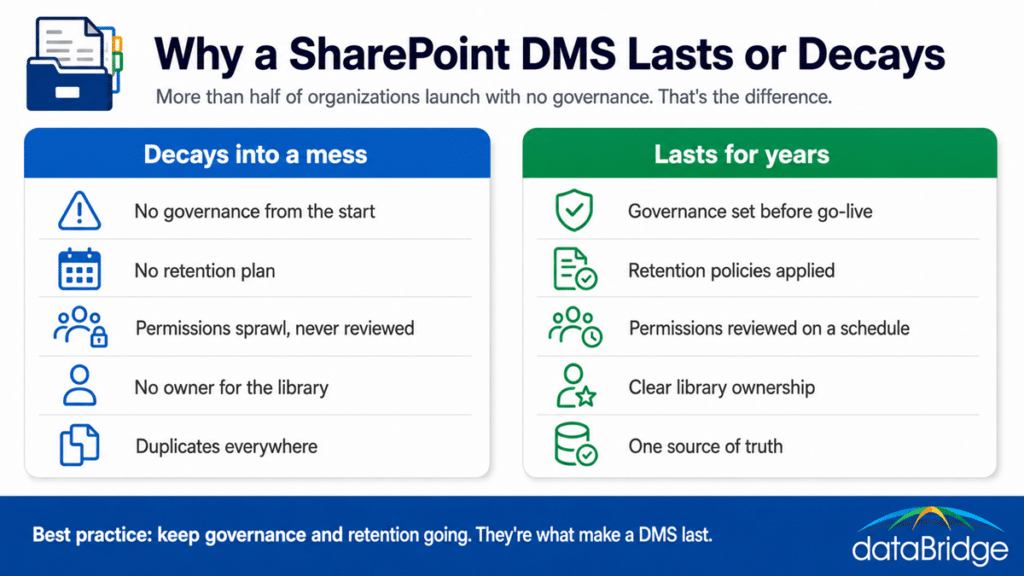
More than half the organizations that come to us have no document management governance in place at all. Not light governance, none. That single fact is the best predictor we have of which SharePoint systems will be a mess again two years after launch. The metadata and content types are what make a document management system good on day one. Governance and retention are what keep it good. Most teams do the first part and skip the second, and then wonder why a clean library turned back into a junk drawer.
What are the best practices for SharePoint document management?
The practices that matter most fall into a foundation you build once and a discipline you maintain. The foundation is metadata, content types, and flat libraries instead of deep folders. The discipline is governance, retention, permission reviews, and clear ownership, and that discipline is what separates a system still working in year three from one that decayed. SharePoint runs a strong document management system when both are in place, and it falls apart when either is missing. The sections below cover both, weighted toward the part teams skip.
Build on metadata and content types
Metadata and content types are the foundation, because they let SharePoint understand what a file actually is rather than where someone filed it. A contract tagged with a client, an effective date, and a status can be found, filtered, and governed no matter which library it sits in. Folders can’t do that.
Contracts are the clearest proof, which is why we wrote a full breakdown of contract management in SharePoint built on exactly this metadata model.
This is the part most teams get at least partly right, so we’ll keep it short. If you want the depth, it’s in our guides on metadata strategy, when to create a custom content type, and why folders fall short. Get this right and the rest of the practices have something solid to stand on.
Keep libraries flat and use views
Deep folder trees are where findability goes to die. The better pattern is a flat library where metadata and views do the organizing, so the same set of documents can be sliced a dozen ways without anyone digging. A view filtered by status, client, or date beats a folder path every time.
Where you would have reached for nested folders, reach for document sets and views instead. It’s the difference between a library people can navigate and one they give up on.
Set governance before anyone starts using it
Governance is the practice most teams skip, and it’s the one that decides whether the system holds up. More than half the organizations we see arrive with none, which is the clearest single predictor of a library that’s a mess two years on. Governance means deciding ownership, naming conventions, permission rules, and how new sites and libraries get created, before content starts piling in rather than after.
Set up after the fact, governance is a cleanup project nobody wants to fund. Set up first, it’s a set of guardrails that keep the system from sprawling in the first place. This is why we treat architecture and governance as the core of the work, and why the governance center exists. The cost of skipping it is always paid later, with interest.
Put a real retention plan in place
Retention is the other half of what makes a document management system last. Without a plan for what to keep and what to dispose of, libraries fill with outdated drafts, duplicates, and abandoned files until people stop trusting what they find. Trust is the whole point of a DMS, and clutter erodes it quietly.
A retention plan decides what’s kept, for how long, and what’s removed, applied through labels and policies rather than left to individual judgment. Microsoft Purview handles the mechanics across your content, which is covered in our work on records management and retention, the difference between retention, sensitivity, and permissions, and disposition review. Governance and retention together are the two practices that most reliably separate a DMS that lasts from one that decays.
Review permissions on a schedule
Permission sprawl is how a clean system turns into a security liability. Access gets granted, people change roles, item-level exceptions pile up, and within a year no one can say who can see what. The fix is to set access at a sensible level, avoid breaking inheritance file by file, and review permissions on a schedule rather than never.
A standing permission review, along with clear external sharing governance, keeps access matched to who actually needs it. This is the kind of maintenance that feels optional until the audit, or the breach, makes it mandatory.
Keep one source of truth
A document should live in one authoritative place. The moment the same file exists in a library, a Teams channel, and three people’s OneDrive, nobody knows which version is real, and the DMS stops being a system of record. Deciding where things live, and holding the line on it, is a practice as much as a setup choice.
That means being clear about the difference between OneDrive and SharePoint, and treating SharePoint as the source of truth rather than letting copies multiply. One authoritative version is what makes search, compliance, and Copilot trustworthy.
Give every library an owner
An ungoverned library has no owner, and what no one owns, no one maintains. Assigning a clear owner to each site and library, someone responsible for its structure, its permissions, and its cleanup, is what keeps governance from decaying the day the consultant leaves. Tools enforce rules. People keep them alive.
Spelling out site owner responsibilities turns governance from a document into a habit. Without a named caretaker, even a well-built system drifts.
Why governance and retention decide whether your DMS lasts
Every practice here matters, and two of them decide the outcome. The foundation, the metadata and content types, gives you a good document management system at launch. Governance and retention are what keep it good through year two, year three, and the staff turnover in between. That’s the pattern we see again and again: the environments that still work years later had governance and retention from the start, and the ones that became a mess again did not.
This is also why more than half of new clients arriving with no governance isn’t just a statistic, it’s a warning. If that describes your setup, the foundation may be fine and the system is still at risk, because nothing is holding it in place. A document management maturity assessment is the fastest way to see which practices you have and which gaps are quietly working against you.