When Should You Create a Custom Content Type vs Use Default SharePoint Types?
SharePoint content types are one of the most powerful tools in modern document management, but they’re also one of the most commonly misunderstood. Many organizations either avoid them entirely or overengineer them to the point where adoption suffers.
The mistake usually starts with the wrong question.
Teams often ask, “Should we use content types?”
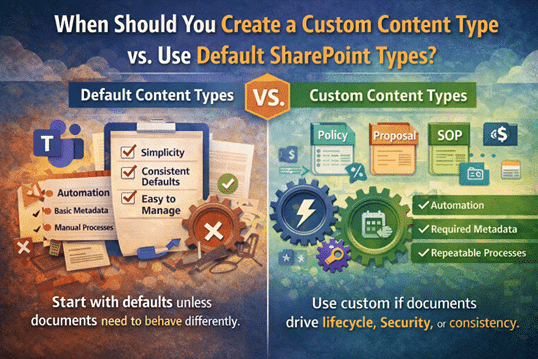
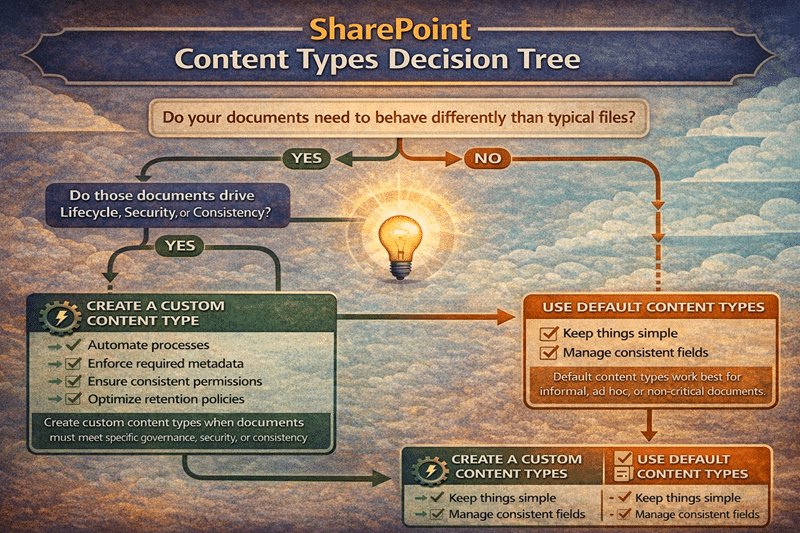
The better question is, “Do our documents need to behave differently?”
That shift matters. Content types are not about structure for structure’s sake. They exist to enforce behavior—how documents are created, classified, governed, secured, and automated over time. If documents don’t need different behavior, content types rarely add value.
Start with defaults unless the business needs behavior
SharePoint’s default content types (such as Document) are surprisingly capable. In many environments, they are all you need—especially early on.
Default content types work well when documents:
- Don’t require lifecycle controls
- Don’t drive approvals or automation
- Don’t need different retention rules
- Don’t require standardized templates
- Don’t need consistent or required metadata
In these scenarios, creating custom content types often introduces unnecessary complexity. Users see more choices, libraries become harder to configure, and governance feels heavier than it needs to be.
At this stage, focusing on clean information architecture and strong design and development decisions usually delivers more value than custom types ever could.
Create custom content types when behavior matters
Custom content types make sense when you need SharePoint to enforce consistency automatically instead of relying on training or tribal knowledge. At dataBridge, we typically recommend custom content types only when they enable specific, measurable outcomes.
1) Standardized document creation
If users repeatedly create the same type of document—policies, SOPs, contracts, proposals—content types can enforce consistency from the moment the file is created. Templates, default naming, and required fields remove guesswork and reduce rework.
2) Required metadata for findability and reporting
Metadata is optional unless SharePoint makes it unavoidable. When documents need to be filtered, searched, reported on, or surfaced accurately—especially for analytics or Copilot accuracy—content types ensure the right metadata exists every time.
On repeatable, high-volume document types, you don’t have to fill those columns by hand – you can let document AI read the values straight out of the files, as long as the documents are consistent enough to extract from.
3) Governance and compliance controls
Some documents carry more risk than others. Policies, legal documents, HR records, and regulated content often need different retention rules, review cycles, or sensitivity labels. Content types create repeatable, auditable governance without relying on manual enforcement.
4) Automation triggers
Automation fails when conditions aren’t predictable. If you want Power Automate flows to run reliably—approvals, notifications, publishing, lifecycle reminders—content types combined with metadata create the stable inputs automation depends on.
Avoid the most common content type trap: too many types
One of the fastest ways to break adoption is by over-modeling content types. Teams often try to represent every variation as its own type:
- “Policy – HR”
- “Policy – IT”
- “Policy – Finance”
This approach doesn’t scale. It confuses users, complicates libraries, and increases maintenance overhead—especially during SharePoint migrations.
A better pattern is to keep content types broad and use metadata to capture variation. One “Policy” content type with a required Department field is almost always more effective than a dozen near-duplicate types.
The same restraint applies when a repeatable package of related documents tempts a team to build structure around it. Before reaching for one, weigh when Document Sets make more sense than folders.
A practical decision checklist
Use a custom content type if:
- The document needs a consistent template
- The document requires required metadata
- The document follows a lifecycle (draft → review → final)
- The document needs unique retention or sensitivity controls
- The document triggers automation
If none of these apply, default content types are usually sufficient—and simpler.
Bottom line:
Use custom content types to create consistent behavior, not because “content types are best practice.” When behavior matters, content types shine. When it doesn’t, simplicity wins.
For more insights on governance, architecture, and Microsoft 365 strategy, explore our SharePoint knowledge center.
Organizations implementing these improvements often engage our SharePoint and Microsoft 365 consulting solutions.