

SharePoint Governance Maturity Scorecard
Use the dataBridge SharePoint Governance Maturity Scorecard to evaluate how well your SharePoint environment is owned, secured, organized, maintained, and prepared for long-term adoption.
Most organizations do not have a SharePoint feature problem. They have a structure, ownership, permissions, lifecycle, and accountability problem.
This scorecard helps your team measure governance maturity across the areas that shape SharePoint trust:
- Ownership
- Permissions
- Site lifecycle
- Metadata
- Records and retention
- Search
- Copilot readiness
- Adoption
- Support model
A mature SharePoint environment does not happen because the platform has enough settings. It happens because the organization makes clear decisions about who owns content, who can access it, how long it stays active, and how users know what to trust.
If your score reveals gaps in ownership, permissions, lifecycle, search, records, or Copilot readiness, contact dataBridge to turn the findings into a practical SharePoint governance roadmap.
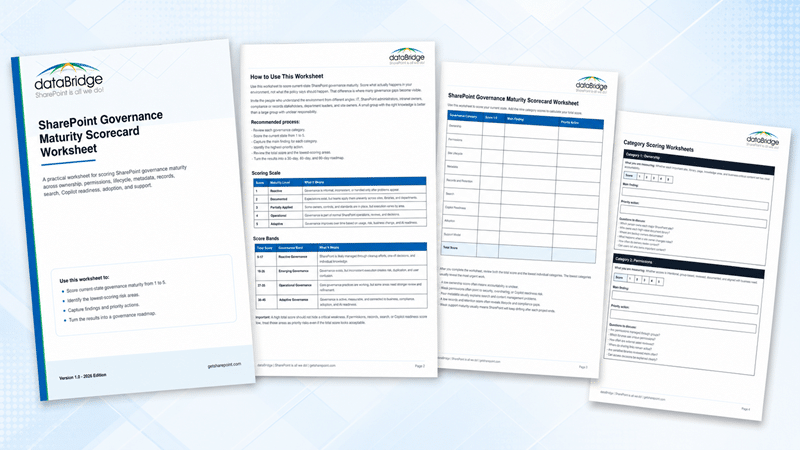
You can also download the SharePoint Governance Maturity Scorecard Worksheet to complete the assessment with your internal team.
Quick Answer: What Is the SharePoint Governance Maturity Scorecard?
The SharePoint Governance Maturity Scorecard is a practical self-assessment that helps organizations score SharePoint governance across nine maturity categories. It shows whether your governance is informal, documented, enforced, operational, or adaptive.
The scorecard evaluates:
- Ownership
- Permissions
- Site lifecycle
- Metadata
- Records and retention
- Search
- Copilot readiness
- Adoption
- Support model
The purpose is not to create another governance document. It is to understand where SharePoint governance works, where it breaks down, and what should improve first.
Why SharePoint Governance Maturity Matters
SharePoint governance maturity determines whether SharePoint stays useful after launch.
A new intranet can look clean on day one. A migration can move files successfully. A document management system can use well-designed libraries. A Copilot rollout can begin with strong interest.
Then daily use takes over.
- Site owners change roles.
- Permissions drift.
- Old files remain searchable.
- Metadata gets skipped.
- New sites appear without structure.
- Policy documents duplicate across libraries.
- Business users stop knowing which answer is current.
Those problems usually do not appear because SharePoint failed. They appear because governance never became part of daily operations.
In SharePoint consulting work, dataBridge often sees the same pattern: the first governance problem is rarely technical. More often, it is unclear accountability.
Someone needs to own the site. A person needs to review the content. Another person needs to approve access. Teams need a process for retiring stale material. Leaders need to know which library is authoritative.
Without those decisions, SharePoint becomes a place where content accumulates instead of a place where information stays trusted.
How This Scorecard Connects to Governance Framework, Copilot Readiness, and Advisory Planning
The SharePoint Governance Maturity Scorecard is a diagnostic tool. It helps your team understand where governance is strong, where it is fragile, and which gaps should become priorities.
After scoring the environment, the next step depends on what the results reveal.
Use the SharePoint Governance Framework when the scorecard shows that roles, standards, decision rights, site ownership, review cadence, lifecycle rules, or governance responsibilities need to become more structured.
Use Copilot Readiness for SharePoint when low scores appear in permissions, metadata, records, search, source authority, stale content, or Copilot readiness. These areas affect whether SharePoint can support trusted AI-assisted work across Microsoft 365.
Use the SharePoint Advisory Partnership when the scorecard reveals ongoing governance needs that cannot be solved by a one-time cleanup. Advisory support helps organizations review governance health, coach owners, prioritize improvements, and keep SharePoint aligned with business change after launch.
The scorecard shows where governance stands today. The framework defines how governance should operate. Copilot readiness addresses AI-related risk. Advisory support keeps the model improving over time.
Who Should Use This SharePoint Governance Maturity Scorecard
Use this scorecard when SharePoint feels useful in some areas but inconsistent across the broader environment. It is especially helpful when IT, compliance, records, intranet owners, department leaders, and business stakeholders need a shared way to evaluate governance without turning the discussion into a long policy review.
This scorecard is a good fit for:
- IT leaders responsible for Microsoft 365 structure, governance, and risk reduction.
- SharePoint administrators who need clearer standards for sites, permissions, lifecycle, and support.
- Compliance and records teams that need stronger control over retention, disposition, sensitive content, and document lifecycle.
- Intranet owners who need pages, policies, news, and knowledge areas to stay accurate after launch.
- Department leaders who rely on SharePoint for collaboration, document management, project work, or operational knowledge.
- Site owners who need clearer expectations for ownership, access, content quality, and review cadence.
- Organizations preparing for migration, intranet redesign, Copilot rollout, SharePoint agents, or a broader governance reset.
- Leadership teams deciding whether SharePoint needs a cleanup, a governance framework, or ongoing advisory support.
The scorecard works best as a working session, not a solo exercise. Score the current environment as it actually operates today. Capture evidence for each score. Note where groups disagree.
Those scoring differences are valuable. If IT believes permissions are mature but business owners do not understand who has access, the issue is not only technical. It is an ownership, communication, and governance problem.
What This Tool Helps Prove
The SharePoint Governance Maturity Scorecard helps your team move from opinion to evidence.
Use it to identify the specific governance conditions that need attention, including ownership, permissions, site lifecycle, metadata, records and retention, search, Copilot readiness, adoption, and support model maturity.
The goal is not to complete a worksheet and stop. The goal is to turn the findings into a practical action plan. After completing the scorecard, review the lowest-scoring areas, assign accountable owners, decide what should happen next, and connect the results to the right dataBridge service or resource.
When the findings show a broader SharePoint operating problem, use SharePoint Consulting Services to define the right next step. When the findings point to governance structure, use the SharePoint Governance Framework to turn roles, decision rights, review cadence, and ownership into a working model.
How the Scorecard Works
The scorecard uses nine governance categories. Each category receives a score from 1 to 5.
A score of 1 means the area is mostly informal. A score of 5 means the area is adaptive, actively governed, and improved over time.
The total possible score is 45 points.
Score each category based on reality, not intention.
A policy may say every site needs an owner. The better question is whether every important site has a current owner, backup owner, review cycle, and escalation path.
A standard may say permissions should be reviewed. The real test is whether access gets reviewed, corrected, and documented on a predictable schedule.
A governance plan may mention metadata. The useful question is whether metadata helps users find, filter, manage, retain, and trust content.
SharePoint governance should be measured by what happens in the environment, not by what sits in a document.
SharePoint Governance Maturity Scoring Scale
| Score | Maturity Level | What It Means |
|---|---|---|
| 1 | Informal | Governance is informal, inconsistent, or handled only after problems appear. |
| 2 | Documented | Expectations exist, but teams apply them unevenly across sites, libraries, and departments. |
| 3 | Enforced | Standards are enforced through site provisioning, permission models, and information architecture, so governance holds by default. |
| 4 | Operational | Governance is part of normal SharePoint operations, reviews, and decisions. |
| 5 | Adaptive | Governance improves over time based on usage, risk, business change, and AI readiness. |
The goal is not to score 5 in every category immediately.
A useful scorecard shows where governance is strong, where it is fragile, and where weak maturity creates risk.
SharePoint Governance Maturity Score Bands
After scoring all nine categories, add the total.
| Total Score | Governance Band | What It Means |
|---|---|---|
| 9-13 | Informal Governance | Governance is mostly implied. Ownership, standards, and lifecycle decisions are handled ad hoc or only after problems appear. |
| 14-22 | Documented Governance | Policies and roles exist, but enforcement relies on awareness and execution varies across sites and departments. |
| 23-31 | Enforced Governance | Standards are built into provisioning, permissions, and information architecture, so governance holds by default in most areas. |
| 32-40 | Operational Governance | Governance is reviewed on a cadence and reinforced through support, so it is part of how SharePoint runs day to day. |
| 41-45 | Adaptive Governance | Governance improves continuously based on usage, risk, business change, and AI readiness. |
A high total score should never hide a critical weakness.
If permissions, records, search, or Copilot readiness score low, treat those areas as priority risks. The overall score may look acceptable while one category still creates serious exposure.
Category 1: Ownership
Ownership measures whether each important site, library, page, knowledge area, and business-critical content set has clear accountability.
This is one of the strongest predictors of SharePoint success.
When no one owns a site, old content stays live. If no one owns a library, permissions drift. When an intranet page has no clear owner, users stop trusting it. If a knowledge area is unmanaged, search results become a mix of current guidance and outdated noise.
Good ownership names who is responsible, what they own, how often they review it, and what happens when their role changes.
Ownership Scoring Signals
| Score | Ownership Maturity Signal |
|---|---|
| 1 | Site and content ownership is unclear, outdated, or known only by a few people. |
| 2 | Owners are documented in some areas, but ownership is not reviewed consistently. |
| 3 | Major sites and libraries have owners, but backup owners and review cadence vary. |
| 4 | Ownership is documented, reviewed, and built into site, page, and content processes. |
| 5 | Ownership is actively managed and connected to governance, adoption, compliance, and content quality. |
Ownership Questions to Ask
Ask these questions when scoring ownership:
- Which person owns each major SharePoint site?
- Who is responsible for each high-value document library?
- How are intranet page owners assigned?
- Where are backup owners documented?
- What happens when a site owner leaves the organization?
- How often do owners review their sites, pages, and libraries?
- Do business owners understand their governance responsibilities?
- Can users tell who owns important content?
A mature SharePoint environment does not leave ownership to memory. It makes ownership visible, current, and operational.
Category 2: Permissions
Permissions measure whether SharePoint access is intentional, group-based, reviewed, documented, and aligned with business need.
This category often exposes the most urgent governance risk.
SharePoint permissions become difficult when sites are created quickly, libraries inherit old access patterns, files are shared directly, and exceptions pile up. Flexibility is useful. Invisible access is not.
Permissions maturity matters even more as organizations expand Microsoft 365 Copilot. AI does not create oversharing. It can make existing access decisions easier to discover and reuse.
Permissions Scoring Signals
| Score | Permissions Maturity Signal |
|---|---|
| 1 | Permissions are mostly reactive, undocumented, or managed through individual exceptions. |
| 2 | Some standards exist, but direct sharing, unique permissions, and stale groups remain common. |
| 3 | Major sites use groups and roles, but reviews and exception cleanup are inconsistent. |
| 4 | Permissions are role-based, reviewed, documented, and aligned with site purpose. |
| 5 | Access is actively governed, risk-reviewed, lifecycle-aware, and ready for AI-powered retrieval. |
Permissions Questions to Ask
Ask these questions when scoring permissions:
- Are permissions managed through groups instead of individual users?
- Which libraries use unique permissions?
- How often are external users reviewed?
- Where do sharing links remain active?
- Are sensitive libraries reviewed more often?
- Do business owners understand who can access their content?
- How are permission exceptions documented?
- Can access decisions be explained without relying on one administrator?
If permissions are unclear, every other governance conversation becomes harder.
For deeper access planning, use the SharePoint Permissions Guide to evaluate permission structure, sharing controls, group models, and long-term access governance.
Category 3: Site Lifecycle
Site lifecycle measures how SharePoint sites are requested, approved, created, reviewed, archived, and retired.
Without lifecycle governance, SharePoint grows in every direction.
New sites appear for projects, departments, committees, initiatives, and temporary collaboration needs. Some remain valuable. Others become abandoned. Many stay searchable long after their business purpose has ended.
A strong site lifecycle does not block teams from working. It gives them a clear path to create the right site with the right structure, ownership, permissions, and review process.
Site Lifecycle Scoring Signals
| Score | Site Lifecycle Maturity Signal |
|---|---|
| 1 | Sites are created informally with little review, ownership, or retirement planning. |
| 2 | Site creation expectations exist, but teams do not apply them consistently. |
| 3 | New sites follow some standards, but review, archive, and retirement processes vary. |
| 4 | Site creation, ownership, templates, reviews, and retirement are part of the operating model. |
| 5 | Lifecycle governance adapts based on usage, risk, business change, and content value. |
Site Lifecycle Questions to Ask
Ask these questions when scoring site lifecycle maturity:
- Who can request a new SharePoint site?
- What approval process exists before site creation?
- Are site templates or provisioning standards used?
- Does each site have a business purpose?
- When are inactive sites reviewed?
- How are project sites archived when work ends?
- Which sites should be retired?
- Can users tell the difference between active and outdated spaces?
A site without a lifecycle plan is not just a site. It is future cleanup waiting to happen.
Use the SharePoint Site Provisioning Strategy when site creation, templates, ownership, and lifecycle controls need more structure.
Category 4: Metadata
Metadata measures whether SharePoint content is organized in ways that support findability, filtering, views, lifecycle management, records, and AI readiness.
Many SharePoint environments still rely too heavily on folders because folders feel familiar. Folders can help in some cases, but they rarely provide enough structure by themselves.
Metadata helps users understand what content is, who owns it, how it should be used, whether it is current, and how it fits into a business process.
Poor metadata creates hidden costs. Search becomes weaker. Views become less useful. Retention planning becomes less precise. Copilot and SharePoint agents have less structure to work with.
Metadata Scoring Signals
| Score | Metadata Maturity Signal |
|---|---|
| 1 | Content is mostly organized through inconsistent folders, file names, and personal habits. |
| 2 | Metadata exists in some libraries, but fields, terms, and usage are inconsistent. |
| 3 | Important libraries use metadata, but taxonomy, content types, and views are not governed consistently. |
| 4 | Metadata standards support navigation, filtering, search, lifecycle, and content ownership. |
| 5 | Metadata is actively managed and connected to governance, records, search, and AI readiness. |
Metadata Questions to Ask
Ask these questions when scoring metadata maturity:
- Do important libraries use meaningful metadata?
- Where do content types add structure?
- Which naming standards need to be clarified?
- How are managed terms governed?
- Do views help users work with content?
- Can content be filtered by status, owner, department, topic, or lifecycle stage?
- Does metadata support retention or records decisions?
- Are metadata standards reviewed as business needs change?
Metadata should not be treated as decoration. It is one of the ways SharePoint becomes manageable at scale.
Use the SharePoint Metadata Strategy Guide when your environment needs stronger taxonomy, content types, managed metadata, and information architecture.
Category 5: Records and Retention
Records and retention measure whether content lifecycle, retention labels, records requirements, archive decisions, and disposition processes are defined and applied.
This category is often underdeveloped because teams focus on where content lives before they define how long it should live.
That creates a long-term problem.
SharePoint environments accumulate old policies, outdated files, inactive project content, duplicate documents, abandoned approvals, and content that no longer reflects current business practice. Some of that content should be preserved. Some should be archived. Other material should be disposed of through the right process.
Mature governance makes those decisions intentional.
Records and Retention Scoring Signals
| Score | Records and Retention Maturity Signal |
|---|---|
| 1 | Retention, records, archive, and disposition decisions are unclear or mostly manual. |
| 2 | Retention expectations exist, but they are not consistently connected to SharePoint structure. |
| 3 | Some labels, policies, or review processes are in place, but coverage and ownership vary. |
| 4 | Records and retention practices align with libraries, content types, ownership, and review cycles. |
| 5 | Records, retention, archive, and disposition are governed as part of the full content lifecycle. |
Records and Retention Questions to Ask
Ask these questions when scoring records and retention maturity:
- Which content must be retained?
- What content should be archived?
- Where should disposition review apply?
- Are retention labels used intentionally?
- How are records requirements mapped to content areas?
- Do business owners understand retention responsibilities?
- Are stale documents separated from active content?
- Which review process supports defensible cleanup?
Records management is not only a compliance issue. It is also a trust issue.
Users need to know whether the content they find is current, official, retained for a reason, or simply forgotten.
Use the SharePoint Records Management and Retention Strategy when retention, records, archive, and disposition need clearer planning.
Category 6: Search
Search measures whether users can find trusted, current, and relevant content in SharePoint.
Search quality is one of the clearest signs of governance maturity.
When users find outdated files, duplicate answers, old pages, private drafts, abandoned project content, or unclear source-of-truth documents, they do not blame the governance model. They blame SharePoint.
That loss of trust is hard to reverse.
Search governance is not just a technical configuration. It depends on ownership, metadata, permissions, page quality, lifecycle decisions, and content cleanup.
Search Scoring Signals
| Score | Search Maturity Signal |
|---|---|
| 1 | Search results are cluttered, inconsistent, or filled with outdated and duplicate content. |
| 2 | Search problems are known, but fixes happen only when users complain. |
| 3 | Important content is organized for search in some areas, but stale content remains common. |
| 4 | Search quality is supported by metadata, ownership, page governance, lifecycle review, and source-of-truth decisions. |
| 5 | Search is actively governed, measured, improved, and aligned with user needs and AI readiness. |
Search Questions to Ask
Ask these questions when scoring search maturity:
- Can users find official content quickly?
- Where do outdated pages and files still appear?
- How are duplicate answers reduced?
- Which libraries are authoritative sources?
- Do page titles and metadata support search?
- Are high-value pages reviewed for accuracy?
- How are search complaints tracked?
- Why do users see different results based on permissions?
Search is not just about finding content. It is about finding content users can trust.
Use SharePoint Search Governance when search quality, source authority, content lifecycle, and findability need stronger governance.
Category 7: Copilot Readiness
Copilot readiness measures whether SharePoint content, permissions, structure, metadata, ownership, and lifecycle practices can support trusted AI-powered responses.
This category is becoming one of the most important parts of SharePoint governance.
Microsoft 365 Copilot depends on the content users can access. If SharePoint contains stale documents, unclear permissions, duplicate answers, poorly governed sites, or sensitive content with broad access, Copilot readiness becomes a governance issue.
AI readiness does not start with prompts. It starts with content quality, permission clarity, and source authority.
Copilot Readiness Scoring Signals
| Score | Copilot Readiness Maturity Signal |
|---|---|
| 1 | Copilot readiness has not been evaluated from a SharePoint governance perspective. |
| 2 | Risks are understood in general, but oversharing, stale content, and source authority have not been assessed. |
| 3 | Some high-risk areas have been reviewed, but readiness varies across sites, libraries, and content types. |
| 4 | SharePoint governance supports Copilot through permissions, lifecycle, metadata, sensitive content review, and authoritative sources. |
| 5 | Copilot readiness is continuously reviewed as part of governance, security, adoption, and content management. |
Copilot Readiness Questions to Ask
Ask these questions when scoring Copilot readiness:
- Which libraries contain sensitive content?
- Where are the authoritative source libraries?
- Could stale files affect AI responses?
- Where might users have broader access than intended?
- Are permissions reviewed before Copilot rollout?
- How are duplicate answers reduced?
- Which old files should be archived?
- Do site owners understand their role in AI readiness?
Copilot readiness is not a one-time technical switch. It is an ongoing governance discipline.
Use Copilot Readiness for SharePoint when your organization needs to prepare SharePoint content, permissions, metadata, and lifecycle practices for Microsoft 365 Copilot.
Category 8: Adoption
Adoption measures whether users and site owners understand how to use SharePoint correctly after launch.
Many SharePoint projects treat adoption as training. Training matters, but adoption is bigger than that.
Users need to understand where to go, how to find information, when to use SharePoint instead of email or file shares, how to work with documents, and how to trust the structure.
Site owners need more specific guidance. They need to understand ownership, page updates, metadata, permissions, content review, lifecycle expectations, and when to ask for help.
Governance fails when users are expected to follow standards they were never taught.
Adoption Scoring Signals
| Score | Adoption Maturity Signal |
|---|---|
| 1 | Users and site owners receive little guidance beyond launch announcements or informal help. |
| 2 | Training exists, but it is not connected to governance expectations or ongoing ownership. |
| 3 | Some site owners and users receive guidance, but adoption support varies by department or project. |
| 4 | Adoption includes role-based guidance, site owner enablement, communication, and governance reinforcement. |
| 5 | Adoption is actively managed, measured, improved, and connected to ownership and business outcomes. |
Adoption Questions to Ask
Ask these questions when scoring adoption maturity:
- Do users know where official content lives?
- Can site owners explain their responsibilities?
- Are governance standards written in practical language?
- How are new owners trained when roles change?
- Where do departments request changes?
- Which old habits weaken SharePoint use?
- Is adoption measured after launch?
- How are common user questions turned into better guidance?
Good adoption makes governance easier because users understand the system they are being asked to follow.
Category 9: Support Model
The support model measures whether SharePoint has a sustainable process for questions, improvements, governance reviews, ownership changes, and ongoing decisions.
This category often determines whether governance survives after the project ends.
A successful SharePoint launch does not eliminate the need for support. It creates a new operating rhythm. Pages need updates. Owners change. Permissions need review. Departments request changes. Search issues appear. New Microsoft 365 capabilities create new questions.
Without a support model, every issue becomes a one-off request.
With a support model, SharePoint becomes easier to sustain.
Support Model Scoring Signals
| Score | Support Model Maturity Signal |
|---|---|
| 1 | SharePoint support is informal, reactive, or dependent on a few individuals. |
| 2 | Support channels exist, but escalation, prioritization, and governance review are unclear. |
| 3 | Common support needs are handled, but ongoing advisory, ownership review, and improvement planning are inconsistent. |
| 4 | Support includes defined roles, intake, prioritization, governance review, and continuous improvement. |
| 5 | The support model is proactive, advisory, measurable, and connected to governance maturity over time. |
Support Model Questions to Ask
Ask these questions when scoring support model maturity:
- Where do users go for SharePoint help?
- How are site owner questions handled?
- Who reviews governance issues?
- What process prioritizes enhancement requests?
- Which governance review cadence exists?
- How are ownership changes managed?
- Which recurring issues are tracked?
- Does SharePoint have an advisory model after launch?
A support model is not just help desk coverage. It is the operating structure that keeps SharePoint from drifting.
Use the SharePoint Advisory Partnership when your organization needs ongoing guidance, governance checkups, owner coaching, and roadmap support after implementation.
SharePoint Governance Maturity Scorecard Worksheet
Use this worksheet to score your current state.
Download the SharePoint Governance Maturity Scorecard Worksheet if you want a printable version of this assessment for a governance workshop, leadership review, or SharePoint planning session.
| Governance Category | Score 1–5 | Main Finding | Priority Action |
|---|---|---|---|
| Ownership | |||
| Permissions | |||
| Site Lifecycle | |||
| Metadata | |||
| Records and Retention | |||
| Search | |||
| Copilot Readiness | |||
| Adoption | |||
| Support Model | |||
| Total Score |
After you complete the worksheet, review two things.
First, look at your total score. This gives your team a broad view of governance maturity.
Next, look at your lowest individual categories. Those areas usually reveal the most urgent work.
Common patterns include:
- A low ownership score often means accountability is unclear.
- Weak permissions often point to security, oversharing, or Copilot readiness risk.
- Poor metadata usually explains search and content management problems.
- A low records and retention score often reveals lifecycle and compliance gaps.
- Weak support maturity usually means SharePoint will keep drifting after each project ends.
How to Interpret Your SharePoint Governance Score
Your total score gives you the maturity band. Your category scores tell you where to act.
Do not treat the score as a grade. Treat it as a decision tool. A total score of 31 may look healthy, but a score of 1 or 2 in permissions, records, search, or Copilot readiness can still create serious business risk.
Review the score in three ways:
- Total score: Shows the overall maturity level.
- Lowest category scores: Reveal the areas that need attention first.
- Category relationships: Show where one weak area is creating problems in another area.
For example, a low ownership score often causes stale content, weak search results, unclear permissions, and poor support habits. A low metadata score often affects search, records, lifecycle management, and Copilot readiness. A low support model score usually means governance will drift again after a cleanup or launch.
If You Score 9–13: Informal Governance
Your SharePoint environment is likely governed through cleanup efforts, exceptions, individual knowledge, and urgent fixes.
Start with ownership, permissions, and site lifecycle. These areas create the foundation for every other governance improvement.
At this stage, the right next step is usually not a long policy document. A better next step is a practical roadmap that identifies which sites, libraries, permissions, and lifecycle gaps need attention first.
To turn that roadmap into a site-level action plan, use the SharePoint site inventory and lifecycle matrix to identify which sites should be kept, merged, archived, cleaned up, assigned owners, or reviewed for higher governance risk.
If several categories are weak, use the SharePoint Governance Framework to turn the scorecard results into roles, standards, review routines, and decision rights.
If You Score 14–22: Documented Governance
Your organization has started to define governance, but execution is still inconsistent.
This is a common stage. Some sites may have owners. Certain departments may follow good habits. A few policies may exist. Other areas may still rely on old permission models, informal naming, unreviewed content, or unclear support paths.
Focus on turning expectations into repeatable practices.
The strongest next step is to define how governance actually works day to day. That usually includes ownership rules, site request standards, permission review routines, content lifecycle decisions, metadata expectations, and escalation paths.
Use the SharePoint Governance Framework when your team needs a working operating model, not just a list of governance concerns.
If You Score 23-31: Enforced Governance
Governance is built into how your environment works. Site provisioning, permissions, and information architecture follow defined standards in most areas, so the platform holds structure by default rather than by reminder.
The gap at this stage is consistency and rhythm. Enforcement may be strong in some sites or departments and thin in others, and governance is still reviewed mainly when something breaks rather than on a schedule.
Focus on closing the uneven areas and adding a review cadence. Confirm every high-value site has an owner, a permission model, and a lifecycle path, then set a recurring governance review so standards do not drift. Use the SharePoint Governance Framework to make enforcement consistent across teams, and the SharePoint Site Ownership and Lifecycle Governance Matrix to close ownership and lifecycle gaps site by site.
If You Score 32–40: Operational Governance
Your SharePoint governance model is working in important areas, but some parts may still be uneven.
At this stage, the biggest risks often appear in the areas that are easier to overlook:
- Stale content.
- Old permissions.
- Weak metadata.
- Unclear source-of-truth libraries.
- Inconsistent records practices.
- Poor search trust.
- Limited Copilot readiness.
- No recurring governance review cadence.
This is where governance should become more measurable. Review site health, ownership gaps, permission exceptions, search issues, support patterns, content lifecycle, and Copilot readiness on a recurring schedule.
If your organization is preparing for Microsoft 365 Copilot or SharePoint agents, use Copilot Readiness for SharePoint to connect governance maturity to permissions, source authority, content quality, and AI-safe information access.
If You Score 41–45: Adaptive Governance
Your governance model is mature enough to support long-term improvement.
That does not mean the work is finished.
Adaptive governance changes as the organization changes. New departments, new projects, new compliance needs, new content types, new AI capabilities, and new collaboration habits will keep affecting SharePoint.
At this stage, the goal is continuous optimization. Governance should be reviewed, measured, adjusted, and reinforced over time.
Use the SharePoint Advisory Partnership when your organization needs a recurring governance cadence, roadmap reviews, owner coaching, Copilot readiness check-ins, and long-term guidance after launch, migration, redesign, or cleanup.
What to Do With Low Category Scores
Low category scores are more important than the total score.
Do not try to fix every weak area at once. Start with the categories that create the most risk, confusion, rework, or loss of trust.
Low Ownership Score
A low ownership score usually means SharePoint depends on informal memory. Sites, pages, libraries, or knowledge areas may exist without clear accountability.
Start by assigning a primary owner, backup owner, review cadence, and escalation path for the most important sites and libraries.
This should become part of the SharePoint Governance Framework so ownership is not treated as a one-time cleanup task.
Low Permissions Score
A low permissions score often points to oversharing, unclear access, direct sharing, unique permissions, stale groups, or weak external sharing control.
Start by reviewing high-value sites, sensitive libraries, external access, unique permissions, and group membership.
If your organization is preparing for Copilot, treat permissions as a priority readiness issue. Use Copilot Readiness for SharePoint to connect permissions cleanup with trusted AI-assisted retrieval.
Low Site Lifecycle Score
A low site lifecycle score usually means sites are easy to create but hard to review, archive, retire, or clean up.
Start by defining site request, approval, naming, ownership, review, archive, and retirement rules.
A lifecycle model should be simple enough to follow, but strong enough to prevent sprawl from becoming normal.
Low Metadata Score
A low metadata score often explains why users struggle to filter, organize, manage, retain, or find content.
Start with high-value libraries. Identify the fields, content types, views, and taxonomy decisions that support real business work.
Do not overbuild metadata. Focus on the fields that help users make decisions, find trusted content, support retention, or prepare content for better search and Copilot experiences.
Low Records and Retention Score
A low records and retention score usually means content lifecycle decisions are unclear.
Start by identifying which content needs retention, records treatment, archive rules, disposition review, or stronger compliance ownership.
This category should connect business content owners with compliance, records, and Microsoft 365 administration.
Low Search Score
A low search score often means the problem is not search configuration alone. It may point to stale content, duplicate documents, weak page ownership, poor metadata, unclear source-of-truth libraries, or content that no one reviews.
Start by identifying the areas users rely on most. Then review whether those sites and libraries are current, owned, structured, and authoritative.
Search trust improves when SharePoint content is governed before users search for it.
Low Copilot Readiness Score
A low Copilot readiness score means SharePoint may not be ready to support trusted AI-assisted work.
Start with the areas Copilot depends on most: permissions, sensitive content, stale documents, authoritative sources, metadata, lifecycle management, and search quality.
Use Copilot Readiness for SharePoint when the scorecard shows that AI readiness depends on deeper SharePoint cleanup, governance, or access review.
Low Adoption Score
A low adoption score usually means governance exists somewhere, but users do not understand how to work within it.
Start by creating role-based guidance for site owners, content owners, department leaders, and everyday users.
Adoption improves when governance feels practical. People need to know where content belongs, who owns it, how to request help, and what standards apply to their work.
Low Support Model Score
A low support model score often means SharePoint will drift after every project.
Start by defining intake, escalation, recurring governance review, owner coaching, issue tracking, and roadmap review routines.
Use the SharePoint Advisory Partnership when your organization needs ongoing support to keep governance active after implementation, migration, redesign, or Copilot readiness work.
How to Run a SharePoint Governance Scorecard Workshop
The scorecard works best as a facilitated working session.
Invite people who understand different parts of the SharePoint environment. That may include IT, compliance, records, intranet owners, department leaders, site owners, and business stakeholders.
Keep the group focused. A small team with the right knowledge is better than a large meeting with unclear responsibility.
Use this workshop structure:
- Review the nine categories.
- Score each category based on current reality.
- Discuss evidence for each score.
- Capture the biggest risk or gap in each area.
- Identify the three categories that need attention first.
- Assign owners for next-step decisions.
- Turn the results into a 30-day, 90-day, and quarterly action plan.
The most valuable part of the workshop is often the discussion behind the score.
If IT scores permissions as a 4 and business owners score them as a 2, that gap matters. It may mean permissions are technically managed but poorly understood.
When leadership scores search as a 3 and employees experience it as a 1, that gap matters too. It may mean governance measures structure but not trust.
Good assessment work makes those gaps visible before they become larger problems.
Why Governance Maturity Matters for Copilot and SharePoint Agents
Copilot readiness has made SharePoint governance more important, not less.
For years, weak governance could stay hidden. A user might not find a stale file unless they searched for it. A sensitive document could sit in a broadly accessible library without much attention. A duplicate policy might cause confusion only when someone opened the wrong version.
AI changes that experience.
Microsoft 365 Copilot and SharePoint agents can surface, summarize, and reuse content that users are allowed to access. That makes permission clarity, source authority, content freshness, and lifecycle governance more visible.
The practical question is not simply whether Copilot is enabled.
The better question is whether SharePoint is ready to serve as a trusted source for AI-assisted work.
This scorecard helps answer that question through a governance lens.
A SharePoint environment with unclear ownership, stale documents, weak metadata, broad permissions, and inconsistent lifecycle controls is not ready for confident AI adoption.
An environment with clear ownership, governed permissions, authoritative libraries, useful metadata, and regular review cycles is in a much better position.
AI readiness begins with information readiness.
Common SharePoint Governance Maturity Gaps
Most SharePoint governance issues are not dramatic at first.
They start small.
Common examples include:
- A site owner leaves the organization.
- A department creates a new library without metadata.
- A project site stays active after the project ends.
- A sensitive document gets shared too broadly.
- A page is published and never reviewed again.
- A folder structure from a file share moves into SharePoint without redesign.
- A knowledge base article becomes outdated but remains searchable.
- A policy is duplicated in three locations.
- A Copilot readiness conversation reveals that no one knows which libraries are authoritative.
Each issue seems manageable by itself.
Together, they create a trust problem.
Employees begin to question whether SharePoint is current, whether search results are reliable, whether permissions are safe, and whether the content they find is the approved answer.
Governance maturity prevents those small issues from becoming the normal operating model.
What Mature SharePoint Governance Looks Like
Mature SharePoint governance is not heavy bureaucracy.
It is a practical operating model.
A mature environment usually has these traits:
- Sites have owners.
- Owners understand their role.
- Permissions are intentional.
- Content has a lifecycle.
- Metadata supports real work.
- Records and retention decisions are planned.
- Search is treated as a trust experience.
- Copilot readiness is connected to content quality and access control.
- Users know where to go.
- Support does not depend on one person.
- Reviews happen before problems pile up.
This is the difference between a SharePoint environment that keeps growing and a SharePoint environment that keeps improving.
When to Review Your Governance Score
Use the scorecard more than once.
A single score gives your team a snapshot. Repeated scoring shows whether governance is improving.
Recommended review points include:
- Before a SharePoint migration.
- Before a Copilot rollout.
- Before an intranet redesign.
- After a major SharePoint launch.
- During quarterly governance reviews.
- When search complaints increase.
- When permissions become difficult to explain.
- When site sprawl becomes visible.
- When business owners lose confidence in SharePoint.
- When compliance or records requirements change.
A recurring review rhythm helps keep governance connected to real business change.
How dataBridge Uses Governance Maturity in SharePoint Planning
dataBridge looks at SharePoint governance as part of the full environment, not as a separate policy exercise.
Governance affects how sites are structured, how documents are managed, how intranet pages stay current, how search behaves, how permissions are reviewed, how records are handled, and how ready the environment is for Copilot.
That is why this scorecard includes both technical and operational categories.
A permissions issue may look technical, but it often points to unclear ownership.
A search issue may look technical, but it often points to stale content, weak metadata, or poor source authority.
A Copilot readiness issue may look like an AI project, but it often points back to SharePoint structure, lifecycle, and access control.
In real environments, these issues are connected.
The scorecard helps make those connections visible before a project begins.
Turn Your Score Into a SharePoint Governance Roadmap
After completing the scorecard, turn the results into a practical roadmap.
A strong roadmap should define:
- Which governance gaps need attention first.
- Which decisions require leadership input.
- Which areas need cleanup.
- Which standards need documentation.
- Which processes need to become operational.
- Which owners need guidance.
- Which risks affect Copilot readiness.
- Which improvements belong in the first 30, 60, and 90 days.
- Which items require ongoing review.
The roadmap should be realistic. SharePoint governance usually improves through focused phases, not one large policy rewrite.
Start with the areas that create the most risk, confusion, or rework.
Then build a repeatable governance cadence the organization can sustain.
Download the SharePoint Governance Maturity Scorecard Worksheet, complete the assessment with your team, and then use the results to identify where ownership, permissions, lifecycle, metadata, records, search, Copilot readiness, adoption, or support need the most attention.
Talk to dataBridge About Your Governance Score
If your score shows gaps in ownership, permissions, lifecycle, metadata, records, search, Copilot readiness, adoption, or support, dataBridge can help you turn the findings into a practical SharePoint governance roadmap.
We help organizations assess SharePoint environments, define governance models, improve site and content structure, prepare for Copilot, strengthen permissions, and create sustainable operating models after launch.
Governance should not be a document that sits outside the way people work.
It should become part of how SharePoint is planned, built, reviewed, supported, and improved.
Contact dataBridge to review your SharePoint governance maturity score and identify the right next steps.
Frequently Asked Questions About the SharePoint Governance Maturity Scorecard
What is a SharePoint governance maturity scorecard?
A SharePoint governance maturity scorecard is a practical assessment tool that helps organizations evaluate how well SharePoint is governed across key areas such as ownership, permissions, lifecycle, metadata, records, search, Copilot readiness, adoption, and support.
How is this different from a SharePoint governance checklist?
A checklist usually confirms whether certain items exist. A maturity scorecard evaluates how consistently governance works in practice. That makes it more useful for planning improvements, prioritizing risk, and building a roadmap.
What is a good SharePoint governance maturity score?
A score of 32 or higher usually means governance has become operational – part of how SharePoint runs day to day. Individual category scores still matter. A low score in permissions, records, search, or Copilot readiness may require attention even when the total score looks acceptable.
How often should we complete the scorecard?
Most organizations should complete the scorecard before major SharePoint initiatives and then review it quarterly or annually. It is especially useful before migrations, intranet redesigns, Copilot rollouts, governance resets, and advisory planning sessions.
Who should participate in the scoring process?
The scoring process should include people who understand SharePoint from different angles. That may include IT, SharePoint administrators, intranet owners, compliance leaders, records managers, department stakeholders, and site owners.
Can this scorecard help with Copilot readiness?
Yes. Copilot readiness depends heavily on SharePoint governance. Permissions, stale content, metadata, source-of-truth libraries, search quality, ownership, and lifecycle controls all affect how reliable AI-assisted experiences can be.
What should we do if our score is low?
A low score is useful because it shows where to focus. Start with the lowest-scoring categories, identify the risks behind them, and create a phased governance roadmap. Many organizations begin with ownership, permissions, lifecycle, and content cleanup before moving into more advanced governance improvements.