

SharePoint Governance Center
This page organizes dataBridge’s SharePoint governance resources into one clear starting point for strategy, operating models, maturity assessment, permissions, provisioning, page ownership, search quality, records, external sharing, and Copilot readiness.
Governance works best when it is practical, connected, and easy to follow. Use this center to move from scattered SharePoint concerns to the right next resource for ownership, structure, lifecycle control, permissions, and long-term trust.
The strongest governance programs are simple enough to follow and structured enough to enforce. They shape how sites are created, how access works, how pages stay current, how records are retained, and how users know which information they can trust.
How This Page Fits With Related dataBridge Resources
Use the related resources this way:
- Use the SharePoint Governance Guide when you need the broad educational model for ownership, permissions, lifecycle controls, policies, standards, sprawl reduction, and long-term governance.
- Use the SharePoint Governance Framework when you need an implementation model for roles, responsibilities, decision rights, standards, governance routines, and operating cadence.
- Use the SharePoint Governance Maturity Model when you need to assess current-state governance and identify practical improvement priorities.
- Use the SharePoint Permissions Guide when the main issue is access structure, role-based permissions, broken inheritance, security groups, sharing boundaries, or permission cleanup.
- Use SharePoint list governance for apps, flows, and Copilot when the content that needs governing is a SharePoint list behind a Power App, workflow, or report rather than a site, library, or page.
- Use SharePoint Governance Tools: Native vs Third-Party when you need to decide whether native Microsoft 365 controls are enough or a third-party governance tool is justified.
- Use SharePoint Site Provisioning Strategy when the main issue is how new sites, Teams-connected workspaces, templates, ownership rules, naming standards, and lifecycle controls should be created.
- Use SharePoint Page Governance when the main issue is page ownership, publishing rules, review dates, news governance, template consistency, and stale-content retirement.
- Use SharePoint Search Governance when the main issue is search quality, trusted answers, duplicate results, stale content, metadata quality, and findability.
- Use SharePoint External Sharing Governance when the main issue is guest access, sharing links, partner collaboration, external permissions, and recurring access review.
- Use SharePoint Records Management and Retention Strategy when the main issue is retention, records, disposition, archive, compliance, and Microsoft Purview alignment.
- Use the SharePoint AI Readiness Center when governance decisions need to support Copilot, SharePoint agents, permissions clarity, trusted content, search quality, and source authority.
- Use the Copilot Readiness Checklist for SharePoint when governance teams need a practical worksheet for reviewing oversharing, stale content, source authority, search quality, archive readiness, ownership, and readiness gaps before Copilot rollout.
- Use SharePoint planning tools and assessment resources when your team needs practical scorecards, worksheets, checklists, and readiness tools across governance, Copilot readiness, permissions, migration, intranet redesign, and AI readiness.
Together, these pages separate the governance resource center from the broader governance guide, implementation framework, maturity model, permissions guidance, provisioning strategy, page governance, search governance, external sharing, records, and AI readiness topics that help organizations keep SharePoint structured, secure, scalable, and trusted.
Written by Michael Fuchs, Founder and CEO of dataBridge. Reviewed by Ken Lewis, Principal Consultant, for SharePoint governance, records management, compliance-driven information architecture, lifecycle, and Microsoft 365 governance accuracy.
Published: May 28, 2026
Last reviewed: August 15, 2026
Quick Answer: What Is the SharePoint Governance Center?
The SharePoint Governance Center is a curated resource hub for dataBridge governance guidance. It helps organizations find the right SharePoint governance resource based on the problem they need to solve, including strategy, operating model, maturity assessment, permissions, site creation, page ownership, search quality, external sharing, lifecycle management, records, and Copilot readiness.
This page is not the full governance guide.
It is the map.
For broad governance strategy, start with the Complete Guide to SharePoint Governance for Microsoft 365. For implementation structure, use the SharePoint Governance Framework. For current-state assessment and improvement planning, use the SharePoint Governance Maturity Model.
How to Use This Governance Center
Start with the business question.
Then choose the resource that matches the need.
A good governance hub reduces guessing. Leaders, IT teams, site owners, compliance teams, and intranet managers should not have to interpret governance differently. They need a shared map they can use when decisions get messy.
Use this center when your organization needs to answer questions like:
- Which SharePoint governance resource should we start with?
- How do we turn governance principles into a working model?
- How mature is our current governance approach?
- Who should approve new sites?
- How should SharePoint permissions be structured?
- How do we govern external sharing?
- How do we keep pages, news, and intranet content current?
- How should records, retention, archive, and disposition fit together?
- How does governance affect search, Copilot, and SharePoint agents?
Governance is not one decision.
It is a connected operating model.
That is why the resources below are organized by role, not only by topic.
SharePoint Governance Resource Map
The resources below show how dataBridge organizes SharePoint governance by role, topic, and practical next step.
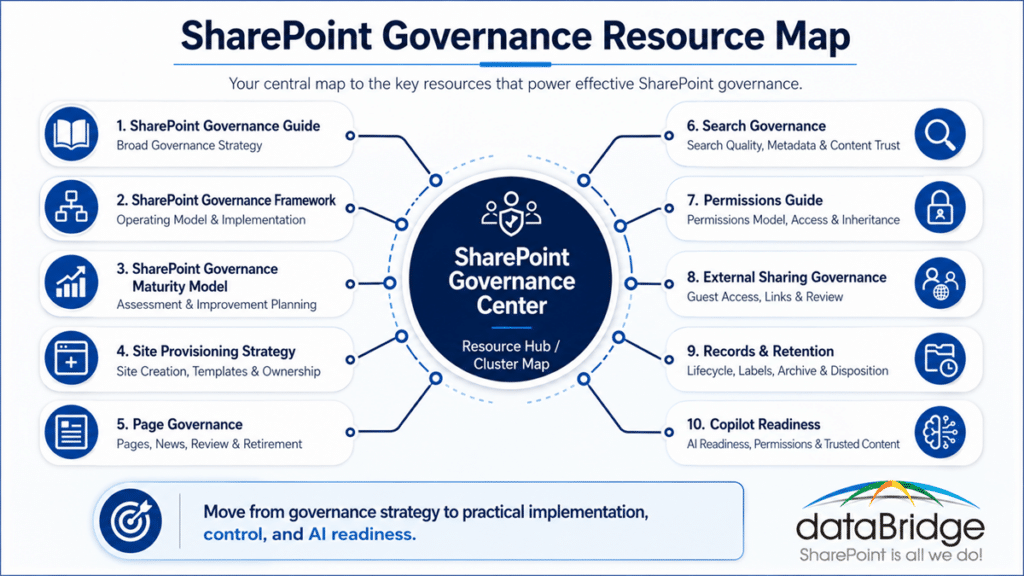
SharePoint Governance Center
You are here.
This page is the resource hub and cluster map for dataBridge SharePoint governance content. Use it when you need a clear path through the governance topic area.
The purpose is simple: connect the right governance question to the right resource.
This matters because governance pages can easily overlap when the structure is unclear. A center page prevents that problem. It points each reader toward the page that owns the next decision.
SharePoint Governance Guide
The SharePoint Governance Guide is the main informational owner for broad governance strategy.
This guide explains the core governance model behind ownership, permissions, policies, lifecycle controls, structural standards, sprawl reduction, and long-term Microsoft 365 management.
Start there when the organization needs the “what” and “why” behind SharePoint governance.
Strong governance starts with clarity. Without it, teams usually create rules they cannot explain and processes they cannot sustain.
SharePoint Governance Framework
The SharePoint Governance Framework is the implementation and operating model owner.
This resource focuses on roles, decision rights, review cadence, ownership, enforcement, standards, and the practical structure needed to make governance work after launch.
It is the right next step when governance already sounds important, but nobody knows who owns which decisions.
A governance framework turns good intentions into repeatable behavior.
SharePoint Governance Maturity Model
The SharePoint Governance Maturity Model supports assessment, benchmarking, and improvement planning.
This resource helps organizations evaluate whether governance is informal, documented, enforced, operational, or adaptive. It also helps leadership prioritize what to improve next.
Start here when the current environment feels messy, but the team needs a fair way to diagnose the real gaps.
Maturity matters because governance does not become strong all at once. It improves through visible stages.
Use the SharePoint Governance Maturity Scorecard when your team needs to turn maturity discussion into a practical worksheet for scoring ownership, permissions, lifecycle, metadata, records, search, Copilot readiness, adoption, and support.
SharePoint Site Provisioning Strategy
The SharePoint Site Provisioning Strategy addresses site creation, templates, approvals, naming, ownership, and lifecycle expectations.
Site provisioning is governance at the front door.
If new sites enter the environment without an intake path, sprawl starts early. Missing templates, unclear approvals, weak naming standards, and absent ownership rules create problems before users upload a single document.
This resource helps organizations define how new SharePoint sites should be requested, approved, created, governed, and reviewed.
SharePoint Page Governance
The SharePoint Page Governance guide focuses on modern pages, news posts, department pages, landing pages, and intranet content ownership.
Modern SharePoint makes publishing easier. That is helpful, but it also creates risk.
Page publishing without ownership becomes content debt.
This resource explains how to define page owners, publishing rules, review dates, templates, retirement rules, and content standards so intranet content stays accurate after launch.
For the newest wrinkle in that discipline, how to govern SharePoint HTML pages covers the review step to add before enabling raw or AI-generated pages.
SharePoint Search Governance
SharePoint Search Governance helps when users cannot find trusted content, search results feel noisy, or Copilot answers depend on inconsistent source material.
Search quality is not only a search setting.
It is a governance outcome.
Ownership, metadata, stale content, duplicate results, source authority, permissions, and review cadence all affect whether users can trust what they find.
SharePoint Permissions Guide
The Complete Guide to SharePoint Permissions is the owner for permissions model, inheritance, groups, and access control.
Permissions should not be treated as a technical afterthought. They define who can see, edit, share, approve, and manage content across SharePoint.
This resource explains permission inheritance, groups, access levels, site permissions, library permissions, folder exceptions, and the larger governance model behind secure collaboration.
Poor permissions rarely stay isolated. They affect search, external sharing, compliance, adoption, and Copilot readiness.
SharePoint External Sharing Governance
SharePoint External Sharing Governance addresses guest access, Anyone links, direct sharing, partner collaboration, and external access reviews.
External sharing is not the enemy.
Unmanaged external sharing is.
This resource helps organizations define when external collaboration is appropriate, what sharing methods are allowed, which sites can share externally, and how access should be reviewed.
SharePoint Records Management and Retention Strategy
SharePoint Records Management and Retention Strategy connects governance to lifecycle, retention, records, defensibility, compliance, and Microsoft Purview alignment.
Retention is not cleanup.
It is lifecycle control.
This resource explains how organizations should decide what must be retained, who owns records decisions, how retention fits into SharePoint structure, and when content should move from active collaboration into controlled lifecycle management.
Retention Labels, Sensitivity Labels, and Permissions
Retention Labels vs Sensitivity Labels vs Permissions in SharePoint helps teams stop confusing access, protection, and lifecycle controls.
These controls work together, but they do different jobs.
Permissions answer who can access content. Sensitivity labels answer how sensitive content should be protected. Retention labels answer how long content should be kept and what should happen later.
Use SharePoint sensitivity labels when the main question is how site labels, file labels, Teams-connected workspaces, and Microsoft Purview protection settings should work together inside the larger governance model.
That distinction matters in real governance work because the wrong control creates false confidence.
Microsoft Purview Disposition Reviews for SharePoint
Microsoft Purview Disposition Reviews for SharePoint supports retained content that needs review before deletion, extension, relabeling, or escalation.
Disposition is where lifecycle governance becomes visible.
A strong disposition process gives reviewers clear roles, decision criteria, and documentation. Without that structure, deletion decisions become inconsistent or overly cautious.
This resource supports organizations that need defensible deletion and better reviewer accountability.
Microsoft 365 Archive for SharePoint
Microsoft 365 Archive for SharePoint helps organizations manage inactive sites that should no longer clutter active search, collaboration, and ownership models.
Not every inactive site should be deleted.
Still, leaving everything active forever weakens governance.
This resource explains how archive planning can reduce noise, support lifecycle decisions, and keep inactive SharePoint content out of the active collaboration layer.
Microsoft 365 Backup for SharePoint
What Microsoft 365 backup protects and where it stops clears up one of the most common Microsoft 365 assumptions: that moving to the cloud means recovery is handled.
Retention controls how long content lives. It does not bring content back after ransomware or an accidental purge.
This resource explains the shared responsibility model, the limits of native recycle bins and the Microsoft 365 Backup product, and how recovery should sit inside lifecycle and governance planning.
SharePoint Retention Label Rollout Plan
The SharePoint Retention Label Rollout Plan gives teams a practical path from policy to adoption.
Retention labels work best when rollout is structured.
That means defining label purpose, mapping labels to real content, piloting with owners, training users, handling exceptions, and expanding in governed waves.
This resource helps teams avoid the mistake of publishing labels before the business understands how to use them.
SharePoint Data Access Governance Reports for Copilot
SharePoint Data Access Governance Reports for Copilot helps organizations review oversharing, permission drift, external access, and sensitive content risk before Copilot rollout.
AI readiness exposes governance weaknesses faster.
A report may reveal risk, but remediation still needs ownership, prioritization, and a repeatable review process.
This resource helps organizations turn access findings into practical governance action.
SharePoint Permission Review Checklist for Copilot
The SharePoint Permission Review Checklist for Copilot helps teams review broad access, guest users, broken inheritance, sharing links, direct permissions, and Copilot exposure risk.
This resource is more operational than the permissions guide.
It gives teams a practical review path before AI-assisted retrieval makes weak access patterns more visible.
Permissions cleanup should not wait until Copilot is already deployed.
Copilot Readiness for SharePoint
Copilot Readiness for SharePoint connects governance to AI readiness, metadata, permissions, content quality, lifecycle control, search behavior, and adoption.
Copilot does not fix weak SharePoint structure.
It reflects it.
This resource explains why SharePoint governance, information architecture, permissions, and content quality matter before organizations rely on AI-assisted answers.
SharePoint AI Readiness Center
The SharePoint AI Readiness Center provides a broader AI readiness map across Copilot, SharePoint agents, permissions, metadata, search, content authority, lifecycle, and governance.
The Governance Center focuses on governance as the organizing discipline.
The AI Readiness Center focuses on AI readiness as the outcome.
Both centers should support each other because AI readiness depends heavily on governed SharePoint structure.
Start Here Based on Your Governance Problem
Use this guide to match the governance issue you are facing with the best dataBridge resource to start with.
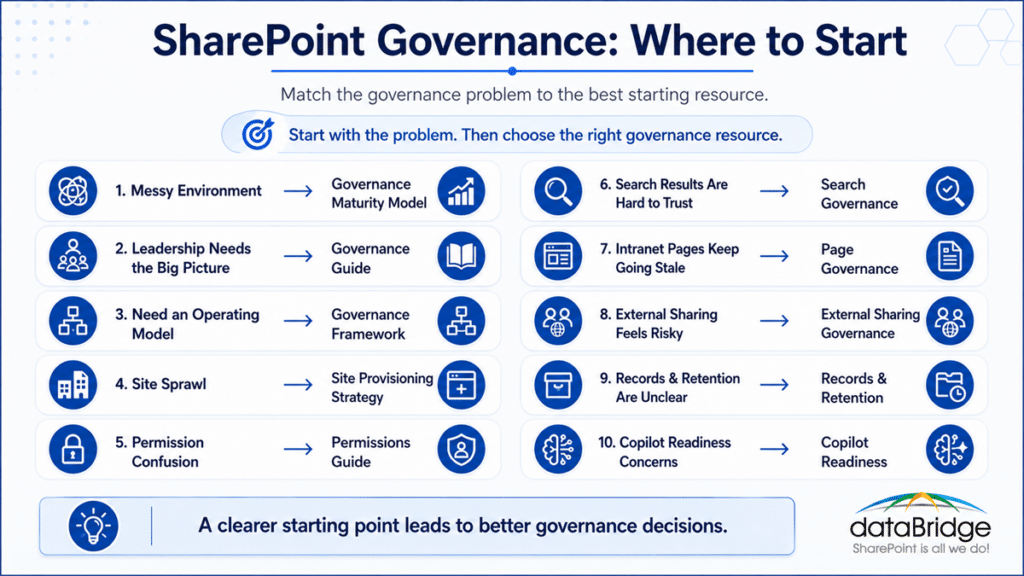
If SharePoint Feels Messy or Uncontrolled
Start with the SharePoint Governance Maturity Model to assess the current state.
Then use the SharePoint Governance Framework to define the operating model.
A messy environment rarely needs one isolated fix. It usually needs clearer ownership, better provisioning, cleaner permissions, stronger lifecycle controls, and a recurring review cadence.
This is one reason governance cleanup can feel harder than expected. The visible symptom is often only the final layer of a deeper structure problem.
If Leadership Needs the Big Picture
The SharePoint Governance Guide is the best starting point when leaders need the big picture.
That guide explains the broad strategy behind SharePoint governance. It helps leadership understand why governance matters, what it should include, and how it supports Microsoft 365 at scale.
After that, move to the SharePoint Governance Framework when the conversation shifts from principles to implementation.
If You Need a Governance Operating Model
Start with the SharePoint Governance Framework when governance has been agreed to in principle but nobody owns the decisions.
An operating model answers what a policy document leaves open. Who approves a new site request. Who reviews permissions, and how often. Who decides when a page gets retired. Who takes over when a site owner leaves the company. Until those questions have names attached, governance stays a set of preferences people follow when it is convenient.
The framework defines roles, decision rights, standards, escalation paths, and the review cadence that keeps the model running after the kickoff meeting ends.
Pair it with the SharePoint Governance Guide when the team also needs the reasoning behind the standards being put in place, and with the SharePoint Governance Maturity Model when leadership wants a baseline before assigning ownership.
Governance written into a document gets read once. Governance written into who decides what gets used every week.
If New Sites Are Creating Sprawl
Use the SharePoint Site Provisioning Strategy when new sites are creating sprawl.
Site sprawl usually begins before users upload content. It starts when site creation has no intake path, template model, approval rule, owner assignment, or lifecycle expectation.
Provisioning governance prevents many future cleanup projects.
It also gives IT and business owners a shared process before the environment becomes harder to manage.
That front-door discipline matters more now that Build lets users create sites through natural language, which strips out the last bit of friction that used to slow sprawl down.
If Permissions Feel Confusing
Start with the Complete Guide to SharePoint Permissions when access control feels inconsistent.
Then use the SharePoint Permission Review Checklist for Copilot if the organization is preparing for Copilot.
Permissions problems tend to grow quietly. By the time users notice them, search results, sharing behavior, and AI readiness may already be affected.
In many projects, permissions are where governance becomes real. People may agree with governance in theory, but access decisions reveal whether the model works.
When the review itself keeps slipping, Microsoft Entra access packages can automate the grant, the expiration, and the recurring recertification – if the licensing math works for your organization.
If External Sharing Feels Risky
Start with SharePoint External Sharing Governance when external collaboration needs clearer boundaries.
The goal is not to block every external collaboration request. Instead, the goal is to define which sites can share, which link types are acceptable, who approves guest access, and how external access gets reviewed.
Good external sharing governance supports collaboration without pretending risk does not exist.
That balance matters. Overly strict rules drive workarounds, while loose rules create avoidable exposure.
Microsoft keeps raising the stakes here as well. The SharePoint One-Time Passcode retirement breaks older external links for guests who never received an Entra B2B account, so unreviewed external access can fail quietly instead of just accumulating risk.
If Search Results Are Hard to Trust
Start with SharePoint Search Governance when users question search quality.
Search quality depends on much more than search configuration. Metadata, permissions, stale content, duplicate documents, ownership, page quality, and source authority all shape what users find.
Better search begins with better governance.
When employees stop trusting search, they often stop trusting SharePoint. That is a governance issue, not just a search issue.
If Intranet Pages Keep Going Stale
Start with SharePoint Page Governance when pages, news, and intranet content are hard to keep current.
Pages need owners, review dates, templates, publishing standards, retirement rules, and clear content accountability.
A beautiful intranet still fails when employees stop trusting the content.
Page governance protects the experience after launch. It also helps teams avoid the slow drift that makes an intranet feel outdated.
If Records and Retention Are Unclear
Start with SharePoint Records Management and Retention Strategy when lifecycle, records, and compliance rules need structure.
Then use Retention Labels vs Sensitivity Labels vs Permissions in SharePoint to clarify the control model.
For deletion decisions, use Microsoft Purview Disposition Reviews for SharePoint. For inactive sites, use Microsoft 365 Archive for SharePoint.
Lifecycle governance works best when active content, retained content, archived content, and disposition decisions are not treated as the same thing.
If Copilot Readiness Is Driving the Governance Conversation
Start with Copilot Readiness for SharePoint when AI readiness is the main driver.
Then use SharePoint Data Access Governance Reports for Copilot and the SharePoint Permission Review Checklist for Copilot for access-focused remediation.
Copilot readiness is not only an AI project. It is a SharePoint governance, permissions, search, content quality, and lifecycle project.
That distinction matters because AI does not create most governance problems. It makes existing problems easier to see.
How These Governance Resources Work Together
SharePoint governance should not be managed as separate topics.
The pieces connect.
A site provisioning model affects site sprawl. Site sprawl affects ownership. Ownership affects page quality and lifecycle review. Lifecycle review affects search. Search quality affects Copilot trust. Permissions affect every one of those areas.
That connection is why organizations need a governance center, not just a list of articles.
A practical governance roadmap often follows this sequence:
- Assess the current state with the SharePoint Governance Maturity Model.
- Establish roles and decision rights with the SharePoint Governance Framework.
- Define broad standards with the SharePoint Governance Guide.
- Control new site creation with a SharePoint Site Provisioning Strategy.
- Clean up access with the Complete Guide to SharePoint Permissions.
- Govern external collaboration through SharePoint External Sharing Governance.
- Protect intranet trust with SharePoint Page Governance.
- Improve findability with SharePoint Search Governance.
- Align lifecycle controls with SharePoint Records Management and Retention Strategy.
- Prepare AI-connected experiences with Copilot Readiness for SharePoint.
This sequence is not rigid.
It gives teams a practical path.
Some organizations begin with permissions because Copilot is creating urgency. Others begin with site provisioning because sprawl is the pain point. Regulated organizations may start with records, retention, external sharing, and disposition.
The right starting point depends on risk, urgency, and business value.
What Strong SharePoint Governance Should Include
Strong SharePoint governance should define how the environment is structured, owned, secured, reviewed, and improved.
At a minimum, organizations should address:
- Ownership: Who owns sites, libraries, pages, policies, records, and review decisions?
- Provisioning: How are new sites requested, approved, created, named, and assigned?
- Permissions: How should access be granted, inherited, reviewed, and cleaned up?
- External Sharing: When is external collaboration allowed, and how is it reviewed?
- Page Governance: How do modern pages, news, and intranet content stay current?
- Lifecycle Management: When should content be reviewed, archived, retained, or retired?
- Records Management: Which content needs retention, disposition, or defensible control?
- Search Governance: How does the organization keep important content findable and trusted?
- AI Readiness: Which governance decisions affect Copilot, agents, and AI-assisted answers?
- Review Cadence: How often does governance get measured, refined, and reinforced?
The details vary by organization.
However, the principle does not change.
Governance must become part of how SharePoint operates day to day.
That is the difference between a governance document and a governance model.
Why Governance Matters More as Microsoft 365 Expands
SharePoint no longer sits alone.
It supports Teams files, intranet pages, document management, search, Microsoft 365 groups, Power Platform solutions, records management, and Copilot experiences.
Structured data needs the same discipline as documents. Governing SharePoint lists explains how lists that power apps, flows, and reporting should be owned, secured, and reviewed.
As lists move from simple trackers into the data layer behind apps and automation, governing those lists becomes part of the same operating model.
For organizations trying to bring structure to libraries, metadata, permissions, retention, search, and controlled documents, a strong SharePoint document management system turns governance from a policy idea into a working content model.
For the specific case of governed policies – ownership, review cycles, acknowledgment evidence, and version history – our guide to policy and procedure management in SharePoint shows what that content model looks like in practice.
Our guide to document management best practices in SharePoint shows what that model looks like in daily operation, from library structure and metadata through the retention habits that keep it working after launch.
That makes governance more important, not less.
A weak site model can create Teams confusion. Poor metadata can weaken search. Loose permissions can create oversharing risk. Stale pages can damage intranet trust. Unclear records rules can create compliance exposure. Duplicate content can weaken Copilot answers.
Most of those failures trace back to one root cause: documents living in the wrong tool. Our guide to how the Microsoft 365 stack should handle documents shows how SharePoint, OneDrive, Teams, and Purview should divide the work so governance has something consistent to act on.
In our experience, organizations often underestimate how connected these issues are.
One team may call it a search problem. Another may call it a migration problem. A third may call it an adoption problem. Underneath, the same governance gaps keep appearing.
When migration is the pressure point, the SharePoint Migration Guide helps teams connect source cleanup, destination architecture, permissions, metadata, validation, adoption, and post-migration governance before old problems move into the new environment.
SharePoint governance gives those problems a common operating model.
It also helps teams stop solving the same issue five different ways.
Microsoft Loop is the newest surface to land inside that boundary – it creates SharePoint Embedded containers automatically, often before IT knows adoption started – which is why Microsoft Loop governance now belongs in the same operating model as sites, Teams, and records.
When to Ask dataBridge for Help
You may need outside help when governance has become difficult to explain, enforce, or sustain.
Common signs include:
- Sites are created without consistent ownership.
- Permissions are too broad or too fragmented.
- Search results include duplicate or outdated content.
- External sharing is enabled, but review habits are unclear.
- Intranet pages look current, but owners are missing.
- Records and retention rules are not aligned with content structure.
- Copilot readiness work reveals oversharing or stale content.
- Leaders want governance, but teams do not know how to operationalize it.
- SharePoint cleanup keeps happening after problems appear.
These issues are fixable.
The answer is not usually more documentation. The better answer is a practical governance model that people can follow.
If those signs sound familiar, our SharePoint Architecture & Governance Consulting engagement turns them into a governance model your team can run. If your organization needs help turning governance concerns into a clear roadmap, contact dataBridge to discuss your SharePoint environment.
Build Governance Around the Way People Actually Work
Governance fails when it ignores real behavior.
Employees need simple paths. Site owners need clear expectations. Compliance teams need defensible controls. IT teams need processes they can manage. Leaders need visibility into risk and progress.
A good governance model respects all of those needs.
That is why dataBridge approaches governance as structure, ownership, and operating rhythm. We do not treat it as a binder of rules that no one reads.
After more than 20 years of SharePoint consulting, one lesson keeps showing up: SharePoint succeeds when structure is clear enough for people to trust.
Governance is the discipline that protects that trust.
Related Governance Resources
Use these resources to continue through the governance cluster:
- SharePoint Governance Guide
- SharePoint Governance Framework
- SharePoint Governance Maturity Model
- SharePoint Site Provisioning Strategy
- SharePoint Page Governance
- SharePoint Search Governance
- Complete Guide to SharePoint Permissions
- SharePoint List Governance for Apps, Flows, and Copilot
- SharePoint External Sharing Governance
- SharePoint Records Management and Retention Strategy
- Retention Labels vs Sensitivity Labels vs Permissions in SharePoint
- Microsoft Purview Disposition Reviews for SharePoint
- Microsoft 365 Archive for SharePoint
- Microsoft 365 Backup: What’s Protected and What Isn’t
- SharePoint Retention Label Rollout Plan
- SharePoint Data Access Governance Reports for Copilot
- SharePoint Permission Review Checklist for Copilot
- Copilot Readiness for SharePoint
- SharePoint AI Readiness Center SharePoint
- Governance Tools: Native vs Third-Party
SharePoint Governance Center FAQs
Is the SharePoint Governance Center replacing the SharePoint Governance Guide?
No. The SharePoint Governance Center is a resource hub and cluster map. The SharePoint Governance Guide remains the main informational owner for broad governance strategy, definitions, planning principles, and best practices.
What is the difference between the Governance Guide, Framework, and Maturity Model?
The SharePoint Governance Guide explains broad governance strategy. The SharePoint Governance Framework explains the operating model for implementation. The SharePoint Governance Maturity Model helps assess current-state maturity and prioritize improvement.
Where should we start if our SharePoint environment already feels messy?
Start with the SharePoint Governance Maturity Model if you need to assess the current state. Then use the SharePoint Governance Framework to define roles, decision rights, ownership, review cadence, and enforcement.
Does SharePoint governance include permissions?
Yes. Permissions are a core part of SharePoint governance because access affects security, search, external sharing, compliance, and Copilot readiness. Use the Complete Guide to SharePoint Permissions when access control is the main concern.
Does SharePoint governance affect Copilot readiness?
Yes. Copilot depends on the structure, permissions, metadata, ownership, lifecycle controls, and content quality already present in SharePoint. Use Copilot Readiness for SharePoint when AI readiness is the main driver.
How does search governance fit into SharePoint governance?
Search governance helps keep important content findable, current, secure, and trusted. It depends on metadata, ownership, content quality, permissions, lifecycle review, and source authority. Use SharePoint Search Governance when search results or Copilot answers are hard to trust.
Should external sharing be disabled to improve governance?
Not always. External sharing can support legitimate collaboration when it has clear rules, approved link types, guest access controls, site-level standards, and review habits. Use SharePoint External Sharing Governance to define a practical model.
How often should SharePoint governance be reviewed?
Most organizations should review governance at least annually. Environments with higher compliance risk, frequent site growth, external sharing, or Copilot rollout should review key areas more often. A good cadence focuses on permissions, ownership, lifecycle, search quality, external access, and content health.
Ready to Strengthen SharePoint Governance?
SharePoint governance works best when it becomes practical, visible, and connected to the way people actually use Microsoft 365.
If your organization needs help assessing governance maturity, defining an operating model, cleaning up permissions, improving lifecycle control, preparing for Copilot, or building a stronger long-term governance roadmap, contact dataBridge to start the conversation.