

SharePoint Intranet Redesign Services
SharePoint intranet redesign services help organizations improve an existing intranet that feels cluttered, outdated, difficult to navigate, or disconnected from daily work. The goal is not just a cleaner home page. It is a stronger structure employees can understand and trust.
dataBridge helps redesign existing SharePoint intranets by improving hub architecture, navigation, content ownership, page standards, governance, search, and relaunch planning. The result is an intranet that is easier for employees to use and easier for site owners to manage.
Talk to dataBridge about your SharePoint intranet redesign
Redesign an Existing SharePoint Intranet Employees Can Trust Again
SharePoint intranet redesign services improve an intranet that already exists but is no longer working well. The work usually includes hub and site restructuring, navigation cleanup, content review, page standards, search improvement, governance repair, and relaunch planning.
A redesign that only changes colors is not a redesign. It is decoration.
Most underperforming intranets do not fail because SharePoint lacks features. They fail because the intranet no longer reflects how employees find information, manage work, and trust content.
Pages multiply. Navigation gets crowded. Department areas grow unevenly. Search returns too many questionable results. Owners change roles, but old pages stay online. Eventually, employees learn to work around the intranet.
That is the point where redesign becomes necessary.
A strong SharePoint intranet redesign gives employees a clearer place to start. Site owners get practical standards to follow. Communications teams gain a more manageable publishing model. Leadership sees an intranet that can support culture, operations, knowledge sharing, and trusted information.
dataBridge focuses on the full intranet system, not just the surface. We redesign the structure underneath the experience so the intranet can stay useful after launch.
When SharePoint Intranet Redesign Services Make Sense
A SharePoint intranet redesign is the right fit when your organization already has an intranet, but employees no longer trust it as the front door to company information.
Common signs include:
- Employees ask coworkers for links instead of using the intranet.
- Search results include outdated, duplicate, or low-value content.
- Departments manage pages with different standards.
- Navigation reflects internal politics instead of employee needs.
- The home page looks busy but does not guide people clearly.
- Site owners do not know what they are responsible for maintaining.
- News, resources, policies, and knowledge content are mixed together.
- Important pages have no review cycle.
- Hubs, sites, pages, libraries, and Teams-connected content grew without a clear model.
- Leadership wants a better employee experience, but the current intranet feels too messy to build on.
These issues are not cosmetic. They are structural.
For teams preparing for redesign, the SharePoint readiness worksheets and planning tools hub provides related governance, migration, Copilot, permission review, and intranet planning resources that help turn redesign concerns into priorities.
Not sure whether your current intranet needs a visual refresh, structural cleanup, or full rebuild? Use the SharePoint Intranet Redesign Readiness Worksheet PDF to score the current state, document evidence, compare redesign options, and turn early concerns into a practical next-step plan.
In our experience, the best redesigns start by naming the real problem. Once the organization agrees that the intranet has become harder to manage than it should be, the work can move from opinion-based redesign to evidence-based improvement.
SharePoint Intranet Redesign Is Different From a New Intranet Build
A new intranet build starts with a blank canvas. An intranet redesign starts with history.
Existing intranets already have content, habits, owners, permissions, links, departments, templates, legacy decisions, and employee expectations. Some pieces should stay. Others need to be retired, merged, rebuilt, or governed differently.
That makes redesign more complex than design.
A practical redesign has to answer questions such as:
- Which parts of the current intranet still work?
- What content do employees actually need?
- Which pages are trusted and current?
- Where does navigation create confusion?
- Which sites should become hubs?
- What content should move, merge, archive, or be removed?
- Who owns each major section after relaunch?
- How will page standards stay consistent?
- What should search prioritize?
- How will the organization communicate the change?
Many intranet redesign projects struggle because they skip these decisions. The team moves directly into page layouts, colors, images, and web parts. Those details matter, but they cannot compensate for weak structure.
Before those choices become fixed, the SharePoint intranet redesign planning worksheet gives the team a practical way to score whether the project should be a redesign, restructure, or rebuild.
If the scoring points toward a rebuild, the cost of a new SharePoint intranet build is covered in our budget guide, so the team can compare the redesign path against a fresh start with real numbers.
What This Looks Like in Practice
A company may have an intranet that still looks acceptable on the surface. The home page loads, departments have pages, and news is still being posted. Yet employees rely on old bookmarks, message coworkers for links, and question whether the content they find is current.
That is a redesign problem, but it is not only a design problem. dataBridge helps review what should stay, what should be merged, what should be archived, which departments need ownership standards, and how navigation should reflect the way employees actually seek information.
Before the redesign moves into page layouts, teams can use the SharePoint Intranet Redesign Readiness Worksheet PDF to score the current state and document evidence. The strongest redesigns start by naming the real problem before choosing colors, templates, or web parts.
SharePoint intranet redesign works best when the process is structured. This framework shows the core stages that help improve an existing intranet in a practical, manageable way.
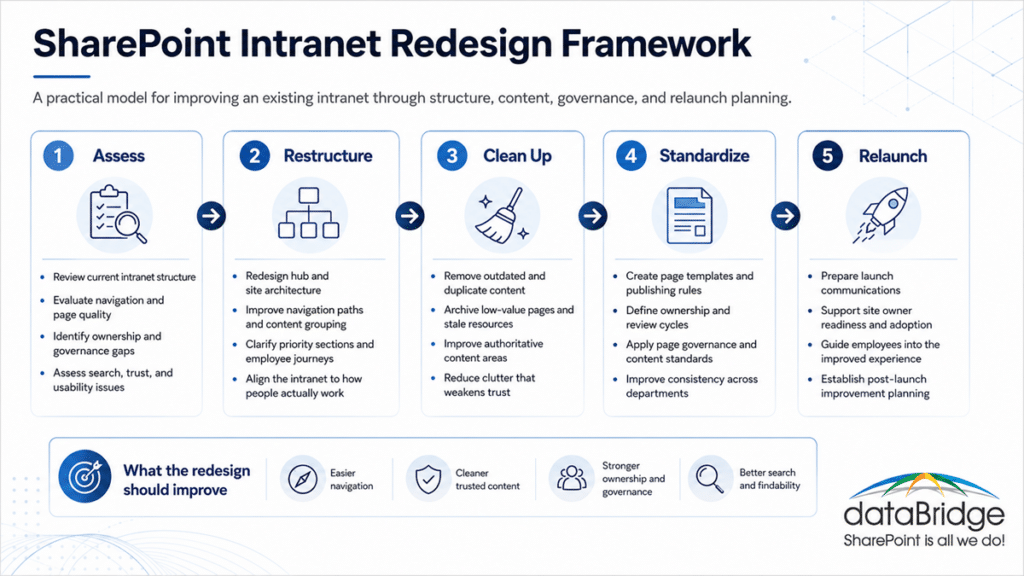
For a broader view of intranet planning, strategy, and delivery, dataBridge’s SharePoint intranet consulting services page explains how intranet strategy, governance, architecture, design, and adoption fit together.
What a SharePoint Intranet Redesign Should Fix
A good SharePoint intranet redesign should make the intranet easier to use and easier to govern.
That sounds simple. In practice, it requires discipline.
The redesign should address the parts of the intranet that create friction for employees, site owners, communications teams, and administrators.
A SharePoint intranet redesign should solve real structural problems, not just refresh the visuals. This infographic shows the most common issues that usually need to be addressed.
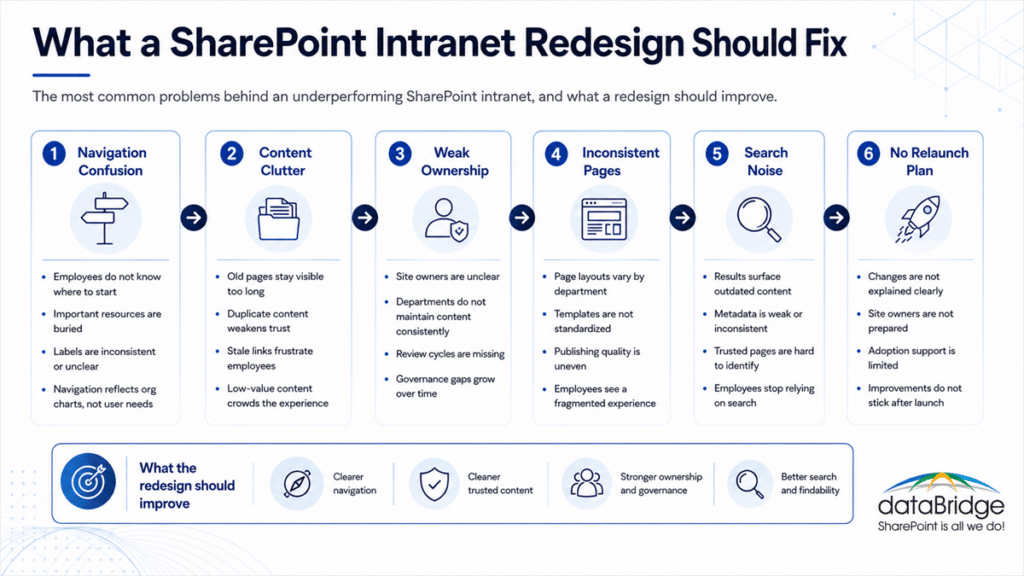
Navigation That No Longer Matches Employee Needs
Navigation often becomes the loudest intranet problem because everyone sees it.
Departments want visibility. Leadership wants priorities reflected. Employees want fast answers. Over time, navigation becomes crowded, redundant, or organized around the company chart instead of common tasks.
A redesign should simplify navigation around employee intent.
That usually means:
- Clear global navigation
- Practical hub navigation
- Fewer competing labels
- Better grouping of resources
- Clear paths to policies, forms, tools, departments, and knowledge
- Less reliance on long dropdowns
- Stronger connection between navigation and search
Navigation should not force employees to understand your internal operating model. It should help them complete work.
Content That Has Grown Without Ownership
Most intranets collect content faster than they retire it.
Old news posts remain visible. Department pages lose owners. Policy links point to outdated versions. Project pages survive long after the project ends. Helpful content gets buried under content that no longer matters.
That is how employees lose trust.
A SharePoint intranet redesign should include content review, not just content movement. The goal is not to migrate clutter into a nicer template. Instead, the redesign should identify what deserves to stay, what needs improvement, and what should be removed.
This is where a SharePoint source of truth model becomes important. Employees, search, Copilot, and SharePoint agents all need clearer signals about which content is authoritative.
Page Standards That Vary by Department
A redesigned intranet needs consistent page patterns.
Without standards, every department invents its own layout. Some pages become text-heavy. Others rely too much on links. A few look polished, while many feel unfinished. Employees notice the inconsistency even when they cannot name the cause.
Page standards make the intranet easier to manage.
Useful standards may include:
- Home page layout rules
- Department landing page templates
- Policy page patterns
- Resource page formats
- News publishing guidelines
- Review and approval expectations
- Owner and reviewer fields
- Metadata requirements
- Accessibility and readability standards
For deeper governance around publishing, ownership, page review, and standards, the SharePoint page governance guide supports the redesign work well.
Search That Returns Too Much Noise
Search problems rarely come from search alone.
Poor results often reflect stale content, weak metadata, unclear ownership, inconsistent page titles, duplicate files, or permission drift. A redesign should treat search as an outcome of structure and governance.
Employees should not have to guess which result is current.
A stronger redesign can improve search by:
- Removing outdated pages and files
- Clarifying authoritative content
- Improving page titles and descriptions
- Strengthening metadata where it matters
- Cleaning up duplicate content
- Reviewing permissions and visibility
- Creating better content paths for common employee needs
- Aligning navigation, page structure, and search behavior
dataBridge’s SharePoint Online search optimization work helps organizations improve findability when search quality has become a trust issue.
Governance That Was Never Operationalized
A governance model only helps when people can follow it.
Many intranets have governance language somewhere, but the day-to-day model is unclear. Site owners do not know what they own. Publishers do not know what standards apply. Administrators do not know when to review old areas. Leadership does not know whether the intranet is improving.
A redesign should turn governance into practical operating rules.
That includes:
- Site and hub ownership
- Page ownership
- Content review cycles
- Publishing standards
- Navigation decision rights
- Template rules
- Permission review expectations
- Department responsibilities
- Authoritative page definitions
- Post-launch governance cadence
Governance should not slow the intranet down. It should keep the intranet usable as it grows.
Our SharePoint Intranet Redesign Services
dataBridge helps organizations redesign existing SharePoint intranets through a structured process. The work can support a full intranet relaunch or a focused redesign of the highest-impact areas.
Every organization has different constraints. Even so, the core services usually fall into these categories.
Existing Intranet Review
We begin by evaluating how the intranet works today.
This review looks at structure, navigation, content quality, ownership, page consistency, search behavior, hub relationships, and governance gaps. The goal is to understand why the intranet feels underused, messy, or difficult to trust.
This review may include:
- Home page assessment
- Navigation review
- Hub and site structure analysis
- Content inventory review
- Page quality review
- Search and findability observations
- Ownership and governance review
- Stakeholder input
- Employee experience feedback
- Relaunch risk identification
If your organization is not ready to move directly into redesign, a SharePoint intranet assessment can help clarify the current-state issues before a larger redesign initiative begins.
Hub and Site Structure Redesign
SharePoint hub architecture matters because it shapes how employees move through the intranet.
A redesign may need to simplify hubs, clarify site relationships, reduce redundant sections, or create a better enterprise intranet framework. Strong hub design also helps departments understand where their content belongs.
The work often includes:
- Reviewing the current hub model
- Clarifying enterprise, department, and functional areas
- Reducing overlapping sites
- Aligning hubs to employee journeys
- Planning site consolidation where needed
- Improving the relationship between sites, pages, libraries, and Teams-connected areas
- Creating a scalable structure for future growth
A practical SharePoint hub site and enterprise intranet architecture framework gives the redesign a stronger foundation.
Navigation Redesign
Navigation should make the intranet feel simple, even when the organization is complex.
We help redesign global navigation, hub navigation, department navigation, and page-level pathways. The work focuses on labels, groupings, priority content, user intent, and maintainability.
A good navigation model should answer employee questions quickly.
For example:
- Where do I find HR information?
- Where are policies?
- How do I get support?
- Where are forms and templates?
- What is happening across the organization?
- Which department owns this information?
- Where do I go for leadership updates?
- How do I find trusted knowledge?
The best navigation is not clever. It is clear.
Content Cleanup and Content Restructuring
Content cleanup is one of the most important parts of an intranet redesign.
An attractive intranet with unmanaged content still creates confusion. Employees need current, useful, and trusted information. Site owners need a realistic model for keeping content clean.
We help organizations review and restructure content by looking at:
- Current pages
- Old pages
- Duplicate content
- Policy and procedure content
- Department resources
- News and announcements
- Forms and templates
- Knowledge articles
- Employee support content
- Files linked from intranet pages
- Content that should be archived or removed
Not every page deserves to survive a redesign.
That may sound blunt, but it protects the intranet. Removing low-value content often improves employee trust faster than adding more pages.
Page Template and UX Improvement
Visual design still matters.
Employees judge credibility quickly. A confusing page layout makes useful content harder to consume. Inconsistent templates also make the intranet harder for site owners to maintain.
dataBridge can help redesign page patterns, templates, landing pages, and content layouts. The goal is not to create a flashy intranet. Instead, the goal is to create an intranet that feels professional, consistent, readable, and easy to maintain.
This may include:
- Home page redesign
- Department landing page templates
- Resource center page patterns
- Policy page layouts
- News and announcement patterns
- Leadership communication pages
- Employee service pages
- Reusable content sections
- Page readability improvements
- Visual consistency standards
For the visual and experience layer, SharePoint branding, UX, and page template design can support the redesign when the intranet needs a stronger look and better page usability.
Search and Findability Improvement
A redesign should improve how people find information.
Navigation helps employees browse. Search helps them recover when they do not know where something lives. Both need to work together.
We review the factors that affect findability across the intranet. That may include page titles, headings, metadata, content duplication, authoritative pages, file naming, permissions, and content placement.
Search improvement may involve:
- Cleaning outdated results
- Strengthening authoritative content
- Improving page naming standards
- Reviewing metadata usage
- Reducing duplicate pages and files
- Clarifying ownership
- Improving content summaries
- Aligning navigation with search intent
- Reviewing content that appears in search but should not
Search is not a magic box. It reflects the quality of the environment underneath it.
Governance Cleanup
Redesign creates a valuable chance to fix governance.
The intranet should not relaunch with the same ownership confusion that caused the original problem. A redesigned site needs clear rules for how it will be managed after launch.
We help define practical governance around:
- Who owns each area
- Who can publish
- Who approves navigation changes
- How page templates should be used
- When content should be reviewed
- How outdated content should be handled
- What departments are responsible for maintaining
- Which pages are authoritative
- How changes should be requested
- What should happen after launch
The goal is not to create a giant governance document. The goal is to create a working model people can actually follow.
Relaunch and Adoption Planning
A redesigned intranet needs a relaunch plan.
Employees need to understand what changed, why it changed, and how the new intranet helps them. Site owners need training and expectations. Leaders need simple talking points. Communications teams need a launch calendar.
A relaunch should not feel like a one-day announcement. It should feel like a managed transition.
The plan may include:
- Launch messaging
- Stakeholder communications
- Site owner guidance
- Department readiness
- Training materials
- Feedback channels
- Post-launch issue tracking
- Adoption measurement
- Governance check-ins
- Continuous improvement planning
For behavior change, communications, and post-launch reinforcement, SharePoint intranet adoption strategy helps the redesign become part of daily work.
Start planning your SharePoint intranet redesign
dataBridge’s SharePoint Intranet Redesign Process
dataBridge uses a structured approach because intranet redesign has many moving parts. The process keeps stakeholders aligned and prevents the project from becoming a collection of disconnected design opinions.
1. Assess the Existing Intranet
We review the current intranet before recommending changes.
That review looks at the employee experience, site structure, content quality, governance, navigation, search, page standards, and ownership. The goal is to separate symptoms from root causes.
A cluttered home page may point to weak content ownership. Poor search may reveal old content and metadata gaps. Low adoption may reflect confusing navigation, not employee resistance.
Good redesign decisions come from evidence.
2. Define the Redesign Goals
A redesign needs clear goals before anyone rebuilds pages.
Leadership may care about culture, communication, and employee experience. Operations may care about forms, policies, and service access. HR may care about onboarding and employee resources. IT may care about governance, permissions, supportability, and scale.
We help define the goals that the redesigned intranet must support.
Typical goals include:
- Improve employee trust
- Simplify navigation
- Reduce content clutter
- Strengthen department ownership
- Improve search quality
- Support company communications
- Make policies and resources easier to find
- Create consistent page standards
- Prepare content for Copilot and AI experiences
- Relaunch the intranet with a stronger operating model
The redesign should serve the organization, not just the project team.
3. Redesign the Structure
Structure shapes the intranet experience.
We map the future-state hub, site, navigation, and content model. This gives the redesign a clearer foundation before templates and pages are rebuilt.
The structure should reflect how employees look for information. It should also support how the organization manages information.
A practical structure may include:
- Enterprise home
- Department areas
- Employee services
- Policies and procedures
- Forms and templates
- News and communications
- Leadership updates
- Knowledge resources
- Project or initiative areas
- Search-supported source-of-truth content
The structure does not need to be complicated. It needs to be understandable.
4. Redesign Priority Content and Pages
Not every page needs the same level of effort.
We identify the pages and content areas that matter most to employees. Those areas usually need stronger structure, clearer writing, better layout, and defined ownership.
Priority content may include:
- Home page
- HR landing page
- IT help and support page
- Policies and procedures
- Forms and templates
- Department landing pages
- Employee resources
- Leadership communication pages
- News and events
- Knowledge base or resource center areas
Important pages should not feel like storage locations. They should guide employees to the right next step.
5. Validate the Experience
Validation helps prevent redesign decisions from staying trapped in a conference room.
We look for feedback from stakeholders, site owners, and representative users. The goal is to test whether the structure, labels, page patterns, and content paths make sense.
Validation can uncover simple but important problems.
A label may mean one thing to leadership and another thing to employees. One department page may look complete but still miss common tasks. Search may surface the right page but show a poor title or summary.
Small fixes at this stage can prevent larger adoption issues later.
6. Relaunch With Governance
A redesigned intranet should launch with clear operating rules.
Site owners need to know what they own. Communications teams need publishing standards. Administrators need review expectations. Departments need a path for updates. Leadership needs visibility into whether the intranet stays healthy.
Relaunch is not the finish line.
After launch, governance keeps the intranet from drifting back into clutter.
What You Get From a SharePoint Intranet Redesign
A SharePoint intranet redesign should produce more than a new-looking site.
The work should give your organization a better operating model for the intranet.
Typical deliverables may include:
- Current-state intranet findings
- Redesign goals and priorities
- Future-state hub and site model
- Navigation recommendations
- Content cleanup plan
- Page template recommendations
- Priority page redesigns
- Ownership model
- Publishing standards
- Content review guidance
- Search and findability recommendations
- Relaunch plan
- Site owner guidance
- Governance cadence
- Post-launch improvement roadmap
The exact deliverables depend on the size of the intranet, the number of departments involved, and how much content needs to be reviewed.
Still, the outcome should be clear. Employees should find information faster. Site owners should know what to maintain. Leaders should see a stronger platform for communication, culture, and trusted content.
SharePoint Intranet Redesign and Copilot Readiness
Modern intranet redesign now has an AI-readiness dimension.
Microsoft 365 Copilot and SharePoint agents depend on the content environment underneath them. If an intranet contains old, duplicate, unmanaged, or poorly governed content, AI experiences can expose that weakness.
AI does not fix intranet clutter. It can make clutter easier to find.
That makes source-of-truth planning more important during redesign. Organizations need to identify which pages, libraries, policies, knowledge content, and resources should be treated as authoritative.
A redesign can help by:
- Removing stale content
- Clarifying trusted pages
- Improving ownership
- Strengthening metadata where useful
- Reducing duplication
- Reviewing permissions
- Creating source-of-truth content areas
- Improving page summaries and structure
- Aligning search, navigation, and authoritative content
This work supports employees today and prepares the intranet for AI-assisted discovery tomorrow.
Copilot readiness should not be treated as a separate technology project when the real issue is content quality. A well-redesigned intranet gives AI a cleaner, more trustworthy content foundation.
Why dataBridge for SharePoint Intranet Redesign Services
dataBridge focuses on SharePoint, Microsoft 365, governance, information architecture, migrations, intranets, and adoption. That matters because intranet redesign is not just a design exercise.
The work touches structure, content, search, ownership, permissions, templates, communication, governance, and user behavior. Each piece affects the others.
After years of SharePoint work, one pattern is clear: underperforming intranets usually have hidden operating-model problems. The home page gets blamed because it is visible. Deeper causes often sit underneath the page.
Those causes include:
- Unclear ownership
- Weak hub structure
- Inconsistent page standards
- Old content
- Poor navigation decisions
- Search clutter
- Department silos
- Missing governance cadence
- No relaunch plan
- Limited site owner support
dataBridge helps organizations address those issues directly.
We bring a practical consulting approach to intranet redesign. That means we look at how the intranet should work after the project ends, not just how it should look on launch day.
SharePoint Intranet Redesign vs. Related Services
SharePoint intranet redesign works best when it has a clear boundary. It should not replace every related intranet service.
Choose SharePoint intranet redesign services when your existing intranet needs restructuring, cleanup, navigation improvement, governance repair, page standards, search improvement, and relaunch planning.
Start with SharePoint intranet consulting services when you need a broader strategy for a new or evolving intranet program.
Consider a SharePoint intranet assessment when you need diagnostic findings before committing to a redesign.
Use SharePoint branding, UX, and page template design when the visual design, page experience, and reusable templates need focused attention.
Prioritize SharePoint intranet adoption strategy when the intranet is structurally sound but employee behavior, launch communication, or site owner engagement needs improvement.
Rely on SharePoint hub site and enterprise intranet architecture framework when the main challenge is hub structure, site relationships, and enterprise intranet architecture.
Point site owners to SharePoint page governance when publishing standards, ownership, review cycles, and page quality need stronger control.
Use SharePoint Online search optimization when findability, search quality, and trusted results are the primary issues.
Build on a SharePoint source of truth model when the redesign needs to support trusted content, Copilot readiness, and authoritative information.
Common SharePoint Intranet Redesign Mistakes
A redesign can improve the intranet quickly, but it can also repeat old problems if the work stays too shallow.
Redesigning the Home Page First
The home page matters, but it is not the intranet.
Starting with the home page can create momentum. However, it can also distract from structure, ownership, navigation, and content quality.
A better approach starts with the employee journey. Once the structure is clear, the home page can guide people into the right areas.
Our SharePoint intranet home page examples show what that looks like in practice, with the tools and links employees open every day placed above the banner.
Keeping Too Much Old Content
Redesign projects often become content preservation projects.
That is a mistake.
Old content should earn its place in the redesigned intranet. If a page has no owner, no clear purpose, no recent review, and no real audience, it should not move forward automatically.
Less content can create more trust.
Letting Every Department Define Its Own Standards
Departments need flexibility, but they also need guardrails.
Without page standards, the redesigned intranet becomes inconsistent again. Employees move from one department area to another and feel like they are using different systems.
Shared templates protect the experience.
Treating Search as an Afterthought
Search should be part of the redesign plan.
Employees use search when navigation fails, when they do not know where to start, or when they need something quickly. If search returns stale or unclear results, the intranet loses credibility.
Search quality depends on content discipline.
Launching Without an Ownership Model
A redesigned intranet will drift if nobody owns it.
Every major area should have an owner. Important pages should have review expectations. Navigation changes should have decision rights. Publishing should follow standards.
Ownership keeps the intranet alive after launch.
Questions to Ask Before Redesigning a SharePoint Intranet
Before starting a redesign, your organization should answer several practical questions.
- What is the intranet supposed to help employees do?
- What current areas still work well?
- Which pages do employees use most?
- Where do people get stuck?
- Which content is outdated or duplicated?
- What should be considered authoritative?
- Which departments need new landing pages?
- Who owns each major section?
- What navigation labels confuse users?
- How should search improve?
- Which pages need templates?
- What governance rules must be clear before relaunch?
- How will the redesign be communicated?
- What happens after launch?
These questions prevent the project from becoming a visual refresh with unresolved structural issues.
A good redesign has to make decisions. Avoiding decisions usually means keeping the mess.
Your answers to these questions also give you a head start on a request for proposal. If you’re inviting outside firms to bid on the redesign, our intranet RFP guide shows how to turn them into a request vendors can price accurately.
Schedule a SharePoint intranet redesign conversation
FAQ
What are SharePoint intranet redesign services?
SharePoint intranet redesign services help organizations improve an existing SharePoint intranet. The work often includes hub and site restructuring, navigation redesign, content cleanup, page templates, search improvement, governance, and relaunch planning.
When should we redesign our SharePoint intranet?
You should consider a redesign when employees no longer trust the intranet, search results feel unreliable, navigation is confusing, content is outdated, or site ownership is unclear. A redesign also makes sense when the intranet no longer reflects how the organization operates.
Is SharePoint intranet redesign the same as SharePoint branding?
No. Branding is one part of the experience, but redesign is broader. A true redesign addresses structure, content, navigation, ownership, governance, templates, search, and adoption. Visual design should support those decisions.
Do we need to rebuild every page?
Usually, no. Most organizations should prioritize high-value pages, high-traffic areas, employee service content, department landing pages, and authoritative resources. Some old pages should be improved, while others should be archived or removed.
How does intranet redesign improve SharePoint search?
A redesign can improve search by removing stale content, clarifying authoritative pages, improving titles and headings, reducing duplication, strengthening ownership, and reviewing metadata. Better search usually starts with better content discipline.
Can an intranet redesign help with Copilot readiness?
Yes. A redesign can help prepare the content environment for Copilot by clarifying trusted sources, cleaning up outdated content, improving ownership, reducing duplication, and strengthening governance. Copilot works better when SharePoint contains clear, current, and authoritative information.
Who should be involved in a SharePoint intranet redesign?
A strong redesign usually involves communications, HR, IT, department representatives, site owners, leadership stakeholders, and selected employee users. The group should be broad enough to reflect real needs but focused enough to make decisions.
What happens after the redesigned intranet launches?
After launch, the intranet needs governance, feedback review, site owner support, content review, search monitoring, and continuous improvement. A launch without an operating model usually leads to the same problems returning over time.
Redesign Your SharePoint Intranet With a Stronger Foundation
An underperforming intranet does not need more clutter. It needs clearer structure, better ownership, cleaner content, stronger navigation, usable governance, and a relaunch plan employees can understand.
dataBridge helps organizations redesign SharePoint intranets so employees can find trusted information, site owners can manage content with confidence, and leadership can rely on the intranet as a real business platform.
Contact dataBridge to discuss your SharePoint intranet redesign