

SharePoint Intranet Redesign Readiness Worksheet
Use this worksheet to decide whether your SharePoint intranet needs a focused redesign, a deeper restructure, or a full rebuild. It helps intranet owners review readiness across navigation, content, ownership, search, adoption, governance, stakeholder alignment, and next-step planning before design work begins.
Most intranet redesign projects begin with a familiar complaint: “The site looks old.”
That may be true. Still, appearance is rarely the whole problem.
A better planning conversation starts with evidence. Is the intranet hard to use because the design is dated, or because the structure underneath it no longer supports how people work?
The SharePoint Intranet Redesign Readiness Worksheet helps your team make that call before the project turns into a homepage redesign, a navigation debate, or a rebuild that may be larger than necessary.
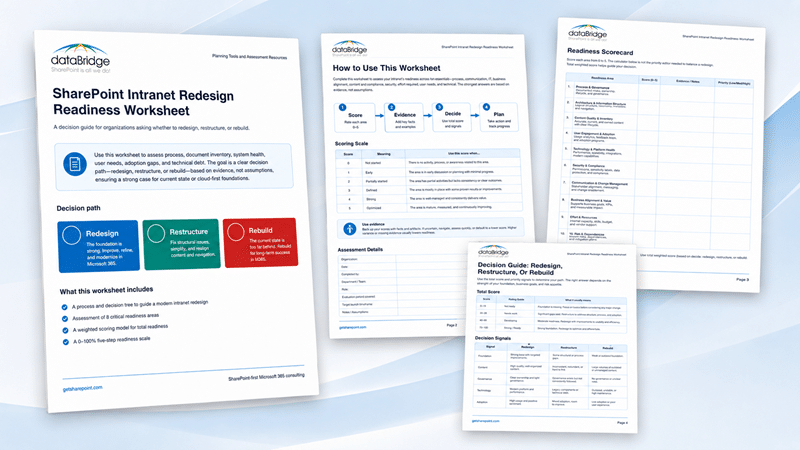
What the SharePoint Intranet Redesign Readiness Worksheet Helps You Decide
The worksheet helps your team decide whether the intranet should be redesigned, restructured, or rebuilt.
That distinction is important.
A redesign improves the experience when the foundation mostly works. A restructure fixes deeper problems with navigation, ownership, content, or governance. A rebuild usually makes sense when the current intranet is too fragmented, stale, or untrusted to repair safely.
In many SharePoint intranet projects, leaders ask for a new homepage first. That is a reasonable starting point, but it can also hide the real issue. If employees cannot find trusted content, if departments maintain pages inconsistently, or if search returns old guidance, a visual refresh will not solve the bigger problem.
This worksheet gives your team a practical decision path before design work begins.
When to Use This Worksheet
Use this worksheet before a SharePoint intranet redesign project, relaunch discussion, navigation cleanup, or content modernization effort.
It is especially useful when:
- Leaders disagree on whether the intranet needs a refresh, restructure, or rebuild
- Employees say they cannot find trusted information
- Departments manage pages, news, or policies inconsistently
- The homepage feels dated, but the deeper issue is unclear
- Navigation has grown around departments instead of employee journeys
- Content owners are missing, inactive, or unclear
- Search results surface duplicates, old pages, or unofficial guidance
- The organization wants a stronger foundation before Microsoft 365 Copilot or SharePoint agents expand content discovery
For a broader view of intranet planning, the modern SharePoint intranet guide explains how structure, content, governance, and adoption work together.
Who Should Complete the Worksheet
A single intranet owner can complete the worksheet, but the discussion is usually better with a small cross-functional group.
Recommended participants include:
- Intranet owner
- Communications or HR lead
- SharePoint or Microsoft 365 administrator
- Department content owners
- Business stakeholder or executive sponsor
- Compliance, records, or security representative when needed
- Adoption or training lead
A strong intranet is not carried by design alone. It needs content ownership, technical support, business alignment, and governance that continues after launch.
That is why this worksheet works best as a planning conversation, not just a form to fill out.
What the Worksheet Includes
The SharePoint Intranet Redesign Readiness Worksheet includes practical planning sections your team can use before deciding the scope of change.
The worksheet includes:
- A 10-category readiness scorecard
- A scoring scale from 1 to 5
- A redesign, restructure, or rebuild decision guide
- A current-state evidence log
- A top findings section
- A recommended path section
- Scope boundary planning
- A 30/60/90-day planning roadmap
- Stakeholder alignment questions
- A final decision summary
Each section helps move the conversation away from preference and toward evidence.
That shift matters. Intranet redesign decisions become clearer when teams can separate visual problems from structural, content, operational, and governance problems.
The 10 Readiness Areas
The worksheet scores the intranet across 10 practical readiness areas.
These categories help your team see whether the current foundation is strong enough to redesign or whether deeper cleanup should happen first.
Business Purpose and Success Measures
The intranet should have clear goals, audiences, and measurable outcomes.
Without that clarity, redesign discussions become subjective. One group wants a better homepage. Another wants more news. Someone else wants fewer sites.
A useful intranet supports real work. It helps employees find guidance, complete tasks, understand priorities, and trust the information they use.
Audience Needs and Employee Journeys
An intranet should reflect how employees work, not only how the organization chart is arranged.
When user needs are unclear, navigation decisions often become political. The worksheet helps your team check whether high-value tasks, roles, and pain points are understood before redesign decisions are made.
This is where many intranet projects quietly drift. The design conversation gets louder than the employee journey.
Navigation and Hub Architecture
Navigation is one of the clearest signals of intranet health.
When employees do not know where to go, design improvements will not fix the experience. In many cases, the better next step is to improve hub structure, audience paths, labels, and ownership before page templates are redesigned.
For more detail on structure, the SharePoint information architecture and metadata page explains how architecture, labels, metadata, and content organization work together.
Content Quality and Source-of-Truth Clarity
A redesigned intranet will not build trust if it still contains outdated, duplicated, or unofficial content.
The worksheet asks your team to evaluate whether core content is current, authoritative, and free from conflicting guidance. This is often the difference between an intranet that looks better and one that works better.
The SharePoint source of truth guide expands on this issue for organizations that need to reduce duplicate guidance and improve employee trust.
Page Ownership and Review Process
Every important page needs an owner, review rhythm, and lifecycle expectation.
Without ownership, the intranet starts becoming stale again soon after launch. Page quality declines slowly. Employees notice the drift before leaders do.
The worksheet helps identify whether ownership is strong enough to support a redesign or whether governance needs attention first.
Search and Findability
Employees judge the intranet by whether they can find what they need.
Search problems often point to deeper issues with content quality, page titles, metadata, permissions, and source authority. A redesign may improve entry points, but it cannot fully compensate for weak findability.
This is a practical warning sign. If search is poor because the content estate is messy, the project should not be framed as design only.
Permissions and Audience Targeting
Permissions and audience targeting affect trust, adoption, and supportability.
The worksheet prompts your team to review whether audiences, security, and targeting rules are clear. This becomes more important when intranet content supports search, Copilot, or targeted communication experiences.
A page that is well designed but poorly targeted still creates confusion.
Branding, Templates, and Page Consistency
Visual consistency still matters.
Templates, page standards, and branding help employees recognize official content. They also make the intranet easier to maintain after launch.
Sequence matters, though. Brand and page design work best when the structure, ownership model, and content priorities are clear first.
Adoption, Communication, and Launch Readiness
A redesigned intranet needs more than a launch announcement.
The worksheet checks whether your team has a plan for communication, training, feedback, and reinforcement. When usage is already weak, the SharePoint intranet adoption strategy page can help connect launch planning to long-term behavior change.
Adoption is not something to bolt on at the end. It should shape how the redesign is planned.
Governance, Support, and AI Readiness
Modern intranets now support more than pages and news.
They influence search, employee self-service, knowledge discovery, and AI-assisted experiences. Weak ownership, stale content, and unclear source authority make those experiences harder to trust.
For broader governance planning, the SharePoint governance guide explains how ownership, lifecycle rules, permissions, content standards, and support models keep SharePoint healthy over time.
How to Use the Worksheet
The worksheet follows a simple four-step process.
Score
Rate each readiness area from 1 to 5.
Do not overwork the number. Use the score to start the right conversation.
A low score does not mean the intranet project has failed. It means the issue should be handled before the team commits to the wrong scope.
Evidence
Write the facts behind each score.
Evidence may include user feedback, search complaints, analytics, outdated pages, duplicate policies, missing owners, unclear navigation paths, or known support issues.
This step keeps the discussion grounded. It also helps reduce the guesswork that often shows up in intranet redesign planning.
Decide
Use the total score and decision signals to choose the most realistic path.
The worksheet does not force a single answer. Some organizations need a phased approach.
For example, a team may restructure navigation and ownership first. After that, they can redesign templates, improve page standards, and relaunch with stronger adoption support.
Plan
Turn the findings into a roadmap.
A decision without next steps rarely changes anything. The worksheet includes a 30/60/90-day planning section so your team can move from discussion to action.
How to Interpret the Score
Use the total score as a starting point, not the only decision factor.
The worksheet uses this decision model:
- 10–24: Rebuild likely
- 25–34: Restructure likely
- 35–44: Redesign likely
- 45–50: Optimize and govern
The score helps your team identify the likely path. The evidence tells you why.
A low score in ownership, content quality, or navigation usually means a cosmetic redesign will not solve the real problem. A stronger path may include structure cleanup, content rationalization, governance decisions, and stakeholder alignment before the visual design phase begins.
Redesign, Restructure, or Rebuild
The worksheet separates three common paths that often get grouped under the word “redesign.”
Redesign
Choose redesign when the structure mostly works, but the experience feels dated or inconsistent.
This path usually focuses on homepage improvements, page templates, navigation refinement, branding, high-value pages, and adoption support.
A redesign works best when users already trust the intranet foundation.
Restructure
Choose restructure when the intranet can be reused, but navigation, content ownership, page standards, or governance need meaningful cleanup.
This path often includes hub architecture changes, content consolidation, ownership assignment, metadata improvements, and page lifecycle planning.
Restructure before redesign when the intranet has useful content but poor organization.
Rebuild
Choose rebuild when the current intranet is too fragmented, stale, or untrusted to repair safely.
A rebuild may be needed when old sites, duplicated portals, unmanaged department areas, unclear ownership, and unreliable content have become the normal operating model.
Rebuilding is not the biggest failure. Sometimes it is the clearest decision because the old foundation no longer supports employee trust.
Where This Worksheet Fits in Your Intranet Planning
This worksheet is a self-guided decision tool.
It is not the same as a formal consultant-led diagnosis. If your team needs a deeper review of what is limiting intranet value, dataBridge provides a SharePoint intranet assessment that examines structure, content, search, governance, adoption, and readiness before a larger redesign or rebuild.
It is also not a replacement for implementation support. Once your organization has chosen the right path, SharePoint intranet consulting services can help turn that direction into hub architecture, navigation, content ownership, page standards, governance, search improvements, and relaunch planning.
The worksheet comes first when the team is still deciding how much change the intranet needs.
Why dataBridge Created This Worksheet
dataBridge created this worksheet because intranet redesign conversations often start too late in the decision process.
By the time a project becomes a page design effort, the real issues may already be locked in. Navigation may still mirror departments instead of employee journeys. Content ownership may still be unclear. Search may still return duplicate or outdated pages. Governance may still depend on informal habits.
A better planning conversation happens before design work starts.
The worksheet reflects a practical pattern we see in SharePoint and Microsoft 365 consulting work: intranet success depends on structure, ownership, content trust, adoption, and governance. Visual design matters, but it cannot carry the intranet alone.
Before You Redesign the Homepage, Check the Foundation
A homepage redesign can improve perception quickly.
Still, the homepage is only one part of the intranet experience. Employees also need clear paths to policies, department resources, forms, knowledge, news, leadership updates, and operational guidance.
If those paths are unclear, the redesign may create temporary excitement but limited long-term value.
Use the worksheet to test whether your intranet needs a new look, a stronger structure, or a more complete reset.
Use the Evidence Log to Separate Symptoms From Root Causes
The current-state evidence log is one of the most useful parts of the worksheet.
Teams often hear symptoms first:
- “The intranet is hard to use.”
- “Search does not work.”
- “Nobody knows where the latest policy is.”
- “The homepage looks old.”
- “Departments keep creating their own pages.”
- “Employees do not trust what they find.”
Those comments are worth capturing, but they need diagnosis.
The evidence log helps your team document what users are saying, where the issue appears, the likely root cause, business impact, and priority level.
That structure keeps the planning conversation practical. It also helps leaders see whether the project is a design issue, a content issue, a governance issue, or a deeper operating model issue.
Use the 30/60/90-Day Roadmap to Move From Decision to Action
The worksheet includes a 30/60/90-day planning roadmap so the team can act on the findings.
A practical roadmap may include:
- First 30 days: Confirm direction, scope, owners, decision criteria, and priority issues
- Days 31–60: Design structure, ownership model, navigation, and priority content improvements
- Days 61–90: Prepare launch, adoption, governance cadence, and support expectations
The roadmap does not need to be complicated. It needs to be clear enough for the project team to understand what happens next.
A simple plan with ownership beats an ambitious redesign that no one is ready to maintain.
Use Stakeholder Alignment Before Launch Planning
The worksheet also includes a stakeholder alignment section.
This is where the team confirms who must approve, build, govern, and maintain the future intranet. It also helps clarify whether the project is a redesign, restructure, rebuild, or phased combination.
That conversation should happen before launch planning accelerates.
When stakeholders align early, the intranet team can reduce rework. They can also make better decisions about content cleanup, source-of-truth pages, governance cadence, and long-term support.
For page-level standards after launch, the SharePoint page governance guide can help define ownership, review cycles, publishing expectations, and lifecycle controls.
What to Do After Completing the Worksheet
After your team completes the worksheet, review the total score, top findings, and decision signals together.
Then choose one of four paths:
- Redesign the experience if the foundation is usable
- Restructure the intranet if content, navigation, and ownership need cleanup
- Rebuild the foundation if the current intranet is too fragmented or untrusted
- Optimize and govern if the intranet is mostly healthy but needs better cadence
Next, translate that decision into scope.
A clear scope should define what is in, what is out, who owns each major decision, and which risks must be resolved before launch.
When to Contact dataBridge
Contact dataBridge when the worksheet shows that the intranet needs more than a simple refresh.
That may include unclear ownership, weak navigation, stale content, poor search trust, fragmented department sites, inconsistent templates, or no practical governance model.
dataBridge helps organizations assess, redesign, govern, and evolve SharePoint intranets that employees can trust.
Related SharePoint Intranet Planning Resources
If you are still learning what a modern intranet should include, start with the complete guide to building a modern SharePoint intranet. It provides broader planning context for intranet structure, content, communication, and governance.
If the worksheet shows weak findability or confusing structure, review the SharePoint information architecture and metadata page before redesigning templates or navigation.
When source authority is the main issue, the SharePoint source of truth guide can help your team reduce duplicates, retire stale guidance, and define trusted content areas.
For organizations preparing SharePoint content for AI-assisted experiences, Copilot readiness for SharePoint explains how governance, permissions, content quality, and source authority affect trusted retrieval.
You can also browse the SharePoint planning tools and assessment resources page for additional worksheets, checklists, matrices, and planning assets.
Frequently Asked Questions
What is the SharePoint Intranet Redesign Readiness Worksheet?
The SharePoint Intranet Redesign Readiness Worksheet is a self-guided planning tool for deciding whether a SharePoint intranet should be redesigned, restructured, or rebuilt.
It includes a readiness scorecard, scoring scale, decision matrix, evidence log, stakeholder alignment section, and 30/60/90-day action plan.
Is this worksheet the same as a SharePoint intranet assessment?
No. The worksheet is a self-guided decision tool. A consultant-led diagnosis goes deeper into structure, content, governance, search, adoption, and technical readiness.
Use the worksheet when your team needs an initial decision path. Use a formal review when the intranet has deeper issues that require outside analysis or facilitated planning.
Should we use this before starting a redesign project?
Yes. Use it before the project becomes focused on design, templates, or homepage layout.
The worksheet helps confirm whether the intranet foundation is ready for a redesign or whether content, navigation, ownership, and governance need cleanup first.
What does “restructure” mean for a SharePoint intranet?
Restructure means the existing intranet can likely be reused, but the organization needs to fix how content, navigation, ownership, hubs, and governance work.
This path is common when the intranet has useful content but employees struggle to find or trust it.
What does “rebuild” mean for a SharePoint intranet?
Rebuild means the current intranet foundation may be too fragmented, stale, or untrusted to repair through small improvements.
A rebuild may include new architecture, clearer ownership, content cleanup, governance standards, page templates, and launch planning.
Does this worksheet help with Copilot readiness?
Yes, but it is not a full Copilot readiness plan.
The worksheet includes governance, support, and AI readiness as one readiness category. That helps teams identify content quality, ownership, and source authority issues that may affect search and AI-assisted discovery.
Who should own the completed worksheet?
The intranet owner should usually own the completed worksheet, but it should be reviewed with communications, IT, business stakeholders, and content owners.
Ownership matters because the worksheet leads to decisions about scope, priorities, governance, and next steps.
Download the SharePoint Intranet Redesign Readiness Worksheet
Use the worksheet to start a better intranet planning conversation.
It will help your team decide whether to redesign, restructure, rebuild, or optimize the current intranet before investing in the wrong level of change.
Download the SharePoint Intranet Redesign Readiness Worksheet