Permissions and Security
Security is a central component of any document management system.
Permissions determine who can view, edit, or manage documents within SharePoint.
Over time, poorly structured environments often accumulate several problematic patterns.
Broken inheritance may occur when individual libraries or folders have custom permissions. Administrators sometimes assign permissions directly to individual users instead of groups. Security groups may evolve inconsistently across departments.
When these patterns develop, administrators frequently struggle to answer a basic question:
Who actually has access to this document?
A well-designed document management system relies on role-based permissions aligned with organizational responsibilities. Access is granted to groups rather than individuals, and inheritance structures remain predictable.
Organizations experiencing permission complexity often benefit from reviewing the SharePoint Permissions Guide, which outlines strategies for restoring clarity to access management.
Search and Discoverability
Search is where the value of document management becomes most visible to employees.
When search works well, users locate documents quickly and confidently. When search fails, productivity declines rapidly.
Effective SharePoint search depends on several factors working together.
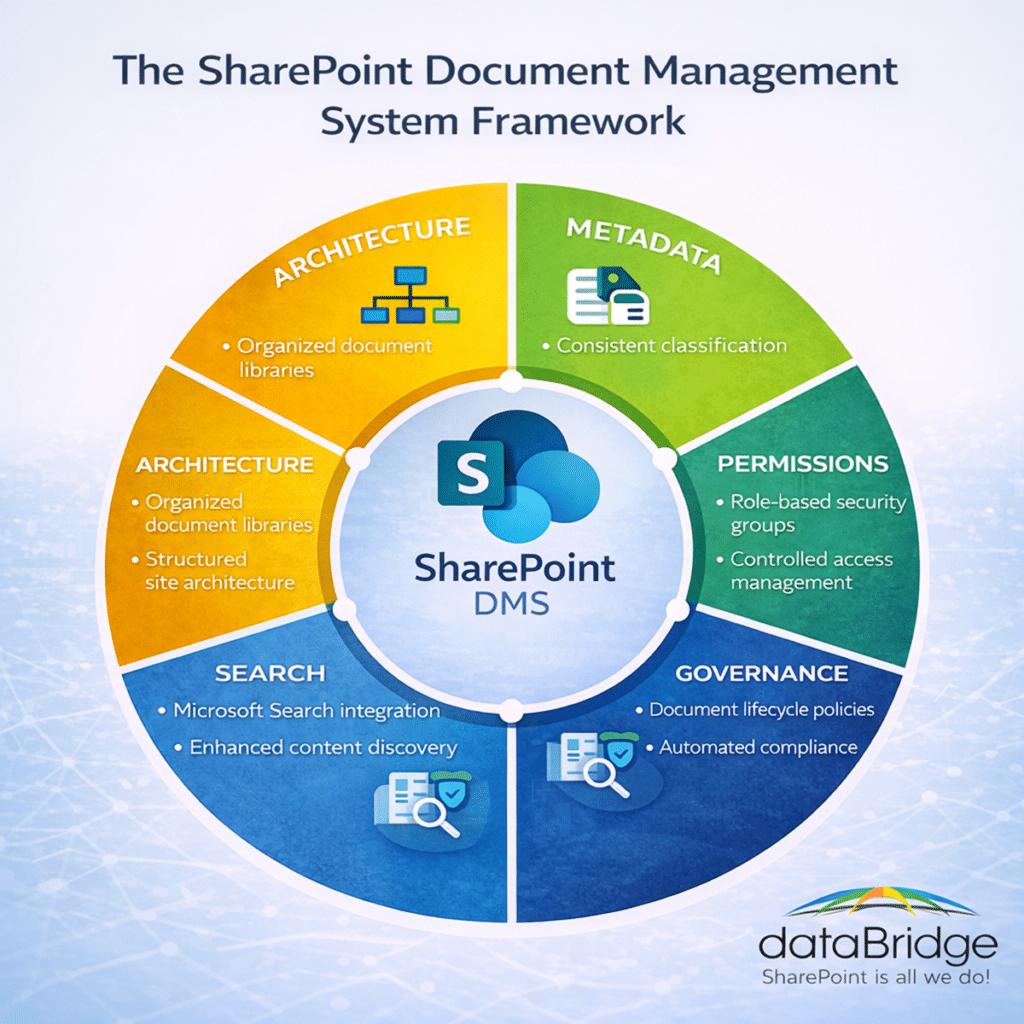
Meaningful metadata ensures documents can be filtered and categorized. Consistent architecture ensures documents are stored in predictable locations. Clear permission structures ensure users only see content they are authorized to access.
Duplicate content can also degrade search performance. When multiple versions of similar files exist across the environment, users may struggle to determine which document represents the authoritative version.
That is where a SharePoint source of truth model becomes important. Document management should help users, search, Copilot, and SharePoint agents understand which documents, libraries, pages, and knowledge sources are authoritative instead of forcing people to choose between competing versions.
When employees need trusted answers instead of just file search results, SharePoint Knowledge Base Design helps structure FAQs, SOPs, policies, how-to content, templates, review dates, and ownership into a governed knowledge layer.
Organizations often assume search problems are technical issues. In reality, search quality usually reflects underlying architecture and classification decisions.
Organizations focused on improving discoverability often review SharePoint Online Search Optimization to better understand how these elements interact.
Governance and Lifecycle Management
Document management does not end when files are uploaded.
Organizations must also determine how documents are maintained over time.
Governance defines how content is created, managed, and retired. Without governance, even well-structured systems eventually drift toward complexity.
Governance policies typically address several questions:
- Who owns each site or library?
- How are new sites created?
- What content requires approval?
- How long should documents be retained?
Ownership is particularly important. Each document library or content area should have a responsible owner who maintains structure, metadata quality, and document relevance.
A comprehensive governance framework is explained in the SharePoint Governance Guide. When document governance becomes part of a broader Microsoft 365 operating model, the SharePoint Governance Center helps connect document ownership, permissions, site provisioning, search governance, external sharing, records, retention, and AI readiness into one clearer roadmap.
Document Lifecycle Management
Documents evolve over time.
Policies are revised. Contracts expire. Reports become outdated.
A well-designed document management system supports the entire lifecycle of content.
Typical lifecycle stages include:
- Draft
- Review
- Approved
- Archived
- Disposed
Lifecycle management ensures outdated content does not remain visible long after it becomes irrelevant. It also improves compliance by ensuring records are retained for appropriate durations.
When document lifecycle needs to extend into retention rules, records classification, disposition review, or Microsoft Purview controls, organizations should connect the DMS model to a SharePoint records management and retention strategy. In some environments, that lifecycle model should also include a retention label rollout for SharePoint libraries and a plan for Microsoft 365 Archive for SharePoint when older sites or libraries no longer support active work.
Policies and procedures are the clearest example of lifecycle discipline in action – they need named owners, jurisdiction-aware review triggers, and acknowledgment records on top of the standard lifecycle stages. Our guide to how to manage policies and procedures in SharePoint walks through that model step by step.
Retention, Compliance, and Records Management
Many industries operate under strict regulatory requirements that define how long certain documents must be retained.
SharePoint supports these requirements through retention labels and records management policies.
Retention alone is not the full control model, though. Our breakdown of retention labels vs sensitivity labels vs permissions in SharePoint explains how document lifecycle, information protection, and user access should be designed together in a governed document management environment.
For libraries that contain contracts, HR files, financial records, legal documents, or client information, SharePoint file sensitivity labels should be planned alongside metadata, permissions, retention, and records controls.
Retention rules can apply based on several factors.
- Document Type
- Compliance Classification
- Department
- Business Process
These policies allow organizations to automate compliance requirements rather than relying on manual processes.
Organizations operating in regulated industries often explore these strategies through SharePoint Architecture for Regulated Industries.
Version Control and Document Integrity
One of SharePoint’s most valuable document management capabilities is version control.
Version history allows organizations to track document changes, restore previous versions, and maintain audit trails.
This eliminates the common practice of storing multiple files with names such as “Final_v3” or “Final_v5.”
Instead, SharePoint maintains a structured version history that records who made changes and when those changes occurred.
Version control improves collaboration while protecting document integrity.
For libraries that need more than basic version history, define a document control model with approvals, review dates, controlled publishing, ownership, audit traceability, and lifecycle expectations. Then use the Document Management Maturity Worksheet (PDF) to score whether your current document control model is strong enough for operational or compliance-sensitive content.
Document Automation with Power Automate
Modern document management systems increasingly rely on automation.
Power Automate allows organizations to create workflows that streamline document management tasks.
Common automation scenarios include:
- Routing documents for approval
- Notifying stakeholders of updates
- Applying metadata automatically
- Archiving completed records
Automation reduces administrative overhead while improving consistency across the environment.
Approval routing is the scenario we get asked about most, and the right answer depends on the library. Our breakdown of which SharePoint approval method fits your library covers when a built-in setting is enough and when you need a flow.
Organizations exploring automation opportunities often review Power Automate Best Practices & Use Cases.
SharePoint Document Management Best Practices
Organizations implementing document management systems in SharePoint consistently follow several best practices.
The five below are the short version – for the full set, including the governance and retention discipline that keeps a system working years after launch, see our complete guide to SharePoint document management best practices.
Design Architecture Before Migration
Successful environments begin with a clear architecture plan before content is migrated. The SharePoint Discovery & Readiness Assessment and SharePoint Migration Readiness Assessment are two helpful resources.
Use the pre-migration document management checklist (PDF) to confirm the migration plan covers document libraries, metadata, ownership, permissions, cleanup, testing, communication, and post-migration validation before content moves.
Use Metadata Strategically
Not every document requires extensive metadata. Focus classification on high-value content such as policies, contracts, and regulated records.
Align Permissions With Organizational Roles
Role-based permissions simplify security management and improve transparency.
Establish Clear Ownership
Each document library should have a designated owner responsible for maintaining content quality.
Implement Governance Early
Governance policies introduced early prevent environments from becoming difficult to manage later.
How to Evaluate a SharePoint Document Management Implementation
Organizations evaluating SharePoint as a document management platform should consider several key questions.
Does the Architecture Support Long-Term Growth?
Sites and libraries should be structured so the environment can scale without becoming fragmented.
Is Metadata Consistent Across the Organization?
Consistent metadata improves search accuracy, automation capabilities, and compliance enforcement.
Are Permissions Transparent?
Administrators should clearly understand who has access to specific content areas.
Is Governance Clearly Defined?
Governance policies should define ownership, lifecycle management, and site creation standards.
Does Search Work Reliably?
Users should be able to locate documents quickly without knowing exactly where files are stored.
SharePoint Document Management Maturity Checklist
1. Library Structure and Ownership
Each important document library should have a clear business purpose, a defined owner, and a supportable structure. Libraries should not become catch-all storage areas for unrelated files.
Score this area low if departments keep creating new libraries without ownership, purpose, or lifecycle rules.
2. Metadata and Content Types
Metadata should help users classify, filter, search, automate, and govern documents. It should be practical enough for users to apply and consistent enough for administrators to manage.
For a deeper framework, use the SharePoint Metadata Strategy Guide when metadata, content types, views, and classification rules need stronger planning.
3. Folder and View Design
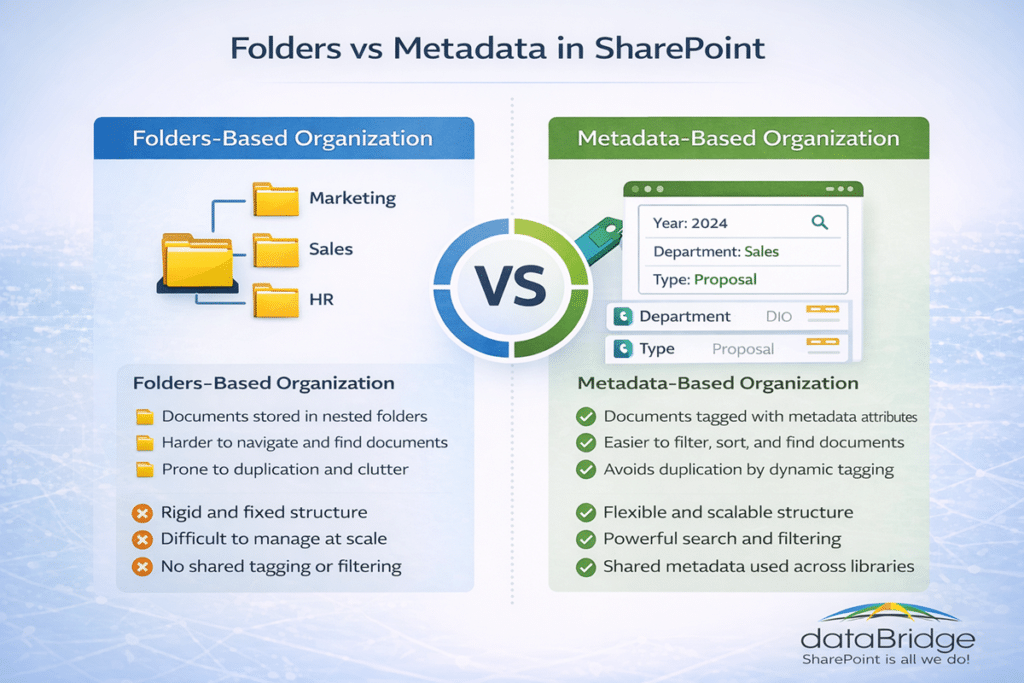
Folders can still be useful, but they should not carry the entire information architecture. A mature document system uses folders selectively and relies on metadata, views, filters, and library design to make content easier to find.
When folder-heavy environments need to become more scalable, the guide to mapping legacy folders to SharePoint metadata can help teams decide what to preserve, flatten, restructure, or replace.
4. Permissions and Access Control
Permissions should align with business roles, content sensitivity, and ownership. Mature environments avoid excessive unique permissions, unclear groups, and inherited access from old migrations.
This matters even more when document libraries contain HR, finance, legal, executive, customer, regulated, or confidential content.
5. Versioning and Document Control
Important documents need a clear versioning model. Controlled documents may also need approvals, review dates, publishing rules, audit traceability, and owner accountability.
Use SharePoint Document Control when formal documents need stronger review, approval, version, and publishing controls.
6. Records, Retention, and Archive Readiness
Document management does not end when a document is published. Mature environments define what should be retained, what should become a record, what should be archived, and what should be removed.
Use SharePoint Records Management and Retention Strategy when lifecycle, retention, disposition, records, archive, and Microsoft Purview alignment need a stronger operating model.
7. Search and Findability
Users should be able to find trusted documents without knowing the exact site, folder, or library where the content lives. Strong search depends on metadata, clear titles, permissions, ownership, and current content.
A document management system is not mature if users still rely on email, Teams messages, or personal bookmarks to locate the right version.
8. Source-of-Truth Clarity
High-value documents should have an authoritative home. Users should know which library, policy center, knowledge base, or document set contains the official version.
Use the SharePoint Source of Truth Model for Copilot Readiness when duplicate documents, competing guidance, or unclear authority make content harder to trust.
9. Knowledge Base Connection
Not every answer belongs inside a document library. Some content should become a knowledge article, FAQ, SOP page, policy summary, or searchable employee guidance.
Use SharePoint Knowledge Base Design when document management needs to connect with FAQs, SOPs, policies, templates, review dates, and trusted employee answers.
The knowledge base template shows what that connection looks like in practice, including a Related Policy lookup that ties each SOP and FAQ to the controlled document it implements.
10. Copilot and AI Readiness
A document management system is more Copilot-ready when documents are current, owned, permissioned correctly, classified consistently, and connected to trusted sources.
Use Copilot-Ready SharePoint Information Architecture when document structure, metadata, permissions, and source authority need to support trusted AI retrieval.
How to Score Your Document Management Maturity
Score each area from 1 to 5.
1 = Critical gap
2 = Weak
3 = Partly defined
4 = Strong
5 = Optimized
A total score below 25 usually means SharePoint is still behaving like file storage. A score between 25 and 39 usually means the foundation exists, but governance and consistency need work. A score of 40 or higher usually means the environment has a stronger document management foundation, although recurring review is still needed.
For a structured scoring tool, download the Document Management Maturity Worksheet (PDF) and use it with site owners, records stakeholders, department leads, and Microsoft 365 administrators.
The Business Impact of Effective Document Management
Well-designed document management systems deliver measurable benefits across an organization.
One of the most immediate improvements is faster information retrieval. When documents are classified consistently and searchable through metadata, employees spend less time locating information and more time completing meaningful work.
Improved document visibility also reduces duplication. When employees can easily locate authoritative versions of documents, they are less likely to create redundant copies.
Security and compliance also benefit from structured document management practices. Role-based permissions ensure sensitive information remains accessible only to authorized users, while retention policies ensure documents are maintained according to regulatory requirements.
Document management also improves collaboration. Teams working on shared documents can rely on version history and structured approval workflows to ensure changes are tracked and approved appropriately.
Finally, effective document management significantly improves the value organizations can extract from emerging technologies such as Microsoft Copilot.
Artificial intelligence tools rely heavily on the quality of underlying content structures. When documents are organized with metadata, governed appropriately, and searchable across the environment, AI tools can surface insights that would otherwise remain hidden.
In this sense, document management does more than organize files. It transforms how organizations access and use their collective knowledge.
DMS for Copilot Readiness
Microsoft Copilot does not make weak document management stronger. It makes the quality of the underlying content more visible.
A SharePoint document management system is more Copilot-ready when the content foundation is clear, governed, and trusted. That means documents need more than a storage location. They need ownership, structure, metadata, permissions, lifecycle rules, and source-of-truth clarity.
A Copilot-ready document management system should answer these questions:
- Which libraries contain authoritative documents?
- Which documents are current, approved, or retired?
- Which content should be used as a trusted source?
- Which documents are duplicated across sites?
- Which libraries contain sensitive or regulated information?
- Which permissions need review before AI-enabled retrieval expands?
- Which documents should be records, controlled documents, archived content, or knowledge base articles?
- Which owners are responsible for maintaining content quality over time?
This is where document management, governance, and AI readiness meet.
For the everyday-user view of that intersection, see how Copilot works with SharePoint document libraries – what it reads, what it misses, and why versions decide answer quality.
The SharePoint Source of Truth Model for Copilot Readiness helps organizations define which documents, pages, libraries, and knowledge assets should be treated as authoritative. That source-of-truth model becomes especially important when multiple departments publish similar guidance or when older files still appear in search.
For documents that need stronger lifecycle controls, records and retention strategy helps connect retention, records, archive, disposition, and Microsoft Purview decisions to the document management model.
For content that should support employee answers, SOPs, policies, FAQs, and service guidance, SharePoint Knowledge Base Design helps turn scattered documents into trusted knowledge assets.
A strong DMS does not guarantee perfect Copilot results. However, it gives Copilot a much cleaner foundation to work from.
The same boundary applies to newer surfaces. Microsoft Loop is built for live drafts and rolling notes, not finished records, so the rule we give clients is simple – work in Loop, publish to SharePoint, and the document system stays the authoritative home.
Before expanding AI-enabled search and retrieval across document-heavy sites, use the Document Management Maturity Worksheet (PDF) to identify where ownership, metadata, permissions, retention, and source authority need cleanup.
Common Document Management Mistakes
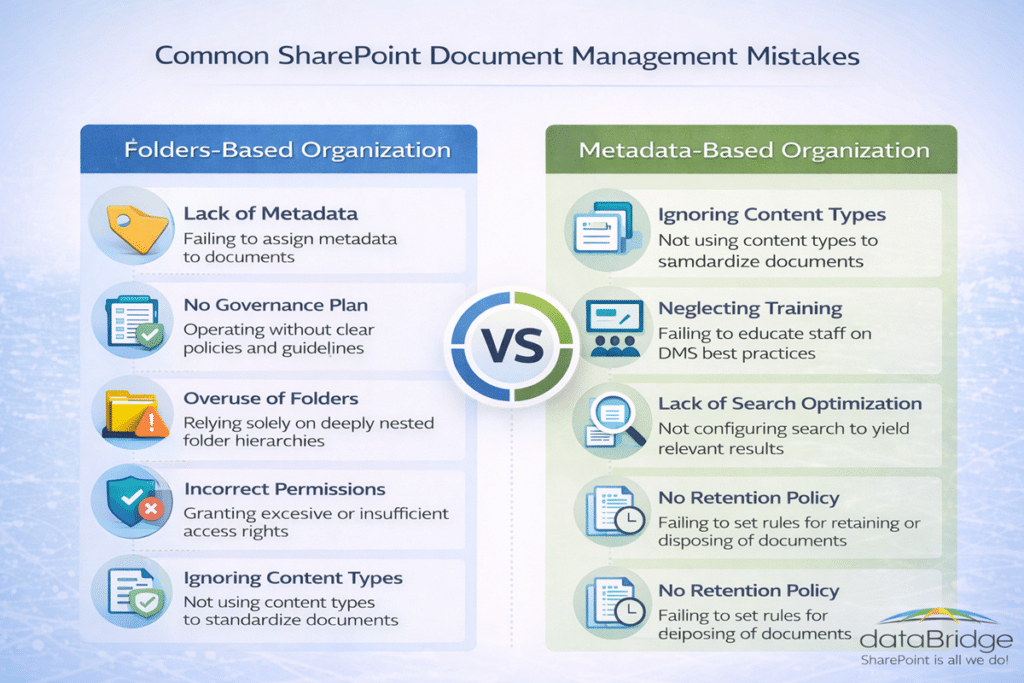
Several mistakes frequently undermine SharePoint document management initiatives.
Treating SharePoint Like a Network Drive
Organizations sometimes replicate legacy file share structures inside SharePoint. This approach limits the benefits of metadata and governance.
Ignoring Governance Early
Governance policies introduced too late often require significant remediation.
Migrating Legacy Problems
Migration projects sometimes focus on moving files rather than improving structure.
Organizations planning migrations often review the common SharePoint mistakes we see after migration so they don’t carry the same problems into the new environment.