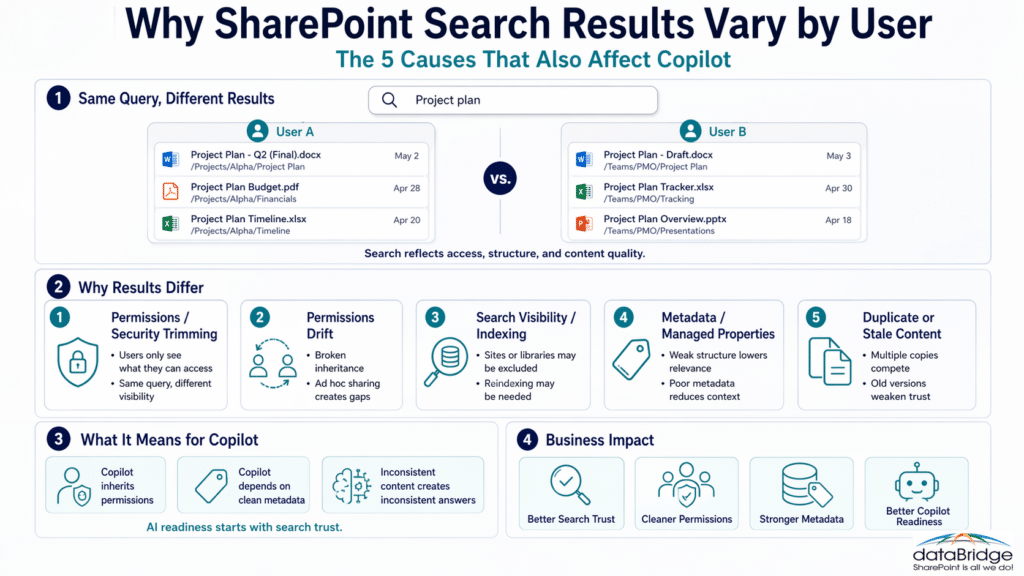
1. Security trimming is the first reason results differ
The most common reason SharePoint search results vary by user is security trimming.
Search does not show every indexed item to every person. It only shows what each user has permission to access. Two people can run the same query and receive different results because the platform is filtering content based on access.
That is not a bug. It is expected behavior.
In practice, it often looks like this:
- one user sees a file because they belong to the right group
- another misses it because access was never granted
- a third sees a different version because they have access to a different library
- someone with broader access sees more clutter than everyone else
This is why permission clarity matters so much. For a deeper explanation, see The Complete Guide to SharePoint Permissions.
2. Permissions drift makes search feel unpredictable
Security trimming is normal. Permissions drift is where things start to feel random.
Over time, many SharePoint environments collect broken inheritance, item-level exceptions, old sharing links, and half-forgotten access groups. Search then reflects those differences in ways users cannot explain.
From the user side, it feels inconsistent. From the platform side, it is often working exactly as configured.
We see this pattern in assessments all the time. One employee says search works fine. Another says it never finds the right thing. Both may be telling the truth.
Common causes include:
- unique permissions added at the library, folder, or file level
- old project groups that still grant access long after the work ended
- oversharing through broad links or loose membership
- missing access for people who should see active content
- site owners making one-off exceptions without seeing the search impact
That is one reason Why Employees Don’t Trust SharePoint — And Why Training Won’t Fix It matters here. Employees do not usually call it permission drift. They just decide SharePoint feels unreliable.
Use the SharePoint Permission Review Checklist for Copilot when inconsistent search results point to broad groups, broken inheritance, unique permissions, guest access, or old sharing links that need a formal review.
3. Search visibility and indexing settings can hide content
Sometimes the content is not missing because of permissions. Sometimes it never became visible to search in the way users expected.
SharePoint search can only return content that is indexed and allowed to appear in results. If a site or library is excluded, or if structural changes have not been reflected properly, users may see partial or inconsistent results.
That usually shows up in cases like these:
- a site is configured not to appear in search results
- a library is excluded from search
- a site or library needs reindexing after changes
- draft or unpublished content is handled differently than users assume
- new or updated content has not settled into the search experience yet
Before anyone tweaks relevance, confirm the content is even eligible to show up. Teams often skip that step.
4. Metadata and managed properties change what search understands
Search works better when content carries meaning.
Without strong metadata, SharePoint leans on filenames, text matches, and whatever clues it can infer from the document itself. That may work for a small library. It does not hold up well at scale.
Managed properties matter here too. Search depends on how crawled properties, managed properties, and the search schema work together. If important metadata is not mapped or used consistently, search loses context.
When that happens, users may see:
- weaker ranking for key documents
- inconsistent filtering
- poor refiners
- broad keyword matches that bury the best answer
- different experiences across teams that classify content differently
Managed properties are not glamorous. They are still one of the quiet reasons search either works or disappoints.
This is exactly why The Complete Guide to SharePoint Metadata Strategy and How Metadata Drives Search Compliance and Copilot Accuracy in SharePoint matter so much. Metadata is not just an organization tool. It is a retrieval tool.
A practical opinion here: weak metadata creates search noise, and search noise becomes Copilot noise.
5. Duplicate content creates competing answers
Duplicate content is one of the least discussed reasons search results vary by user.
Teams often assume the problem is purely about access. In reality, copied files, renamed versions, old folders, and side-by-side libraries can create different outcomes even when permissions are mostly aligned.
A common pattern looks like this:
- one department keeps the current policy in a governed library
- another team downloads it, renames it, and saves a local copy elsewhere
- both versions stay searchable
- different users surface different copies based on access and ranking signals
That is how trust starts to slip.
Search cannot invent a single source of truth when the environment contains several plausible answers. In our experience, duplicate content is especially damaging because it feels like a search problem when it is really a content discipline problem.
This same issue becomes more visible after file share migration planning when old folders, copied files, outdated versions, and unmanaged permissions move into SharePoint without cleanup, metadata, ownership, and source-of-truth decisions.
That is why organizations should define authoritative SharePoint content before they try to tune search results. A SharePoint authoritative content model gives search, users, Copilot, and SharePoint agents clearer signals about which version should be trusted.
6. Context and behavior signals also influence what people see
Not every difference in search results points to a serious issue. Some variation is subtle.
Context, activity, content relationships, and surrounding signals can influence what surfaces first. Two users with similar access may still notice small ranking differences.
Still, teams lean on personalization as an explanation too quickly. Minor ranking shifts are normal. Major trust problems usually are not.
If users are consistently missing the right answer, do not blame context first. Start with permissions, metadata, indexing, and duplication.
The real diagnostic question is not “Is search broken?”
A better question is this:
What is search faithfully reflecting that the organization has not governed well?
That framing changes the conversation. Search becomes a signal, not just a symptom.
When users say search feels random, they are often describing one or more of these conditions:
- access is inconsistent
- metadata is weak
- duplicates are unresolved
- ownership is unclear
- stale content still competes with current content
Search is often the messenger here. Teams blame the messenger a lot.
When search visibility varies in confusing ways, the issue often points back to the SharePoint architecture and governance model behind the environment. Clear site structure, permissions design, ownership, metadata, lifecycle rules, and governance cadence help make search behavior easier to understand and manage.
What this means for Copilot
This matters even more once Copilot enters the picture.
Copilot works within the same broader Microsoft 365 content estate. It depends on permissions, structure, metadata, and content quality to retrieve and ground useful answers. If search already varies by user, Copilot outcomes will vary too.
That does not mean Copilot is broken. It means Copilot is inheriting the environment.
The practical takeaway is straightforward:
- if a user cannot access a document, Copilot should not surface it
- if duplicate files exist, Copilot may ground a response in the wrong copy
- if metadata is weak, Copilot has less context for retrieval
- if stale content stays live, AI may treat it as current
- if permissions drift is widespread, different users may get very different answers to the same prompt
Copilot is not confused. It is bounded by the structure you gave it.
That is why Copilot Readiness for SharePoint should never be treated as a licensing conversation alone. AI readiness starts with search trust, permissions clarity, metadata quality, and cleaner content architecture.
If your organization is planning for AI while users still say search feels unreliable, contact dataBridge. That gap should be addressed before Copilot scales it.
Why search inconsistency becomes an AI trust problem
Employees do not separate search trust from AI trust.
If they cannot find the right policy, template, form, or source document, confidence drops. Once Copilot enters the workflow, expectations rise. People now want fast answers, cited sources, and consistent retrieval.
When one employee gets a strong response and another gets a weaker one, nobody says, “This reflects permission variance and metadata quality.” They say, “Why is this tool inconsistent?”
That is a fair reaction.
This is one reason Why Employees Don’t Trust SharePoint — And Why Training Won’t Fix It connects so directly to AI rollout. Trust problems usually begin before AI arrives. Copilot just makes them harder to ignore.
A practical diagnostic path for inconsistent SharePoint search
If you want to troubleshoot this in a disciplined way, use this order.
Compare permissions first
Start with access.
Check whether both users can reach the same site, library, folder, and file. Do not stop at site-level membership. Many search differences hide lower in the stack.
Review sharing and broken inheritance
Look for unique permissions, old sharing choices, and exceptions added over time.
This is often where “it works for one person but not another” begins.
Confirm the content is searchable
Make sure the site and library are allowed to appear in search. Then review whether reindexing is needed after recent structural changes.
Many teams skip this and go straight to relevance tuning.
Inspect metadata and managed properties
Review whether important fields are used consistently and whether search schema decisions support the experience you want.
If metadata carries little meaning, search has less to work with.
Check for duplicates and stale copies
Look for multiple versions of the same document across sites and libraries.
Most organizations underestimate how much duplicate content weakens relevance and trust.
Review the broader information architecture
At this point, step back and look at the environment as a whole. Search inconsistency is often a sign that the information architecture itself needs work.
That is why SharePoint Online Search Optimization should be treated as a structural discipline, not a quick fix.
What better looks like
A stronger SharePoint search experience usually has these qualities:
- permissions are role-based and predictable
- metadata is consistent enough to support meaningful retrieval
- duplicate content is reduced
- current content is easier to distinguish from stale content
- site owners understand the impact of their access and content decisions
- users trust the results enough to rely on them
That last point matters most. Search does not need to feel perfect. It does need to feel dependable.
When a consultant-led search assessment makes sense
Some search issues are isolated. Others point to a wider operating problem.
A consultant-led assessment makes sense when:
- users in similar roles get very different results
- permissions are difficult to explain or audit
- metadata exists but is not improving findability
- duplicate content is widespread
- Copilot rollout is planned or already underway
- employees say SharePoint feels inconsistent, noisy, or hard to trust
This is where dataBridge helps. We look past the search bar and into the structure behind it. That includes permissions, metadata, search schema decisions, duplicate content, governance, and Copilot readiness.
If your tenant is showing these patterns, contact dataBridge.
Related SharePoint Search and Structure Resources
Frequently asked questions about why SharePoint search results vary by user
Why do two users get different SharePoint search results for the same query?
The most common reason is permissions. SharePoint search is security trimmed, so users only see results they have permission to access. Metadata, indexing, and duplicate content can also create different outcomes.
Can broken inheritance affect SharePoint search results?
Yes. Broken inheritance can create access differences at the library, folder, or file level. When that happens, search results may vary from one user to another even inside the same team.
Does metadata affect SharePoint search relevance?
Yes. Metadata gives search more context. Strong metadata improves ranking, filtering, and retrieval quality. Weak metadata usually leads to noisier results.
Can duplicate files make SharePoint search feel inconsistent?
Absolutely. Duplicate files, copied folders, and stale versions often compete in search. Different users may surface different copies based on access and relevance signals.
What does this have to do with Copilot?
Copilot relies on the same broader SharePoint and Microsoft 365 foundation. If permissions, metadata, and content quality are inconsistent, AI responses will reflect those weaknesses too.
Is this why employees stop trusting SharePoint?
Often, yes. Users may not describe the cause in technical terms, but inconsistent search is one of the fastest ways to reduce trust in the platform.
The bottom line
When SharePoint search results vary by user, the search box is not usually the real issue.
More often, the platform is reflecting permissions, metadata, indexing, duplicate content, and governance decisions already present in the environment.
That is why this topic matters beyond search. It affects findability, trust, and Copilot readiness at the same time.
A cleaner environment produces cleaner retrieval. Cleaner retrieval produces better user confidence. Better user confidence is what makes both SharePoint and Copilot more useful.
If your organization wants search results people can trust across users and across AI experiences, contact dataBridge.
Reviewed By