
The Complete Guide to SharePoint Online Migrations
This guide explains how to plan a SharePoint Online migration with stronger architecture, governance, permissions, adoption, and post-migration follow-through. It helps organizations understand why migration success depends on more than moving files and why Microsoft 365 structure should be defined before content is relocated.
A SharePoint Online migration is one of the best times to clean up content, clarify ownership, and improve the way information is organized. Organizations that treat migration as a strategic reset typically get better results than those that simply copy data. This guide explains the planning decisions that make that possible.
A SharePoint Online migration is not a file transfer project. It is a structural transformation that impacts governance, information architecture, security, search, adoption, compliance, and AI readiness.
If you want a planning-focused companion to this guide, use our SharePoint Migration Checklist for Microsoft 365 to pressure-test goals, architecture, governance, permissions, and cutover readiness before execution begins.
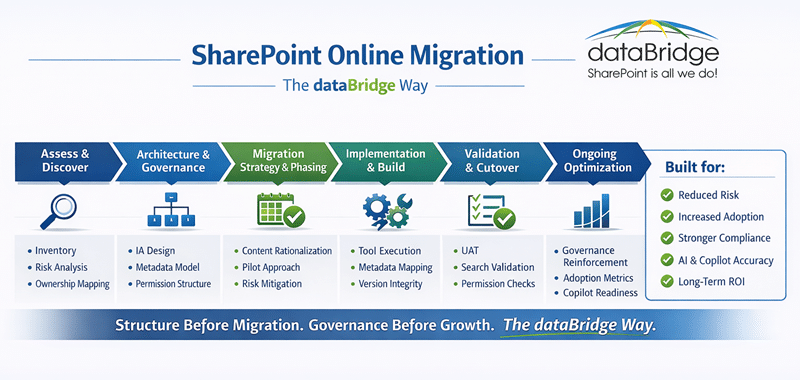
At dataBridge, we approach migrations through The dataBridge Way:
Assess & Discover → Architecture & Governance → Migration Strategy & Modernization → Implementation & Build → Validation & Cutover → Ongoing Support & Optimization
Organizations move to SharePoint Online as part of their broader investment in Microsoft 365. However, most migrations fail to deliver long-term value because they prioritize speed over structure.
This guide combines comprehensive migration best practices with dataBridge’s consulting-led methodology.
When file shares are part of the migration, the File Share to SharePoint Migration Readiness Matrix helps teams make better scope decisions before content is copied into SharePoint.
How This Page Fits With Related dataBridge Resources
This page is the primary dataBridge resource for SharePoint Online migration planning. It explains how assessment, architecture, governance, cleanup, permissions, migration waves, validation, adoption, document management, and AI readiness work together inside a successful SharePoint migration.
Use the related resources this way:
- Use SharePoint Migration Consulting & SharePoint Online Migration Services when you need hands-on planning, strategy, execution, validation, adoption support, and post-migration optimization from dataBridge.
- Use the SharePoint Migration Readiness Assessment when you need to evaluate scope, content quality, ownership, permissions, governance gaps, cleanup needs, and readiness before migration begins.
- Use the SharePoint Migration Checklist for Microsoft 365 when you need a practical pre-migration checklist to pressure-test goals, architecture, governance, permissions, testing, communication, and cutover readiness.
- Use File Share to SharePoint Migration Services when network drives, shared drives, file servers, and legacy folder structures need to become a cleaner SharePoint environment.
- Use How to Map Legacy Folder Structures to Metadata in SharePoint when old folder paths need to be translated into metadata, views, content types, document libraries, and modern SharePoint structure.
- Use Why Most SharePoint Migrations Fail when you want a focused explanation of the mistakes that cause migrations to recreate old problems, including lift-and-shift planning, broken permissions, poor metadata, duplicate content, weak governance, and missing adoption planning.
- Use the SharePoint Post-Migration Checklist after go-live to validate permissions, search, metadata, governance, ownership, adoption, content quality, and post-migration support needs.
- Use the SharePoint planning tools hub when your migration planning needs practical scorecards, checklists, and readiness worksheets across governance, permissions, Copilot readiness, file share cleanup, and post-migration validation.
- Use the SharePoint Document Management System page when migration success depends on better document libraries, metadata, permissions, search, retention, records, lifecycle governance, and source authority.
- Use the SharePoint Governance Center when migration planning needs to connect with broader governance decisions around ownership, permissions, site provisioning, lifecycle management, external sharing, records, retention, search, and AI readiness.
- Use the SharePoint AI Readiness Center when migration is part of a broader Copilot, SharePoint agent, content trust, permissions, metadata, search, and lifecycle governance conversation.
- Use the SharePoint Intranet Center when the migration includes intranet pages, department sites, policy content, navigation, news, employee resources, or knowledge content that must become easier to find and govern.
Together, these pages separate the broad SharePoint migration planning model from the specific consulting, readiness, checklist, file share migration, metadata mapping, risk guidance, validation, document management, governance, intranet, and AI readiness topics that help organizations migrate without recreating old problems.
Written by Michael Fuchs, Founder and CEO of dataBridge. Reviewed by Evelyn Runnals, Senior Solutions Architect, for SharePoint migration planning, modern intranet architecture, process improvement, solution design, and Microsoft 365 modernization accuracy.
Published: February 16, 2026
Last reviewed: July 23, 2026
Quick Answer: How to Use This SharePoint Migration Guide.
This guide is the curated dataBridge resource for planning, governing, executing, and validating SharePoint Online migrations. It helps organizations choose the right next resource based on the migration problem they are trying to solve, whether that problem involves readiness, file shares, legacy folders, metadata, permissions, governance, migration waves, validation, adoption, document management, or Copilot readiness.
The resource map below points you to the right next step for the specific migration problem you are solving.
Start Here Based on Your Migration Problem
Use the guide below to choose the right dataBridge resource based on the migration problem you are trying to solve.
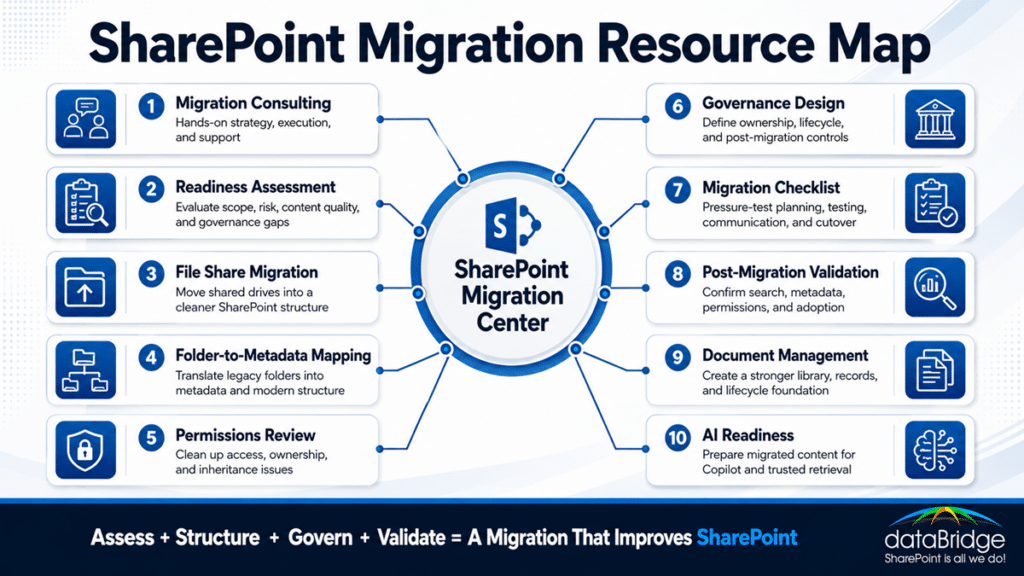
We need the full SharePoint Online migration planning model
Start with this page. It explains how assessment, architecture, governance, cleanup, permissions, migration waves, validation, adoption, document management, and AI readiness work together inside a successful SharePoint Online migration.
We need hands-on migration planning and execution support
Use SharePoint Migration Consulting & SharePoint Online Migration Services when your organization needs dataBridge to help plan, structure, execute, validate, and support the migration.
We are not ready to define migration scope yet
Use the SharePoint Migration Readiness Assessment when you need to understand what exists, what should move, what should be cleaned up, where permissions risk exists, and which governance decisions must be made before migration waves begin.
We need a practical pre-migration planning checklist
Use the SharePoint Migration Checklist for Microsoft 365 when you need to pressure-test goals, inventory, architecture, governance, permissions, metadata, communication, testing, and cutover readiness before the migration begins.
We are moving from file shares or network drives
Use File Share to SharePoint Migration Services when the source environment includes shared drives, department folders, project folders, file servers, network drives, or legacy folder structures.
Use the Google Workspace to SharePoint migration guide when the source is Google Drive and Shared Drives, file formats need conversion testing, the sharing model needs to be rebuilt as SharePoint permissions, and Apps Script or Google Forms processes need a Power Platform rebuild.
We are consolidating off Box
Use Box to SharePoint Migration: What to Plan Before You Move when the source is Box and the plan needs to cover shared link breakage, collaborator role mapping, Box Notes conversion, and a read-only coexistence window before cutover.
We need to convert folders into metadata
Use How to Map Legacy Folder Structures to Metadata in SharePoint when folder names, paths, departments, clients, projects, years, regions, document types, or status values need to become useful SharePoint metadata.
We are worried about migration mistakes
Use Why Most SharePoint Migrations Fail when the concern is lift-and-shift planning, duplicate content, broken permissions, poor metadata, weak governance, low adoption, or post-migration rework.
We need to validate the environment after go-live
Use the SharePoint Post-Migration Checklist when content has moved and the next priority is validating permissions, metadata, search, ownership, governance, adoption, and support needs.
We need a better document management foundation after migration
Use the SharePoint Document Management System page when migration needs to result in better libraries, metadata, permissions, lifecycle controls, records, retention, search, and source authority.
We need governance before migration waves begin
Use the SharePoint Governance Center when migration planning depends on ownership, permissions, site provisioning, lifecycle rules, external sharing, records, retention, search governance, and AI readiness.
We need the migration to support Copilot or SharePoint agents
Use the SharePoint AI Readiness Center when migration cleanup, metadata mapping, permissions review, content trust, source authority, and lifecycle governance need to support trusted AI retrieval.
We are migrating or rebuilding an intranet
Use the SharePoint Intranet Center when the migration includes intranet pages, department sites, policy content, navigation, news, employee resources, or knowledge content that must become easier to find and govern.
The resources in this center all support one migration model: assess first, structure before moving, govern before launch, validate after go-live, and optimize continuously.
1. Why Organizations Migrate to SharePoint Online
Organizations typically migrate from:
- File shares
- SharePoint Server
- Legacy intranets
- Third-party document management systems
Primary Drivers
- Cloud scalability
- Enhanced security and compliance
- Remote collaboration enablement
- Integration with Teams and Power Platform
- Cost reduction from infrastructure elimination
- Preparation for AI and Copilot
However, technology is rarely the true problem. Most organizations migrate because their current environment lacks structure, ownership, and governance clarity.
Migration is an opportunity to rebuild properly.
Before that rebuild gets scoped, it helps to understand how much a SharePoint migration costs and what drives the range.
That rebuild matters most when the source is a different platform entirely. A Confluence to SharePoint consolidation is a restructuring project wearing a migration’s clothes, because Confluence and SharePoint store knowledge in different shapes – pages and macros on one side, libraries and metadata on the other.
2. Types of SharePoint Migrations
A. Lift-and-Shift Migration
Moves content “as-is” into SharePoint Online.
Pros: Faster upfront execution
Cons: Transfers legacy chaos to the cloud
Best for: Low-risk environments or highly temporary transitions
B. Structured Migration
Re-architects structure before migration.
Includes:
- Information architecture redesign
- Metadata modeling
- Governance alignment
- Content rationalization
- Permission restructuring
Best for: Long-term success, adoption, and AI readiness
Migration is often the best opportunity to correct structural inconsistencies. Implementing a formal SharePoint taxonomy and metadata strategy during migration reduces duplication, improves search clarity, and prepares the environment for governance and AI readiness.
C. Hybrid Migration
Combines on-premises and cloud during transition.
Often used when:
- Compliance constraints exist
- Large enterprises require phased rollout
- Business continuity must be tightly controlled
A hybrid stage is common when an on-premises SharePoint Server farm moves to the cloud in phases. For the full path off 2016 or 2019 before support ends, see how dataBridge handles a SharePoint Server to SharePoint Online migration.
If your 2016 or 2019 farm is already past support, start with what running SharePoint past end of support actually means before you scope the move.
3. The dataBridge Migration Phases
Phase 1: Assess & Discover
Every successful migration begins with clarity.
We analyze:
- Full content inventory
- Site ownership
- Permission complexity
- Content age and usage
- ROT (Redundant, Obsolete, Trivial content)
- Risk and compliance exposure
Deliverables
- Content inventory report
- Risk assessment
- Structural gaps analysis
- Migration roadmap
Many organizations can reduce migration scope significantly once outdated, duplicate, unused, or low-value content is reviewed before migration.
Without discovery, migration becomes guesswork. Organizations that want a structured diagnostic before scope is finalized should start with a structured readiness assessment.
If your source environment relies on deep folders and inconsistent naming, it helps to understand how to map legacy folder structures to metadata in SharePoint before migration begins.
When the migration source is a file server or shared drive, a dedicated file share to SharePoint migration approach keeps source inventory, cleanup, permissions, metadata, and migration waves tied to one practical plan.
Phase 2: Architecture & Governance Design
Before any content moves, we design the future state.
This includes:
- Site hierarchy and hub strategy
- Library architecture (not folder sprawl)
- Metadata taxonomy
- Content types
- Permission model (role-based)
- Lifecycle and retention policies
- Ownership accountability
Governance is not a document. It is an enforceable system.
Migration without architecture leads to poor search, low adoption, and inaccurate AI outputs.
Before migration waves begin, a clear SharePoint architecture and governance foundation should define destination sites, hub relationships, library structure, permissions, metadata, ownership, lifecycle expectations, and post-migration governance. The SharePoint Governance Center helps connect those migration decisions to the broader operating model for ownership, permissions, provisioning, lifecycle rules, records, retention, search governance, external sharing, and AI readiness.
Migration presents an opportunity to correct structural fragmentation. Implementing a structured SharePoint hub site architecture framework during modernization prevents long-term navigation and governance issues.
Phase 3: Tool Selection
Tools support the strategy—they do not define it.
Tools support the strategy, they do not define it. The right one depends on your source, your volume, how tangled the permissions are, and whether you are moving tenant to tenant.
- SPMT, Microsoft’s free SharePoint Migration Tool, fits smaller, cleaner moves from file shares or on-premises SharePoint into SharePoint Online.
- ShareGate handles most mid-size to large migrations, with strong pre-migration assessment, reporting, and the ability to restructure content as it moves.
- Quest Content Matrix is built for the largest, most complex environments, including high-volume tenant-to-tenant consolidations.
- PowerShell covers the automation, permission remediation, and edge cases the packaged tools leave behind, working alongside whichever primary tool you run.
Tool selection depends on:
- Volume
- Complexity
- Metadata mapping requirements
- Reporting needs
- Governance enforcement capabilities
The tool is tactical. Structure is strategic. When it is time to put a name to the tool, how the main SharePoint migration tools compare walks through where each one fits and where it gives out.
Phase 4: Content Rationalization
One of the most overlooked migration steps.
Before migration, we ask:
- Does this content still have business value?
- Who owns it?
- How often is it accessed?
- Should it be archived instead?
- Does it present compliance risk?
Less content means:
- Lower risk
- Better search
- Faster migration
- Stronger adoption
Migration is often the moment when compliance gaps become visible. Organizations in regulated industries should align modernization efforts with a formal SharePoint architecture for regulated industries strategy to ensure retention policies, audit trails, and classification standards are preserved.
Phase 5: Migration Strategy & Modernization
Big Bang Migration
Entire environment moved at once.
Risk: High
Disruption: Significant
Phased Migration
Content moved by:
- Department
- Business unit
- Functional area
- Site collection priority
Advantages:
- Controlled risk
- Pilot validation
- Incremental adoption
- Reduced disruption
Structure is validated before scale.
Phase 6: Implementation & Build
During execution, we focus on:
- Metadata mapping accuracy
- Permission restructuring
- Version history integrity
- Performance monitoring
- Risk mitigation
Migration success is measured by accuracy—not speed.
Phase 7: Permissions & Security Alignment
Permissions are one of the largest migration failure points.
Common issues include:
- Broken inheritance
- Orphaned users
- Over-permissioned libraries
- Legacy AD groups no longer valid
Best practices:
- Simplify before migration
- Align permissions to role-based design
- Minimize unique permissions
- Use Microsoft 365 groups strategically
Security clarity builds trust.
Phase 8: Data Integrity & Validation
Migration does not end when files copy successfully.
Validation includes:
- Metadata accuracy
- Permission verification
- Version history confirmation
- Search indexing checks
- Link validation
We perform:
- Pilot testing
- User acceptance testing (UAT)
- Structured sign-off
Structure must work in practice.
Phase 9: Adoption & Change Management
Technical success does not guarantee user adoption.
We support:
- Stakeholder communication
- Executive sponsorship
- Governance education
- Owner accountability
- Training programs
- Office hours
Users need clarity:
- Where to store content
- How to find content
- Who owns content
- How long content lives
Without adoption planning, SharePoint becomes shelfware.
Phase 10: Post-Migration Optimization
Migration is the beginning—not the end.
We optimize:
- Search configuration
- Metadata refinement
- Site consolidation
- Governance reinforcement
- Automation opportunities
- Power Platform integration
We evaluate:
- Adoption metrics
- Site growth patterns
- Permission drift
- Lifecycle compliance
Continuous improvement protects your investment. Post-migration is also the moment to confirm recovery rather than assume it. A fresh tenant does not arrive with a backup, so settle where Microsoft 365 backup fits after a migration before an incident makes the gap obvious.
For a practical post-go-live validation sequence, use the SharePoint Post-Migration Checklist. When the environment needs longer-term guidance after launch, a SharePoint Advisory Partnership can help sustain governance, adoption, ownership, permissions, and continuous improvement after the migration is complete.
4. Copilot & AI Readiness
Organizations preparing for Microsoft Copilot must ensure:
- Clean metadata
- Clear ownership
- Structured permissions
- Eliminated ROT
- Defined lifecycle governance
AI amplifies structure—or chaos.
A poorly migrated environment produces inaccurate AI responses.
Migration is the moment to prepare your environment for AI-driven collaboration.
For organizations preparing migrated content for Copilot, SharePoint agents, or AI-powered retrieval, the SharePoint AI Readiness Center connects migration decisions to content trust, permissions, metadata, lifecycle governance, search quality, source authority, and adoption. A migration that removes stale content, clarifies ownership, improves metadata, and validates permissions gives AI a stronger SharePoint foundation to work from.
If part of that content still lives on a file server, start with why Copilot cannot read file servers or network drives and what moving it actually buys you.
5. Common SharePoint Migration Mistakes to Avoid
The most common migration mistakes usually come from treating migration as a transfer project instead of a structure, governance, and adoption project.
Watch for these patterns:
- Migrating without governance
- Moving too much outdated or duplicate content
- Ignoring metadata and information architecture
- Carrying forward broken permissions
- Skipping user adoption planning
- Treating go-live as the finish line
For the deeper risk breakdown, use Why Most SharePoint Migrations Fail. This guide stays focused on the complete migration planning sequence.
6. SharePoint Migration Checklist
Every SharePoint migration needs a practical checklist, but the checklist should support the larger migration plan rather than replace it.
At a minimum, confirm that your team has:
- Defined migration goals
- Assessed the current environment
- Identified content owners
- Designed the future-state architecture
- Cleaned up redundant content
- Selected the right migration approach
- Reviewed permissions
- Planned pilot testing
- Prepared user training
- Defined post-migration governance and support
For a detailed pre-migration checklist, use the SharePoint Migration Checklist for Microsoft 365.
You can also download the detailed pre-migration checklist as a worksheet to review migration goals, current-state inventory, target architecture, permissions, communication, pilot testing, and cutover planning with your project team.
7. Estimated Timeline
| Organization Size | Typical Timeline |
|---|---|
| Small (<250 users) | 4–8 weeks |
| Mid-size (250–2,000 users) | 2–6 months |
| Enterprise (2,000+) | 6–18+ months |
Timeline depends more on structural complexity than raw file volume.
8. Cost Considerations
Migration costs include:
- Consulting and architecture design
- Tool licensing
- Internal IT resources
- Governance planning
- Training and adoption
- Post-migration support
The most expensive migrations are the ones done twice.
Why dataBridge Leads with Consulting
Many firms approach SharePoint migrations as implementation projects.
We approach them as consulting-led transformations.
At dataBridge:
- Consulting leads. Implementation follows.
- Structure precedes customization.
- Governance is operational—not theoretical.
- Ownership is non-negotiable.
- AI readiness is built in—not bolted on.
This is The dataBridge Way.
Related SharePoint Migration Resources
Use these related dataBridge resources to go deeper into the specific part of SharePoint migration planning, readiness, structure, governance, execution, validation, or optimization you need to address.
Migration Planning, Readiness, and Consulting
SharePoint Migration Consulting & SharePoint Online Migration Services
Use this when your organization needs hands-on migration strategy, planning, execution, validation, adoption support, and post-migration optimization from dataBridge.
SharePoint Migration Readiness Assessment
Use this when you need to evaluate content sprawl, ownership, permissions, governance gaps, cleanup needs, migration risk, and readiness before scope is finalized.
SharePoint Migration Checklist for Microsoft 365
Use this when your team needs a practical checklist for migration goals, source inventory, architecture, governance, permissions, testing, communication, and cutover planning.
Building a Phased SharePoint Migration Plan
Use this when the checklist tasks need to become a phased plan with named owners and a timeline built around content decisions rather than data volume.
Tenant-to-Tenant Migration for Mergers and Divestitures
Use this when a merger, acquisition, or divestiture is forcing a move between Microsoft 365 tenants, and identity, permissions, retention, and governance have to be reconciled under a deal deadline nobody scoped against the content.
File Share Migration, Folder Mapping, and Metadata
File Share to SharePoint Migration Services
Use this when network drives, file servers, shared drives, department folders, and legacy folder structures need to move into a cleaner SharePoint model.
How to Map Legacy Folder Structures to Metadata in SharePoint
Use this when old folder paths need to become metadata, content types, views, libraries, taxonomy, and more usable SharePoint structure.
SharePoint Information Architecture & Metadata Consulting
Use this when destination sites, libraries, hubs, content types, metadata, navigation, ownership, and content models need to be designed before migration waves begin.
SharePoint Taxonomy and Metadata Strategy
Use this when controlled vocabulary, term store design, enterprise terms, and taxonomy governance need to support the migrated environment.
Governance, Permissions, and Risk Reduction
SharePoint Governance Center
Use this when migration success depends on ownership, permissions, provisioning, lifecycle rules, external sharing, records, retention, search governance, and AI readiness.
SharePoint Governance Framework
Use this when your organization needs a practical operating model for roles, responsibilities, standards, decision rights, governance routines, and post-migration ownership.
Complete Guide to SharePoint Permissions
Use this when legacy permissions, broken inheritance, direct access, broad groups, or sensitive content need to be reviewed before access patterns move into SharePoint Online.
SharePoint Architecture and Governance Consulting
Use this when destination design, governance, metadata, permissions, lifecycle, migration dependencies, intranet structure, document management, and Copilot readiness need to work as one model.
Microsoft 365 Backup: What’s Protected and What Isn’t
Use this when leaders assume that landing in Microsoft 365 means content is backed up, and the team needs the shared responsibility model, native retention limits, and a clear view of where backup fits before and after cutover.
Post-Migration Validation and Optimization
SharePoint Post-Migration Checklist
Use this after go-live to validate permissions, metadata, search, governance, ownership, adoption, support needs, and content quality.
SharePoint Online Search Optimization
Use this when users struggle to find migrated content, search results feel noisy, or metadata and permissions need to support better findability.
SharePoint & Microsoft 365 Support
Use this when the environment needs ongoing technical support, issue resolution, refinement, administration help, and post-launch improvement.
SharePoint Advisory Partnership
Use this when your team needs structured post-launch guidance to sustain governance, adoption, ownership, permissions, and continuous improvement after migration.
Document Management, Intranets, and AI Readiness
SharePoint Document Management System
Use this when migration needs to create a better document management foundation with libraries, metadata, permissions, search, records, retention, lifecycle controls, and source authority.
SharePoint Intranet Center
Use this when the migration includes intranet pages, policies, department resources, employee knowledge, navigation, news, or content that needs a trusted employee experience.
SharePoint AI Readiness Center
Use this when migrated content needs to support Copilot, SharePoint agents, trusted AI retrieval, content trust, permissions clarity, metadata, source authority, search quality, and lifecycle governance.
Copilot Readiness for SharePoint
Use this when migration is part of a broader Copilot readiness effort involving structure, permissions, metadata, governance, content quality, search, and adoption.
Migration Case Studies
SharePoint Document Migration and Field Mobility Solution for Solar Energy Provider
Use this case study to see how structured migration planning, document access, field usability, and SharePoint modernization can come together in a real project.
SharePoint Document Control Migration for Global Manufacturer
Use this case study to see how document control, migration, governance, structured SharePoint modernization, and long-term platform alignment can support regulated or operationally complex environments.
Final Perspective
A SharePoint Online migration is an opportunity.
Done correctly, it:
- Reduces risk
- Improves discoverability
- Strengthens compliance
- Increases adoption
- Prepares for AI
- Enhances ROI
Done poorly, it simply relocates disorder to the cloud.
The difference lies in structure, disciplined consulting, and long-term governance design.
If your organization is preparing for a SharePoint Online migration, start with architecture—not with tools.
That’s how migrations create enterprise value. Organizations that need hands-on planning and execution support can explore SharePoint Migration Consulting.
What Our Clients Say
