SharePoint Intranet Case Study | Nonprofit Healthcare
This case study shows how dataBridge helped a nonprofit organization address challenges related to a SharePoint intranet and policy management system. It highlights the business context, the SharePoint or Microsoft 365 solution delivered, and the outcomes created through stronger architecture, governance, usability, and long-term platform alignment.
A nonprofit organization needed a more structured way to solve issues tied to a SharePoint intranet and policy management system. dataBridge approached the work as a business and platform-design effort, not just a technical implementation. This page explains the client challenge, the consulting approach used, and the results achieved through stronger Microsoft 365 structure.
Justice Resource Institute Case Study
Introduction
Justice Resource Institute (JRI) is a national leader in social justice, operating more than 100 programs that support underserved individuals, families, and communities across the United States. As the organization expanded its services, leadership recognized the need for a centralized digital platform to improve communication, policy governance, and collaboration across a workforce of more than 1,000 employees.
JRI partnered with dataBridge to design and implement a SharePoint Global Intranet that would support internal communication, streamline policy management, and provide staff with a single location to access organizational resources.
The resulting platform serves as a centralized hub for collaboration, policy governance, credential tracking, and employee engagement across the organization.
Key Outcomes
✔ Implemented a SharePoint Global Intranet supporting more than 1,000 employees
✔ Centralized policy management with structured metadata and approval workflows
✔ Improved internal communication through automated news and announcement rollups
✔ Implemented credential tracking system for clinical professionals
✔ Migrated legacy file server content into SharePoint Online
✔ Created a scalable intranet architecture supporting long-term growth
Client Overview
Industry: Nonprofit Healthcare and Social Services
Organization: Justice Resource Institute (JRI)
Primary Platforms: Microsoft 365, SharePoint Online
Key Focus Areas
- SharePoint intranet implementation
- Policy and governance management
- Internal communications platform
- Credential tracking and compliance
- Enterprise search and information discovery
Project Scope Snapshot
Project Duration: 6 months
Primary Platforms
- Microsoft 365
- SharePoint Online
- KWIZCom Forms Technology
Key Workstreams
- Global SharePoint intranet implementation
- Policy management system design
- Credential tracking solution
- Migration of legacy file server content
- Communication and employee engagement tools
- SharePoint architecture and navigation design
Stakeholders Involved
- Executive leadership
- Program managers
- Clinical leadership
- IT administrators
- Communications teams
The Challenge
As JRI expanded its programs and services, internal information became distributed across multiple systems, file shares, and communication channels.
This created several operational challenges:
- Difficulty locating organizational policies and resources
- Limited visibility into credential status for clinical professionals
- Inconsistent communication across departments and programs
- Legacy file server content that was difficult to manage and share
- Lack of a centralized hub for collaboration and program materials
Leadership recognized the need for a modern intranet platform capable of supporting a large distributed workforce while improving governance and information accessibility.
Communication and Employee Engagement
For organizations with a large and distributed workforce, effective internal communication is essential. Justice Resource Institute operates more than 100 programs and supports a workforce of over 1,000 employees across clinical, administrative, and program roles. Ensuring that staff can quickly access organizational updates, program resources, and leadership communication was a key objective of the new intranet platform.
The SharePoint intranet designed by dataBridge serves as a central hub where employees can access important organizational information from a single location. By combining structured content publishing with SharePoint’s powerful search capabilities, the intranet helps staff quickly locate the information they need while staying informed about news and updates across the organization.
How the SharePoint Intranet Connects Employees Across the Organization
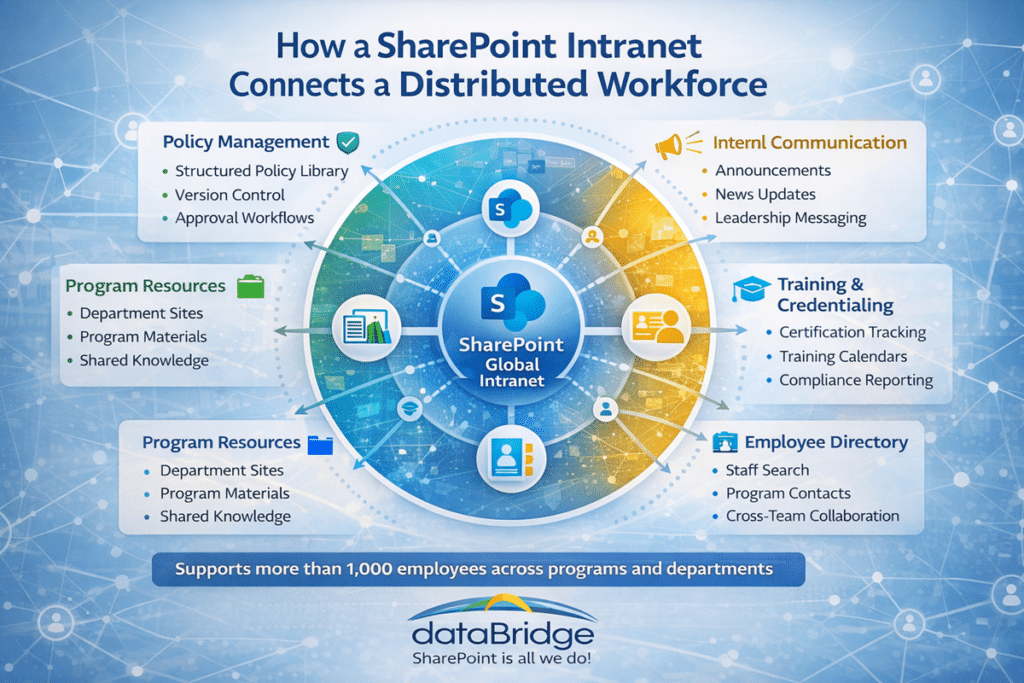
To support communication and engagement across the organization, dataBridge implemented several intranet features including:
- A rotating homepage slideshow highlighting important news, events, and organizational announcements.
- Featured images with summaries linking to full stories and updates
- Organization-wide announcements that automatically roll up from multiple sites
- Leadership messaging where executives and program leaders can share updates and insights
These communication tools use SharePoint Online search and aggregation capabilities, ensuring that important updates remain visible and easy for employees to discover.
The dataBridge Approach
dataBridge partnered with JRI to design and implement a SharePoint-based intranet platform that would serve as the organization’s central digital workspace.
The engagement focused on five key initiatives.
Centralized Policy Management
To support governance and compliance, dataBridge implemented a centralized policy management system within SharePoint.
Modern Policy Management Workflow in SharePoint
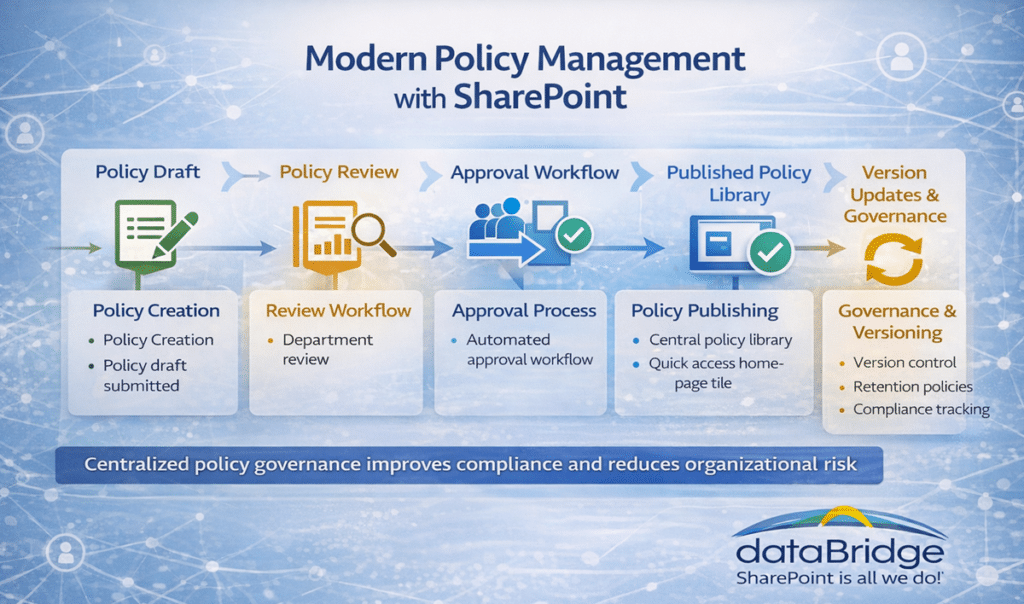
SharePoint enables organizations to manage policies through structured workflows, ensuring employees always access the latest approved documents.
The Policy Management Library includes:
- Structured metadata and taxonomy
- Version control and policy history tracking
- Retention policies
- Approval workflows for policy updates
- Governance controls for publishing new policies
A prominent quick-access tile on the intranet homepage directs employees to the policy library, ensuring that policies and procedures are easy to locate.
To see how the pieces of a system like this fit together – one governed library, structured review cycles, and acknowledgment tracking – follow our guide to building a SharePoint policy management system.
Credential Management for Clinical Staff
Many JRI programs rely on licensed professionals such as nurses, counselors, and clinicians.
To improve credential management and compliance reporting, dataBridge implemented a credential tracking system using KWIZCom forms technology integrated with SharePoint.
The system enables the organization to:
- Track credentials across multiple professional roles
- Verify required certifications for specific programs
- Alert managers when credentials expire
- Approve new credential applications electronically
Previously managed through spreadsheets and paper forms, the new system provides metadata-driven reporting dashboards that allow managers to quickly review credential status across programs.
SharePoint Architecture and Navigation Design
The intranet environment was designed using SharePoint architecture best practices to ensure scalability and long-term maintainability.
Capabilities of a Modern SharePoint Nonprofit Intranet
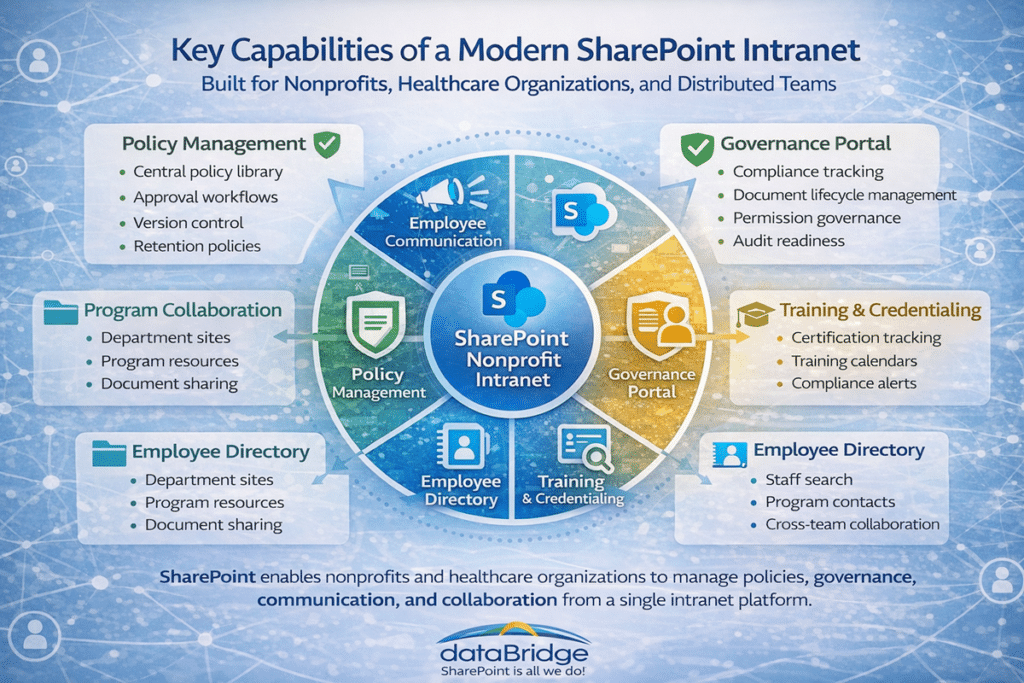
The platform follows a flat architecture model, including:
- Site collections representing major organizational areas
- Subsites supporting programs and projects
- Consistent global navigation across the environment
This structure allows the platform to grow alongside JRI’s expanding services while maintaining a consistent user experience across departments.
Branding and User Experience
Custom branding was applied to align the intranet with JRI’s organizational identity.
Enhancements included:
- Custom CSS, JavaScript, and HTML styling
- Branded landing pages
- A redesigned intranet homepage
Importantly, these customizations were implemented without modifying the SharePoint master page, ensuring long-term platform stability and compatibility with future Microsoft updates.
The default SharePoint search experience was also prominently positioned and styled to encourage employees to rely on search for locating policies, documents, and program resources.
An enhanced Employee Directory with advanced people search was also implemented, allowing staff to quickly locate colleagues across departments and programs.
Training and Ongoing Support
Following implementation, dataBridge worked closely with JRI to support user adoption and ongoing improvements.
Support activities included:
- Training sessions for administrators and content owners
- Guidance on populating the intranet with production content
- Enhancements and adjustments as organizational needs evolved
This collaborative approach ensured a smooth rollout and strong adoption across a large and diverse workforce.
Organizations planning similar initiatives often begin by reviewing a comprehensive SharePoint intranet strategy guide that explains how architecture, governance, and search design influence long-term success.
For organizations that already have an intranet in place but are unsure whether they need redesign, governance cleanup, or structural improvements, a SharePoint intranet assessment can help define the right next step.
For organizations facing similar communication, policy, ownership, or intranet trust issues, use the SharePoint Intranet Redesign Readiness Worksheet PDF to evaluate whether your current intranet needs a refresh, restructure, or rebuild.
Results
The new SharePoint intranet provides Justice Resource Institute with a centralized platform for communication, policy governance, and collaboration.
Key outcomes include:
- Improved internal communication across the organization
- Simplified access to policies, procedures, and program resources
- Streamlined credential tracking for clinical staff
- Modernized collaboration through Microsoft 365
- A scalable intranet platform capable of supporting future growth
JRI continues to expand the platform as new programs and operational needs emerge.
What This Means for Your Organization
Organizations with large distributed workforces often struggle to maintain consistent communication, policy governance, and access to critical resources.
A well-designed SharePoint intranet platform can centralize information, improve employee engagement, and provide a scalable foundation for collaboration across departments and programs.
If your organization is facing similar challenges with SharePoint, Microsoft Teams, or Microsoft 365 governance, dataBridge can help design a structured solution.
Explore more SharePoint consulting case studies and client success stories.
Related Resources
What our clients say