SharePoint Document Control Migration for Global Manufacturer
This case study shows how dataBridge helped a global manufacturer address challenges related to document control migration, governance, and structured SharePoint modernization. It highlights the business context, the SharePoint or Microsoft 365 solution delivered, and the outcomes created through stronger architecture, governance, usability, and long-term platform alignment.
A global manufacturer needed a more structured way to solve issues tied to document control migration, governance, and structured SharePoint modernization. dataBridge approached the work as a business and platform-design effort, not just a technical implementation. This page explains the client challenge, the consulting approach used, and the results achieved through stronger Microsoft 365 structure.
Barrett Case Study
Introduction
Barrett is a global leader in large-caliber rifle design and manufacturing. As the company expanded its quality management and compliance programs, leadership recognized limitations in its existing document control platform.
Barrett partnered with dataBridge to modernize document control and compliance workflows using SharePoint Online and Microsoft 365. The goal was to migrate controlled documents, preserve regulatory audit history, and automate document governance processes while building a scalable platform capable of supporting long-term compliance and operational efficiency.
Key Outcomes
✔ Successfully migrated controlled documents and metadata into SharePoint Online
✔ Preserved document version history and regulatory audit data
✔ Implemented automated change request and document approval workflows
✔ Created role-based document visibility aligned with organizational job positions
✔ Built compliance dashboards supporting regulatory audits and training verification
✔ Automated document lifecycle management and archival processes
Client Overview
Industry: Manufacturing / Firearms Production
Organization: Barrett
Primary Platforms: Microsoft 365, SharePoint Online, Power Automate, Power Apps
Key Focus Areas
- Document control modernization
- Compliance and regulatory reporting
- Change management automation
- Enterprise document lifecycle management
- Microsoft 365 workflow automation
Project Scope Snapshot
Project Duration: 6 months
Primary Platforms
- SharePoint Online
- Power Automate
- Power Apps
- SQL Server
Key Workstreams
- Migration of document control system into SharePoint Online
- Data discovery and database structure analysis
- Document and metadata migration
- Compliance workflow automation
- Document lifecycle management
- Quality management dashboards and reporting
Stakeholders Involved
- Quality management leadership
- Engineering and manufacturing teams
- Compliance and regulatory stakeholders
- IT and document control administrators
The Challenge
Barrett relied on an existing document control platform to manage controlled procedures and compliance documentation. Over time, the system introduced operational limitations that made it difficult to automate workflows and expand document governance capabilities.
Several challenges emerged:
- Limited flexibility for automation and customization
- Complex contract and licensing constraints
- Limited visibility into the underlying database structure
- Strict regulatory requirements requiring preservation of document history and version records
In addition, the project timeline was constrained by a hard contract deadline that required the migration and new solution to be completed within a defined window.
This meant the project team needed to deliver a fully functional solution while simultaneously performing data discovery, system design, and migration planning.
Data Discovery and Migration Complexity
One of the most complex aspects of the project involved understanding how document content and metadata were structured within the legacy system’s SQL database.
Because the system’s data model was not well documented, dataBridge engineers began exploring the stored objects using SQL queries to determine how documents, metadata fields, and related records were connected.
Initial queries took up to thirty minutes to run while the team identified relationships between tables and stored objects.
To accelerate the investigation process, dataBridge created a local SQL development environment and imported a backup of the database. This allowed the team to conduct deeper analysis and build detailed documentation describing how the data was structured.
The discovery process enabled the creation of:
- Detailed data definition documentation
- Source-to-target metadata mapping
- Migration scripts for documents and associated metadata
These artifacts became the foundation for a successful migration into SharePoint Online.
The dataBridge Approach
dataBridge partnered with Barrett to design a scalable document control system built on SharePoint Online and Microsoft 365 automation tools.
SharePoint Document Control System Architecture
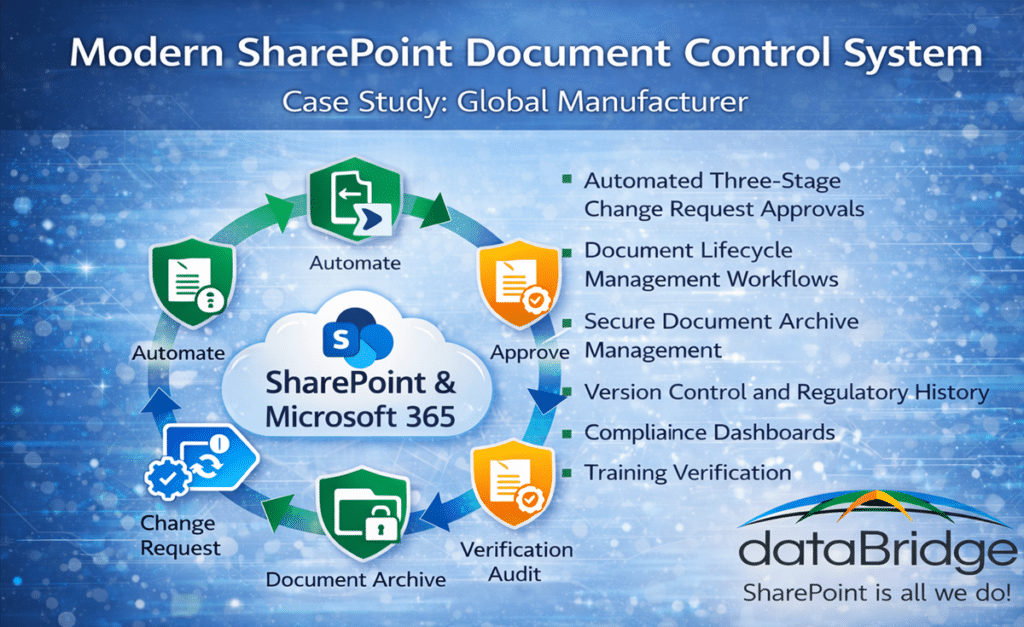
This architecture illustrates how SharePoint Online and Microsoft 365 automation tools can function as a modern document control system for regulated manufacturing environments.
The engagement focused on four primary initiatives.
Data Migration and Metadata Mapping
Custom PowerShell scripts were developed to export documents and metadata from the legacy database and import them into SharePoint Online.
Because Barrett operates in a highly regulated manufacturing environment, preserving document history and version records was essential.
During the migration process:
- Document approvals, comments, and reviews were injected into SharePoint’s native version history
- Version numbers were recreated to reflect the original document lifecycle
- Metadata fields were mapped and enhanced during migration
Additional metadata was introduced to improve document classification and automation.
One example was a managed metadata column representing job roles across the organization. Documents were tagged with job position identifiers so employees could easily access procedures relevant to their role.
Automated Change Control and Approval Workflows
To strengthen document governance and compliance, dataBridge implemented automated workflows using Power Automate.
The system included:
- Three-stage change request approval workflows
- Automated document content approvals
- Approval logic tied to document types and revision categories
The solution enforces strict change control requirements. Documents cannot be published unless an approved change request workflow has been completed.
This ensures that document revisions follow proper quality management procedures.
Compliance Dashboards and Training Verification
Because Barrett is subject to multiple federal regulatory requirements, the system needed to support detailed compliance monitoring.
dataBridge developed quality management dashboards that track:
- Document revision history
- User training acknowledgments
- Compliance status across departments
When a controlled document undergoes a major revision, employees associated with that document must confirm they have reviewed the updated procedure.
The system automatically tracks training acknowledgments and highlights users who have not completed required training, allowing quality management teams to follow up before regulatory deadlines.
Document Lifecycle Automation
The new solution also includes automated lifecycle management for controlled documents.
Annual document review tasks are automatically generated for document owners. If a document revision occurs mid-year, the review schedule automatically adjusts to maintain compliance with internal quality procedures.
An automated archive process was also created.
When a document is marked obsolete:
- The document is moved from the production site to a restricted archive site
- Related metadata and associated list items are preserved
- Version history remains intact
If the document must later be restored, an automated workflow can return the entire dataset to production while maintaining its original history.
SharePoint as a Quality Management System (QMS)
Many organizations rely on specialized quality management systems to manage controlled documents, approvals, and compliance records.
SharePoint QMS Architecture for Regulated Manufacturing
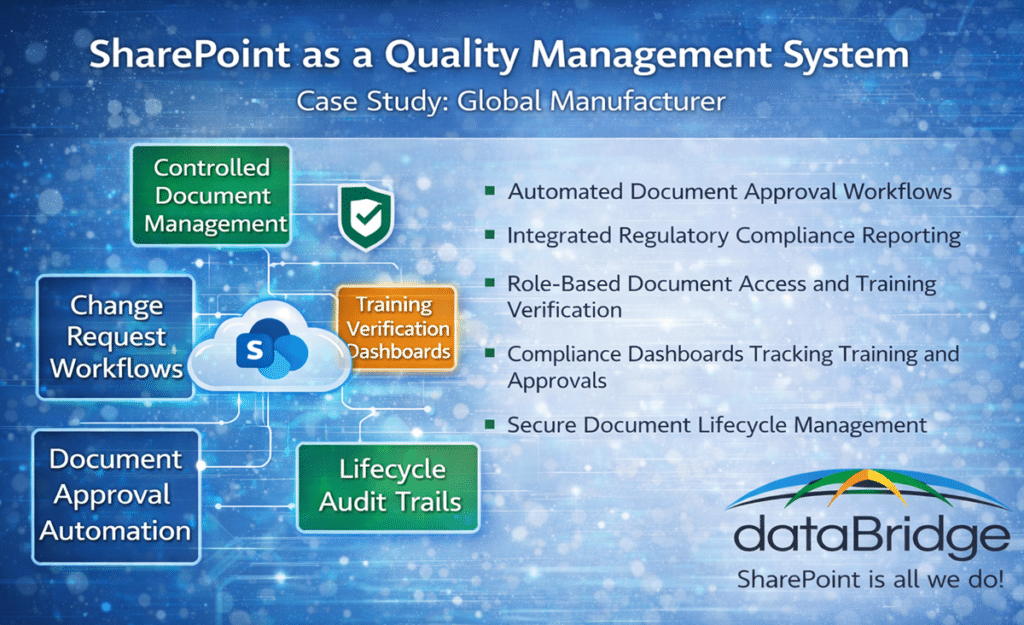
This architecture illustrates how SharePoint Online and Microsoft 365 automation tools can function as a scalable Quality Management System (QMS) supporting document control, compliance workflows, and training verification.
However, this project demonstrated how SharePoint Online can function as a powerful Quality Management System (QMS) when designed with the proper architecture and governance model.
Using SharePoint, Power Automate, and Microsoft 365 security controls, Barrett was able to implement:
- Controlled document management
- Change request workflows
- Document approval automation
- Training verification dashboards
- Compliance reporting capabilities
This approach provides the flexibility of a modern cloud platform while maintaining the governance and compliance capabilities required in regulated manufacturing environments.
Results
The project successfully modernized Barrett’s document control environment using SharePoint Online and Microsoft 365 automation capabilities.
Key outcomes included:
- Successful migration of controlled documents, metadata, and version history
- Improved automation of change control and document approval workflows
- Greater visibility into compliance and training requirements
- Automated document lifecycle management and archival processes
- A scalable Microsoft 365 platform supporting future process automation
The project was completed on schedule, two weeks ahead of the contract deadline, and remained below the not-to-exceed budget defined in the statement of work.
Key Takeaways
Organizations operating in regulated industries often rely on legacy document control systems that limit flexibility and automation.
Migrating document management processes to SharePoint Online allows organizations to modernize compliance workflows while maintaining strict regulatory controls.
With the right architecture and governance strategy, Microsoft 365 can support complex document control systems and function as a scalable Quality Management System (QMS).
Tools and Technologies Used
- SharePoint Online
- Power Automate
- Power Apps
- SQL Server
- PowerShell (PnP.PowerShell, dbatools)
- Redgate SQL Compare
- Visual Studio Code
- JSON Column Formatting
- PnP Search
- JavaScript / HTML / CSS
- SharePoint REST API
If your organization is facing similar challenges with SharePoint, Microsoft Teams, or Microsoft 365 governance, dataBridge can help design a structured solution.
Explore more SharePoint consulting case studies and client success stories.
Related Resources
What our clients say