
SharePoint AI Readiness Center
Prepare SharePoint for Copilot, SharePoint agents, and trusted AI retrieval with the content quality, permissions, metadata, ownership, search, and lifecycle controls those AI experiences depend on.
This resource center helps organizations move from AI interest to AI-ready SharePoint by organizing the practical guidance needed for cleanup, access review, source authority, governance, and adoption planning.
Use this page as the starting map for SharePoint AI readiness across dataBridge. Start with Copilot Readiness for SharePoint when you need the primary readiness model, use the Copilot Readiness Assessment for SharePoint when you need a practical current-state review, and use the SharePoint planning tools and assessment resources hub when your team needs worksheets, scorecards, and checklists.
AI-ready SharePoint is built through practical decisions: which content is authoritative, who can access it, who owns it, what metadata gives it context, what should be archived, and how Copilot or SharePoint agents should be scoped. The sections below organize those decisions into resource paths for governance, document management, migration, permissions, information architecture, and SharePoint agent planning.
Talk to dataBridge about SharePoint AI readiness
How This Page Fits With Related dataBridge Resources
Use these resources based on the AI readiness problem your organization needs to solve:
- Use Copilot Readiness for SharePoint when you need the primary readiness guide for SharePoint structure, permissions, metadata, content quality, governance, search, and Copilot outcomes.
- Use Copilot Readiness Assessment for SharePoint when your organization needs a practical review of SharePoint risk before Copilot rollout.
- Use Microsoft Copilot Consulting & Readiness Services when your organization needs broader Microsoft 365 Copilot planning, use-case strategy, adoption support, rollout guidance, and post-launch optimization.
- Use Copilot-Ready SharePoint Information Architecture when the main issue is metadata, taxonomy, content structure, search quality, source authority, and AI grounding.
- Use the SharePoint Governance Center when AI readiness depends on ownership, permissions, lifecycle controls, provisioning, records, external sharing, search governance, and ongoing accountability.
- Use the SharePoint Document Management System page when AI readiness depends on better document libraries, metadata, permissions, retention, records, search, document control, and lifecycle governance.
- Use the SharePoint Migration Guide when pre-migration cleanup, permissions review, metadata mapping, destination architecture, validation, and adoption planning need to reduce AI-readiness risk.
- Use the SharePoint planning tools and assessment resources hub when your team needs practical worksheets, scorecards, and readiness checklists that connect AI readiness to governance scoring, Copilot readiness, permission review, migration planning, and intranet readiness.
Together, these pages separate the broad SharePoint AI readiness resource map from the specific readiness guide, assessment page, consulting service, governance resources, document management foundation, migration planning model, and information architecture work that help organizations prepare SharePoint for trusted AI outcomes.
What Is SharePoint AI Readiness?
SharePoint AI readiness means your SharePoint environment has the content quality, access controls, metadata, ownership, search signals, and lifecycle governance needed to support trusted AI-assisted work.
An AI-ready SharePoint environment helps people answer practical questions:
- Which content is authoritative?
- Who owns it?
- Who should access it?
- When was it last reviewed?
- What should be archived, retained, updated, or removed?
- Which sites and libraries should support Copilot or SharePoint agents?
- Which information should stay outside the active knowledge layer?
Those questions sound simple. In real SharePoint environments, they usually are not.
After more than 20 years of SharePoint consulting, dataBridge sees a consistent pattern. Organizations do not struggle with AI because they lack interest in Copilot. They struggle because SharePoint has grown for years without enough structure, governance, and content accountability.
That is the readiness gap.
Why SharePoint Is the Foundation for AI in Microsoft 365
Microsoft 365 Copilot, Copilot Chat, SharePoint agents, Teams, OneDrive, and SharePoint do not operate in separate spaces. They connect through content, permissions, identity, search, and collaboration patterns.
Microsoft explains that Microsoft 365 Copilot data access is scoped to the signed-in user’s permissions. It also explains that Copilot presents only data each individual can access. For SharePoint agents, Microsoft notes that agents answer from included sources the user already has permission to access through SharePoint agent source and permission controls.
That makes SharePoint readiness a business issue, not just an IT issue.
Poor permissions can create exposure. Weak ownership can leave stale content active. Duplicate libraries can confuse search. Unclear metadata can reduce context. Old files can appear more useful than they really are.
AI readiness is not a license deployment task. It is an information quality, access, ownership, and governance task.
When AI readiness concerns trace back to governance, use the SharePoint Governance Maturity Scorecard to score the ownership, permissions, lifecycle, records, search, adoption, and support practices that Copilot and SharePoint agents depend on.
The dataBridge View: AI Trust Comes From Structure
AI trust does not come from the prompt alone.
It comes from the environment the prompt can reach.
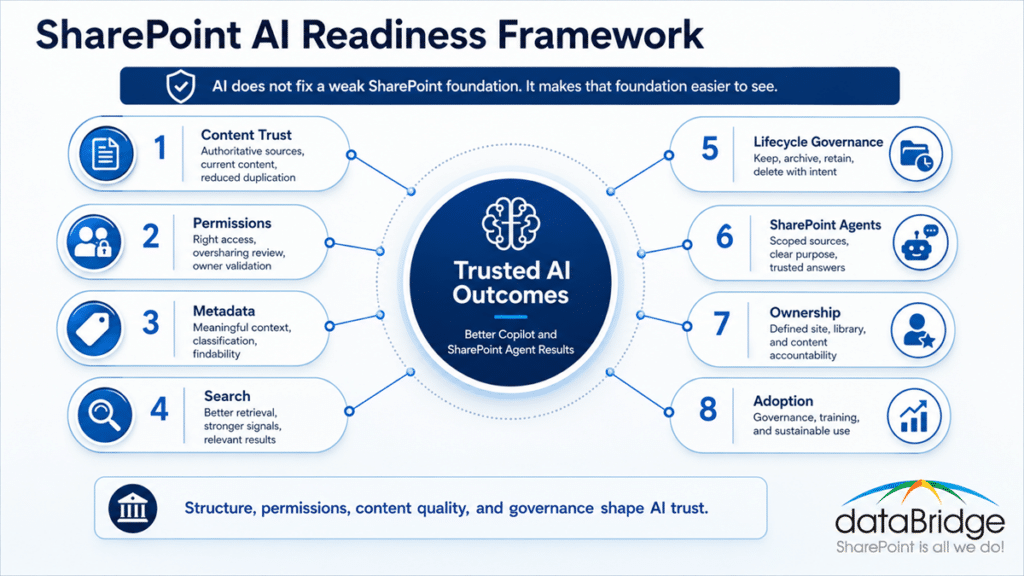
That is why dataBridge focuses on the SharePoint foundation before broad Copilot rollout. A cleaner SharePoint environment gives AI better sources to work from. A governed permission model helps reduce oversharing risk. Clear ownership helps teams maintain content after launch.
The strongest AI-ready environments usually have a few things in common:
- Authoritative sources are easy to identify.
- Sensitive content has appropriate controls.
- Site and library ownership is clear.
- Metadata supports findability and governance.
- Search results are reviewed over time.
- Content lifecycle decisions are not ignored.
- SharePoint agents are scoped to trusted sources.
- Business teams understand their role in readiness.
Technology enables the experience. Governance protects it.
Written by Michael Fuchs, Founder and CEO of dataBridge. Reviewed by Dylan Skinner, Senior Solutions Developer, for SharePoint architecture, Power Platform, AI, Microsoft Copilot, SharePoint agents, and AI readiness accuracy.
Published: May 27, 2026
Last reviewed: July 23, 2026
What This Looks Like in Practice
An organization may begin AI planning by asking when it can turn on Microsoft 365 Copilot. During review, the larger issue is often that SharePoint has grown without a trusted knowledge layer. Sensitive documents may sit in broad-access sites, policy libraries may have no clear owner, and old project files may still look current in search.
In that situation, dataBridge treats AI readiness as a SharePoint trust problem. The work starts by identifying authoritative content, reviewing permissions, assigning ownership, improving metadata, clarifying lifecycle decisions, and deciding which sites or libraries should support Copilot and SharePoint agents.
The practical outcome is a cleaner readiness path. Business teams can see which content should be trusted, IT can see where access risk is concentrated, and leaders can make better rollout decisions before AI makes old SharePoint problems easier to discover.
This work often connects the Copilot Readiness for SharePoint guide, the Copilot Readiness Assessment for SharePoint, the SharePoint Permission Review Checklist for Copilot, and the SharePoint Source of Truth Model for Copilot Readiness.
Start Here: Core SharePoint AI Readiness Resources
Copilot Readiness for SharePoint
Start with Copilot Readiness for SharePoint when the main question is whether your SharePoint environment can support Microsoft 365 Copilot in a reliable way.
This page explains how structure, permissions, metadata, governance, search behavior, lifecycle control, and content quality affect AI-assisted work.
Microsoft Copilot Consulting and Readiness Services
Review Microsoft Copilot Consulting & Readiness Services when your organization needs broader planning around Microsoft 365 Copilot adoption, use cases, governance, rollout, and user readiness.
Copilot success depends on more than technical access. Teams also need practical use cases, adoption planning, and a realistic roadmap.
Copilot Readiness Assessment for SharePoint
Choose the Copilot Readiness Assessment for SharePoint when you need a structured review before rollout.
An assessment helps identify oversharing risk, stale content, weak ownership, inconsistent metadata, search concerns, and governance gaps.
Use the Copilot Readiness Checklist for SharePoint when your team needs a hands-on worksheet to review SharePoint permissions, content quality, source authority, metadata, search, lifecycle, and ownership before AI expands.
Copilot Chat vs Microsoft 365 Copilot vs SharePoint Agents
Read Copilot Chat vs Microsoft 365 Copilot vs SharePoint Agents when stakeholders need to understand which AI experience they are planning for.
These tools do not use content in exactly the same way. Scope matters.
The SharePoint AI Readiness Path
A practical readiness path helps teams move in the right order. Do not start by asking what AI can do. Start by asking whether SharePoint can support the answers users expect.

1. Clarify the AI Experience
First, define whether you are preparing for Microsoft 365 Copilot, Copilot Chat, SharePoint agents, or AI-supported search and knowledge retrieval.
Each experience carries different expectations. A broad Copilot rollout is not the same as a scoped SharePoint agent for a policy library.
Each experience is also licensed differently, and some of it is already inside your base plan. Read Microsoft Copilot Licensing: Which AI You Actually Need before the budget conversation starts.
2. Identify Trusted Sources
Next, decide which SharePoint sites, pages, libraries, policies, procedures, and knowledge assets should be treated as authoritative.
A source-of-truth model gives AI better material to work from. It also helps employees understand where reliable answers live.
3. Review Permissions and Access
Then, review access before AI expands the reach of search and retrieval.
Broad sharing, stale groups, inherited permission confusion, external access, and unmanaged site ownership can all create AI readiness risk.
4. Strengthen Information Architecture
After that, improve the structure of sites, hubs, libraries, metadata, content types, naming patterns, and taxonomy.
AI needs context. SharePoint information architecture gives that context shape.
5. Clean Up Content Quality
Content cleanup comes next.
Keep what is useful. Update what is outdated. Archive what has long-term value but should not remain active. Delete what no longer belongs.
For organizations moving content into SharePoint Online, the SharePoint Migration Guide shows how pre-migration cleanup, metadata mapping, permissions review, destination architecture, validation, and adoption planning can reduce AI-readiness risk before the new environment becomes active.
When cleanup targets a legacy S drive, remember that content sitting on file shares is invisible to Copilot until it moves into Microsoft 365.
6. Improve Lifecycle Governance
Lifecycle governance keeps the environment from drifting back into confusion.
Ownership, review cadence, retention, archive, disposition, and page governance all matter after rollout.
7. Design Scoped AI Experiences
Once the foundation improves, design SharePoint agents and AI use cases around approved sources, clear purpose, and role-appropriate access.
A SharePoint agent should never be broader than the content model behind it.
8. Build a Roadmap
Finally, turn findings into a phased roadmap.
The best plans separate quick wins from deeper architecture, governance, and adoption work.
Discuss your SharePoint AI readiness roadmap with dataBridge
Readiness Area 1: Content Trust and Source Authority
AI readiness starts with content trust.
When SharePoint contains duplicate policies, outdated procedures, abandoned libraries, and unclear ownership, users receive inconsistent answers. AI can make that inconsistency easier to find, but it cannot decide which answer your organization should trust.
A strong source-of-truth model helps people and AI tools work from better information.
Key Questions to Ask
- Which content is authoritative?
- Which documents are duplicates?
- Which pages have no owner?
- Which libraries contain outdated information?
- Which files should stay active and searchable?
- Which sources should support SharePoint agents?
- Which information should move into archive or retention workflows?
Recommended Resources
Start with SharePoint Source of Truth Model for Copilot Readiness when your team needs to define which content should be treated as the trusted answer for policies, procedures, knowledge, and business processes.
Move to SharePoint Knowledge Base Design when your organization needs a cleaner model for FAQs, SOPs, help content, internal guidance, and reusable knowledge.
Step up to SharePoint knowledge management when the question is bigger than a single knowledge base – whether your content works as a knowledge system at all, and which taxonomy and ownership decisions turn a document store into trustworthy AI source material.
Reference SharePoint Document Control when formal documents need review, approval, version control, ownership, and lifecycle structure.
Read What to Archive, Keep, or Delete Before Copilot Rollout when your team needs a practical content cleanup model before AI rollout.
Use Why Employees Don’t Trust SharePoint to understand why trust breaks down when content ownership, navigation, search, and authority signals are weak.
Readiness Area 2: Access, Permissions, and Oversharing
Copilot does not create poor permissions from nothing. It exposes the permission model that already exists.
That distinction matters.
If users can already access sensitive or outdated content, AI may make that content easier to find. As a result, SharePoint permissions become one of the most important AI readiness controls.
Permissions are not cleanup after launch. They are the starting line.
Key Questions to Ask
- Which sites allow broad internal access?
- Which libraries contain sensitive information?
- Which groups are stale or unmanaged?
- Where has inheritance been broken without clear reason?
- Which external users still have access?
- Which sites need owner review before Copilot rollout?
- Which permission decisions need business validation?
Recommended Resources
Begin with the SharePoint Permission Review Checklist for Copilot when your team needs a practical review model before AI rollout.
Teams that need a hands-on worksheet can download the SharePoint Permission Review Checklist for Copilot and use it to structure owner validation, guest access review, broad group cleanup, and sharing-link decisions.
Use The Complete Guide to SharePoint Permissions to understand inheritance, groups, sharing, access control, and permission governance.
Review SharePoint Data Access Governance Reports for Copilot when administrators need evidence around oversharing, access patterns, and permission risk.
Read Why SharePoint Search Results Vary by User to understand why different users see different results based on permissions, content access, and search behavior.
Explore SharePoint Advanced Management for Copilot to learn where advanced governance tools can help reduce exposure and support cleanup before rollout.
Read Restricted Content Discovery: Keeping Sites Out of Copilot when a site has to stay out of Copilot during cleanup, or when your tenant still relies on Restricted SharePoint Search ahead of its January 2027 retirement.
Connect AI readiness with protection planning through Microsoft Purview DLP for SharePoint, Teams, OneDrive, and Copilot when sensitive information risk needs attention across Microsoft 365.
Readiness Area 3: Information Architecture, Metadata, and Search Signals
AI needs context.
In SharePoint, context comes from sites, hubs, libraries, metadata, content types, taxonomy, ownership, search signals, and source authority. Without that structure, AI has less help separating strong content from weak content.
A well-designed SharePoint document management system gives that context a practical home by connecting libraries, metadata, permissions, ownership, retention, search, and lifecycle governance around the documents people and AI tools rely on.
To see the stakes at the library level, start with what Copilot actually does inside a document library and why cluttered libraries produce confident wrong answers.
Information architecture is not an old SharePoint topic. It is now an AI readiness topic.
Key Questions to Ask
- Do sites reflect how the business actually works?
- Are libraries organized by purpose?
- Does metadata describe content clearly?
- Are content types used where consistency matters?
- Can users filter, sort, and find documents?
- Do search results surface trusted sources?
- Are hubs and associated sites aligned to business meaning?
- Does the structure support future SharePoint agents?
Recommended Resources
Start with Copilot-Ready SharePoint Information Architecture when your team needs to connect site structure, metadata, permissions, ownership, and AI outcomes.
Use The Complete Guide to SharePoint Metadata Strategy to design metadata that supports findability, governance, reporting, automation, and AI context.
Turn to SharePoint Taxonomy and Metadata Strategy when your organization needs a stronger classification model across departments, document types, and business processes.
Read Folders vs Metadata: Why This Still Matters for AI to understand why old storage habits still affect modern AI outcomes.
Read SharePoint Premium (Syntex): when document AI is worth it to decide whether document AI should extract your metadata at scale or whether structure work has to come first.
Read SharePoint Knowledge Agent vs Premium document AI when both tools are offering to tag your metadata and you need to know which one your libraries actually need.
Review SharePoint Online Search Optimization when search quality, findability, and content retrieval need practical improvement.
Use SharePoint Search Governance for Trusted Copilot Answers to build a recurring process for keeping search and AI answers useful over time.
Readiness Area 4: Lifecycle, Archive, Retention, and Compliance
AI readiness is not only about what Copilot can find.
It is also about what should remain active, what should be archived, what must be retained, and what should be removed from the day-to-day knowledge layer.
Old content creates noise. Duplicates create confusion. Unreviewed content weakens trust. Therefore, lifecycle governance becomes part of AI readiness.
Archive is not a storage decision only. It is an AI quality decision.
Microsoft Loop content sits in this same lifecycle conversation – it stores itself in OneDrive and SharePoint Embedded containers that count against your quota and vanish when accounts are deleted – so Loop content lifecycle and offboarding deserve a place in your cleanup and retention review before AI retrieval expands.
Key Questions to Ask
- Which content should remain active?
- Which sites should be archived?
- Which documents need retention labels?
- Which records need formal lifecycle controls?
- Which stale content should be defensibly deleted?
- Which sensitive content needs protection beyond permissions?
- Which departments need stricter review cadence?
- Which decisions need compliance or records input?
Recommended Resources
Start with Microsoft 365 Archive for SharePoint when your organization needs to understand how archive can reduce active clutter and support better lifecycle control.
Review SharePoint Records Management and Retention Strategy when records, retention, compliance, and document lifecycle need a stronger SharePoint operating model.
Use SharePoint Retention Label Rollout Plan for Purview to plan a practical retention label rollout across real SharePoint content.
Read Retention Labels vs Sensitivity Labels vs Permissions in SharePoint when teams need a clear explanation of lifecycle, protection, and access controls.
Turn to Purview Disposition Review for SharePoint when your organization needs defensible deletion, reviewer accountability, and documented lifecycle decisions.
Review Microsoft Purview DLP for SharePoint, Teams, OneDrive, and Copilot when sensitive information risk needs to be addressed across Microsoft 365.
Readiness Area 5: SharePoint Agents and Scoped AI Experiences
SharePoint agents work best when they are scoped to clear sources.
That means agent planning should start with purpose, source quality, permissions, ownership, and review rules. A generic agent pointed at messy content will not create a trusted experience.
The source model matters more than the novelty of the agent.
For the most common agent use case, see how an AI assistant on a SharePoint intranet turns governed intranet content into employee answers.
Key Questions to Ask
- What business question should the agent answer?
- Which SharePoint site or library should the agent use?
- Are the sources current and authoritative?
- Do users have appropriate access?
- Who owns the agent’s source content?
- Who reviews answers and source quality?
- Should the agent include a hub, site, library, or smaller source set?
- What happens when content changes?
Recommended Resources
Begin with How to Design SharePoint Agents That Users Can Trust when your team needs a practical model for agent scope, sources, permissions, ownership, and review.
Read Microsoft Agent 365: Govern AI Agents Before They Sprawl when the question moves from designing one agent to controlling who can create, share, and run agents across the whole tenant.
Read Copilot Chat vs Microsoft 365 Copilot vs SharePoint Agents when leaders need to understand the differences between AI experiences before setting expectations.
Review SharePoint Source of Truth Model for Copilot Readiness before selecting agent sources.
Explore SharePoint Knowledge Base Design when an agent should answer from structured internal knowledge, procedures, or support content.
Use Copilot-Ready SharePoint Information Architecture to align agent design with sites, metadata, permissions, ownership, and content quality.
Readiness Area 6: Governance, Adoption, and Ongoing Ownership
AI readiness does not end at rollout.
SharePoint keeps changing. Teams create new content. Permissions drift. Owners change roles. Sites age. Search results shift. Business processes evolve.
Because of that, AI readiness needs an operating model.
That operating model starts with knowing how to tell whether Copilot is actually working – usage reports paired with the trust signals the dashboards can’t see.
Governance is not a document people read once. It is the set of decisions that keeps SharePoint useful after launch.
That is especially true for intranets, where pages, news, policies, department resources, knowledge content, and search behavior all shape AI trust. The SharePoint Intranet Center connects intranet planning to structure, ownership, search quality, page governance, adoption, and Copilot-ready content.
Key Questions to Ask
- Who owns each major site?
- Who reviews sensitive libraries?
- Who approves new AI use cases?
- Who maintains knowledge content?
- Who reviews search quality?
- Who decides when content should be archived?
- Who monitors permissions over time?
- Who turns lessons learned into governance updates?
Recommended Resources
Start with SharePoint Governance Framework when your organization needs a practical model for roles, responsibilities, standards, policies, and decision-making.
Use The Complete Guide to SharePoint Governance for Microsoft 365 for broader guidance on ownership, permissions, lifecycle, information architecture, and operating standards.
Because AI readiness depends on governed SharePoint structure, the SharePoint Governance Center is the best next resource when the issue is broader governance strategy, operating model design, maturity, permissions, lifecycle, records, external sharing, or search trust.
Review SharePoint Architecture and Governance Consulting when site structure, hubs, metadata, permissions, lifecycle, migrations, intranets, and Copilot readiness need to work as one model.
Explore SharePoint Discovery and Readiness Assessment when the organization needs a broader evaluation of SharePoint structure, governance, and improvement priorities.
Consider SharePoint Advisory Partnership when your team needs ongoing guidance after launch to sustain governance, adoption, ownership, and continuous improvement.
Where Teams Usually Discover AI Readiness Problems
Many organizations do not see the problem until they test AI against real content.
That is when practical issues appear.
A user asks for a policy and receives an old version. A department asks about a process and gets conflicting answers. Someone discovers a document they should not have seen. Another user cannot find content that should be easy to retrieve.
In our SharePoint consulting work, those issues usually trace back to ordinary root causes:
- Unclear site purpose
- Duplicate libraries
- Weak naming standards
- Stale ownership
- Overly broad permissions
- Broken inheritance
- Unmanaged external sharing
- Outdated pages
- Conflicting policy versions
- Missing metadata
- Poor search tuning
- No content review cadence
- Weak records and retention planning
The tool did not create those issues.
It surfaced them.
That is why dataBridge treats SharePoint AI readiness as a structured improvement program. The work is practical. It is also cross-functional.
IT, business owners, records teams, compliance leaders, site owners, and communications teams all have a role.
What a Strong SharePoint AI Readiness Model Includes
A strong readiness model connects technical controls with business decisions.
The technical side matters. Permissions, search, metadata, archive, labels, sharing settings, and administrative reports all support readiness.
However, business decisions matter just as much.
Someone must decide which content is authoritative. Someone must own the knowledge base. Someone must confirm access. Another person may need to approve archive decisions. A business owner should review whether an agent belongs against a specific source.
A useful SharePoint AI readiness model includes:
- Content authority standards
- Permission review practices
- Site and library ownership rules
- Metadata and taxonomy guidance
- Search governance cadence
- Archive and lifecycle criteria
- Records and retention alignment
- Sensitive content review
- SharePoint agent source rules
- Adoption and training support
- Ongoing advisory cadence
- Executive reporting and roadmap planning
This is where The dataBridge Way becomes important. dataBridge approaches SharePoint work through discovery, architecture, governance, design, implementation, adoption, and optimization.
That sequence matters.
AI readiness works better when structure comes before scale.
When to Start With a SharePoint AI Readiness Assessment
Start with an assessment when the organization knows Copilot or SharePoint agents are important but does not yet know where risk exists.
An assessment is especially useful when:
- Copilot rollout is planned or already underway.
- SharePoint has years of unmanaged growth.
- Permissions are hard to explain.
- Sensitive content exists across many sites.
- Site ownership is unclear.
- Search results feel inconsistent.
- Knowledge content exists in too many places.
- Departments disagree about authoritative sources.
- Leaders want a roadmap before expanding AI use.
- SharePoint agents are being discussed without a source model.
A good assessment does not only produce findings. It creates priorities.
Some issues need immediate action. Others belong in a phased roadmap. A few may require governance changes, owner decisions, or department-level cleanup.
That is normal.
The goal is not perfect SharePoint. The goal is a safer, clearer, and more trusted foundation for AI.
To see what that foundation is worth in dollars, the Microsoft 365 Copilot ROI calculator models year-one return with the readiness investment included.
Schedule a SharePoint AI readiness conversation
Practical SharePoint AI Readiness Checklist
Use this checklist as a starting point before broader Copilot or agent rollout.
Content Trust
- Identify authoritative content sources.
- Remove or archive duplicate policy versions.
- Assign owners to major knowledge areas.
- Review stale pages and unmanaged libraries.
- Confirm which content should remain active.
Permissions and Access
- Review broad internal sharing.
- Identify external access risk.
- Validate membership in key groups.
- Check broken inheritance patterns.
- Confirm access for sensitive libraries.
- Prioritize sites with high exposure.
Information Architecture
- Review site and hub structure.
- Standardize library purpose.
- Improve metadata where context matters.
- Use content types for repeatable document models.
- Align naming patterns with business meaning.
Search and Retrieval
- Test search results for common employee questions.
- Review whether trusted sources appear first.
- Identify stale or duplicate results.
- Confirm user-specific results make sense.
- Add search governance to the operating cadence.
Lifecycle and Compliance
- Decide what to keep, archive, delete, or retain.
- Align retention labels with real content types.
- Use disposition review where defensible deletion matters.
- Separate lifecycle controls from access controls.
- Review sensitive content protection needs.
SharePoint Agents
- Define the agent’s purpose.
- Select trusted sources.
- Validate source permissions.
- Assign an owner.
- Create a review cadence.
- Test results with real user questions.
Common SharePoint AI Readiness Mistakes
Treating Copilot as a Standalone Tool
Copilot does not operate in a vacuum. It reflects the Microsoft 365 environment around it.
When SharePoint content is fragmented, Copilot readiness becomes harder.
Starting With Licenses Instead of Structure
Licenses enable usage. They do not create source authority, clean permissions, or content ownership.
The readiness work should begin before broad rollout.
That mistake got more expensive on July 1, 2026. With Copilot Chat now bundled into every Microsoft 365 base plan, the license is paid for before the structure work starts, so the only variable still under your control is whether the content is ready when the bill arrives.
Assuming Permissions Are Already Correct
Many organizations assume permissions are fine because nobody has complained.
That is a weak test.
AI readiness requires a more deliberate review of access, sharing, groups, and ownership.
Ignoring Stale Content
Old content does not become harmless because users stopped opening it.
If it remains active and accessible, it can still influence search and AI-driven discovery.
Designing Agents Without Source Governance
A SharePoint agent needs a clear source model.
Without trusted sources, owners, permissions, and review rules, the agent may create more confusion than value.
Treating Metadata as Optional
Metadata is not only an organizing feature.
It supports filtering, views, automation, compliance, search, reporting, and AI context.
Leaving Business Owners Out
IT can identify risk, but business owners must validate meaning.
The business knows which content is current, authoritative, sensitive, or obsolete.
Frequently Asked Questions About SharePoint AI Readiness
What is SharePoint AI readiness?
SharePoint AI readiness means your SharePoint environment has the content quality, permissions, metadata, ownership, search governance, and lifecycle controls needed to support Microsoft 365 Copilot, SharePoint agents, and trusted AI retrieval.
Why does SharePoint structure matter for Copilot?
SharePoint structure affects what content exists, how it is organized, who can access it, and how easily it can be found. Better structure gives Copilot stronger content signals and reduces confusion from duplicate, stale, or poorly governed information.
Can Copilot bypass SharePoint permissions?
No. Microsoft 365 Copilot uses the existing Microsoft 365 permission model. However, that makes permission review more important because content that users can already access may become easier to discover.
What makes SharePoint content trustworthy for AI?
Trustworthy SharePoint content usually has a clear owner, current information, appropriate permissions, useful metadata, strong version control, review cadence, and an obvious relationship to an authoritative source.
Should stale content be archived before Copilot rollout?
Yes, in many cases. Content that has long-term value but should not remain active may belong in archive. Content that is outdated, duplicate, or misleading should be reviewed before it remains available to AI-driven discovery.
How do SharePoint agents use content?
SharePoint agents answer from selected sources, such as sites, pages, and files. The quality of the agent depends on source quality, permissions, ownership, and the clarity of the knowledge area the agent supports.
Is SharePoint AI readiness only an IT project?
No. IT plays a major role, but business owners, records managers, compliance teams, knowledge owners, communications teams, and department leaders must help validate content, access, ownership, and lifecycle decisions.
Where should an organization start?
Start with a practical assessment of content trust, permissions, information architecture, lifecycle governance, and high-risk sites. Then build a phased roadmap that separates quick wins from deeper cleanup and governance work.
Build a SharePoint Foundation AI Can Trust
AI readiness is not about chasing every new Microsoft 365 feature.
It is about preparing the environment those features rely on.
SharePoint should make trusted content easier to find, easier to govern, and easier to maintain. Copilot and SharePoint agents raise the stakes because they make the quality of that foundation more visible.
The organizations that benefit most from AI will not be the ones with the most content.
They will be the ones with the clearest content model.
dataBridge helps organizations prepare SharePoint for Microsoft 365 Copilot, SharePoint agents, and trusted AI retrieval through structure-first consulting, practical governance, permission review, information architecture, content lifecycle planning, and ongoing advisory support.