Why This Question Matters
This is not just a naming issue.
It is a planning issue.
When leaders assume Copilot Chat already reads across the tenant, they often overestimate the immediate data exposure question. When users assume Microsoft 365 Copilot behaves like a generic public AI assistant, they miss why permissions, oversharing, stale content, and information architecture suddenly matter more. When site owners treat SharePoint agents like a smaller version of tenant-wide Copilot, they often overlook the value of a tightly scoped knowledge experience.
That is exactly why we put together our guide to SharePoint agents scope, sources, permissions, and ownership, which shows how narrow scope and governed source design make agent rollouts more trustworthy.
Clear definitions lead to better planning.
Loose definitions usually create preventable problems.
The same blur hits budgets, since each experience is licensed differently – the full Microsoft 365 Copilot cost picture separates seat licenses, base-plan prerequisites, and consumption-billed agents.
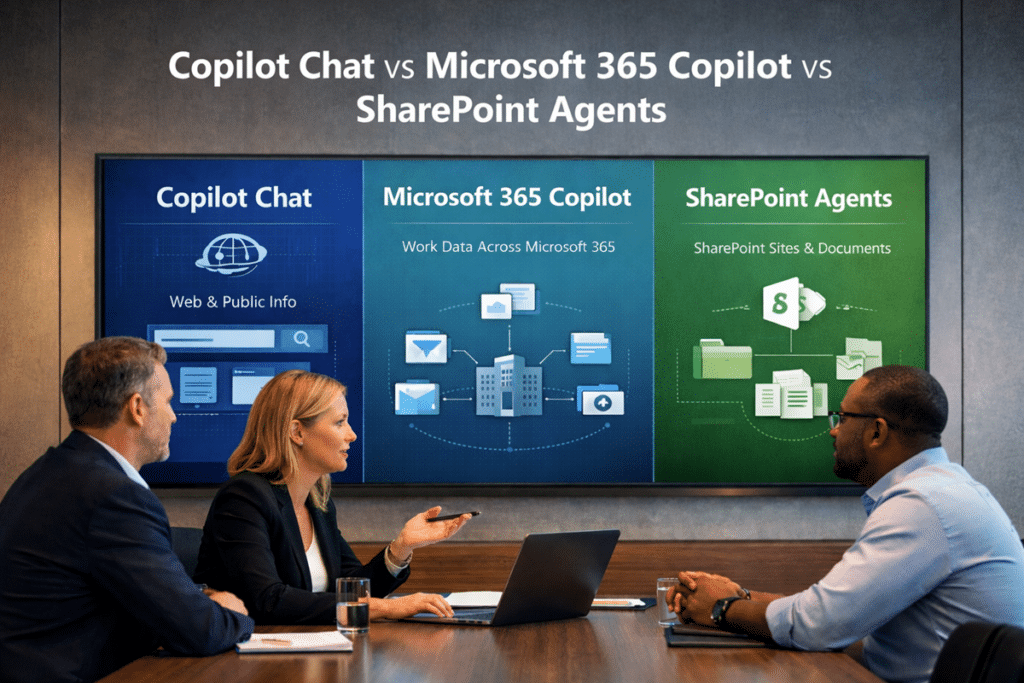
What Copilot Chat Actually Uses
Copilot Chat is often the easiest place for organizations to begin because it creates a lower-friction AI entry point.
Microsoft describes it as an experience built around chat and agents. It is distinct from Microsoft 365 Copilot, even though the names are close enough to confuse people. Microsoft also documents that web search can be used in both Microsoft 365 Copilot and Microsoft 365 Copilot Chat when enabled, which reinforces that web grounding is part of the picture.
That makes Copilot Chat useful for scenarios like:
- General research
- Drafting and brainstorming
- Summarizing information
- Exploring ideas
- Working with content intentionally brought into scope
- Using agents in more controlled ways
What Copilot Chat should not be treated as is a substitute for the full Microsoft 365 Copilot data model.
That difference is where many rollout conversations go off track. A team hears “Copilot,” assumes broad work data grounding, and starts reacting to the wrong scenario.
A better way to frame Copilot Chat is this:
It is a distinct AI chat experience for work, not a shortcut name for the full Microsoft 365 Copilot experience.
That nuance is not academic. It directly affects how you explain risk, value, scope, and next steps to the business.
It affects the invoice too. Since July 1, 2026, Copilot Chat is part of every base Microsoft 365 plan rather than something you opt into, which is one more reason the lighter experience should not be mistaken for the full one when the renewal quote lands.
What Microsoft 365 Copilot Actually Uses
Microsoft 365 Copilot is the experience most organizations are really asking about when they ask whether Copilot uses tenant data.
This is the broader work-grounded experience.
Microsoft’s architecture documentation explains that grounding can include input files and other content Copilot discovers. Microsoft also states that Copilot only accesses data users are authorized to access and honors existing security, compliance, privacy, and data residency controls.
That does not mean Microsoft 365 Copilot has universal tenant-wide visibility.
Instead, it means the experience can work across Microsoft 365 content already available to the signed-in user within existing permission boundaries.
This is where many organizations get a reality check.
If permissions are too loose, Copilot can surface that problem faster.
When content is stale, AI does not hide the weakness.
If libraries are full of duplicates, bad naming, weak metadata, or unclear ownership, Microsoft 365 Copilot will not clean that up for you.
In practice, AI often reveals structural truth more quickly than people expect.
That is one reason a thoughtful Copilot Readiness for SharePoint effort usually creates more value than rushing straight into licensing conversations.
Use the Copilot Readiness Checklist for SharePoint when stakeholders need a practical way to review what Microsoft 365 Copilot may encounter across permissions, source authority, stale content, metadata, search, and ownership.
What SharePoint Agents Actually Use
SharePoint agents sit in a different lane.
Microsoft is quite direct here: agents in SharePoint use SharePoint sites, pages, and document libraries as knowledge sources. Microsoft also notes that the response a user receives depends on that user’s permissions to the underlying sources.
That focus is exactly what makes them useful.
Rather than trying to answer from broad Microsoft 365 context, a SharePoint agent can help users work within a defined body of knowledge. That can make the experience easier to scope, easier to govern, and easier to align to a specific business purpose.
This can be a very practical fit for:
- Policy and procedure libraries
- Department knowledge hubs
- Project documentation collections
- Intranet knowledge centers
- Function-specific content repositories
A narrower footprint is often an advantage.
Focused use cases are usually easier to test. Governance questions become more concrete. Stakeholders can evaluate a known source, a known audience, and a known purpose instead of debating “AI in the tenant” as one giant abstract idea.
The intranet is where that focus pays off most often, and our guide to adding an AI assistant to your SharePoint intranet walks through that use case end to end.
Microsoft’s documentation also notes that SharePoint admins can use tools like permissions, restricted access control policies, and related governance controls to shape what information users can access through agents.
Those controls govern what a single agent can reach. Governing the agents themselves, meaning who can build them, how they are shared, and what they can do outside the tenant, is now handled by Microsoft Agent 365, which treats each agent as a managed identity in Entra ID.
So What Counts as Tenant Data Here?
This is where conversations often get sloppy.
When most organizations say “tenant data,” they usually mean business content living inside Microsoft 365, such as:
- SharePoint files
- OneDrive files
- Emails
- Teams chats
- Meeting content
- Microsoft 365 documents and collaboration history
Microsoft 365 Copilot can work across that broader work context, subject to the user’s existing access. SharePoint agents are narrower because their knowledge sources are defined within SharePoint. Copilot Chat is a different experience again and should not be casually described as though it carries the same Microsoft 365-wide grounding model.
That is why the phrase “Copilot uses our tenant data” is too vague to guide rollout decisions.
A better conversation asks:
- Which Copilot experience?
- Which source?
- Which user?
- Which permissions?
- Which business scenario?
That level of precision is what turns AI planning into something useful.
Permissions Matter More Than the Label
For most organizations, the bigger issue is not whether a Copilot experience can touch tenant data.
The bigger issue is whether the current environment already exposes too much to the wrong people, lacks enough structure, or has unclear ownership.
Copilot does not create those problems.
What it tends to do is make them easier to notice.
Microsoft’s current guidance is explicit that Copilot only accesses data users are authorized to access, and SharePoint’s own documentation says agent responses depend on each user’s permissions to the referenced sources.
The same access boundaries affect SharePoint search. Users may enter the same search query and receive different results because SharePoint only returns content each person is allowed to access. Understanding permissions and SharePoint search results helps organizations separate normal security trimming from actual search problems.
That is why Copilot readiness is never only an AI conversation.
It is also a permissions conversation.
It is also a control-model conversation. This guide on retention labels vs sensitivity labels vs permissions in SharePoint explains why access, protection, and lifecycle controls need to be understood separately before organizations trust AI results at scale.
It is also a governance conversation.
Content quality belongs in that discussion too.
Information architecture matters as well.
This is exactly where pages like the SharePoint Governance Framework and the Complete Guide to SharePoint Metadata Strategy become strategically relevant. AI does not replace structure. In most environments, it raises the cost of weak structure.
Common Misunderstandings That Cause Rollout Problems
“Copilot Chat already sees all our Microsoft 365 content.”
Usually no.
Microsoft distinguishes Copilot Chat from Microsoft 365 Copilot, and the current documentation does not position them as the same broad work-grounded experience. That is why teams should avoid treating a work sign-in as proof of full Microsoft 365-wide grounding.
“Microsoft 365 Copilot has tenant-wide access.”
No.
Microsoft says Copilot only accesses data users are authorized to access. That is very different from unrestricted visibility across everything in the tenant.
“SharePoint agents are basically the same as Microsoft 365 Copilot.”
Not really.
SharePoint agents are grounded in defined SharePoint knowledge sources such as sites, pages, and document libraries. That is a much narrower operating model than broad Microsoft 365 work context.
“If we only start with Copilot Chat, governance can wait.”
That is risky.
A lighter entry point may reduce the initial scope, but it does not remove the need to think clearly about permissions, ownership, content quality, and what happens when the organization moves into broader AI use later. That is an inference from the way Microsoft separates these experiences and ties them to permission-scoped access models.
A Better Way to Plan Rollout
A better rollout conversation usually starts with three simple steps.
Clarify the Experience First
Do not begin with the word “Copilot” as though that answers the question by itself.
Start by defining the actual experience under discussion. Is the use case really about chat-first AI assistance, broader Microsoft 365 work-grounded help, or a focused SharePoint agent tied to a specific knowledge area?
That first decision shapes the rest.
Match the Experience to the Real Data Source
Use case fit matters more than hype.
If the goal is broad productivity across meetings, chats, email, and documents, Microsoft 365 Copilot may be the right fit.
If the goal is guided access to a defined knowledge area in SharePoint, a SharePoint agent may be the better fit.
If the goal is general drafting, brainstorming, and early experimentation, Copilot Chat may be the simplest place to start.
Fix the Foundation Before Broad Rollout
Before AI gets scaled, review:
- Permissions
- Content ownership
- Stale content
- Duplicate files
- Metadata quality
- Site structure
- Lifecycle and archival patterns
That is why related content like What to Archive, Keep, or Delete Before Copilot Rollout, How Metadata Drives Search, Compliance, and Copilot Accuracy in SharePoint, and How Teams Impacts Copilot belongs in the same planning conversation.
dataBridge’s View
The real question is not whether “Copilot” uses tenant data.
A more useful question is whether your organization understands which Copilot experience is using which data, under which permissions, for which scenario.
That shift improves decision-making.
In our experience, organizations get better outcomes when they stop treating Copilot like one giant feature and start treating it like a set of distinct AI experiences with different scopes, dependencies, and governance implications.
That mindset makes rollout more practical.
It clarifies what to enable first.
Governance priorities become easier to define.
Cleanup work becomes easier to justify.
Pilot decisions get sharper.
That is where consulting adds real value.
Turning on a feature is rarely the hard part. Aligning the environment, the expectations, and the business use case before people depend on it is usually where the real work lives.
Related Copilot Planning Resources
Final Takeaway
Copilot Chat, Microsoft 365 Copilot, and SharePoint agents are not interchangeable.
Scope changes from one experience to the next.
Grounding changes too.
The content sources are not the same.
Rollout planning should not be the same either.
If a team is still using “Copilot” as though it describes one uniform capability, that is the first thing to fix.
In Microsoft 365, clarity around data scope is not a minor detail.
It is the starting point for responsible rollout.
Reviewed By