
Quick answer
SharePoint Data Access Governance reports help organizations find sites that may contain overshared, sensitive, or poorly governed content before Microsoft 365 Copilot, SharePoint agents, and enterprise search make that content easier to discover. The reports are most valuable when they lead to clear action: site owner review, permission cleanup, external sharing review, sensitive content validation, lifecycle decisions, and governance follow-through.
For the full SharePoint AI readiness model, start with Copilot Readiness for SharePoint. This article focuses specifically on how SharePoint Data Access Governance reports help organizations identify oversharing, permission exposure, and access-review priorities before Copilot rollout.
Written by Michael Fuchs, Founder and CEO of dataBridge. Reviewed by Dylan Skinner, Senior Solutions Developer, for SharePoint Advanced Management, Power Platform, AI, Microsoft Copilot, and Copilot readiness accuracy.
Published: May 26, 2026
Last reviewed: May 26, 2026
Why Data Access Governance Reports Matter Before Copilot
Microsoft 365 Copilot does not create a new SharePoint permission model. It works within the access users already have.
That sounds reassuring at first.
Then the real question appears.
Do those permissions still reflect what the business intends?
Most organizations preparing for Copilot ask, “Will Copilot show people content they should not see?” That is the right concern, but it is only part of the issue.
A better question is this:
Do our current SharePoint permissions, sharing links, site memberships, and content ownership decisions still match the way our organization operates today?
That question usually exposes the real readiness problem.
In consulting work, dataBridge often sees organizations treat Copilot readiness as a rollout milestone. They assign licenses, prepare training, publish user guidance, and assume the SharePoint environment underneath is ready. Then they discover old project sites, broad permissions, inherited access, sharing links, inactive owners, and stale content that nobody reviewed.
Copilot did not create those issues.
It made them harder to ignore.
Microsoft explains that Data Access Governance reports for SharePoint sites help organizations discover sites that may contain overshared or sensitive content. Microsoft also includes Data Access Governance reports within SharePoint Advanced Management, where they support broader content governance, oversharing controls, and Copilot readiness.
Reports do not solve governance by themselves. They give your organization evidence.
The value comes from what you do next.
What Are SharePoint Data Access Governance Reports?
SharePoint Data Access Governance reports are reporting tools in SharePoint Advanced Management. They help administrators review access patterns across SharePoint and OneDrive so the organization can find areas that may need review, cleanup, or stronger governance.
These reports can help identify patterns such as:
- Sites with broad permissions
- Sites that may contain overshared content
- Sites with external sharing activity
- Sites where users may have wider access than expected
- Sites that need owner review
- Areas where sensitive content may require stronger controls
- Locations where governance has drifted over time
Microsoft’s guidance on getting ready for Microsoft 365 Copilot with SharePoint Advanced Management points to Data Access Governance reports as one way to identify oversharing risks before Copilot rollout.
That is the practical value.
The reports give administrators a better starting point than guesswork. They help teams see where SharePoint access may need attention before AI, search, or agents rely more heavily on the same content environment.
Why Reports Alone Do Not Make SharePoint Ready for Copilot
A report can show risk. It cannot decide what the organization should do about that risk.
That distinction matters.
A Data Access Governance report may show that a site has broad access. It may show heavy sharing-link activity. Another report may show that certain users can access more sites than expected.
Those findings still need interpretation.
The report does not know whether access is appropriate, outdated, accidental, temporary, required, or risky. Business context makes that decision possible.
A consultant-led review usually asks questions like:
- What business function owns this site?
- Does the owner still understand the permission model?
- Does the site contain HR, legal, financial, client, executive, or regulated content?
- Are external users still supposed to have access?
- Are sharing links still needed?
- Should access move from direct permissions to groups?
- Is the site still active?
- Should the site be archived, restricted, restructured, or cleaned up?
- Will Copilot, search, or SharePoint agents rely on this content?
The report starts the conversation. Governance turns it into action. To place these reports inside the larger cleanup and governance sequence, use the SharePoint AI readiness process for content trust, permissions, search, lifecycle, ownership, and SharePoint agent planning.
For the governance resource map that supports that cleanup sequence, the SharePoint Governance Center organizes the related guidance for permissions, external sharing, lifecycle, records, search, provisioning, maturity, and Copilot readiness.
That is why dataBridge treats Data Access Governance reports as part of a broader Copilot Readiness Assessment for SharePoint, not as a standalone technical export.
The Core Problem: SharePoint Access Drift
Most SharePoint permission problems do not appear all at once.
They build slowly.
A team creates a project site. Someone breaks inheritance on a library. A vendor receives access. A manager creates a sharing link for convenience. The department reorganizes. A site owner leaves. A folder becomes a permanent working area. Months pass, and nobody reviews the access model.
That is access drift.
Access drift is one of the biggest reasons Copilot readiness gets complicated. Permissions may still be technically valid, but they may no longer reflect business intent.
Technically permitted is not the same as intentionally governed.
SharePoint Data Access Governance reports help expose where access drift may exist. The next step is deciding who should review the findings, what should change, and which risks matter before rollout.
Where Data Access Governance Fits in the Copilot Readiness Model
Data Access Governance reports should sit inside a larger SharePoint AI readiness process.
They should not replace governance, permissions planning, content cleanup, or owner accountability. Instead, they should help prioritize where those activities need attention first.
Use the Copilot Readiness Checklist for SharePoint to turn report findings into a broader readiness review across permissions, sensitive libraries, stale content, source authority, metadata, search, archive, and ownership.
A practical Copilot readiness model includes:
- Permission review
- External sharing review
- Sensitive content review
- Site ownership validation
- Content lifecycle review
- Search and findability review
- Source-of-truth decisions
- DLP and compliance alignment
- Site access reviews
- Remediation tracking
The reports help turn a broad concern into a focused review list.
That is where SharePoint Advanced Management for Copilot becomes important. SharePoint Advanced Management gives organizations stronger tools to see and manage risk. Data Access Governance reports help teams decide where to act first.
The Reports You Should Review First
Not every organization needs to start with every report.
A better approach is to begin with the reports most likely to expose Copilot readiness risk. Then expand the review as patterns emerge.
1. Site Permissions Across Your Organization
The site permissions report gives administrators a snapshot of permission states across SharePoint sites. Microsoft’s documentation for the site permission states snapshot report explains how administrators can generate a baseline of site permissions.
This is often the best place to start.
The goal is not to panic when a site has broad access. Some sites are designed for wide employee visibility. Others are not.
Separate sites into practical categories:
- Enterprise communication sites
- Department sites
- Project sites
- Executive sites
- HR sites
- Legal sites
- Finance sites
- Client or case-related sites
- Teams-connected sites
- Archive or legacy sites
A broad permission model may be fine for an employee news site. The same model may be unacceptable for HR investigations, contract files, acquisition planning, or leadership materials.
Context carries more weight than the raw number of users.
2. Site Permissions for Users
The user permissions report helps administrators understand which sites selected users can access. Microsoft describes the site permissions for users report as a way to list sites a user can access and evaluate whether access is direct, indirect, site-wide, or limited to sections.
This report can be especially useful before Copilot rollout.
It helps answer questions like:
- Can executives access more sites than expected?
- Do former department leaders still have legacy access?
- Do service accounts have unnecessary access?
- Do external users appear in unexpected places?
- Do high-risk users have access to sensitive sites?
- Are users receiving access through old groups nobody reviews?
In real SharePoint environments, user-based review often reveals access paths that site-by-site review misses.
That matters because employees do not experience SharePoint one site at a time. They experience it through search, links, Teams, OneDrive, Copilot, and shared files.
3. Sharing Links Activity
Sharing links can create some of the most confusing access patterns in SharePoint.
A site may look controlled at the group level while file and folder links quietly expand access underneath it. Microsoft’s sharing links activity report helps identify sites where users have created the most new sharing links over a recent period.
This is a strong Copilot readiness signal.
Heavy sharing-link activity may indicate:
- Active collaboration
- Weak site design
- Overreliance on ad hoc access
- Missing external collaboration rules
- Poor document library structure
- Lack of owner training
- Unclear sharing expectations
The report does not tell you which explanation is true. It tells you where to investigate.
A healthy SharePoint environment should not depend on uncontrolled sharing links as the default collaboration model.
4. Sites With Potentially Sensitive or Overshared Content
Some reports help administrators identify sites that may contain sensitive or overshared content. Those findings deserve careful review before Copilot, Microsoft Search, or SharePoint agents rely more heavily on the environment.
Sensitive content does not automatically mean access is wrong.
A finance team should have finance content. A legal team should have legal content. HR should have HR content.
Risk increases when sensitive content lives in the wrong place, has the wrong audience, or lacks a clear owner.
A report may identify a site that deserves a deeper review. That review should look at permissions, labels, DLP policies, sharing settings, library design, lifecycle rules, and accountability.
This is where Microsoft Purview DLP for SharePoint, Teams, OneDrive, and Copilot becomes part of the larger picture. DLP helps enforce policy. Data Access Governance reports help identify where access risk may already exist.
How to Use Data Access Governance Reports Before Copilot Rollout
A strong review process should follow a simple sequence.
Do not start by trying to fix everything. Start by deciding where the most important risks may exist.
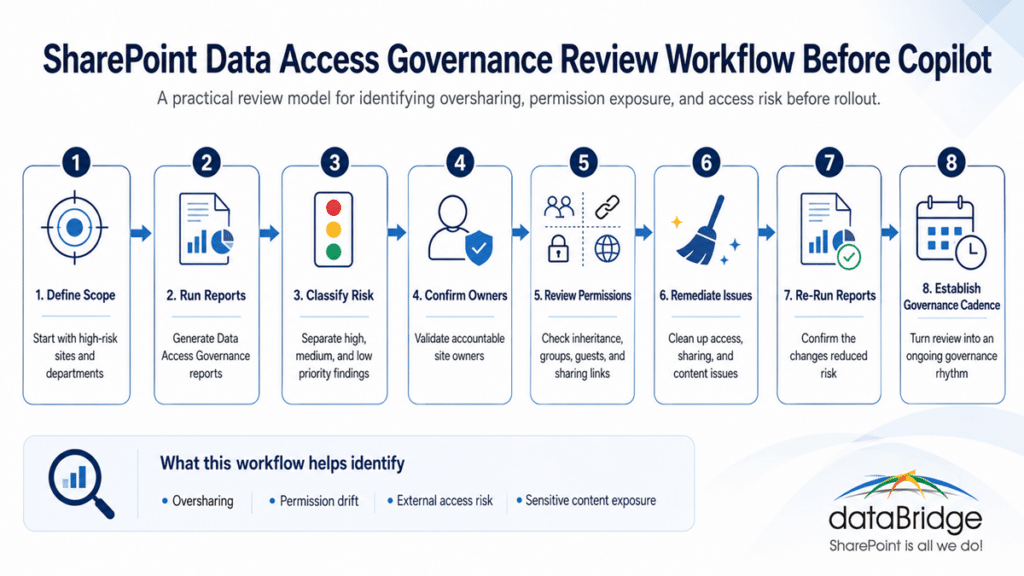
Step 1: Define the Review Scope
Begin with the sites most likely to create business risk.
Common starting groups include:
- HR
- Finance
- Legal
- Executive leadership
- Compliance
- Client delivery
- Regulated departments
- External collaboration sites
- Legacy migration sites
- Teams-connected sites with heavy file activity
This prevents the review from becoming too broad.
Many organizations lose momentum because they try to review every site with the same level of effort. That usually creates delay, confusion, and low-quality follow-through.
Focus first on content that could create risk if surfaced to the wrong audience.
Step 2: Create a Risk Triage Model
Data Access Governance reports become more useful when findings are classified.
A practical triage model might include:
- High risk: Sensitive content with broad or unclear access
- Medium risk: Broad access, active sharing, or unclear ownership
- Low risk: Intended broad-access sites with known owners
- Watch list: Sites that need later review but do not block rollout
- No action: Sites that match the intended access model
This keeps the review practical.
Not every finding needs immediate remediation. Some findings need documentation, owner confirmation, or follow-up after rollout.
The goal is not perfect SharePoint. The goal is visible, prioritized, and controlled risk.
For the high-risk tier, the report can also tell you which sites to hold back from Copilot with a per-site discovery restriction until owner review and cleanup are done.
Step 3: Confirm Site Ownership
Every access review needs an owner.
Without ownership, reports become interesting but ineffective.
Each site reviewed before Copilot rollout should have:
- A business owner
- A technical or administrative contact
- A defined purpose
- A known audience
- A permission model
- A lifecycle expectation
- A review cadence
When ownership is unclear, permissions usually become unclear too.
This is why SharePoint Governance Framework work often becomes part of Copilot readiness. Governance defines who makes decisions, how reviews happen, and what happens when content no longer fits the model.
Step 4: Review Permission Inheritance
Permission inheritance is not automatically good or bad.
It is a design decision.
Many SharePoint environments become risky because inheritance is broken without clear documentation. Libraries, folders, and individual files may have unique permissions that no longer match the site’s purpose.
During review, look for:
- Broken inheritance
- Direct user permissions
- Overuse of “Everyone except external users”
- Unclear Microsoft 365 groups
- Legacy SharePoint groups
- Private channels and shared channels
- Site collection admin sprawl
- Library-level exceptions
- Folder-level exceptions
- File-level sharing
This is where the SharePoint Permission Review Checklist for Copilot is useful. It gives the review a practical structure.
A report can show where access exists. The checklist helps determine whether that access still makes sense.
Use the SharePoint Permission Review Checklist for Copilot PDF to convert report findings into site owner questions, review priorities, and cleanup actions.
Step 5: Review External Sharing
External sharing deserves its own review before Copilot rollout.
Vendors, partners, board members, contractors, auditors, and clients may all need access to certain content. That does not mean external access should remain open forever.
Before Copilot rollout, review:
- Externally shared sites
- Anonymous or anyone links, if allowed
- Organization-wide sharing links
- Specific people links
- Guest users
- Expired or non-expiring links
- Vendor collaboration areas
- Partner-facing libraries
- Old project sites with external users
The goal is not to eliminate external collaboration. The goal is to govern it.
For broader guidance, connect this review to SharePoint External Sharing Governance. External sharing should not depend only on user judgment at the moment someone needs to send a file.
Step 6: Identify Sensitive Content Hotspots
Permissions and sensitive content need to be reviewed together.
A site with sensitive content and narrow access may be fine. Another site with broad access and low-risk content may also be fine. The concern increases when sensitive content and broad access overlap.
Review sites that may contain:
- Employee records
- Compensation information
- Legal documents
- Contracts
- Board materials
- Client records
- Financial data
- M&A content
- Audit materials
- Security documentation
- Regulated operational records
These areas may also require retention, records, DLP, sensitivity labels, or stronger lifecycle controls.
The SharePoint Security and Compliance page should support this work because security and compliance decisions need to be designed into the environment, not patched on after users lose trust.
Step 7: Initiate Site Access Reviews
Microsoft allows organizations to initiate site access reviews from Data Access Governance reports. Microsoft’s documentation on site access reviews for Data Access Governance reports explains that administrators can initiate reviews from the report experience and send review requests to site owners.
This is where reporting becomes practical governance.
A site access review should ask owners to confirm:
- Who should have access
- Which groups should remain
- Which users should be removed
- Whether external users still need access
- Whether sharing links should expire or be removed
- Whether the site still serves its original purpose
- Whether content should be archived
- Whether the site should be restricted before Copilot rollout
Site owners should not receive vague review requests.
Give them clear instructions, examples, deadlines, and escalation paths.
A weak request says, “Please review this site.”
A better request says, “Please confirm whether these groups, external users, and sharing links still match the business purpose of this site before Copilot rollout.”
That small change improves the quality of the response.
Step 8: Track Remediation Decisions
A review without tracking becomes a meeting note.
Every finding should lead to a documented outcome.
Common outcomes include:
- No action required
- Remove direct users
- Replace direct access with groups
- Remove external users
- Expire sharing links
- Restrict site access
- Update site owner
- Archive inactive site
- Apply DLP policy
- Apply sensitivity label
- Review retention settings
- Redesign library structure
- Move content to authoritative site
- Add to later governance review
This step is where many organizations lose momentum.
The report creates visibility. The remediation tracker creates accountability.
How to Prioritize Data Access Governance Findings
Not all findings carry the same risk.
A good prioritization model should combine access, sensitivity, activity, ownership, and business importance.
The model below helps separate urgent access risks from sites that are broad by design but still governed.
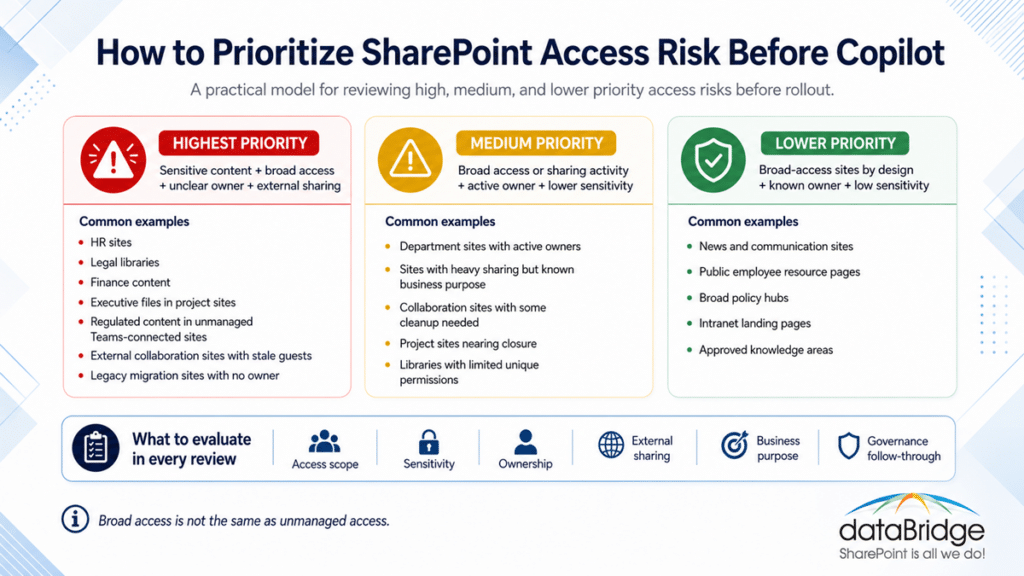
The key is not to treat broad access as automatically bad. The real question is whether the access level matches the site’s sensitivity, ownership, business purpose, and governance model.
Highest priority
Prioritize sites where sensitive content overlaps with broad or unclear access.
Examples include:
- HR sites with broad internal access
- Legal libraries with broken inheritance
- Finance content shared through old links
- Executive files in project sites
- Regulated content in unmanaged Teams-connected sites
- External collaboration sites with stale guests
- Legacy migration sites with no owner
These areas deserve review before Copilot rollout.
Medium priority
Medium-priority sites may have access concerns but lower sensitivity or clearer ownership.
Examples include:
- Department sites with active owners
- Sites with heavy sharing but known business purpose
- Collaboration sites with some cleanup needed
- Project sites nearing closure
- Libraries with limited unique permissions
These sites may not block rollout, but they should enter a remediation plan.
Lower priority
Lower-priority sites may be broad by design.
Examples include:
- News and communication sites
- Public employee resource pages
- Broad policy hubs
- Intranet landing pages
- Approved knowledge areas
Even then, ownership still matters.
Broad access is not the same as unmanaged access.
Common Mistakes When Using Data Access Governance Reports
Data Access Governance reports are useful. They are also easy to misuse.
Mistake 1: Treating Every Finding as a Defect
Some sites should have broad access.
The real issue is whether broad access matches the site’s purpose.
An employee news site and an HR investigation site should not use the same risk logic. A report may flag both, but governance must interpret the difference.
Mistake 2: Reviewing Reports Without Business Owners
IT can generate the report. IT cannot always decide who should access each business site.
Business owners need to confirm intent.
This is especially true for legal, finance, HR, operations, client, and regulated content.
Mistake 3: Cleaning Permissions Without Fixing Structure
Permission cleanup helps, but structure still matters.
If a site mixes public, private, draft, final, archived, and sensitive content in one place, permissions will keep becoming messy.
That is a design problem.
Sometimes the answer is not another access review. The answer is better information architecture.
Use SharePoint Information Architecture & Metadata Consulting Services when the content model itself creates permission confusion.
Mistake 4: Ignoring Teams-Connected SharePoint Sites
Teams files live in SharePoint.
That simple fact creates a lot of readiness risk.
Many organizations review standalone SharePoint sites but miss the SharePoint sites behind Teams. Those sites often contain active files, shared folders, private channel content, inherited collaboration habits, and external access patterns.
Copilot readiness should include Teams-connected SharePoint sites, especially when departments use Teams as their main file workspace.
Mistake 5: Treating Copilot Readiness as a One-Time Review
Copilot readiness is not a one-time cleanup project.
Permissions change. Sharing links grow. Owners leave. Content ages. Sites multiply. Teams expand.
A one-time review may reduce initial risk, but governance keeps the environment healthy.
That is why Data Access Governance reports should become part of an ongoing governance cadence.
What a Practical Data Access Governance Review Should Include
A useful review should be structured enough to produce action.
Here is a practical model.
Phase 1: Discovery
Start with a defined scope and generate the first set of reports.
Review:
- High-risk business areas
- Sensitive departments
- Heavily shared sites
- Broad-access sites
- External collaboration areas
- Teams-connected sites
- Legacy or migrated content areas
The goal is to identify where deeper review should begin.
Phase 2: Classification
Group findings by risk and business context.
Classify sites by:
- Sensitivity
- Audience
- Ownership
- External sharing
- Permission complexity
- Activity level
- Copilot relevance
- Business criticality
This helps prevent teams from treating every report result the same way.
Phase 3: Owner Review
Send targeted review requests to site owners.
Make each request clear.
Ask owners to confirm:
- Site purpose
- Intended audience
- External access
- Group membership
- Sharing link need
- Content sensitivity
- Cleanup actions
- Archive or retention needs
Owner review turns the report into governance.
Phase 4: Remediation
Act on confirmed issues.
Possible remediation steps include:
- Removing stale users
- Expiring old links
- Updating groups
- Restoring inheritance where appropriate
- Splitting libraries
- Moving sensitive content
- Applying DLP
- Restricting high-risk sites
- Archiving inactive areas
- Updating ownership records
Good remediation is specific. Vague cleanup rarely lasts.
Phase 5: Governance Cadence
Schedule recurring reviews.
A practical cadence might include:
- Monthly review for high-risk sites
- Quarterly review for sensitive departments
- Semiannual review for broad collaboration areas
- Annual review for lower-risk sites
- Triggered review after reorganizations, migrations, or major Copilot changes
The cadence should match the risk.
A small department site does not need the same review rhythm as an executive, legal, or HR workspace.
How Data Access Governance Reports Support SharePoint Permissions
Data Access Governance reports and permission reviews work together.
The reports help identify where access may need attention. The permission review defines what the organization should validate.
A good permission review should include:
- Site owners
- Site members
- Site visitors
- Microsoft 365 groups
- SharePoint groups
- Direct permissions
- Guests
- Sharing links
- Broken inheritance
- Library-level permissions
- Folder-level permissions
- File-level permissions
- Site collection administrators
Use The Complete Guide to SharePoint Permissions as the broader permission model. It explains how access should be structured before reports become remediation work.
Reports show symptoms. Permission design addresses the cause.
How Data Access Governance Reports Support External Sharing Governance
External sharing is one of the biggest Copilot readiness concerns because it often grows outside formal governance.
A project team shares with a vendor. A department shares with an auditor. A manager shares a file with a consultant. Later, the business forgets those relationships still exist.
Data Access Governance reports can help identify where sharing activity deserves review.
The remediation questions should be practical:
- Is the external user still active?
- Does the vendor still need access?
- Are links scoped to specific people?
- Do sharing links expire?
- Should content move to a dedicated external collaboration site?
- Does the site have an accountable owner?
- Are sensitive files protected by the right controls?
External sharing is not bad. Unreviewed external sharing is the risk.
How Data Access Governance Reports Support Microsoft Purview DLP
Data Access Governance reports help identify where access risk may exist. Microsoft Purview DLP helps enforce policies that protect sensitive information.
These tools should support each other.
For example, a report may identify a site with broad access and sensitive content indicators. That finding may lead to a deeper review of DLP policies, sensitive information types, labels, access controls, or content location.
Do not treat DLP as a substitute for permissions.
DLP helps reduce certain types of exposure. Permissions still define who can access content in the first place.
This is why Microsoft Purview DLP for SharePoint, Teams, OneDrive, and Copilot should connect to Data Access Governance review. The strongest model combines policy enforcement, access review, and content governance.
How Data Access Governance Reports Support SharePoint Agents
SharePoint agents raise the stakes for source selection.
A SharePoint agent should not point to a messy set of sites, libraries, and documents without review. The quality of the answers depends on the quality, scope, permissions, and ownership of the sources behind the agent.
Data Access Governance reports can help identify whether a proposed source area has access issues before it becomes part of an agent experience.
Before creating or approving a SharePoint agent, review:
- Source site permissions
- External sharing
- Sensitive content
- Site ownership
- Content freshness
- Library structure
- Source authority
- Duplicate content
- Broken inheritance
- Audience expectations
Use How to Design SharePoint Agents That Users Can Trust when agent scope, sources, permissions, and ownership need deeper review.
A SharePoint agent should behave like a governed knowledge product, not a shortcut around content governance.
How to Turn Reports Into an Executive-Ready Copilot Readiness Story
Executives usually do not need every report detail.
They need to understand risk, progress, and decisions.
A useful executive summary should answer five questions:
- Which areas were reviewed?
- Which areas present the highest access risk?
- What has already been remediated?
- What decisions require business ownership?
- What must happen before Copilot expands?
A strong summary might say:
“We reviewed high-risk SharePoint sites across HR, Finance, Legal, Operations, and executive workspaces. We identified 18 sites requiring owner review, 7 sites with external sharing concerns, 4 sites needing permission restructuring, and 3 inactive sites recommended for archive. No broad Copilot rollout should proceed for these content areas until owner review is complete.”
That kind of statement is more useful than a raw export.
It connects the report to business decisions.
What Site Owners Need to Know
Site owners should not be expected to interpret governance reports without guidance.
Give them plain-language expectations.
Site owners should understand:
- What the site is for
- Who should have access
- Which content is sensitive
- Which external users should remain
- Whether sharing links are still needed
- Which libraries contain authoritative content
- What should be archived
- What should be removed
- When the next review will happen
This is also a training issue.
Many site owners inherited their role. They may not know how permissions work, how sharing links behave, or how Copilot changes content visibility expectations.
Data Access Governance review should include site owner education, not just remediation tickets.
What IT Should Own
IT and Microsoft 365 administrators should own the reporting process, configuration review, and platform controls.
That includes:
- Generating reports
- Managing SharePoint Advanced Management settings
- Supporting site access reviews
- Reviewing sharing settings
- Helping interpret permission models
- Coordinating with security and compliance
- Applying administrative controls
- Supporting remediation
- Tracking exceptions
- Reporting progress
IT should not make every business access decision alone.
The business owns the content. IT helps make the access model visible and manageable.
What Compliance Should Own
Compliance should help interpret sensitive content risk.
That may include:
- Retention requirements
- Records management
- DLP policy needs
- Sensitivity label strategy
- Regulatory expectations
- Audit requirements
- Legal hold considerations
- Disposition review
- External sharing policy
- Escalation rules
Compliance should be involved before sensitive content review becomes reactive.
A Copilot readiness review is a good moment to align SharePoint access, retention, DLP, and records decisions.
What Business Owners Should Own
Business owners should confirm whether access still matches business intent.
Their role includes:
- Confirming site purpose
- Validating membership
- Approving external access
- Identifying sensitive content
- Confirming authoritative sources
- Removing stale content
- Naming a backup owner
- Supporting remediation
- Reviewing exceptions
- Maintaining future review cadence
The best governance model does not make IT the only owner of SharePoint.
It gives business teams clear responsibility for the content they depend on.
A Simple Data Access Governance Review Checklist
Use this checklist before Copilot rollout.
Scope
- Identify high-risk departments.
- Include Teams-connected SharePoint sites.
- Include external collaboration sites.
- Include legacy migrated sites.
- Include sites likely to contain sensitive content.
Reporting
- Run relevant Data Access Governance reports.
- Review site permission states.
- Review user access patterns.
- Review sharing link activity.
- Review sensitive or overshared content indicators.
- Export and retain review evidence where appropriate.
Ownership
- Confirm site owners.
- Identify missing owners.
- Assign backup owners.
- Confirm business purpose.
- Document intended audience.
Permissions
- Review broad groups.
- Review direct permissions.
- Review broken inheritance.
- Review library, folder, and file exceptions.
- Review site collection administrators.
- Confirm Microsoft 365 group membership.
External Sharing
- Review guest users.
- Review sharing links.
- Remove stale access.
- Confirm vendor or partner needs.
- Apply expiration where appropriate.
- Escalate risky exceptions.
Sensitive Content
- Identify sensitive content areas.
- Review DLP needs.
- Review labels and retention.
- Confirm content location.
- Move content when structure is wrong.
- Restrict access when needed.
Remediation
- Assign actions.
- Track owners.
- Set due dates.
- Record decisions.
- Confirm completion.
- Add unresolved items to a risk register.
Governance
- Establish review cadence.
- Train site owners.
- Define escalation paths.
- Align with Copilot rollout stages.
- Re-run reports after remediation.
- Continue monitoring after launch.
When Data Access Governance Reports Are Not Enough
Reports are powerful, but they have limits.
They do not replace information architecture. Reports do not fix poor document library design. They do not decide which source is authoritative. Reports do not train site owners. They do not remove stale content automatically. Reports do not create a governance operating model.
When the reports reveal deeper issues, the next step may be broader SharePoint readiness work.
That might include:
- Permission redesign
- Site architecture cleanup
- Metadata strategy
- External sharing governance
- Sensitive content controls
- DLP planning
- Site owner training
- Content lifecycle planning
- Source-of-truth design
- Migration cleanup
- SharePoint agent source review
Reports help you see the problem. A readiness plan helps you fix it.
How dataBridge Helps Organizations Use Data Access Governance Reports
dataBridge helps organizations move from report review to practical SharePoint remediation.
That work usually includes:
- Reviewing SharePoint access risk before Copilot rollout
- Interpreting Data Access Governance reports
- Prioritizing high-risk sites
- Building remediation trackers
- Guiding site owner reviews
- Reviewing permission structures
- Evaluating external sharing
- Connecting findings to DLP and compliance needs
- Identifying source-of-truth content
- Preparing SharePoint for Copilot and SharePoint agents
- Creating a repeatable governance cadence
Our approach is intentionally practical.
We do not treat Copilot readiness as a generic AI workshop. We look at the SharePoint environment underneath it: sites, libraries, permissions, sharing, metadata, ownership, lifecycle, search, and governance.
That is where the real readiness work happens.
If your organization needs help reviewing SharePoint access risk before Copilot rollout, contact dataBridge to discuss a consultant-led SharePoint readiness review.
What Good Looks Like After Review
A strong Data Access Governance review should leave the organization with more than exported reports.
It should produce clear outcomes.
After review, you should know:
- Which sites are safe to include in Copilot rollout
- Which sites need remediation first
- Which sites require business owner review
- Which sites contain sensitive content
- Which external access should remain
- Which sharing links should be removed
- Which owners are accountable
- Which exceptions are accepted
- Which risks remain open
- Which controls need to be strengthened
- Which review cadence should continue
That level of clarity builds confidence.
It also gives leadership a better answer than “permissions follow security trimming.”
Security trimming matters. It is not the whole governance story.
A stronger story is this: “We reviewed the SharePoint access model, prioritized risk, completed remediation, assigned owners, and created an ongoing review process.”
That is a better Copilot readiness position.
Final Takeaway
SharePoint Data Access Governance reports are one of the most practical tools organizations can use before Copilot rollout.
They help expose oversharing, permission drift, external access concerns, and sensitive content risk. More importantly, they create a path from concern to action.
Still, the reports are only the start.
Copilot readiness requires interpretation, ownership, remediation, and governance. It requires IT, security, compliance, and business owners to agree on what access should look like before AI makes content easier to discover.
The organizations that handle this well will not be the ones with the most reports. They will be the ones that turn those reports into better decisions.
If you want a SharePoint-first review of your Copilot readiness risks, schedule a conversation with dataBridge.
Frequently Asked Questions
What are SharePoint Data Access Governance reports?
SharePoint Data Access Governance reports are reports in SharePoint Advanced Management that help administrators identify sites that may contain overshared or sensitive content. They help organizations review permission patterns, sharing activity, user access, and sites that may require governance follow-up.
Why do Data Access Governance reports matter for Copilot readiness?
They matter because Microsoft 365 Copilot can surface content a user already has permission to access. If SharePoint permissions are too broad, outdated, or unclear, Copilot readiness becomes a governance issue. Data Access Governance reports help identify where access should be reviewed before rollout.
Do Data Access Governance reports replace a SharePoint permission review?
No. They help identify where permission review should happen first. A complete permission review still needs business context, site owner input, group review, external sharing review, and remediation decisions.
Should every report finding be fixed before Copilot rollout?
Not always. Some sites are broad by design. The goal is to classify findings by business risk, content sensitivity, ownership, and intended audience. High-risk sites should be remediated first.
Who should review SharePoint Data Access Governance reports?
Microsoft 365 administrators usually generate the reports, but IT should not review them alone. Site owners, security, compliance, records management, and business leaders should help interpret risk and confirm intended access.
How often should organizations run Data Access Governance reports?
Run the reports before major Copilot rollout decisions, after major migrations, after reorganizations, and on a recurring governance cadence. High-risk departments may need more frequent review than broad communication sites.
How do Data Access Governance reports relate to SharePoint Advanced Management?
Data Access Governance reports are part of SharePoint Advanced Management. They work alongside other controls and capabilities that help organizations manage oversharing, content governance, access review, and Copilot readiness.
Can Data Access Governance reports help with SharePoint agents?
Yes. Before a SharePoint agent uses a site or library as a source, organizations should review permissions, sharing, sensitivity, ownership, and source authority. Data Access Governance reports can help identify risky source areas before agents are rolled out.

Author
-

Michael is the Founder and CEO of dataBridge, where he helps organizations approach SharePoint and Microsoft 365 with a stronger focus on strategy, governance, architecture, and long-term business value. His consulting-first perspective shapes how clients plan smarter, avoid costly missteps, and build digital workplaces that hold up over time.