

Copilot Readiness Checklist for SharePoint
Use the dataBridge Copilot Readiness Checklist for SharePoint to review the SharePoint permissions, content quality, ownership, metadata, search, archive, and governance issues that affect Microsoft 365 Copilot. This checklist helps teams find practical risks before a pilot, broad rollout, or larger SharePoint AI readiness effort.
Copilot readiness is not a license rollout. It is an information readiness project.
This checklist helps your team review the SharePoint areas that most often affect AI trust:
- Oversharing
- Stale content
- Sensitive libraries
- Source-of-truth libraries
- Metadata consistency
- Search quality
- Archive readiness
- Site ownership
Microsoft 365 Copilot works best when SharePoint content is current, governed, secured, and easy to trust. When SharePoint is cluttered, overshared, outdated, or poorly owned, Copilot readiness becomes a governance problem before it becomes a user adoption problem.
If your checklist reveals gaps in permissions, content quality, search, ownership, archive readiness, or governance, contact dataBridge to turn the findings into a practical Copilot readiness roadmap.
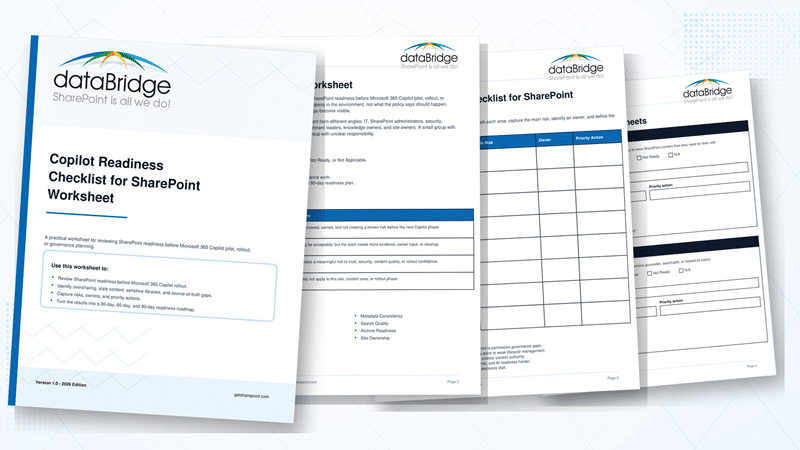
You can also download the Copilot Readiness Checklist for SharePoint Worksheet to review readiness risks with your internal SharePoint, IT, security, compliance, and business teams.
Quick Answer: What Is the Copilot Readiness Checklist for SharePoint?
The Copilot Readiness Checklist for SharePoint is a practical review tool that helps organizations evaluate whether SharePoint content, permissions, ownership, metadata, search, and lifecycle practices are ready for Microsoft 365 Copilot.
The checklist focuses on eight readiness areas:
- Oversharing
- Stale content
- Sensitive libraries
- Source-of-truth libraries
- Metadata consistency
- Search quality
- Archive readiness
- Site ownership
The goal is not to make every SharePoint site perfect.
A better goal is to identify the issues that could weaken Copilot trust, expose content too broadly, surface outdated answers, or make AI-assisted work harder to rely on.
Why Copilot Readiness Starts in SharePoint
Many Copilot readiness conversations start with licensing, training, or prompts.
Those topics matter. They are not the foundation.
In SharePoint consulting and readiness work, dataBridge often sees Copilot concerns trace back to everyday SharePoint issues:
- Old files remain searchable.
- Sensitive libraries have broader access than expected.
- Department sites have unclear owners.
- Multiple libraries contain different versions of the same answer.
- Metadata exists in one area but not another.
- Project sites stay active long after the project ends.
- Search returns content that users do not fully trust.
Copilot does not create those issues. It makes them easier to notice.
That is why Copilot readiness should begin with SharePoint content, access, ownership, lifecycle, and search. The best Copilot pilot starts with information people already trust.
A cleaner pilot beats a bigger pilot.
How This Page Fits With Related dataBridge Resources
This page is the primary dataBridge resource for a practical Copilot readiness checklist. It gives teams a worksheet-style review they can use before a rollout, pilot, assessment, or governance cleanup effort.
Use the related resources this way:
- Start with the SharePoint AI Readiness Center when you want the main hub for SharePoint AI readiness resources.
- Use the SharePoint readiness checklists and assessment resources hub when you want this Copilot checklist alongside related dataBridge tools for governance maturity, permission review, migration planning, post-migration validation, intranet readiness, and AI readiness.
- Review Copilot Readiness for SharePoint when you need the broader strategy for preparing SharePoint for Microsoft 365 Copilot.
- Use the Copilot Readiness Assessment for SharePoint when your organization needs a more formal review before rollout.
- Apply the SharePoint Governance Maturity Scorecard when Copilot gaps point back to ownership, permissions, lifecycle, records, search, adoption, and support maturity.
- Go deeper with the SharePoint Permissions Guide when access control, external sharing, permission drift, and sensitive content exposure are the biggest concerns.
- Use the SharePoint Permission Review Checklist when your team needs a more focused permission review before enabling or expanding Copilot.
- After the broader readiness worksheet, download the Copilot permission review checklist when the team needs a deeper access-control review before enabling or expanding Copilot.
- Clarify authority with the SharePoint Source of Truth Model when users need clearer guidance on which libraries, pages, and documents are official.
- Improve findability with SharePoint Search Governance when stale content, duplicate answers, and trusted search results need stronger control.
- Plan cleanup with Microsoft 365 Archive for SharePoint when inactive sites or stale content need an archive strategy before Copilot rollout.
Who Should Use This Copilot Readiness Checklist?
Use this checklist when your organization is preparing for Microsoft 365 Copilot and needs to understand whether SharePoint is secure, current, structured, and trustworthy enough for AI-assisted search, summarization, and content reuse.
This checklist is especially useful for:
- IT leaders preparing for a Copilot pilot or broader Microsoft 365 Copilot rollout.
- SharePoint administrators reviewing permissions, sites, libraries, metadata, ownership, and content quality.
- Security teams concerned about oversharing, external access, sensitive libraries, and permission drift.
- Compliance and records teams reviewing retention, archive readiness, sensitive content, and lifecycle controls.
- Intranet owners responsible for trusted employee-facing pages, policies, news, and knowledge content.
- Department leaders who manage business-critical SharePoint libraries, procedures, project spaces, or knowledge areas.
- Site owners who need clearer expectations before Copilot makes SharePoint content easier to discover.
- Change management teams preparing users for AI-assisted work across Microsoft 365.
- Organizations planning a Copilot pilot, broad rollout, readiness assessment, SharePoint cleanup, or governance reset.
The checklist works best as a cross-functional review. IT can identify access patterns, site structure, sharing settings, administrative gaps, and technical risks. Business owners know whether content is current, official, sensitive, duplicated, outdated, or still useful.
That combination matters.
Copilot readiness is not just a technical review. It is a business trust review. The goal is to identify the SharePoint areas most likely to affect security, accuracy, user confidence, and rollout risk before Copilot expands to a larger audience.
Use the checklist before a pilot, before broad rollout, after a migration, after a reorganization, or when SharePoint agents and AI-assisted experiences are being planned around business-critical content.
What This Tool Helps Prove
The Copilot Readiness Checklist for SharePoint helps your team move from opinion to evidence.
Use it to identify the specific SharePoint conditions that could weaken Microsoft 365 Copilot trust, including oversharing, stale content, sensitive libraries, source-of-truth gaps, metadata inconsistency, poor search quality, archive readiness, site ownership, and governance issues.
The goal is not to complete a worksheet and stop. The goal is to turn the findings into a practical action plan. After completing the checklist, review the highest-risk readiness areas, assign accountable owners, decide what should happen next, and connect the results to the right dataBridge service or resource.
When the findings show a broader AI readiness problem, use the Copilot Readiness Assessment for SharePoint to define the right next step. When the findings point specifically to access risk, use the SharePoint Permission Review Checklist for Copilot to go deeper on broad access, guest users, sharing links, broken inheritance, and sensitive content exposure.
What This Checklist Does and Does Not Cover
This checklist helps teams identify SharePoint readiness issues that affect Microsoft 365 Copilot trust.
It covers practical readiness areas such as:
- Permissions and oversharing
- Stale content
- Sensitive libraries
- Source-of-truth content
- Metadata consistency
- Search quality
- Archive readiness
- Site ownership
It does not replace a full Copilot implementation plan, security architecture review, adoption plan, or Microsoft 365 governance framework.
That separation matters.
This checklist helps your team see where SharePoint may create risk or confusion. A more formal Copilot Readiness Assessment for SharePoint can then turn those findings into a deeper roadmap.
How to Use the Checklist
Use the checklist as a practical working session, not a documentation exercise.
For each readiness area, review the current SharePoint environment as it actually operates today. Do not mark an area ready because a policy says it should be ready. Mark it based on evidence from sites, libraries, permissions, content owners, search behavior, stale content, sensitive content, and user experience.
For each readiness area, capture:
- Status.
- Main risk.
- Evidence or example.
- Content or site owner.
- Priority action.
- Timing before pilot or rollout.
A useful checklist does not need perfect answers. It needs honest answers.
When the team cannot explain who owns a library, who should have access, which version is official, or whether content is still current, that area probably needs review before Copilot expands.
How to Interpret Ready, Needs Review, and Not Ready
Use the status labels to separate acceptable pilot risk from issues that need investigation or remediation.
Ready
Mark an area Ready when there is enough evidence to trust the current state.
Ready does not mean perfect. It means the area has reasonable controls, clear ownership, and no known issue that should block the next rollout step.
Examples include:
- Important sites have current owners.
- Sensitive libraries have reviewed access.
- Source-of-truth content is clear enough for users to trust.
- Stale content has been removed, archived, or labeled.
- Metadata and search quality are strong enough for the intended pilot or rollout scope.
- Known risks are documented and assigned.
A Ready status should still have an owner. Copilot readiness needs ongoing review because content, permissions, and business needs change over time.
Needs Review
Mark an area Needs Review when the team does not have enough evidence to call it ready.
This is often the most important status. It shows where assumptions need to be tested before Copilot expands.
Examples include:
- Site owners are unclear or outdated.
- Sensitive libraries exist, but access has not been recently reviewed.
- Broad groups may be appropriate, but no one can confirm why.
- Search returns mixed results for important user questions.
- Source-of-truth content exists in more than one place.
- Metadata is inconsistent across important libraries.
- Old sites may need archive review.
- Business owners have not confirmed whether content is still current.
Needs Review does not always mean Copilot must stop. It means the area needs investigation, owner input, and a decision before it is treated as safe for a larger audience.
Not Ready
Mark an area Not Ready when there is a known issue that could affect security, trust, accuracy, or user confidence.
Examples include:
- Sensitive content is stored in broad collaboration areas.
- External sharing is unclear or unmanaged.
- Old project sites remain active and searchable.
- Important libraries have no business owner.
- Users cannot tell which document is official.
- Search surfaces outdated or conflicting content.
- Permissions are difficult to explain.
- Content cleanup decisions have no owner.
- Governance routines do not exist after launch.
Not Ready does not mean the entire Copilot program has failed. It means the issue should be prioritized before a pilot expands or before broad rollout begins.
Not Applicable
Use Not Applicable only when the readiness area truly does not apply to the reviewed scope.
Do not use Not Applicable to avoid difficult review work. For example, a small pilot may not include every sensitive library, but sensitive content still needs attention before broad rollout.
How to Read the Results
After completing the checklist, review the results in three ways.
First, look for any Not Ready items in oversharing, sensitive libraries, source-of-truth content, search quality, archive readiness, or site ownership. These areas can create the most visible Copilot readiness problems.
Next, look for repeated Needs Review items. A pattern of uncertainty often points to weak governance, unclear ownership, or poor content lifecycle habits.
Finally, separate pilot readiness from rollout readiness. A controlled pilot can move forward with known risks if the scope is limited and the risks are owned. A broad rollout needs stronger confidence across permissions, sensitive content, ownership, source authority, metadata, search, and lifecycle governance.
Checklist Area 1: Oversharing
Oversharing means users may have access to more SharePoint content than they need for their role.
This is often the first Copilot readiness concern.
SharePoint supports flexible collaboration, but broad access becomes risky when content is sensitive, outdated, or poorly understood. Copilot can make existing access decisions more visible, so permission clarity matters before rollout.
Oversharing is not always obvious.
It often hides inside old groups, inherited permissions, direct sharing links, external access, inactive users, and libraries that were never reviewed after launch.
Oversharing Checklist
Review these items:
- Important sites use groups instead of individual user permissions.
- Sensitive libraries have restricted and documented access.
- Unique permissions are reviewed and justified.
- External users are reviewed on a regular schedule.
- Sharing links are reviewed for age, scope, and purpose.
- Broad groups are checked for unnecessary access.
- Former employees, vendors, and inactive users are removed.
- Business owners understand who can access their content.
- Permission exceptions are documented.
- High-risk sites have a clear access review owner.
Oversharing Questions to Ask
Use these questions during review:
- Which users have access to sensitive content?
- What groups are broader than they should be?
- Where are unique permissions used?
- Which sharing links are still active?
- Do site owners understand the access model?
- Can administrators explain why access exists?
- What sites would create concern if Copilot surfaced their content?
If permissions are difficult to explain, Copilot readiness is not ready enough.
For deeper permission planning, use the SharePoint Permissions Guide and the SharePoint Permission Review Checklist before expanding Copilot access.
Checklist Area 2: Stale Content
Stale content is outdated content that remains accessible, searchable, or treated as useful.
This is one of the most common Copilot readiness problems.
Old policies, expired procedures, outdated project documents, abandoned drafts, and legacy guidance can all create confusion. Users may ignore stale content when they recognize it manually. AI-assisted experiences can make that old content easier to find and reuse.
Stale content weakens trust because users cannot tell whether the answer is current.
Stale Content Checklist
Review these items:
- Important pages have review dates.
- Policy and procedure libraries have named owners.
- Old versions of guidance are removed, archived, or clearly labeled.
- Abandoned project sites are reviewed.
- Legacy documents are separated from active working content.
- Drafts are not mixed with official documents.
- Old news posts are reviewed when they become evergreen guidance.
- Duplicate documents are consolidated.
- Business-critical content has a review cycle.
- Users know where to find the current answer.
Stale Content Questions to Ask
During the review, ask:
- Which files are still searchable but no longer current?
- Where do users find multiple answers to the same question?
- What pages have not been reviewed recently?
- Which content should be archived before Copilot expands?
- What libraries contain abandoned project material?
- Who owns the cleanup decision?
- How will stale content be prevented from returning?
Stale content is not just clutter. It is a trust problem.
Use Microsoft 365 Archive for SharePoint when inactive sites or old content need a practical archive strategy before Copilot rollout.
Checklist Area 3: Sensitive Libraries
Sensitive libraries contain information that requires tighter access, clearer ownership, or stronger review.
Examples may include HR files, legal documents, finance records, contracts, board materials, investigations, confidential policies, regulated records, or client-specific information.
Copilot readiness requires more than knowing sensitive content exists.
Teams need to know where it lives, who can access it, how it is labeled, how often it is reviewed, and whether it belongs in the current location.
When this review identifies libraries with confidential or regulated documents, SharePoint sensitivity labels can help determine whether protection belongs at the file level, site level, or both.
Sensitive content does not need to be everywhere to create risk. A few poorly governed libraries can create the largest readiness concern.
Sensitive Library Checklist
Review these items:
- Sensitive libraries are inventoried.
- Library owners are documented.
- Access is limited to appropriate groups.
- External sharing is reviewed.
- Unique permissions are documented.
- Sensitive files are not stored in broad collaboration areas.
- Retention and records requirements are understood.
- Labels or policy controls are reviewed where appropriate.
- Sensitive libraries have a higher review cadence.
- Site owners know when to escalate security or compliance questions.
Sensitive Library Questions to Ask
Use these questions with library owners and security stakeholders:
- Which libraries contain sensitive information?
- Who owns each sensitive library?
- What groups can access those libraries?
- Are sensitive files stored in the right sites?
- Should any libraries be split, restricted, archived, or redesigned?
- Are external users present where they should not be?
- What content would create concern if surfaced in a Copilot response?
Sensitive content should not depend on hope, memory, or informal permission habits.
Use the SharePoint Governance Maturity Scorecard when sensitive library risks reveal broader governance weaknesses across ownership, permissions, records, search, and lifecycle.
Checklist Area 4: Source-of-Truth Libraries
A source-of-truth library is the place users should trust for official, current, approved information.
Copilot readiness depends heavily on source authority.
When SharePoint contains duplicate answers, competing libraries, abandoned versions, and unclear ownership, users may struggle to know which content is official. Copilot may not understand the business context behind those duplicates.
Governance has to make the authoritative source clear.
The question is not only whether the right content exists. The better question is whether SharePoint makes the right content easier to trust than everything else.
Source-of-Truth Checklist
Review these items:
- Official libraries are clearly identified.
- Department owners know which content is authoritative.
- Duplicate libraries are reviewed and consolidated where possible.
- Policy, procedure, and knowledge content have clear approval paths.
- Page titles and library names help users identify official sources.
- Older versions are archived or removed.
- Cross-links point users to the approved location.
- Search results support current and authoritative content through better structure.
- Users know where to go for official answers.
- Business owners understand source-of-truth responsibility.
Source-of-Truth Questions to Ask
Ask these questions when reviewing source authority:
- Which library is the official source for each major content type?
- Where do duplicate answers exist?
- What content do users trust most today?
- Which pages or libraries should become authoritative?
- Who approves updates to official content?
- How are old versions retired?
- Could a new employee tell which source is official?
The best Copilot answers come from content that was already trusted before Copilot arrived.
Use the SharePoint Source of Truth Model when your organization needs a clearer model for authoritative libraries, official pages, ownership, and content trust.
Checklist Area 5: Metadata Consistency
Metadata consistency measures whether SharePoint content uses fields, content types, terms, labels, and views in a predictable way.
Metadata is not busywork. It is structure.
Good metadata helps users filter, find, organize, manage, retain, and trust content. Poor metadata makes SharePoint feel like a shared drive with a better search box.
Copilot readiness improves when content is easier to classify and understand. Metadata cannot solve every AI issue, but weak metadata makes content quality problems harder to manage.
Metadata Consistency Checklist
Review these items:
- High-value libraries use meaningful metadata.
- Similar libraries use consistent fields where appropriate.
- Required fields are limited to what users can maintain.
- Content types are used where they add structure.
- Managed terms are governed.
- Views support real work.
- Metadata supports search and filtering.
- Metadata helps identify owner, status, department, topic, or lifecycle stage.
- Retention or records needs are considered.
- Site owners understand how metadata should be maintained.
Metadata Consistency Questions to Ask
Use these questions with site owners and content managers:
- Which libraries rely only on folders?
- What metadata fields are useful today?
- Which fields are ignored by users?
- Where do similar libraries use different terms?
- Can users filter content by meaningful business criteria?
- Does metadata support lifecycle, retention, or source authority?
- Who governs changes to metadata standards?
Metadata should make SharePoint easier to use, not harder to maintain.
Use the SharePoint Metadata Strategy Guide when your environment needs stronger taxonomy, content types, managed metadata, and library structure.
Checklist Area 6: Search Quality
Search quality measures whether users can find trusted, current, relevant content in SharePoint.
Search is one of the fastest ways to see whether Copilot readiness is strong or weak.
When search results include outdated files, duplicate pages, unclear titles, abandoned sites, or broadly accessible content, Copilot readiness concerns usually follow. Search quality and AI readiness are connected because both depend on content structure, access, ownership, and lifecycle.
Users do not separate search trust from SharePoint trust. If search feels unreliable, AI answers will receive more skepticism too.
Search Quality Checklist
Review these items:
- Users can find official content quickly.
- High-value pages have clear titles.
- Important libraries use helpful names and descriptions.
- Duplicate answers are reduced.
- Old content is removed, archived, or clearly marked.
- Search complaints are tracked.
- Source-of-truth content is easy to identify.
- Permissions do not create confusing search differences.
- Metadata supports search refinement.
- Search quality is reviewed before Copilot rollout.
Search Quality Questions to Ask
Ask these questions during search review:
- What do users search for most often?
- Which searches return confusing results?
- Where do duplicate answers appear?
- What important pages are hard to find?
- Are old project sites still showing up?
- Do permissions explain why users see different results?
- Which content should be cleaned up before Copilot expands?
Search quality is not only a technical issue. It is a trust signal.
Use SharePoint Search Governance when search quality, source authority, stale content, and findability need more structured governance.
Checklist Area 7: Archive Readiness
Archive readiness measures whether inactive sites, stale libraries, old project content, and outdated information can be removed from daily work without losing important history.
This area often gets ignored until SharePoint feels cluttered.
Not every old site should be deleted. Not every outdated file should remain active. Many environments need a clear archive model that separates working content from historical content.
Copilot readiness benefits from that separation because active content becomes easier to trust.
Archive Readiness Checklist
Review these items:
- Inactive sites are identified.
- Project sites have closure or archive rules.
- Old libraries are reviewed before remaining searchable.
- Historical content is separated from active content.
- Archive decisions include business owners.
- Compliance and retention needs are considered.
- Users can tell whether content is active or historical.
- Old content is not left active by default.
- Archive actions are documented.
- Future site lifecycle rules prevent the same issue from returning.
Archive Readiness Questions to Ask
Use these questions during archive planning:
- Which sites are inactive?
- What content should remain active?
- Which content should be archived?
- What content must be retained?
- Who approves archive decisions?
- How will users find historical content when needed?
- Which old content should not influence current work?
Archive readiness is not about hiding problems. It is about keeping current work clean and historical content controlled.
Use Microsoft 365 Archive for SharePoint when your organization needs a practical model for inactive sites, storage strategy, and lifecycle cleanup.
Checklist Area 8: Site Ownership
Site ownership measures whether each important SharePoint site has a current business owner, backup owner, and review responsibility.
This area may sound simple, but it often explains many Copilot readiness gaps.
A site without an owner becomes hard to govern. Permissions drift. Content gets stale. Questions go unanswered. Search quality declines. Archive decisions stall. Sensitive content remains in questionable places.
Copilot readiness needs ownership because AI readiness decisions require business context.
IT can identify access patterns and site activity. Business owners need to decide what content is official, current, sensitive, outdated, or no longer needed.
Site Ownership Checklist
Review these items:
- Each important site has a named owner.
- Critical sites have backup owners.
- Owners understand their responsibilities.
- Site ownership is reviewed when people change roles.
- Inactive owners are identified.
- Owners approve cleanup and archive decisions.
- Owners participate in permission reviews.
- Owners understand Copilot readiness implications.
- Site purpose is documented.
- Ownership expectations are part of governance.
Site Ownership Questions to Ask
Ask these questions when reviewing ownership:
- Who owns each major site?
- Is the owner still in the right role?
- Who is the backup owner?
- Does the owner understand the site’s content and audience?
- Who approves changes to permissions?
- Who decides whether content is stale?
- Who confirms whether the site is ready for Copilot?
AI readiness needs human accountability. Without owners, Copilot readiness becomes guesswork.
Use the SharePoint Governance Maturity Scorecard when site ownership issues are part of a wider governance maturity gap.
Copilot Readiness Checklist Worksheet
Use this worksheet to review your current state.
Download the Copilot Readiness Checklist for SharePoint Worksheet if you want a printable version for a Copilot pilot planning session, governance review, or readiness workshop.
| Readiness Area | Status | Main Risk | Owner | Priority Action |
|---|---|---|---|---|
| Oversharing | ||||
| Stale Content | ||||
| Sensitive Libraries | ||||
| Source-of-Truth Libraries | ||||
| Metadata Consistency | ||||
| Search Quality | ||||
| Archive Readiness | ||||
| Site Ownership |
After completing the worksheet, review two things.
First, identify the areas marked not ready or needs review.
Next, look for patterns across the checklist.
Common patterns include:
- Oversharing and sensitive library issues usually point to permission governance gaps.
- Stale content and archive readiness issues usually point to weak lifecycle management.
- Source-of-truth and search issues usually point to unclear content authority.
- Metadata inconsistency often makes search, records, and AI readiness harder.
- Site ownership gaps usually explain why cleanup decisions stall.
Do not try to fix everything at once.
Start with the areas that create the most risk for trust, security, or user confidence.
Before a Copilot Pilot vs Before Broad Rollout
A Copilot pilot and a broad Copilot rollout should not use the same readiness standard.
A pilot can be controlled. The user group can be limited. The content scope can be narrower. Known issues can be documented and monitored.
A broad rollout is different. More users, departments, sites, libraries, and business scenarios become part of the experience. That means SharePoint permissions, content quality, ownership, metadata, search, archive readiness, and support routines need stronger governance before expansion.
Before a Copilot Pilot
Before a pilot, focus on the areas that could create immediate risk, confusion, or loss of trust for the pilot audience.
At minimum, review:
- Pilot users and business scenarios.
- High-risk SharePoint sites included in pilot scope.
- Sensitive libraries that pilot users can access.
- Broad permission groups in pilot-related sites.
- External sharing in pilot-related sites and libraries.
- Old project sites that may still appear in search.
- Duplicate policies, procedures, or knowledge content.
- Source-of-truth libraries for pilot scenarios.
- Important intranet pages and business-critical content.
- Search results for common pilot user questions.
- Site ownership for critical pilot areas.
- Support and escalation paths for pilot feedback.
A pilot does not require every SharePoint site to be perfect.
It does require the pilot scope to be intentional. The team should know which content Copilot may use, who owns that content, what risks are known, and which issues need cleanup before expansion.
The best Copilot pilot is not the largest pilot. It is the pilot that teaches your organization where SharePoint is ready, where governance is weak, and what must improve before rollout.
Before Broad Copilot Rollout
Before broad rollout, the readiness bar should be higher.
Your organization should be able to answer these questions with confidence:
- Which SharePoint sites contain sensitive or regulated content?
- Which libraries are authoritative sources of truth?
- Which sites, libraries, or pages contain stale content?
- Which old project sites should be archived or retired?
- Which broad groups, guests, links, or unique permissions need review?
- Which departments own the most business-critical content?
- Which content owners are responsible for cleanup decisions?
- Which metadata issues affect findability, filtering, lifecycle, or search quality?
- Which search results are likely to confuse users?
- Which governance routines will continue after rollout?
- Which support path will handle Copilot-related content concerns?
- Which risks require leadership, security, compliance, or records decisions?
Broad rollout should not be treated as a license deployment only.
It changes how people find, summarize, and reuse organizational knowledge. That makes SharePoint readiness a core part of the rollout plan.
Before broad rollout, your team should have a practical remediation roadmap. That roadmap should identify which issues must be fixed first, which risks can be managed during rollout, who owns each action, and how readiness will be reviewed after Copilot expands.
Use the Copilot Readiness Assessment for SharePoint when the checklist reveals multiple Needs Review or Not Ready areas and your organization needs a more formal roadmap before rollout.
How to Run a Copilot Readiness Checklist Workshop
The checklist works best as a focused workshop.
Invite people who understand SharePoint from different angles. That may include IT, security, compliance, records, intranet owners, department leaders, knowledge owners, and site owners.
Keep the workshop practical.
Use this structure:
- Review the eight readiness areas.
- Identify high-risk sites and libraries.
- Mark each area as ready, needs review, not ready, or not applicable.
- Capture the main risk for each area.
- Assign an owner for each follow-up action.
- Separate quick cleanup from larger governance work.
- Create a 30-day, 60-day, and 90-day readiness plan.
- Decide what must be fixed before pilot or rollout.
The most valuable outcome is not a perfect checklist.
The useful outcome is agreement on what needs to be cleaned up, who owns the decision, and what should happen before Copilot expands.
What Good Copilot Readiness Looks Like
A Copilot-ready SharePoint environment is not perfect.
It is governed well enough that users can trust the content Copilot can access.
A strong readiness foundation usually includes:
- Clear site ownership
- Reviewed permissions
- Controlled external sharing
- Identified sensitive libraries
- Current source-of-truth content
- Reduced stale content
- Useful metadata
- Better search quality
- Archive rules for inactive sites
- Clear support and escalation paths
- Ongoing governance reviews
This is where many organizations underestimate the work.
Copilot readiness does not end when licenses are assigned. It continues as content changes, owners change, sites age, and new business needs appear.
How dataBridge Helps With Copilot Readiness for SharePoint
dataBridge helps organizations prepare SharePoint for Copilot by reviewing the content, access, ownership, structure, lifecycle, and governance issues that affect AI trust.
Our work often includes:
- SharePoint environment review
- Permission and oversharing analysis
- Sensitive library review
- Source-of-truth planning
- Metadata and information architecture recommendations
- Search and stale content review
- Archive readiness planning
- Site ownership cleanup
- Governance roadmap development
- Adoption and support planning
The real value is not another checklist.
The value is turning the checklist into decisions, cleanup actions, and an operating model the organization can sustain.
Turn Your Checklist Into a Copilot Readiness Assessment
A completed checklist should lead to decisions.
If most areas are Ready, the checklist can help confirm the next pilot or rollout step. If several areas are marked Needs Review or Not Ready, the checklist should become the starting point for a deeper readiness assessment.
Use the Copilot Readiness Assessment for SharePoint when your organization needs help turning checklist findings into a practical roadmap.
A readiness assessment is especially useful when:
- Oversharing risks appear in important SharePoint sites.
- Sensitive libraries have unclear permissions or ownership.
- Source-of-truth content is duplicated, outdated, or hard to identify.
- Stale content remains active, searchable, or mixed with current guidance.
- Metadata inconsistency affects search, filtering, lifecycle, or content trust.
- Search results return outdated, confusing, or conflicting content.
- Archive decisions are unclear before rollout.
- Site ownership is missing, outdated, or not understood.
- The pilot scope is unclear.
- Leadership needs a stronger risk view before broad rollout.
- Your team needs a phased 30/60/90-day remediation plan.
The checklist shows where the issues are. The assessment helps determine what to fix first, who should own the work, and what should happen before Copilot expands.
Talk to dataBridge About a Copilot Readiness Assessment
If your checklist reveals oversharing, stale content, sensitive library concerns, unclear source-of-truth content, weak metadata, poor search quality, archive gaps, or site ownership issues, dataBridge can help turn those findings into a practical Copilot readiness roadmap.
We help organizations prepare SharePoint for Microsoft 365 Copilot by reviewing the information foundation Copilot depends on.
That work may include permissions review, sensitive content review, source-of-truth planning, metadata and information architecture recommendations, search and stale content review, archive readiness planning, site ownership cleanup, governance roadmap development, and adoption support.
Start with the Copilot Readiness Assessment for SharePoint when your organization needs a more structured review before pilot expansion or broad rollout.
You can also contact dataBridge to review your checklist findings and identify the right next step.
Frequently Asked Questions About the Copilot Readiness Checklist for SharePoint
What is a Copilot Readiness Checklist for SharePoint?
A Copilot Readiness Checklist for SharePoint is a practical review tool that helps organizations evaluate whether SharePoint content, permissions, ownership, metadata, search, lifecycle, and archive practices are ready to support Microsoft 365 Copilot.
Why does SharePoint matter for Copilot readiness?
SharePoint stores much of the content users rely on across Microsoft 365. If SharePoint contains overshared, outdated, duplicated, sensitive, or poorly owned content, Copilot readiness can be affected.
What should we review before enabling Copilot?
Review oversharing, sensitive libraries, stale content, source-of-truth libraries, metadata consistency, search quality, archive readiness, and site ownership before expanding Copilot broadly.
Is Copilot readiness only an IT responsibility?
No. IT plays an important role, but business owners, compliance teams, records teams, intranet owners, security teams, and department leaders all help determine whether SharePoint content is accurate, appropriate, current, and trusted.
How is this checklist different from a Copilot readiness assessment?
This checklist is a practical self-review tool. A Copilot Readiness Assessment for SharePoint is a more formal review that helps identify risks, priorities, and roadmap actions across SharePoint content, permissions, governance, and AI readiness.
What is the biggest SharePoint risk before Copilot rollout?
The biggest risk is usually not one setting. It is a combination of broad access, stale content, unclear ownership, duplicate sources, and weak lifecycle governance.
Should we clean up all SharePoint content before using Copilot?
No. Most organizations should start with high-risk and high-value content first. Sensitive libraries, broad access areas, source-of-truth content, old project sites, and heavily used intranet pages usually deserve attention before lower-value areas.
How often should we review Copilot readiness?
Review Copilot readiness before pilot, before broad rollout, and during regular governance reviews. SharePoint content changes constantly, so readiness should become part of the ongoing operating model.