What Microsoft 365 Archive actually does
Microsoft says Microsoft 365 Archive moves inactive SharePoint content into a cold storage tier at lower cost while preserving the same security, compliance, and searchability standards. Microsoft also states that archived content is not used for Copilot training and that sites retain metadata and permissions through reactivation.
Those details are important because they change the lifecycle conversation.
Archive is not just about storage.
It is about separating active working content from inactive content that still deserves to exist.
That is a much healthier model for long-term SharePoint operations.
Why this matters for SharePoint governance
Inactive sites are not harmless just because nobody has touched them in months.
They still affect navigation. They still shape search results. They still create ownership confusion. They still sit inside the broader Microsoft 365 content estate that admins are expected to govern.
That is why SharePoint governance should include a clear keep-live, archive, and delete model. Mature environments do not leave that decision to chance. They define it, apply it, and review it over time.
This is one of those areas where structure beats convenience. Letting old sites stay live forever feels easier in the moment. It usually creates more friction later.
When a SharePoint site should stay live
A site should stay live when it still supports active business work.
That often includes:
- Ongoing department collaboration
- Active project delivery
- Current process documentation
- Live intranet publishing
- Frequently used knowledge resources
- Current workflows, forms, or approvals
Low traffic alone should not push a site toward archive. Some sites are quiet but still important. The better question is whether the site still supports current work.
If the answer is yes, keep it live.
When a SharePoint site is a strong archive candidate
A site is a strong archive candidate when the active work is over but the content still matters.
Common examples include completed project sites, retired initiative workspaces, former merger or migration sites, old department collaboration spaces, and areas kept for audit or historical reference.
That is the sweet spot for Microsoft 365 Archive.
The content no longer belongs in the active working layer. At the same time, deleting it would be too aggressive. Archiving gives you a cleaner operational outcome.
In our experience, this is where many Microsoft 365 environments are weakest. They know a site is no longer active. They also know they are not comfortable deleting it. Without an archive strategy, they usually choose the worst third option and leave it live indefinitely.
A simple decision framework for site archiving
Use these five questions to decide whether a site should stay live, be archived, or be deleted.
1. Is the site still supporting active work?
If people still use the site for current work, keep it live.
2. Does the content still have business or compliance value?
If the answer is yes, archiving may be more appropriate than deletion.
3. Is there a realistic chance the content will need to be revisited later?
That could mean audit response, legal review, project history, reference to prior deliverables, or future planning.
4. Would leaving the site live create more noise than value?
This is often the deciding factor. If the site mainly adds clutter, stale content, and weak governance signals, it probably should not stay active.
5. Is the site governed well enough to archive confidently?
Before archiving, you should understand the site’s purpose, ownership, retention posture, and likely future value. Archiving a mystery site is not a strategy.
That same mindset also supports stronger SharePoint records management and retention strategy. Archive works best when lifecycle rules are clear.
The same keep-live, archive, or delete logic should apply during file share migration archive decisions so old shared-drive content does not become active SharePoint clutter by default.
Why Microsoft 365 Archive matters for Copilot readiness
Microsoft says Copilot is not trained on archived content. That makes Microsoft 365 Archive relevant to AI readiness, especially in tenants with large amounts of outdated, low-value content.
That point is easy to oversimplify, so let’s keep it practical.
Archive does not solve every Copilot governance problem. It does help reduce the amount of inactive content sitting in the active estate. That matters because many Copilot issues are not really AI issues. They are content discipline issues.
Weak ownership, stale sites, poor lifecycle control, and unmanaged sprawl make AI rollout harder. Better structure usually improves outcomes faster than more rollout messaging.
That is why this topic connects naturally to what to archive, keep, or delete before Copilot rollout and to broader SharePoint consulting services.
A practical scenario
Imagine a company that completed a two-year ERP rollout. The project produced multiple SharePoint sites for planning, testing, change management, training, vendor coordination, and status reporting.
The rollout is finished. The core team has moved on. Nobody wants those sites mixed into the live project environment anymore. Leadership also knows the content may still matter for audit support, future upgrade planning, or dispute review.
Deleting those sites would create risk.
Leaving them live would create clutter.
Archiving them is the better operational decision because it preserves the content while moving it out of the active working layer.
That is the kind of practical lifecycle decision mature SharePoint environments should make more often.
What archived SharePoint content still preserves
Microsoft states that when a site is archived, compliance features such as eDiscovery and retention labels continue to apply. Microsoft also says Purview features work with archived content and that archived sites retain metadata and permissions through reactivation.
That is a big reason this feature matters.
Archive lets you preserve inactive content without pretending it still belongs in day-to-day collaboration.
For organizations focused on governance, records, compliance, and lifecycle planning, that is a strong operational advantage.
Search, access, and reactivation expectations
This is where clarity matters.
Microsoft says archived content retains searchability standards, and Microsoft’s archive search guidance explains that archived content can appear in SharePoint and OneDrive web search with archive-specific search options. Microsoft also notes that content in archived sites generally requires reactivation before normal access is restored. End users can reactivate archived files in some scenarios, while archived sites typically require administrator action. Reactivation can take up to 24 hours.
That means archived content is preserved, discoverable in supported ways, and governed. It should not be described as if it behaves exactly like an active collaboration site.
That is an important difference.
Archive is a lifecycle and retrieval model. It is not business-as-usual access at a lower price.
What Microsoft 365 Archive does not replace
Microsoft 365 Archive is useful. It is not a substitute for governance.
It does not replace:
- Site lifecycle rules
- Ownership accountability
- Permissions governance
- Retention planning
- Information architecture cleanup
- Search optimization
- Ongoing content stewardship
A tool cannot fix weak operational discipline. It can support a strong model. It cannot create one.
That is why this topic should sit beside pages like SharePoint Online search optimization, SharePoint governance, and SharePoint records management and retention strategy, not replace them.
For a clearer map of the full governance model around archive decisions, use the SharePoint governance topic map to connect site lifecycle, records, retention, provisioning, permissions, search, external sharing, and AI readiness.
When deletion is still the right answer
Not every inactive site should be archived.
Some should be deleted.
If a site has no active use, no retention requirement, no audit value, no historical importance, and no realistic future need, deletion is usually the better governance decision.
This is where organizations need to be honest.
Archive should not become a polite way to avoid cleanup. Otherwise, cold storage becomes the new junk drawer. That is not mature lifecycle management. It is just deferred clutter.
The dataBridge point of view
The strongest SharePoint environments usually follow a simple rule: active content should stay useful, inactive content should be handled intentionally, and content without value should not remain forever.
That sounds obvious. Many tenants still do the opposite.
They keep too much live content because deletion feels risky and archiving feels unfamiliar. Over time, that creates a noisier environment, weaker ownership, and a less disciplined foundation for governance, search, and AI.
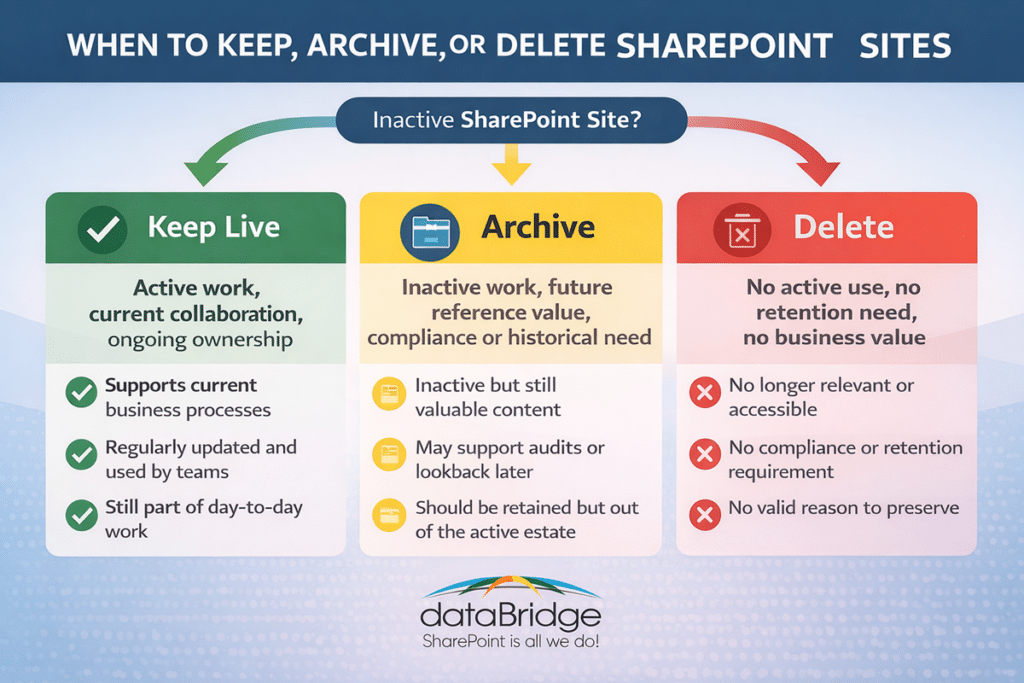
A better approach is to define three outcomes for every site:
Keep live
Archive
Delete
That model creates cleaner decision-making. It also supports stronger lifecycle discipline across your Microsoft 365 environment.
Related Archive, Lifecycle, and Copilot Readiness Resources
If you need help defining that model, contact dataBridge to build a practical SharePoint lifecycle strategy that supports governance, compliance, search quality, and Copilot readiness.
Conclusion
Microsoft 365 Archive for SharePoint is not just a storage feature. In the right environment, it is a governance tool.
Organizations that leave every inactive site live usually make search harder, lifecycle decisions weaker, and Copilot readiness messier. Teams that delete too aggressively create avoidable risk. The better path is usually in the middle.
Keep active content live.
Archive inactive content that still matters.
Delete content that no longer deserves to exist.
That is the kind of operational discipline mature SharePoint environments need. It also fits the way dataBridge approaches SharePoint: structure first, governance on purpose, and lifecycle decisions made like infrastructure decisions rather than last-minute cleanup.
When your SharePoint environment needs that kind of clarity, talk with dataBridge.