

Power Apps Strategy & Architecture
Power Apps strategy and architecture help organizations design low-code applications that fit real business workflows, data models, security requirements, and support needs. dataBridge focuses on app design choices that improve usability, governance, scalability, and alignment with SharePoint and Microsoft 365.
The success of a Power App depends on more than the form itself. Data sources, ownership, user experience, security, and long-term maintenance all influence whether the solution remains useful. This page explains how dataBridge approaches Power Apps strategy and architecture so low-code solutions can scale without becoming fragile.
This page focuses specifically on Power Apps strategy and architecture.
Use this page when the main issue is app purpose, user experience, data model, security, maintainability, and scalability.
Build Maintainable, Scalable, and Business-Aligned Power Apps
Organizations often treat Microsoft Power Apps like a toolbox: build something fast, then worry about quality later. However, without planning and structured architecture, apps grow brittle, adoption stalls, and technical debt accumulates.
We often see Power Apps environments where apps were built in silos with limited standards, inconsistent naming, unclear ownership, and no lifecycle plan. The result is shadow development, duplicated logic, inconsistent security, and frustrated users.
A disciplined Power Apps strategy and architecture prevents those problems. This page explains how to design apps that are maintainable, reliable, and aligned with long-term business goals – not just short-term wins.
What Is Power Apps Strategy & Architecture?
Power Apps strategy is the plan that ensures applications solve real business problems with clarity and purpose.
Power Apps architecture is the structural design that governs how apps are built, how data flows, how security is managed, and how solutions scale.
When strategy and architecture are clear, Power Apps become reliable operational tools rather than short-lived prototypes.
Ultimately, good Power Apps strategy is not about every app, but about creating a sustainable ecosystem of apps that work together.
What This Power Apps Page Does Not Replace
Power Apps strategy and architecture is one part of a larger Power Platform model.
This page does not replace:
- Microsoft Power Platform Consulting for broader app, automation, forms, governance, adoption, and Microsoft 365 automation planning
- Power Automate Best Practices & Use Cases for workflow design, approvals, routing, error handling, and automation reliability
- Power Platform Governance & Security for environments, connectors, maker controls, data access, security, and lifecycle governance
- SharePoint vs Dataverse for Power Apps for data source selection and long-term app architecture tradeoffs
Its job is more specific: help organizations design Power Apps that solve real business problems without becoming fragile, unsupported, or difficult to scale.
Why Most Power Apps Projects Fall Short
In our experience, Power Apps projects often fail for similar reasons:
- They are built without a plan for data structure
- Security and permissions are treated as afterthoughts
- Apps don’t integrate cleanly with enterprise systems
- Governance and lifecycle management are missing
- Technical debt grows faster than user adoption
Here’s a simple rule we use with clients:
If an app is expected to serve multiple business units or hundreds of users, it needs architecture – not improvisation.
Without this mindset shift, even “simple” apps eventually cause support headaches.
Core Power Apps Best Practices
Power Apps best practices focus on defining clear business objectives, consistent data modeling, secure architecture, and collaborative governance so apps are maintainable, scalable, and aligned to enterprise workflows.
Good Power Apps strategy ensures apps solve real business needs and are built on solid architectural foundations that support long-term Microsoft 365 success.
Power Apps Strategy Best Practices
Here are the principles we apply in enterprise environments.
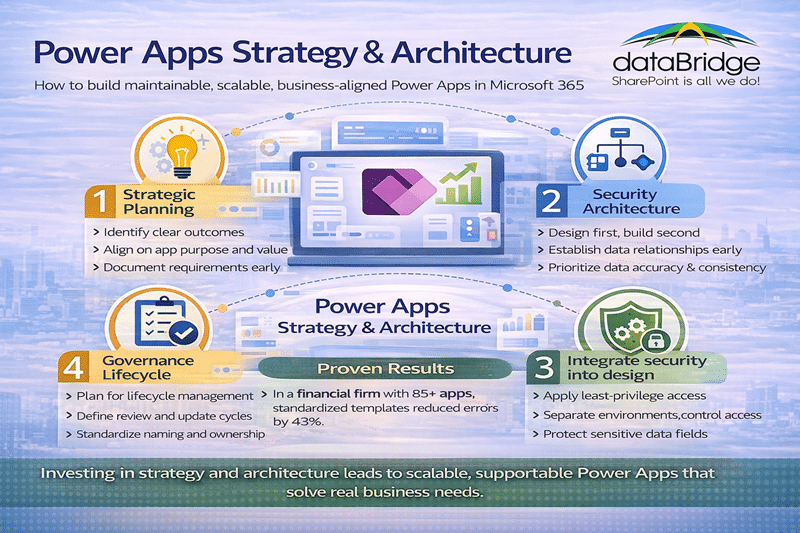
1. Define Clear Business Outcomes Upfront
Start with why.
Before building anything, ask:
What problem needs to be solved?
Who will use this app?
How will success be measured?
Too many organizations build apps because they can, not because they should.
We always advise: If you cannot describe the intended business result in one sentence, don’t build it yet.
This aligns your work with broader Microsoft 365 Consulting Strategy outcomes.
2. Standardize Naming and Solution Templates
Consistent naming avoids confusion and technical debt.
For example:
BusinessUnit – Process – AppName – VersionFinance – ExpenseClaims – Mobile – v1
This may feel overly formal at first, but the payoff is real. In one client environment with 120 apps, naming standards cut onboarding time in half because people could predict where things lived and what they did.
3. Model Data First, Then Build Apps
Power Apps should never drive the data model. It should reflect it.
Poor data modeling leads to:
- Fragmented databases
- Inconsistent business rules
- Broken screens
- Unreliable integrations
This is where strong SharePoint Information Architecture & Metadata integrates with Power Apps strategy. Apps on top of good data models are far easier to maintain.
Power Apps architecture should include an early data-source decision. If the solution may outgrow a simple SharePoint list model, review SharePoint vs Dataverse for Power Apps before the app becomes too difficult to redesign.
When the answer is a SharePoint list, that list should be treated as an application data source. Our guide to governing SharePoint lists behind Power Apps covers the ownership, permissions, metadata, and change-control decisions that keep the app stable after launch.
When SharePoint is the right data source, treat the list as an application data layer and govern the SharePoint list before the app depends on it.
4. Design for Security and Compliance
Security isn’t a checkbox. It’s an architecture decision.
At minimum, you should:
- Apply least-privilege principles
- Use role-based access controls
- Separate environments by function
- Secure sensitive fields with appropriate policies
In one healthcare organization, inconsistent security design resulted in multiple apps unintentionally exposing sensitive lists. Fixing these issues required app rework and governance intervention – a costly lesson that could have been caught earlier.
5. Establish Governance and Lifecycle Policies
An app doesn’t end when it launches. Apps age, requirements change, and business priorities shift.
Good lifecycle planning includes:
- Version rollouts
- Deprecation policies
- Performance monitoring
- User feedback loops
In environments without lifecycle controls, we often see old apps linger long past retirement date – hidden sources of technical debt.
That’s why we recommend structuring governance using principles from the SharePoint Governance Maturity Model.
Power Apps Architecture Principles
Strong architecture reduces surprises. It ensures apps are:
- Efficient
- Secure
- Scalable
- Maintainable
Here’s how we design it.
Component-Based Design
Break apps into reusable components:
- Screens
- Controls
- Business logic
- Custom connectors
This makes updates predictable and reduces duplicated work.
Integration with Microsoft 365 Services
Power Apps rarely live alone. They need to integrate with:
- SharePoint Online lists and libraries
- Dataverse for complex relational models
- Power Automate for workflow
- Teams for collaboration interfaces
Strong architecture anticipates these relationships and plans for them.
Environment Strategy
Do not treat environments casually. Use separate:
- Development
- Test
- Production
That separation protects data integrity and prevents accidental changes in live systems.
The environment to watch is the default one. Apps built from a customized list form land in the default environment every tenant starts with, which has none of that dev-test-production separation, so it needs a redirect and a review cadence rather than being left open.
Results From Real Environments
Here are three examples that illustrate the difference strategy makes:
- In a financial services environment with 85 active apps, standardized templates and naming conventions reduced deployment errors by 43% in the first eight weeks.
- A global manufacturer restructured their data model before building 25+ apps, resulting in improved performance and reduced support tickets by 37% within three months.
- A professional services firm with a decentralized Power Apps portfolio implemented governance and lifecycle policies and saw response times to app incidents improve by over 60%.
These are not abstract improvements – they are measurable outcomes we have repeatedly seen.
When to Invest in Strategy & Architecture
You should invest in Power Apps strategy and architecture when:
- Apps are shared across teams
- You plan to scale beyond ad-hoc tools
- Multiple data sources are involved
- You rely on integrations (e.g., Power Automate)
- Security and compliance matter
- You need predictable long-term support
This is not a luxury – it is a requirement for enterprise-grade solutions.
Common Pitfalls to Avoid
- Building First, Thinking Later – Jumping straight into development leads to unstable apps.
- Ignoring Data Models – Poor data choices cause cascading issues.
- Treating Security Last – Security must be built into architecture – not applied later.
- No Governance or Lifecycle – Apps age – plan for that.
Frequently Asked Questions
What separates strategy from architecture?
Strategy is why you build; architecture is how you build. Both are necessary for scalable solutions.
How many Power Apps should an organization have?
There’s no ideal number. The right number is the one you can govern, support, and maintain reliably.
Can Power Apps replace custom development?
Power Apps accelerates low-code solutions. However, complex enterprise requirements may still require traditional development.
How do we measure Power Apps success?
Success looks like:
- High adoption
- Low error rates
- Predictable performance
- Stakeholder satisfaction
- Business goal achievement
Planning an app that needs to last? Talk to dataBridge about your Power Apps architecture.