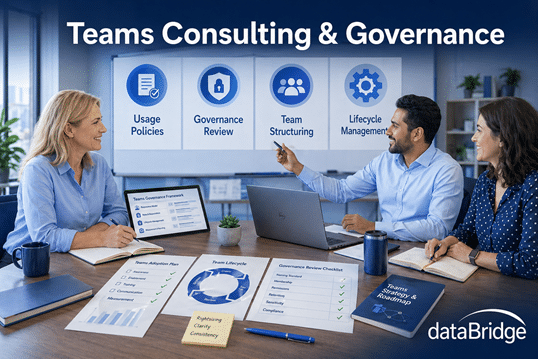
Microsoft Teams Consulting & Governance
Microsoft Teams consulting and governance help organizations improve collaboration structure, ownership, lifecycle control, permissions, and alignment with SharePoint and Microsoft 365. dataBridge focuses on building a Teams environment that supports productivity without creating sprawl, confusion, oversharing, or disconnected collaboration habits.
Teams works best when it fits into a wider Microsoft 365 strategy instead of growing unchecked. Without governance, channels, files, and permissions quickly become harder to manage. This page explains how dataBridge helps organizations use Teams more intentionally by connecting governance, structure, and day-to-day usability.
What Microsoft Teams consulting should start with
Microsoft Teams consulting works best when it starts with the SharePoint underneath Teams, not the chat layer on top. Every team you create spins up a SharePoint site, so the permissions, naming, and governance choices made in Teams land straight in your intranet. We plan both together, the same way we handle SharePoint and Microsoft 365 integration across the wider environment.
How This Microsoft Teams Consulting Page Fits With Related dataBridge Resources
This page is the primary dataBridge resource for Microsoft Teams consulting and governance. It explains how dataBridge helps organizations improve Teams structure, ownership, lifecycle control, permissions, guest access, file strategy, SharePoint alignment, adoption, and Copilot readiness.
Use the related resources this way:
- Use the Microsoft Teams Readiness Assessment when you need to evaluate Teams structure, channels, ownership, lifecycle, guest access, adoption, and governance controls.
- Use Teams Readiness vs. Teams Readiness for SharePoint when you need to understand whether the issue is Teams behavior, the SharePoint foundation behind Teams, or both.
- Use the Microsoft Teams Readiness Assessment for SharePoint when Teams file problems, permissions, metadata, search, lifecycle, or Copilot reliability are rooted in SharePoint.
- Use SharePoint vs Teams when users need practical guidance on where work, files, and authoritative content should live.
- Use Teams Is Not a File System when Teams files are becoming scattered, duplicated, hard to find, or difficult to govern.
- Use Why Teams Becomes Chaotic when sprawl, unclear ownership, channel overload, and lifecycle gaps are the main issue.
- Use How Teams Impacts Copilot when Teams conversations, files, permissions, and meeting content need to be evaluated as part of Copilot readiness.
Together, these resources separate the broad Microsoft Teams consulting service from the diagnostic, comparison, file-governance, Teams-vs-SharePoint, and Copilot-readiness topics that support it.
Make Microsoft Teams Easier to Use, Easier to Manage, and Ready for AI
Microsoft Teams has become the center of collaboration for many organizations – but without structure and governance, it quickly becomes noisy, confusing, and difficult to trust.
dataBridge helps organizations design, govern, and optimize Microsoft Teams so it supports real work, scales over time, and integrates cleanly with SharePoint and Copilot.
Teams works best when it’s intentional – not accidental.
Because Teams governance depends on file structure, permissions, and lifecycle controls behind the scenes, it works best when anchored by a SharePoint Governance Framework.
Why Microsoft Teams Struggles in Many Organizations
Teams issues rarely stem from the tool itself. They usually come from how Teams is enabled, structured, owned, and allowed to grow.
Common challenges include:
- Too many Teams with overlapping purposes
- Channels created without clear standards
- Unclear ownership and accountability
- Guest access that is difficult to review
- Files scattered across chats and channels
- Teams-connected SharePoint sites that no one governs
- Lifecycle gaps for inactive Teams
- Confusion about when to use Teams vs. SharePoint
These problems compound over time and directly affect adoption, security, search quality, and AI readiness.
What This Looks Like in Practice
A company may ask for Teams governance because there are too many Teams, too many channels, or too many guest users. During review, the larger issue often sits behind Teams: files are stored inconsistently in SharePoint, permissions are unclear, inactive Teams have no lifecycle plan, and users do not know when to use Teams versus SharePoint.
dataBridge helps connect Teams governance to the SharePoint structure behind it. The work may include naming standards, ownership rules, guest access review, file guidance, lifecycle controls, permissions alignment, and user training.
This often connects to the Microsoft Teams Readiness Assessment, Teams Readiness vs. Teams Readiness for SharePoint, and SharePoint vs Teams. Teams becomes easier to govern when users understand where collaboration ends and structured content management begins.
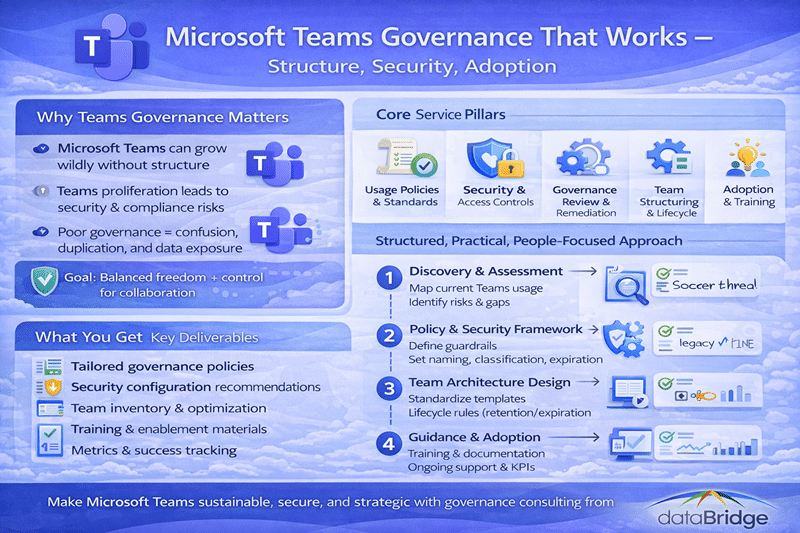
Microsoft Teams Is Not a Standalone Tool
Teams is deeply connected to SharePoint.
Every Team:
- Is backed by a SharePoint site
- Stores shared files in SharePoint
- Uses SharePoint permissions for files
- Affects search and content discovery
- Creates lifecycle and ownership responsibilities
- Influences Copilot readiness
When Teams and SharePoint are treated separately, both environments become harder to manage. Teams feels noisy, files become scattered, permissions become confusing, and users lose confidence in where work belongs.
That is why Microsoft Teams governance should include SharePoint alignment from the beginning. For the broader platform connection, use SharePoint & Microsoft 365 Integration. For the SharePoint foundation behind Teams, use the Microsoft Teams Readiness Assessment for SharePoint.
That alignment also shapes how employees reach intranet content inside Teams, which is why it helps to understand how a SharePoint home site, hub sites, and Viva Connections fit together before exposing the intranet through Teams.
Our Microsoft Teams Consulting Focus
dataBridge approaches Teams as part of a broader Microsoft 365 ecosystem – not an isolated product.
Teams Strategy & Design
We help define when to create Teams, how channels should function, what ownership responsibilities look like, and how adoption patterns should be reinforced through a Microsoft Teams Readiness Assessment and SharePoint Adoption & Change Management.
Clarity reduces noise and improves adoption.
Teams Governance & Ownership
Effective Teams governance doesn’t slow people down – it removes guesswork.
We establish clear ownership and lifecycle rules using Microsoft Teams readiness assessment patterns and the broader SharePoint Governance Framework for organization-wide governance alignment.
Governance is embedded, not bolted on.
Permissions & Security Alignment
Teams permissions are more complex than they appear.
We help organizations:
- Understand Teams and SharePoint permission relationships
- Reduce over-permissioning
- Manage private and shared channels safely
- Minimize security risk before it becomes visible
This work becomes even more important with Copilot because permissions and sharing behavior influence what users can surface across Microsoft 365. dataBridge helps organizations review Teams membership, private and shared channels, guest access, SharePoint-backed file permissions, and oversharing risk before those issues become harder to explain.
File Strategy & SharePoint Alignment
Teams vs. SharePoint Governance Differences
Teams is for collaboration. SharePoint is for structure.
We help define:
- When files belong in Teams
- When content should live in SharePoint
- How to avoid duplication and version confusion
- How to maintain a clear source of truth
Clear file guidance improves trust and usability. Teams should support active collaboration, while SharePoint should provide structure for authoritative, reusable, governed, and long-term content.
For user-facing guidance, use SharePoint vs Teams. For deeper file-governance guidance, use Teams Is Not a File System. For the SharePoint content model behind Teams files, use the SharePoint Document Management System page.
Loop components now follow the same split – they collaborate inside Teams chats but store themselves in OneDrive and SharePoint Embedded containers, so governing Microsoft Loop content belongs in the same file-strategy conversation as Teams.
Teams Adoption & Sustainability
Adoption stalls when Teams becomes hard to use, not because users resist change.
We focus on:
- Reducing channel and notification overload
- Creating predictable patterns users can rely on
- Designing Teams to teach users naturally
- Supporting long-term, sustainable usage
Microsoft Teams and Copilot Readiness
Teams readiness is part of Copilot readiness because Teams conversations, meeting context, channel files, permissions, and ownership patterns all influence the quality of AI-assisted work.
When Teams is unstructured:
- Conversations become noisy
- Files become harder to trust
- Meeting context becomes fragmented
- Permissions become harder to explain
- Copilot may surface noise instead of insight
Teams does not need to be perfect before Copilot. It does need enough structure, ownership, and governance for users to trust the collaboration environment underneath AI.
For the deeper Teams-specific AI discussion, use How Teams Impacts Copilot. For the SharePoint-specific readiness model, use Copilot Readiness for SharePoint.
Why dataBridge Microsoft Teams Consulting
Organizations work with dataBridge because we:
- Specialize in SharePoint, Teams, and Microsoft 365
- Focus on structure, governance, and adoption
- Understand how Copilot actually works
- Take a foundation-first approach
- Design for long-term success – not quick fixes
We don’t just turn Teams on. We make it work.
How We Typically Engage
Teams engagements often begin with:
- A Teams and SharePoint assessment
- Governance and structure recommendations
- Permission and security review
- Clear next steps for remediation
From there, we support implementation, cleanup, and ongoing optimization.
Microsoft Teams Doesn’t Have to Be Chaotic
With the right structure, ownership, and governance, Microsoft Teams becomes:
- Easier to navigate
- Easier to manage
- Easier to trust
- Ready for AI
Teams succeeds when it’s designed with intention.
Teams sprawl already costing you findability? Talk to dataBridge about Teams governance.
Related Microsoft Teams Consulting Resources
- Microsoft Teams Readiness Assessment
- Teams Readiness vs. Teams Readiness for SharePoint
- Microsoft Teams Readiness Assessment for SharePoint
- SharePoint vs Teams
- Teams Is Not a File System
- Why Teams Becomes Chaotic
- How Teams Impacts Copilot
- SharePoint & Microsoft 365 Integration
- Copilot Readiness for SharePoint
What our clients say