
A modern SharePoint intranet is not one homepage. It is a connected structure of sites, navigation, content ownership, governance, and employee access.
That difference matters when comparing a SharePoint home site vs hub site vs Viva Connections. Each one does a different job. When those jobs blur, the intranet can feel confusing even when the design looks polished.
A home site gives employees an enterprise starting point. Hub sites connect related SharePoint sites into a governed structure. Viva Connections, along with the SharePoint app in Teams experience, brings intranet access closer to where employees already work.
The strongest intranets often use all three. The real decision is not which one is better. The real decision is how each part should support the employee experience.
For broader intranet planning, dataBridge’s How to Design and Build a Modern SharePoint Intranet explains the larger structure behind communication, navigation, governance, usability, search, and adoption. This article focuses on one specific architecture decision: how the home site, hub sites, and Viva Connections should work together.
Quick Answer: SharePoint Home Site vs Hub Site vs Viva Connections
Use a SharePoint home site as the organization-wide landing experience for the intranet. Use hub sites to organize related sites around departments, functions, regions, or business themes. Use Viva Connections or the SharePoint app in Teams to make the intranet easier to reach from Microsoft Teams and mobile devices.
A simple rule helps:
- The home site answers, “Where does the organization start?”
- A hub site answers, “How are related sites connected?”
- Viva Connections answers, “How do employees reach the intranet inside Teams?”
- Communication sites answer, “Where do we publish information?”
- Team sites answer, “Where do teams collaborate on work?”
- Department sites answer, “Where does this business area manage its content?”
- Enterprise navigation answers, “How do people move through the environment?”
Use this visual comparison as a quick reference for how the three major intranet building blocks work together.
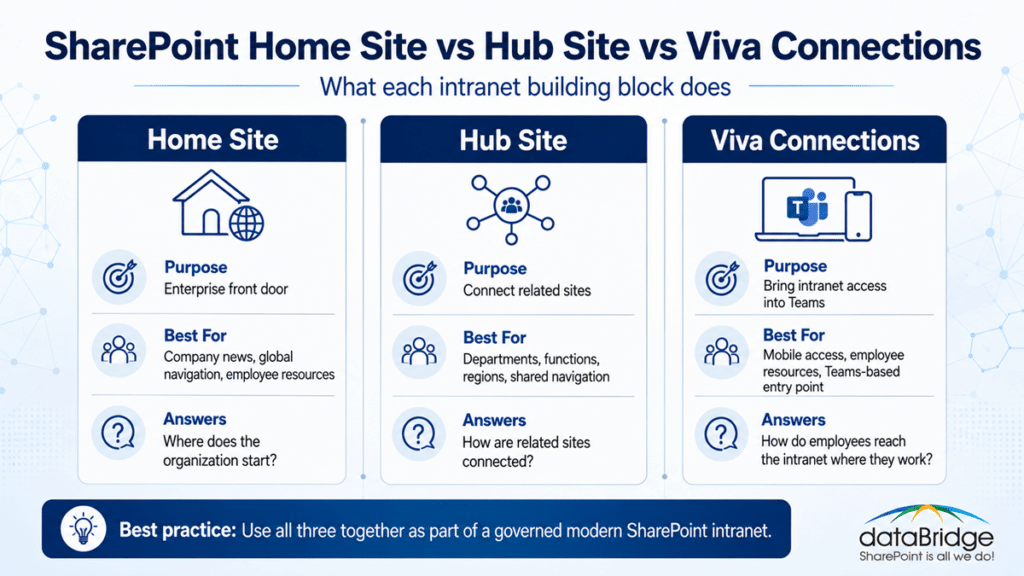
The important takeaway is simple: the home site, hub sites, and Viva Connections should not compete with each other. Each one should play a clear role in the larger SharePoint intranet architecture.
An intranet does not succeed because one of these pieces exists. It succeeds when the pieces work together by design.
That is where many intranet projects either become clear or start drifting.
Why This Comparison Matters
Many SharePoint intranet conversations begin with the wrong question.
Teams often ask, “What should the homepage look like?”
That question matters. It just should not be the first question. A better starting point is, “What structure will help employees find and trust the right information?”
A homepage can look great and still fail employees. We see that pattern often in SharePoint consulting work. The hero area looks modern. The quick links look useful. The news layout looks clean. Then employees start asking where content belongs, who owns each section, why navigation changes so often, and which department page is the official source.
The problem is not only design. It is architecture.
That is why this comparison matters. A SharePoint home site, a hub site, and Viva Connections solve related problems, but they are not interchangeable.
For organizations planning a broader redesign, SharePoint Intranet Consulting Services can help define the strategy, structure, governance, design model, and rollout path before the build begins.
What Is a SharePoint Home Site?
A SharePoint home site is the main landing experience for an organization’s intranet. It is usually built from a SharePoint communication site and then designated as the home site by an administrator.
Microsoft’s SharePoint home site guidance describes the home site as a branded landing experience and a gateway to other portals across the intranet. That is the main idea. The home site is not the entire intranet. It is the front door.
A well-designed home site often includes:
- Organization-wide news
- Executive communication
- Enterprise navigation
- Important employee resources
- Links to department portals
- Links to policies and tools
- Search entry points
- Events and announcements
- Audience-targeted content
- High-value quick links
- Connection points to Viva Connections or the SharePoint app in Teams
The home site should serve the whole organization. It should not become the storage place for every department update, document library, or operational process.
A strong home site is selective. It gives employees the clearest possible place to begin.
What a SharePoint Home Site Should Do
The home site should create orientation.
Employees should land there and understand where to go next. They should see what matters across the organization, what is timely, and how to reach common resources.
In practice, a home site should support five jobs.
Provide a Clear Enterprise Starting Point
The home site should feel like the intranet’s front door. It gives employees one trusted place to start instead of relying on bookmarks, Teams chats, browser history, or old links.
That does not mean every employee will open the home site every day. It means the organization has one official location that represents the enterprise intranet experience.
Connect Employees to High-Traffic Portals
Most employees need recurring access to HR, IT, Finance, Operations, Facilities, Benefits, Policies, Training, and department resources.
The home site should not recreate all of that content. Instead, it should connect people to the right portals through clear navigation and curated pathways.
That is where the home site and hub sites need to work together.
Publish Organization-Wide News
The home site is often the right place for leadership updates, company announcements, broad employee communication, and enterprise news.
A practical rule helps. If the update matters to most employees, it may belong on the home site. If it matters to one department, region, or audience, it may belong in a more focused site or hub.
Support Global Navigation
Global navigation helps employees move through the intranet without relying only on page-level links. Microsoft’s home site planning guidance connects the home site to global navigation planning, which makes this decision more important than a simple homepage choice.
Navigation should be governed. Otherwise, it becomes a political list of everything every department wants promoted.
Anchor the Intranet Experience in Teams
Microsoft’s newer SharePoint home site update guidance explains how home sites connect to the SharePoint app in Teams experience. For many organizations, that makes the home site even more important.
The home site is no longer just a browser destination. It can influence how employees access intranet content from Teams and mobile experiences.
That shift makes governance more important, not less.
What a SharePoint Home Site Should Not Do
A home site should not carry the entire intranet.
That mistake creates overloaded pages, unclear ownership, slow performance, and poor findability. It also makes every department compete for homepage visibility.
A SharePoint home site should not be:
- A replacement for department sites
- A replacement for hub architecture
- A place for every document library
- A catch-all for every news post
- A substitute for governance
- A substitute for adoption planning
- A workaround for poor navigation
- A visual layer over an unstructured intranet
A homepage-first intranet usually looks better than it works.
That point may sound blunt, but it shows up repeatedly. The page design gets attention. The architecture underneath determines whether employees trust the experience.
For organizations that already have an intranet but cannot tell whether the issue is design, structure, ownership, or content quality, a SharePoint Intranet Assessment can help identify what needs to change before another redesign begins.
What Is a SharePoint Hub Site?
A SharePoint hub site connects related SharePoint sites. It helps organize the intranet around business relationships instead of older subsite structures.
Microsoft’s SharePoint hub site planning guidance describes hub sites as a connective layer for organizing families of communication sites and team sites. That is the right way to think about them.
A hub site creates structure around related content and related sites.
For example, an organization might use hubs for:
- Human Resources
- Information Technology
- Finance
- Operations
- Legal
- Sales
- Customer Service
- Regions
- Business units
- Employee services
- Knowledge areas
- Policy and compliance content
The hub does not have to be the whole intranet. It is a structure for a related set of sites.
A good hub reduces confusion. A bad hub adds another layer of sprawl.
What a SharePoint Hub Site Should Do
A hub site should organize related sites around a clear purpose.
That purpose should be obvious to both site owners and employees. If nobody can explain why a hub exists, the hub probably needs more planning.
Connect Related Sites
The main purpose of a hub is to connect related sites. That connection may be based on a department, function, region, service area, or business theme.
For example, an HR hub may connect:
- Benefits
- Payroll
- Employee relations
- Learning and development
- Recruiting
- Policies
- Manager resources
- New employee onboarding
Each site can have its own ownership and content model. The hub creates shared structure across them.
Standardize Navigation
A hub gives related sites a shared navigation experience. That helps employees move through a business area without feeling like every site was designed by a different team.
This matters more than many organizations expect. Inconsistent navigation is one of the fastest ways to reduce intranet trust.
Roll Up Content
Hub sites can surface news, events, highlighted content, and related site activity across associated sites. That makes the hub useful as a destination, not only a navigation label.
For example, an Operations hub may roll up updates from safety, logistics, facilities, and process improvement sites.
Support Governance by Grouping Ownership
Hub sites make governance easier when they reflect real ownership patterns.
A department hub can have a clear business owner. Associated sites can have local owners. Publishing, review, and lifecycle expectations can then match the business structure.
This is where hub planning becomes a governance decision.
For deeper guidance, dataBridge’s SharePoint Hub Site & Enterprise Intranet Architecture Framework explains how hub structure, navigation, site relationships, and hub sprawl should be planned before growth becomes harder to control.
What a SharePoint Hub Site Should Not Do
A hub site should not exist just because a department wants a larger presence.
That is how hub sprawl begins.
A hub site should not be:
- Created for every small team
- Used as a political navigation layer
- Treated as a replacement for the home site
- Built without associated site standards
- Used to hide duplicated content
- Allowed to grow without ownership
- Treated as permanent when the business may change
One common mistake is creating too many hubs too early. The model feels organized for a few months. Then navigation gets crowded, ownership becomes unclear, and employees stop knowing where to start.
A better approach is to map real business relationships first. Then create hubs where shared navigation, shared ownership, and content rollups create value.
What Is Viva Connections?
Viva Connections is Microsoft’s employee experience entry point for bringing intranet content, resources, and engagement into Microsoft Teams and the web.
Microsoft’s Viva Connections overview describes it as a gateway to a modern employee experience. In practical SharePoint terms, Viva Connections helps employees reach intranet content from Teams, mobile, and desktop experiences.
That matters because many employees spend much of their day in Teams.
A traditional intranet asks employees to go somewhere else. Viva Connections helps bring the intranet closer to the place where work is already happening.
However, Viva Connections does not fix a poorly structured intranet. It exposes it.
If the home site is confusing, navigation is messy, and department content is outdated, putting that experience inside Teams will not solve the problem. It gives employees another doorway into the same weak structure.
That is why Teams entry points should follow intranet architecture, not replace it.
For organizations thinking through the connection between Teams, SharePoint, governance, and employee access, Microsoft Teams Consulting & Governance can help align the Teams experience with the SharePoint foundation underneath it.
Viva Connections vs SharePoint App in Teams
The terminology around Viva Connections and the SharePoint app in Teams continues to evolve.
Microsoft’s current SharePoint home site update guidance explains that the Viva Connections experience in Teams is tied closely to the SharePoint app in Teams branding. Existing configured experiences can continue, but the direction is clear: the intranet experience is becoming more visible inside Teams.
For planning purposes, the practical question stays the same.
How should employees reach trusted intranet content from the places where they already work?
Some organizations will still refer to Viva Connections. Others may start saying SharePoint app in Teams. Employees may simply call it “the intranet in Teams.”
The name matters less than the structure behind it.
A weak intranet inside Teams is still a weak intranet. A governed intranet inside Teams becomes much easier to reach.
For a closer look at what the rename changed and when your intranet actually needs the app, see Viva Connections, now the SharePoint app in Teams.
What Viva Connections Should Do
Viva Connections should make the intranet more accessible.
It should not become a separate intranet. It should extend the intranet experience into Teams and mobile workflows.
Bring the Intranet Into Teams
Many employees do not start their day in a browser. They start in Teams.
Viva Connections helps meet employees where they already work. That can improve awareness, reduce friction, and make important resources easier to reach.
Support Mobile and Frontline Access
Mobile access matters for field employees, frontline staff, distributed teams, and employees who do not sit at a desk all day.
A home site may work well on desktop. Viva Connections can make key resources more accessible through mobile and Teams-based experiences.
Highlight Priority Resources
The Viva Connections dashboard can help surface important tools, cards, links, and tasks. This is useful when employees need fast access to common actions.
Examples include:
- Submit a ticket
- View pay and benefits
- Access policies
- Open training resources
- Find forms
- View schedules
- Reach employee services
- Start onboarding tasks
These resources should connect to governed content. They should not become a second set of unmanaged shortcuts.
Reinforce the Home Site Experience
Viva Connections works best when it reinforces the same information architecture as the home site and hub structure.
Employees should not feel like the Teams experience, browser intranet, and mobile experience are three separate worlds.
The entry point can change. The structure should remain coherent.
What Viva Connections Should Not Do
Viva Connections should not become a workaround for intranet planning.
It should not be used to push a confusing intranet into Teams and hope adoption improves.
Viva Connections should not be:
- A replacement for a SharePoint home site
- A replacement for hub planning
- A replacement for global navigation
- A dumping ground for random links
- A second homepage with different priorities
- A separate governance model
- A shortcut around content cleanup
- A launch tactic without adoption planning
We see this often with Microsoft 365 tools. A new entry point creates excitement. Then employees run into the same content problems they had before.
The tool improves access. Governance improves trust.
Both matter.
SharePoint Home Site vs Hub Site: The Main Difference
The difference between a SharePoint home site and a hub site is purpose.
A home site is the enterprise landing experience. A hub site connects related sites.
That sounds simple. Yet many intranet architecture issues come from blurring the two.
The home site should serve the whole organization. A hub site should serve a defined family of related sites.
For example:
- The home site may link to HR, IT, Finance, and Operations.
- The HR hub may connect Benefits, Payroll, Recruiting, Policies, and Training.
- The IT hub may connect Support, Cybersecurity, Applications, Devices, and Service Status.
- The Finance hub may connect Procurement, Budgeting, Expense Reporting, and Vendor Management.
The home site is the front door. The hubs are the organized wings of the building.
That metaphor is not perfect, but it helps. Employees need one clear place to enter. They also need logical pathways once they are inside.
Can a SharePoint Home Site Also Be a Hub Site?
Yes, a SharePoint home site can also be a hub site in many intranet architectures.
That does not mean every home site should be a hub. It means the organization can use the home site as both the main landing experience and a hub for top-level navigation or associated sites when that structure makes sense.
This decision should be intentional.
A home site may work well as a hub when:
- The intranet is relatively centralized
- The organization wants one strong top-level navigation layer
- Associated sites need shared branding or navigation
- The home site should roll up content from major intranet areas
- Governance can support the relationship clearly
A separate hub structure may work better when:
- The intranet has many departments or regions
- Business areas need distinct navigation
- Ownership is distributed
- Content volume is high
- Regional or functional structures differ
- The home site should stay focused on enterprise-wide content
The mistake is not choosing one model or the other. The mistake is making the decision accidentally.
Intranet architecture should be designed, documented, and governed.
Home Site vs Intranet Homepage
A SharePoint home site and an intranet homepage are related, but they are not always the same thing.
The intranet homepage is the visible page employees see. The home site is the SharePoint site that holds special intranet capabilities and acts as the organization’s main landing site.
In many organizations, the home page of the home site becomes the intranet homepage. That is usually the clearest model.
Still, the distinction matters during planning.
A homepage design decision asks:
- What should appear above the fold?
- Which news should be featured?
- Which links matter most?
- How should the page look?
- What should employees see first?
A home site architecture decision asks:
- Which site should become the official intranet landing site?
- How should global navigation work?
- How should search and discoverability work?
- How will this connect to Teams?
- Who owns the site?
- How will the content stay current?
- What governance rules apply?
Design makes the homepage usable. Architecture makes the home site sustainable.
For visual structure, page templates, and usability planning, SharePoint Branding, UX & Page Template Design can help align the intranet experience with real employee needs instead of relying on appearance alone.
Hub Site vs Department Site
A hub site and a department site are also different.
A department site usually holds the content, pages, news, documents, links, and resources for a specific department. A hub site connects a group of related sites.
Sometimes a department’s main communication site is also registered as a hub. That can work well for large departments.
For example, the HR landing site may be both:
- The main HR department site
- The HR hub site for related HR sites
In smaller organizations, that model may be enough. In larger organizations, HR may need several sites connected through an HR hub.
The right model depends on scale, ownership, content volume, and employee journeys.
A practical test helps:
If the department has one main site with a manageable amount of content, it may not need a hub.
If the department has several related sites that need shared navigation and rollups, a hub may make sense.
If the only reason to create a hub is “we want one,” pause and review the structure first.
Communication Site vs Team Site in the Intranet
Communication sites and team sites play different roles.
A communication site is usually best for publishing information to a broad audience. It works well for department portals, policy centers, knowledge areas, and intranet pages.
A team site is usually best for collaboration among a defined group. It works well for working documents, project files, team collaboration, and Microsoft 365 group-connected workspaces.
In an intranet architecture, communication sites often form the published experience. Team sites often support the working layer behind it.
For example:
- HR policies may be published on an HR communication site.
- The HR team may draft and manage working files in a private team site.
- Final approved content may be published to the intranet.
- The HR hub may connect the related HR sites.
- The home site may link employees to the HR portal.
- Viva Connections may surface key HR resources inside Teams.
This layered model prevents the intranet from becoming a mix of drafts, working files, final content, and old documents.
That is why architecture matters.
Enterprise Navigation: The Missing Layer in Many Intranets
Many intranet problems are navigation problems.
Employees do not care whether a site is a home site, hub site, communication site, or team site. They care whether they can find what they need.
Enterprise navigation connects the architecture to the user experience.
A good navigation model should answer:
- What belongs in global navigation?
- What belongs in home site navigation?
- What belongs in hub navigation?
- What belongs in local site navigation?
- What should be audience targeted?
- What should be promoted as a quick link?
- What should be found through search instead?
- Who approves navigation changes?
- How often should navigation be reviewed?
Navigation is not a design decoration. It is an information architecture decision.
Poor navigation creates symptoms that look like adoption problems. Employees say the intranet is hard to use. Leaders think people are resisting change. Site owners add more links to solve the issue.
Usually, the problem is more basic: nobody governed the pathways.
For broader structure, metadata, and findability planning, SharePoint Information Architecture & Metadata Consulting can help define how content should be organized before navigation becomes overloaded.
A Practical SharePoint Intranet Architecture Example
Here is a simple example of how the pieces can fit together.
Enterprise Home Site
The organization creates one home site called Employee Home.
This site includes:
- Company news
- Leadership messages
- Global navigation
- Employee resources
- Enterprise quick links
- Events
- Search entry points
- Featured portals
- Links to major hubs
- Connections to Teams access
This is the front door.
Major Hub Sites
The organization creates hubs for major business areas.
Examples include:
- HR Hub
- IT Hub
- Finance Hub
- Operations Hub
- Legal Hub
- Regional Hub
- Policy and Compliance Hub
Each hub connects related communication sites and, where appropriate, related team sites.
Department Communication Sites
Departments publish information through communication sites.
Examples include:
- Benefits
- Payroll
- Employee Handbook
- IT Support
- Cybersecurity
- Expense Reporting
- Procurement
- Facilities
- Safety
- Training
Each site has an owner, purpose, review cadence, and publishing standards.
Team Collaboration Sites
Internal teams use team sites for working content.
Examples include:
- HR Operations Team
- IT Service Desk Team
- Finance Planning Team
- Legal Working Team
- Operations Leadership Team
These sites are not always promoted broadly. They support work behind the published intranet.
Viva Connections or SharePoint App in Teams
The organization then brings key intranet resources into Teams.
Employees can access:
- Home site content
- Important links
- Resources
- Announcements
- Dashboard cards
- Mobile-friendly tools
- News and updates
The Teams experience extends the intranet. It does not replace the structure.
This model is simple enough to understand and strong enough to govern.
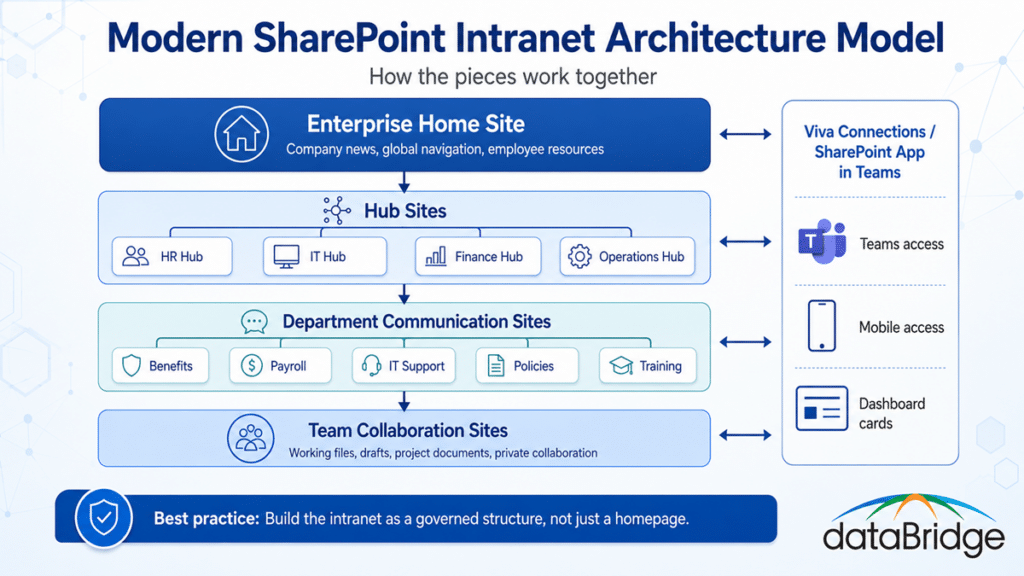
The structure should make the intranet easier to govern. The home site creates the enterprise entry point, hub sites connect related areas, department sites publish trusted information, team sites support collaboration, and Viva Connections brings access into Teams.
Decision Framework: Which One Do You Need?
Use this framework when deciding between a SharePoint home site, hub site, Viva Connections, or another site type.
Use a SharePoint Home Site When You Need an Enterprise Front Door
Choose a home site when the organization needs one official intranet starting point.
This is the right choice when employees need:
- Organization-wide news
- Common resources
- Global navigation
- A trusted landing page
- A connection point to the broader intranet
- A consistent employee experience
Do not use the home site to solve every department problem.
Use a Hub Site When You Need to Connect Related Sites
Choose a hub site when multiple sites belong together.
This is the right choice when a business area needs:
- Shared navigation
- Shared branding
- Related content rollups
- A common destination
- Connected department or function sites
- A clearer governance structure
Do not create a hub for every small team.
Use Viva Connections or SharePoint App in Teams When Employees Need Access in Teams
Choose Viva Connections or the SharePoint app in Teams when employees need intranet access inside Microsoft Teams.
This is the right choice when the organization wants:
- Teams-based intranet access
- Mobile access
- Employee resources in the flow of work
- Dashboard cards
- Announcements
- Easier access for frontline or distributed users
Do not use it to hide a weak intranet structure.
Use Communication Sites When You Need Published Content
Choose communication sites when information needs to be published to a broader audience.
This is the right choice for:
- Department portals
- Policy centers
- Knowledge bases
- Resource centers
- Service pages
- News destinations
- Employee information
Do not use communication sites for active private collaboration unless the purpose is clear.
Use Team Sites When You Need Collaboration
Choose team sites when a group needs to collaborate on working content.
This is the right choice for:
- Project files
- Team documents
- Drafts
- Working notes
- Shared lists
- Internal collaboration
- Microsoft 365 group-connected work
Do not make every team site part of the visible intranet experience.
Common Mistakes When Structuring a SharePoint Intranet
The same mistakes appear across many intranet redesigns.
They usually start with good intentions. Then growth exposes the missing architecture.
Mistake 1: Treating the Home Site as the Whole Intranet
The home site should guide employees. It should not hold everything.
When the home site becomes overloaded, employees lose the signal. Important content competes with department updates, resource links, campaign banners, and one-off announcements.
A focused home site performs better than a crowded one.
Mistake 2: Creating Too Many Hubs
Hub sites are powerful, but they can create sprawl.
Too many hubs make navigation harder. They also create governance questions around ownership, naming, page standards, associated sites, and content rollups.
A hub should exist because it improves structure. It should not exist because a department wants status.
Mistake 3: Launching Viva Connections Before Cleaning Up Content
Viva Connections can make the intranet easier to reach. It cannot make outdated content trustworthy.
Before launching the Teams experience broadly, review:
- Home site content
- Navigation
- High-traffic links
- Department portals
- Permissions
- Search behavior
- Mobile layout
- Ownership
- Publishing rules
Better access will not fix weak governance.
Mistake 4: Confusing Design With Architecture
A polished homepage does not guarantee a useful intranet.
Design matters. Layout matters. Branding matters. Yet those decisions should sit on top of sound architecture.
If employees cannot tell where content belongs, design will not solve the problem.
Mistake 5: Ignoring Page Governance
Modern intranets grow through pages, news, links, and updates. Without governance, the page layer slowly becomes stale.
A strong model defines:
- Who can publish
- Who approves key pages
- How pages are reviewed
- When content should be retired
- Which pages are authoritative
- How templates should be used
- What belongs on the home site
- What belongs in hubs
For deeper guidance, SharePoint Page Governance for Modern Intranets explains how publishing standards, review cycles, and ownership keep the intranet useful after launch.
Mistake 6: Letting Every Department Design Its Own Experience
Departments need flexibility. They should not all create completely different navigation patterns, page layouts, labels, and ownership models.
Too much variation creates friction for employees.
A strong intranet gives departments enough room to support their needs while maintaining a consistent experience across the environment.
Mistake 7: Measuring Launch Instead of Sustained Adoption
An intranet launch is not the finish line.
After launch, employees need reinforcement. Site owners need guidance. Content needs review. Navigation needs adjustment. Leaders need to keep using the intranet as the trusted place for communication.
That is why a SharePoint Intranet Adoption Strategy should be part of the plan from the beginning.
How to Plan the Right Structure
The best structure starts with employee journeys, not site names.
Before deciding on a home site, hub sites, and Viva Connections, answer these questions.
What Do Employees Need Most Often?
Start with real usage patterns.
Employees may need to:
- Read company news
- Find HR policies
- Submit IT tickets
- Access forms
- Review benefits
- Find department contacts
- Open training
- Check procedures
- View leadership updates
- Search for documents
- Access frontline resources
These needs should shape the home site and navigation model.
What Content Is Enterprise-Wide?
Enterprise-wide content belongs close to the home site.
Examples include:
- Company news
- Leadership messages
- Employee resources
- Core policies
- Benefits links
- IT support links
- Organization-wide events
- Common forms
- Emergency information
- Company directories
The home site should prioritize content that matters broadly.
What Content Belongs to a Department or Function?
Department content usually belongs in a communication site or hub.
Examples include:
- HR programs
- IT service information
- Finance procedures
- Operations updates
- Legal guidance
- Regional resources
- Facilities information
- Training content
These areas need ownership and structure. They should not all live on the home site.
Which Sites Need to Be Connected?
Hub planning begins when related sites need shared structure.
Ask:
- Which sites belong together?
- Who owns the group?
- What navigation should be shared?
- What content should roll up?
- Which audiences use these sites?
- How might the structure change later?
- Does this hub reduce confusion?
If the answers are unclear, the hub may not be ready.
How Should Employees Access the Intranet From Teams?
Teams access should reflect the intranet structure.
Ask:
- Which employees live in Teams?
- Which resources should appear first?
- What should be mobile-friendly?
- Which dashboard cards matter?
- How will news appear?
- Should audience targeting be used?
- Who owns the Teams-based experience?
- How will changes be governed?
This step helps Viva Connections support the intranet instead of becoming a separate experience.
The dataBridge Point of View
At dataBridge, we do not treat a SharePoint intranet as a homepage project.
A homepage is part of the experience. It is not the whole experience.
A sustainable intranet needs:
- Clear architecture
- Thoughtful hub planning
- Governed navigation
- Strong page templates
- Defined ownership
- Searchable content
- Practical permissions
- Launch planning
- Adoption reinforcement
- Ongoing improvement
That is why we follow The dataBridge Way:
Assess & Discover → Architecture & Governance → Migration Strategy & Modernization → Implementation & Build → Validation & Cutover → Ongoing Support & Optimization
That sequence matters.
If the team jumps straight to design, the intranet may look finished before the hard decisions are made. If the team starts with assessment, architecture, and governance, the design has a stronger foundation.
The best intranets feel simple to employees because the structure underneath them was carefully planned.
Need help deciding how your home site, hub sites, navigation, and Teams entry points should work together? Schedule a SharePoint intranet architecture conversation with dataBridge.
Practical Architecture Rules for Modern SharePoint Intranets
These rules help keep the model clear.
One Home Site Should Represent the Enterprise Experience
Most organizations need one clear enterprise landing experience.
That home site should carry the brand, voice, priorities, and navigation model for the organization. It should not become a crowded request board for every department.
Hubs Should Reflect Real Business Relationships
Create hubs where shared navigation and site relationships create value.
Do not create hubs just to make the intranet map look complete. A smaller number of well-governed hubs usually works better than many weak ones.
Viva Connections Should Extend the Intranet
Use Viva Connections or the SharePoint app in Teams to bring the intranet closer to employees.
Do not let it become a parallel intranet with different links, priorities, and ownership rules.
Navigation Should Be Governed Like Content
Navigation changes should have ownership and review.
Every link added to global navigation creates a decision for every employee who uses it. Treat that space with discipline.
Department Sites Need Ownership
Every department site should have a business owner, content owner, and review process.
Without ownership, department pages become stale. Once employees find stale content, trust drops quickly.
Page Templates Should Reduce Variance
Templates help departments publish consistently.
They also make the intranet easier to scan, easier to govern, and easier to improve over time.
Adoption Should Start Before Launch
Adoption is not an announcement after go-live.
It should begin during planning, design, stakeholder alignment, content preparation, training, and site owner readiness.
How This Supports Microsoft 365 and Copilot Readiness
This architecture decision also matters for Microsoft 365 Copilot and SharePoint agents.
AI depends on the content environment underneath it. If SharePoint has unclear ownership, duplicate portals, stale pages, messy permissions, and weak navigation, AI can surface content that sounds helpful but may not be authoritative.
A strong intranet structure helps define what employees, search, Copilot, and agents should trust.
The home site can establish the enterprise entry point. Hub sites can organize related authoritative content. Communication sites can publish approved information. Team sites can separate working content from final content. Viva Connections can make trusted content easier to reach.
That structure does not make AI perfect. It does make the environment more governable.
In practical terms, intranet architecture is now part of AI readiness.
When to Revisit Your Existing Intranet Structure
You may need to revisit your SharePoint intranet architecture if employees say:
- I do not know where to start.
- I cannot tell which site is official.
- The homepage looks good, but I still cannot find things.
- Every department organizes content differently.
- Search results show too many old pages.
- Teams has links to different versions of the intranet.
- News appears in too many places.
- Navigation keeps changing.
- Nobody owns stale content.
- The intranet feels like a collection of sites, not one experience.
These comments point to structure. They are not only training issues.
A redesign may help, but only if it addresses the architecture underneath.
SharePoint Home Site vs Hub Site vs Viva Connections: Final Recommendation
Most modern intranets need a home site, hub sites, and a Teams-connected experience.
The question is not which one is better. The question is what job each one should perform.
Use the home site for the enterprise landing experience.
Use hub sites to connect related sites around departments, functions, regions, or business areas.
Use Viva Connections or the SharePoint app in Teams to extend the intranet into Teams and mobile experiences.
Use communication sites for published content.
Use team sites for collaboration.
Then govern the full model with ownership, navigation standards, page templates, publishing rules, review cycles, and adoption planning.
That is how a modern SharePoint intranet becomes more than a homepage.
It becomes a trusted digital workplace structure.
If your organization is planning a new intranet, redesigning an existing one, or trying to connect SharePoint with Teams more effectively, contact dataBridge to discuss your SharePoint intranet structure.
Frequently Asked Questions
What is the difference between a SharePoint home site and a hub site?
A SharePoint home site is the main enterprise landing experience for the intranet. A hub site connects related SharePoint sites through shared navigation, branding, and content rollups. The home site is the front door. A hub site organizes a related group of sites.
Is a SharePoint home site the same as an intranet homepage?
Not exactly. The intranet homepage is the page employees see first. The SharePoint home site is the site designated as the organization’s main intranet landing site. In many organizations, the home page of the home site becomes the intranet homepage.
Can a SharePoint home site also be a hub site?
Yes, a SharePoint home site can also be associated with hub functionality in the right architecture. That decision should be based on navigation, ownership, content relationships, and governance needs. It should not happen by accident.
Does Viva Connections replace a SharePoint intranet?
No. Viva Connections does not replace the SharePoint intranet. It helps bring intranet content, resources, and employee experiences into Microsoft Teams and mobile access. The SharePoint structure underneath still matters.
What is the SharePoint app in Teams?
The SharePoint app in Teams is connected to Microsoft’s evolving Viva Connections and home site experience. For planning purposes, it helps bring the intranet into Teams so employees can access resources closer to where they work.
Should every department have a SharePoint hub site?
No. Every department does not need a hub site. A hub makes sense when a department or function has multiple related sites that need shared navigation, rollups, and governance. Smaller departments may only need a well-structured communication site.
What should go on a SharePoint home site?
A SharePoint home site should include organization-wide news, enterprise navigation, important employee resources, key links, events, announcements, search entry points, and pathways to major portals. It should not hold every department’s detailed content.
What should go on a SharePoint hub site?
A SharePoint hub site should organize related sites. It may include hub-level navigation, department or function news, highlighted content, events, links to associated sites, and resources that matter to that business area or audience.
Should the intranet launch in Teams first or SharePoint first?
The structure should come first. Once the home site, hubs, navigation, ownership, and content model are clear, the organization can decide how to expose the experience through Teams. Launching in Teams before structure is ready usually amplifies existing problems.
How should we start if our current intranet is messy?
Start with an assessment. Review the home site, hub structure, navigation, content ownership, page quality, permissions, search behavior, and adoption issues. Then create a roadmap before redesigning pages or launching the Teams experience.

Author
-

Michael is the Founder and CEO of dataBridge, where he helps organizations approach SharePoint and Microsoft 365 with a stronger focus on strategy, governance, architecture, and long-term business value. His consulting-first perspective shapes how clients plan smarter, avoid costly missteps, and build digital workplaces that hold up over time.