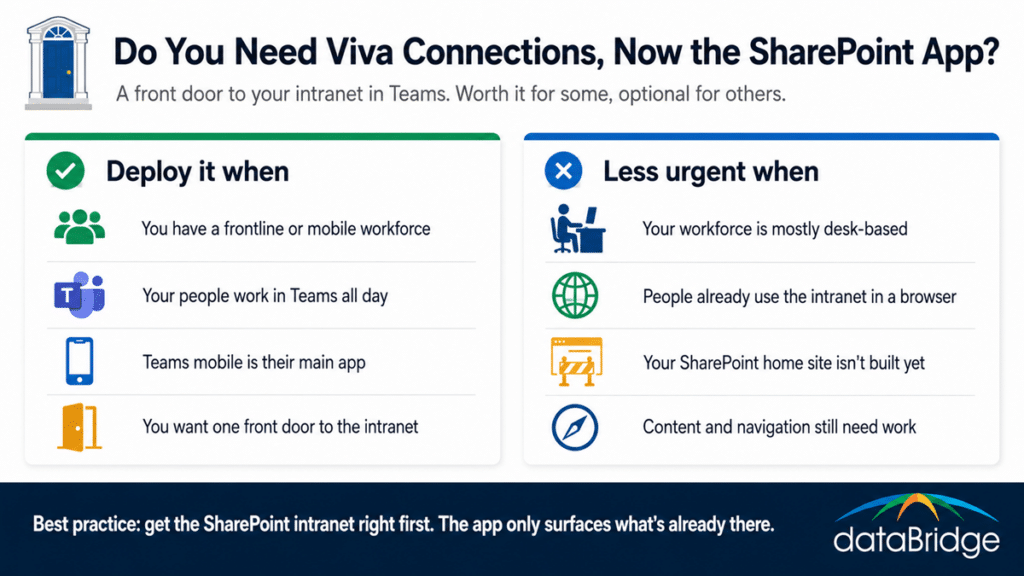
A lot of people went looking for Viva Connections in Teams this year and found a SharePoint app where it used to be. Same tool, new name. Microsoft renamed the Viva Connections app in Teams to the SharePoint app, with the change rolling out through the first half of 2026, and nothing about what it does actually changed. The more useful question is the one the rename buried: does your intranet need it at all? For most organizations the answer comes down to who your people are and where they work, not what Microsoft is calling it this quarter.
What is Viva Connections, now the SharePoint app in Teams?
Viva Connections, renamed the SharePoint app in Teams in 2026, is the front door to your SharePoint intranet inside Microsoft Teams. It brings your home site, company news, a dashboard of quick actions, and your key resources into Teams on both desktop and mobile, so people reach the intranet without leaving the app they already work in all day. The rename changed the label on the Teams app and left the purpose untouched.
The important word is front door. It surfaces an intranet you already have, rather than being an intranet on its own. If you have built a modern SharePoint intranet on a SharePoint home site, this is how you put it in front of people inside Teams. If you haven’t, there is nothing for it to open onto, which matters more than it sounds and we will come back to it.
What the rename actually changed
Not much, and that’s the honest answer. Microsoft renamed the Viva Connections app in Teams to the SharePoint app, the rollout ran through mid-2026, and the functionality and your data stayed exactly the same. If your organization already gave the app a custom name and logo, you see no change at all. For everyone else, the app simply appears as SharePoint in Teams instead of Viva Connections.
A couple of details are worth knowing so the change doesn’t trip up your team. End users see SharePoint, while administrators still manage it as Viva Connections in the Microsoft 365 admin center, and setting up multiple home sites still runs through Viva Connections there. So if someone on your staff says Viva Connections disappeared, this rename is almost always why, and nothing was lost.
How the SharePoint app surfaces your intranet
The app pulls your existing intranet into Teams through a few parts that work together:
The home site, your intranet’s main page, shown inside Teams rather than only in a browser.
The dashboard, a set of cards for quick tasks and tools, which is the piece frontline workers tend to use most.
The feed, company news drawn from your SharePoint sites.
Resources, a curated set of links and destinations people need often.
You can connect it to an existing SharePoint home site or stand it up on its own, though connecting it to a real intranet is where the value is. On its own it’s a thin shell. Pointed at a well-built intranet, it’s a genuine front door.
Do you need Viva Connections, now the SharePoint app?
For most organizations, the SharePoint app earns its place in two situations: when you have a frontline or mobile workforce, or when you want your intranet living inside Teams where people already spend their day. Outside of those, it’s a useful addition rather than something you have to deploy.
The frontline and mobile case is the strongest. For a field technician, a nurse, a retail associate, or a driver, the Teams mobile app is often the only corporate app they open in a shift. The SharePoint app puts the intranet in their pocket, so the schedule, the policy, the announcement, and the form are a tap away instead of buried on a site they would never visit on a desktop they don’t use. That reach is hard to get any other way.
The Teams-centric case is close behind. If your people work inside Teams most of the day, meeting them there beats hoping they navigate out to a separate intranet site that quietly loses traffic. When your workforce is mostly desk-based and already visits the intranet in a browser, the urgency drops, and the app becomes a convenience rather than a requirement. Either way, the value tracks adoption, and adoption tracks whether people find something worth opening.