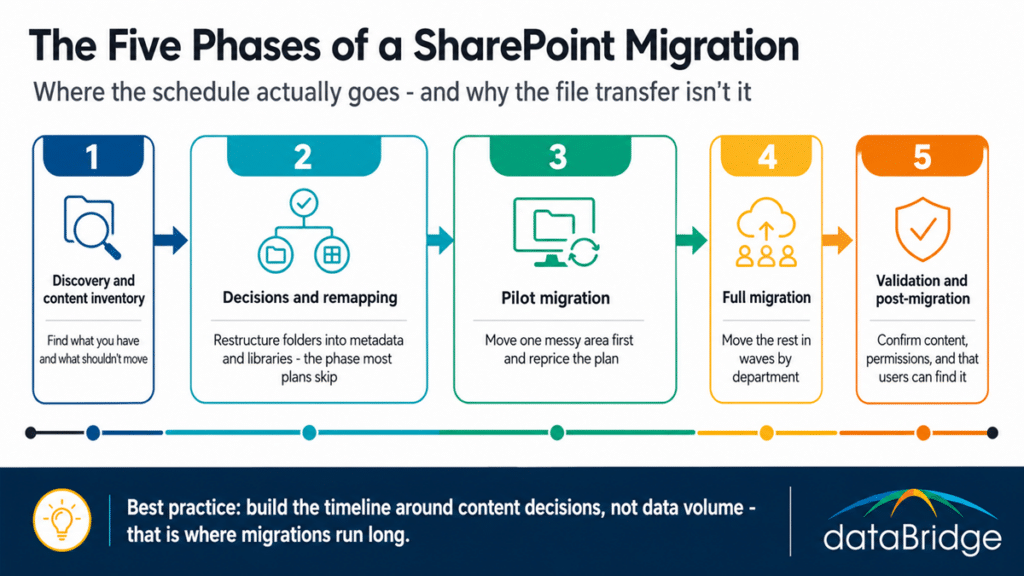
Phase 1: Discovery and content inventory
Discovery is where you find out what you actually have, and it is the phase teams shortchange most. Inventory every site, library, and file share in scope – volume, age, owner, last-accessed date, and permissions. The output that matters is not a file count. It is the raw material for the single most valuable decision in the whole project: what doesn’t need to move.
On most engagements, a meaningful share of source content is obsolete, duplicated, or abandoned – files nobody has opened in years, drafts that were superseded, whole libraries tied to projects that ended. Every one of those you move is cost you pay twice: once to migrate it and again to search past it later. Discovery is where you build the case for leaving it behind, and our SharePoint migration readiness assessment is the structured version of this phase.
Phase 2: Decisions and remapping
This is the phase almost no plan budgets enough time for, and it is the reason migrations run long. Every content area that survives discovery still needs two decisions: does it move as-is, and if not, how does its structure change on the way in. Folder hierarchies become metadata. Sprawling file shares become governed libraries. Permissions modeled on individual users become group-based access. None of that happens by pointing a tool at the source.
The remapping work is heavier than teams expect because the old structure is almost never the right target structure. A file share that grew for fifteen years encodes decisions nobody remembers making, and copying it faithfully just imports the confusion. Deciding the new information architecture – and mapping old to new, area by area – is real project time that belongs on the plan as its own phase, not a footnote inside “migrate content.” This is where a defined SharePoint migration strategy earns its cost.
Phase 3: Pilot migration
Move one representative content area first – a single department or library that includes the messy cases, not the easy ones. The pilot validates your tooling, your remapping decisions, and your time estimates against reality before you commit the whole organization to them. What you learn here reprices the rest of the plan. A pilot that takes twice as long as scoped is not a failure; it is the plan correcting itself while the stakes are still small.
Phase 4: Full migration
With the pilot’s lessons folded in, migrate the remaining content in waves organized by department, business function, or priority. Waves keep the project legible – each one has an owner, a validation step, and a cutover – and they let users transition in manageable groups rather than all at once. Sequence the waves so the highest-risk or highest-value content moves when the team is warmed up but not yet fatigued, usually second or third rather than first or last.
Phase 5: Validation and post-migration
The migration is not done when the files land. Validate that content transferred completely, permissions resolved correctly, metadata applied as designed, and links still work. Then confirm users can find what they need in the new structure, because a technically perfect migration that people can’t navigate has failed at its actual job. Our SharePoint post-migration checklist is the validation companion to this phase.
Who owns what: roles in a migration plan
A migration plan fails without named owners, and the role organizations most often leave unfilled is the one that decides what happens to the content. Technical roles get staffed by default; the decision-making roles get assumed, and assumed owners make no decisions. Here is who the plan needs.
- an executive sponsor who holds the timeline and settles cross-department disputes over scope and priority
- a project lead who owns the plan day to day and keeps the phases moving
- a technical migration lead responsible for tooling, the transfer itself, and validation
- content owners from each business area – the role most often missing – who can make keep, restructure, or discard calls on their own content because nobody else has the authority or the knowledge to
- an information architect or governance lead who designs the target structure the remapping phase maps toward
The content-owner gap is worth dwelling on because it is what stalls the decisions-and-remapping phase. IT can move anything, but IT cannot decide that a decade of a department’s files is safe to leave behind. Only the business owner can, and if that person is not named in the plan and given time, the whole project waits on a decision nobody is empowered to make. Naming them is the cheapest schedule insurance in the plan.
How long does a SharePoint migration take?
A realistic SharePoint migration runs weeks to several months, and the honest answer to “can we do it faster” is that the content decisions set the floor, not the data volume. A small, clean environment with clear ownership can move in a few weeks. A large file share with fifteen years of undocumented structure and no clear content owners takes months, and most of that time is decisions and remapping, not transfer.
The trap is scoping the timeline off data size alone. Two environments of identical volume can differ by months depending on how much of the content needs restructuring and how quickly the organization can make keep-or-kill decisions. When someone asks for a three-week migration of a messy environment, the schedule isn’t the constraint – the decision-making capacity is. Our SharePoint migration ROI calculator helps frame the timeline against the cost of the environment you’re leaving in place.
Where migration plans go wrong
Most failed plans share one root error: they treat migration as a data-transfer project when it is a content-decision project wearing a transfer’s clothes. That single misframing produces the predictable failures – no time budgeted for inventory, no owner for content decisions, a target structure that copies the source’s problems, a timeline scoped off volume instead of complexity. We catalog the specific ones in our guide to SharePoint migration mistakes, and nearly all of them trace back to a plan that skipped the deciding and jumped to the moving.
The fix is the plan itself. A project plan that gives discovery and remapping their own phases, names a content owner for every business area, and builds the timeline around decisions rather than gigabytes is the difference between a migration that improves the environment and one that faithfully reproduces the mess in a more expensive place. For the full picture across every stage, our complete guide to SharePoint Online migrations is the pillar this plan sits inside.
Frequently asked questions
What is the difference between a migration checklist and a project plan?
A checklist lists the tasks to complete, in order. A project plan sequences the work into phases, assigns an owner to each decision, and builds a realistic timeline – especially around the content-inventory and remapping decisions a checklist can’t capture. Use the checklist to execute; use the project plan to scope, schedule, and staff.
What is the most underestimated phase of a SharePoint migration?
The content decisions – deciding what not to move and how to restructure what stays. Teams scope migration as a transfer and skip the inventory and remapping work, then discover mid-project that much of the source is obsolete and much of the rest needs its structure rebuilt. That phase, not the file transfer, is where migrations run long.
How long should a SharePoint migration take?
Anywhere from a few weeks for a small, clean environment to several months for a large one with undocumented structure and unclear ownership. The timeline is driven by how much content needs restructuring and how fast the organization can make keep-or-discard decisions, not by data volume alone.
Who should own decisions in a SharePoint migration?
Each business area needs a named content owner with authority to decide what moves, what gets restructured, and what gets left behind. This is the role most often missing from migration plans, and its absence stalls the project because IT can move content but cannot decide the fate of a department’s files.
Should you migrate everything or leave content behind?
Leave content behind deliberately. On most migrations a meaningful share of source content is obsolete, duplicated, or abandoned, and moving it costs you twice – once to migrate and again to search past it later. Discovery exists to build the case for what stays in the past.
Reviewed By