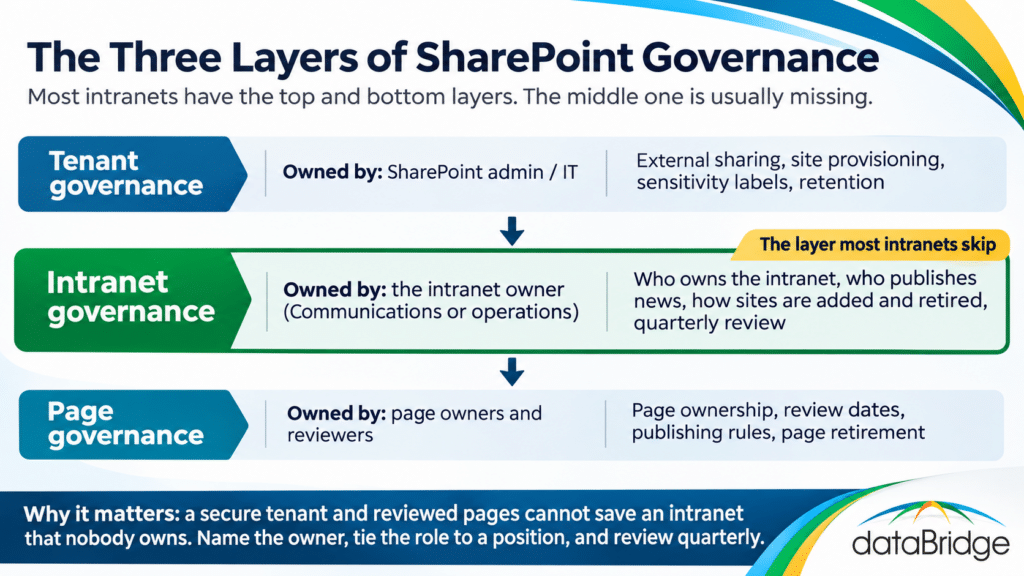
The top layer is tenant governance: external sharing, site provisioning, sensitivity labels, retention, the things an admin controls for everyone. Our SharePoint governance framework covers that layer, and the SharePoint Governance Center collects the detail.
The bottom layer is page governance: who owns a given page, when it gets reviewed, when it gets retired. We wrote that up in SharePoint page governance, and it assumes the intranet above it already has an owner.
Intranet governance is the middle layer. It is where the intranet owner lives, where the publishing model is set, and where the decision to retire a site gets made. If you only have the top and bottom layers, you have an environment that is secure and pages that are reviewed, inside an intranet that is slowly drifting away from the organization it was built for.
Who owns the intranet, and what happens when they leave
An intranet needs one named owner with the authority to say no, and a written rule for what happens when that person leaves. Without the second part, the first expires with the first reorg.
The owner is not the SharePoint admin. The admin keeps the platform running. The intranet owner decides what the intranet is for, which departments get a site, what goes on the home page, and who is allowed to publish news. In most organizations that person sits in Communications or in an operations role close to leadership, because those are the people who already carry accountability for what employees are told. When the role lands in IT by default, it tends to become a ticket queue, and ticket queues do not say no.
The pattern we see most often is simple. The launch owner was engaged and visible. Then they moved on. Their successor inherited a job description that did not mention the intranet, and nobody else noticed the gap because SharePoint kept running. Eighteen months later, department sites have drifted, the home page is stale, nobody can say who approved the last news post, and the organization concludes that SharePoint intranets do not work.
The fix is one line in the governance document: the intranet owner role is tied to a position rather than a person, and reassigning it is part of the handover checklist when that position changes hands. Our SharePoint site ownership governance matrix is built for exactly this, and the SharePoint site owner responsibilities guide covers what each department-level owner signs up for underneath the intranet owner.
Who is allowed to publish news
News publishing should follow accountability. The person who publishes a news post is the person who answers for it when it is wrong, and that is rarely the person who happened to have an open afternoon.
This is the second pattern we see constantly. At launch, publishing rights were handed out generously because the goal was to get content flowing. Two years later, news is written by whoever on the team has time, approved by nobody, and the result is an intranet home page that reads like a bulletin board at a community center. Employees learn that the news feed is noise, and they stop reading it. Once that happens, the one piece of the intranet that could reach everyone has lost its audience.
A working publishing model has four parts:
- A short list of named news authors per department, rather than a permission level handed to a whole group
- One approver for anything that goes on the home page, usually the intranet owner or a Communications lead
- A rule for what counts as organization-wide news versus department news, so the home page is not where every team announces its potluck
- Audience targeting set up so department news reaches the department and nobody else
SharePoint supports all of this natively. News can be scoped to a site, promoted to a hub, targeted by audience, and held for approval before it goes live. The campaigns in SharePoint post shows how the native tools handle coordinated announcements. The configuration is the easy part. The hard part is deciding who gets the permission and taking it back from everyone else.
How sites get added, and how they get retired
Every site in the intranet needs a reason to exist, an owner, a place in the hub model, and an expected end date, and the end date is the part nobody writes down. Project sites in particular should carry a retirement date from the day they are created.
The third pattern: hub navigation that still lists sites for projects that ended in 2023. Each one was created for a good reason. Each one had an owner at the time. None of them had a plan for what happens when the project closes, so they stayed in the navigation, kept showing up in search, and taught employees that half of what the intranet points to is dead.
A lifecycle rule has two halves. On the way in, a site is added to the intranet only when it has an owner, a purpose, a place in the hub model, and an end date where one applies. Our SharePoint hub site architecture framework covers how to decide what belongs under which hub, and site provisioning should enforce it rather than letting anyone with a license create a site and ask for hub association later.
On the way out, a site leaves the navigation when its purpose ends. For a project site, that is the project close. For a department site, that is a reorg. The content does not have to disappear: it can be archived with Microsoft 365 Archive or left in place with the hub association removed. What matters is that it stops being presented as current. An intranet that only ever adds is an intranet that gets less trustworthy every quarter.
The review cadence that keeps all of this alive
A quarterly review by the intranet owner, with a fixed checklist, is what separates an intranet that still works in year four from one that gets rebuilt. The review takes an hour if the checklist is short and the owner actually does it.
The checklist we use has six questions:
- Is every site in the hub navigation still active, with a named owner who is still in the role?
- Has every department site published something in the last quarter? If not, why does it exist?
- Who published news to the home page this quarter, and were all of them on the approved list?
- What are the top ten search queries, and does each one return the right result on the first page?
- Which pages have passed their review date without being reviewed?
- Has anyone left the organization who held an ownership role, and was the role reassigned?
The search question is the one most owners skip, and it is the one employees notice first. SharePoint search governance explains what to look at and how to fix the common failures.
Write the answers down each quarter. After a year you have a record that shows whether the intranet is drifting, and that record is what justifies the next investment, whether that is a redesign or just a conversation with a department head about their dead site.
Why no product can include governance
Intranet-in-a-box vendors sell governance as something their product includes. It is not something a product can include. A product can enforce an approval workflow; it cannot decide who the approver should be, and it cannot notice that the approver left in March.
The organizations whose intranets still work years after launch did not buy better software. They named an owner, tied the role to a position, limited who can publish, wrote down when sites retire, and checked every quarter. All of that is available in SharePoint today with no additional license. The complete guide to building a modern SharePoint intranet covers how governance fits into the build, and the SharePoint intranet adoption strategy page covers the other half of the problem: an intranet with perfect governance and no audience is still a failed intranet.
If you are not sure whether your intranet has a governance model or just the memory of one, a SharePoint intranet assessment is the fastest way to find out. The first question we ask is who owns it. The answer tells us most of what we need to know.
Frequently asked questions
What is SharePoint intranet governance?
SharePoint intranet governance is the set of rules that keep an intranet trustworthy after launch: who owns it, who can publish news, how sites get added and retired, and how often those rules are reviewed. It sits between tenant governance (sharing, retention, provisioning, labels) and page governance (individual page review and retirement).
Who should own the SharePoint intranet?
One named person with authority to decide what the intranet is for and who can publish to it, usually in Communications or an operations role close to leadership. The role should be tied to a position rather than a person, with a named backup, so it survives turnover. The SharePoint admin runs the platform; the intranet owner runs the intranet.
How many people should be able to publish news?
As few as the organization can tolerate. A short named list of authors per department, with one approver for anything that reaches the home page. Publishing rights handed to a whole group at launch are the most common reason the news feed stops being read.
When should a project site be removed from the intranet?
When the project closes. The site should carry an expected end date from the day it is created. At close, remove the hub association so it stops appearing in navigation and search as current content, and archive it if the content has retention value.
How often should intranet governance be reviewed?
Quarterly, by the intranet owner, against a fixed checklist: active sites and owners, department publishing activity, who published home page news, top search queries, overdue page reviews, and any ownership roles vacated by departures.
Is intranet governance the same as SharePoint governance?
No. SharePoint governance usually means tenant-level controls: external sharing, provisioning, retention, labels. Intranet governance is narrower and sits inside it, covering ownership, publishing, and lifecycle for the intranet specifically.
Reviewed By