Your communications team spends a week publishing a run of related news posts for a benefits-enrollment push. When it is over, someone asks the fair question: did anyone read it, and did it change what people did? Until now, SharePoint could show you page views on each individual post and almost nothing about the push as a whole. You could see that a page got 400 views. You could not see whether the campaign worked.
Microsoft is closing that gap with Campaigns in SharePoint. It is a real improvement for the teams who can use it, and there is a licensing line that decides who those teams are.
What is Campaigns in SharePoint?
Campaigns in SharePoint lets communications teams group related SharePoint news posts into a single campaign and see analytics for that campaign as a whole, without leaving SharePoint. It brings Viva Amplify’s campaign management natively into the SharePoint news environment, so a team can organize an initiative and read its results in the same place they publish. It is rolling out worldwide from July to September 2026, reaching general availability in August (Microsoft 365 roadmap ID 568073), and it needs no admin action to appear.
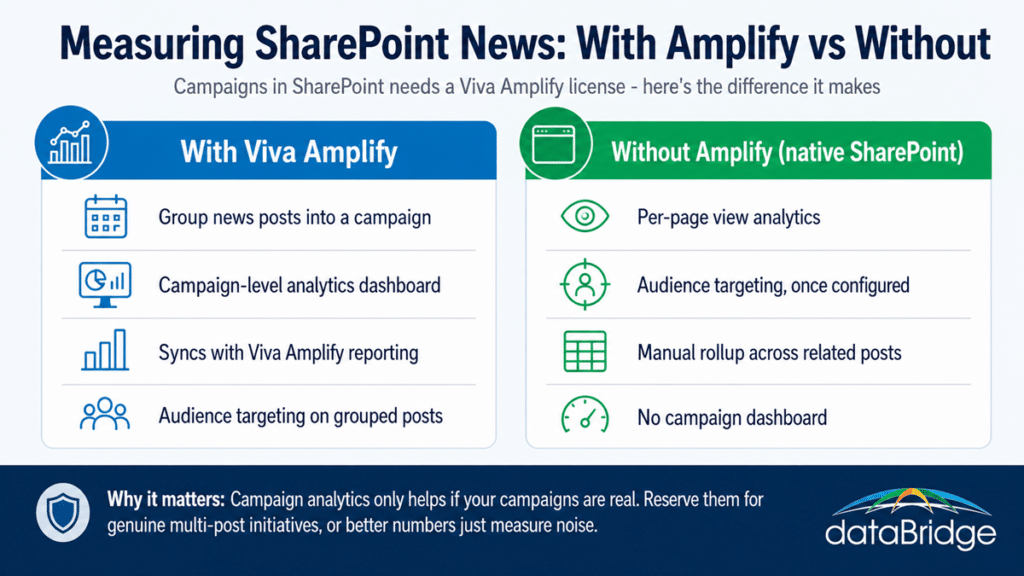
Under the hood, a campaign is a native SharePoint object, held as a Campaigns list you will find under Site contents. You group the posts that belong to an initiative, and a campaign analytics dashboard shows how they performed together. You can also apply SharePoint audience targeting to the posts in a campaign, so the right announcements reach the right people. It is a lighter-weight option than building a full multi-channel campaign in the Viva Amplify app, meant for organizing and measuring news that already lives on your SharePoint site.
The catch: it needs Viva Amplify
Campaigns in SharePoint is available only to users licensed for Viva Amplify. If your organization does not license Amplify, the feature will not appear for your communications team, even though it lives inside SharePoint and needs no setup. That single line decides whether this post is describing a tool you can use or a tool you would have to buy into.
That matters because Amplify is a paid Viva add-on, so this is a licensed capability tucked inside a product most people assume is already included with Microsoft 365. Existing Amplify campaigns show up here, and new campaigns created in SharePoint sync back to Amplify analytics, so the two experiences are the same system rather than separate ones. Before you plan a comms-measurement strategy around this, confirm what your tenant actually licenses, because the whole feature sits behind that entitlement.
What problem it actually solves
It solves the measurement gap that has always sat under internal communications: a team could see how one page performed but never how a whole initiative performed. Grouping posts into a campaign produces a rollup, so you can read reach and engagement across the entire push rather than piecing it together one page at a time.
That gap is bigger than it sounds. Communications teams do not think in single posts. They run initiatives – a change rollout, an open-enrollment window – as a sequence of related posts over days or weeks. Measuring those posts individually tells you which pages got clicks, not whether the message moved. Campaign-level analytics is the view that has been missing, and for a team that publishes deliberately, it is the difference between guessing and knowing.
What you can and cannot do without Amplify
Without Viva Amplify, native SharePoint still gives you per-page view analytics and audience targeting, but not the campaign-level rollup. You can approximate a campaign view by collecting related posts on a landing page or a news hub, or by maintaining a view by hand, but you will not get the automatic campaign dashboard that groups the numbers for you.
For the many organizations that do not license Amplify, that is the honest picture. Audience targeting gets the right post in front of the right region, department, or role, though it is genuine configuration work rather than a switch. Per-page analytics tells you how each post did. What is missing is the layer that reads a set of posts as one campaign. So the real question is a buy-versus-build one: is campaign-level measurement worth adding Amplify, or can your team live with per-page numbers and a manual rollup for the few initiatives that need it. For most mid-market comms teams running a handful of real campaigns a year, that answer is not automatic, and it is worth working out before a license renewal rather than after.