Nearly every organization that asks us about policy acknowledgement already has a process. It’s a Microsoft Forms survey with a checkbox, or an email that says “reply to confirm you’ve read the attached,” and somewhere there’s a spreadsheet or an Outlook folder where the confirmations land. It records that a person acknowledged a policy once. It does not record which revision they acknowledged, because the form or the email had no way to know.
Then the policy gets rewritten. The handbook changes in 2025, nobody is asked to re-acknowledge, and when the auditor asks for proof that staff have read the current version, the organization produces evidence that they read the 2023 one. The process worked exactly as designed. The design was missing one column.
This post is about building policy acknowledgement in SharePoint so that the record ties a person to a specific revision of a specific policy, re-acknowledgement fires automatically when the policy changes, and the report an auditor asks for is a filtered view rather than a weekend of spreadsheet work. It assumes the policies themselves already live in a SharePoint library with content approval and versioning, which our guide to managing policies and procedures in SharePoint sets up. If they don’t yet, start there, because acknowledgement without a controlled source is a record of people reading an unmanaged document.
What a Policy Acknowledgement Record Has to Capture
A defensible acknowledgement record captures five things: who acknowledged, which policy, which revision of that policy, when, and by what method. Miss any one and the record is weaker than it looks. Miss the revision and the record is useless the first time the policy changes, which is the failure the Forms survey has built in. Everything else in this post follows from getting those five fields into one list.
The sixth thing isn’t a field, it’s a trigger. When a policy is revised in a way that matters, the system has to know that the previous acknowledgements no longer count and new ones are required. A record that captures revision but never asks for a fresh signature on a new revision is only half the fix. The design below handles both.
Why Forms Surveys and Email Replies Fail an Audit
A Forms survey or an email reply records intent, not evidence, and it records it against a policy name rather than a policy version. The auditor’s question is “can you show me that everyone who should have read the current version of the information security policy has done so.” The Forms response export shows names and a date. It does not show which version was current on that date, it does not know the policy has since changed, and it has no way to re-ask. The email folder is worse: it proves someone replied, and the attachment they replied to is whatever was attached that day.
There’s a second failure that shows up later. Forms are owned by the person who created them, so when that person leaves, the responses and the form go with their account unless someone transferred ownership. We’ve seen an organization lose three years of acknowledgements this way. A SharePoint list has no such owner; it belongs to the site.
Four Ways to Track Policy Acknowledgement in SharePoint
Four approaches cover nearly every case, and they range from a patched-up version of what most organizations already have to a signed document with legal weight. The right one depends on how many policies you have, how often they change and how hard your auditor pushes on the word “signed.”
Forms plus a flow writing to a list
The cheapest repair of the existing process keeps the Forms survey but adds a Power Automate flow that writes each response into a SharePoint list, stamping it with the policy and the revision that was current at the time. It works for a small policy set that rarely changes, and it buys time. It still carries the ownership problem and the form still can’t present the revision to the reader, so it’s a bridge rather than a destination.
List-based attestation
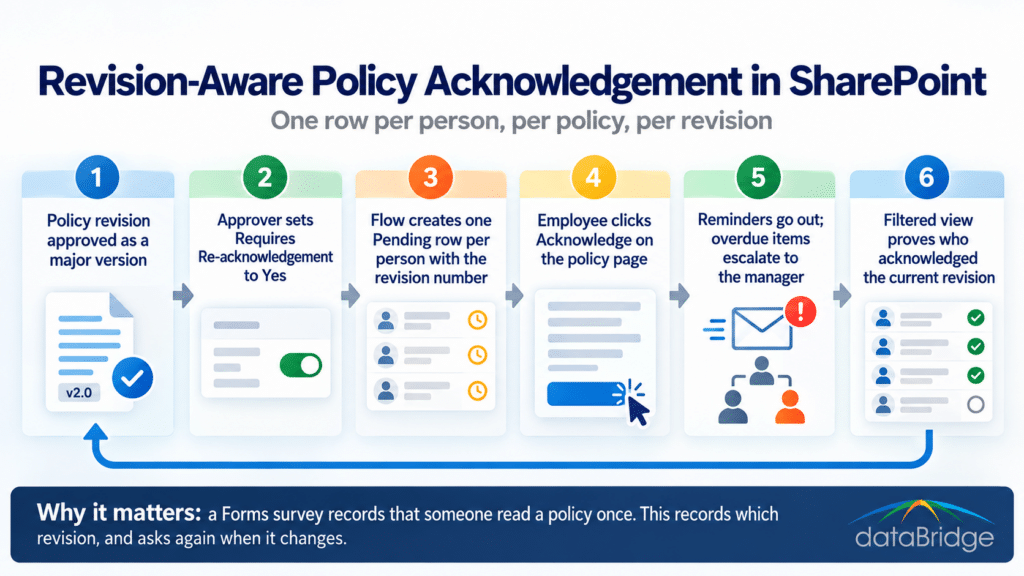
A SharePoint list records one row per person per policy revision, created by a flow when a new revision is approved and completed when the employee clicks an acknowledgement button on the policy page. This is the model we recommend for most mid-sized organizations because every one of the five fields is a column, the re-acknowledgement trigger is the same flow that creates the rows, and reporting is a list view. The next section walks through the build.
Power Automate approvals
The Approvals action in Power Automate sends each employee an approval request for the policy, and their response is recorded in the Approvals system with a timestamp. It suits small audiences, such as a leadership team acknowledging a conflict-of-interest policy, where the formality of an approval card is useful. It scales poorly past a few hundred people, the Approvals history isn’t a list you can report on without more flow work, and it inherits every ownership rule that applies to approval flows generally.
SharePoint eSignature
SharePoint eSignature, part of SharePoint Premium, collects a legally recognized electronic signature on the policy document itself and stores the signed copy with an audit trail. It’s the right tool when the policy is a contract-like document (a code of conduct, an acceptable-use agreement) where “signed” has to mean signed, or when a regulator or counsel asks for it. It is billed pay-as-you-go through an Azure subscription where available, and it is heavier than most routine policy acknowledgement needs. Use it for the handful of policies that need it, not all of them.
The List-Based Attestation Model We Recommend
The build has two lists and one flow. The Policies library already exists: it holds the controlled documents with content approval, major and minor versioning, and at minimum a Policy ID, Owner, Effective Date, Review Date and Audience column. Add one more column, a yes/no called Requires Re-acknowledgement, which the approver sets when they publish a revision. That single column is what separates a typo fix from a change that everyone has to read again.
The second list is Acknowledgements. Its columns are Employee (person), Policy (lookup to the Policies library), Revision (text, copied from the policy’s major version number at the time the row is created), Status (choice: Pending, Acknowledged, Overdue), Due Date, Acknowledged On (date and time, set by the flow when the button is clicked) and Method (choice: Button, eSignature, Manual). Every one of the five required fields is here, and the lookup to the policy means the record survives a policy title change.
The flow triggers when a policy’s content approval status changes to Approved on a major version. It reads the Audience column, resolves it to a list of people (a Microsoft 365 group or an Entra security group works best), and creates one Pending row per person with the current revision number and a due date, typically fourteen or thirty days out. A second scheduled flow runs daily, sends a reminder for Pending rows approaching the due date, flips rows past due to Overdue, and sends the manager a digest of their team’s overdue items. On the policy page itself, a button (a simple Power Apps form or a formatted list button) sets the employee’s row to Acknowledged and stamps Acknowledged On. The employee never touches the list directly.