Identification, description and approval
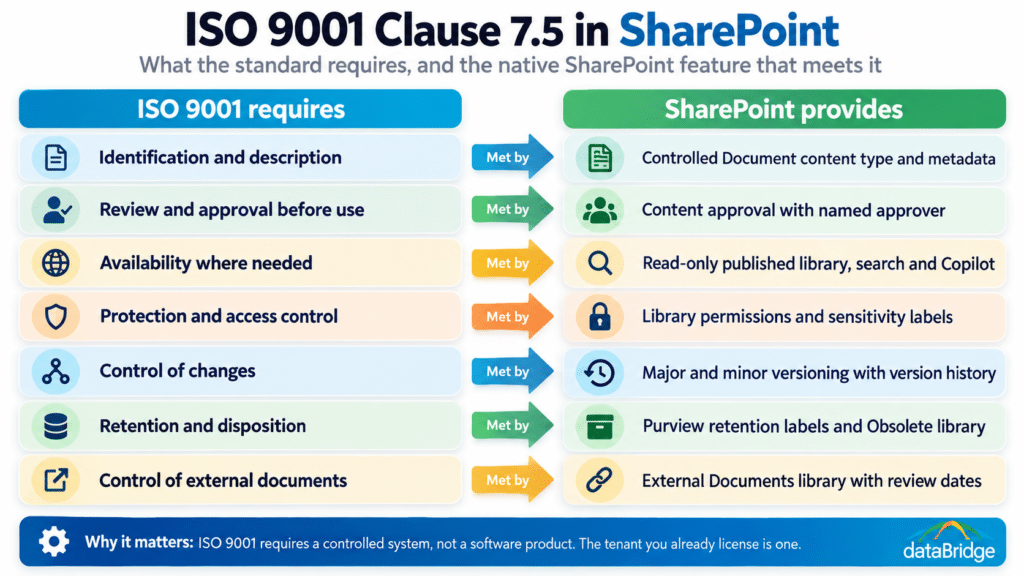
A Controlled Document content type carries the metadata the standard asks for: document number, title, revision, document type (procedure, work instruction, form, specification), process owner, approver, effective date and next review date. Content approval is turned on in the library, so a document sits in Draft or Pending until the named approver sets it to Approved, and the approval is recorded with a name and timestamp. Minor versions are drafts; major versions are approved releases. Our document approval workflow post covers how to run the approval step without tying it to one person’s account, which matters here because the auditor will ask who approved revision C and the answer can’t be “a flow that broke when Dave left.”
Availability and protection
Approved documents are published to a read-only Controlled Documents library that every employee can read and only document controllers can edit. Draft versions are invisible to readers until approved, which is what the minor/major versioning setting does by default. Sensitivity labels protect confidential procedures, and permissions are set at the library level, never per document, so the model is auditable in one screen. Search and Copilot index the published library, which means the current version is the one that surfaces when someone asks for it, provided obsolete versions are moved out of the indexed library rather than left beside the current one.
Change control
Version history is the change record: every approved revision is a major version with the approver, date and an optional comment stating what changed. A Revision History column or a linked change-request list item carries the reason for change and the review that preceded it. When a new major version is approved, a Power Automate flow notifies the distribution list and, where training is required, creates the training record (more on that below). Superseded versions stay in version history for the audit trail but are no longer what readers see.
Retention and disposition
Retention labels from Purview apply the retention period the quality manual specifies, typically a fixed number of years after a document is made obsolete, and prevent deletion until the period runs out. Obsolete documents move to an Obsolete library with a status column and the retention label still attached, so they’re retrievable for an audit but excluded from search. Our records management and retention strategy guide covers the label design. The important part for ISO is that disposition is a policy applied by the system, not a cleanup someone remembers to do.
External documents
Customer specifications, supplier certifications, regulatory standards and the ISO standard itself are external documents under 7.5.3.2. They live in their own library with an External Document content type, a source column, a received date and a review date, and the same read-only publishing model. The mistake we see most often is external documents scattered through project folders with no record of which version the organization is working to. One library, one content type, one review cadence fixes it.
Controlled vs. Uncontrolled Copies in a SharePoint QMS
The uncontrolled-copy problem goes away when the controlled document is a link, not a file. In a SharePoint QMS, nobody attaches the procedure to an email or pastes it into a Teams channel; they share the link to the published library, and the link always resolves to the current approved version. Teams channel tabs point at the Controlled Documents library. Intranet pages embed the library view. The document exists once.
Printed copies are the remaining gap, and they’re handled the way quality systems always handled them: a footer stating that printed copies are uncontrolled and the SharePoint library is the source of truth, applied automatically by converting the approved Word document to PDF through a flow at publication. The parallel-system habit of stamping a file CONTROLLED and emailing it around is the thing to kill, and killing it is a change-management job as much as a technical one. The quality manual gets rewritten to name the library as the system of record, and the old network share is set read-only on cutover day.
Beyond Documents: Training Records, CAPA and Audit Evidence
Three parts of a QMS outside document control fit in SharePoint lists for most mid-sized organizations, and a fourth is where the limits start. Training records (clause 7.2) are a list linking an employee, a controlled document and its revision, a completion date and a trainer sign-off, created by the flow that fires when a new major version is approved. That gives the auditor the answer to “who has been trained on the current revision of this work instruction” in a filtered view rather than a spreadsheet.
Nonconformances and corrective actions (clause 10.2) are a list with a form, a status workflow, a root-cause field, an owner and a due date, with Power Automate reminders and a Power BI view of open items by age. Internal audit schedules and findings follow the same shape. All of it carries the Purview unified audit log underneath, which records who viewed, edited, approved or deleted anything, and that log is evidence the standard’s clause 9 asks for.
The limit is complexity and scale. A CAPA process with eight stages, multiple approvers per stage, supplier involvement and effectiveness verification is buildable in SharePoint and Power Platform, but at that point you’re maintaining an application, and the build-versus-buy math shifts. That’s the first signal that a dedicated QMS may be worth its license.
What an ISO 9001 Auditor Asks to See
Auditors ask for the same evidence regardless of what system produced it, and a SharePoint QMS should answer each request with a view, not a search. They will ask for the master list of controlled documents with current revisions; the Controlled Documents library’s default view, grouped by document type, is that list. They will pick a document and ask who approved it and when; version history answers it. They will ask how a revision reaches the people who use it; the distribution flow and the training records list answer it. They will ask where obsolete versions are and how you prevent their use; the Obsolete library and the read-only publishing model answer it. They will ask how long records are kept; the retention label on the library answers it.
They will also, without announcing it, walk the floor and ask someone to show them the current procedure. If that person opens Teams and finds a link to the library, you pass. If they open a Teams channel and find a PDF someone posted in 2024, the parallel system is still running and the auditor has found it.
When a Dedicated QMS Still Wins
A dedicated QMS earns its license when the regulatory regime is stricter than ISO 9001, when the process side of quality is complex enough to be an application in its own right, or when the organization operates across many sites with thousands of controlled documents and a dedicated quality staff. FDA-regulated manufacturers working under 21 CFR Part 11 need validated electronic signatures and system validation documentation; both are achievable in SharePoint, but the validation effort is substantial and a pre-validated platform is often cheaper. Medical device firms under ISO 13485 and automotive suppliers under IATF 16949 carry process requirements (design controls, PPAP, APQP) that purpose-built tools handle out of the box.
Below those thresholds, which is where most ISO 9001 manufacturing and engineering firms with 100 to 1,000 employees sit, the dedicated QMS is paying for a document control capability the tenant already has, plus a CAPA module the organization could build, in exchange for a second system that the rest of the company won’t open. Our SharePoint architecture for regulated industries page covers how we draw that line by sector.
Moving Document Control From a Parallel System Into SharePoint
The move is a migration project with a quality overlay, and it runs in a fixed order: inventory the controlled documents in the current system with their revision, status and owner; design the content types, metadata and library structure to match the quality manual; migrate approved revisions as major versions with their metadata, and obsolete revisions to the Obsolete library with retention applied; rewrite the quality manual to name SharePoint as the system of record; train document controllers and process owners; set the old system read-only on cutover day; and schedule the first internal audit against the new system within ninety days so any gaps surface before the registrar does.
Our manufacturing document control migration case study walks through one of these end to end. The piece clients underestimate is the quality manual rewrite, because that document is itself controlled, and until it says SharePoint is the source of truth, the auditor is entitled to treat the network share as the QMS.
Frequently Asked Questions
Does ISO 9001 require quality management software?
No. ISO 9001:2015 requires that documented information be identified, approved, available, protected, change-controlled and retained, and that records demonstrate the system works. It is silent on tools. A SharePoint library built to those requirements satisfies the standard; a dedicated platform satisfies it with a different interface.
Can SharePoint handle ISO 9001 document control for a multi-site manufacturer?
Yes, for ISO 9001 document control at most mid-sized scales. A hub with one Controlled Documents library per site or per process family, shared content types and a common metadata model handles multi-site distribution well. The limits arrive with stricter regulatory regimes or with thousands of documents managed by a dedicated quality department.
How do you prove to an auditor that SharePoint controls document versions?
Version history on each approved document records every major revision with approver and timestamp. Content approval records who released each version. The Obsolete library with retention labels shows superseded versions are retained but not in use. Together they answer the version control questions in clause 7.5.3 without a separate report.
Is SharePoint 21 CFR Part 11 compliant?
SharePoint can be configured and validated to meet Part 11 requirements for electronic records and signatures, but compliance is a property of the validated system and its procedures, not the software alone. The validation effort is real, and for FDA-regulated manufacturers a pre-validated QMS is frequently the more economical route. For ISO 9001 alone, Part 11 doesn’t apply.
If your quality team is running document control in a parallel system and you’d like to know what it would take to bring it into SharePoint before your next surveillance audit, tell us what you’re working with and we’ll tell you whether the gap is a build or a purchase.
Reviewed By