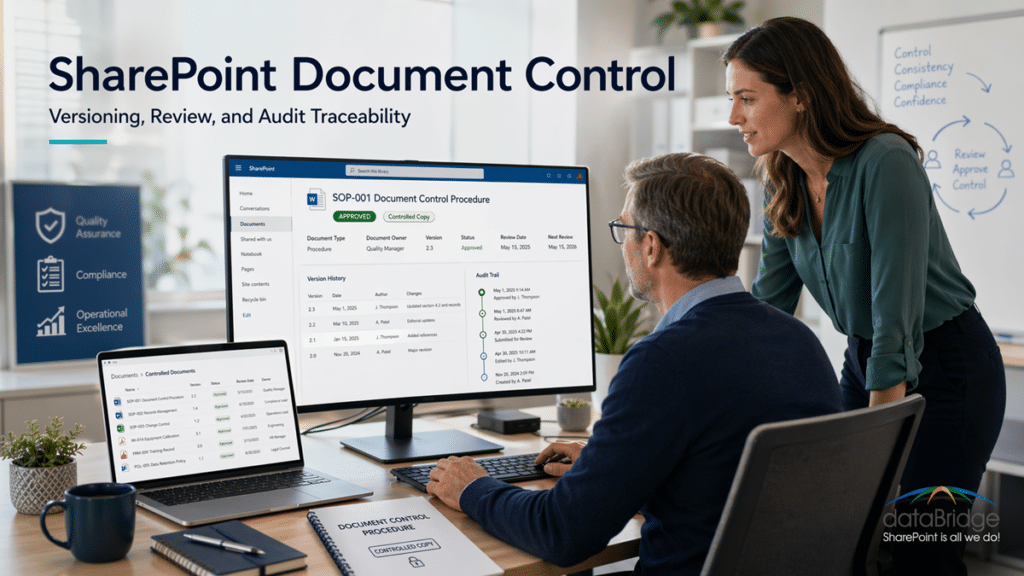
How to Design Libraries for Versioning, Review, and Audit Traceability
SharePoint document control works best when the library is designed around accountability, not just storage.
A controlled-document library should help people answer the questions that matter during daily work and during an audit: what is the current version, who owns it, who approved it, when does it need review, and what evidence exists if someone asks later?
That is the real value of SharePoint document control.
This is not only about uploading policies, procedures, specifications, work instructions, or quality documents into Microsoft 365. It is about designing libraries where versioning, review cycles, approval states, ownership, permissions, retention, and audit traceability work together.
At dataBridge, we often see teams make the same discovery. They move important documents into SharePoint because they want structure, better search, and stronger compliance support. Then they realize that a document library with folders and permissions still leaves too much to chance.
A library can store controlled documents. It does not automatically control them.
SharePoint document control is a library design discipline. It connects metadata, versioning, approval, ownership, security, retention, and audit history into one reliable operating model.
For the broader AI readiness view, the SharePoint AI readiness foundation explains how document control connects with trusted content, permissions, metadata, lifecycle governance, search, and Copilot outcomes.
If your organization needs controlled-document libraries that can stand up to audits, inspections, policy reviews, or regulated workflows, contact dataBridge to discuss your SharePoint document control strategy.
This article focuses specifically on controlled-document library design. For the broader business document platform, start with the SharePoint Document Management System page. For lifecycle, retention, disposition, and records planning, use records and retention strategy.
Written by Ken Lewis, Principal Consultant, for SharePoint document control, records management, information control, lifecycle governance, compliance alignment, and Microsoft 365 accuracy. Reviewed by Michael Fuchs, Founder and CEO of dataBridge.
Published: May 6, 2026
Last reviewed: August 15, 2026
What Is SharePoint Document Control?
SharePoint document control is the process of designing SharePoint libraries so business-critical documents can be created, reviewed, approved, published, revised, retired, and audited with clear governance.
In practical terms, SharePoint document control helps your organization manage:
- Version history
- Draft and approved states
- Review dates
- Document ownership
- Required metadata
- Approval workflows
- Controlled access
- Retention and records rules
- Superseded or obsolete documents
- Audit traceability
A basic SharePoint document library stores files.
A controlled-document library manages the lifecycle of those files.
That difference matters in regulated, quality-driven, or policy-heavy environments. Teams need more than “the file is in SharePoint.” They need proof that the right people reviewed it, approved it, used the current version, and maintained the required history.
A broader document platform may start with a SharePoint Document Management System. SharePoint document control goes deeper. It focuses on the rules and library design choices that make controlled documents reliable.
If controlled-document problems are part of a larger library issue, the SharePoint document management maturity assessment helps teams review structure, ownership, metadata, permissions, version confidence, records readiness, search, and lifecycle governance together.
SharePoint Document Control vs. Document Management vs. Records Management
These topics overlap, but they solve different problems.
A SharePoint Document Management System organizes, secures, searches, governs, and manages business documents across Microsoft 365.
SharePoint document control focuses on business-critical documents that need stronger control, such as policies, procedures, SOPs, specifications, forms, quality documents, work instructions, and regulated content.
SharePoint Records Management and Retention Strategy focuses on lifecycle, retention, records classification, disposition, and defensibility.
Document control sits between the broader DMS and the records strategy. It makes sure controlled documents can be created, reviewed, approved, published, revised, retired, and audited with less ambiguity.
Why SharePoint Document Control Matters
Document control matters because uncontrolled documents create operational risk.
People may use outdated procedures. Teams may edit the wrong version. Auditors may ask for approval evidence. Leaders may struggle to identify who owns a policy. Employees may find three versions of the same form and trust the wrong one.
Those issues are not minor.
They create confusion, rework, compliance exposure, and lost confidence in SharePoint.
A strong SharePoint document control model helps your organization:
- Protect the current approved version
- Separate drafts from published documents
- Show who approved a document
- Track when a document needs review
- Reduce duplicate and conflicting content
- Support audit and inspection requests
- Preserve document history
- Align retention with business rules
- Improve search and employee trust
A controlled document without a clear owner is already drifting out of control.
SharePoint can support strong document control, but only when the structure is intentional. Versioning alone will not solve the problem.
SharePoint Document Control Is Not Just Version History
Many teams assume document control begins and ends with version history.
That assumption creates a weak control model.
Version history tells you that a file changed. It does not always tell you whether the change was reviewed, whether the version was approved, or whether the old version should still be visible.
That is why controlled-library design must combine several controls.
A good model connects:
- Versioning rules
- Content approval
- Required metadata
- Review dates
- Document owners
- Permissions
- Approval workflows
- Retention labels
- Audit logs
- Publishing rules
When these pieces work together, SharePoint becomes more than a document repository. It becomes a controlled information environment.
When they do not, SharePoint becomes another shared drive with better branding.
That gap between a controlled library and a glorified shared drive is the same one that decides whether SharePoint works as a document management system in the first place.
The Core Blueprint for a Controlled SharePoint Library
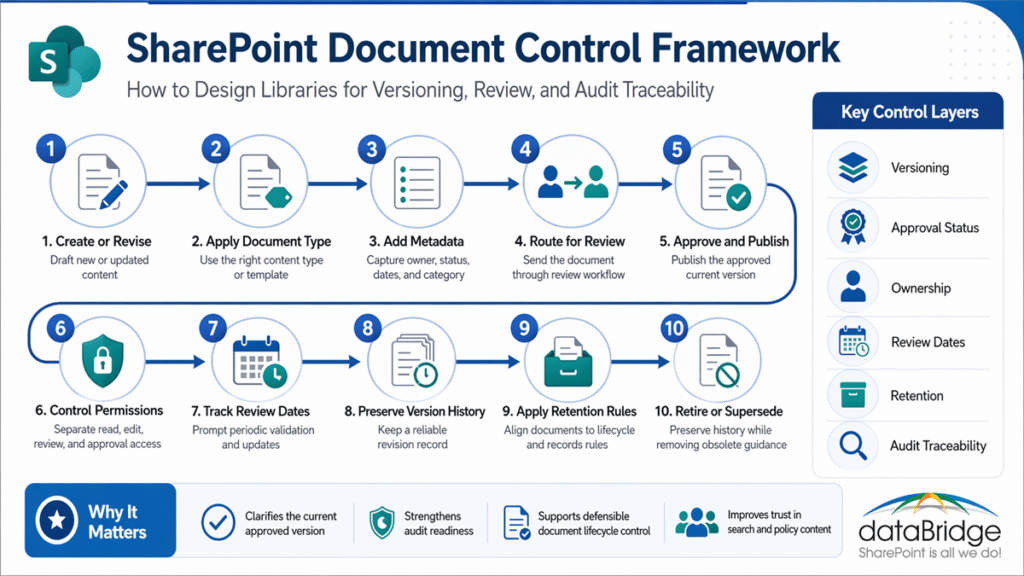
A controlled-document library should be designed around the document lifecycle.
That lifecycle usually follows a practical sequence.
- Create or revise the document.
- Apply the correct document type.
- Add required metadata.
- Route the document for review.
- Approve the document for use.
- Publish the current version.
- Restrict uncontrolled changes.
- Schedule future review.
- Retain the document according to policy.
- Retire or replace obsolete versions.
This sequence sounds simple. In real environments, it requires discipline.
The best SharePoint document control libraries do not rely on users remembering every step. Instead, they guide people through the process with structure.
That structure should include required fields, clear statuses, workflow prompts, permissions, and views that show people what needs attention.
For controlled libraries, metadata capture during document submission is especially useful because it helps collect owner, document type, approval status, review date, and lifecycle details before the document enters the control process.
In document control projects, the biggest wins usually come from reducing ambiguity. People need to know where a document belongs, what status it is in, and what action comes next.
Start With the Type of Document Being Controlled
Before configuring SharePoint, define what kind of documents need control.
Do not start with the library settings screen.
Start with the business process.
Controlled documents may include:
- Policies
- Procedures
- Work instructions
- Quality manuals
- Safety documents
- Training materials
- Standard operating procedures
- Specifications
- Forms and templates
- Regulatory submissions
- Engineering documents
- Client deliverables
- HR policies
- Healthcare protocols
Each type may need different rules.
A safety procedure may need scheduled review and strict approval. A template may need version control but lighter workflow. A regulated procedure may require retention, audit evidence, and limited editor access.
That is why one generic library rarely works for every controlled document.
Library design should reflect the document’s risk, lifecycle, audience, and ownership. Part of that design is deciding how controlled documents are grouped. When a controlled item is really a package – a policy with its approval evidence, or a procedure with its supporting forms – a document set usually beats a folder, because the set carries shared metadata and review status across everything inside it.
Design Libraries Around Process, Not Departments
Many organizations build SharePoint libraries around departments.
That can work for general collaboration. It often fails for document control.
Controlled documents should be organized around lifecycle and governance needs. A department-based structure may hide important differences between policies, procedures, templates, drafts, and records.
A better design starts with the process.
Ask these questions first:
- What document types need formal control?
- Who creates them?
- Who reviews them?
- Who approves them?
- Who can edit approved versions?
- Who only needs read access?
- How often must each document be reviewed?
- What happens when a document becomes obsolete?
- Which documents need retention labels?
- What proof will auditors expect?
These questions shape the library structure.
For regulated or highly controlled organizations, this also connects to broader SharePoint architecture. The page SharePoint Site Architecture for Regulated Industries explains how structure, governance, permissions, and compliance expectations should work together.
Libraries built around departments often serve the org chart. Libraries built around control serve the audit trail.
Use Metadata as the Control Layer
Metadata gives controlled-document libraries their discipline.
Without metadata, SharePoint users depend on file names, folder paths, and memory. That is not enough for document control.
A controlled library should use required metadata fields that describe the document and its lifecycle.
Useful metadata fields may include:
- Document title
- Document ID
- Document type
- Department or business area
- Process owner
- Document owner
- Reviewer
- Approver
- Effective date
- Next review date
- Approval status
- Revision status
- Controlled copy status
- Superseded by
- Retention category
- Sensitivity level
- Business process
- Location or region
- Applicable regulation or standard
Do not add metadata just because SharePoint supports it.
Every field should support search, filtering, workflow, retention, reporting, or auditability.
Too much metadata slows adoption. Too little metadata weakens control.
The right amount is the amount people can maintain consistently.
For the broader metadata model behind controlled libraries, use the SharePoint Metadata Strategy Guide. For controlled vocabulary, managed metadata, and term consistency, use SharePoint Taxonomy and Metadata Strategy.
When to Use Custom Content Types
Custom content types can make SharePoint document control much stronger.
They allow your organization to define reusable rules for a specific kind of document. A policy, procedure, form, or work instruction may need its own metadata, template, workflow, and retention logic.
Use a custom content type when a document category has a distinct lifecycle.
For example, a controlled policy may need:
- A standard template
- Required policy owner
- Review date
- Approval workflow
- Effective date
- Published status
- Retention category
A work instruction may need different fields.
It may require process area, location, equipment, safety review, and revision reason.
That difference matters.
The article When Should You Create a Custom Content Type explains when content types are worth the added structure.
For document control, content types are usually valuable when they reduce confusion. They become a problem when teams create too many and nobody understands them.
A custom content type should make governance easier to follow. If it only makes the system harder to explain, it is not helping.
Versioning Rules for Controlled Documents
Versioning is central to SharePoint document control.
However, the versioning model should match the control requirement.
For organizations that also need lifecycle control, retention, or formal records handling, document control should align with SharePoint Records Management and Retention Strategy.
Most controlled libraries need a clear approach to:
- Major versions
- Minor versions
- Draft visibility
- Version limits
- Check-in comments
- Required checkout
- Content approval
- Restore permissions
- Version cleanup
For many controlled-document libraries, major versions should represent published or approved versions. Minor versions can support drafts or in-progress revisions.
That distinction helps teams avoid a common issue: users treating every edit as a new approved version.
A practical model might look like this:
- Minor versions track draft changes.
- Major versions represent approved releases.
- Only approved major versions appear to general readers.
- Editors can work on drafts.
- Approvers control publication.
- Version history stays available for traceability.
This model gives users confidence that they are reading the current approved version.
It also gives reviewers a cleaner history when they need to inspect changes.
Should You Require Check-Out?
Required check-out can help in some controlled-document libraries.
It prevents multiple people from editing the same document at once. That can be useful for formal procedures, policies, or controlled templates.
Still, check-out can also frustrate users.
A document may get locked by someone who forgets to check it back in. Teams may lose time chasing ownership. Adoption may suffer if the process feels too rigid.
Use required check-out when controlled editing matters more than collaboration speed.
Do not use it as a default for every library.
For many organizations, metadata, versioning, approval, and permissions create enough structure. In higher-control scenarios, check-out may still make sense.
The decision should reflect risk, not habit.
Approval States Should Be Clear and Useful
Approval states are one of the most important parts of SharePoint document control.
Users need to know whether a document is draft, under review, approved, rejected, superseded, or retired.
A simple approval-state model may include:
- Draft
- In Review
- Approved
- Published
- Rejected
- Superseded
- Retired
Some environments need fewer states.
Others need more.
The goal is not to create a complicated status list. The goal is to make the current state obvious.
A controlled document should never leave people guessing.
If a document is still being edited, readers should not mistake it for approved guidance. When a policy is retired, users should not treat it as current. If a procedure has been superseded, the replacement should be easy to find.
Good approval states reduce risk because they reduce interpretation.
Review Dates Keep Controlled Documents Alive
A document can be approved and still become stale.
That is why review dates matter.
Controlled-document libraries should include a next review date for documents that need periodic validation. This is especially important for policies, procedures, SOPs, work instructions, and quality documentation.
Review dates help teams answer:
- Is this document still accurate?
- Does the owner still exist?
- Has the process changed?
- Did regulations or standards change?
- Should the document be revised?
- Can the document be retired?
A review date does not guarantee quality. It creates a prompt for accountability.
That prompt should connect to a view, notification, workflow, or dashboard. Otherwise, review dates become decorative metadata.
Review-date fields only work when someone owns the follow-up. A dashboard without accountability becomes another ignored report.
Ownership Must Be Built Into the Library
Every controlled document needs an owner.
Ownership is not the same as authorship.
The author may write the document. The owner is accountable for accuracy, review, and lifecycle decisions.
A SharePoint document control library should make ownership visible.
Useful ownership fields include:
- Document owner
- Business owner
- Process owner
- Reviewer
- Approver
- Backup owner
- Owning department
This helps employees know where to send questions.
It also helps compliance, legal, or leadership teams identify who can approve changes.
Do not hide ownership in email threads.
Put it into the library.
That single design choice improves search, accountability, and audit response.
Permissions Should Protect the Current Approved Version
Permissions are a critical part of SharePoint document control.
However, many organizations either overuse permissions or ignore them until a problem appears.
A controlled library should separate who can read, contribute, approve, and manage the content.
Typical roles may include:
- Readers
- Document authors
- Reviewers
- Approvers
- Library owners
- Records or compliance owners
- Site administrators
Readers should usually see only approved content.
Authors may need draft access. Reviewers should have enough permission to inspect, comment, or approve. Approvers need clear authority to publish final versions.
Library owners should manage structure, not make every business decision.
This separation protects the controlled state of the document.
It also prevents a common issue: too many people can edit the approved version.
If everyone can edit a controlled document, the document is not truly controlled.
Use Views to Make Control Work Day to Day
Views are often underrated.
A well-designed SharePoint view can turn metadata into action.
Controlled-document libraries should include views for different user needs.
Useful views may include:
- Current approved documents
- Drafts in progress
- Documents awaiting review
- Documents awaiting approval
- Documents due for review
- Documents past review date
- Documents by owner
- Documents by department
- Superseded documents
- Retired documents
- Records or retained documents
The default view should not show everything.
It should show the most useful version of the truth for the main audience.
For most readers, that means current approved documents.
It may mean upcoming reviews for owners. For approvers, it may mean pending approvals. And for compliance teams, it may mean overdue or superseded content.
Good views reduce training burden because the library itself guides behavior.
Approval Workflows Should Match the Risk
SharePoint workflows and Power Automate can support document review and approval.
The workflow should match the document’s risk level.
A low-risk template may only need owner approval. A policy may require department review and executive approval. A regulated procedure may need quality, legal, compliance, and operational review.
Do not route every document through the same heavy workflow.
That creates bottlenecks.
A practical workflow model may include:
- Author submits document for review.
- Reviewer checks content and metadata.
- Approver approves or rejects publication.
- Document moves to approved state.
- Effective date is assigned.
- Review date is scheduled.
- Notification goes to the right audience.
- Audit evidence remains available.
This structure gives teams consistency without making every document painfully slow.
A good workflow should help the business move with control.
It should not punish people for using the system.
When it’s time to build it, our guide to the SharePoint document approval workflow compares the native options and shows how to keep a flow running after the person who built it leaves.
Audit Traceability: What SharePoint Needs to Prove
Audit traceability is the reason document control gets serious.
Auditors, inspectors, legal teams, and business leaders may need to know what happened to a document over time.
A controlled SharePoint library should help show:
- Who created the document
- Who modified it
- What version was approved
- When approval happened
- Who approved it
- What changed between versions
- When the document became effective
- When the next review was due
- Whether it was superseded
- Whether it was retained
- Whether it was retired
- Who had access
SharePoint can support this evidence through version history, approval history, audit logs, metadata, retention labels, and workflow records.
The important point is design.
If metadata, workflow, and permissions are poorly designed, audit traceability becomes harder than it should be.
Auditors rarely care that SharePoint exists. They care whether the system can explain the life of a document.
Retention and Records Rules Should Not Be an Afterthought
Document control does not end at approval.
Controlled documents also need lifecycle rules.
Retention helps define how long documents should be kept, when they can be deleted, and which documents should become records.
This is where SharePoint document control connects to Microsoft Purview and records management.
A mature model should answer:
- Which controlled documents are records?
- When does retention begin?
- How long should each document type be retained?
- What happens when a document is superseded?
- Should obsolete versions remain accessible?
- Who can dispose of controlled documents?
- Which labels apply automatically?
- Which labels require manual selection?
For the broader lifecycle model, see SharePoint Records Management and Retention Strategy for Microsoft 365.
Retention should be designed with the library from the beginning. When teams add it later, they often discover that metadata, ownership, and document types are too weak to support clean policy decisions. For libraries that need formal lifecycle rules, our Microsoft Purview retention label rollout guide explains how to map labels to real SharePoint content, test the model in pilot libraries, train site owners, and expand adoption in governed waves.
That problem is avoidable.
How to Handle Superseded and Obsolete Documents
Superseded documents need special care.
Users should not rely on old procedures or outdated policies. At the same time, the organization may need to preserve older versions for audit, legal, or operational reasons.
A controlled library should define what happens when a document is replaced.
Common options include:
- Mark the old document as superseded.
- Link it to the replacement document.
- Move it to an obsolete or retired view.
- Restrict general user visibility.
- Preserve the version history.
- Apply the correct retention label.
- Keep an audit trail of the change.
The current approved version should be easy to find.
The obsolete version should be controlled, not casually deleted.
This is especially important in manufacturing, healthcare, nonprofit policy management, and other environments where people rely on documented procedures.
The case study SharePoint Document Control Migration for Global Manufacturer shows why controlled structure matters when organizations migrate document control processes into SharePoint.
Document IDs and Naming Conventions
Document IDs can support stronger control.
They help teams identify documents even when titles change. They also help with audit trails, references, and policy libraries.
A document ID strategy may include:
- Document type prefix
- Department code
- Process code
- Region or location
- Sequence number
- Revision indicator
However, naming conventions should stay usable.
Complex naming rules often fail because people do not follow them. If metadata already captures the information, the file name does not need to carry everything.
A practical name might include document title and document ID.
Metadata can carry owner, department, status, effective date, and review cycle.
The best naming strategy is the one people can follow under pressure.
Library Design for Policies and Procedures
Policies and procedures often need a formal document control model.
They also need strong usability.
Employees should not need to understand SharePoint governance to find the current policy.
A policy library should usually include:
- Policy title
- Policy owner
- Policy category
- Effective date
- Review date
- Approval status
- Related procedures
- Audience
- Department
- Region
- Retention label
- Current approved view
Policy management becomes stronger when publishing rules are clear.
Draft policies should not appear beside approved policies. Retired policies should not appear in search as if they are current. Review dates should trigger action before the policy becomes stale.
For a real-world example of policy and intranet structure, see SharePoint Intranet and Policy Management System for National Nonprofit Healthcare Organization.
That type of work shows why document control and employee experience must support each other.
A policy nobody can find is weak. A policy nobody can trust is worse.
Document control gives policies their versioning and approval backbone. For the full policy lifecycle on top of it – jurisdiction metadata, automated review cycles, and acknowledgment tracking by version – see our guide to SharePoint policy management.
Library Design for Manufacturing, Quality, and Regulated Operations
Manufacturing, quality, and regulated operations often need tighter document control.
In these environments, controlled documents may support production, safety, compliance, training, inspections, or customer obligations.
The library design should account for:
- Formal revision control
- Document owner accountability
- Required review cycles
- Approval evidence
- Training dependencies
- Location-specific procedures
- Controlled copy handling
- Superseded-document access
- Records retention
- Audit traceability
SharePoint can support these needs when the structure is intentional.
The mistake is treating regulated documents like ordinary collaboration files.
They are not ordinary files.
They are operating instructions, evidence, commitments, and controls.
For regulated architecture planning, connect this topic with regulated-industry site architecture.
How Document Control Supports Search and Copilot Readiness
Strong document control improves search.
It also improves AI readiness.
When metadata, approval status, ownership, and current-version views are clear, users are more likely to find trusted documents. Search results become cleaner. Outdated documents become easier to separate from current guidance.
That matters even more as organizations prepare for Microsoft 365 Copilot.
Copilot can only work with the content environment it can access. If SharePoint contains outdated policies, duplicate procedures, unclear ownership, and unmanaged libraries, AI experiences may expose that weakness.
Document control helps reduce that risk.
It does not guarantee perfect AI results. Still, it gives your environment a stronger foundation.
Good document control tells people and systems which documents are current, approved, owned, and governed. That same discipline should extend beyond controlled documents into the broader content estate. A SharePoint source of truth framework helps organizations decide which content is current, authoritative, and appropriate for search, Copilot, and SharePoint agents to rely on.
That is a major advantage.
Common SharePoint Document Control Mistakes
SharePoint document control often fails for predictable reasons.
Most failures are not technical.
They come from weak design decisions.
1. Using one library for every document type
One library can become too broad.
Policies, procedures, templates, and records may need different metadata and workflows.
2. Relying only on folders
Folders can help with navigation.
They cannot replace metadata, views, ownership, approval states, or review dates. When a controlled deliverable is really a package of related files — a procedure with its approval evidence and training record — that is usually a Document Sets vs folders decision rather than a folder one.
3. Allowing too many editors
Controlled documents need clear editing authority.
Too many contributors can weaken the approved version.
4. Skipping approval states
Version history alone does not prove approval.
Documents need visible lifecycle status.
5. Ignoring review dates
Approved documents can become stale.
Review dates create accountability before the content becomes risky.
6. Overbuilding workflows
A workflow with too many steps may slow the business.
Control should fit the risk.
7. Treating retention as separate
Retention belongs in the document control design.
It should not be added after the library becomes messy.
8. Forgetting the user experience
If employees cannot find the current version, the control model is failing.
Usability is part of governance.
A document control system that users avoid is not controlled. It is bypassed.
A Practical SharePoint Document Control Checklist
Use this checklist before building or redesigning controlled-document libraries.
- Define which document types need control.
- Identify the business owner for each document type.
- Decide whether each type needs a custom content type.
- Define required metadata fields.
- Create a clear versioning model.
- Decide how drafts and approved documents appear.
- Configure content approval where needed.
- Define approval statuses.
- Add review dates and ownership fields.
- Create views for readers, owners, reviewers, and approvers.
- Separate read, edit, review, and approval permissions.
- Define how superseded documents are handled.
- Connect retention labels to document types.
- Preserve audit and approval evidence.
- Test the library with real users.
- Train owners on their responsibilities.
- Review the model after launch.
This checklist should not live only in a project plan.
It should shape the library itself.
The strongest SharePoint document control models make the right behavior easier than the wrong behavior.
What SharePoint Can Control vs. What Your Organization Must Decide
SharePoint can support document control, but it cannot define your governance model by itself.
The tool can help manage:
- Version history
- Permissions
- Content approval
- Required metadata
- Views
- Alerts and workflows
- Audit activity
- Retention labels
- Search and filtering
- Library structure
Your organization must still decide:
- Which documents require control
- Who owns each document
- Who can approve changes
- What the review cycle should be
- Which documents become records
- How obsolete documents are handled
- Which users need access
- What evidence auditors expect
- How exceptions are managed
That separation matters.
SharePoint provides the control mechanisms. The business provides the authority.
When those two pieces align, the library becomes useful and defensible.
How dataBridge Approaches SharePoint Document Control
dataBridge approaches SharePoint document control as a business and governance design problem first.
The technology matters. However, the structure matters more.
A controlled-document library must fit the way people work. It must also support compliance, ownership, review, auditability, and long-term maintainability.
Our approach usually focuses on five areas.
1. Document control discovery
We start by identifying which documents need formal control.
This includes policies, procedures, work instructions, templates, specifications, and other critical document types.
2. Library and architecture design
We design libraries around lifecycle, ownership, permissions, and retrieval needs.
The goal is not just a clean launch. The goal is a system that remains trustworthy.
3. Metadata and content type strategy
We define the fields and content types that support search, review, approval, retention, and traceability.
This prevents SharePoint from becoming another folder maze.
4. Review and approval design
We design review states, approval paths, owner responsibilities, and escalation points.
The process should be strong enough to support audits and simple enough for users to follow.
5. Governance and adoption
We connect the library design to training, operating rules, retention, permissions, and continuous improvement.
That helps the document control model survive beyond the initial project.
If your organization needs a controlled SharePoint library model for policies, procedures, regulated documents, quality content, or audit-ready operations, contact dataBridge to start the conversation.
Best Practices for SharePoint Document Control
Strong SharePoint document control depends on a few practical principles.
Make the current approved version obvious
Users should not need to compare files manually.
The library should make the current approved version clear.
Keep metadata meaningful
Every required field should earn its place.
If a field does not support control, search, workflow, or reporting, question it.
Use views as part of governance
Views should guide behavior.
Readers, reviewers, approvers, and owners need different ways to see the library.
Separate drafting from publishing
Drafts should not appear as approved guidance.
Use versioning, approval, and permissions to protect the published version.
Assign real owners
Every controlled document needs an accountable owner.
That owner should understand review, revision, and retirement responsibilities.
Design retention early
Retention belongs in the library design.
It should connect to document type, status, and lifecycle rules.
Keep workflows understandable
People should know what happens after they submit a document.
Complexity should be reserved for documents that truly need it.
Review the model after launch
A document control library should evolve.
Review overdue documents, workflow delays, metadata quality, and user feedback.
When to Get Help With SharePoint Document Control
You may need help if SharePoint already stores important documents but lacks control.
Common signs include:
- Users cannot identify the current approved version.
- Policies and procedures exist in multiple places.
- Review dates are missing or ignored.
- Owners are unclear.
- Approval evidence is hard to find.
- Drafts appear beside approved documents.
- Permissions allow too many people to edit.
- Superseded documents remain visible.
- Retention rules are disconnected from libraries.
- Auditors or leaders ask questions the system cannot answer.
- Employees do not trust SharePoint search results.
These issues usually point to a design gap.
Adding another library rarely fixes it.
The better answer is a controlled-document architecture that connects structure, ownership, workflow, and governance.
dataBridge helps organizations design SharePoint document control environments that support real operations, not just file storage.
To discuss your SharePoint document control needs, contact dataBridge.
Frequently Asked Questions About SharePoint Document Control
What is SharePoint document control?
SharePoint document control is the process of designing SharePoint libraries to manage controlled documents through creation, review, approval, publishing, revision, retention, and audit traceability. It uses metadata, versioning, permissions, approval states, review dates, and governance rules to keep documents reliable.
Can SharePoint be used for document control?
Yes, SharePoint can support document control when libraries are designed correctly. The strongest models use versioning, content approval, required metadata, ownership fields, review dates, permissions, retention labels, and audit history together.
Is SharePoint document control the same as document management?
No. Document management is broader. It includes organizing, storing, finding, and managing documents across an organization. Document control is more specific. It focuses on controlled-document lifecycle rules, approval, versioning, review, ownership, and traceability.
What should a controlled-document library include?
A controlled-document library should include required metadata, versioning rules, approval states, document ownership, review dates, permissions, workflow logic, views, retention labels, and clear handling for superseded or retired documents.
Should controlled documents use major and minor versions?
Many controlled-document libraries benefit from major and minor versions. Minor versions can support drafts, while major versions can represent approved releases. This helps separate in-progress work from current approved documents.
When should a document become a record?
A document should become a record when it needs formal retention, protection, and lifecycle control under business, legal, regulatory, or compliance requirements. The exact rule depends on the document type and records strategy.
Do controlled documents need approval workflows?
Many controlled documents need approval workflows, but not all workflows should be complex. The approval process should match the document’s risk, audience, and compliance requirements.
How do review dates help document control?
Review dates create accountability. They remind owners to confirm whether a document is still accurate, needs revision, should be retired, or must remain active. Review dates work best when connected to views, notifications, or workflow.
How does SharePoint document control support audits?
SharePoint document control supports audits by preserving version history, approval evidence, ownership, metadata, effective dates, review dates, permissions, retention labels, and lifecycle status. These elements help explain what happened to a document over time.
What is the biggest mistake in SharePoint document control?
The biggest mistake is treating document control like normal file storage. Controlled documents need lifecycle rules, ownership, approval, version discipline, permissions, retention, and audit traceability. Without those controls, SharePoint becomes another shared drive.
Final Thought: Controlled Libraries Need Operational Discipline
SharePoint document control is not about making libraries more complicated.
It is about making important documents more trustworthy.
A strong controlled-document library tells users what is current, who owns it, who approved it, when it needs review, and what history exists behind it.
That level of clarity does not happen by accident.
It comes from intentional library design, practical governance, and a willingness to treat controlled documents differently from everyday collaboration files.
The best SharePoint document control systems are not the most complex.
They are the ones people can use, owners can manage, and auditors can understand.
If your organization needs that kind of structure, contact dataBridge to design SharePoint document control libraries that support versioning, review, ownership, retention, and audit traceability.
Reviewed By