



Case study
Power Platform Process Automation for Home Healthcare Provider
A home healthcare provider needed a more structured way to handle Power Platform process automation and Microsoft 365 workflow improvement. The dataBridge team approached the work as a business and platform-design effort. The outcomes came from stronger architecture, governance, and usability in Microsoft 365.
On this page
Overview
The challenge
All About Home Care Case Study
All About Home Care (AAHC) is a growing physical therapy provider serving patients throughout the state of Texas. As the organization expanded its services and patient volume, several internal processes that were originally managed through spreadsheets began to create operational challenges.
AAHC sought a technology partner who understood healthcare operations and could help modernize key workflows using the Microsoft 365 platform while maintaining HIPAA compliance. It partnered with dataBridge to transition several critical business processes from spreadsheet-based tools into integrated Microsoft 365 solutions built using Power Apps, SharePoint, and Power Automate.
Key Outcomes
✔ Replaced spreadsheet-based workflows with integrated Microsoft 365 solutions ✔ Built a scalable patient intake application using Power Apps and SharePoint ✔ Implemented a geographic staffing planning system with mapping capabilities ✔ Created a mobile business development tool for field agents ✔ Reduced operational complexity and manual data entry ✔ Established a secure and HIPAA-aligned Microsoft 365 environment
Client Overview
Industry: Healthcare / Physical Therapy
Organization: All About Home Care
Primary Platforms: Microsoft 365, SharePoint, Power Apps, Power Automate
Key Focus Areas
- Patient intake process modernization
- Workforce planning and scheduling
- Mobile business development tools
- Healthcare compliance readiness
- Process automation using the Microsoft Power Platform
Project Scope Snapshot
Project Duration: 6–9 months
Primary Platforms
- Microsoft 365
- SharePoint Online
- Power Apps
- Power Automate
Key Workstreams
- Patient intake automation
- Staff deployment planning tools
- Business development mobile applications
- Microsoft 365 governance and compliance configuration
- Integration with EMR data sources
Stakeholders Involved
- Executive leadership
- Clinical operations teams
- Business development staff
- IT and compliance stakeholders
The Challenge
As All About Home Care continued to grow, several core operational processes were still being managed through spreadsheets and manual workflows. Over time this created several challenges.
Patient Intake Process
Patient intake and questionnaires were managed through multiple Excel files shared across teams. This approach introduced several problems:
- Confusion over the source of truth due to multiple file copies
- Scalability limitations as the volume of patient data increased
- Manual integration with the organization’s Electronic Medical Records (EMR) system
Staffing and Care Planning
Staff scheduling and deployment planning were managed through separate spreadsheets. As patient demand increased across geographic regions, leadership needed better visibility into where practitioners were deployed and where additional staffing might be required.
Business Development in the Field
AAHC’s business development team often worked in the field, where limited access to internal tools made it difficult to update information or access the latest data in real time. Leadership recognized that the organization needed a more scalable and integrated system to support continued growth.
The Compliance Complexity
Because All About Home Care operates in the healthcare sector, all technology solutions needed to meet HIPAA compliance requirements. Any modernization effort had to handle patient data securely while still letting staff access information efficiently across devices and locations. dataBridge worked with AAHC to design solutions that used Microsoft 365’s built-in security and compliance capabilities while simplifying daily workflows for staff.
The dataBridge Approach
dataBridge partnered with All About Home Care to design several integrated solutions using Microsoft 365 and the Power Platform. The engagement focused on three primary systems.
Power Platform Architecture for Healthcare Process Automation

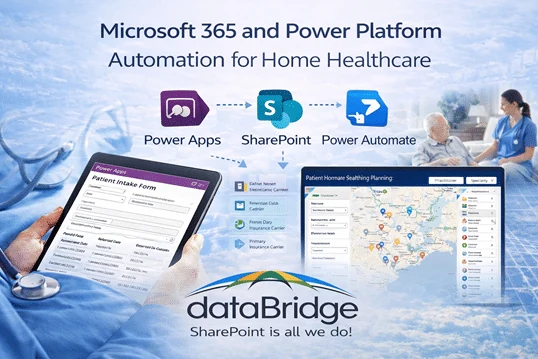
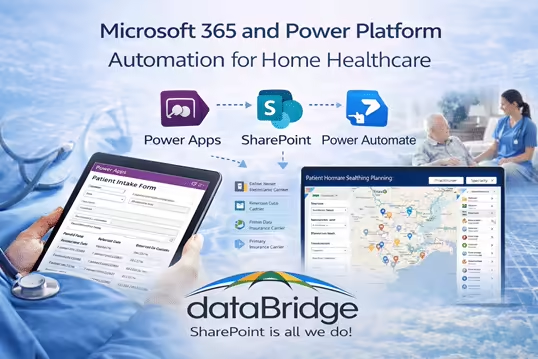
Power Platform automation architecture showing how Power Apps, SharePoint, and Power Automate support patient intake, workforce planning, and field operations for home healthcare providers.
Patient Intake Tracker
The first initiative replaced spreadsheet-based patient intake processes with a scalable application. The dataBridge team developed an integrated intake system consisting of:
- A Power Apps front-end application
- SharePoint lists and document libraries as the backend data platform
SharePoint was selected instead of Dataverse because the expected data volumes aligned well with SharePoint’s capabilities, while the platform’s built-in self-service tools allowed the client to extend the solution with minimal technical complexity. The new system provided:
- A centralized patient intake workflow
- Improved data accuracy and consistency
- A scalable data structure capable of supporting future growth
Staffing Deployment Tracker
To improve workforce planning, dataBridge built a second solution that provides a visual mapping interface for staffing coordination. The system includes:
- A Power Apps canvas application
- SharePoint lists to manage staffing and scheduling data
- Power Automate flows to integrate data from the EMR system
Leadership can now view staffing deployment across geographic areas on a map. The map interface offers:
- Zoom and pan capabilities
- Location pinning
- Filters based on patient needs and practitioner specialization
This tool significantly improved visibility into workforce planning and patient care coverage.
Business Development Tracker
The third solution helps AAHC’s business development team work more effectively in the field. The dataBridge team built a fully responsive mobile application that allows agents to:
- View customer and prospect information
- Update engagement details in real time
- Access data from phones, tablets, or desktops
The system ensures that information entered in the field immediately becomes available to leadership and operational teams.
How Power Platform Transformed Healthcare Workflows

Power Platform architecture illustrating how Power Apps, SharePoint, and Power Automate support healthcare process automation and HIPAA-aligned workflows.
This architecture allows healthcare organizations to automate patient intake, coordinate staffing, and enable mobile access while maintaining HIPAA-aligned security.
Results
The Microsoft 365 solutions built by dataBridge helped All About Home Care move several key operational processes away from spreadsheet-based workflows into integrated applications. Key results included:
- Improved visibility into patient intake and care coordination
- More efficient staffing deployment and scheduling
- Better collaboration between operations, clinical staff, and leadership
- Increased mobility for business development teams
- Reduced manual data entry and operational complexity
The solutions also established a scalable Microsoft 365 platform that can support future process automation initiatives.
Moving Healthcare Workflows Off Spreadsheets
Organizations in healthcare often begin with simple tools such as spreadsheets to manage operational processes. As the organization grows, those tools can become difficult to scale and maintain. Modernizing these workflows on the Microsoft 365 platform lets organizations improve efficiency, maintain compliance, and give staff tools that support both office and field operations.
If your organization is facing similar challenges with SharePoint, Microsoft 365 automation, or Power Platform solutions, dataBridge can help design a structured solution. Start a conversation, or explore more SharePoint consulting case studies and client success stories.
Related Resources
- SharePoint Governance Guide
- SharePoint Consulting Services
- Power Platform Consulting Services
- Power Automate Best Practices & Use Cases
- Copilot Readiness for SharePoint
What our clients say
Best consultants I have ever worked with! dataBridge was instrumental in helping AtSite launch its customer facing portal in SharePoint. Their quick responsiveness to changes during the design and development process, and deep knowledge of the SharePoint technology was critical to the success of the project. The team did a great job transferring SharePoint knowledge so AtSite could support and manage the portal post implementation.
Ryan Sober, Director of Technology at AtSite, shares how dataBridge’s SharePoint consulting expertise supported the successful design, development, and long-term management of their customer-facing SharePoint portal.
Work with dataBridge
Talk with a SharePoint consultant
20+ years and 1,741+ SharePoint projects, delivered by U.S.-based senior consultants. Free consultation.