
From Policy to Pilot to Purview Adoption
A SharePoint retention label rollout plan helps your organization move from retention policy to practical Microsoft Purview adoption without overwhelming users, site owners, or compliance teams.
That distinction matters.
Retention labels are powerful, but they can become confusing quickly. When the rollout starts with too many labels, unclear ownership, weak metadata, or no pilot plan, people apply labels inconsistently. Some users avoid them altogether.
Good retention does not start with a giant label catalog.
It starts with clear business decisions.
At dataBridge, we often see this during SharePoint governance, records management, document control, and Copilot readiness work. The organization knows retention matters. Legal, compliance, IT, and business leaders usually agree that content should not live forever.
Then the practical question appears:
How do we roll out retention labels in SharePoint without creating confusion?
That is where a structured SharePoint retention label rollout plan helps.
A rollout plan should define which labels matter, where to pilot them, how users will apply them, what metadata supports them, which content can be auto-labeled, and who owns the process after launch.
If your organization needs help turning Microsoft Purview retention policy into a practical SharePoint rollout, contact dataBridge to discuss your retention label strategy.
What Is a SharePoint Retention Label Rollout?
Quick Answer: A SharePoint retention label rollout plan defines how Microsoft Purview retention labels will be designed, tested, applied, monitored, and governed across SharePoint sites and libraries. The strongest rollout plans start with business goals, a practical label inventory, content mapping, a focused pilot, site owner training, reporting, exception handling, and phased adoption.
A SharePoint retention label rollout is the process of designing, testing, publishing, applying, governing, and improving retention labels across SharePoint content.
In Microsoft Purview, retention labels classify content and define how long it should be kept. They can also help determine what happens when the retention period ends. Microsoft explains that retention labels can apply retention settings at the item level, including documents in SharePoint, while retention policies usually apply broader settings at the site, mailbox, or location level.
For SharePoint, a rollout plan should answer practical questions:
- Which content types need retention labels?
- Which labels should users apply manually?
- Which labels should be applied automatically?
- Which SharePoint sites and libraries should be included first?
- Which labels may need disposition review later?
- Which metadata fields support labeling?
- Which owners approve label decisions?
- How will users know which label to choose?
- How will the organization monitor label adoption?
- How will exceptions be handled?
Retention labels should not be treated as a background compliance setting only.
They affect how people manage content every day. Before finalizing retention labels, teams should separate lifecycle controls from sensitivity controls. Use SharePoint sensitivity labels when the rollout question is protection, classification, site-level controls, or file-level protection rather than retention.
For the broader lifecycle strategy, SharePoint Records Management and Retention Strategy explains how retention fits into governance, records, ownership, and long-term content control. This article focuses on the rollout path that turns that strategy into SharePoint adoption.
Why Retention Label Rollout Planning Matters
Retention labels can fail even when they are technically configured correctly.
The issue is usually not Purview.
The issue is the rollout model.
A weak rollout may create:
- Too many label choices
- Confusing label names
- Inconsistent user application
- Labels that do not match content types
- Auto-apply rules that are too broad
- Records decisions without business ownership
- Site owners who do not understand their role
- Libraries with missing metadata
- Content that reaches disposition without clear review logic
- Reports nobody reviews
That creates a familiar problem.
The tool exists, but the operating model is weak.
A strong SharePoint retention label rollout plan helps your organization reduce confusion, improve compliance alignment, support defensible lifecycle decisions, and make Purview easier to manage over time.
It also supports AI readiness.
Copilot, search, and SharePoint agents perform better when stale, duplicate, unowned, and unmanaged content does not remain active by accident.
Retention labels do not solve every content problem. Still, they give organizations a structured way to connect content value, business risk, retention rules, and lifecycle decisions.
Retention Labels Are Not Sensitivity Labels or Permissions
Before rolling out retention labels, make sure stakeholders understand what they do.
Retention labels answer a lifecycle question:
How long should this content be kept, and what should happen next?
Sensitivity labels answer a protection question:
How should this content be secured, encrypted, marked, or protected?
Permissions answer an access question:
Who can see, edit, share, or manage this content?
Those differences matter during rollout.
If users confuse retention labels with sensitivity labels or permissions, they may apply the wrong control for the wrong reason. A confidential file may need a sensitivity label, limited permissions, and a retention label. Each control plays a different role.
The article Retention Labels vs Sensitivity Labels vs Permissions in SharePoint explains those differences in more detail. A retention label rollout should build on that understanding instead of assuming every user knows the control model.
A simple rule helps:
Retention is about lifecycle. Sensitivity is about protection. Permissions are about access.
When that message is clear, adoption improves.
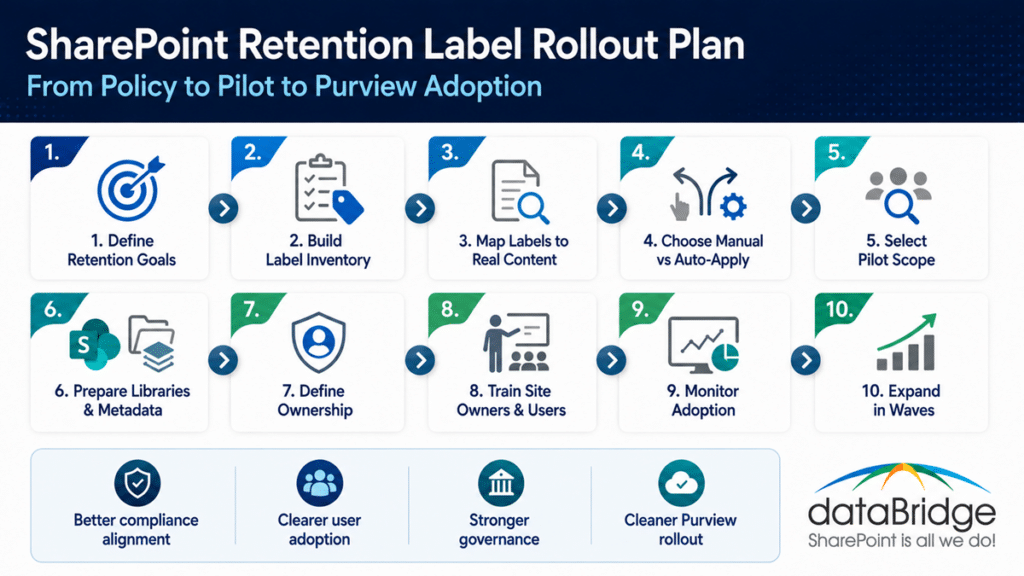
The Core SharePoint Retention Label Rollout Plan
A practical SharePoint retention label rollout plan follows a clear sequence.
Do not start by publishing labels tenant-wide.
Start with the decisions that make labels usable.
1. Define the Retention Policy Goals
Start with the business outcome.
Do not start inside Microsoft Purview.
Microsoft supports automatically applying retention labels based on conditions such as sensitive information types, keywords or searchable properties, trainable classifiers, and cloud attachments stored in SharePoint or OneDrive.
A retention label rollout should support clear goals, such as:
- Keeping required records for the correct period
- Reducing uncontrolled content growth
- Supporting legal, regulatory, or contractual obligations
- Improving defensible deletion
- Separating active content from retained content
- Supporting eDiscovery readiness
- Improving SharePoint governance
- Reducing stale content before Copilot rollout
- Giving content owners a clear lifecycle process
Different goals require different rollout choices.
A heavily regulated organization may need formal records labels and disposition review. A professional services firm may need project lifecycle labels. A nonprofit may need policy, finance, HR, and grant-related retention categories.
The goal should shape the rollout.
If the goal is vague, the label model becomes vague too.
In real SharePoint environments, retention projects struggle when teams try to solve every lifecycle problem at once. The better move is to define the first business outcome clearly, prove the model, and expand with control.
2. Build a Practical Retention Label Inventory
A label inventory is the working list of labels your organization plans to use.
This should not become a long catalog nobody understands.
A practical inventory should include:
- Label name
- Business description
- Content category
- Retention period
- Retention trigger
- End-of-retention action
- Manual or automatic application
- Eligible SharePoint locations
- Business owner
- Compliance or records owner
- User-facing instructions
- Disposition review requirement
- Pilot scope
- Reporting owner
Label names matter more than many teams expect.
A label called “FIN-RET-07” may work for records staff, but it will confuse everyday users. A label called “Finance Records – 7 Years” is easier to understand.
Clarity beats clever taxonomy.
The label inventory should be small enough to explain and strong enough to govern. Microsoft Purview also includes file plan capabilities that help organizations organize and manage retention labels using descriptors such as business function, category, authority type, and citation.
3. Map Labels to Real SharePoint Content
Retention labels should reflect real content, not abstract policy language.
Map labels to SharePoint content types and locations, such as:
- Policies
- SOPs
- Contracts
- HR files
- Finance records
- Project closure records
- Client deliverables
- Board materials
- Audit evidence
- Regulated procedures
- Templates
- Forms
- Department guidance
- Controlled documents
This mapping step prevents overengineering.
It also exposes gaps.
For example, your policy may require a seven-year retention category, but SharePoint may not have a clean way to identify which content belongs in that category. The right metadata may be missing. Libraries may mix unrelated content. Owners may not agree which documents are records.
Those issues should be solved before broad rollout.
The SharePoint Metadata Strategy Guide is important here because metadata often becomes the bridge between business retention categories and SharePoint content. Without usable metadata, retention labels become harder to apply consistently.
4. Decide Where Manual Labels Make Sense
Manual retention labels work best when users or owners can make a reliable decision.
They are useful when human judgment matters.
Manual labels may work for:
- Project closure documents
- Client deliverables
- Department records
- Approved policies
- Contract files
- Formal procedures
- Board materials
- Specialized business records
However, manual labels can fail when users are unsure what to choose.
Before relying on manual application, ask:
- Can users understand the label names?
- Do owners know which content qualifies?
- Are instructions clear?
- Are there too many choices?
- Will labels interrupt daily work?
- Is the wrong label easy to apply?
- Who reviews label usage?
Manual labeling needs guidance.
It should not rely on users interpreting records policy on their own.
A good rollout may use manual labels in controlled libraries where owners understand the content and the business risk. For broad collaboration spaces, manual labeling may be too inconsistent.
5. Identify Auto-Apply Candidates
Auto-apply rules can make retention label adoption more consistent.
They can also create problems when used too broadly.
Auto-apply may work well when content has clear signals, such as:
- Specific metadata values
- Document types
- Content types
- Keywords
- Sensitive information types
- Trainable classifiers
- Site or library location
- Event-based triggers
- Structured naming patterns
Good candidates include content that is easy to identify and consistently stored.
Poor candidates include mixed libraries, vague document sets, inconsistent file names, or content with unclear ownership.
Auto-apply is not magic.
It depends on signals.
If SharePoint content lacks metadata, structure, or predictable location, auto-apply rules may mislabel content or miss important items.
A strong SharePoint retention label rollout plan should test auto-apply rules in a pilot before expanding them. That protects the organization from applying lifecycle rules too broadly.
6. Choose the Right Pilot Scope
The pilot is where the rollout becomes real.
Do not skip it.
A pilot should be narrow enough to control and meaningful enough to prove the model.
Good pilot candidates include:
- One policy library
- One contract library
- One HR record area
- One project closeout process
- One regulated document library
- One department with engaged owners
- One records-heavy business process
- One controlled document library
Avoid starting with the most chaotic area.
A pilot should test the model, not punish the project team.
Choose a site or library where owners are available, content is valuable, and the retention decisions are clear enough to validate.
The best pilots answer practical questions:
- Do users understand the label names?
- Can owners apply labels correctly?
- Does metadata support the process?
- Are auto-apply rules accurate?
- Are reports useful?
- Are exceptions manageable?
- Does the process create too much overhead?
- What training is needed before expansion?
A pilot should produce decisions, not just feedback.
7. Prepare SharePoint Libraries Before Labeling
Retention labels work better when SharePoint libraries are structured well.
A messy library makes rollout harder.
Before applying labels, review:
- Library purpose
- Content types
- Metadata fields
- Required columns
- Folder structure
- Permissions
- Versioning
- Approval status
- Owners
- Review dates
- Sensitive content
- Duplicate content
- Stale content
Some libraries may need cleanup first.
Others may need to be split, redesigned, or aligned to a stronger document control model.
For controlled policies, SOPs, procedures, and audit-sensitive files, SharePoint Document Control is a related foundation because retention labels should support the document lifecycle instead of sitting apart from it.
Retention should not be added after the library becomes unmanageable.
It should be part of the library design.
8. Define Ownership for Labels and Content
Retention label rollout needs two kinds of ownership.
First, someone must own the label model.
Second, someone must own the content.
Those roles are related, but they are not always the same.
A strong rollout may include:
- Records owner
- Compliance owner
- Legal stakeholder
- SharePoint owner
- Microsoft Purview administrator
- Department content owner
- Site owner
- Library owner
- Business process owner
- Reviewer or approver
Do not make IT the owner of every retention decision.
IT can configure labels, publish policies, and support reporting. However, IT usually should not decide whether a finance record, HR file, contract, or regulated procedure must be retained for a specific business reason.
Business ownership makes retention defensible.
Governance turns that ownership into a repeatable process.
For highly regulated organizations, SharePoint Site Architecture for Regulated Industries explains why site structure, ownership, permissions, and compliance expectations need to work together. Retention label rollout should align with that architecture instead of operating as a disconnected compliance task.
9. Create User Guidance That People Can Actually Follow
Retention label guidance should be short, clear, and specific.
Most users do not want to interpret a records schedule during daily work.
Give them practical help.
Useful guidance may include:
- What each label means
- When to use each label
- When not to use each label
- Examples of eligible content
- Who to ask for help
- What happens after a label is applied
- Whether the label can be changed
- Whether the label declares a record
- What users should do with uncertain content
Avoid compliance language that only specialists understand.
For example, “Apply this label to final signed client agreements that must be retained for seven years after contract end” is more useful than “Apply according to corporate retention schedule section 4.2.”
Good guidance reduces mislabeling.
It also builds trust.
If users feel unsure, they will avoid the label or choose whatever seems safest. That often means content gets over-retained.
Over-retention feels cautious, but it creates cost, clutter, and discovery risk.
10. Train Site Owners Before General Users
Site owners need deeper training than general users.
They are the first line of retention adoption in SharePoint.
A site owner should understand:
- Which labels apply to the site
- Which libraries are included
- Which content should be labeled
- Which labels are manual
- Which labels are automatic
- How to spot mislabeling
- How to handle exceptions
- Who approves changes
- How to read basic reports
- When to escalate questions
General users may only need simple guidance.
Site owners need enough context to govern the content area.
This is where many rollouts fail.
The training focuses on end users, but the owners are not prepared to support them.
A SharePoint retention label rollout plan should train owners first. Then user training becomes easier and more reliable.
11. Align Retention Labels With DLP, eDiscovery, and Disposition
Retention labels do not work in isolation.
They sit inside a broader Microsoft Purview and SharePoint governance ecosystem.
A strong rollout should connect retention labels with:
- Data loss prevention
- Sensitivity labels
- Permissions
- eDiscovery
- Legal hold processes
- Records management
- Disposition review
- Audit needs
- Copilot readiness
- Content lifecycle governance
For example, Microsoft Purview DLP for SharePoint, Teams, OneDrive, and Copilot focuses on preventing sensitive information from being shared or exposed in risky ways. Retention labels focus on how long content should be kept and what happens next.
Both controls may apply to the same content.
The same is true for investigations. Microsoft Purview eDiscovery for SharePoint and Teams depends on the organization being able to find, preserve, and review content when legal or compliance needs arise.
Retention labels can support that lifecycle, but they should not conflict with legal hold or investigation requirements.
Disposition is the next stage. Microsoft explains that disposition review is configured on a retention label and begins when labeled content reaches the end of its retention period. From there, Microsoft Purview Disposition Reviews for SharePoint should explain how reviewers decide whether content can be deleted, retained longer, relabeled, or escalated.
The rollout plan comes before that.
Disposition review is what happens later when the label reaches the end of the road.
12. Decide How Exceptions Will Be Handled
Every retention label rollout needs an exception process.
Without one, users invent their own.
Exceptions may include:
- Content that fits more than one label
- Content under investigation
- Content tied to an active contract
- Content with uncertain ownership
- Content that should be retained longer
- Content that should not be labeled yet
- Content mislabeled during pilot
- Content in a mixed-purpose library
- Content subject to legal hold
- Content moved from another system
An exception process should define:
- Who reviews the question
- What information is needed
- How decisions are documented
- Whether the label can be changed
- Whether legal or compliance must approve
- How exceptions are reported
- When the exception should be revisited
A good exception process prevents two extremes.
One extreme is user confusion. The other is over-escalation.
Not every labeling question needs a committee.
However, some decisions need legal, records, or compliance input.
The rollout plan should define the difference.
13. Monitor Label Adoption After Launch
Publishing labels is not the finish line.
Adoption needs monitoring.
Review:
- Which labels are being used
- Which sites have label activity
- Which libraries have no label usage
- Which labels appear overused
- Which labels appear underused
- Which labels are being changed
- Which content remains unlabeled
- Which auto-apply rules are working
- Which users or owners need help
- Which exceptions repeat
Reports should lead to action.
If a label is not being used, find out why. Maybe the name is unclear. Maybe the label does not match the content. Perhaps users do not know when to apply it. In some cases, the label may not be needed at all.
A SharePoint retention label rollout plan should include post-launch review meetings.
The first 30 to 90 days usually reveal the most useful lessons.
14. Expand in Waves
A retention label rollout should expand in waves.
That gives your organization time to learn, adjust, and build trust.
A typical rollout pattern may look like this:
- Wave 1: Pilot one or two high-value libraries.
- Wave 2: Expand to similar libraries or departments.
- Wave 3: Add additional content categories.
- Wave 4: Introduce auto-apply where signals are reliable.
- Wave 5: Add disposition review where needed.
- Wave 6: Formalize reporting and recurring governance.
Do not rush to label everything.
That creates noise.
A slower, structured rollout usually creates better adoption and fewer cleanup problems.
The goal is not maximum label coverage on day one.
The goal is correct, governed, and sustainable label adoption.
15. Build a Recurring Governance Cadence
Retention labels need ongoing governance.
A recurring cadence should review:
- Label usage
- Label accuracy
- Auto-apply performance
- Exceptions
- Owner feedback
- New content types
- Retention schedule changes
- Legal or regulatory changes
- Disposition volume
- User confusion
- Reporting trends
- Purview configuration changes
A quarterly review works for many organizations. High-risk environments may need more frequent reviews.
The cadence matters because SharePoint changes.
New sites appear. Teams change. Business processes evolve. Regulations shift. Content owners leave. Labels that made sense last year may need adjustment.
Retention labels are not a set-and-forget control.
They are part of a living governance model.
Common SharePoint Retention Label Rollout Mistakes
Retention label projects often fail in predictable ways.
Most mistakes happen before broad adoption begins.
1. Creating Too Many Labels
A large label catalog looks complete.
It often creates confusion.
Users need labels they can understand and apply.
2. Starting Without a Pilot
A pilot reveals gaps before they spread.
Skipping the pilot usually pushes confusion into production.
3. Using Compliance Language as User Guidance
Users need plain-language instructions.
Policy language may be accurate but still hard to apply.
4. Ignoring Metadata Dependencies
Auto-apply rules and label accuracy often depend on metadata.
Weak metadata creates weak retention decisions.
5. Treating Labels as an IT Configuration Task
Retention is a business and compliance decision.
IT can configure the system, but the business must own the meaning.
6. Labeling Mixed Libraries Too Early
Mixed libraries create uncertainty.
Clean structure should come before broad label rollout.
7. Forgetting Site Owners
Site owners carry the rollout after launch.
If they are not trained, adoption suffers.
8. Skipping Reporting
You cannot improve what nobody monitors.
Label reporting should produce decisions, not just dashboards.
9. Ignoring Disposition Planning
Some labels eventually lead to deletion decisions.
Plan for that before the first review queue appears.
10. Rolling Out Everything at Once
Big-bang rollout increases risk.
Waves create time to learn.
A Practical SharePoint Retention Label Rollout Checklist
Use this checklist before publishing retention labels broadly across SharePoint.
- Define the business goals for retention labels.
- Build a practical label inventory.
- Map labels to real SharePoint content.
- Confirm retention periods and triggers.
- Decide which labels are manual.
- Identify auto-apply candidates.
- Select a focused pilot scope.
- Prepare libraries before labeling.
- Confirm content owners and label owners.
- Write plain-language user guidance.
- Train site owners before general users.
- Align labels with DLP, eDiscovery, and disposition.
- Define exception handling.
- Monitor adoption after launch.
- Expand in waves.
- Review labels on a recurring cadence.
This checklist works because it focuses on adoption, not only configuration.
A technically correct label model can still fail if users do not understand it, owners do not govern it, or reports do not lead to action.
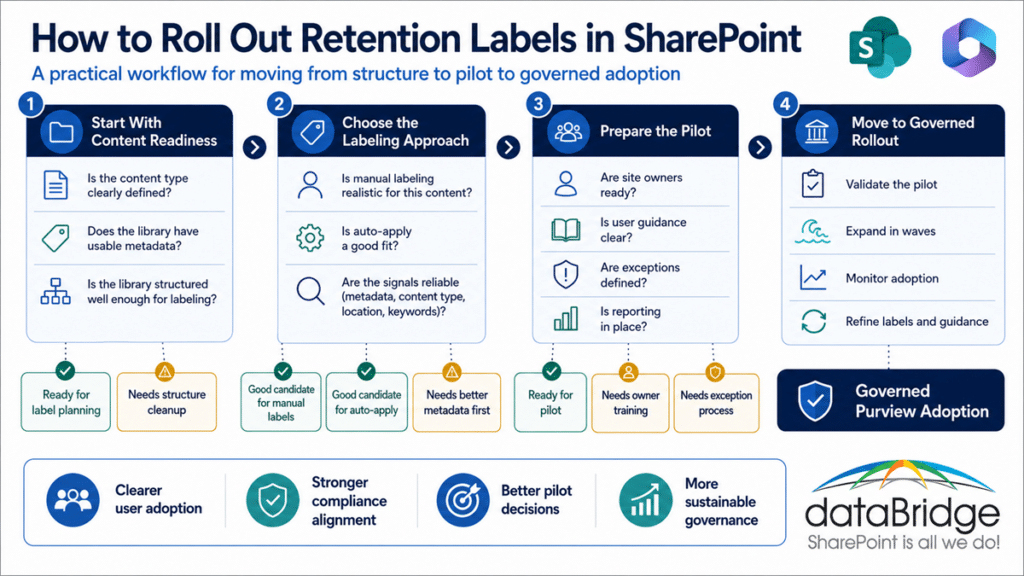
How Retention Labels Support Copilot Readiness
Retention labels are not a Copilot feature.
Still, they support Copilot readiness.
Why?
Because Copilot depends on the content environment it can access. If SharePoint contains years of stale, duplicate, expired, or unowned content, AI experiences may surface that weakness.
Retention labels help define what should stay, what should move through lifecycle controls, and what may eventually be reviewed for disposition.
That does not mean old content should be deleted casually.
It means old content should not stay active by accident.
Strong retention label adoption can support:
- Cleaner content lifecycle decisions
- Better records control
- Reduced stale content
- Stronger compliance alignment
- Better governance visibility
- More trusted SharePoint search
- Safer AI readiness planning
- Clearer ownership of retained content
Copilot readiness is not only about permissions.
It is also about content quality, lifecycle management, and trust.
A strong SharePoint retention label rollout plan helps make that work real.
How dataBridge Approaches SharePoint Retention Label Rollout
dataBridge approaches retention label rollout as a SharePoint governance and Microsoft 365 adoption challenge.
The goal is not just to configure Purview.
The goal is to build a retention model people can understand, apply, and govern.
Our approach usually focuses on five areas.
1. Retention and Records Discovery
We identify which SharePoint content needs lifecycle control.
This includes policies, SOPs, contracts, project records, HR files, finance records, client deliverables, and regulated content.
In many environments, this discovery work reveals that the written retention policy and the actual SharePoint structure do not fully line up yet.
That gap should be addressed before broad rollout.
2. SharePoint Structure and Metadata Review
We review whether sites, libraries, content types, and metadata can support the retention label model.
If the structure is weak, the label rollout will be harder to sustain.
A retention label should sit on top of a usable content model, not compensate for a messy one.
3. Label Inventory and Pilot Planning
We help define a practical label catalog, pilot scope, manual label guidance, and auto-apply candidates.
The rollout should start small enough to manage and meaningful enough to prove.
A good pilot gives the organization a better model, not just a list of complaints.
4. User and Owner Adoption
We prepare site owners, content owners, and users for the label rollout.
That includes plain-language guidance, examples, decision rules, and support paths.
Adoption improves when people understand both the label and the reason behind it.
5. Governance and Purview Adoption
We connect retention labels to reporting, exception handling, eDiscovery, DLP, disposition review, and long-term SharePoint governance.
This helps the model survive beyond launch.
A configuration project ends when the setting is turned on.
A governance model continues after people start using it.
If your organization needs a practical SharePoint retention label rollout plan, contact dataBridge to discuss your Microsoft Purview and SharePoint governance needs.
When to Get Help With a SharePoint Retention Label Rollout
You may need help if your organization understands retention labels but is unsure how to roll them out.
Common signs include:
- The label catalog is too large or unclear.
- Users do not know which label to apply.
- Site owners are not ready to support adoption.
- Libraries mix records, drafts, policies, and working files.
- Metadata is too weak for auto-apply rules.
- Legal, compliance, and IT disagree on label ownership.
- Retention periods are defined but not mapped to SharePoint content.
- Auto-labeling feels risky.
- Disposition review has not been planned.
- Reports exist but nobody reviews them.
- Copilot readiness has exposed stale or unmanaged content.
These are not just configuration problems.
They are rollout problems.
The better answer is a structured plan that moves from policy to pilot to Purview adoption.
If your organization needs help designing that path, contact dataBridge to build a SharePoint retention label rollout plan that is practical, governed, and sustainable.
Frequently Asked Questions About SharePoint Retention Label Rollout
What Is a SharePoint Retention Label Rollout?
A SharePoint retention label rollout is the process of designing, testing, publishing, applying, monitoring, and governing Microsoft Purview retention labels across SharePoint sites, libraries, and content types.
Why Do Retention Labels Matter in SharePoint?
Retention labels help organizations control how long SharePoint content is kept and what happens at the end of its lifecycle. They support records management, compliance, defensible deletion, and long-term governance.
Should Retention Labels Be Applied Manually or Automatically?
Both approaches can work. Manual labels are useful when business judgment is needed. Automatic labels work best when content has reliable signals, such as metadata, content type, location, sensitive information type, or consistent structure.
How Many Retention Labels Should We Create?
Create the fewest labels that can support your business, legal, regulatory, and operational needs. Too many labels create confusion. A smaller label catalog with clear ownership and guidance usually works better.
What Should Be Included in a Retention Label Inventory?
A retention label inventory should include the label name, business description, content category, retention period, retention trigger, end-of-retention action, owner, eligible SharePoint locations, user guidance, and reporting needs.
Why Is a Pilot Important Before Broad Rollout?
A pilot helps validate label names, user guidance, metadata dependencies, auto-apply rules, reporting, and exception handling before labels are deployed more broadly. It reduces rollout risk.
How Do Retention Labels Relate to Disposition Reviews?
Some retention labels can trigger disposition review at the end of the retention period. Disposition review is the later decision point where reviewers approve deletion, extend retention, relabel content, or escalate the decision.
Do Retention Labels Replace Permissions?
No. Retention labels do not replace permissions. Retention labels manage lifecycle. Permissions manage access. Sensitive content may need both correct retention labels and appropriate permissions.
How Do Retention Labels Support Copilot Readiness?
Retention labels support Copilot readiness by helping organizations manage stale, duplicate, expired, or unmanaged content. They improve lifecycle governance, which supports cleaner search and more trusted AI experiences.
Who Should Own Retention Label Governance?
Retention label governance should usually involve records, compliance, legal, IT, SharePoint owners, and business content owners. IT can configure labels, but business and compliance stakeholders should own retention meaning and decisions.
Final Thought: Retention Label Rollout Is an Adoption Plan, Not Just a Purview Setting
A SharePoint retention label rollout plan should make retention easier to understand, apply, and govern.
That is the point.
Microsoft Purview gives your organization powerful controls. SharePoint gives those controls a content layer. Governance turns both into a working model.
The rollout plan is what connects them.
Start with clear goals. Build a practical label inventory. Map labels to real content. Pilot with the right owners. Train users. Monitor adoption. Then expand in waves.
That approach gives your organization a stronger path from policy to pilot to Purview adoption.
If your organization wants to roll out retention labels across SharePoint without creating confusion or unnecessary overhead, contact dataBridge to build a practical SharePoint retention label rollout plan.
Reviewed By