
Written by Michael Fuchs, Founder and CEO of dataBridge. Reviewed by Kelli Ann Morrison, Senior Solution Architect and Migration Specialist, for SharePoint Online, Microsoft 365, intranet architecture, migrations, metadata, automation, governance, and long-term platform sustainability accuracy.
Published: May 23, 2026
Last reviewed: May 23, 2026
Publishing, Review, and Retirement Rules for Modern Pages
SharePoint page governance is the operating model that keeps intranet pages, news posts, department content, and modern pages useful after launch.
That matters because intranet content does not stay healthy on its own.
A SharePoint intranet usually does not fail because pages are easy to publish. It fails when publishing becomes easier than ownership.
A new intranet may launch with clean navigation, polished branding, strong page templates, and clear messaging. Then everyday publishing begins. Departments post updates. Owners change roles. News gets old. Pages stay live long after their purpose changes. Duplicate guidance appears. Search results become noisy.
Eventually, employees ask the question every intranet team wants to avoid:
“Which page should I trust?”
That is not only a design problem.
It is a governance problem.
At dataBridge, we often see this after organizations invest in a new SharePoint intranet or portal. The launch creates momentum, but the content model still needs a long-term operating rhythm. Without that rhythm, even a well-designed intranet can slowly turn into a cluttered publishing environment.
SharePoint page governance defines who can publish, who owns each page, when content gets reviewed, how templates are used, what happens to stale pages, and how modern pages support search, Copilot, and employee trust.
A strong intranet is not just built well.
It is maintained well.
If your organization needs help managing intranet pages after launch, contact dataBridge to discuss a practical SharePoint page governance model.
SharePoint page governance works best when teams treat publishing, review, updates, and retirement as one continuous lifecycle.
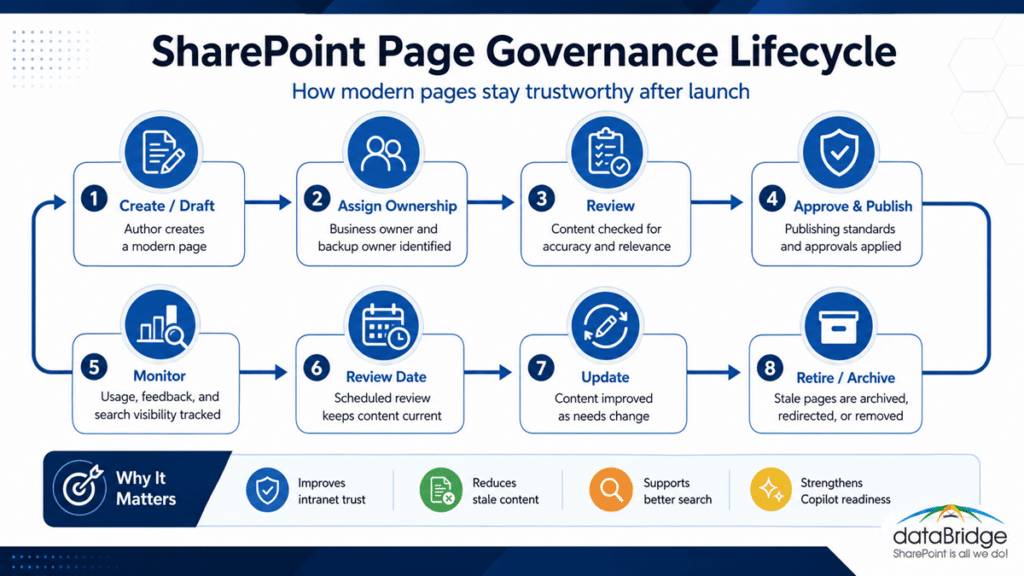
What Is SharePoint Page Governance?
SharePoint page governance is the set of rules, roles, and review habits used to manage modern SharePoint pages and news content over time.
It focuses on what happens after pages are created.
A practical SharePoint page governance model should answer these questions:
- Who can create pages?
- Who can publish news?
- Who owns each page after launch?
- Which templates should authors use?
- Which pages need approval?
- How often should content be reviewed?
- What happens when a page becomes stale?
- When should a page be retired?
- How should audience targeting be managed?
- How do pages support search and Copilot?
- Who monitors content quality after launch?
This is different from intranet design.
The design defines the experience. Governance keeps that experience trustworthy.
For the broader planning side, How to Design and Build a Modern SharePoint Intranet explains how strategy, architecture, navigation, security, adoption, and governance shape a modern intranet. This article focuses more narrowly on how to manage modern pages and news once the intranet is live.
That focus matters.
An intranet launch is a milestone. Page governance is the habit that protects the intranet after launch.
When the problem is not just ongoing page review but a cluttered existing intranet, a focused SharePoint intranet redesign can rebuild the structure, templates, ownership model, content review process, and relaunch plan that page governance depends on.
Why SharePoint Page Governance Matters
Modern SharePoint pages are easy to create.
That is useful.
It can also create risk.
When too many people publish without standards, an intranet can fill with duplicate pages, outdated news, inconsistent layouts, unclear ownership, and content that no longer reflects the business.
The issue usually appears slowly.
At first, one page is outdated. Then a department posts a new version without retiring the old one. A news post becomes a permanent reference. A page template gets modified locally. Another team copies content from an old site. Search starts returning conflicting results.
Employees do not describe this as “page governance failure.”
They simply say, “I can’t find the right information.”
A strong SharePoint page governance model helps your organization:
- Keep intranet pages current
- Reduce duplicate guidance
- Clarify page ownership
- Improve publishing quality
- Support consistent page templates
- Retire stale content before it damages trust
- Improve SharePoint search results
- Support better Copilot answers
- Keep department pages aligned with intranet standards
- Make content ownership visible and manageable
Page governance is not bureaucracy.
It is how you protect employee trust in the intranet. If stale pages, unclear owners, or weak review habits are part of a larger intranet governance issue, use the SharePoint Governance Maturity Scorecard to evaluate page ownership, adoption, lifecycle, search, and support within the broader governance model.
SharePoint Page Governance vs. Intranet Governance
SharePoint page governance is part of intranet governance, but it is more specific.
Intranet governance covers the overall model for ownership, navigation, security, branding, adoption, permissions, site lifecycle, content standards, and operating responsibilities.
Page governance focuses on the publishing layer.
It defines how modern pages, news posts, landing pages, knowledge pages, department pages, and resource pages stay accurate over time.
A SharePoint Intranet Consulting Services engagement may define the broader strategy, structure, and launch plan. SharePoint page governance makes sure the day-to-day publishing model supports that strategy after launch.
When the broader structure still needs to be defined, SharePoint intranet architecture and governance helps establish the hub model, navigation, permissions, ownership, lifecycle rules, and governance standards that page governance depends on.
Both matter.
A good intranet can still fail if pages become unowned, stale, or inconsistent.
SharePoint Page Governance Is Not Knowledge Base Design
A SharePoint knowledge base and SharePoint page governance overlap, but they are not the same thing.
A knowledge base focuses on structured answers, FAQs, SOPs, policies, and help content.
Page governance focuses on how pages and news are created, maintained, reviewed, retired, and governed across the intranet.
A SharePoint Knowledge Base Design strategy may define article templates, answer structure, knowledge ownership, and review cadence. Page governance should support that model, but it also applies to broader intranet content like department landing pages, leadership updates, campaign pages, service pages, and news posts.
The difference is important.
Not every page is a knowledge article. Still, every important page needs governance.
A practical SharePoint page governance model usually comes down to a defined set of repeatable controls that keep modern pages accurate, trusted, and useful over time.
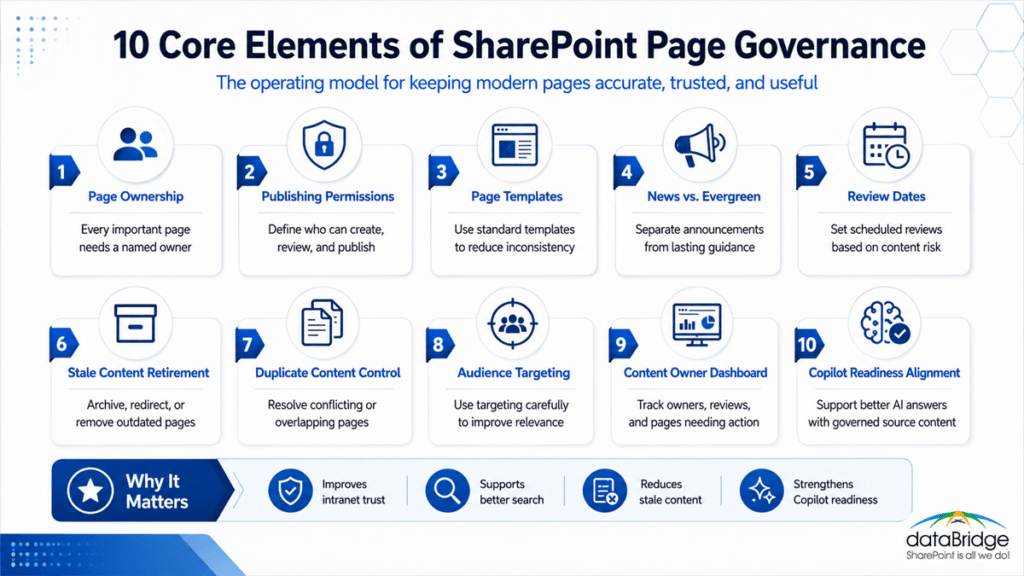
The Core SharePoint Page Governance Model
A practical SharePoint page governance model includes ten operating disciplines.
Each one helps modern SharePoint pages stay useful after the intranet goes live.
1. Define Page Ownership
Every important SharePoint page needs an owner.
Ownership should not be implied.
A page owner should know what the page is for, who it serves, when it needs review, and what should happen when the content changes.
Useful page ownership fields may include:
- Page owner
- Department owner
- Content reviewer
- Approver
- Backup owner
- Business process owner
- Last reviewed date
- Next review date
- Page status
This does not mean every quick news post needs a complex ownership model.
It means pages employees rely on should not be anonymous.
A page without an owner becomes stale by default.
In many intranet environments, stale content is not caused by bad intentions. It happens because nobody knows who is responsible for the page anymore.
That problem is avoidable.
When missing ownership appears across many intranet pages, use the SharePoint Intranet Redesign Readiness Worksheet to decide whether the issue is page governance alone or a larger redesign, restructure, or rebuild decision.
2. Define Who Can Publish
Publishing permissions should match the importance of the content.
Some pages can be created by trained department authors. Others need review before they go live.
A strong publishing model may include:
- Page authors
- News authors
- Department publishers
- Page reviewers
- Site owners
- Intranet owners
- Communications reviewers
- Compliance reviewers
- Final approvers
Do not give broad publishing access just because SharePoint makes publishing easy.
Easy publishing does not mean unmanaged publishing.
For intranet content, the question is not only “Can someone publish?”
The better question is, “Should this person publish this type of content without review?”
A page governance model should define the answer before content quality starts drifting.
That question gets sharper with a new page type in the mix, which is why what to govern before enabling HTML pages walks through the security, accessibility, brand, and ownership checks a raw or Copilot-built page needs.
3. Use Standard Page Templates
Templates reduce inconsistency.
They also make pages easier to scan, govern, and maintain.
A SharePoint page template should help authors create consistent content without reinventing the layout every time.
Common page templates may include:
- Department landing page
- Service page
- Policy summary page
- News post
- Leadership update
- Event page
- Resource page
- Knowledge article
- Process overview
- FAQ page
- Campaign page
A good template defines the structure before the author starts writing.
That may include:
- Page title format
- Short summary
- Audience
- Owner
- Related links
- Call to action
- Contact information
- Review date
- Related policy or document
- Supporting resources
A SharePoint Branding, UX & Page Template Design strategy should make page templates useful, not just attractive. Visual consistency matters, but governance consistency matters more.
The visual side has a governed home of its own now. Managing brand assets in the SharePoint Brand Center puts approved fonts, colors, logos, and themes in one place with a named owner, which is the same ownership rule this model applies to pages.
Templates should guide behavior.
If authors ignore the template because it is too complicated, the template is not working.
4. Separate News From Evergreen Pages
News posts and evergreen pages serve different purposes.
News is timely.
Evergreen pages are meant to stay useful over time.
When organizations confuse the two, old news posts often become accidental guidance. Employees find them in search months later and treat them like current policy.
That creates avoidable confusion.
A SharePoint page governance model should define:
- What qualifies as news
- How long news remains relevant
- When news should link to an evergreen page
- When news should be archived
- Whether news should appear in search long term
- Who owns news content after publication
- How outdated announcements are handled
A good rule helps:
Use news to announce change. Use pages to preserve guidance.
For example, a benefits enrollment announcement can be a news post. The standing benefits instructions should live on an evergreen page.
That distinction protects search quality.
It also helps Copilot and SharePoint agents rely on better source content.
It also sets up measurement. When news is grouped deliberately, Campaigns in SharePoint can roll a related set of posts into one analytics view, so a comms team sees whether the whole push landed instead of reading page views one post at a time.
5. Add Review Dates to Important Pages
A page can look polished and still be outdated.
That is why review dates matter.
Important SharePoint pages should include a review cadence based on content risk and change rate.
Review schedules may look like this:
- Quarterly for high-change operational pages
- Twice per year for department service pages
- Annually for stable policy summaries
- Event-based review after process, system, or ownership changes
- Immediate review after repeated user confusion
Review dates should not be decorative metadata.
They should drive action.
A page owner dashboard, list view, or review report should show which pages are due, overdue, or missing owners.
This is where page governance becomes practical.
If owners cannot see what needs attention, review dates will not help.
6. Retire Stale Pages Before They Pollute Search
Stale pages are one of the biggest threats to intranet trust.
They also affect search and AI readiness.
An outdated page may still appear in search results. It may still be linked from other pages. Users may still have access to it. Copilot may also reference content users can access, even when the content is old or poorly governed.
That does not mean every stale page should be deleted immediately.
It means stale pages need decisions.
A stale page may need to be:
- Updated
- Assigned to a new owner
- Merged with another page
- Retired
- Redirected
- Archived
- Removed from navigation
- Replaced with a current page
- Hidden from general discovery
- Retained for compliance reasons
A SharePoint Search Governance model should connect directly to page governance because stale pages can weaken search trust. If employees keep finding outdated content, they stop trusting the intranet.
Retirement is not cleanup.
It is part of governance.
For a broader map of the related governance topics that support page quality, the SharePoint governance resource center connects page governance with search, provisioning, permissions, records, external sharing, lifecycle, and Copilot readiness.
7. Control Duplicate and Conflicting Pages
Duplicate pages make employees choose.
That is rarely good.
Sometimes duplicates are harmless. Other times, they create conflicting guidance.
Duplicate page issues often happen when:
- Departments copy pages from old sites
- News posts become permanent references
- Pages are recreated instead of updated
- Multiple departments explain the same process
- Legacy content is migrated without review
- Page owners do not know a newer page exists
- Teams create local versions of enterprise guidance
A page governance model should define a duplicate-content process.
That process should answer:
- Which page is authoritative?
- Who owns the duplicate?
- Should the pages be merged?
- Should one page be retired?
- Should the page redirect to another source?
- Should enterprise guidance override local guidance?
- Does the duplicate reveal a larger ownership issue?
A duplicate page is often a symptom.
The root problem is usually unclear authority.
A SharePoint Source of Truth Model helps resolve that problem by defining which content should be treated as the trusted answer before search, Copilot, or agents rely on it.
8. Use Audience Targeting Carefully
Audience targeting can improve relevance.
It can also hide content in ways that confuse users.
Use audience targeting when different groups need different experiences, such as:
- Managers
- Field employees
- Departments
- Locations
- Regions
- New hires
- Executives
- Project teams
- Role-based audiences
However, targeting should not become a substitute for good navigation or permissions.
Audience targeting changes what content appears to users in certain experiences. It does not automatically solve ownership, search, or governance problems.
A page governance model should define:
- Which pages can use audience targeting
- Who approves targeting rules
- How audiences are maintained
- Whether content should still be searchable
- What happens when someone belongs to multiple audiences
- How targeted content is reviewed over time
Use targeting to improve relevance.
Do not use it to hide a messy structure.
9. Create a Content Owner Dashboard
Page governance needs visibility.
A content owner dashboard can help intranet managers and site owners see what needs attention.
The dashboard may show:
- Pages by owner
- Pages with no owner
- Pages due for review
- Pages past review date
- News posts older than a defined period
- Pages with low engagement
- Pages with high search traffic
- Pages missing metadata
- Pages marked for retirement
- Duplicate pages under review
- Pages pending approval
- Recently updated pages
This dashboard does not need to be complicated.
It needs to help owners act.
A page governance dashboard should answer simple questions:
- What needs review?
- What has no owner?
- What should be retired?
- What is getting traffic?
- What is creating confusion?
- What content supports important employee tasks?
If the dashboard only reports activity, it is not enough.
Good dashboards support decisions.
10. Connect Page Governance to Copilot Readiness
Copilot readiness is not only about permissions.
It is also about content quality.
Modern SharePoint pages can become important source material for employees, search, Copilot, and SharePoint agents. If those pages are current, structured, owned, and reviewed, they can support better answers. If they are stale, duplicated, unowned, or poorly titled, AI experiences may expose that weakness faster.
That is why Copilot Readiness for SharePoint should include page governance.
A Copilot-ready page should usually have:
- Clear title
- Useful summary
- Accurate content
- Visible owner
- Current review date
- Appropriate permissions
- Strong internal links
- Clear audience
- Related source documents
- Retired content handled properly
- No duplicate competing page
Copilot does not make weak content stronger.
It makes weak content more visible.
That is why page governance matters more now than it did in older intranet environments.
SharePoint Page Governance Roles and Responsibilities
Page governance works best when roles are clear.
If everyone can publish but nobody owns maintenance, the intranet will eventually drift.
A practical SharePoint page governance model may include these roles.
Intranet Owner
The intranet owner oversees the overall publishing model, governance standards, page quality expectations, and long-term content health.
This role often works across communications, IT, and business stakeholders.
Site Owner
The site owner manages the SharePoint site or department area where pages live.
They help enforce local page standards, manage permissions, and support content owners.
Page Owner
The page owner is accountable for the accuracy and usefulness of a specific page.
This person should know what the page supports, when it needs review, and whether it should stay active.
Content Author
The content author creates or updates page content.
Authors should use approved templates, plain-language writing, and page standards.
Reviewer
The reviewer confirms that the page is accurate, appropriate, current, and aligned with the business process.
Some pages may need department review. Others may need communications, compliance, legal, or HR review.
Approver
The approver confirms that the page is ready to publish.
This role is especially useful for high-risk pages, policy summaries, leadership content, and employee-facing service guidance.
Metadata or Taxonomy Owner
The metadata owner manages terms, page classifications, content types, and taxonomy consistency.
This role helps pages remain findable through search, navigation, and content rollups.
Governance Sponsor
The governance sponsor supports the operating model and helps resolve ownership conflicts.
This role matters when departments do not agree on who owns content or which page should become authoritative.
You do not need a large committee to govern pages.
You need clear responsibility.
Which SharePoint Pages Need Stronger Governance?
Not every SharePoint page needs the same level of control.
A low-risk event recap does not need the same review process as a policy page.
Use stronger governance for pages that:
- Employees rely on repeatedly
- Explain a business process
- Summarize a policy
- Support compliance
- Affect HR, finance, legal, or operations
- Contain instructions or procedures
- Serve as department landing pages
- Appear in main navigation
- Receive high search traffic
- Support onboarding
- Answer common employee questions
- Feed Copilot or SharePoint agent scenarios
These pages deserve ownership, review dates, template standards, and retirement rules.
Lower-risk pages may need lighter governance.
That balance matters.
Too much governance slows publishing. Too little governance weakens trust.
The best model applies control based on importance and risk.
SharePoint Page Publishing Rules
Publishing rules should make expectations clear before authors create content.
A practical publishing model should define:
- Who can create pages
- Who can publish pages
- Which templates are required
- Which metadata is required
- Which pages need approval
- How news posts are handled
- How audience targeting is approved
- How page owners are assigned
- What links must be included
- What accessibility standards apply
- What writing standards apply
- What happens after publication
Publishing rules do not need to be long.
They need to be usable.
A one-page publishing standard often works better than a policy document nobody reads.
Useful publishing standards may include:
- Use approved templates.
- Write clear page titles.
- Add a short summary near the top.
- Assign an owner.
- Add a review date.
- Link to authoritative sources.
- Avoid duplicating existing content.
- Use news for announcements, not permanent guidance.
- Keep calls to action clear.
- Review page accessibility before publishing.
This is where intranet governance becomes practical.
The rules should help authors publish better pages with less guesswork.
SharePoint Page Review Rules
Review rules keep pages current.
They should define what happens after content goes live.
A page review should check:
- Is the content still accurate?
- Is the owner still correct?
- Are links still working?
- Is the page still needed?
- Does the page duplicate another page?
- Does the title match employee language?
- Is the summary still useful?
- Is the metadata complete?
- Does the audience targeting still make sense?
- Should the page be updated, merged, retired, or archived?
A review should produce a decision.
Not just a check mark.
The decision may be:
- Keep as is
- Update content
- Change owner
- Change review date
- Merge with another page
- Retire the page
- Archive the page
- Redirect to a better source
- Escalate to governance review
The goal is not to review for the sake of reviewing.
The goal is to keep the intranet trustworthy.
SharePoint Page Retirement Rules
Retirement rules are often missing from intranet governance.
That creates clutter.
Pages get created, but they rarely get removed.
A page retirement model should define when a page should stop being active.
Common retirement triggers include:
- The information is outdated.
- The service or process changed.
- The page duplicates a better page.
- The page owner left.
- The page has low value and no current purpose.
- A campaign or event ended.
- A news post is no longer relevant.
- A policy summary was replaced.
- A department reorganized.
- Search results show the page is causing confusion.
Retirement does not always mean deletion.
A retired page may be archived, redirected, hidden from navigation, replaced, or retained for records purposes.
The key is status.
Users should not mistake retired content for current guidance.
Page retirement is one of the cleanest ways to improve search quality.
It also protects Copilot and SharePoint agents from relying on content that no longer reflects the business.
Metadata for SharePoint Page Governance
Modern pages need metadata too.
Page metadata helps with ownership, search, rollups, filtering, review, and governance reporting.
Useful page metadata may include:
- Page type
- Content owner
- Department
- Audience
- Business process
- Review date
- Last reviewed date
- Page status
- Related policy
- Related service
- Related system
- Authoritative source
- News category
- Expiration date
- Retirement status
- Content risk level
Do not add metadata just to add metadata.
Every field should support governance, search, reporting, navigation, or review.
The best metadata helps people maintain the page.
If owners do not understand the fields, the metadata will decay.
A practical page metadata model should connect to the broader SharePoint Governance Framework. Governance should define not only which fields exist, but who maintains them and how they support the operating model.
How SharePoint Page Governance Improves Search
Search is one of the clearest reasons to govern pages.
When pages are titled well, owned, reviewed, and retired properly, users have a better chance of finding the right answer.
Page governance improves search by:
- Reducing stale pages
- Removing duplicate guidance
- Improving page titles
- Making summaries clearer
- Adding useful metadata
- Linking related content
- Clarifying authoritative sources
- Keeping owners visible
- Managing review dates
- Handling retired content
A SharePoint search result should not make employees compare five similar pages.
It should help them find the right page faster.
That is why page governance and search governance should work together.
If your organization is building a stronger search operating model, SharePoint Search Governance explains how metadata, ownership, stale content, duplicate escalation, and review cadence support better search quality over time.
Page governance supplies many of the signals that search governance depends on.
How SharePoint Page Governance Supports Intranet Adoption
An intranet adoption strategy should not stop at launch.
Employees keep using the intranet only if it remains useful.
A strong SharePoint Intranet Adoption Strategy should therefore include page governance. Adoption suffers when employees find outdated content, broken links, old news, duplicate pages, or pages with unclear ownership.
Trust drives adoption.
If users trust the intranet, they return to it. When they do not, they ask coworkers, save files locally, or use old links.
Page governance helps adoption by keeping the content layer healthy.
That is not glamorous work.
It is exactly the work that makes an intranet last.
How Page Governance Fits Hub Site Architecture
Page governance becomes more important as intranets grow across hubs, departments, and related sites.
A single site may be easy to manage. An enterprise intranet with multiple departments, audiences, and content owners needs stronger operating rules.
A SharePoint Hub Site & Enterprise Intranet Architecture Framework helps organize sites, navigation, and relationships. Page governance adds the publishing, review, and retirement habits that keep those sites useful.
Hub architecture answers where content belongs.
Page governance answers how that content stays current.
Those two disciplines should work together.
A Practical SharePoint Page Governance Checklist
Use this checklist to manage modern SharePoint pages and news after launch.
- Define page ownership.
- Assign backup owners for critical pages.
- Define who can create and publish pages.
- Use standard page templates.
- Separate news from evergreen guidance.
- Require review dates for important pages.
- Track pages due for review.
- Create rules for stale content.
- Define retirement and archive decisions.
- Manage duplicate and conflicting pages.
- Use audience targeting intentionally.
- Add useful page metadata.
- Monitor high-traffic pages.
- Review pages that appear in search often.
- Maintain content owner dashboards.
- Link pages to authoritative sources.
- Train authors and owners.
- Align page governance with Copilot readiness.
- Review the model on a recurring cadence.
This checklist works because it focuses on the real content problems that appear after launch.
Page governance is not about controlling every word.
It is about making important content easier to trust.
Common SharePoint Page Governance Mistakes
Page governance problems usually follow familiar patterns.
The platform is rarely the root cause.
The operating model is.
1. Treating Launch as the Finish Line
A SharePoint intranet launch is not the end of content governance.
It is the beginning of the operating model.
2. Publishing Without Owners
Pages without owners become stale.
Every important page should have someone accountable for accuracy and review.
3. Letting News Become Permanent Guidance
News is for timely communication.
Evergreen pages should hold lasting guidance.
4. Skipping Review Dates
Without review dates, content ages silently.
Employees usually discover the problem before owners do.
5. Allowing Too Many Templates
Too many templates create inconsistency.
A smaller set of useful templates is easier to govern.
6. Ignoring Duplicate Pages
Duplicate pages make employees choose between answers.
That weakens intranet trust.
7. Using Audience Targeting to Hide Structure Problems
Targeting can improve relevance.
It should not cover up poor navigation, ownership, or page design.
8. Forgetting Search and Copilot
Modern pages are source content.
If they are stale or duplicated, search and AI experiences may reflect that weakness.
A Practical SharePoint Page Governance Cadence
Page governance should become a recurring habit.
A simple cadence can keep the model manageable.
Monthly Review
Use monthly reviews for high-value pages and active publishing areas.
Review:
- Pages due for review
- New pages published
- News posts older than the active period
- High-traffic pages
- Content feedback
- Broken or outdated links
- Urgent stale-content issues
Monthly reviews should focus on visible issues.
The goal is to prevent trust problems from spreading.
Quarterly Review
Use quarterly reviews for broader governance.
Review:
- Pages with no owner
- Overdue review dates
- Duplicate pages
- Template usage
- Audience targeting
- Search performance
- Content owner dashboard trends
- Pages marked for retirement
- Department publishing patterns
Quarterly reviews should produce decisions.
If the same pages remain overdue every quarter, the governance model needs stronger accountability.
Annual Review
Use an annual review to reassess the page governance model.
Review:
- Page templates
- Metadata standards
- Publishing roles
- Approval rules
- Owner training
- Retirement patterns
- Intranet adoption feedback
- Search and Copilot readiness
- Hub and site architecture changes
An annual review should improve the model.
It should not replace ongoing page maintenance.
How dataBridge Approaches SharePoint Page Governance
dataBridge approaches SharePoint page governance as part of long-term intranet health.
The goal is not only a better launch.
The goal is an intranet that remains useful, trusted, and maintainable after launch.
Our approach usually focuses on five areas.
1. Page and Content Discovery
We review existing pages, news posts, department content, ownership, templates, and stale-content patterns.
This helps identify where content trust is already strong and where governance needs improvement.
In many intranets, the issue is not a lack of content. The issue is that too much content has no clear owner, review path, or retirement rule.
2. Publishing and Template Standards
We define practical publishing rules and page templates that fit the organization.
The best templates help authors create better pages without making publishing feel heavy.
A useful template should reduce guesswork, not create friction.
3. Ownership and Review Model
We help define page owners, backup owners, reviewers, approvers, review cadence, and retirement decisions.
This turns page governance from an idea into an operating model.
Ownership is where intranet content becomes sustainable.
4. Search and AI Readiness Alignment
We connect page governance to search quality, Copilot readiness, and source-of-truth decisions.
Modern pages often become answer sources, so they need to stay current, structured, and trustworthy.
The cleaner the page model, the stronger the search and AI foundation.
5. Content Owner Enablement
We help intranet teams prepare owners and authors for long-term governance.
That may include owner dashboards, training, guidance, review views, and publishing standards.
Page governance works best when owners can see what needs attention and know what decision to make next.
If your organization needs a practical SharePoint page governance model, contact dataBridge to discuss how to keep intranet pages useful after launch.
When to Get Help With SharePoint Page Governance
You may need help if your intranet launched successfully, but content quality is starting to drift.
Common signs include:
- Pages have no clear owners.
- News posts are used as long-term guidance.
- Employees find outdated pages in search.
- Departments create duplicate pages.
- Page templates are inconsistent.
- Review dates are missing.
- Audience targeting is confusing.
- Content owners do not know what to maintain.
- Search results show old intranet content.
- Copilot readiness work reveals stale pages.
- Departments publish without clear standards.
- Nobody knows when to retire pages.
These issues usually point to a page governance gap.
Adding more pages will not fix it.
The better answer is a clear operating model for publishing, review, ownership, and retirement.
When page governance issues are part of a larger intranet problem, download the SharePoint Intranet Redesign Readiness Worksheet (PDF) to decide whether you need stronger operating controls, structural cleanup, or a broader rebuild.
If your organization wants an intranet that stays current after launch, contact dataBridge to build a SharePoint page governance model that supports long-term employee trust.
Frequently Asked Questions About SharePoint Page Governance
What Is SharePoint Page Governance?
SharePoint page governance is the operating model used to manage modern SharePoint pages and news over time. It defines page ownership, publishing permissions, templates, review dates, stale-content handling, retirement rules, audience targeting, and content quality standards.
Why Does SharePoint Page Governance Matter?
SharePoint page governance matters because intranet pages can become stale, duplicated, or unowned after launch. Without governance, employees may find outdated content, search results can become noisy, and Copilot may surface weaker source content.
Who Should Own SharePoint Pages?
Important SharePoint pages should have named business owners. Site owners, intranet owners, reviewers, approvers, and content authors may also support the process, but one person or team should be accountable for page accuracy and review.
How Often Should SharePoint Pages Be Reviewed?
Review frequency should depend on content risk and change rate. High-change operational pages may need quarterly review, department pages may need review twice per year, and stable policy summaries may need annual review or event-based review.
What Is the Difference Between SharePoint News and Pages?
SharePoint news is best for timely announcements and updates. SharePoint pages are better for evergreen guidance, service information, department content, policy summaries, and long-term employee resources.
Should Every SharePoint Page Have a Review Date?
Not every low-risk page needs a formal review date, but important pages should. Pages that support policies, processes, departments, onboarding, employee services, or search-heavy topics should have visible review ownership and review cadence.
How Should Stale SharePoint Pages Be Handled?
Stale pages should be reviewed and assigned a decision. They may need to be updated, merged, retired, archived, redirected, removed from navigation, or retained for compliance reasons. Stale pages should not compete with current guidance.
How Does Page Governance Improve SharePoint Search?
Page governance improves search by keeping titles clear, metadata current, pages owned, stale content retired, and duplicate pages controlled. These habits help employees find the right information faster.
How Does SharePoint Page Governance Support Copilot?
SharePoint page governance supports Copilot by improving the quality of source content. Current pages with clear ownership, accurate summaries, useful metadata, and retired-content handling are more trustworthy than stale or duplicated pages.
What Is the Biggest SharePoint Page Governance Mistake?
The biggest mistake is treating an intranet launch as the end of governance. The launch creates the structure, but page governance keeps content useful, current, and trusted over time.
Final Thought: Modern Pages Need Ongoing Ownership
SharePoint page governance is what protects the intranet after launch.
Modern pages are easy to create, but easy publishing does not guarantee useful content. Pages need owners. News needs a shelf life. Templates need standards. Review dates need follow-through. Stale pages need retirement rules.
That work is not extra.
It is the operating model that keeps the intranet useful.
Employees trust an intranet when the pages they find are current, clear, and reliable. Search works better when old pages do not compete with current guidance. Copilot performs better when source content is structured, owned, and governed.
A strong SharePoint page governance model connects all of that.
If your organization wants to keep intranet pages, news, and modern SharePoint content trustworthy after launch, contact dataBridge to build a page governance model that supports search quality, employee adoption, and long-term Microsoft 365 value.
Reviewed By