The migration tool reported 100 percent complete. Someone opened a few folders, saw files where files should be, and called it done. Six weeks later a department went looking for a contract folder and found it was not there, and that was the first time anyone compared how many items left the file share against how many arrived in SharePoint.
We see that sequence in most of the migrations we are brought in to fix. The organization did not skip testing on purpose. They thought the tool’s completion report was the test.
A SharePoint migration test plan is the set of checks that prove content arrived complete and usable before anyone is told to stop using the old location. It sits between the SharePoint migration checklist that plans the move and the SharePoint post-migration checklist that cleans up after it, and it is the phase most migration plans compress into a single line that says “validate.”
Why the tool’s completion report is not a test
A migration tool’s report tells you what the tool attempted and what it logged as finished. It does not tell you whether everything that should have moved actually did, whether what moved is usable, or whether anyone who owns the content agrees.
Every migration tool, ShareGate and AvePoint included, produces a report at the end of a job. That report is useful and you should keep it. But it counts from the tool’s own queue, which means anything the tool never picked up is invisible to it: files in paths that exceeded the length limit, names with characters SharePoint rejects, files that were open or locked during the scan, folders the service account could not read, and items that failed silently and were retried into a skip list nobody opened. The report says the job completed. The job did complete. The content is still missing.
The second half of the problem is that the report says nothing about usability. A file can arrive with its metadata columns blank, its modified date reset to today, its version history gone, and a permission set that lets the whole company read it. The tool counts that as a success. The content owner will not.
Treating the report as the test is the first of three patterns behind the migrations that come back to us. The other two follow from it: nobody reconciled counts, and the only validation was someone clicking through a few folders. The SharePoint migration mistakes post covers what else goes wrong upstream of testing.
What a SharePoint migration test plan contains
A migration test plan has four parts, run in order: a pilot wave that tests the process on real content, a validation pass that reconciles source against destination, a user acceptance step where content owners sign off on their own libraries, and a set of cutover criteria that say when the old location can be made read-only. Each part produces a record. If any part has no record, it did not happen.
The pilot wave
The pilot migrates a deliberately chosen slice of real content, runs every validation check against it, and fixes the process before the production waves start. Its job is to test the method. Executives can see a preview later.
Pick the pilot for difficulty rather than convenience. A small, clean library proves nothing. The right pilot includes the library with the deepest folder nesting, the one with the most unique permissions, the one with the oldest files, and the one whose owner is most likely to complain. If the method survives those, it will survive the rest. If it does not, you have found that out on one wave instead of twelve.
The pilot also sets the baseline for how long a wave takes, how many items fail on the first pass, how long the content owner needs to review, and how many of the failures were avoidable. Those numbers feed the SharePoint migration project plan, which is where the wave schedule lives.
The validation pass
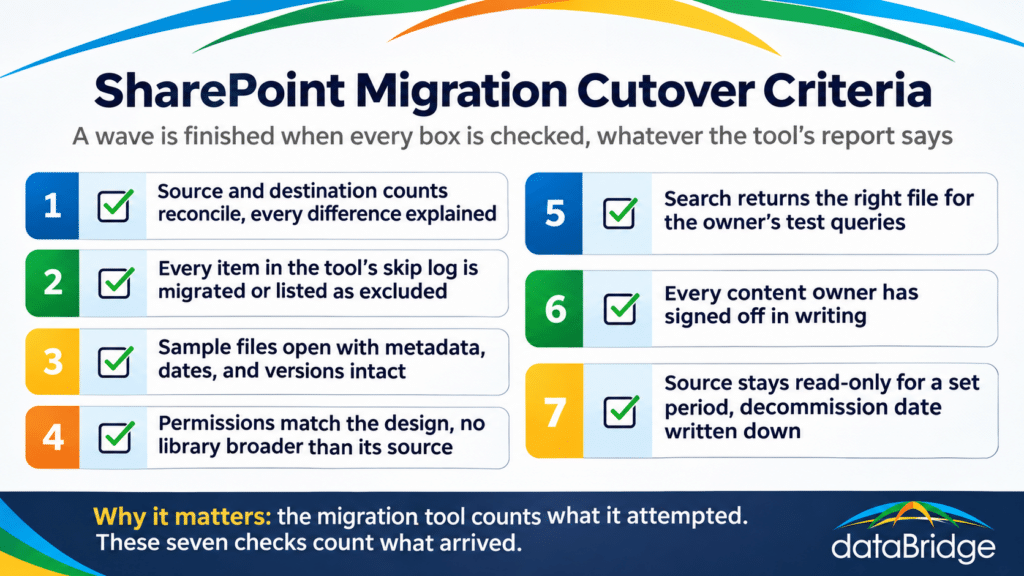
Validation reconciles what should exist in the destination against what does, using an inventory taken from the source before the wave ran. The tool’s report is one input. The source inventory is the other, and without it there is nothing to reconcile against.
Before each wave, capture per library: file count, folder count, total size, and the list of items with unique permissions. After the wave, capture the same from SharePoint and compare. Every difference needs an explanation. Some are fine: files excluded by rule, duplicates the tool collapsed, temp files, and system files that should not have moved. Some are not, and those go back to the tool’s skip log and get resolved before the wave is called complete.
Count reconciliation catches missing content. It does not catch broken content, so the validation pass also samples. For each library, the content owner picks a fixed number of files, opens each one in the new location, and checks that it opens, that its metadata is populated, that its modified date and author survived if those were in scope, and that version history is present where it was required. Twenty files per library is a reasonable sample for most waves; a library that fails the sample gets a larger one.
Permissions are checked separately because they fail separately. Compare the list of unique permissions in the source against the destination, confirm that nothing arrived with broader access than it left with, and confirm that the site and library permissions match the design rather than the tool’s default. A library that lands readable by Everyone because the destination site was provisioned that way is a validation failure even though every file arrived.
Search is the last check, and it has a lag. SharePoint has to index the new content before search returns it, so a search test run minutes after a wave will fail for reasons that have nothing to do with the migration. Run it the next day, with a short list of queries the content owner would actually type, and confirm the right file comes back first.
User acceptance
The content owner for each library confirms, in writing, that the library is complete and usable. Nobody else can give that sign-off, because nobody else knows what should be there.
This is the step most plans skip, usually because it is slow. Owners are busy and reviewing a migrated library is not their job. But the owner is the only person who will notice that the 2022 subfolder is missing or that the files are there but the column that tells you which client they belong to is blank. IT cannot see that. The tool cannot see that. If the owner does not sign off, the first real test of the migration is the first time someone in that department goes looking for something, and that is the six-weeks-later ticket from the opening of this post.
Give owners the sample list and the count reconciliation for their library, a short checklist, a deadline, and a named person to ask when something looks wrong. Record the sign-off. A wave with an unsigned library is not finished.
Cutover criteria
Cutover criteria are the written conditions under which the source location is made read-only and users are told to work in SharePoint. They are set before the first wave, so that the decision at the end is a comparison against a list rather than a judgment call under schedule pressure.