Who Will Quote Your Migration, and What Each Is Selling
Four kinds of providers show up when an organization asks for a SharePoint migration price, and each sells a different thing. Your internal IT team sells familiarity with the source and a cost that looks like zero because it’s salary. Your MSP sells the tool license plus labor at their hourly rate, usually scoped to the copy. A migration shop or tool reseller sells the tool and the runbook, often at a fixed per-terabyte price. A SharePoint consultancy sells the content and structure decisions, with the copy as the last step.
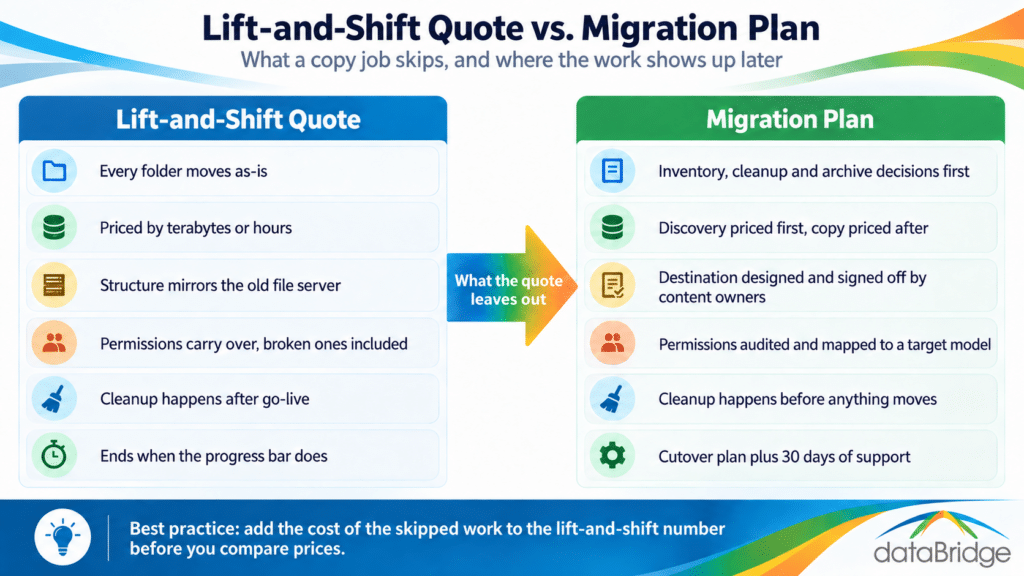
The first three are lift-and-shift providers by default, because that’s what their business model rewards. Hours or terabytes are easy to quote; deciding what a department should archive is not. The consultancy costs more up front and is the only one of the four whose incentive is for the destination to be usable, because that’s what they’re being judged on. That doesn’t make the consultancy right for every migration. A 200 GB share with a clean structure and a motivated department head may not need one. A multi-terabyte file server feeding an intranet, a document management rollout and a Copilot license almost certainly does.
Seven Questions to Ask Before You Sign
These are the questions that separate a migration plan from a copy job, in the order we’d ask them. A firm that answers all seven in writing is proposing a migration. A firm that answers two is proposing a tool run.
1. What happens to content before it moves?
The answer should include an inventory of the source with age, size, duplication and last-access data, a cleanup pass with the content owners, and an archive decision for whatever doesn’t move. If the answer is “we migrate everything and you can clean up afterward,” the quote is for a copy. Cleanup after go-live costs more than cleanup before, because now it’s happening in two places.
2. Who decides the destination structure, and when?
The destination should be designed before the tool is configured, with sites, libraries and metadata mapped from the source and signed off by the people who own the content. A proposal that says the structure will “mirror the existing folders” has made the decision for you by not making it. Our migration project plan shows where that design phase sits and how long it takes relative to the copy.
3. Is the price fixed, and what is it fixed to?
Fixed-price quotes are usually fixed to volume: terabytes, item counts or user counts. That’s fine for the copy. It cannot be fixed for the decisions, because nobody knows how many there are until the inventory runs. A credible firm will quote the discovery and design phase first, then fix the migration price once the scope is known. A firm that fixes the whole price before seeing the source is pricing the copy and hoping the rest sorts itself out. Our breakdown of what a SharePoint migration costs shows how the two halves split.
4. Which tool, and who holds the license?
Every serious firm will name the tool. The better question is whether the tool is doing the work or the people are. Ask what the tool can’t move from your specific source (permissions, metadata, version history, links in Office documents) and what the firm does about each gap. If the firm resells the tool, ask whether their recommendation would change if they didn’t. Our comparison of SharePoint migration tools tells you what each one handles so you can check the answers.
5. Who owns permissions mapping?
Source permissions almost never translate cleanly. Groups that don’t exist in Entra, individual grants to departed staff, broken inheritance halfway down a tree. The proposal should say who audits the source permissions, who designs the target model and who reconciles the differences. If the answer is “permissions carry over,” they will, including the broken ones.
6. What does cutover and the first thirty days look like?
Ask how the firm handles the window between final sync and go-live, how users are told where things went, and who answers the questions in the first month. A migration company plans for the fact that employees will spend the first week looking for files in the old locations. A copy job ends when the progress bar does.
7. Who on your team has done this at our size, and will they be on the project?
Ask for the names of the people who will do the discovery and design, not the sales engineer. Ask how many migrations of comparable size and source type they’ve run. Senior people on discovery is the single biggest predictor of whether the destination is usable, and it’s the line item most likely to be quietly staffed down after signing.
What a Good Migration Proposal Shows You
A good migration proposal shows a decisions phase with a deliverable you can read before the copy starts, a volume-based price for the copy that is set after that phase, and named people for both. It will usually include a content inventory report, a destination design document with site and library structure, a permissions model, a cutover plan and a post-migration support window. If any one of those is missing, ask why, and listen for whether the answer is “we don’t do that” or “we do that in week two.”
The proposal should also be honest about what doesn’t move. Every source has something: InfoPath forms, workflows, long paths, files with characters SharePoint rejects, version history past the tool’s limit. A proposal that lists those up front and says what happens to each is written by someone who has done this before. A proposal that promises everything moves was written by someone who hasn’t checked.
How to Compare Two Quotes That Aren’t for the Same Job
To compare a lift-and-shift quote against a migration company’s quote, add to the lift-and-shift number the cost of the work it skipped. Estimate your team’s hours for a content inventory, a cleanup pass with each department, a destination design, a permissions audit and the post-go-live support, at loaded cost. Add the risk cost of doing those things after go-live instead of before. Then compare.
Most organizations that run that math find the gap closes to a fraction of what the sticker prices suggested, and some find the migration company is cheaper once internal time is counted. Our migration ROI calculator is built for exactly this comparison. If the gap is still large after the honest math, the lift and shift may be right for you, and you’ll be choosing it with your eyes open rather than because it was the first number you saw.
Frequently Asked Questions
Can our MSP do a SharePoint migration?
For the copy, usually yes. Most MSPs own a migration tool license and have run it before. What they typically don’t offer is the content inventory, cleanup, destination design and permissions model that determine whether SharePoint is usable afterward. Ask them the seven questions above and see how many they answer.
Should we clean up content before or after migrating to SharePoint?
Before. Cleanup after go-live means working in two systems at once, employees finding duplicates in both, and archive decisions made under pressure. Cleanup before means the source shrinks, the migration gets faster and cheaper, and the destination starts clean. The only content worth migrating first and cleaning later is content with a hard compliance hold.
How long should a SharePoint migration company take to give a quote?
A credible firm quotes the discovery and design phase quickly, often within a week, and quotes the migration itself only after that phase produces an inventory. If you receive a fixed price for the entire migration before anyone has looked at the source, the price is for volume and the decisions are being left to you.
What’s the difference between a SharePoint migration expert and a migration tool vendor?
A tool vendor sells software that copies content and may offer services to run it. A migration expert decides what should move, where it should land and who owns it, then uses a tool to execute. Many good firms partner with tool vendors. The question is which one is making the content decisions on your project.
If you have a lift-and-shift quote in hand and want to know what it leaves out for your specific source, our migration readiness assessment answers that before you sign anything. Or tell us what you’re migrating and we’ll tell you whether you need us at all.
Reviewed By