Skip to content
the SharePoint migration myth its not a file move

The SharePoint Migration Myth: It’s Not a File Move

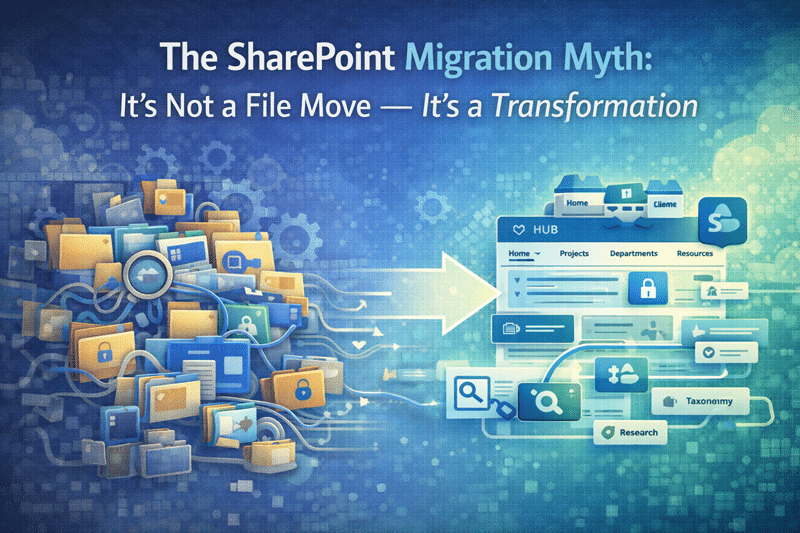
The SharePoint Migration Myth: It’s Not a File Move — It’s a Transformation

A “lift-and-shift” SharePoint migration sounds efficient.

On paper, it promises speed, minimal disruption, and a quick win. In reality, it often recreates the very problems organizations hoped to leave behind—just inside a newer interface.

At dataBridge, we see this pattern repeatedly. Organizations approach migrations like logistics projects: move content, validate access, and go live.

Then something predictable happens.

A few weeks later:

  • Adoption slows
  • Search feels unreliable
  • Users revert to email or file shares
  • Leaders ask why the migration didn’t deliver real value

The explanation is straightforward.

Moving files does not redesign structure.

If the architecture underneath the platform never changes, the experience rarely improves.

This is exactly why we emphasize planning before execution in our SharePoint Consulting Services engagements and why our Complete Guide to SharePoint Online Migrations focuses on transformation rather than simple transport.


The Lift-and-Shift Assumption

A lift-and-shift migration assumes something that is rarely true.

It assumes the existing environment is already structured well enough to succeed in SharePoint.

Most of the time, it isn’t.

Legacy file systems often include years of accumulated friction:

  • Deep folder hierarchies
  • Duplicate files across departments
  • Broken permission inheritance
  • Content without ownership
  • Documents nobody trusts or can find

When that environment moves into SharePoint unchanged, the problems don’t disappear.

They scale.

SharePoint becomes a faster, more visible version of the same chaos.

We often tell clients something simple:

A migration doesn’t fix architecture. It exposes it.

That may sound blunt, but it’s accurate. Technology rarely fails first. Structure does.


Migrations Amplify the Environment You Already Have

A migration acts like a multiplier.

If your environment includes inconsistent permissions, unclear content ownership, or unreliable search results, a lift-and-shift approach spreads those weaknesses across your new platform.

Users immediately recognize the patterns they struggled with before.

Only now they appear in SharePoint Online.

The interface looks modern. The experience feels familiar.

Unfortunately, it’s the wrong kind of familiar.

In several recent engagements, organizations migrated hundreds of thousands of documents only to discover that the same findability and governance issues resurfaced within weeks. The migration technically succeeded. The outcome did not.

That distinction matters.

A migration project can finish on schedule and still miss the bigger objective: improving how people actually work.

A practical next step is to use a SharePoint Migration Checklist for Microsoft 365 so architecture, permissions, metadata, and governance decisions are made before content is moved.

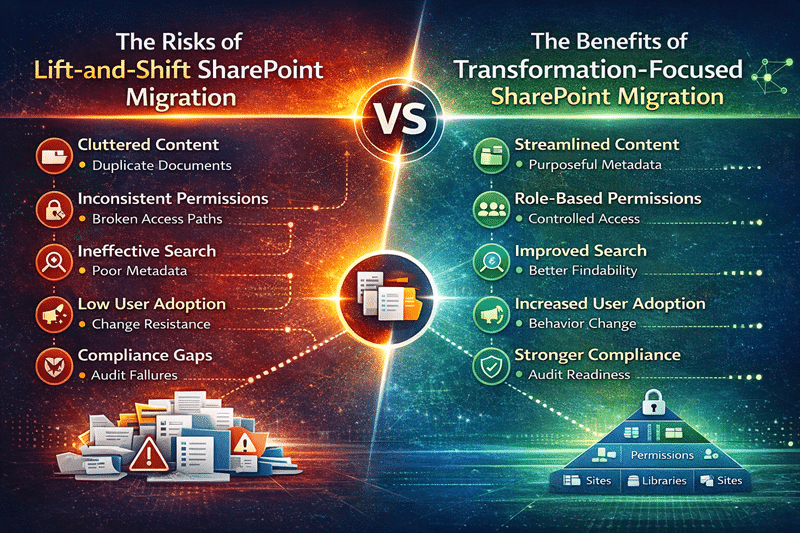
Lift-and-Shift vs Transformation SharePoint Migration

Lift-and-shift SharePoint migration risks compared with a transformation-focused migration strategy, highlighting content cleanup, metadata structure, role-based permissions, improved search, user adoption, and compliance readiness in Microsoft 365
A successful SharePoint migration is not just a file move. Transformation-focused migrations redesign information architecture, governance, and permissions to improve search, compliance, and Microsoft 365 adoption.

A transformation-focused SharePoint migration redesigns structure, governance, and permissions before content moves, preventing legacy problems from scaling into the new environment.


A Successful Migration Redesigns First

Organizations that get real value from SharePoint migrations take a different approach.

They redesign before they move.

Instead of treating SharePoint as a destination, they treat migration as an opportunity to rebuild the information environment from the ground up.

In practice, that means the migration plan includes much more than file transfer.

A transformation-focused migration typically begins with:

Content Inventory and Cleanup

Identify redundant, outdated, and trivial content before migration. Reducing clutter improves search quality and lowers long-term governance risk.

Information Architecture Design

Create a scalable structure using libraries, metadata, and site hierarchy aligned to how the organization actually works. This work often connects directly to SharePoint Information Architecture & Metadata Strategy.

Permission Rationalization

Replace fragile, person-based permissions with role-based security groups that are easier to manage and audit.

Governance and Ownership Definition

Define who owns content, how it is reviewed, and when it should be archived or disposed. This process aligns closely with the SharePoint Governance Maturity Model.

Adoption Planning

Provide clear expectations and training so teams understand not just how to use SharePoint, but how the structure supports their work.

These steps may sound deliberate—and they are.

But they are also the difference between a migration that merely completes and one that actually improves the environment. This SharePoint Intranet Adoption Strategy & Launch Framework is a great resource.


Migration Is the Best Moment to Reset

Migration creates something rare inside organizations: permission to change.

Users already expect disruption when systems move. That expectation opens a window to fix structural issues that might otherwise remain untouched.

During well-planned migrations, organizations can:

  • Remove obsolete or duplicate content
  • Simplify complex permissions
  • Clarify content ownership
  • Introduce metadata that improves search
  • Establish governance practices that support long-term growth

These improvements compound over time.

Search results improve. Trust increases. Adoption rises.

The platform begins to work the way it was intended.


Why Structure Matters Even More for AI

Migration decisions now carry another implication.

Artificial intelligence.

Microsoft Copilot and other AI experiences rely heavily on structured, trustworthy content. When metadata, permissions, and ownership are inconsistent, AI responses become unreliable.

We see this frequently in early Copilot pilots. The technology works—but the answers lack context because the content environment lacks structure.

Strong information architecture changes that dynamic.

Well-structured environments improve:

  • Copilot accuracy
  • Search relevance
  • Compliance visibility
  • Content lifecycle management

That is why migration planning increasingly overlaps with Copilot Readiness for SharePoint initiatives. Preparing the platform for AI often begins with fixing the structural foundations migration exposes.


Migration Is Transformation, Not Transport

Ultimately, a SharePoint migration is not about moving files from point A to point B.

It is about rebuilding how information works.

Organizations that approach migration this way experience very different outcomes:

  • Faster adoption
  • Better search and discoverability
  • Stronger governance
  • Greater confidence in the platform

Organizations that treat migration as transport often inherit yesterday’s problems tomorrow.

The technology changes.

The experience does not.


The dataBridge Perspective

After years of helping organizations modernize SharePoint environments, one pattern stands out.

The most successful migrations are not the fastest.

They are the most intentional.

Successful migrations treat migration as a catalyst for improvement, not simply a technical exercise. They redesign structure, clarify governance, and align the platform with how people actually work.

When that happens, SharePoint becomes more than a document repository.

It becomes a reliable system of record—and a foundation for collaboration, compliance, and AI-driven insight.


Bottom Line

Migration is not a shortcut.

It is an opportunity.

Used well, it becomes the single most effective moment to redesign structure, restore trust, and position SharePoint—and Microsoft 365—for long-term success.

If your organization is planning a migration, start with structure first. The technology will follow.

For more insights on governance, architecture, and Microsoft 365 strategy, explore our SharePoint & Microsoft 365 Knowledge Center.

Organizations implementing these improvements often engage our SharePoint and Microsoft 365 consulting solutions.

Frequently Asked Questions

What is the biggest mistake organizations make during a SharePoint migration?

The most common mistake is treating migration as a file transfer instead of a structural redesign. When organizations move content without addressing information architecture, permissions, governance, and ownership, the same problems simply reappear in the new environment. A successful SharePoint migration begins with evaluating structure, reducing redundant content, and defining governance before any files move.


Should organizations clean up content before migrating to SharePoint Online?

Yes. Migration is the best opportunity to review and reduce redundant, outdated, and trivial content. Without this cleanup step, organizations often carry years of unnecessary files into SharePoint, which makes search less reliable and governance more difficult. A structured content inventory allows teams to archive, delete, or reorganize information so the new environment starts clean and scalable.


How does SharePoint migration impact AI tools like Microsoft Copilot?

AI tools depend heavily on structured, trustworthy content. If documents lack clear ownership, metadata, and consistent permissions, AI responses become less reliable. A well-planned migration improves AI readiness by aligning content with strong information architecture, governance controls, and security models. In many organizations, migration is the ideal moment to prepare SharePoint for effective AI and Copilot experiences.

Related Resources

The Complete Guide to SharePoint Online Migrations


Reviewed By

Evelyn Runnals
Evelyn RunnalsSenior Solutions Architect
Evelyn designs and delivers enterprise SharePoint and Microsoft 365 solutions with a strong emphasis on complex migrations, modern intranet architecture, and process improvement. She combines technical depth with solution design experience that helps clients modernize confidently.

About The Author

Michael Fuchs
Michael FuchsFounder and CEO
Michael Fuchs is the Founder and CEO of dataBridge, a SharePoint and Microsoft 365 consulting firm focused on helping organizations build stronger digital workplaces through strategy, governance, architecture, migrations, intranets, and long-term platform success.

SHARE ON SOCIAL MEDIA

DATABRIDGE BLOG

Professional hero image showing Microsoft Purview eDiscovery for SharePoint and Teams with investigation visuals, secure file folders, digital dashboards, and collaboration icons.

Microsoft Purview eDiscovery for SharePoint and Teams

Microsoft Purview eDiscovery only works well when SharePoint and Teams are structured for real investigation pressure. This guide explains what to prepare before your first case, including governance, permissions, content locations, retention, and access control.
Professional hero image for a SharePoint External Sharing Governance blog post showing three business professionals collaborating in a modern office with visual labels for Guest Access, Anyone Links, and Direct Sharing.

SharePoint External Sharing Governance

External sharing in SharePoint is easy to enable, but governing it well takes more discipline. This post explains how to manage guest access, Anyone links, site-level sharing, and oversharing risk so external collaboration stays controlled, practical, and easier to trust.
Professional hero image showing Microsoft Purview DLP protecting SharePoint, Teams, OneDrive, and Copilot with a central security shield, Microsoft 365 app icons, alert symbols, and an AI assistant over a modern digital city background.

How Microsoft Purview DLP Protects SharePoint, Teams, OneDrive, and Copilot

Microsoft Purview DLP helps organizations reduce oversharing, control sensitive content movement, and protect Microsoft 365 across SharePoint, Teams, OneDrive, and Copilot. This guide explains how DLP works by workload, where it fits in a stronger governance model, and what to consider before rollout.