

SharePoint Site Ownership & Lifecycle Governance Matrix
Use the dataBridge SharePoint Site Ownership & Lifecycle Governance Matrix to map each SharePoint site to a business owner, technical contact, review cadence, lifecycle status, archive rule, and next governance action. The matrix helps teams keep SharePoint ownership clear after launch instead of letting sites turn into unmanaged workspaces.
A SharePoint site without an owner is not a managed collaboration space. It is an unmanaged business risk.
Many SharePoint problems begin quietly after launch. Sites keep growing. Owners change roles. Teams stop using old workspaces. Sensitive content remains active. Project sites stay searchable long after the work ends. Eventually, no one knows whether a site should be retained, archived, merged, redesigned, or retired.
This matrix gives your team a practical way to review ownership, lifecycle status, and cleanup decisions in one place.
Talk to dataBridge About SharePoint Site Governance
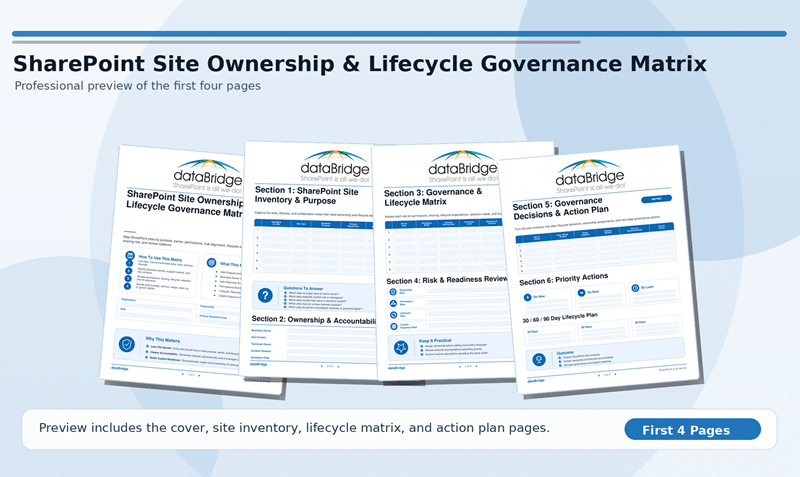
Preview the SharePoint Site Ownership & Lifecycle Governance Matrix
The matrix gives your team a structured way to review SharePoint sites by purpose, owner, technical contact, review cadence, lifecycle status, archive rule, permission concern, and next governance action.
The inventory matters, but the decision matters more.
A site list tells you what exists. A governance matrix tells you who owns each site, whether it still has a valid purpose, and what should happen next.
Quick Answer: What Is the SharePoint Site Ownership & Lifecycle Governance Matrix?
The SharePoint Site Ownership & Lifecycle Governance Matrix is a practical dataBridge worksheet that helps organizations document who owns each SharePoint site, how often it should be reviewed, where it is in its lifecycle, and what governance action should happen next.
It is useful when your tenant has too many sites, unclear owners, stale project workspaces, inactive department areas, outdated content, broad permissions, or no consistent review cadence.
For the broader governance model, start with the SharePoint Governance Framework. This matrix focuses specifically on site-level ownership, lifecycle review, and action tracking.
Who Should Use This Matrix?
This matrix is built for teams that need to bring order to SharePoint sites after they have already been created.
It is especially useful for:
- SharePoint administrators reviewing active, inactive, or ownerless sites.
- Microsoft 365 administrators managing Teams-connected sites and group-connected workspaces.
- Governance committees that need a repeatable site review process.
- Site owners who need clearer expectations for maintenance and lifecycle decisions.
- Department leaders who need to confirm which sites still support active work.
- IT leaders preparing for cleanup, migration, archive, or Copilot readiness.
- Security and compliance stakeholders reviewing sensitive or externally shared sites.
- Operations teams that need a current list of critical workspaces and accountable owners.
The strongest review usually includes IT and the business. SharePoint ownership cannot be solved by administration alone because the business decides whether a site still matters.
Why Site Ownership and Lifecycle Governance Matter
SharePoint site sprawl rarely looks urgent at first.
A project site stays active after the project closes. A department creates a new workspace instead of improving the old one. A Teams-connected site keeps files after the team stops using it. A business owner leaves, and no one assigns a replacement.
Small gaps become larger governance problems over time.
Inactive sites can contain outdated policies, old project files, sensitive documents, broken ownership paths, unclear permissions, and content that still appears in search. When Microsoft 365 Copilot enters the environment, those weaknesses become more visible because content quality, ownership, permissions, and source authority matter even more.
In dataBridge SharePoint assessments, site-level risk often starts with a simple question that no one can answer quickly: who owns this site now?
That is why ownership comes first. Lifecycle decisions are hard to make when accountability is unclear.
What the Matrix Helps You Capture
A useful site governance review should capture more than the site name and URL.
The matrix helps your team document the information needed to make real decisions.
Site Purpose
Every site should have a clear purpose.
A site may support a department, project, client, function, community, process, knowledge base, or controlled document area. When the purpose is hard to explain, the site may need cleanup, consolidation, archive, or retirement.
Clear purpose helps users understand why the site exists and what content belongs there.
Business Owner
The business owner is accountable for the content and purpose of the site.
This person does not need to be a SharePoint expert. However, they should be able to confirm whether the site is still needed, who should have access, what content is authoritative, and when cleanup or archive decisions should happen.
A site without a business owner will eventually drift.
Technical Contact
The technical contact supports the operational side of the site.
That support may include site configuration, permission updates, page changes, library settings, metadata updates, navigation, and escalation to IT. In smaller environments, the business owner and technical contact may be the same person. In larger environments, separating those roles usually creates better accountability.
Clear technical ownership prevents simple issues from becoming unresolved support tickets.
Review Cadence
Every important site needs a review rhythm.
Some sites need quarterly review because they contain sensitive content, active project work, external users, or compliance-related documents. Others may only need annual review because they are stable department sites or reference areas.
Event-based review also matters. Ownership changes, department reorganizations, project closeout, policy updates, mergers, audits, and Copilot rollout planning should all trigger site review.
A review cadence is governance in motion. Without it, ownership becomes a one-time launch decision.
Lifecycle Status
Lifecycle status shows where the site is in its useful life.
Common lifecycle statuses include active, needs review, cleanup needed, archive candidate, merge candidate, retire candidate, and strategic site. These labels help the team move beyond vague concerns and toward decisions.
A lifecycle label should lead to action. Otherwise, it becomes another unused field.
Archive or Retention Rule
Some sites should remain active. Others should be archived, retained, merged, or removed after review.
The matrix helps document whether a site has a known archive rule, retention need, records consideration, or business reason to stay available. This is especially important for project sites, client sites, policy areas, legal content, HR content, financial records, and regulated documents.
When inactive sites need a deliberate archive strategy instead of staying active by default, use Microsoft 365 Archive for SharePoint.
Permission and Sharing Concerns
Ownership review should include access review.
Sites with broad groups, external guests, anonymous links, stale members, inherited migration permissions, or sensitive libraries need more attention. The issue is not whether access exists. The issue is whether access is still intentional.
When permissions are difficult to explain, audit, or maintain, use the SharePoint Permissions Guide.
Next Governance Action
The review should end with a decision.
A site may need an owner assigned, permissions reviewed, content cleaned up, pages updated, metadata improved, archive rules confirmed, site merged, site retired, or a follow-up workshop scheduled.
A matrix without next actions is just documentation. Governance improves when the review creates accountable work.
How to Use the Matrix
Start with a focused site inventory.
Do not try to fix every SharePoint site in one meeting. Begin with the sites that create the most business value, risk, or confusion.
A practical review flow looks like this:
- Export or compile the list of current SharePoint sites.
- Group sites by department, purpose, sensitivity, activity, or business area.
- Identify obvious high-risk sites first.
- Confirm the business owner and technical contact.
- Assign a review cadence based on risk and business importance.
- Mark the lifecycle status for each site.
- Capture archive, retention, permission, or cleanup concerns.
- Assign the next governance action.
- Review the matrix on a recurring cadence.
The first pass does not need to be perfect. It needs to create visibility.
Once the team can see which sites are ownerless, stale, duplicated, sensitive, inactive, or poorly governed, better decisions become easier.
How to Interpret Lifecycle Status
Lifecycle status should be simple enough for site owners to understand.
Use these categories as a starting point.
Active
The site supports current work and has a valid business purpose.
Active sites still need an owner, technical contact, review cadence, and clear permission model. Active does not mean unmanaged.
Needs Review
The site may still be useful, but the owner, purpose, content quality, permissions, or lifecycle rule needs confirmation.
This status is common after reorganizations, staff changes, migrations, and Teams sprawl. It should always have a follow-up owner and review date.
Cleanup Needed
The site still has value, but the structure or content needs improvement.
Cleanup may include stale files, old pages, duplicate libraries, weak metadata, broken links, broad access, unclear navigation, or outdated documents.
When owners need clearer expectations for what they should maintain, use SharePoint Site Owner Responsibilities.
Archive Candidate
The site no longer supports active work, but the content may need to be retained.
Archive candidates often include completed projects, old client workspaces, legacy department sites, closed initiatives, or historical reference areas. These sites should not stay fully active just because no one has made a decision.
Merge Candidate
The site overlaps with another site, hub, department workspace, or knowledge area.
Merge candidates often appear when teams create new sites instead of improving existing ones. Merging can reduce duplication, improve search, simplify ownership, and give users a clearer destination.
Retire Candidate
The site no longer has a valid business purpose, and the content does not need to remain active.
Retirement should still follow a review process. Confirm ownership, retention requirements, records needs, stakeholder impact, and communication before removing access or deleting content.
Strategic Site
The site is important enough to require stronger governance.
Strategic sites may include executive workspaces, policy centers, HR sites, quality systems, compliance areas, client portals, knowledge bases, or high-value department sites. These sites usually need stronger ownership, review cadence, permission control, and lifecycle rules.
What High-Risk Site Ownership Problems Look Like
Some site ownership gaps deserve faster action.
High-risk signs include:
- No clear business owner.
- Owner left the organization or changed roles.
- Site purpose is unclear.
- Multiple sites appear to serve the same audience.
- Sensitive content exists without active review.
- External guests still have access.
- Broad groups have access without explanation.
- Content is stale but still searchable.
- Project sites remain active long after closeout.
- Teams-connected sites exist with no lifecycle plan.
- Permissions are too complex for the owner to explain.
- Site contains policies, procedures, or records without review rules.
These problems usually point to a bigger operating-model issue.
When many sites show the same warning signs, use the SharePoint Governance Maturity Scorecard to evaluate whether ownership, permissions, site lifecycle, metadata, records, search, adoption, and support are mature enough across the environment.
Site Ownership Matrix vs. Site Owner Checklist
A site owner checklist helps one owner manage one site.
A site ownership matrix helps the organization govern many sites at once.
That difference matters.
A checklist supports day-to-day responsibilities. The matrix gives leaders and governance teams a broader view of ownership coverage, lifecycle status, cleanup needs, archive decisions, and follow-up actions.
Both tools work best together. Site owners need practical expectations, and governance teams need visibility across the environment.
Site Ownership Matrix vs. Site Provisioning Strategy
Site provisioning controls what happens before a site is created.
A site ownership matrix controls what happens after sites already exist.
A strong SharePoint Site Provisioning Strategy should define request intake, naming rules, templates, ownership expectations, permission defaults, and lifecycle requirements. However, provisioning alone cannot fix the sites already in the tenant.
The matrix closes that gap. It helps teams review the current environment and bring older sites into a better governance model.
How This Matrix Supports Copilot Readiness
Copilot readiness depends on more than security settings.
SharePoint sites need clear ownership, current content, source-of-truth rules, appropriate permissions, and lifecycle controls. When those elements are weak, AI-assisted retrieval can make existing content problems easier to find.
The matrix helps identify sites that may need review before Copilot expands across the organization.
A site with no owner, stale files, broad access, unclear purpose, and no archive rule should not be treated as AI-ready. It should be reviewed, cleaned up, archived, merged, or retired before users rely on it for trusted answers.
When site ownership, permissions, stale content, metadata, search, source authority, and lifecycle governance need to be evaluated together, start with Copilot Readiness for SharePoint.
How to Turn the Matrix Into a Governance Roadmap
The matrix should lead to a practical roadmap.
Start by sorting sites into three groups.
First Priority: Reduce Risk
Focus on ownerless sites, sensitive sites, externally shared sites, inactive project sites, broad permission groups, and sites with stale content that still appears in search.
These sites create the highest governance, compliance, and Copilot readiness risk.
Second Priority: Improve Structure
Review duplicated sites, unclear site purposes, confusing navigation, inconsistent library structures, and sites that overlap with stronger hubs or department workspaces.
This phase usually improves findability and reduces user confusion.
Third Priority: Operationalize Review
Create a recurring review cadence for owners, technical contacts, administrators, and governance stakeholders.
This is where the matrix becomes an operating tool instead of a cleanup exercise.
When your team needs a broader model for decision rights, ownership, policies, lifecycle management, permissions, adoption, measurement, and support, use the complete SharePoint governance guide.
What to Do After Completing the Matrix
Once your team completes the first review, choose the highest-risk sites first.
A practical 30/60/90-day plan may look like this.
First 30 Days: Confirm Ownership and Risk
Identify sites with missing owners, unclear purpose, broad access, external sharing, sensitive content, or inactive use.
During this phase, assign business owners and technical contacts for the sites that matter most. Then document the review cadence and next action for each site.
Next 60 Days: Clean Up and Decide
Work through the sites marked cleanup needed, archive candidate, merge candidate, or retire candidate.
This phase may include permission cleanup, content review, page updates, metadata improvement, owner training, stakeholder confirmation, and archive planning.
Next 90 Days: Make Review Repeatable
Turn the matrix into a recurring governance artifact.
Review strategic sites more often. Keep lower-risk sites on a lighter cadence. Update the matrix when owners change, departments reorganize, projects close, policies change, or Copilot readiness work expands.
A one-time cleanup helps. A recurring review process changes how SharePoint is managed.
When to Talk to dataBridge
The matrix is useful on its own, but it often reveals deeper governance problems.
A dataBridge working session may help when:
- Many sites have no clear owner.
- Site purpose is difficult to explain.
- Permissions are too broad or inconsistent.
- Site reviews are not happening.
- Teams-connected sites are growing without lifecycle rules.
- Old project sites are still active.
- Archive and retention decisions are unclear.
- Copilot readiness depends on cleaning up SharePoint first.
- Leadership needs a practical governance roadmap.
dataBridge helps organizations turn site inventories into governance decisions. That includes ownership models, lifecycle rules, permission cleanup, archive planning, Copilot readiness, owner training, and long-term support.
Talk to dataBridge About SharePoint Site Ownership and Governance
Related SharePoint Planning Resources
The SharePoint Planning Tools and Assessment Resources hub includes scorecards, checklists, worksheets, and matrices for governance, document management, migrations, Copilot readiness, permissions, intranets, and information architecture.
Use the SharePoint Governance Maturity Scorecard when site ownership problems point to broader governance maturity issues.
Use the SharePoint Document Management Maturity Assessment when site ownership gaps are connected to document libraries, metadata, lifecycle controls, records readiness, search, and source-of-truth clarity.
Use the SharePoint Permission Review Checklist for Copilot when sites contain sensitive libraries, broad groups, stale access, external guests, or permission exceptions that need review before Copilot expands.
Use the Copilot Readiness Checklist for SharePoint when site ownership review is part of a broader Microsoft 365 Copilot pilot or rollout.
Talk to dataBridge About Your Site Governance Matrix
A site ownership matrix is valuable because it turns unclear SharePoint ownership into visible decisions.
If your review shows ownerless sites, stale workspaces, confusing lifecycle status, broad permissions, archive uncertainty, or Copilot readiness risk, dataBridge can help turn the findings into a practical governance roadmap.
Bring your completed matrix to a working session with dataBridge. We can help prioritize the sites, define the cleanup path, assign governance responsibilities, and build a repeatable review process.
Contact dataBridge About SharePoint Site Governance
Frequently Asked Questions
What is a SharePoint site ownership matrix?
A SharePoint site ownership matrix is a worksheet that maps each SharePoint site to a business owner, technical contact, review cadence, lifecycle status, archive rule, permission concern, and next governance action. It helps organizations move from a basic site inventory to a managed governance process.
Who should own a SharePoint site?
A SharePoint site should have a business owner who understands the purpose, audience, content, and risk of the site. It should also have a technical contact who can support configuration, permissions, libraries, pages, metadata, and escalation. In smaller teams, one person may hold both roles.
How often should SharePoint sites be reviewed?
High-risk or strategic sites should usually be reviewed quarterly. Stable department or reference sites may be reviewed annually. Sites with sensitive content, external sharing, active projects, compliance requirements, or Copilot readiness concerns should be reviewed more often.
What should happen to inactive SharePoint sites?
Inactive sites should be reviewed before any archive, merge, retirement, or deletion decision. The review should confirm ownership, business value, retention requirements, records needs, permissions, search impact, and whether the content should remain accessible.
How does site ownership affect Copilot readiness?
Copilot readiness depends on trusted content, appropriate permissions, clear ownership, current information, and source-of-truth clarity. Sites with no owner, stale content, broad access, or unclear purpose can create AI readiness risk because users may receive answers from content that should have been reviewed, archived, or retired.
Is this matrix a replacement for a SharePoint governance framework?
No. The matrix is a practical tool for site-level ownership and lifecycle review. A broader governance framework should also define decision rights, policies, roles, provisioning rules, permissions, metadata, records, adoption, support, and measurement.